

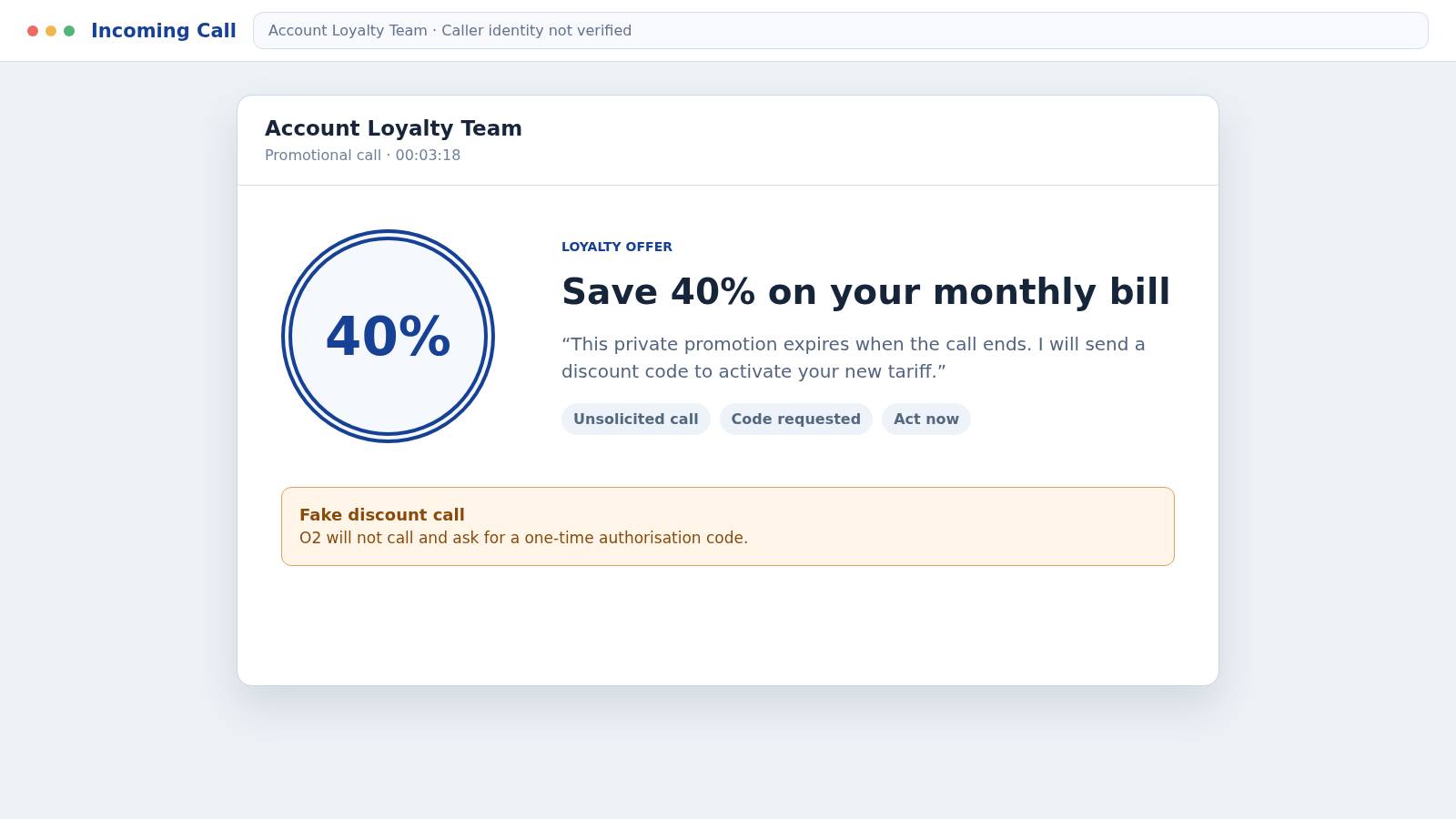
The caller sounds friendly and says O2 is rewarding loyal customers with 30% or 40% off their monthly bill. Moments later, a genuine one-time code arrives from O2.
The O2 discount call scam is designed to make those two events feel connected. The offer is only the opening move, and the code can unlock far more than a cheaper tariff.
Overview
A generous discount starts an account takeover
Fraudsters call without warning and claim to represent O2’s loyalty, promotions, upgrades, or retention department. A large bill discount, free upgrade, or special device offer keeps the customer on the line.
The caller asks for basic information and then says a one-time authorisation code is needed to apply the offer. O2 states that it will never call, text, or email a customer to request that private code.
The real O2 message is deliberately triggered
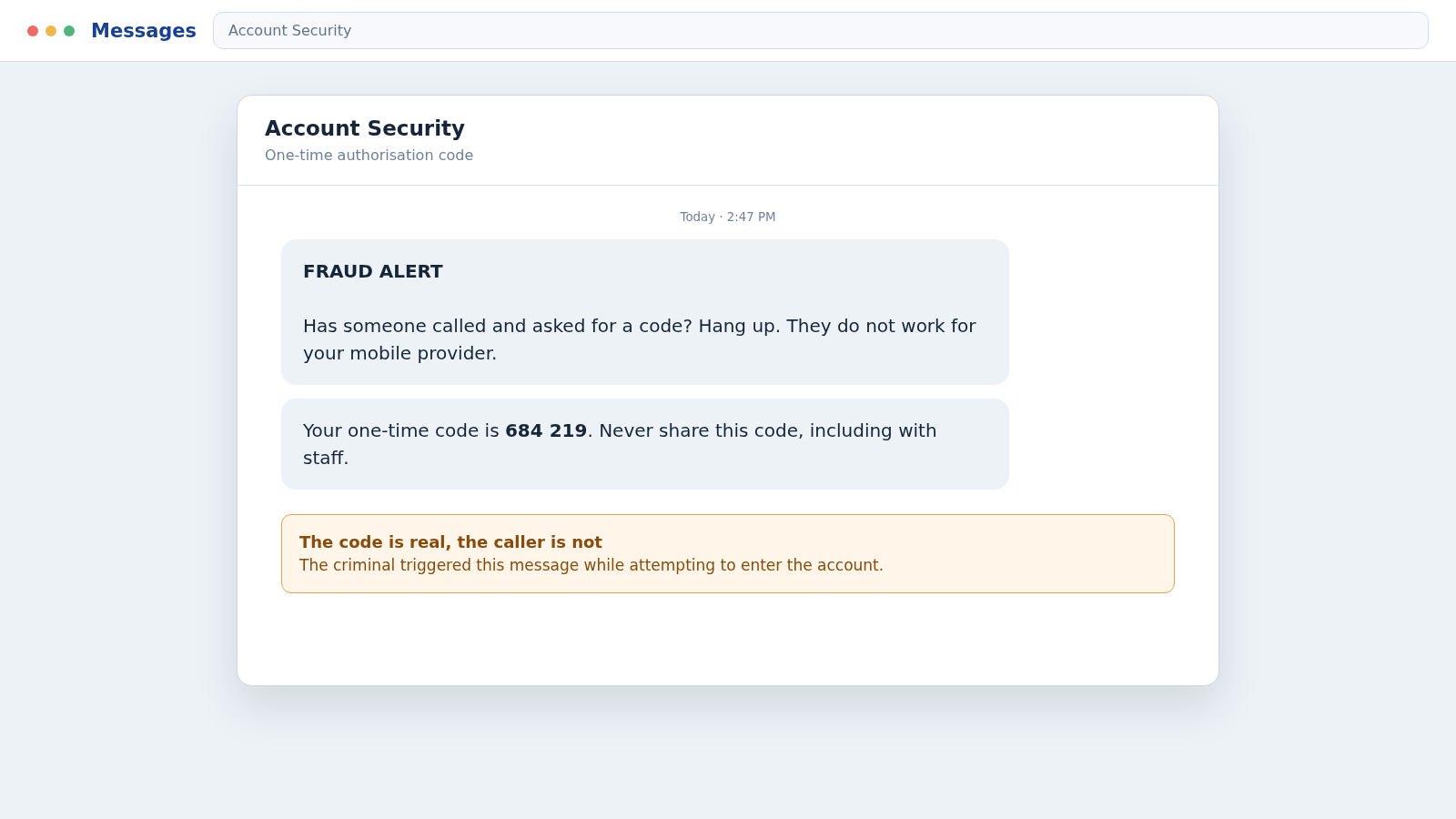
The criminal may already know the target’s telephone number and email address. While talking, they use O2’s real password-reset or account process, causing a legitimate code to arrive in the customer’s normal O2 message thread.
That genuine message does not validate the caller. It means someone is attempting an action that needs the customer’s private approval.
Control of a mobile account can expose other accounts
With account access, a criminal may change the email or address, order a new device, request a replacement SIM, divert calls, or move the mobile number to another network.
The scheme may target:
- My O2 username, password, and security answers
- One-time authorisation codes sent by O2
- Billing address and payment information
- New phones, accessories, or additional contracts
- A SIM swap or transfer of the victim’s telephone number
- Banking and email accounts that use SMS verification
- Personal details useful for identity fraud
The discount does not need to exist. Its job is to make the victim cooperate while the caller performs a real account action in the background.
What the Fake O2 Caller May Offer
Common scripts promise 30% or 40% off an airtime plan, a loyalty reward, a free handset upgrade, or compensation for poor coverage. The caller may say the offer expires during the call.
Some agents ask which network the person uses before claiming to be from that company. Others keep using the O2 script even when the recipient says they are not an O2 customer.
The conversation begins with harmless questions about monthly price, contract length, or device preference. These answers help the scammer sound informed and can be reused in later identity checks.
When the code arrives, the caller calls it a discount code, verification number, promotional PIN, or cancellation code. The real message may warn not to share it, so the caller invents a reason that the warning does not apply.
A genuine promotion does not require the customer to reveal a secret code generated by an unsolicited caller. The correct response is to hang up and restart contact through O2.
How the O2 Discount Call Scam Works
Step 1: The scammer places large numbers of cold calls
Lists of UK mobile numbers can be obtained from marketing data, previous breaches, public listings, or automated dialing. The criminal does not need an accurate list of O2 customers.
A familiar network name gives the call a reasonable chance of matching. People who say they use O2 identify themselves as stronger targets.
Step 2: A discount or upgrade keeps the target engaged
The caller says a loyalty department has approved a temporary reduction or premium upgrade. The amount is large enough to sound valuable but presented as a routine retention offer.
False scarcity discourages verification. The target may be told that the promotion cannot be found online and disappears if the call ends.
Step 3: Personal details make the conversation feel official
The fake agent asks for a name, email, postcode, tariff, account security answer, or last payment amount. They may frame each question as a confirmation rather than a request for new information.
Knowing one correct fact does not prove employment. Criminals combine leaked data with answers collected during the same call.
Step 4: The attacker starts a real O2 account action
Using the telephone number and other details, the attacker attempts a password reset, account login, address change, device order, or another protected request through O2’s genuine system.
O2 then sends a one-time authorisation code to the real customer. The timing is controlled by the attacker, which lets them announce that a message is about to arrive.
Step 5: The security code is relabeled as a discount code
The caller asks the customer to read the number aloud. They may claim it proves eligibility, confirms consent for the lower price, or activates a new tariff.
In reality, the number may complete the account action the criminal initiated. The warning in the message should be followed exactly, even if the caller sounds patient and professional.
Step 6: Account settings are changed behind the scenes
Once inside My O2, the intruder may alter contact details, reset credentials, request a replacement SIM, add a connection, or order expensive equipment.
Changing the delivery address helps the criminal receive an order. In other versions, a device is sent to the victim and a fake courier later tries to collect it as a supposed mistake.
Step 7: The mobile number becomes a route to wider fraud
A successful SIM swap or port-out transfers calls and texts to a SIM controlled by the attacker. The victim may suddenly lose service while the criminal receives authentication messages.
Email, banking, payment, and social accounts that depend on SMS recovery can then be targeted. The mobile account becomes a bridge rather than the final objective.
Step 8: The scam continues through deliveries or follow-up calls
If a new phone reaches the victim, someone may call as O2 or a courier and request its return. The supplied collection address does not lead back to O2.
Stolen details may also support a second approach from fake bank security. The caller already knows the number was compromised and can present the next warning with unusual accuracy.
Why the One-Time Code Looks Completely Genuine
The code often is genuine. It comes from O2 because the scammer is interacting with O2’s real account system, not because O2 approved the telephone offer.
A one-time code fills the gap between knowing an account identifier and proving control of the registered phone. The attacker needs the customer to hand over that missing factor.
The message may appear in a familiar O2 conversation and include a direct warning. Trust the warning, not the stranger’s explanation for ignoring it.
Only enter an O2 code during an action you personally started through the official site or app. Never speak it to someone who initiated contact.
An unexpected code is a reason to secure the account. It is not a reason to keep talking with the person who predicted it.
What Criminals Can Do With a Compromised Mobile Account
An account takeover can create charges for phones, tablets, accessories, new lines, or premium services. The exact options depend on the account and the checks that O2 applies.
Changing contact details can delay warnings and redirect deliveries. A new password can also lock the customer out while orders or account changes are processed.
A SIM swap is especially serious because the victim’s telephone number begins working on a card held by the criminal. Calls and text messages intended for the victim can be intercepted.
That access may help reset other accounts, but it does not automatically defeat every security method. Authenticator apps, passkeys, and security keys do not rely on the mobile network in the same way.
The goal is to react before an order ships or a number transfer completes. Loss of mobile service after a suspicious call should be treated as an urgent security event.
Warning Signs of a Fake O2 Call
- The call is unexpected and offers an unusually large discount.
- The deal expires if you hang up or call back.
- The agent asks for a one-time authorisation code.
- A genuine O2 warning is dismissed as standard wording.
- The caller requests a password, PIN, or security answer.
- Caller ID is offered as the main proof of identity.
- You are asked to approve an order you did not place.
- A delivered phone must be handed to an unknown courier.
- The agent becomes forceful when you refuse the code.
- Your service stops shortly after the conversation.
O2 specifically warns that callers may sound friendly and convincing. Tone is not a security control, and a familiar caller ID can be cloned.
How to Verify an O2 Offer Safely
End the unsolicited call. Open My O2 through the app you already use or type the official address yourself, then review orders, account details, tariffs, and registered contact information.
Call O2 on 202 from an O2 mobile or use the current contact number shown on O2’s official website. Do not use a number supplied by the caller or a sponsored search result.
Ask whether the promotion and any recent account action are genuine. A real offer remains verifiable after the customer has broken contact with the original agent.
Forward suspicious call details using the UK 7726 reporting service. O2 advises customers to text CALL followed by the suspicious number to 7726.
If the phone has lost service, use another device to contact O2 and the bank. Do not wait for the signal to return by itself.
Company, Address, and Fulfillment Checks
The department name does not prove employment
Labels such as loyalty, retention, promotions, or upgrade team are easy to invent. Verify the offer through My O2 or a new call placed to O2.
The displayed telephone number can be cloned
Caller ID may show a local number or even an official-looking identity. It tells you what the network displayed, not who is actually speaking.
Official support never needs the private code
O2 says it will never request a one-time code, password, PIN, or bank details through an unexpected call, text, or email. That boundary makes verification simple.
A device return needs a traceable O2 route
Do not hand an unexpected phone to a caller’s courier. Contact O2 independently, obtain documented return instructions, and use only the verified process attached to the real account.
What to Do if You Have Fallen Victim to This Scam
- Hang up and stop sharing information. Do not provide another code, approve an order, or follow instructions about returning a device.
- Contact O2 immediately. Use 202 from an O2 mobile or the official support route. Report every code shared and ask staff to inspect passwords, contact details, orders, SIM changes, call diverts, and port requests.
- Secure My O2. Reset the password from a trusted device, use a unique credential, correct changed information, and sign out unfamiliar sessions if the option is available.
- Protect the associated email. Change its password, enable stronger authentication, and review recovery details, forwarding rules, and recent logins.
- Call the bank if financial information was exposed. Use a trusted number, explain that a mobile account may be compromised, review transactions, and replace affected cards.
- Respond urgently to lost service. A sudden outage may indicate a SIM swap or port-out. Contact O2 from another line and tell financial providers that SMS security could be intercepted.
- Inspect any device used during the call. Remove remote-control tools or suspicious apps, then run a full scan with Malwarebytes before accessing sensitive accounts.
- Block malicious links and ads. AdGuard can reduce exposure to known phishing pages and deceptive advertisements, but it cannot cancel an account order or SIM change.
- Save and report the evidence. Keep call logs, texts, codes, order emails, delivery notices, and account changes. Send suspicious call details to 7726 and report financial loss through the UK’s fraud reporting service.
- Reject fake recovery help. Criminals may call again as O2, a bank, police, or a refund team. Verify every new contact from the beginning.
Frequently Asked Questions
Does O2 call customers with real discounts?
Promotions can exist, but no genuine unsolicited caller should ask for a one-time code. End the call and verify the exact offer through My O2 or official support.
Why did the code arrive from the real O2 sender?
The scammer may have triggered O2’s genuine recovery or account process. The code is real, but it is meant to stop the person on the telephone from completing that action.
What can a scammer do with my O2 code?
Depending on the action underway, it may help reset access, change account details, order equipment, or support a SIM-related attack. Report it immediately.
What if an unexpected phone is delivered?
Do not give it to a caller’s courier. Contact O2 independently, confirm the order, and follow documented return instructions supplied through the verified account.
Is the call genuine if caller ID says O2?
No. Caller ID can be spoofed or cloned. The safe test is a separate contact that you initiate through an official route.
What if I shared personal details but not the code?
Tell O2, secure the account and email, watch for password resets or orders, and be alert for more convincing follow-up scams using the information you disclosed.
The Bottom Line
The O2 discount call scam turns an appealing 30% or 40% offer into a live account takeover attempt. The genuine code arrives because the criminal requested it, not because the caller works for O2.
Never share an O2 authorisation code with someone who contacted you. Hang up, open My O2 yourself, and verify the offer and account activity through a channel the caller cannot control.








