

The call sounds organized, calm, and oddly specific. Someone claims a policy, account, or identity problem has put your money at risk, then offers to guide you through the fix on WhatsApp.
That is what makes the WhatsApp screen-sharing scam so persuasive. The instructions may feel safer than handing over a password because you are still holding the device.
That distinction is exactly what the caller wants you to believe.
Overview
The caller invents a financial emergency
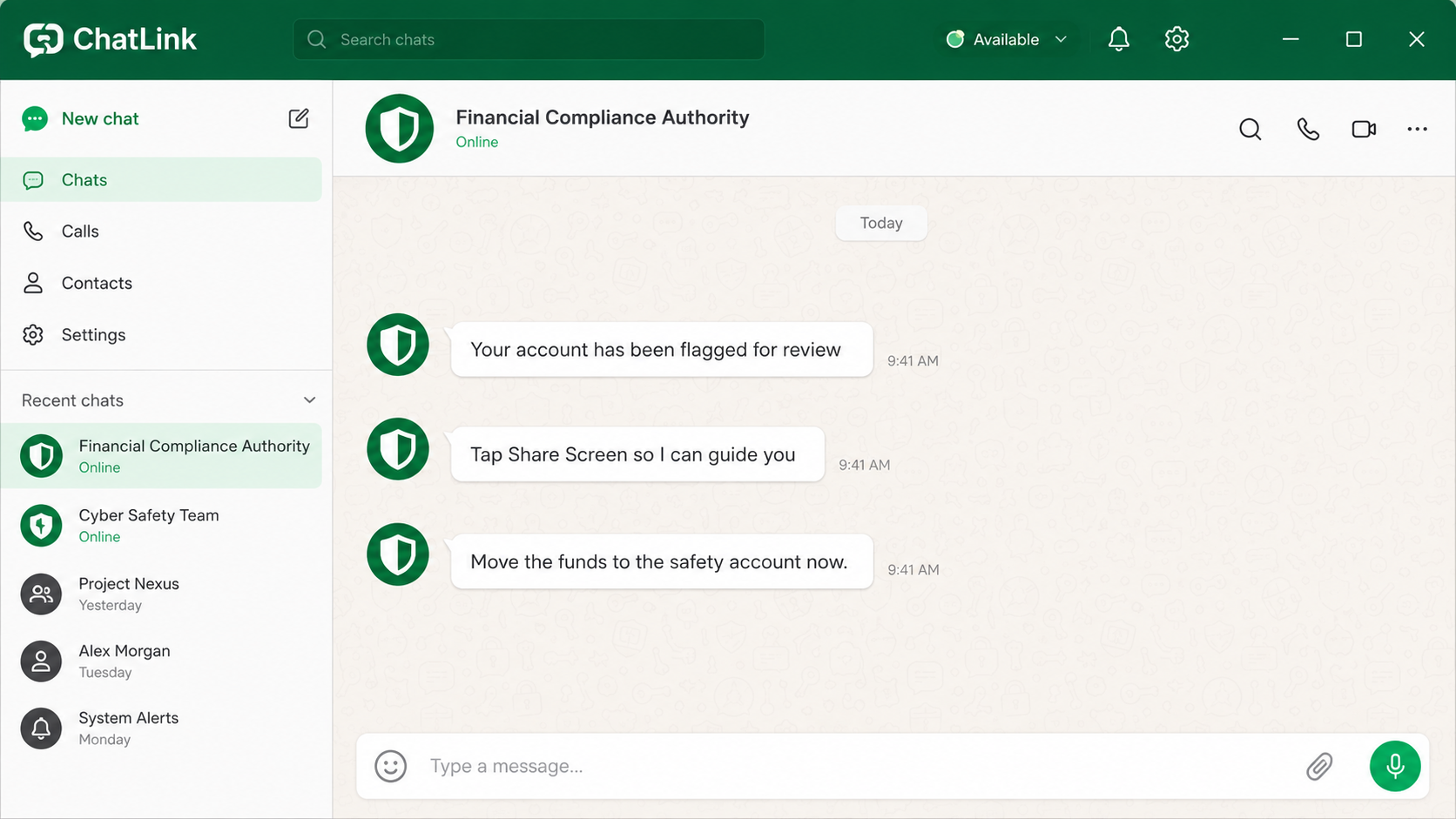
The WhatsApp screen-sharing scam begins with an unsolicited call or message from someone posing as an insurer, payment company, bank employee, regulator, or police officer. The opening story changes, but it always creates a problem that supposedly needs immediate attention.
You may be told that an insurance plan was opened in your name, your bank account is linked to money laundering, or a suspicious transfer is already pending.
When you deny knowing anything about it, the first caller helpfully transfers you to a more senior “officer.” That second voice gives the story authority and keeps you from stepping away.
This is not a theoretical trick. In a June 2025 advisory, the Singapore Police Force said at least 46 reports involving this method had produced combined losses of at least $3 million.
Screen sharing turns your private banking session public
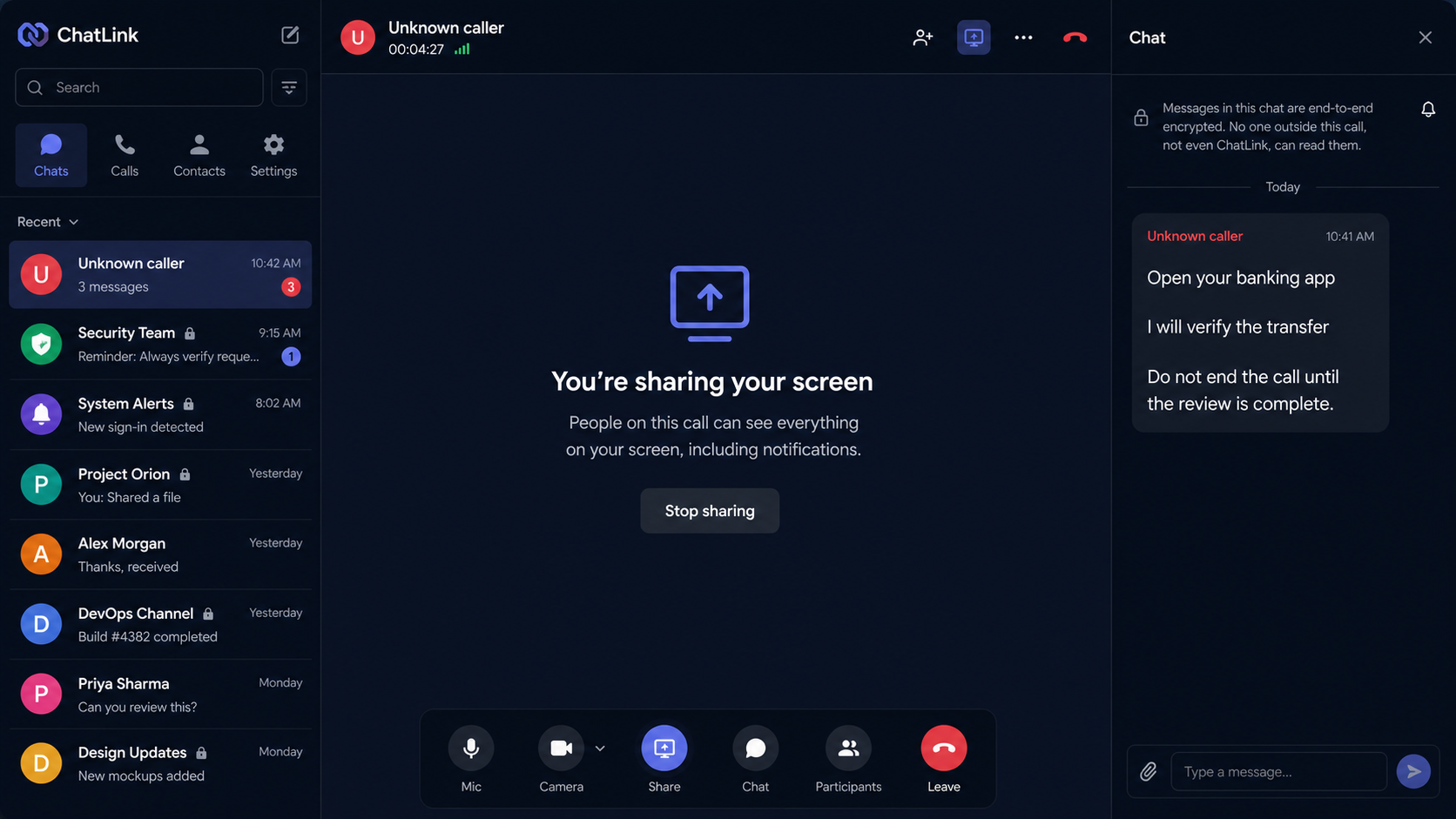
The scammer asks you to start WhatsApp screen sharing so they can “verify” your account or talk you through a security process. Once sharing begins, everything visible on the display can also be visible to the caller: account balances, usernames, payment screens, transaction details, one-time codes, incoming notifications, and the destination account.
The caller does not need to hack through the bank’s security if they can persuade you to open the app and approve each action yourself. You remain in control of the phone in a narrow technical sense, but the criminal controls the story, the pace, and the instructions.
The money is often described as going to a “safety account,” “holding account,” or “protected wallet.” No regulator or bank protects funds by asking a customer to transfer them to an account supplied during an unexpected WhatsApp call.
The screen share may lead to account takeover as well
Some versions focus on a bank transfer. Others use the shared screen to capture a WhatsApp registration code, email recovery link, payment-app login, or password reset notification. If the criminal takes over the WhatsApp account, they can immediately contact family, friends, church groups, or coworkers while appearing to be the real owner.
That second stage matters because the next victim may trust the sender. A familiar profile can be used to request an emergency payment, promote a fake investment, or recruit contacts into the same screen-sharing routine.
Warning signs include:
- An unexpected caller claims your money is connected to a crime or unauthorized policy.
- You are moved from one “department” or “officer” to another.
- The caller wants to continue entirely through WhatsApp.
- You are asked to share your screen while opening a banking or payment app.
- The caller supplies a “safety account” for your money.
- You are told not to speak with your bank, family, or local police.
- The caller asks you to read, display, or approve a one-time code.
- You are pressured to remain on the call until the transfer is complete.
- The caller treats questions or delays as proof that you may be arrested.
How the WhatsApp Screen-Sharing Scam Works
Step 1: The criminal chooses a believable identity
The caller may borrow the name of an insurer, card network, central bank, regulator, or local authority. A logo and official-sounding profile name can be created in minutes. Caller ID can also be spoofed, so a familiar number is not reliable proof.
The strongest versions begin with a mundane issue, such as a policy renewal or payment dispute. The crime allegation comes only after the victim says the policy is not theirs. That progression feels like a real investigation unfolding instead of a prepared script.
Step 2: A second impersonator raises the pressure
The first caller says the matter must be reported to a regulator or police officer. Another scammer then joins or calls back, recites personal details, and gives a case number. The handoff is theater, but it makes two criminals appear to confirm each other.
The fake officer may say the victim must cooperate confidentially because bank employees could be involved. That warning is designed to cut off the exact people who could expose the scam.
Step 3: WhatsApp becomes the fake investigation room
The victim is instructed to switch to a WhatsApp call, keep the microphone on, and follow directions without interruption. The scammer may ask for identity documents or request a photo of a bank card as part of a supposed statement.
Using one familiar app for calls, messages, documents, and screen sharing creates a false sense that the process is contained and secure. End-to-end encryption protects a conversation from outsiders; it does not make the person at the other end honest.
Step 4: The victim starts sharing the screen
The caller explains how to tap the share-screen button and may claim the feature lets them place a protective flag on the account. In reality, it lets the caller watch the victim navigate every app opened during the session.
Notifications can be just as valuable as the banking screen. A one-time password, password-reset link, account balance, or incoming warning may briefly appear at the top of the display. The criminal can read it even if the victim never says it aloud.
Step 5: The victim is coached into moving the money
The caller provides account details and describes the transfer as a temporary safeguard. If the bank displays a fraud warning, the victim is told to ignore it because the “investigation” has already approved the transaction.
Some criminals tell victims to lie about the reason for the transfer if a bank employee calls. That is not a security measure. It is evidence that the caller knows the bank would stop the payment if it heard the real story.
Step 6: One transfer becomes several
A successful payment may be followed by claims that another account, fixed deposit, card, or retirement balance is also exposed. The caller keeps the screen share active and moves from app to app until the victim reaches a limit or the bank intervenes.
If a transaction fails, the scammer may request a different recipient, a payment app, cryptocurrency, or cash withdrawal. Changing the payment rail does not change the fraud.
Step 7: The caller uses what was exposed
After the call, stolen credentials or visible personal details can support additional account access. A captured WhatsApp code can let the criminal register the account on another device and lock out the owner.
The attacker may then message trusted contacts with a new emergency. The original victim becomes the familiar face of the next approach, which is why fast account recovery and a direct warning to contacts are so important.
Why Screen Sharing Is So Dangerous During a Call
People often treat screen sharing as a passive activity. It feels like showing someone a window, not giving them control. But a criminal who can see the screen and direct the victim’s taps can achieve many of the same results as remote-access malware.
A real bank may ask questions to verify a transaction. It does not need to watch you enter a password or transfer funds to an unfamiliar recipient. A regulator investigates financial institutions; it does not operate personal “safety accounts.”
WhatsApp has added warnings and anti-scam features over time, and Meta advises users to pause before responding to suspicious requests. Those protections can help, but the decisive safety step is ending the call and independently contacting the organization being impersonated.
If the caller says hanging up will cancel protection, trigger an arrest, or ruin the investigation, hang up anyway. A genuine institution can be reached again through its published number. A scammer needs continuous control because the story weakens as soon as you check it elsewhere.
What the Caller May See During Screen Sharing
Start with the obvious material: the account balance, recent payments, saved recipients, card details, and the name of the bank. Even when a password is hidden, the rest of the session can tell a criminal which account is worth targeting and how much pressure to apply.
Then consider what appears only briefly. SMS previews, authenticator approvals, email subjects, password-reset links, and fraud alerts can flash across the top of the screen. A caller watching closely can copy a code or learn that the bank has blocked a transfer before you finish reading the notification yourself.
Screen sharing can also expose personal information outside banking. Contact lists reveal family relationships. Email and calendar entries reveal travel, work, and appointments. Photos of identity documents or cards may be visible in recent files. These details can make a later impersonation call much more convincing.
If the session included more than one app, make a written list after ending the call. Note every account opened and every notification that appeared. That list is more useful than changing random passwords because it helps you prioritize the exact accounts and people placed at risk.
Do not rely on the caller’s promise that the share was recorded only for compliance. WhatsApp does not turn an unknown viewer into a regulated employee, and you cannot know whether another camera or screen recorder captured the session.
Company, Address, and Fulfillment Checks
Verify the organization outside WhatsApp
Open the bank’s official app or type the organization’s website yourself. Call the number printed on your card or published on the official site. Never use a number, contact card, or link sent by the caller you are checking.
Ask for a department that can be independently reached
A genuine employee can give you a name, department, and reference that the institution can verify after you call back. A scammer usually invents reasons why the conversation cannot be interrupted or transferred through the official switchboard.
Reject any destination described as a safety account
Check the recipient name shown by the bank. If it belongs to a person or unfamiliar business, stop. No official title spoken on a call changes who controls the receiving account.
Do not rely on the profile name or caller ID
Names, logos, badges, and phone numbers can be copied or spoofed. Traceability comes from a route you chose independently, not from details displayed inside the suspicious conversation.
What to Do if You Have Fallen Victim to This Scam
- Stop sharing and end the call. Do not wait for permission. Disconnect Wi-Fi or mobile data briefly if the interface will not close.
- Call your bank immediately. Use the number on the card or in the official app. Identify every transfer made during the call and ask whether any can be recalled or frozen.
- Tell the bank that a criminal watched the session. Passwords, balances, recipient details, and security prompts may have been exposed even if only one transfer was sent.
- Change exposed credentials from a clean device. Start with email, banking, WhatsApp, and any account whose notification appeared while sharing. Use new, unique passwords.
- Recover WhatsApp. Re-register your number if you were logged out, review linked devices, remove anything unfamiliar, enable two-step verification, and never share the registration code.
- Warn your contacts directly. Use a phone call, SMS, or another account to tell family, friends, church groups, and coworkers not to trust recent payment requests from your profile.
- Preserve evidence. Save the profile, call times, messages, transfer receipts, account numbers, and screenshots. Do not continue chatting just to collect more.
- Check for installed software. If the caller also made you install an app, profile, extension, or file, disconnect the device from sensitive accounts and run a full Malwarebytes scan.
- Block repeat lures. After the device is clean, AdGuard can help block many known phishing and malicious-ad destinations. It cannot identify a dishonest caller inside a legitimate messaging app.
- Report the incident. Report the account to WhatsApp, the transfers to your bank, and the fraud to the appropriate police or national fraud-reporting service.
- Ignore recovery agents. Anyone who promises to retrieve the payment for an upfront fee or access to your device is attempting another scam.
Frequently Asked Questions
Can someone steal money just by seeing my screen?
Watching alone does not automatically move money, but it can expose credentials and codes while the caller coaches you into approving transactions. Treat any banking session shown to an unknown person as compromised.
Does WhatsApp screen sharing give remote control?
The standard feature shares what is displayed; it does not normally give the viewer direct touch control. The scam works because the caller tells the victim exactly what to press. A separate remote-access app can provide greater control if one was installed.
Is a WhatsApp Business profile proof of identity?
No. Business-style names, categories, and logos can look convincing, but they do not replace independent verification through the organization’s official website or app.
What if I shared my screen but opened no financial apps?
The risk is lower, but review what was visible, including notifications, email previews, contact details, and authentication codes. Change anything that may have been exposed and remove unfamiliar linked devices.
Will a bank ever ask me to move money for safety?
No legitimate bank or regulator needs you to transfer personal funds to an account supplied by an unexpected caller. End the conversation and call the bank independently.
Should I call back to challenge the scammer?
No. Calling back confirms that your number is active and gives the operator another chance to pressure you. Block the account, keep the evidence, and report it.
The Bottom Line
The WhatsApp screen-sharing scam turns a useful support feature into a window onto your most sensitive accounts. The caller does not need a sophisticated exploit when fear and a rehearsed script can persuade you to expose the screen and approve the payment.
End the call, stop sharing, and verify the story through a number you found yourself. If anyone asks you to move money to a “safety account,” the safe action is not the transfer. It is hanging up.

Join the discussion
0 commentsShare your experience or ask a question about this article.
Discussion
Start the conversation
Have a question or something useful to share? Add the first comment.