

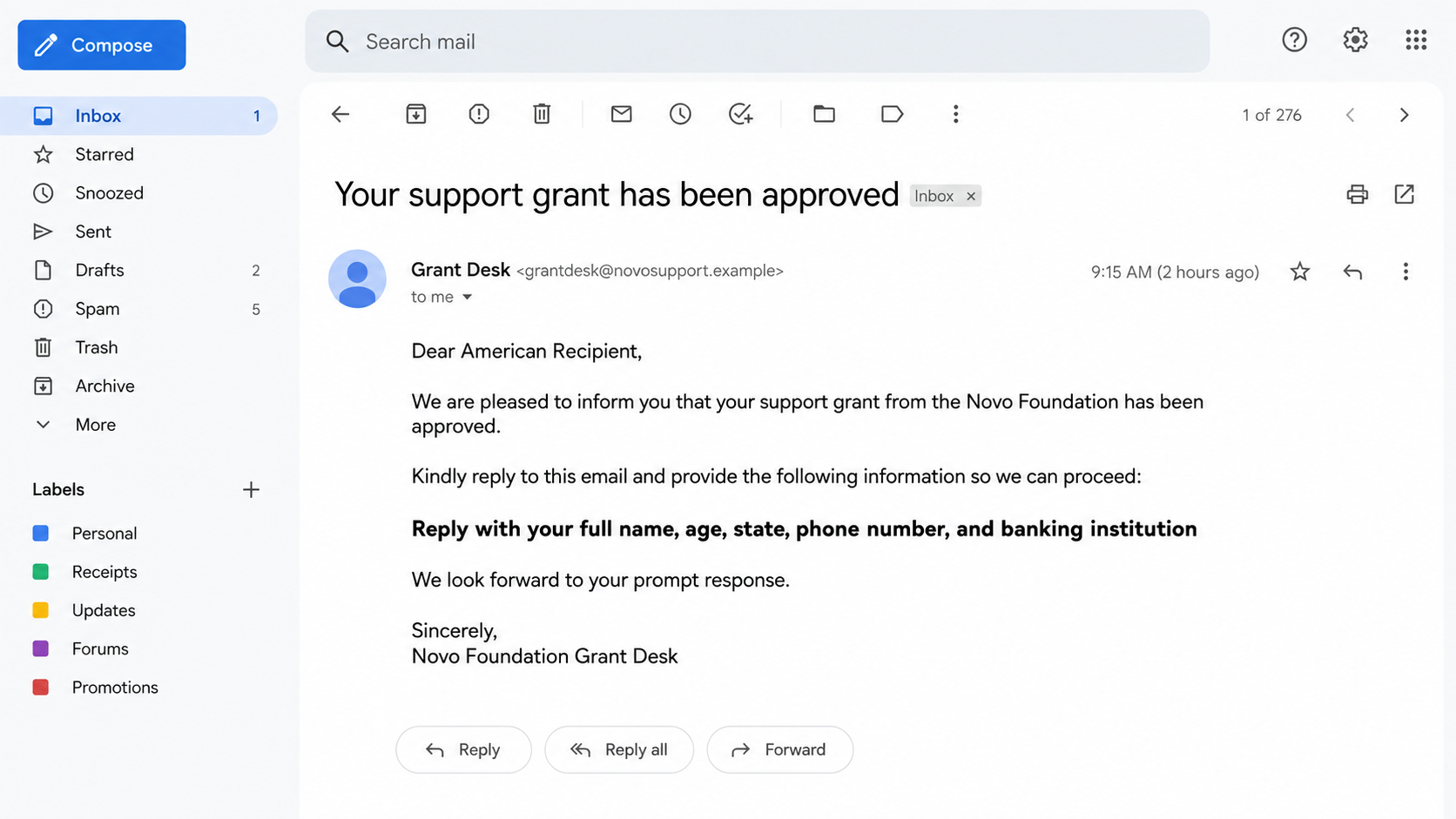
An unexpected email says financial help has already been approved. There was no application, interview, or earlier conversation, yet a “payment officer” appears ready to release the money.
The message asks for a reply with ordinary details first: name, age, state, telephone number, and banking institution. The request can feel harmless because it stops just short of asking for an account number.
The NoVo Foundation grant email scam uses that small first reply to open a much more expensive conversation.
Overview
The email invents an approval that never happened
The message claims a “support grant for Americans” has been approved in the recipient’s name. It may say the money can cover school, bills, medical costs, housing, or other personal expenses. The positive news is supposed to make one missing fact feel unimportant: the recipient never applied.
Real grant programs have eligibility rules, an application process, a defined purpose, and records the applicant can verify independently. They do not select random inboxes and then ask a stranger to introduce themselves after approval.
The Federal Trade Commission warns that unsolicited offers of free grant money for personal needs are scams. Requests for personal information, financial details, or an advance processing payment make the situation even clearer.
The real NoVo Foundation contradicts the pitch
NoVo Foundation is a real philanthropic organization, which is why its name is useful to an impersonator. The scammer borrows that credibility without borrowing the organization’s actual process.
The foundation’s official website states that it does not accept unsolicited proposals or requests for funding. An email announcing a personal grant to an unknown recipient is therefore not a shortcut into the real foundation’s grantmaking.
The safest response is to visit the known official website independently. Do not use the reply address, telephone number, contact person, or portal supplied in the grant email to verify the same email.
The first data request builds a victim profile
Full name, age, state, telephone number, school, and bank name may not empty an account by themselves. Together, they help a scammer choose the next script, answer identity questions, create a convincing form, and decide which financial institution to impersonate.
After the recipient replies, the “officer” can request a copy of an ID, address, routing number, online-banking login, or a fee. The gradual escalation feels like paperwork because each request is only slightly more sensitive than the previous one.
Warning signs include:
- The recipient is approved without applying.
- The grant is described as general help for personal expenses.
- The greeting is broad, such as “American recipient.”
- A real foundation’s name appears with an unrelated sender domain.
- The message asks for age, state, phone number, and bank name by reply.
- A “payment officer” is introduced only after the recipient responds.
- The amount is large but the program name and rules are vague.
- The sender promises quick release after verification.
- Gift cards, wire transfers, cryptocurrency, or cash are requested for fees.
- The recipient is told not to contact the foundation through public channels.
How the NoVo Foundation Grant Email Scam Works
Step 1: A real organization’s name is copied
The operator chooses a foundation, charity, public agency, or famous donor that people can find online. A familiar name makes the offer searchable and gives the email a story the scammer did not have to build.
Logos, staff names, addresses, and descriptions can be copied from public pages. None of those details proves the message came from that organization. The sending domain and the official funding process matter more than the signature block.
Step 2: The recipient is told approval came first
Instead of asking the person to apply, the message says a grant is waiting. Some versions claim a database, community program, random selection, or government partnership identified the recipient. That removes the work and uncertainty normally associated with funding.
The absence of an application is not generosity. It prevents the victim from comparing the email with a real application record, case number, eligibility document, or portal they already know.
Step 3: A low-friction reply confirms the target
The first request may avoid the most alarming data. The scammer asks for a name, age, location, mobile number, bank name, school, or preferred contact method. Replying confirms that the address is active and that the recipient is interested.
The answers also help personalize later messages. A scammer who knows the victim’s bank can send a matching deposit form. One who knows the state can mention a local office, tax, or delivery service.
Step 4: The payment officer creates a formal process
A second person or account may take over. The new contact uses a title such as grant payment officer, claims director, finance agent, or disbursement manager. Multiple roles make a tiny operation feel like an institution.
The victim may receive a certificate, approval letter, beneficiary number, or screenshot of a pending transfer. These files are cheap to produce and do not show money moving through a real grant system.
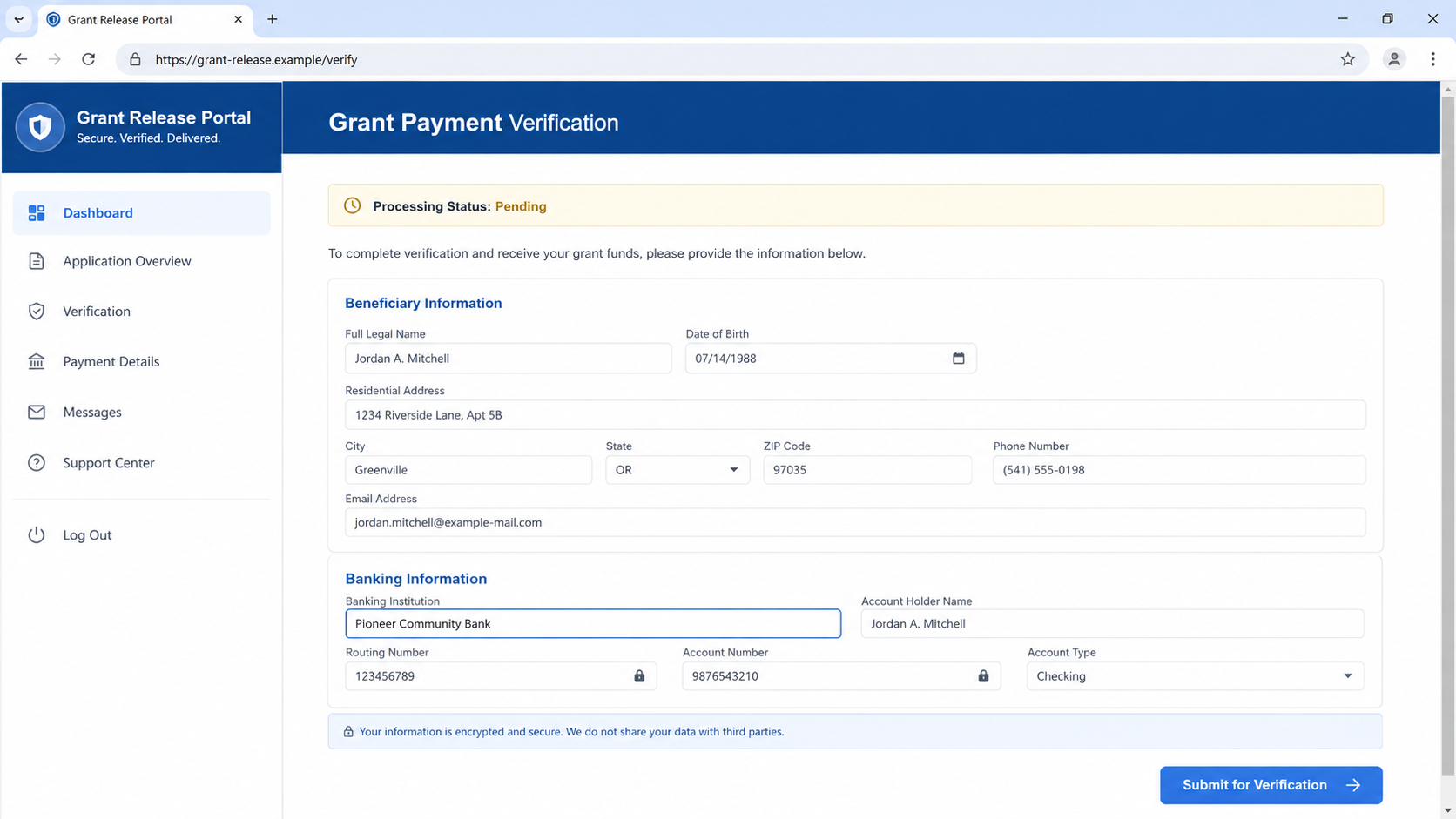
Step 5: Identity and bank details are collected
The next form can request a government ID, Social Security number, date of birth, address, account number, routing number, or online-banking credentials. The explanation is always reassuring: verification, tax reporting, eligibility, or direct deposit.
A legitimate organization does not need an email recipient’s password or one-time code. Banking details should never be entered into a portal reached through an unsolicited approval message.
Step 6: A fee blocks the imaginary release
Once the victim expects the grant, the sender invents a processing, insurance, transfer, tax, delivery, clearance, or anti-fraud charge. The amount may start small, especially when gift cards or a payment app are used.
The FTC’s guidance is direct: no government agency contacts people out of the blue to offer a personal grant, and an agency will not demand an advance fee by gift card, cash, wire, or cryptocurrency.
Step 7: Every payment creates another obstacle
Paying the first charge does not release funds. It tells the operator the victim can pay. A second demand may be blamed on taxes, an incorrect form, international transfer rules, a frozen code, or a refundable security deposit.
The promised grant remains permanently one step away. If the victim stops, a recovery scammer may appear and offer to recover the fees for another upfront payment.
Why the Bank Name Matters to the Scammer
A request for the “banking institution” can look less dangerous than a request for an account number. It is still valuable. The answer tells the operator which login page, security wording, telephone number, and colors to imitate in the next message.
The scammer can claim the victim’s bank rejected the grant transfer and send a tailored link. They may pose as that bank’s fraud team, mention a pending deposit, or request a one-time code to “authorize incoming funds.”
A bank name also helps with telephone impersonation. The operator can spoof a caller ID or send a text that appears connected to the email conversation. The victim hears familiar details and assumes the separate contact confirms the grant.
Do not test the offer by sending partial or altered information. A reply itself confirms interest and can lead to more targeted contact. Mark the message as phishing and verify the organization outside the conversation.
If personal information was already shared, write down exactly what left your control. The response depends on the data. A bank name requires vigilance; an account number, ID image, password, or one-time code requires immediate action.
How to Verify a Real Grant
Begin with the application you submitted. A genuine grant decision should connect to a program, deadline, applicant account, proposal, and contact path you already used. Search for the program independently and compare every detail.
For federal opportunities in the United States, use Grants.gov rather than a link sent by an unknown “agent.” Real federal grants are generally designed for specific projects and organizations, not surprise personal payments for ordinary bills.
Contact a foundation through the address on its official website. Describe the email without forwarding a dangerous attachment. Ask whether the program and staff member exist. Do not rely on a telephone number printed on the supposed award certificate.
Read current eligibility and application pages. The NoVo Foundation homepage plainly says it does not accept unsolicited proposals or requests for funding. That official statement outweighs an inbox promise from an unrelated address.
Finally, separate the institution from the impersonator. A real foundation can be a victim of name misuse. Report the fake message without accusing the legitimate organization of operating the scam.
Company, Address, and Fulfillment Checks
The display name can be typed by anyone
“NoVo Foundation Grant Desk” in an inbox is not authentication. Expand the full sender and reply-to addresses. Look for unrelated domains, free email accounts, extra words, misspellings, and a reply address different from the visible sender.
The official funding policy contradicts random approval
The foundation’s public notice says it does not accept unsolicited funding requests. A stranger cannot create a legitimate personal program by attaching the organization’s name to an email. Verify current policies only at novofoundation.org.
An address copied from a website proves nothing
Impersonators often paste the real organization’s address into a footer. Compare the whole communication path, not one accurate line. A genuine address beside an unrelated domain and advance-fee demand remains a dangerous message.
There is no verifiable disbursement
A screenshot marked “pending,” a certificate, or an email promise is not a bank transfer. Verify deposits inside the bank’s real app. Never pay to unlock funds that do not appear as a settled transaction.
What to Do if You Have Fallen Victim to This Scam
- Stop replying and do not pay. Do not send a final verification fee or explain that you suspect a scam. Preserve the message thread, full headers, payment instructions, telephone numbers, domains, and files.
- Contact the bank through a trusted channel. If you shared an account or routing number, call the number on your card or statement. Ask about account monitoring, transfer restrictions, and whether a new account is appropriate.
- Replace exposed credentials. If you entered a password, change it from the real service and anywhere it was reused. Start with email and banking, then enable strong multi-factor authentication.
- Report identity information at IdentityTheft.gov. If an ID, Social Security number, or detailed personal profile was sent, follow the recovery plan and consider a credit freeze with all three bureaus.
- Reverse payments quickly. Contact the card issuer, bank, wire service, gift-card company, payment app, or exchange. State that the transfer resulted from an impersonation scam and ask about the available recall process.
- Scan devices if you opened a file. Run a full Malwarebytes scan if you opened an attachment, installed a viewer, or visited a page that triggered a download.
- Add web protection without treating it as a cure. AdGuard can block many malicious domains and advertising routes. It cannot retrieve information already submitted or reverse a bank transfer, so finish the financial and identity steps.
- Report the impersonation. Send the evidence to the real foundation through its official contact path. In the United States, report the scam to ReportFraud.ftc.gov and serious internet crime to IC3.gov.
- Watch for tailored follow-ups. Expect fake bank calls, deposit alerts, tax messages, and recovery offers that reuse the information you disclosed. Verify every new contact independently.
- Tell trusted contacts. If the message came through a compromised friend or social account, warn that person outside the same conversation. Ask workplace security to search for copies if a business address was targeted.
- Reject refund agents who demand money. A person promising to release the grant or recover a fee for another advance payment is continuing the same loss.
Frequently Asked Questions
Does NoVo Foundation send personal grants by email?
The official website says the foundation does not accept unsolicited proposals or funding requests. An unexpected personal approval should be treated as impersonation and verified through the official site.
Why does the scam ask only for my bank’s name?
That answer helps the operator tailor a fake deposit form, login page, telephone call, or security message. It also confirms that the recipient is willing to continue.
Can a real grant require taxes or a processing fee first?
A surprise grant that requires gift cards, cryptocurrency, a wire, cash, or another advance payment is a scam. Do not pay money to release promised money.
What if the sender knows my name and address?
Those details may come from public records, marketing lists, or a breach. Familiar information does not authenticate the grant. Verify the program and sender independently.
Is it safe to open the attached award letter?
Do not open an unexpected attachment to test the claim. It may contain a malicious document, link, calendar event, or executable. The award can be checked without opening it.
What if I replied but sent no sensitive data?
Stop contact, mark the message as phishing, and expect more targeted emails. A reply confirms an active address, but the response is narrower if no credentials, identity records, bank details, or payment were shared.
The Bottom Line
The NoVo Foundation grant email scam turns a real organization’s name into an imaginary personal award. Approval without an application is the first warning; requests for personal data, banking information, and advance fees reveal the rest.
Do not reply to the payment officer. Check the foundation’s real website, protect any information already disclosed, and report the impersonation. A legitimate grant begins with a verifiable program and application, not a stranger asking which bank you use.

Join the discussion
0 commentsShare your experience or ask a question about this article.
Discussion
Start the conversation
Have a question or something useful to share? Add the first comment.