

A recruiter says your resume is exactly what a technology company needs. The interview happens entirely by chat, the offer arrives within hours, and a check for home-office equipment is already being prepared.
The Tipping Points Technology job scam uses the rhythm of real remote hiring until one unusual instruction changes everything. That instruction can leave an applicant without a job and owing the bank thousands.
Overview
What the supposed recruiter offers
The approach presents a remote data-entry, administrative, customer-support, or technology position with attractive pay and flexible hours. One reported version promised paid training followed by a $35 hourly rate.
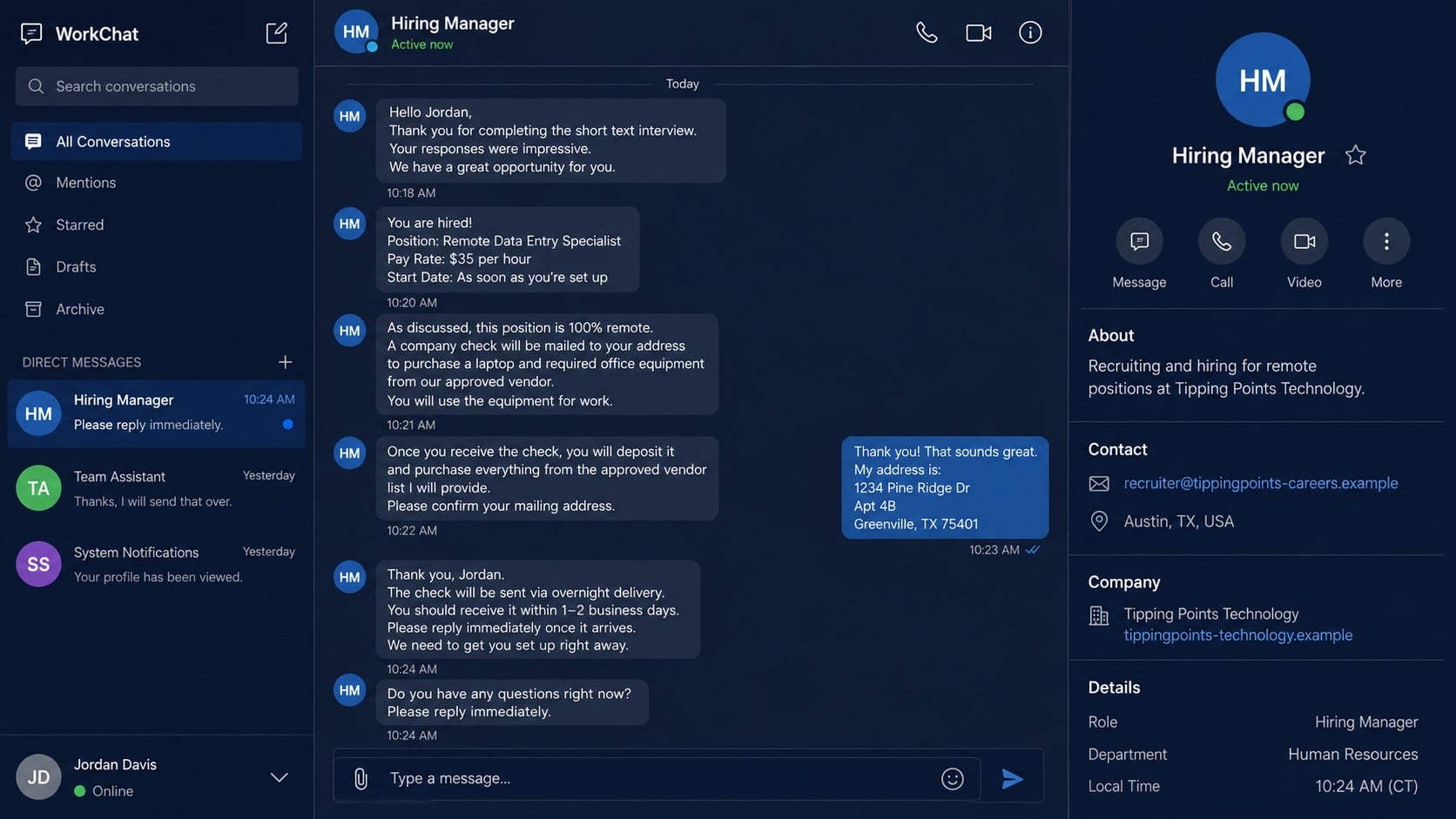
The applicant is directed into a text-only interview on a messaging app. After a short series of generic questions, the interviewer announces that the candidate has been hired and says the company will provide everything needed to begin.
- A remote position with unusually fast approval
- An interview conducted only by written chat
- A formal-looking offer letter or onboarding packet
- A company check for equipment and software
- An approved vendor selected by the recruiter
- Pressure to deposit the check and pay the vendor quickly
Where the fake check enters the story
The new hire is told that a check will cover a computer, printer, accounting software, time-tracking tools, or a dedicated workspace. It may arrive by overnight mail or as an image for mobile deposit.
The amount is deliberately larger than the applicant’s expected pay. The recruiter’s instructions send most of it to an “approved vendor,” who is actually controlled by or working with the scammer.
The bank may show the deposit as available before discovering that the check is counterfeit, altered, or drawn on a compromised account. Funds availability is not the same as final settlement.
Why the applicant loses real money
The vendor payment leaves through a method that is fast and difficult to reverse. Days or weeks later, the deposited check is returned, the provisional credit disappears, and the account holder is responsible for the money already sent.
The scam can also collect a driver’s license, Social Security number, bank details, address, and tax-form information. Even if no payment is made, a completed onboarding packet can create a serious identity-theft risk.
The central rule is simple: an honest employer does not send a new applicant a check and require that applicant to use personal banking to pay the employer’s equipment supplier.
Why the Hiring Process Feels Real at First
The recruiter may know details from your resume
A scammer can find resumes on job boards, professional networks, portfolio sites, and breached databases. Mentioning a real skill, former employer, or position does not prove that the message came from the company named in the offer.
Some applicants are contacted soon after applying elsewhere, so the timing feels connected to a legitimate search. The fraudulent recruiter may never say where the resume was found or may name a platform the applicant already uses.
The interview creates emotional investment
A series of questions makes the applicant feel evaluated. The person may spend an hour explaining work history, availability, strengths, and home-office experience before receiving approval.
That effort changes the decision. Once someone believes a difficult search has ended, questioning the equipment instructions can feel like risking a valuable opportunity.
The paperwork copies ordinary employment documents
Offer letters, direct-deposit forms, employee handbooks, tax documents, and confidentiality agreements are easy to reproduce. A logo and electronic signature make the package look organized, but they do not connect it to a verified employer.
The safest test occurs outside the documents. Find the company’s official site independently, locate a public phone number, and ask whether the position, recruiter, and interview process are genuine.
How the Tipping Points Technology Job Scam Works
Step 1: An unexpected recruiter starts the conversation
The first contact may arrive by email, text, a job platform, or a messaging app. The sender claims to represent Tipping Points Technology or a similarly named business and says the applicant’s background fits a remote opening.
The address often uses a free email provider or a domain that adds careers, hiring, team, or HR to the company name. It may look plausible at a glance while remaining separate from any verified business domain.
A real company name can be impersonated, and an official-sounding name can also be invented. The offer must be verified with the organization itself rather than accepted on the recruiter’s word.
Step 2: The applicant is moved into a text-only interview
The recruiter says an interview manager is waiting on a chat service. Video is avoided because a text conversation lets one operator handle several targets, follow a script, and hide voice, location, and identity.
Questions may resemble a genuine interview, but follow-up is shallow. The interviewer rarely challenges vague answers, explains the team, or introduces a supervisor who can be independently verified.
If the applicant pauses, the interviewer may send question marks or repeated prompts asking whether the conversation is still active. That impatience is part of the pressure, not evidence of an urgent hiring need.
Step 3: The job is awarded with little meaningful review
The applicant is congratulated quickly, sometimes before references, employment eligibility, a live conversation, or a role-specific assessment. The pay and benefits may be well above what the limited screening would justify.
A formal offer letter arrives and the supposed manager begins discussing a start date. This shifts attention from “Is this job real?” to “How do I get ready in time?”
Personal information may be collected at this stage through a fake onboarding portal. Requests for identity and tax records can feel normal after an offer, which is why verifying the employer before submitting them is critical.
Step 4: The employer offers a check for office equipment
The recruiter says the company will pay for a computer and other supplies. Instead of ordering and shipping the equipment directly, the company supposedly sends the applicant a check and provides a vendor list.
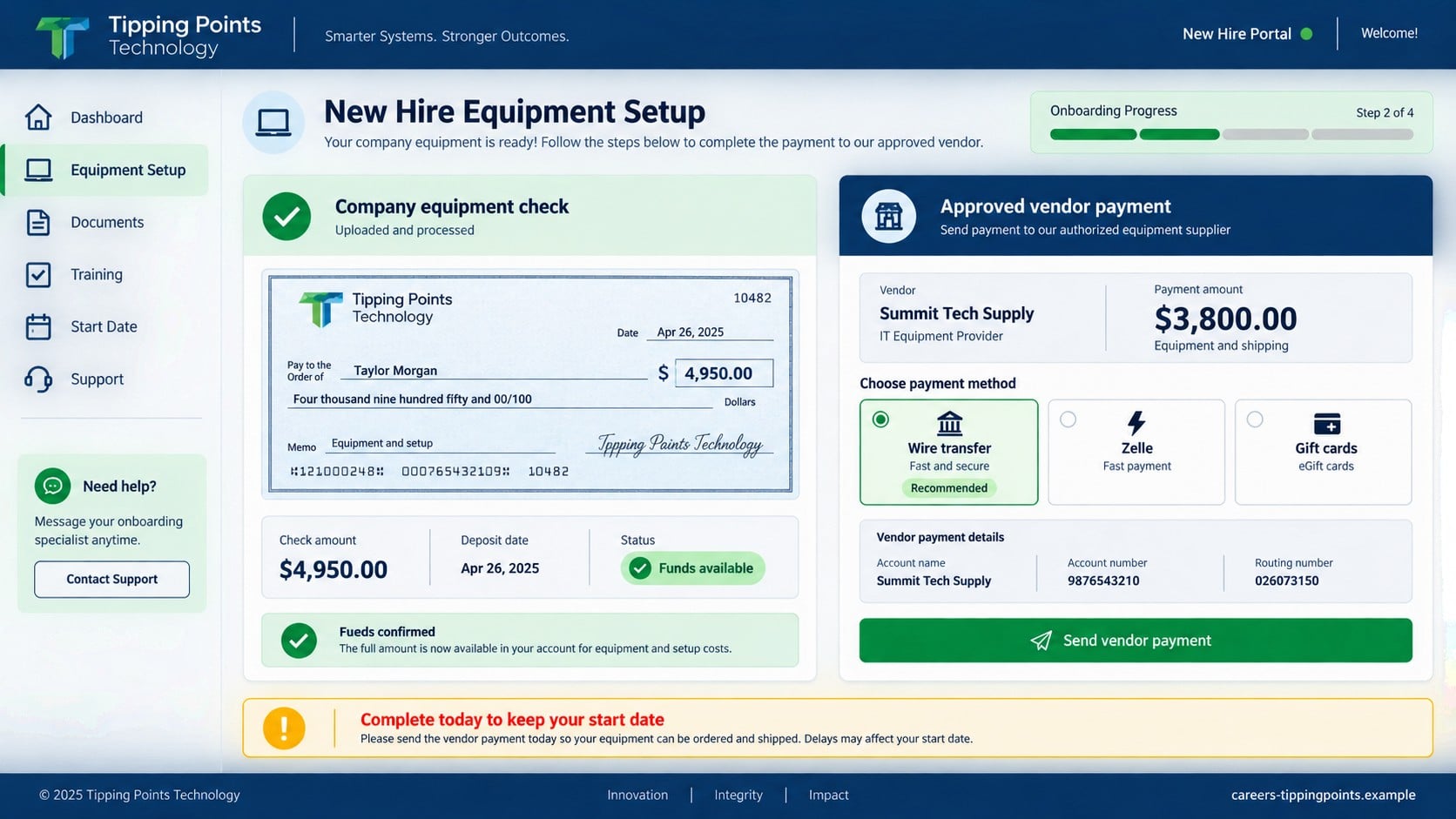
The amount might be $4,950, with instructions to send $3,800 or more to the designated supplier. The remaining amount may be described as a signing bonus, first pay, or money for incidental costs.
This arrangement turns the applicant’s bank account into the payment bridge. The scammer contributes a check that can be reversed while demanding a vendor payment that may be gone within minutes.
Step 5: The bank displays funds before the check is verified
The applicant deposits the check and sees the balance rise. A teller or mobile app may show that some or all funds are available, which the recruiter calls proof that the check cleared.
The FTC’s fake-check guidance explains why that conclusion is unsafe. Banks must make funds available quickly, but it can take much longer to discover that a check is fraudulent.
The displayed money is provisional. If the issuing account rejects the item or the check is identified as counterfeit, the credit is removed from the applicant’s account.
Step 6: The approved vendor receives the real payment
The recruiter insists that equipment must come from a particular supplier to meet company security rules. The applicant is instructed to send a wire, Zelle transfer, payment-app transfer, cryptocurrency, or gift-card codes.
The vendor may send an invoice and promise next-day shipping. That extra role makes the transaction look like procurement, but the recruiter and vendor can be the same operator using different accounts.
If a bank warns about fraud, the applicant may be coached to describe the payment as personal or say the recipient is trusted. An honest employer does not ask a new hire to mislead a financial institution.
Step 7: The check is returned and the recruiter disappears
After the vendor receives the payment, messages slow down or stop. No equipment arrives, the start date passes, and the company contact cannot be reached through an independently verified channel.
The bank later reverses the check and may charge a returned-item fee. If the account no longer contains enough money, the applicant can be left with a negative balance and collection problems.
Meanwhile, identity documents supplied during onboarding remain exposed. A second scammer may offer to recover the payment or claim that another fee will release the equipment.
Company, Address, and Fulfillment Checks
The name in the offer is not the verified employer
A job offer using the words Tipping Points Technology does not prove that a particular registered company authorized it. Similar business names can exist, and scammers routinely borrow names from real organizations.
Compare the sender domain, legal employer on the offer, payroll entity, job posting, and company website. The same identity should remain consistent from recruitment through onboarding.
The address may have been copied or invented
An offer letter can list a real office, shared workspace, registered-agent address, or unrelated property. A valid street address proves only that the location exists.
Call the organization using contact information you found independently and ask whether the recruiter works there. Do not use the phone number printed on the questionable offer to verify the offer.
Support may be another role in the same script
The recruiter, interview manager, payroll officer, and equipment vendor may appear to be separate people. If every role communicates only through new email accounts and one chat thread, there is no independent support channel.
A real hiring team should be reachable through an established company directory, switchboard, careers page, or verified business profile. Secrecy and resistance to verification are serious warnings.
The equipment route does not make business sense
Companies that require managed computers typically purchase, configure, track, and ship those assets themselves. Sending an applicant a check to pay an unknown vendor removes control over security, warranties, tax records, and inventory.
Ask for the vendor’s legal name, address, model numbers, invoice terms, and relationship with the employer. If the answer is “deposit first and we will explain later,” stop the process.
Warning Signs Before You Accept the Offer
- The recruiter contacts you from a free or lookalike email address.
- You cannot find the opening on an official careers page.
- The entire interview occurs by text with no live conversation.
- You are hired immediately after generic questions.
- The pay is unusually high for the role and screening process.
- Identity or bank details are requested before the employer is verified.
- A check is sent for equipment, software, or a signing bonus.
- You must pay a vendor selected by the recruiter.
- The recruiter treats available funds as proof that a check is good.
- You are told to hide the payment purpose from the bank.
The FTC’s remote-job scam guidance recommends verifying openings through the employer, never paying for a job or equipment, and treating check-and-send-money instructions as fraud.
Do not worry about appearing rude. A legitimate recruiter can explain the process, wait while you verify it, and connect you with the employer through an official channel.
What to Do if You Have Fallen Victim to This Scam
- Stop every payment and message without delay. Do not send the vendor another transfer, gift-card code, or “refund.” Preserve the conversation before blocking the accounts.
- Call the bank’s fraud department. Explain that you deposited a check connected to a fake job and sent money against the provisional credit. Ask whether the check can be isolated and whether transfers can be recalled.
- Do not spend the displayed check balance. Leave enough money available for the reversal when possible. Ask the bank how a returned check, negative balance, and fees will be handled.
- Contact the payment provider immediately. Report wires, Zelle payments, gift cards, crypto transfers, or payment-app transactions through official fraud channels. Recovery is not guaranteed, but delay reduces the available options.
- Secure email and job-platform accounts. Change reused passwords, sign out unfamiliar sessions, review recovery settings, and enable multi-factor authentication. Remove any mailbox forwarding rule you did not create.
- Respond to identity exposure. If you sent a Social Security number, driver’s license, tax form, or bank details, use IdentityTheft.gov to build a recovery plan and consider credit freezes with the three major bureaus.
- Scan the device with Malwarebytes. Run a full scan if you opened attachments, installed interview software, added a browser extension, or used an unfamiliar onboarding program. Remove confirmed threats before changing sensitive passwords on that device.
- Use AdGuard to reduce malicious follow-up traffic. It can help block known phishing sites, deceptive ads, and tracking connections. It cannot reverse a transfer or prove that a recruiter is genuine.
- Create a complete evidence file. Save emails with headers, chat exports, job posts, offer letters, check images, deposit receipts, vendor invoices, payment identifiers, phone numbers, domains, and delivery envelopes.
- Notify the impersonated company and job platform. Send the evidence through independently verified channels so fraudulent listings and recruiter accounts can be investigated. Avoid accusing an unrelated employee without proof.
- Report the crime and reject recovery offers. File with the FTC and, for substantial online losses, the FBI Internet Crime Complaint Center. Do not pay anyone who promises guaranteed recovery or secret access to investigators.
Frequently Asked Questions
Is Tipping Points Technology itself confirmed to be fraudulent?
This article addresses a reported job-offer and fake-check pattern using that name. A name can be borrowed from a real or unrelated organization. Verify the exact legal employer and recruiter before drawing conclusions about any similarly named business.
Why did my bank make money from the check available?
Banks make deposited funds available under timing rules before every check is finally verified. Availability does not prevent a later reversal if the check is counterfeit, altered, stolen, or rejected.
Can a legitimate employer send money for home-office equipment?
An employer might reimburse documented expenses under a verified policy. The scam warning is a check combined with instructions to send money to a designated vendor. Confirm any unusual arrangement through the employer’s official finance team.
What if I deposited the check but sent nothing?
Do not spend the funds. Tell the bank’s fraud department how you received the check and follow its instructions. Preserve the offer and messages, then stop contact with the recruiter.
Does a video interview prove the job is real?
No. Video adds context but can still involve an impersonator, prerecorded content, or a money mule. Verify the opening, sender domain, employer, and equipment process independently.
Should I ship equipment back if a package arrives?
Do not forward a package to an address supplied by the suspicious recruiter. Contact the carrier, bank, police, or an attorney as appropriate, preserve the label, and ask for documented instructions before moving anything.
The Bottom Line
The Tipping Points Technology job scam turns a fast remote offer into a fake-check loss. The interview and paperwork build confidence, but the real objective appears when the applicant must deposit a check and pay an approved vendor.
Verify the role outside the recruiter’s channels and never use your bank account as an employer’s purchasing department. If the check is already deposited, contact the bank before the temporary balance becomes an expensive debt.








