

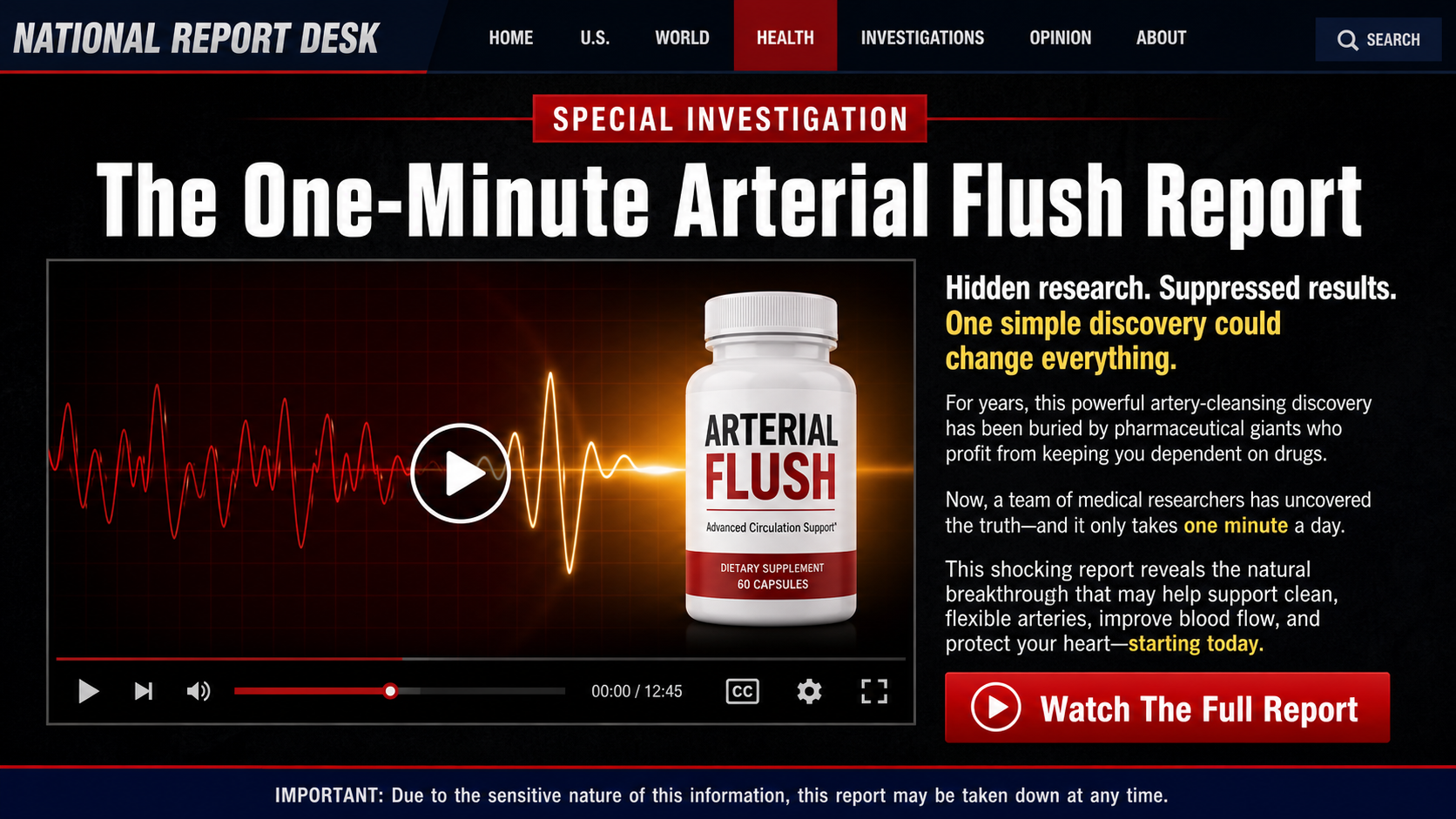
A dramatic “60 Minutes” report appears to reveal a one-minute ritual that supposedly clears clogged arteries without changing medicine, diet, or daily routines.
The familiar studio look, recognizable voices, and urgent health promises make the Fake 60 Minutes Arterial Flush Report Scam unusually convincing at first glance.
Overview
The broadcast is an imitation, not a CBS investigation
The campaign borrows the visual language of American television journalism, including red banners, investigative labels, anchor-style narration, and familiar interview pacing.
Examined versions name “60 Minutes” and present manipulated clips of public figures as if they participated in a legitimate cardiovascular report.
The page is not hosted on CBSNews.com, and the presentation does not appear in the program’s genuine episode archive.
That distinction matters because a polished video player can hide the fact that the surrounding website belongs to an unrelated sales funnel.
Famous names create authority that the offer has not earned
Versions of the campaign have invoked Dr. Sanjay Gupta, Lesley Stahl, Bryant Gumbel, Dr. Caldwell Esselstyn, and several entertainment figures.
Their appearances are assembled through altered footage, synthetic audio, misleading edits, or clips removed from their original context.
None of those visual tricks establishes an endorsement, a clinical trial, or participation in the product being sold.
The crowded celebrity lineup serves another purpose. Each new face makes the previous unsupported claim feel more socially confirmed.
The promised ritual eventually becomes a bottle order
The opening pitch suggests viewers will learn an inexpensive household technique for dissolving dangerous material inside their arteries.
Instead, the presentation delays the answer while introducing a supplement offer called CardioFlush in the version reviewed.
The product name is not the durable part of the campaign. Affiliate operators can replace the bottle while preserving the same emotional script.
The important warning signs are therefore the journey, not only the label:
- A social advertisement promises a suppressed heart discovery.
- Altered celebrity footage supplies instant medical authority.
- A counterfeit news page imitates a trusted broadcaster.
- A long video withholds the promised household ritual.
- Unsupported artery-clearing claims replace ordinary medical caution.
- The final answer becomes a multi-bottle supplement purchase.
- Per-bottle pricing can distract from the full transaction.
- Continuity language may authorize repeat shipments.
What the Campaign Actually Claims
The sales story describes a hidden buildup inside blood vessels using memorable phrases such as “arterial cement” or hardened material blocking circulation.
It then claims a simple ritual can break that material apart, normalize blood pressure, and remove the need for commonly prescribed medication.
Those promises are far beyond ordinary supplement language about supporting general wellness.
A claim to treat atherosclerosis, hypertension, stroke risk, or heart failure is a disease-treatment claim, regardless of the word printed on the bottle.
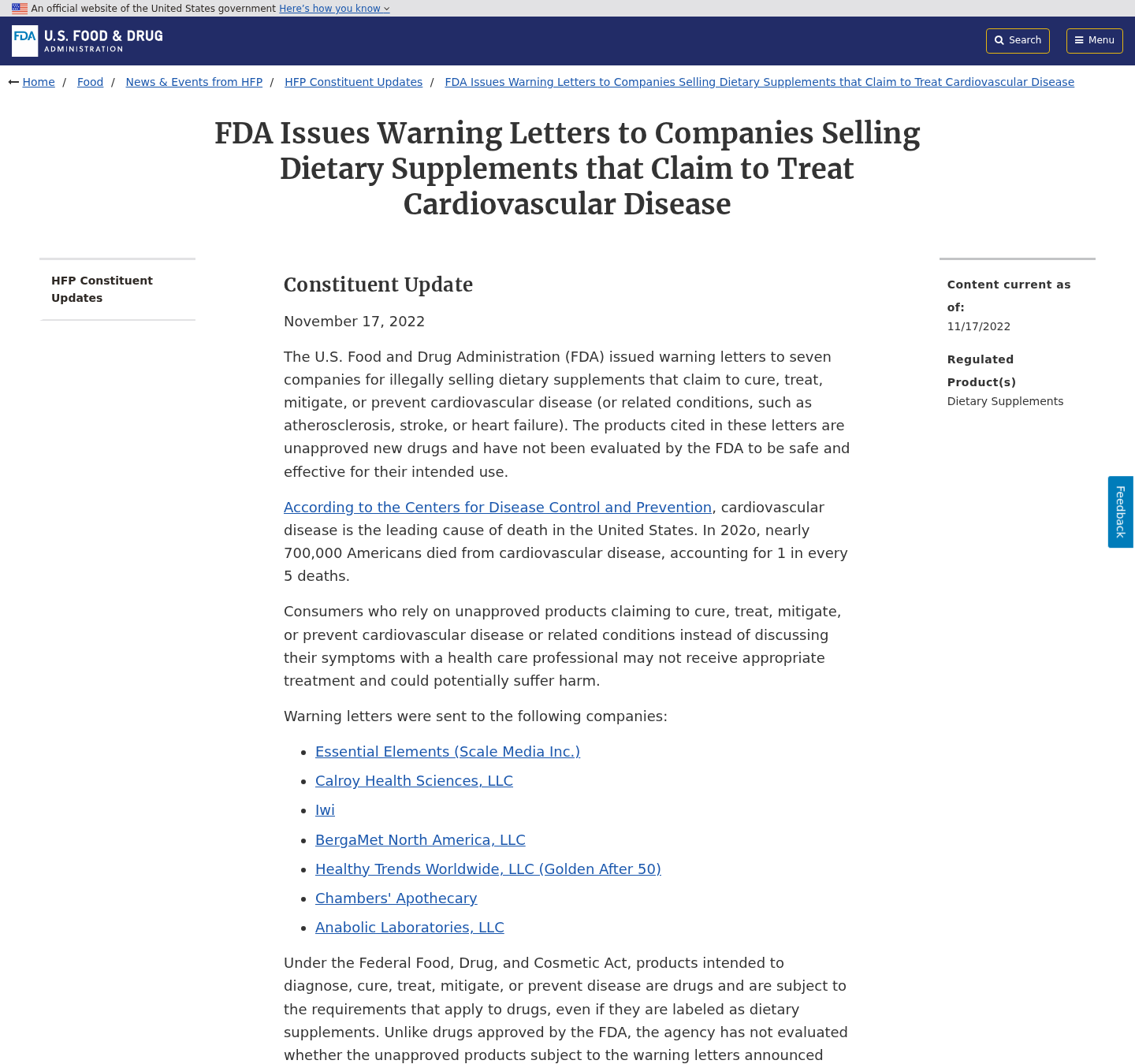
The FDA has warned companies that supplements marketed to cure, treat, mitigate, or prevent cardiovascular disease can be considered unapproved drugs.
The agency also warns that relying on such products can delay appropriate diagnosis and treatment.
A disclaimer at the bottom cannot neutralize a video that repeatedly tells viewers a product reverses disease or replaces medication.
Marketing must be judged as a complete impression, including narration, testimonials, visuals, urgency, and the path into checkout.
Cardiovascular symptoms can have many causes, and some require urgent evaluation.
No online presentation can safely decide whether a person should stop losartan, amlodipine, or another prescribed treatment.
Why the Fake Report Feels Believable
The designers understand that viewers do not evaluate every element independently. They recognize a newsroom, familiar voice, and serious medical vocabulary as one package.
A counterfeit page often includes navigation links, publication dates, comment counters, video controls, and logos that are decorative rather than functional.
These details reduce hesitation because they resemble ordinary online journalism.
The script also blends familiar truths with invented conclusions. Arterial plaque is real, and high blood pressure genuinely deserves medical care.
The deception begins when the video turns that concern into an unsupported secret-cure narrative.
Viewers may be told pharmaceutical companies suppressed the discovery because an inexpensive solution threatens profits.
That conspiracy framing makes missing evidence appear like proof of concealment.
It also discourages viewers from asking a cardiologist, pharmacist, or family member who might challenge the claim.
Testimonials then compress complicated health changes into emotional before-and-after stories.
Without medical records, study methods, and independent verification, those stories cannot establish what caused any reported improvement.
CardioFlush and the Auto-Refill Terms
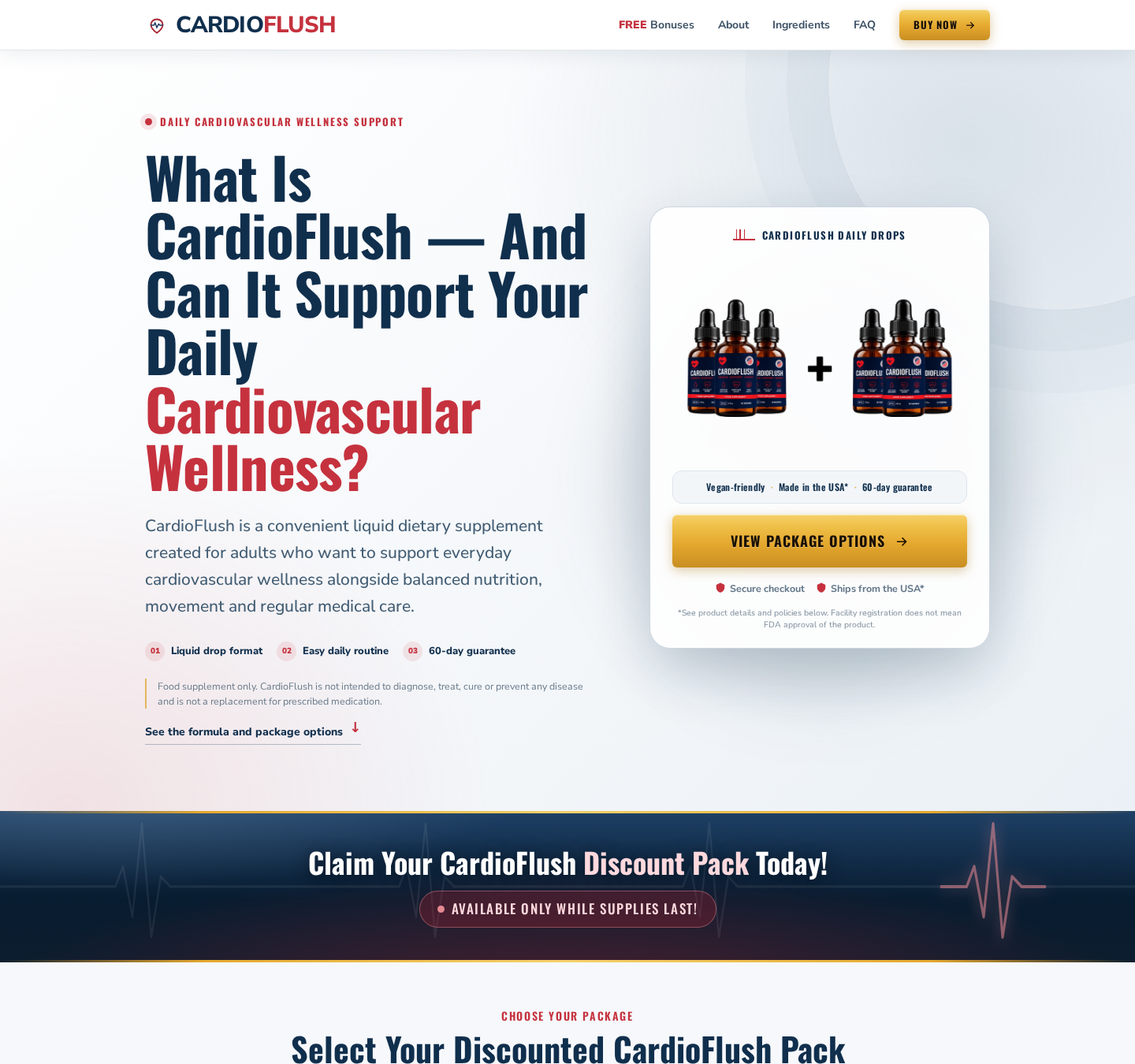
The CardioFlush page reviewed presents liquid drops for “daily cardiovascular wellness support” and displays several discounted package sizes.
That softer wording differs sharply from the funnel’s dramatic promises about flushing arteries and replacing drugs.
The page states that CardioFlush is a dietary supplement and not intended to diagnose, treat, cure, or prevent disease.
It also says facility registration does not mean FDA approval of the product.
Those disclosures are important, but buyers may reach them only after an emotionally forceful video has shaped expectations.
The same site’s FAQ states that CardioFlush operates on an automatic refill subscription.
It says the selected bundle ships every 30 days unless the customer cancels through the listed support channels.
This is not merely a theoretical refill concern. It is continuity language published by the current seller page.
A buyer expecting one purchase could therefore authorize repeated versions of the same bundle, depending on the final checkout terms accepted.
The checkout must be read line by line because the website contains conflicting impressions.
One visible banner says “one time fee, no autoship,” while the product FAQ describes automatic refills.
Conflicting statements should stop the purchase until the merchant provides a clear written answer tied to the exact package.
Save the checkout, terms, order summary, and confirmation before paying. Later pages can change, while screenshots preserve what you actually saw.
Never rely on a per-bottle figure alone. Multiply it by the package quantity and add shipping, tax, expedited delivery, and optional extras.
Countdowns, viewer counters, and “reserved order” messages are sales pressure, not proof that inventory is disappearing.
How the Fake 60 Minutes Arterial Flush Report Scam Works
Step 1: A sponsored video targets fear about heart disease
The first contact commonly appears in a social feed, short-video platform, or advertising network.
It asks whether medication only hides the problem while a simple discovery addresses the “real cause.”
The language targets people already worried about blood pressure, circulation, chest discomfort, or an upcoming medical appointment.
A dramatic clip can also reach relatives searching for help on somebody else’s behalf.
Step 2: AI and edited footage manufacture a television report
Recognizable presenters and doctors appear to discuss an extraordinary breakthrough.
Lip movement, vocal rhythm, lighting, and facial details may look slightly unnatural, especially when the clip is slowed or replayed.
However, compression and a small mobile screen can hide those defects.
The decisive test is not visual perfection. It is whether the claimed segment exists on the broadcaster’s verified website and official channels.
Step 3: The click opens a counterfeit news advertorial
The destination resembles a news article but lives on a domain unrelated to the publication it imitates.
Navigation buttons may return to the sales page, do nothing, or redirect into more promotional content.
A real broadcaster’s masthead cannot authenticate a page hosted somewhere else.
Check the registered domain in the address bar, not the logo printed within the page.
Step 4: A long video turns uncertainty into urgency
The presentation repeats the danger, introduces supposed experts, and promises the recipe later.
Each delay increases the viewer’s emotional investment and makes leaving feel like abandoning important information.
Timers and warnings suggest the report may disappear because powerful interests want it removed.
This manufactured scarcity prevents careful comparison and discourages a calm medical discussion.
Step 5: Pseudoscience creates a simple hidden cause
Complex cardiovascular disease becomes one sticky substance that supposedly blocks every vessel and explains unrelated symptoms.
The story uses scientific vocabulary without presenting a reproducible protocol, trial registration, participant data, adverse events, or peer-reviewed findings.
An animated artery is not clinical evidence. Neither is a testimonial accompanied by laboratory graphics.
Real treatment decisions depend on diagnosis, risk factors, examination, testing, and individual medical history.
Step 6: The promised ritual changes into CardioFlush
After viewers wait for a household recipe, the narrator explains that the useful components must be concentrated, stabilized, or combined into a proprietary formula.
The “free discovery” has now become a commercial product.
In the examined campaign that product is CardioFlush, but another bottle can occupy the same final position tomorrow.
This rotation helps affiliates keep the story alive after a brand receives complaints or loses advertising accounts.
Step 7: Package math and refill language expand the commitment
The largest bundle receives the boldest discount and lowest per-bottle number.
A customer may focus on that small number while the checkout authorizes several bottles, expedited delivery, or recurring shipments.
CardioFlush currently publishes automatic refill wording for the chosen bundle every 30 days.
Because other page elements suggest a one-time transaction, the buyer must resolve the contradiction before submitting payment.
Step 8: Refund friction can follow the emotional purchase
A guarantee does not operate automatically. Customers may need an authorization number, returned bottles, tracking, and action within a measured window.
Some buyers are offered partial refunds during retention calls, according to complaints associated with similar direct-response funnels.
That broader pattern does not prove every CardioFlush request receives the same treatment.
It does explain why written cancellation and preserved documentation are essential from the first contact.
Medical Claims That Should Stop You
No supplement advertisement should instruct a viewer to discontinue prescribed cardiovascular medication.
Stopping treatment without clinical guidance can allow blood pressure or another condition to worsen silently.
Promises to dissolve arterial plaque within days also demand extraordinary evidence.
Look for human trials on the finished formulation, not studies about isolated ingredients at different doses.
A bibliography at the bottom may link to legitimate research that never tested the marketed bottle.
Check whether participants, dosage, duration, endpoints, and formulation actually match the commercial offer.
“FDA registered facility” does not mean FDA approved the supplement’s effectiveness.
Registration concerns a facility. Approval is a separate regulatory conclusion that ordinary dietary supplements do not receive before marketing.
“Doctor formulated” is equally incomplete unless the physician is named, licensed, accountable, and involved with the exact formula.
Even then, one professional’s involvement would not replace controlled evidence.
How to Verify a Supposed Television Health Discovery
Search the exact segment title on the broadcaster’s official domain and verified video channel.
Use distinctive phrases from the advertisement inside quotation marks. A genuine national investigation normally leaves a broad, consistent record.
Visit the public figure’s verified website or social account separately.
Do not follow endorsement links supplied by the sales page because those can lead to more fabricated evidence.
Inspect the domain carefully. Extra words before or after a broadcaster’s name do not make the address official.
Look for an editorial masthead, reachable newsroom contacts, corrections policy, and unrelated reporting that behaves normally.
Search the claimed study in clinical-trial registries and medical databases by investigator, intervention, and condition.
If the seller provides only screenshots of journal logos, ask for the exact citation.
Call your pharmacist using a known number and describe the product, ingredients, dosage, and claim.
A pharmacist can check interactions without requiring you to trust either an advertisement or an anonymous review.
Finally, compare the product page, terms, checkout, receipt, and card descriptor.
Any disagreement about recurrence, quantity, refund timing, or merchant identity is a reason to stop.
Company, Address, and Fulfillment Checks
The brand name does not identify the legal seller
CardioFlush is the product name, but a buyer needs the legal entity that accepts payment and carries the refund obligation.
Compare the checkout, terms, privacy notice, receipt, package label, and card statement.
If those documents use different entities without explanation, obtaining a meaningful remedy becomes harder.
The listed Aurora address appears tied to order handling
The checkout displays 19655 East 35th Drive, Suite 100, Aurora, Colorado 80011.
An address associated with shipping or returns does not automatically establish a corporate headquarters, research laboratory, or manufacturing plant.
Ask which legal business occupies the suite and whether it handles refunds, fulfillment, manufacturing, or only returned parcels.
Support promises must survive a real cancellation request
The current pages publish support@cardioflush.com and +1 (323) 286-0206 for questions and cancellation.
Save every message, call time, agent name, and confirmation number.
A functioning contact channel matters more than a large “cancel anytime” badge displayed before payment.
The supply chain remains separate from the sales story
The site says the drops are manufactured in the United States with foreign and domestic ingredients.
That statement does not identify every ingredient supplier, final manufacturer, lot test, or certificate of analysis.
Request a complete Supplement Facts panel, lot number, manufacturer identity, and testing documentation before swallowing an unfamiliar formula.
Questions to Ask Before Ordering Any Artery Supplement
Ask whether the exact purchase is one-time or recurring, and require the answer in writing.
Ask what quantity will arrive now and what quantity could arrive during each later billing cycle.
Request the complete total, not only a per-bottle headline.
Confirm whether opened and empty bottles qualify for return, who pays postage, and when the guarantee clock begins.
Ask for the legal seller’s name and a physical address that accepts formal correspondence.
Request the finished product’s testing, not a generic facility badge.
Show the label to a clinician or pharmacist who knows your diagnoses and prescriptions.
Ask the seller to identify the published human trial supporting any claim about arteries or blood pressure.
If the answers remain vague, leaving the page is safer than accepting a countdown.
A legitimate merchant can explain price, recurrence, ingredients, returns, and identity without a twenty-minute video.
What to Do if You Have Fallen Victim to This Scam
- Do not stop prescribed medicine. Contact the clinician who manages your heart or blood-pressure treatment before changing anything.
- Save the complete purchase trail. Keep the advertisement, domain, video screenshots, checkout, receipt, terms, package, label, and card descriptor.
- Send a written cancellation. State that you cancel every refill, membership, continuity plan, and future shipment associated with the order.
- Request the refund procedure. Ask for the deadline, return address, authorization number, eligible containers, tracking requirement, and exact refund amount.
- Contact the card issuer. Explain any misleading recurring authorization, unexpected quantity, unauthorized charge, or refusal to honor a timely cancellation.
- Watch for later billing. Review statements for the merchant descriptor and related names, because a replacement card alone may not stop authorized updater services.
- Discuss the supplement with a pharmacist. Bring the bottle and full label, especially if you take anticoagulants, blood-pressure drugs, or diabetes medication.
- Report adverse reactions. Seek urgent care for severe symptoms and submit supplement problems through the FDA Safety Reporting Portal.
- Report deceptive marketing. File complaints with the FTC, FDA, state attorney general, advertising platform, and IC3 when identity manipulation or fraud occurred.
- Scan affected devices with Malwarebytes. This checks for harmful downloads or browser changes if the funnel installed anything beyond opening a webpage.
- Use AdGuard for risky advertising paths. Its filtering can block many known malicious ad domains, although it cannot replace careful verification.
- Reject recovery callers. Nobody needs cryptocurrency, gift cards, remote access, or an upfront fee to secure a legitimate refund.
Is Your Device Infected? Run a Free Malware Scan
Slow performance, constant pop-ups, or strange behavior? These are classic signs of a malware infection. The fastest way to find out is to scan your device with Malwarebytes Free — one of the most trusted malware removal tools available.
The free version detects and removes the most common threats, including:
- Adware — the cause of those annoying pop-ups
- Browser hijackers — unwanted redirects and changed homepages
- Trojans and spyware — hidden programs stealing your data
- Potentially unwanted programs (PUPs) — software you never asked for
👉 Select your device below — Windows, Mac, or Android — then follow the simple steps to download Malwarebytes, scan your system, and remove any threats it finds. The scan usually takes 5 to 20 minutes.
Run a Malware Scan with Malwarebytes for Windows
Malwarebytes is one of the most popular and trusted anti-malware tools for Windows — and it’s completely free for removing infections. It catches threats that many antivirus programs miss, including adware, browser hijackers, and trojans. Follow the steps below to scan and clean your PC in just a few minutes.
Download Malwarebytes
Click the button below to download the latest version of Malwarebytes for Windows from the official source. The free version is all you need — it will scan your computer and remove adware, browser hijackers, and other malicious software at no cost.
Download MalwarebytesOfficial installer for Windows 11 and 10. Your download starts right away.Want real-time protection? See Malwarebytes Premium Malwarebytes Free for WindowsScans and removes malware at no cost
-
Install Malwarebytes
When the download finishes, open your Downloads folder and double-click the MBSetup file. If Windows shows a User Account Control pop-up, click “Yes” to allow the installation.

Follow the On-Screen Prompts to Install Malwarebytes
The setup wizard will walk you through a few quick screens:
-
Choose where you’re installing the program — “Personal Computer” or “Work Computer” — then click Next.

-
Malwarebytes will now install on your device. This usually takes under a minute.

-
When installation is complete, the “Welcome to Malwarebytes” screen will open automatically.

-
On the final screen, click Open Malwarebytes to launch the program.

-
Enable “Scan for Rootkits”
Before scanning, turn on rootkit detection so Malwarebytes can find even the most hidden threats. Click the Settings gear icon on the left side of the screen.

In the settings menu, find “Scan for rootkits” and click the toggle so it turns blue.

Done? Click “Dashboard” in the left pane to return to the main screen.
Start the Scan
Click the blue Scan button. Malwarebytes will automatically update its virus database and start checking your computer for malware.

-
Wait for the Scan to Finish
The scan checks your entire system for browser hijackers and other malicious programs, so it can take 5 to 20 minutes depending on your computer. Feel free to do something else — just check back occasionally to see the progress.

-
Quarantine the Detected Threats
When the scan is done, you’ll see a list of everything Malwarebytes found — malware, adware, and potentially unwanted programs. Click the “Quarantine” button to remove all of them at once.

Malwarebytes will now remove the malicious files and registry entries and move them safely into quarantine.

-
Restart Your Computer
Some threats can only be fully removed after a reboot. If Malwarebytes asks you to restart, click Yes. Once you’re logged back in, Malwarebytes has finished removing the threats it found.

That’s it — your Windows PC is now clean of trojans, adware, and other malware, and should be back to running smoothly.
If you are still having problems with your computer after completing these instructions, then please follow one of the steps:
- Run a computer scan with ESET Online Scanner
- Ask for help in our Windows Malware Removal Help & Support forum.
Run a Malware Scan with Malwarebytes for Mac
Malwarebytes for Mac is a free on-demand scanner that removes the malware other security software tends to miss — adware, browser hijackers, and unwanted programs included. Cleaning an infected Mac with Malwarebytes has always been completely free, and it’s our go-to recommendation. Follow the steps below to scan and clean your Mac in just a few minutes.
-
Download Malwarebytes for Mac
Click the button below to download the latest version of Malwarebytes for Mac.
Download MalwarebytesOfficial installer for macOS. Your download starts right away.Want real-time protection? See Malwarebytes PremiumMalwarebytes Free for MacScans and removes malware at no cost -
Open the Malwarebytes setup file
When the download finishes, open your Downloads folder and double-click the setup file to begin the installation.

-
Follow the On-Screen Prompts to Install Malwarebytes
The Malwarebytes for Mac Installer will guide you through a few quick screens. Click “Continue” and keep following the prompts until the installation completes.



When the installation is complete, Malwarebytes opens to the Welcome to Malwarebytes screen. Click “Get started“.
-
Select “Personal Computer” or “Work Computer”
Malwarebytes will ask what type of computer you’re installing it on. Click either Personal Computer or Work Computer, whichever applies.

-
Start the Scan
Click the “Scan” button. Malwarebytes will automatically update its detection database and begin checking your Mac for malware.

-
Wait for the Scan to Finish
Malwarebytes will scan your Mac for adware, browser hijackers, and other malicious programs. This can take a few minutes, so feel free to do something else — just check back occasionally to see the progress.

-
Quarantine the Detected Threats
When the scan is done, you’ll see a list of everything Malwarebytes found. Click the “Quarantine” button to remove all the threats at once.

-
Restart Your Mac
Malwarebytes will now remove all the malicious files it found. Some threats can only be fully removed after a reboot — if Malwarebytes asks you to restart, allow it. Once you’re logged back in, your Mac is clean.

That’s it — your Mac is now free of adware, rogue browser extensions, and other potentially harmful software.
If you are still experiencing problems while trying to remove a malicious program from your computer, please ask for help in our Mac Malware Removal Help & Support forum.
Run a Malware Scan with Malwarebytes for Android
Malwarebytes for Android automatically detects and removes dangerous threats like malware and ransomware so you don’t have to worry about your most-used device being compromised. Aggressive detection of adware and potentially unwanted programs keeps your Android phone or tablet running smooth.
-
Download Malwarebytes for Android.
You can download Malwarebytes for Android by clicking the link below.
Get Malwarebytes for AndroidOpens Google Play in a new tab.Want real-time protection? See Malwarebytes Premium for AndroidMalwarebytes for AndroidScans your phone and removes malware at no cost -
Install Malwarebytes for Android on your phone.
In the Google Play Store, tap “Install” to install Malwarebytes for Android on your device.

When the installation process has finished, tap “Open” to begin using Malwarebytes for Android. You can also open Malwarebytes by tapping on its icon in your phone menu or home screen.

-
Follow the on-screen prompts to complete the setup process
When Malwarebytes will open, you will see the Malwarebytes Setup Wizard which will guide you through a series of permissions and other setup options.
This is the first of two screens that explain the difference between the Premium and Free versions. Swipe this screen to continue.
Tap on “Got it” to proceed to the next step.
Malwarebytes for Android will now ask for a set of permissions that are required to scan your device and protect it from malware. Tap on “Give permission” to continue.
Tap on “Allow” to permit Malwarebytes to access the files on your phone.
-
Update database and run a scan with Malwarebytes for Android
You will now be prompted to update the Malwarebytes database and run a full system scan.

Click on “Update database” to update the Malwarebytes for Android definitions to the latest version, then click on “Run full scan” to perform a system scan.

-
Wait for the Malwarebytes scan to complete.
Malwarebytes will now start scanning your phone for adware and other malicious apps. This process can take a few minutes, so we suggest you do something else and periodically check on the status of the scan to see when it is finished.

-
Click on “Remove Selected”.
When the scan has been completed, you will be presented with a screen showing the malware infections that Malwarebytes for Android has detected. To remove the malicious apps that Malwarebytes has found, tap on the “Remove Selected” button.

-
Restart your phone.
Malwarebytes for Android will now remove all the malicious apps that it has found. To complete the malware removal process, Malwarebytes may ask you to restart your device.
That’s it — your Android phone is now clean — no more malicious apps, adware, or browser redirects.
If you are still having problems with your phone after completing these instructions, then please follow one of the steps:
- Restore your phone to factory settings by going to Settings > General management > Reset > Factory data reset.
- Ask for help in our Mobile Malware Removal Help & Support forum.
Stay Protected: Block Ads and Malicious Sites
Now that your device is clean, keep it that way. Most infections start with a malicious ad or a fake download button — so blocking them at the source is your best defense.
We recommend AdGuard, which blocks malicious ads, phishing pages, and dangerous redirects before they can reach you.
👉 Download AdGuard and browse safely
Frequently Asked Questions
Did 60 Minutes broadcast the arterial flush report?
No matching authentic investigation was found on the broadcaster’s official channels. The campaign uses a lookalike presentation to create that impression.
Did the celebrities shown endorse CardioFlush?
The altered clips do not prove endorsement. Verify any public figure’s involvement through independent official statements, not the seller’s own video.
Can a supplement dissolve arterial plaque in days?
Such a claim requires rigorous clinical evidence and medical oversight. The funnel reviewed did not provide credible proof for that extraordinary promise.
Does CardioFlush use automatic refills?
The current product FAQ states that selected bundles ship every 30 days through an auto-refill subscription, despite conflicting one-time wording elsewhere.
Is an FDA-registered facility the same as FDA approval?
No. Facility registration does not mean the agency approved the supplement, its formula, or its cardiovascular marketing claims.
What should I do about an unexpected repeat charge?
Cancel in writing, preserve the terms you saw, contact the merchant, and promptly dispute any charge that was not clearly authorized.
The Bottom Line
The Fake 60 Minutes Arterial Flush Report Scam manufactures trust with altered personalities, counterfeit journalism, delayed recipes, and unsupported medical promises.
CardioFlush currently adds a documented auto-refill concern and contradictory purchase language. Verify the full charge and recurring terms before considering any order.
Most importantly, never let an anonymous advertorial replace cardiovascular care or persuade you to change prescribed treatment.

Join the discussion
0 commentsShare your experience or ask a question about this article.
Discussion
Start the conversation
Have a question or something useful to share? Add the first comment.