Rima CineStation Exposed: Real Projector or Fake $129 Technology Deal?
Written by: Lapain Epuran
Published on:
Rima CineStation promises the kind of projector people normally research for weeks, then prices it like an impulse purchase.
The offer becomes much less convincing when its pictures, specifications, seller history, and customer reports are examined together.
Overview
The advertisement sells an impossible bargain
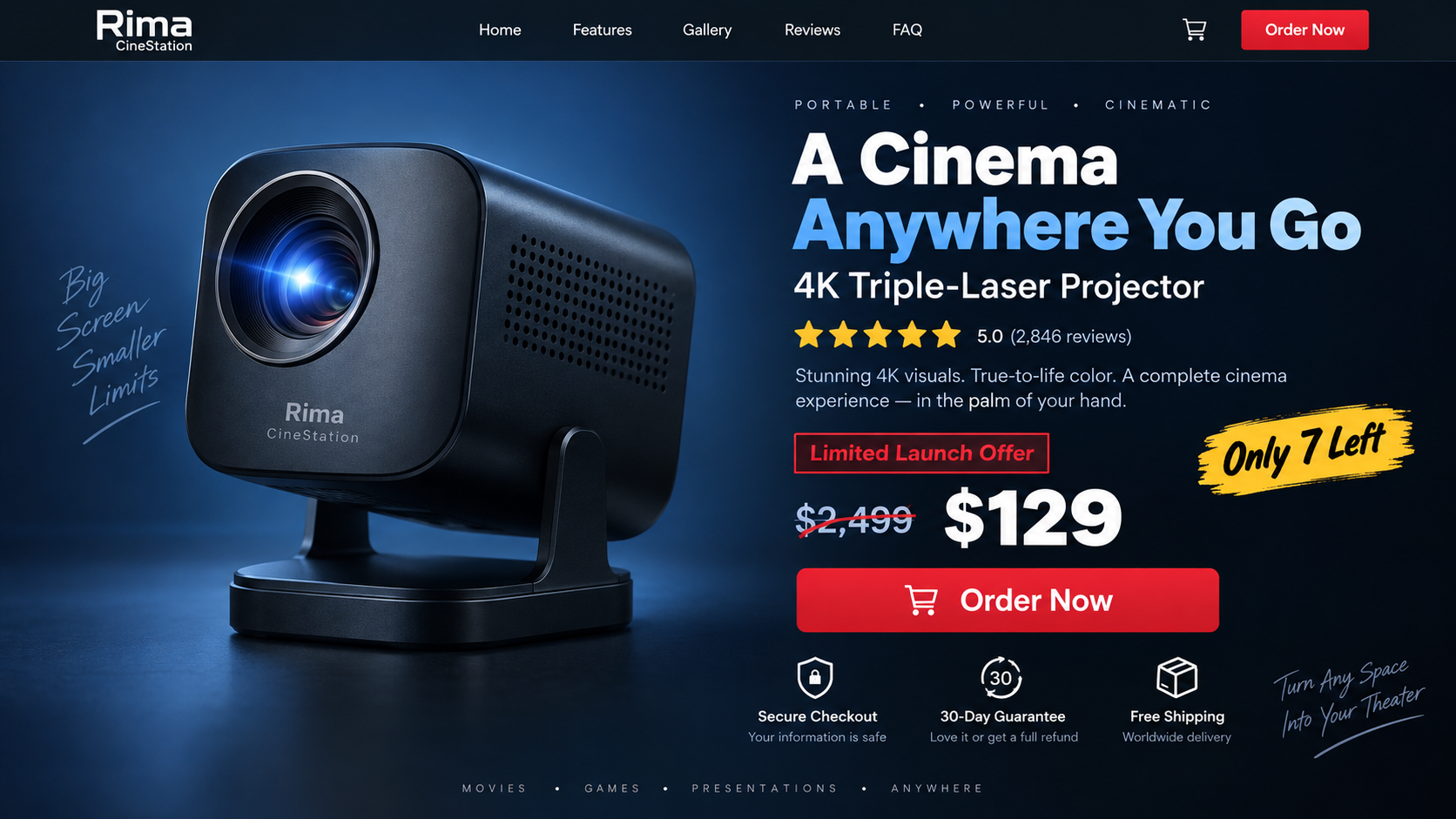
Rima CineStation promotions described a compact projector with premium 4K triple-laser performance, cinematic brightness, advanced sound, and easy portability.
The advertised price was around $129, often presented as a temporary reduction from a much larger amount.
Comparable premium projectors from established manufacturers sell for far more. That gap is too large to accept without strong independent evidence.
The store disappeared while complaints remained
The rimatech-us.co storefront was unavailable during our latest check. Its disappearance prevents shoppers from reviewing the original policies or seeking ordinary support.
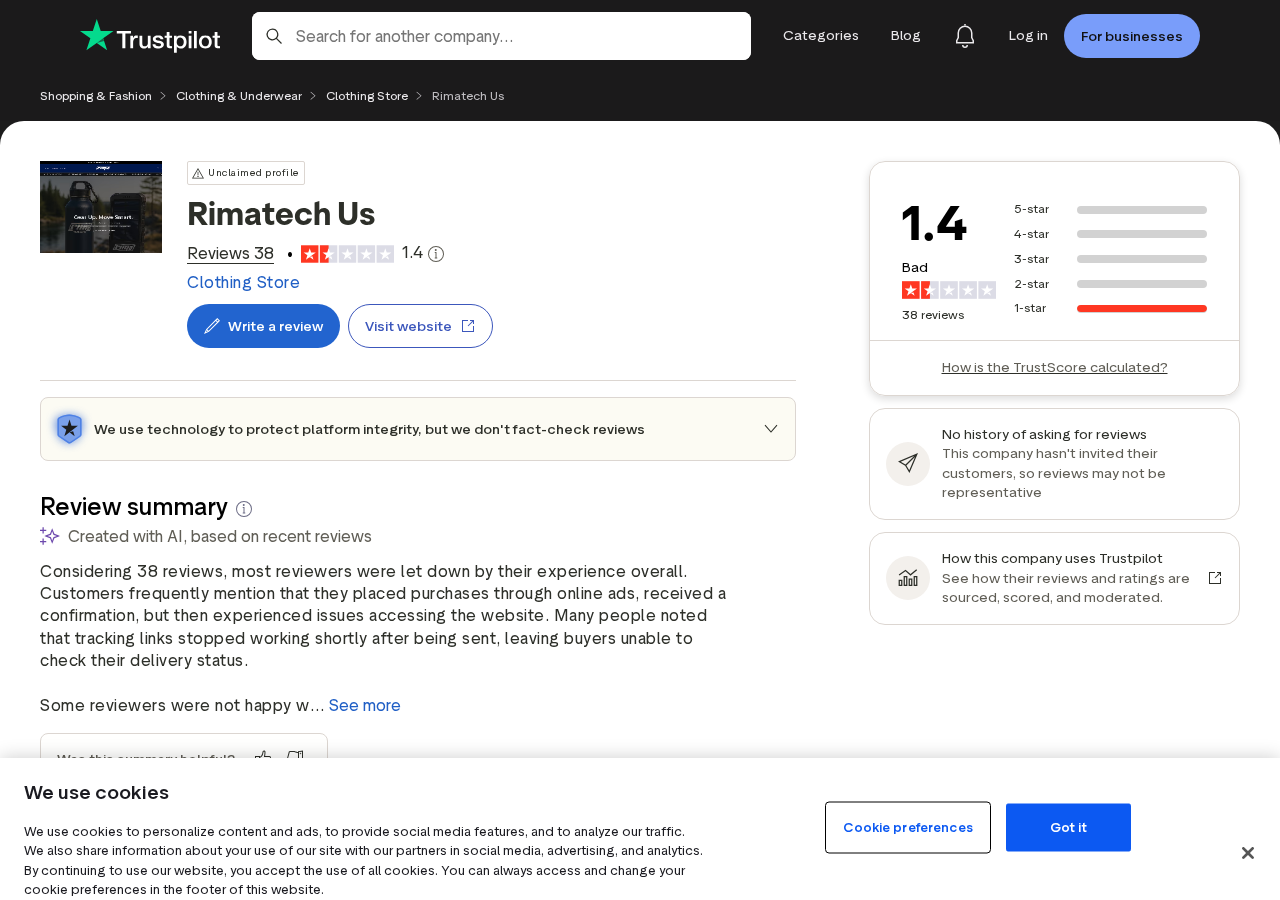
Meanwhile, its Trustpilot page remained accessible with a 1.4 rating from 38 reviews. The visible distribution was entirely one-star.
Reviewers alleged non-delivery, broken tracking, unresponsive support, or goods that never matched the promoted technology.
Those are customer allegations rather than independently verified transaction records. Their consistency still creates a substantial warning.
The same storefront promoted unrelated futuristic products
Rima branding was also attached to a triple-screen laptop accessory and a compact jet boat offer.
That assortment resembles a rotating direct-response store, not a specialist projector manufacturer with a documented engineering and service network.
The most important findings are straightforward:
The product’s price conflicts sharply with the specifications shown.
Promotional imagery resembles a much more expensive established projector.
The former store is no longer functioning normally.
Independent reviewers repeatedly report fulfillment and support problems.
The Rima product name can disappear while the underlying pitch returns elsewhere.
What the Rima CineStation Ads Promise
The pitch turns a complex home-theater purchase into a simple lifestyle upgrade. One small box supposedly replaces expensive screens, speakers, and installation.
A genuine projector can offer several of those features. Combining all of them in a $129 device is the implausible part.
A premium specification list without engineering detail
Brightness should be stated in a recognized measurement and accompanied by test conditions. Resolution should distinguish native output from supported input.
Laser type, throw ratio, contrast, fan noise, connectivity, operating system, and warranty coverage also matter.
The Rima pitch used premium labels more effectively than verifiable model documentation. Buyers saw benefits, not the limitations needed for comparison.
A discount designed to stop comparison shopping
Large crossed-out prices suggest that an expensive machine has briefly become affordable. Scarcity counters imply the opportunity could vanish.
The comparison price may not reflect a genuine sales history for that product. It often functions as a psychological anchor.
A timer or “only a few left” message should never replace model research, especially when an unfamiliar seller claims a dramatic technology breakthrough.
Borrowed visual credibility
Promotional scenes resembled material associated with established premium projectors. The apparent machine looked far more sophisticated than the price suggested.
Images can be copied, altered, or placed beside a new name. They do not prove the seller possesses the pictured inventory.
Reverse-image searching a product photograph is one of the fastest ways to expose this kind of mismatch.
How the Rima CineStation Scam Works
Step 1: A social media ad presents the dream product
The campaign begins with a polished video showing a bright cinematic image, effortless setup, and a compact device.
The viewer is not asked to understand projectors. The ad promises a premium movie experience without subscriptions, installation, or premium pricing.
Comments and reaction counts may create social proof. They do not establish that verified customers received the advertised item.
Step 2: The landing page borrows authority
The page may look like a product review, technology announcement, or official manufacturer store before revealing its order button.
Badges, review stars, media-style headings, and supposed awards create reassurance. Many of those elements are controlled entirely by the seller.
A legitimate-looking layout is easy to reproduce. Company identity and verifiable specifications are much harder to fake consistently.
Step 3: An extreme discount creates urgency
The shopper sees a premium reference price slashed to around $129. A timer, low-stock warning, or sale deadline discourages outside research.
People fear losing the bargain more than receiving the wrong product. That emotional reversal is the funnel’s strongest tool.
Leaving the page for ten minutes usually costs nothing. It may reveal that the countdown resets or the same discount appears daily.
Step 4: Product images hide the identity gap
The page shows a sophisticated projector, but the model number, manufacturer, and certification details remain vague or absent.
Visual similarity to an established device encourages buyers to transfer that product’s reputation onto the Rima name.
The checkout sells whatever the merchant lists, not whatever a borrowed photograph originally represented.
Step 5: The checkout pushes more units
Quantity selectors, bundle discounts, accidental upgrades, and post-purchase offers can turn one intended device into several billed items.
Always read the final quantity and total before authorization. Save a screenshot because the order summary may become unavailable later.
If the page adds products without clear consent, stop. Do not continue merely because payment information has already been entered.
Step 6: Tracking delays the buyer’s response
A confirmation email or tracking number makes the transaction feel active. Some reviewers alleged their tracking did not produce a meaningful delivery.
Long estimated windows can consume chargeback time while support asks the customer to remain patient.
Check the carrier directly. A label created without carrier possession is not evidence that the advertised projector is moving.
Step 7: The store vanishes or support stops answering
When complaints accumulate, a disposable storefront can go offline. The same advertisement may later return with a different product name and domain.
The customer is left with an unfamiliar statement descriptor, an unresponsive mailbox, and screenshots of policies no longer online.
This is why the article focuses on the product pitch, not only one address. The CineStation name may rotate, but the mechanism remains recognizable.
The Product Comparison That Changes the Story
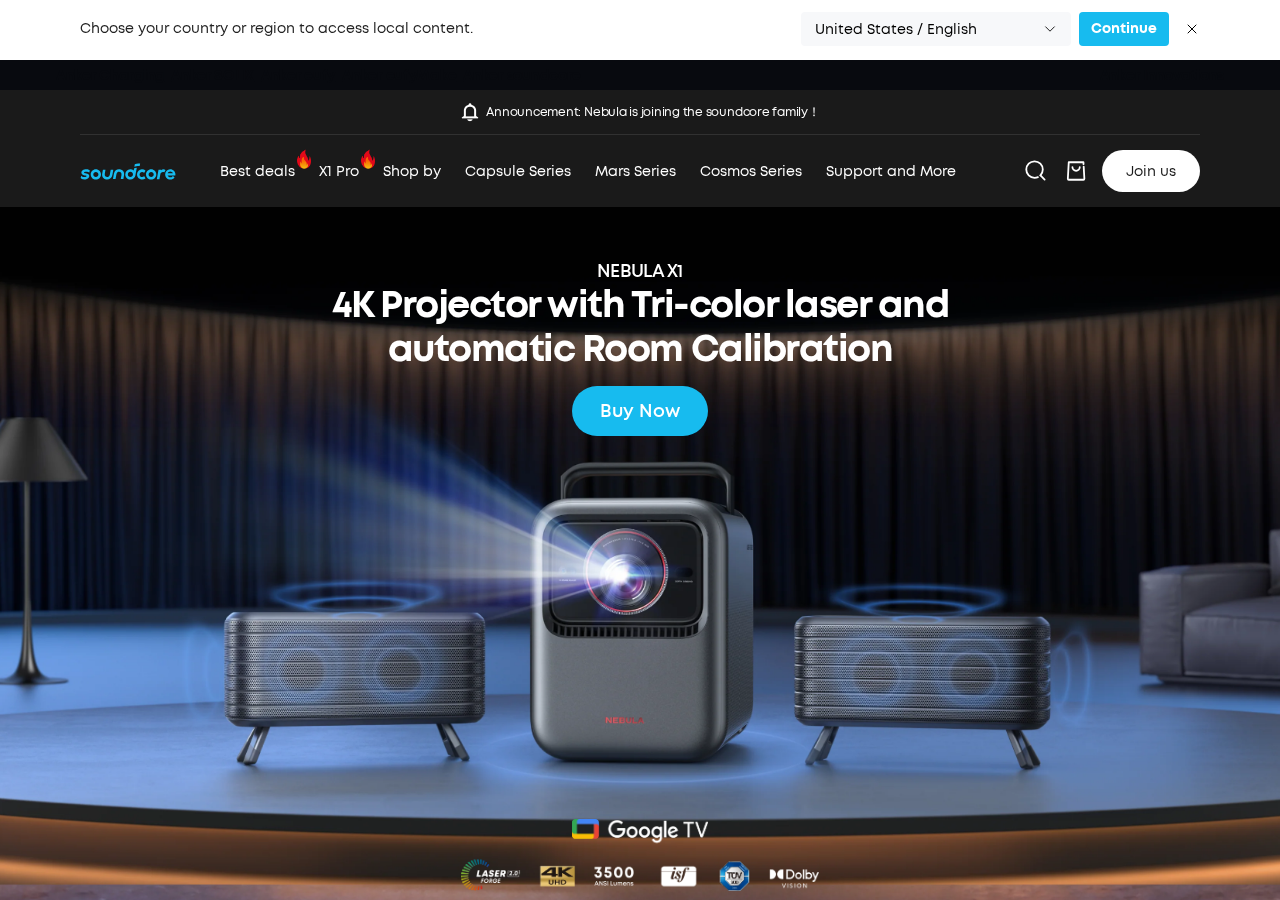
Promotional imagery associated with CineStation closely resembled the Nebula X1, a documented premium projector sold through an established brand.
Nebula’s official materials describe a 4K triple-laser system with 3,500 ANSI lumens and advanced optical features.
Official European pricing observed during our review was roughly €1,999 to €2,499, depending on the offer and package.
That comparison does not prove what every Rima buyer received. It shows why the $129 representation required extraordinary proof.
Similar appearance does not mean equivalent hardware
Projector housings can be imitated cheaply. The expensive components are inside: light source, imaging system, optics, cooling, processing, and calibration.
A low-cost device may accept a 4K signal while producing a much lower native image. Sellers often blur that distinction.
Brightness claims can also use incomparable units. Look for standardized ANSI or ISO measurements from a credible test.
Premium projectors have traceable support
Established models provide manuals, firmware, replacement accessories, safety documentation, warranty terms, and regional support pages.
Rima CineStation lacked a comparable public ecosystem. A glossy landing page cannot substitute for those ownership basics.
If a product has no downloadable manual before purchase, buyers cannot even confirm ports, voltage, mounting, or supported applications.
Cheap projectors are not automatically scams
Many inexpensive projectors are real and useful within modest expectations. They may work for dark rooms, casual viewing, or children’s content.
The problem is misrepresentation. A $60 projector should not be sold through images and specifications implying a $2,000 machine.
Judge the transaction by the exact model delivered and the claims made, not by whether some picture eventually appears on a wall.
Warning Signs in a Projector Offer
These signals recur across fake projector and TV-box campaigns. Several together justify leaving the checkout.
A premium projector is offered for less than an ordinary replacement lamp.
The native resolution is never stated clearly.
Brightness uses vague language or an unfamiliar measurement.
Product photographs appear on another manufacturer’s website.
The seller has no manual, firmware page, or authorized service network.
A countdown restarts whenever the page reloads.
The business sells unrelated miracle gadgets through identical pages.
The checkout makes one-unit ordering difficult.
Returns require prior approval from support that does not answer.
The domain disappears soon after the advertising campaign.
Do not be reassured by HTTPS alone. Encryption protects data in transit; it does not prove that the merchant will fulfill its promise.
Likewise, payment-card logos show accepted methods, not approval from those networks. Seller-made trust badges carry little independent weight.
What Buyer Complaints Reveal
The Trustpilot profile provides a snapshot of reported experiences, not a verified ledger of every order placed through the Rima storefront.
Still, the concentration matters. A 1.4 rating across 38 reviews is not the mixed pattern expected from ordinary preference differences.
Complaints repeatedly focused on the basic obligations of online commerce: shipping, tracking, communication, and receiving what was ordered.
Those issues are more concrete than disagreement about color quality. A parcel either enters a carrier network or it does not.
Review dates can also show whether complaints appeared during the same advertising period. That helps separate current warnings from old ownership problems.
We did not independently authenticate every reviewer or inspect their payment records. Their claims should be described as reports, not judicial findings.
However, a merchant can answer detailed reviews, publish shipping evidence, and maintain accessible support. The vanished storefront removes that reassurance.
Consumers should also watch for recovery impostors beneath complaint pages. They may promise refunds after collecting another fee or personal information.
Never send card details to someone who contacts you because of a public review. Work directly with the original payment provider.
If your experience differs, preserve evidence anyway. A working parcel for one buyer does not validate the specifications promoted to everyone.
A very cheap projector may arrive and still represent misrepresentation when the advertisement promised premium triple-laser performance.
Conversely, delayed shipping alone is not proof of fraud when a traceable merchant communicates and ultimately honors its policy.
Rima’s risk comes from the combination: implausible product economics, borrowed-looking imagery, severe complaints, and lost business continuity.
Each clue reinforces the others. The case does not depend on one anonymous comment or one unavailable page.
That combined record is strong enough to advise avoiding the offer, even without knowing the outcome of every individual order.
Company, Address, and Fulfillment Checks
The Rima brand does not identify a proven manufacturer
Search for a registered entity, directors, product documentation, and an operating history connected specifically to the projector.
A brand printed on a landing page can be created overnight. It should not be confused with a company that designed the pictured hardware.
The former website no longer provides normal support
Rimatech-us.co was unavailable during our check. That leaves buyers unable to confirm policies through the original sales channel.
Use saved receipts and card records rather than trusting replacement support addresses posted by strangers in comments.
Addresses may point only to parcel handling
A return warehouse can receive packages for many stores without manufacturing, testing, or controlling the products.
Map every address and verify the named company. Never ship an expensive return to an unconfirmed location provided through an informal message.
Fulfillment claims must match the advertised machine
When a parcel arrives, record the unboxing continuously. Photograph the shipping label, model number, ports, manual, and power information.
Compare those details with the advertisement immediately. Do not wait until the return or dispute window is nearly over.
Search the delivered model number before connecting it to Wi-Fi. Another manufacturer’s manual may reveal the device’s real resolution and ordinary retail value.
Weigh the parcel and preserve the carrier label. A documented weight can help demonstrate that a promised premium projector could not have been enclosed.
Do not let support substitute store credit for a required refund without understanding the consequences. Credit on a disappearing website has little practical value.
If a return is demanded, calculate tracked international postage first. A deliberately uneconomic return can make a generous guarantee functionally useless.
What to Do if You Have Fallen Victim to This Scam
Save the complete evidence set. Capture the advertisement, product page, checkout, confirmation, tracking, statement charge, and support conversation.
Check the carrier directly. Determine whether the parcel was accepted, delivered elsewhere, or never moved beyond label creation.
Contact the seller in writing. State exactly whether the issue is non-delivery, wrong quantity, counterfeit imagery, or materially different goods.
Request cancellation promptly. If fulfillment has not begun, demand written cancellation and preserve the response or silence.
Open a card dispute when justified. Provide dates, amounts, screenshots, tracking facts, and attempted resolution. Describe events accurately.
Do not pay a second fee. Ignore anyone claiming another payment will release the package, insurance, customs refund, or recovery service.
Document any delivered device. Keep packaging and film the unboxing. Compare the model and specifications with the original offer.
Use electrical products cautiously. Stop using equipment that overheats, smells, sparks, or lacks suitable certification and voltage information.
Run Malwarebytes after suspicious downloads. Scan devices if the seller required an unknown player, app, extension, or firmware installer.
Use AdGuard against repeat campaigns. It can block many malicious ad networks and redirects, but it cannot recover an existing payment.
Is Your Device Infected? Run a Free Malware Scan
Slow performance, constant pop-ups, or strange behavior? These are classic signs of a malware infection. The fastest way to find out is to scan your device with Malwarebytes Anti-Malware Free — one of the most trusted malware removal tools available.
The free version detects and removes the most common threats, including:
Adware — the cause of those annoying pop-ups
Browser hijackers — unwanted redirects and changed homepages
Trojans and spyware — hidden programs stealing your data
Potentially unwanted programs (PUPs) — software you never asked for
👉 Select your device below — Windows, Mac, or Android — then follow the simple steps to download Malwarebytes, scan your system, and remove any threats it finds. The whole process takes about 5 minutes.
Malwarebytes for WindowsMalwarebytes for MacMalwarebytes for Android
Run a Malware Scan with Malwarebytes for Windows
Malwarebytes is one of the most popular and trusted anti-malware tools for Windows — and it’s completely free for removing infections. It catches threats that many antivirus programs miss, including adware, browser hijackers, and trojans. Follow the steps below to scan and clean your PC in just a few minutes.
Download Malwarebytes
Click the button below to download the latest version of Malwarebytes for Windows from the official source. The free version is all you need — it will scan your computer and remove adware, browser hijackers, and other malicious software at no cost.
(The link opens in a new page where your download will start)
Install Malwarebytes
When the download finishes, open your Downloads folder and double-click the MBSetup file. If Windows shows a User Account Control pop-up, click “Yes” to allow the installation.
Follow the On-Screen Prompts to Install Malwarebytes
The setup wizard will walk you through a few quick screens:
Choose where you’re installing the program — “Personal Computer” or “Work Computer” — then click Next.
Malwarebytes will now install on your device. This usually takes under a minute.
When installation is complete, the “Welcome to Malwarebytes” screen will open automatically.
On the final screen, click Open Malwarebytes to launch the program.
Enable “Scan for Rootkits”
Before scanning, turn on rootkit detection so Malwarebytes can find even the most hidden threats. Click the Settings gear icon on the left side of the screen.
In the settings menu, find “Scan for rootkits” and click the toggle so it turns blue.
Done? Click “Dashboard” in the left pane to return to the main screen.
Start the Scan
Click the blue Scan button. Malwarebytes will automatically update its virus database and start checking your computer for malware.
Wait for the Scan to Finish
The scan checks your entire system for browser hijackers and other malicious programs, so it can take several minutes. Feel free to do something else — just check back occasionally to see the progress.
Quarantine the Detected Threats
When the scan is done, you’ll see a list of everything Malwarebytes found — malware, adware, and potentially unwanted programs. Click the “Quarantine” button to remove all of them at once.
Malwarebytes will now remove the malicious files and registry entries and move them safely into quarantine.
Restart Your Computer
Some threats can only be fully removed after a reboot. If Malwarebytes asks you to restart, click Yes. Once you’re logged back in, your PC is clean and you can continue with the next steps in this guide.
When the scan finishes, click Quarantine to remove everything Malwarebytes found. That’s it — your Windows PC is now clean of trojans, adware, and other malware, and should be back to running smoothly.
If your current antivirus allowed this malicious program on your computer, you may want to consider purchasing Malwarebytes Premium to protect against these types of threats in the future. If you are still having problems with your computer after completing these instructions, then please follow one of the steps:
Malwarebytes for Mac is a free on-demand scanner that removes the malware other security software tends to miss — adware, browser hijackers, and unwanted programs included. Cleaning an infected Mac with Malwarebytes has always been completely free, and it’s our go-to recommendation. Follow the steps below to scan and clean your Mac in just a few minutes.
Download Malwarebytes for Mac
Click the button below to download the latest version of Malwarebytes for Mac.
When the download finishes, open your Downloads folder and double-click the setup file to begin the installation.
Follow the On-Screen Prompts to Install Malwarebytes
The Malwarebytes for Mac Installer will guide you through a few quick screens. Click “Continue” and keep following the prompts until the installation completes.
When the installation is complete, Malwarebytes opens to the Welcome to Malwarebytes screen. Click “Get started“.
Select “Personal Computer” or “Work Computer”
Malwarebytes will ask what type of computer you’re installing it on. Click either Personal Computer or Work Computer, whichever applies.
Start the Scan
Click the “Scan” button. Malwarebytes will automatically update its detection database and begin checking your Mac for malware.
Wait for the Scan to Finish
Malwarebytes will scan your Mac for adware, browser hijackers, and other malicious programs. This can take a few minutes, so feel free to do something else — just check back occasionally to see the progress.
Quarantine the Detected Threats
When the scan is done, you’ll see a list of everything Malwarebytes found. Click the “Quarantine” button to remove all the threats at once.
Restart Your Mac
Malwarebytes will now remove all the malicious files it found. Some threats can only be fully removed after a reboot — if Malwarebytes asks you to restart, allow it. Once you’re logged back in, your Mac is clean.
Once the scan is done, remove every threat it detected. Your Mac is now free of adware, rogue browser extensions, and other potentially harmful software.
If your current antivirus allowed a malicious program on your computer, you might want to consider purchasing the full-featured version of Malwarebytes Anti-Malware to protect against these types of threats in the future. If you are still experiencing problems while trying to remove a malicious program from your computer, please ask for help in our Mac Malware Removal Help & Support forum.
Run a Malware Scan with Malwarebytes for Android
Malwarebytes for Android automatically detects and removes dangerous threats like malware and ransomware so you don’t have to worry about your most-used device being compromised. Aggressive detection of adware and potentially unwanted programs keeps your Android phone or tablet running smooth.
Download Malwarebytes for Android.
You can download Malwarebytes for Android by clicking the link below.
In the Google Play Store, tap “Install” to install Malwarebytes for Android on your device.
When the installation process has finished, tap “Open” to begin using Malwarebytes for Android. You can also open Malwarebytes by tapping on its icon in your phone menu or home screen.
Follow the on-screen prompts to complete the setup process
When Malwarebytes will open, you will see the Malwarebytes Setup Wizard which will guide you through a series of permissions and other setup options. This is the first of two screens that explain the difference between the Premium and Free versions. Swipe this screen to continue. Tap on “Got it” to proceed to the next step. Malwarebytes for Android will now ask for a set of permissions that are required to scan your device and protect it from malware. Tap on “Give permission” to continue. Tap on “Allow” to permit Malwarebytes to access the files on your phone.
Update database and run a scan with Malwarebytes for Android
You will now be prompted to update the Malwarebytes database and run a full system scan.
Click on “Update database” to update the Malwarebytes for Android definitions to the latest version, then click on “Run full scan” to perform a system scan.
Wait for the Malwarebytes scan to complete.
Malwarebytes will now start scanning your phone for adware and other malicious apps. This process can take a few minutes, so we suggest you do something else and periodically check on the status of the scan to see when it is finished.
Click on “Remove Selected”.
When the scan has been completed, you will be presented with a screen showing the malware infections that Malwarebytes for Android has detected. To remove the malicious apps that Malwarebytes has found, tap on the “Remove Selected” button.
Restart your phone.
Malwarebytes for Android will now remove all the malicious apps that it has found. To complete the malware removal process, Malwarebytes may ask you to restart your device.
After the scan, tap Remove Selected to delete all detected threats. Your Android phone is now clean — no more malicious apps, adware, or browser redirects.
If your current antivirus allowed a malicious app on your phone, you may want to consider purchasing the full-featured version of Malwarebytes to protect against these types of threats in the future. If you are still having problems with your phone after completing these instructions, then please follow one of the steps:
Restore your phone to factory settings by going to Settings > General management > Reset > Factory data reset.
Now that your device is clean, keep it that way. Most infections start with a malicious ad or a fake download button — so blocking them at the source is your best defense.
We recommend AdGuard, which blocks malicious ads, phishing pages, and dangerous redirects before they can reach you.
We found no reliable evidence supporting the premium specifications and $129 value presented. The offer carries multiple strong scam indicators.
Why is the $129 price suspicious?
Documented triple-laser 4K projectors cost many times more. The price conflicts with the hardware and support needed for those specifications.
Did Rima use another projector’s pictures?
Promotional material closely resembled the Nebula X1. Buyers should compare images and specifications directly before assuming Rima made the pictured device.
Is rimatech-us.co still working?
The storefront was unavailable during our latest check. Domains can return, so its current status should always be verified independently.
What might arrive after ordering?
Customer outcomes cannot be predicted. Complaints alleged non-delivery or problems, while deceptive gadget schemes sometimes send a cheaper substitute.
Can I recover my money?
Recovery depends on payment method, evidence, timing, and local rules. Contact the seller and payment provider immediately rather than waiting for repeated excuses.
The Bottom Line
Rima CineStation combined premium-projector imagery, implausible pricing, a disappearing storefront, and serious customer complaints. The evidence supports treating the offer as unsafe.
Ignore the rotating name. Any $129 “triple-laser 4K cinema” deserves verification through model records, independent testing, seller identity, and realistic fulfillment before payment.
10 Rules to Avoid Online Scams
Here are 10 practical safety rules to help you avoid malware, online shopping scams, crypto scams, and other online fraud. Each tip includes a quick “if you already got hit” action.
Stop and verify before you click, log in, download, or pay.
Most scams win by creating urgency. Verify using a trusted method: type the website address yourself, use the official app, or call a known number (not the one in the message).
If you already clicked: close the page, do not enter passwords, and run a malware scan.
Keep your operating system, browser, and apps updated.
Updates patch security holes used by malware and malicious ads. Turn on automatic updates where possible.
If you saw a scary “update now” pop-up: close it and update only through your device settings or the official app store.
Use layered protection: antivirus plus an ad blocker.
Antivirus helps block malware. An ad blocker reduces scam redirects, phishing pages, and malvertising.
If your browser is acting weird: remove unknown extensions, reset the browser, then run a full scan.
Install apps, software, and extensions only from official sources.
Avoid cracked software, “keygens,” and random downloads. During installs, choose Custom/Advanced and decline bundled offers you do not recognize.
If you already installed something suspicious: uninstall it, restart, and scan again.
Treat links and attachments as untrusted by default.
Phishing often impersonates delivery services, banks, and popular brands. If it is unexpected, do not open attachments or log in through the message.
If you entered credentials: change the password immediately and enable 2FA.
Shop safely: research the store, then pay with protection.
Be cautious with brand-new stores, “closing sale” stories, and prices that make no sense. Prefer credit cards or PayPal for dispute options. Avoid wire transfers, gift cards, and crypto payments.
If you already paid: contact your card issuer or PayPal quickly to dispute the transaction.
Crypto rule: never pay a “fee” to withdraw or recover money.
Common patterns include fake profits, then “tax,” “gas,” or “verification” fees. Another is a “recovery agent” who demands upfront crypto.
If you already sent crypto: stop paying, save evidence (wallet addresses, TXIDs, chats), and report the scam to the platform used.
Secure your accounts with unique passwords and 2FA (start with email).
Use a password manager and unique passwords for every account. Enable 2FA using an authenticator app when possible.
If you suspect an account takeover: change passwords, sign out of all devices, and review recent logins and recovery settings.
Back up important files and keep one backup offline.
Backups protect you from ransomware and device failure. Keep at least one backup on an external drive that is not always connected.
If you suspect infection: do not connect backup drives until the system is clean.
If you think you are a victim: stop losses, document evidence, and escalate fast.
Move quickly. Speed matters for disputes, account recovery, and limiting damage.
Stop payments and contact: do not send more money or respond to the scammer.
Call your bank or card issuer: block transactions, replace the card if needed, and start a dispute or chargeback.
Secure your email first: change the email password, enable 2FA, and remove unfamiliar recovery options.
Secure other accounts: change passwords, enable 2FA, and log out of all sessions.
Scan your device: remove suspicious apps or extensions, then run a full malware scan.
Save evidence: screenshots, emails, order pages, tracking pages, wallet addresses, TXIDs, and chat logs.
Report it: to the payment provider, marketplace, social platform, exchange, or wallet service involved.
These rules are intentionally simple. Most online losses happen when decisions are rushed. Slow down, verify independently, and use payment methods and account controls that give you recourse.
Hello! I'm Lapain Epuran, your go-to source for detailed and honest product reviews. From tech gadgets to miracle cures, I provide insights to help you make informed choices. Join me as we discover what's truly worth your time and money.