IMF Global Beneficiary Sweepstakes Scam: Fake $3 Million Prize Exposed
Written by: Lapain Epuran
Published on:
An email announcing a life-changing international award can stir hope before common sense catches up. The official tone and enormous figure make the message difficult to ignore.
Prize notices deserve patient verification, especially when nobody remembers entering. The details below show which questions reveal what the celebration is hiding.
Overview
An Unsolicited $3,000,000.00 Award
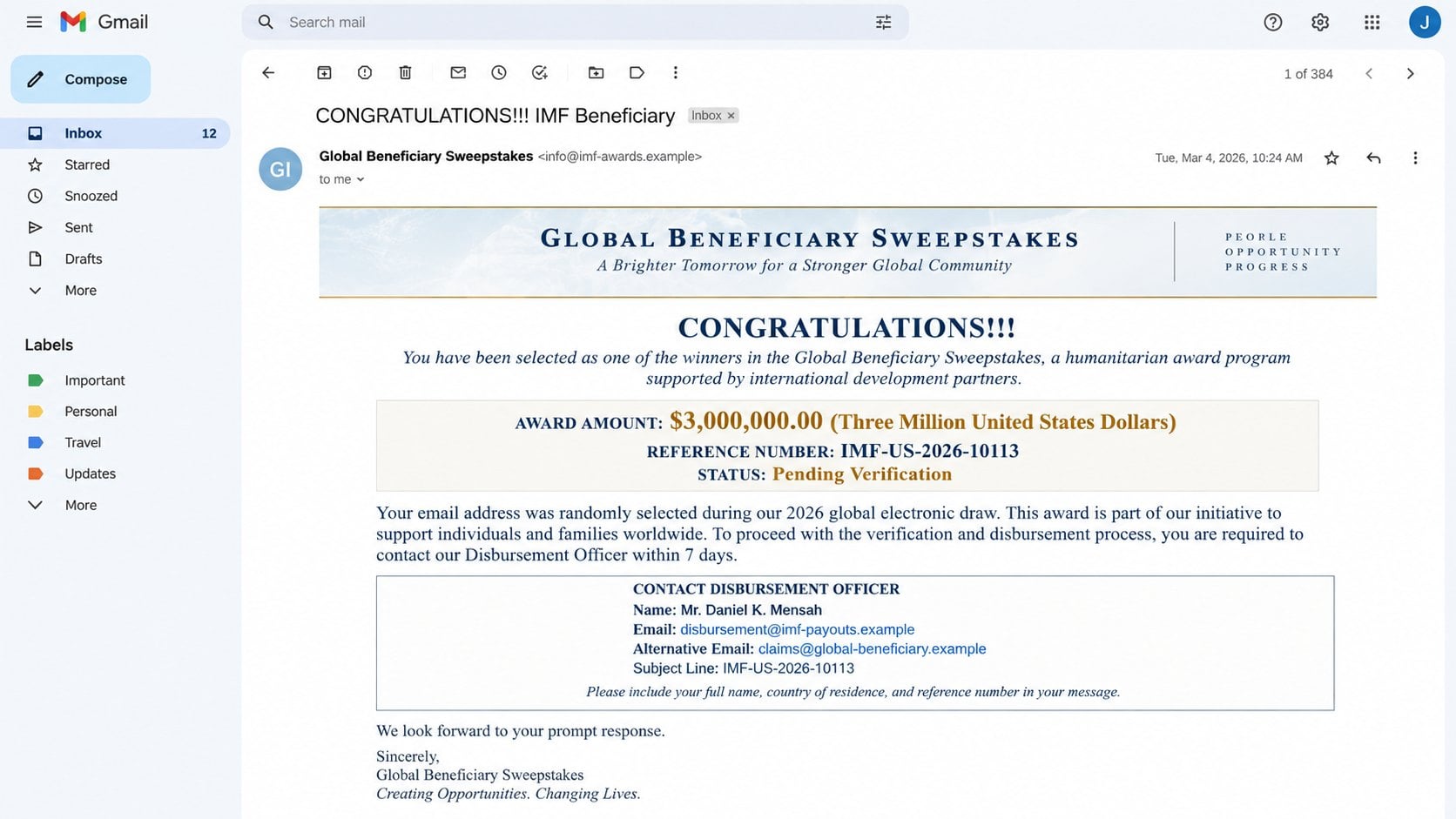
The IMF Global Beneficiary Sweepstakes scam tells recipients they were selected for a $3,000,000.00 international prize, despite never entering a drawing.
Its subject reads “CONGRATULATIONS!!!. IMF Beneficiary.” The notice presents reference IMF-US-2026-10113 and describes the award as pending verification.
The recipient is labeled an “International Award Recipient,” a grand title that sounds official while explaining nothing about eligibility or selection.
The International Monetary Fund does not run this supposed sweepstakes and is not involved. Its name is being misused to manufacture credibility.
A Personal Contact Replaces an Official Claims Process
The message instructs the recipient to contact a supposed Disbursement Officer or Claims Manager. The named representative is “Melvin Morrison.”
Instead of an institutional claims portal, the campaign uses a personal webmail address. That choice breaks the official story immediately.
The recipient entered no contest or beneficiary program.
The award arrives without verifiable rules or drawing records.
A public institution’s name is paired with free email service.
The winner must initiate private contact to unlock the process.
Identity documents and personal details are likely requested next.
Fees appear only after the victim becomes emotionally invested.
Replying signals that the address is active and the recipient is curious. That begins a longer, personalized advance-fee operation.
The Prize Is Bait for Payments and Personal Data
No legitimate $3,000,000.00 fund waits behind the correspondence. The apparent fortune exists only to make smaller requests feel reasonable.
Operators may demand identification, bank information, addresses, telephone numbers, or signatures. Those records can support identity theft and additional targeting.
They then invent clearance charges, taxes, legal certificates, courier costs, insurance, or transfer expenses. Every payment produces another obstacle.
This is an advance-fee scam. The victim pays real money while the promised award remains permanently one invented requirement away.
How the IMF Global Beneficiary Sweepstakes Scam Works
Step 1: A Mass Email Declares the Recipient a Winner
The first message is often distributed widely. It does not need accurate knowledge about the recipient because the prize story is deliberately universal.
Words such as “global,” “beneficiary,” and “international” create scale and authority. They also make the selection process difficult to question precisely.
A reference number resembles case management. In reality, a typed identifier is effortless to invent and proves neither registration nor award ownership.
The enormous amount transforms the reader’s attention. Even a skeptical person may wonder whether replying once could confirm an extraordinary opportunity.
Step 2: Institutional Language Creates Borrowed Trust
The email invokes the IMF because its name is associated with governments, financial stability, and international programs. That reputation is valuable camouflage.
Scammers may add formal titles, seals, slogans, or bureaucratic formatting. None establishes that the message originated from the real institution.
The mismatch between official claims and ordinary email infrastructure is crucial. A claims manager using personal webmail cannot validate a multinational award.
Recipients should judge the channel, not the tone. Impressive language is easier to copy than secure institutional procedures.
Step 3: The Reply Opens a One-to-One Conversation
Once someone responds, the operator shifts from a mass lure to personal persuasion. Questions and instructions can now adapt to that individual.
The fake officer may congratulate the winner warmly and explain that confidentiality protects the claim. Secrecy isolates the victim from skeptical relatives.
Deadlines may be introduced, supposedly because unclaimed funds will expire. The pressure discourages independent research and thoughtful consultation.
The fraudster may also call or move the conversation to a messaging application. Multiple channels make the fictional case feel more active.
Step 4: Verification Becomes Identity Collection
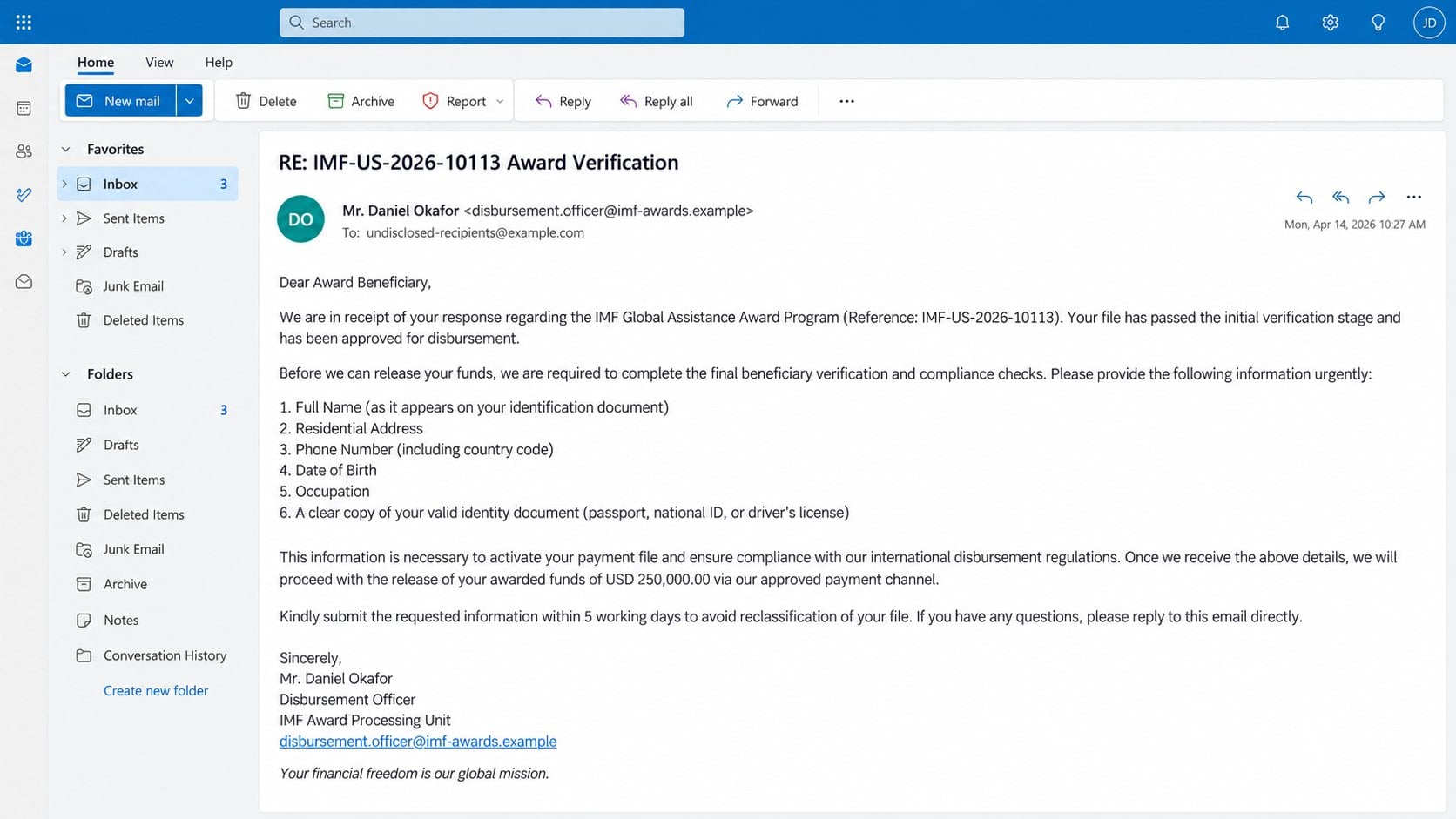
The next stage commonly requests a full name, residential address, telephone number, date of birth, occupation, and copy of identification.
Each request is framed as standard beneficiary verification. Yet the recipient has never been shown legitimate contest rules, entry records, or an authenticated award.
Document copies can support account opening, impersonation, recovery scams, or more convincing fraud. They remain dangerous even if no fee is paid.
Bank details may be requested under the pretext of arranging a transfer. Sharing them can expose additional financial and identity information.
Step 5: A Mandatory Fee Appears Before Release
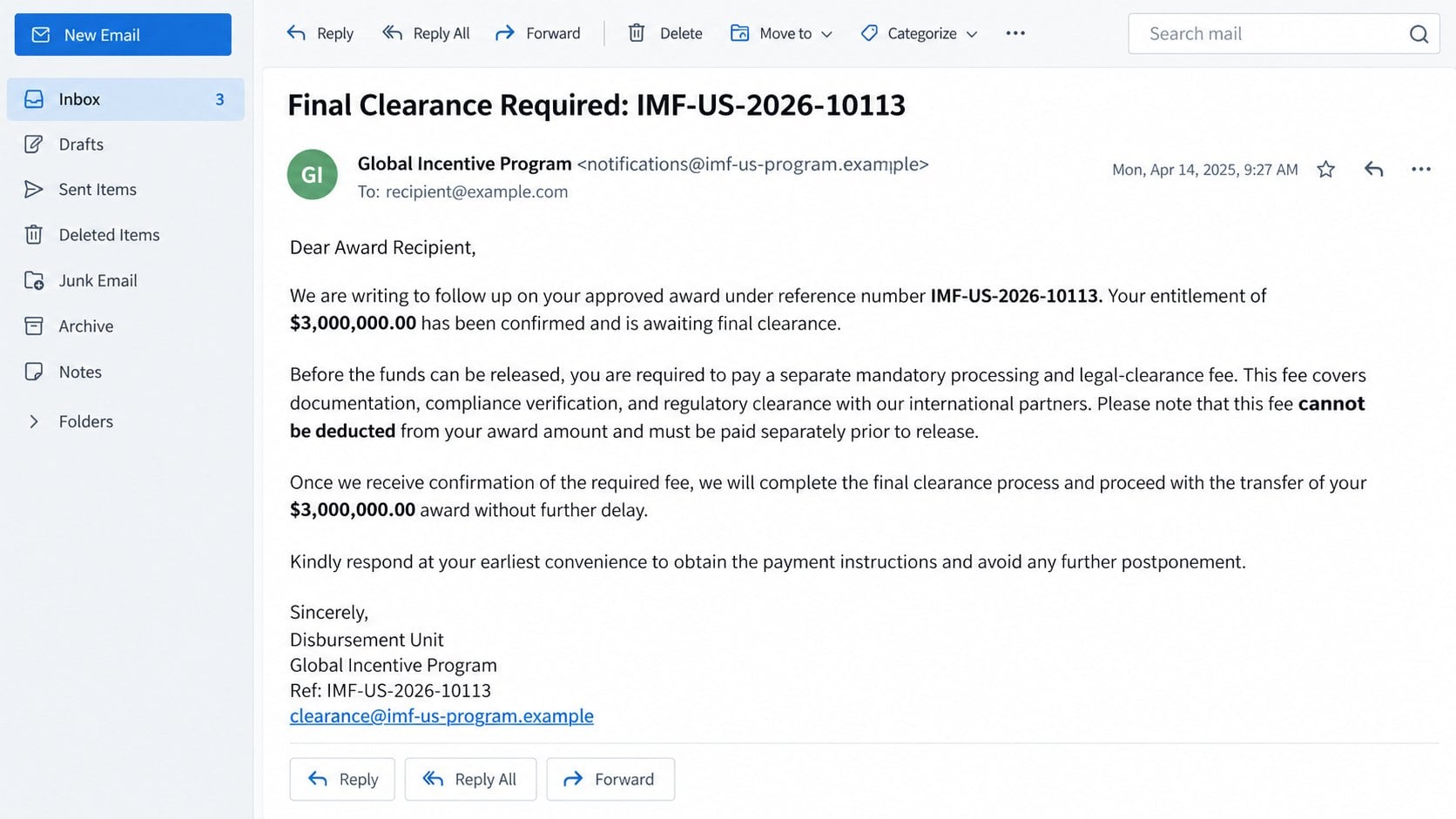
After the victim supplies information, the case is declared approved. A final charge suddenly blocks the promised transfer.
The fee may be described as processing, anti-money-laundering certification, tax clearance, legal documentation, insurance, or secure delivery.
The operator insists that it cannot be deducted from the award. That illogical rule forces the victim to send money separately.
Payment methods often reduce recovery options, including wire transfer, cryptocurrency, gift cards, or transfers to individuals and unfamiliar companies.
Step 6: Each Payment Produces Another Requirement
Paying never releases the fictional prize. Instead, a new official-looking problem appears: an expired certificate, currency charge, customs hold, or compliance review.
Sunk costs make stopping emotionally difficult. Victims may send more because abandoning the claim would mean accepting that earlier payments are gone.
When payments finally stop, another criminal may offer recovery assistance for an upfront fee. That second approach often uses information from the first operation.
The chain ends only when the victim disengages. There is no hidden stage at which the $3,000,000.00 becomes real.
How to Verify an Unexpected International Award
Start With the Missing Entry
A genuine sweepstakes needs rules, eligibility criteria, entry records, drawing dates, and an identifiable organizer. Ask when and how you entered.
Being “randomly selected by email” is not a satisfactory explanation for a $3,000,000.00 award. A reference number cannot replace an entry trail.
Search your own records before engaging. If no entry, nomination, grant application, or official program exists, the foundation of the claim is missing.
Compare the Contact Method With the Claimed Institution
Visit the institution’s genuine website independently and examine its public programs. Do not use addresses, numbers, or links supplied by the prize email.
An official organization communicates through controlled domains and documented procedures. Personal Gmail or similar accounts contradict the supposed authority.
Call a verified public number if uncertainty remains. Ask whether the named award, reference format, and alleged officer exist.
Demand Transparent Rules Without Sending Documents
Do not provide identification merely to learn what the program is. The organizer should already publish rules and privacy information.
Ask for the legally registered sponsor, jurisdiction, drawing record, entry source, and formal terms. Vague answers reveal that the process cannot withstand scrutiny.
Legitimate verification should not require secrecy. Show the correspondence to a trusted person, lawyer, bank adviser, or consumer-protection office.
Reject Every Pay-to-Receive Explanation
A prize that requires advance payment is not a prize. Taxes, when genuinely owed, are handled through lawful tax procedures rather than secret transfers.
Claims that fees cannot be deducted from the promised $3,000,000.00 are designed to sound procedural. They exist solely to extract separate funds.
Never send cryptocurrency, gift cards, cash, or wire transfers to release unexpected winnings. Those methods are chosen because recovery can be difficult.
What to Do If You Fell Victim to the IMF Sweepstakes Scam
Do not feel embarrassed. These operations are built around patient persuasion and official-looking correspondence. Focus on stopping further loss and protecting exposed information.
End all communication with the operators.
Stop replying, calling, or negotiating. Block their addresses and numbers, but preserve the full conversation before deleting anything.
Do not send a final explanation. Additional engagement provides more opportunities for threats, sympathy, or new payment excuses.
Contact the payment provider immediately.
Tell your bank, card issuer, transfer service, or cryptocurrency platform that the transaction funded an advance-fee fraud. Request recall or dispute options.
Speed matters, although recovery is not guaranteed. Give the provider dates, recipients, amounts, receipts, and reference numbers.
Protect any identity records you shared.
If you sent identification, contact the issuing authority for guidance. Consider fraud alerts, credit monitoring, or a credit freeze where available.
Change answers to security questions that used exposed details. Watch for accounts, loans, or mobile services you did not request.
Secure email and financial accounts.
Replace passwords if you shared them or reused related credentials. Review sessions, recovery settings, beneficiaries, and recent account activity.
Enable strong multifactor authentication. Tell your bank if criminals know account numbers, balances, signatures, or correspondence patterns.
Preserve evidence and report the fraud.
Save emails, headers, attachments, chat logs, telephone numbers, payment instructions, wallet addresses, and document copies. Keep them in chronological order.
Report the scheme to local police or the national fraud authority. Also notify any real institution whose name was impersonated.
Check devices used for downloaded forms.
If you opened an attachment or installed anything, disconnect suspicious software and run a thorough Malwarebytes scan. Remove detected threats before changing sensitive credentials.
AdGuard can help filter known malicious pages and deceptive advertising. It will not recover money or verify a prize, so continue account monitoring.
Expect recovery scammers to make contact.
Criminals may promise investigators, lawyers, or agents who can retrieve the loss for another fee. Treat unsolicited recovery offers as hostile.
Use only professionals you locate and verify independently. Nobody can guarantee the return of transferred funds for an advance payment.
Is Your Device Infected? Run a Free Malware Scan
Slow performance, constant pop-ups, or strange behavior? These are classic signs of a malware infection. The fastest way to find out is to scan your device with Malwarebytes Anti-Malware Free — one of the most trusted malware removal tools available.
The free version detects and removes the most common threats, including:
Adware — the cause of those annoying pop-ups
Browser hijackers — unwanted redirects and changed homepages
Trojans and spyware — hidden programs stealing your data
Potentially unwanted programs (PUPs) — software you never asked for
👉 Select your device below — Windows, Mac, or Android — then follow the simple steps to download Malwarebytes, scan your system, and remove any threats it finds. The whole process takes about 5 minutes.
Malwarebytes for WindowsMalwarebytes for MacMalwarebytes for Android
Run a Malware Scan with Malwarebytes for Windows
Malwarebytes is one of the most popular and trusted anti-malware tools for Windows — and it’s completely free for removing infections. It catches threats that many antivirus programs miss, including adware, browser hijackers, and trojans. Follow the steps below to scan and clean your PC in just a few minutes.
Download Malwarebytes
Click the button below to download the latest version of Malwarebytes for Windows from the official source. The free version is all you need — it will scan your computer and remove adware, browser hijackers, and other malicious software at no cost.
(The link opens in a new page where your download will start)
Install Malwarebytes
When the download finishes, open your Downloads folder and double-click the MBSetup file. If Windows shows a User Account Control pop-up, click “Yes” to allow the installation.
Follow the On-Screen Prompts to Install Malwarebytes
The setup wizard will walk you through a few quick screens:
Choose where you’re installing the program — “Personal Computer” or “Work Computer” — then click Next.
Malwarebytes will now install on your device. This usually takes under a minute.
When installation is complete, the “Welcome to Malwarebytes” screen will open automatically.
On the final screen, click Open Malwarebytes to launch the program.
Enable “Scan for Rootkits”
Before scanning, turn on rootkit detection so Malwarebytes can find even the most hidden threats. Click the Settings gear icon on the left side of the screen.
In the settings menu, find “Scan for rootkits” and click the toggle so it turns blue.
Done? Click “Dashboard” in the left pane to return to the main screen.
Start the Scan
Click the blue Scan button. Malwarebytes will automatically update its virus database and start checking your computer for malware.
Wait for the Scan to Finish
The scan checks your entire system for browser hijackers and other malicious programs, so it can take several minutes. Feel free to do something else — just check back occasionally to see the progress.
Quarantine the Detected Threats
When the scan is done, you’ll see a list of everything Malwarebytes found — malware, adware, and potentially unwanted programs. Click the “Quarantine” button to remove all of them at once.
Malwarebytes will now remove the malicious files and registry entries and move them safely into quarantine.
Restart Your Computer
Some threats can only be fully removed after a reboot. If Malwarebytes asks you to restart, click Yes. Once you’re logged back in, your PC is clean and you can continue with the next steps in this guide.
When the scan finishes, click Quarantine to remove everything Malwarebytes found. That’s it — your Windows PC is now clean of trojans, adware, and other malware, and should be back to running smoothly.
If your current antivirus allowed this malicious program on your computer, you may want to consider purchasing Malwarebytes Premium to protect against these types of threats in the future. If you are still having problems with your computer after completing these instructions, then please follow one of the steps:
Malwarebytes for Mac is a free on-demand scanner that removes the malware other security software tends to miss — adware, browser hijackers, and unwanted programs included. Cleaning an infected Mac with Malwarebytes has always been completely free, and it’s our go-to recommendation. Follow the steps below to scan and clean your Mac in just a few minutes.
Download Malwarebytes for Mac
Click the button below to download the latest version of Malwarebytes for Mac.
When the download finishes, open your Downloads folder and double-click the setup file to begin the installation.
Follow the On-Screen Prompts to Install Malwarebytes
The Malwarebytes for Mac Installer will guide you through a few quick screens. Click “Continue” and keep following the prompts until the installation completes.
When the installation is complete, Malwarebytes opens to the Welcome to Malwarebytes screen. Click “Get started“.
Select “Personal Computer” or “Work Computer”
Malwarebytes will ask what type of computer you’re installing it on. Click either Personal Computer or Work Computer, whichever applies.
Start the Scan
Click the “Scan” button. Malwarebytes will automatically update its detection database and begin checking your Mac for malware.
Wait for the Scan to Finish
Malwarebytes will scan your Mac for adware, browser hijackers, and other malicious programs. This can take a few minutes, so feel free to do something else — just check back occasionally to see the progress.
Quarantine the Detected Threats
When the scan is done, you’ll see a list of everything Malwarebytes found. Click the “Quarantine” button to remove all the threats at once.
Restart Your Mac
Malwarebytes will now remove all the malicious files it found. Some threats can only be fully removed after a reboot — if Malwarebytes asks you to restart, allow it. Once you’re logged back in, your Mac is clean.
Once the scan is done, remove every threat it detected. Your Mac is now free of adware, rogue browser extensions, and other potentially harmful software.
If your current antivirus allowed a malicious program on your computer, you might want to consider purchasing the full-featured version of Malwarebytes Anti-Malware to protect against these types of threats in the future. If you are still experiencing problems while trying to remove a malicious program from your computer, please ask for help in our Mac Malware Removal Help & Support forum.
Run a Malware Scan with Malwarebytes for Android
Malwarebytes for Android automatically detects and removes dangerous threats like malware and ransomware so you don’t have to worry about your most-used device being compromised. Aggressive detection of adware and potentially unwanted programs keeps your Android phone or tablet running smooth.
Download Malwarebytes for Android.
You can download Malwarebytes for Android by clicking the link below.
In the Google Play Store, tap “Install” to install Malwarebytes for Android on your device.
When the installation process has finished, tap “Open” to begin using Malwarebytes for Android. You can also open Malwarebytes by tapping on its icon in your phone menu or home screen.
Follow the on-screen prompts to complete the setup process
When Malwarebytes will open, you will see the Malwarebytes Setup Wizard which will guide you through a series of permissions and other setup options. This is the first of two screens that explain the difference between the Premium and Free versions. Swipe this screen to continue. Tap on “Got it” to proceed to the next step. Malwarebytes for Android will now ask for a set of permissions that are required to scan your device and protect it from malware. Tap on “Give permission” to continue. Tap on “Allow” to permit Malwarebytes to access the files on your phone.
Update database and run a scan with Malwarebytes for Android
You will now be prompted to update the Malwarebytes database and run a full system scan.
Click on “Update database” to update the Malwarebytes for Android definitions to the latest version, then click on “Run full scan” to perform a system scan.
Wait for the Malwarebytes scan to complete.
Malwarebytes will now start scanning your phone for adware and other malicious apps. This process can take a few minutes, so we suggest you do something else and periodically check on the status of the scan to see when it is finished.
Click on “Remove Selected”.
When the scan has been completed, you will be presented with a screen showing the malware infections that Malwarebytes for Android has detected. To remove the malicious apps that Malwarebytes has found, tap on the “Remove Selected” button.
Restart your phone.
Malwarebytes for Android will now remove all the malicious apps that it has found. To complete the malware removal process, Malwarebytes may ask you to restart your device.
After the scan, tap Remove Selected to delete all detected threats. Your Android phone is now clean — no more malicious apps, adware, or browser redirects.
If your current antivirus allowed a malicious app on your phone, you may want to consider purchasing the full-featured version of Malwarebytes to protect against these types of threats in the future. If you are still having problems with your phone after completing these instructions, then please follow one of the steps:
Restore your phone to factory settings by going to Settings > General management > Reset > Factory data reset.
Now that your device is clean, keep it that way. Most infections start with a malicious ad or a fake download button — so blocking them at the source is your best defense.
We recommend AdGuard, which blocks malicious ads, phishing pages, and dangerous redirects before they can reach you.
Advance-fee fraud is not a single ridiculous request. It is a sequence that gradually changes what the victim believes is reasonable.
The first reply costs nothing, so curiosity feels harmless. Providing a name then makes the fictional claim seem more personal and concrete.
After documents are submitted, the operator celebrates progress. The victim begins imagining debts paid, family helped, and a future transformed.
The first fee appears tiny beside $3,000,000.00. That comparison is artificial, yet it makes a costly transfer resemble a sensible administrative expense.
When another charge arrives, earlier losses create pressure to continue. Walking away feels like forfeiting both the prize and money already sent.
Scammers alternate authority, reassurance, and urgency. They may become sympathetic after a refusal, then threatening as a deadline approaches.
Isolation strengthens the effect. Confidentiality claims keep the story away from relatives or advisers who might challenge its contradictions.
The solution is not sharper intuition alone. External verification and a firm refusal to prepay remove the operator’s emotional leverage.
Common Fee Stories Used After the First Reply
A “processing fee” suggests ordinary administration. In truth, a real organization can explain costs publicly and does not demand secret payment from random winners.
A “tax certificate” borrows the language of government. Taxes are not settled by wiring money to a private claims manager.
An “anti-terrorism” or “anti-money-laundering” clearance sounds intimidating. Compliance checks do not create a prize that the recipient never entered.
A courier or diplomatic delivery charge adds physical detail. The promised package remains fictional, regardless of tracking forms or photographs.
Insurance fees imply protection for the transfer. Genuine insurers do not appear suddenly through an unverified email chain.
Currency conversion charges may be justified as cross-border necessity. Reputable financial institutions disclose exchange costs through authenticated channels.
Late penalties are used when a victim hesitates. A supposed award should not grow more expensive because someone seeks independent advice.
Finally, recovery charges target people who already recognized the fraud. The new operator may secretly belong to the same network.
Every version shares one principle: real money must leave before imaginary money arrives. Recognizing that pattern ends the debate.
Forged certificates do not improve the claim. A seal, signature, or official-looking letter remains meaningless when its issuing organization cannot verify it.
Telephone conversations add performance, not proof. Callers can rehearse titles, departments, and procedures while operating far outside the institution they impersonate.
Never let a deadline prevent consultation. A genuine entitlement survives reasonable questions, while fraud depends on keeping scrutiny brief and private.
Frequently Asked Questions
Does the IMF run a Global Beneficiary Sweepstakes?
No. The named institution is being impersonated. The unexpected $3,000,000.00 award and private claims contact are part of the fraud.
Is reference IMF-US-2026-10113 proof of a claim?
No. Anyone can type a reference into an email. A valid case must connect to an authentic program and independently confirmed records.
Why did the message call me a beneficiary?
The term sounds formal and financially important. It lets the sender avoid explaining any real contest entry or legal entitlement.
Can a legitimate prize require taxes first?
Unexpected winners should never transfer private fees to release funds. Genuine tax obligations follow official law and verified government procedures.
What if I only sent a copy of my ID?
Treat the document as exposed. Contact its issuer, monitor credit and accounts, preserve evidence, and follow identity-theft guidance in your jurisdiction.
Can someone recover money for an upfront fee?
Be extremely cautious. Guaranteed recovery promises and advance charges commonly form a second scam aimed at previous victims.
The Bottom Line
The IMF Global Beneficiary Sweepstakes email invents a $3,000,000.00 award to obtain personal records and repeated advance payments. No prize awaits behind the fees.
Do not reply, send documents, or pay. Verify institutional claims independently and involve your bank quickly if money has already moved.
10 Rules to Avoid Online Scams
Here are 10 practical safety rules to help you avoid malware, online shopping scams, crypto scams, and other online fraud. Each tip includes a quick “if you already got hit” action.
Stop and verify before you click, log in, download, or pay.
Most scams win by creating urgency. Verify using a trusted method: type the website address yourself, use the official app, or call a known number (not the one in the message).
If you already clicked: close the page, do not enter passwords, and run a malware scan.
Keep your operating system, browser, and apps updated.
Updates patch security holes used by malware and malicious ads. Turn on automatic updates where possible.
If you saw a scary “update now” pop-up: close it and update only through your device settings or the official app store.
Use layered protection: antivirus plus an ad blocker.
Antivirus helps block malware. An ad blocker reduces scam redirects, phishing pages, and malvertising.
If your browser is acting weird: remove unknown extensions, reset the browser, then run a full scan.
Install apps, software, and extensions only from official sources.
Avoid cracked software, “keygens,” and random downloads. During installs, choose Custom/Advanced and decline bundled offers you do not recognize.
If you already installed something suspicious: uninstall it, restart, and scan again.
Treat links and attachments as untrusted by default.
Phishing often impersonates delivery services, banks, and popular brands. If it is unexpected, do not open attachments or log in through the message.
If you entered credentials: change the password immediately and enable 2FA.
Shop safely: research the store, then pay with protection.
Be cautious with brand-new stores, “closing sale” stories, and prices that make no sense. Prefer credit cards or PayPal for dispute options. Avoid wire transfers, gift cards, and crypto payments.
If you already paid: contact your card issuer or PayPal quickly to dispute the transaction.
Crypto rule: never pay a “fee” to withdraw or recover money.
Common patterns include fake profits, then “tax,” “gas,” or “verification” fees. Another is a “recovery agent” who demands upfront crypto.
If you already sent crypto: stop paying, save evidence (wallet addresses, TXIDs, chats), and report the scam to the platform used.
Secure your accounts with unique passwords and 2FA (start with email).
Use a password manager and unique passwords for every account. Enable 2FA using an authenticator app when possible.
If you suspect an account takeover: change passwords, sign out of all devices, and review recent logins and recovery settings.
Back up important files and keep one backup offline.
Backups protect you from ransomware and device failure. Keep at least one backup on an external drive that is not always connected.
If you suspect infection: do not connect backup drives until the system is clean.
If you think you are a victim: stop losses, document evidence, and escalate fast.
Move quickly. Speed matters for disputes, account recovery, and limiting damage.
Stop payments and contact: do not send more money or respond to the scammer.
Call your bank or card issuer: block transactions, replace the card if needed, and start a dispute or chargeback.
Secure your email first: change the email password, enable 2FA, and remove unfamiliar recovery options.
Secure other accounts: change passwords, enable 2FA, and log out of all sessions.
Scan your device: remove suspicious apps or extensions, then run a full malware scan.
Save evidence: screenshots, emails, order pages, tracking pages, wallet addresses, TXIDs, and chat logs.
Report it: to the payment provider, marketplace, social platform, exchange, or wallet service involved.
These rules are intentionally simple. Most online losses happen when decisions are rushed. Slow down, verify independently, and use payment methods and account controls that give you recourse.
Hello! I'm Lapain Epuran, your go-to source for detailed and honest product reviews. From tech gadgets to miracle cures, I provide insights to help you make informed choices. Join me as we discover what's truly worth your time and money.