

Rima HoloDesk appears to solve a familiar problem: turn one laptop into a three-screen workstation without carrying a desk full of equipment.
The $64 offer looks irresistible. The evidence behind that price, seller, imagery, and delivery promise tells a different story.
Overview
HoloDesk was marketed far below realistic pricing
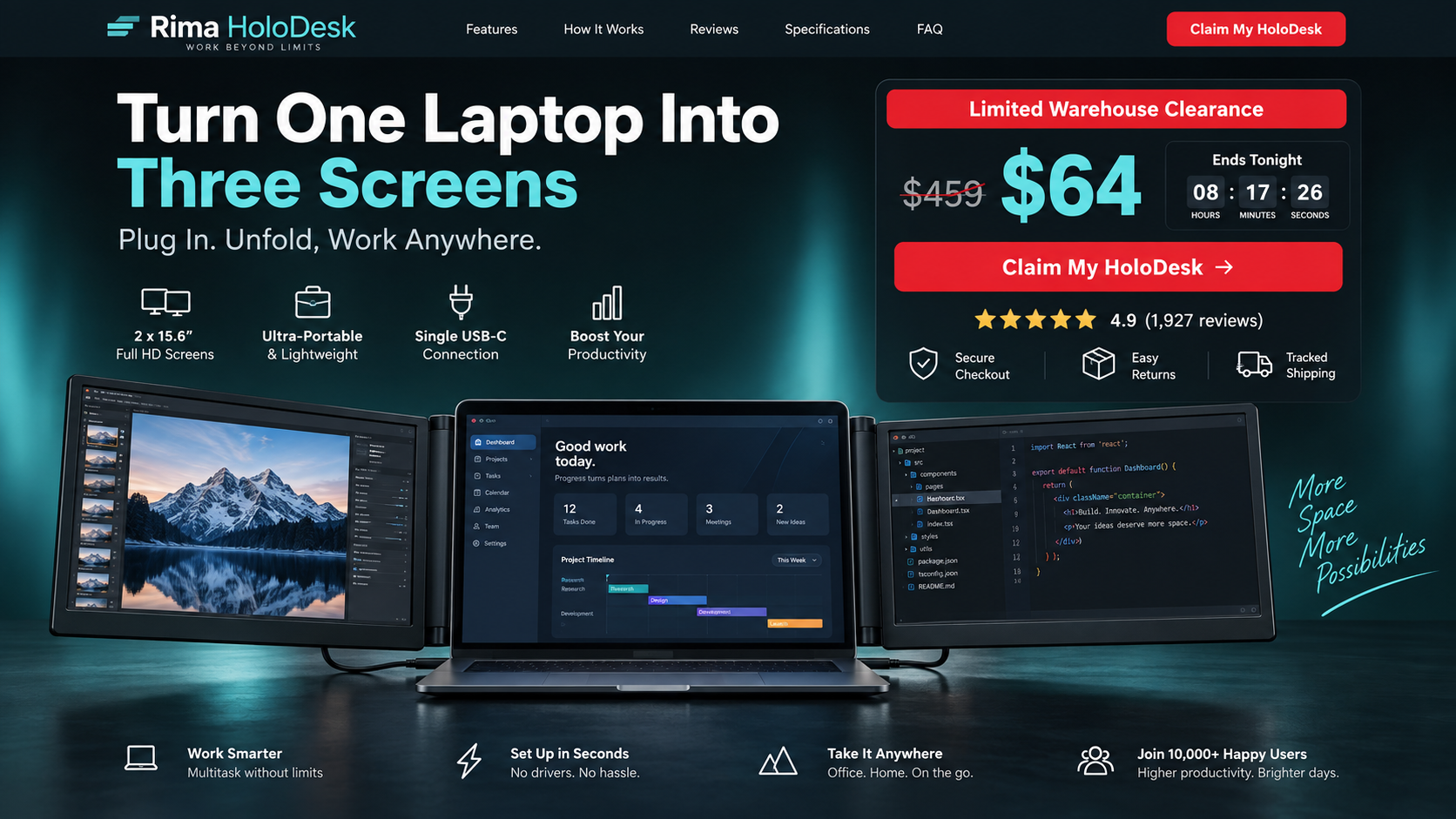
The ads presented two slim side displays that attach around a laptop, creating an instant portable command center.
A supposed regular price near $459 was reduced to about $64, with urgency messages pushing visitors toward immediate checkout.
Documented triple-screen accessories from established sellers commonly cost over $400. The discount therefore required unusually strong proof that never appeared.
The visuals resembled an established monitor system
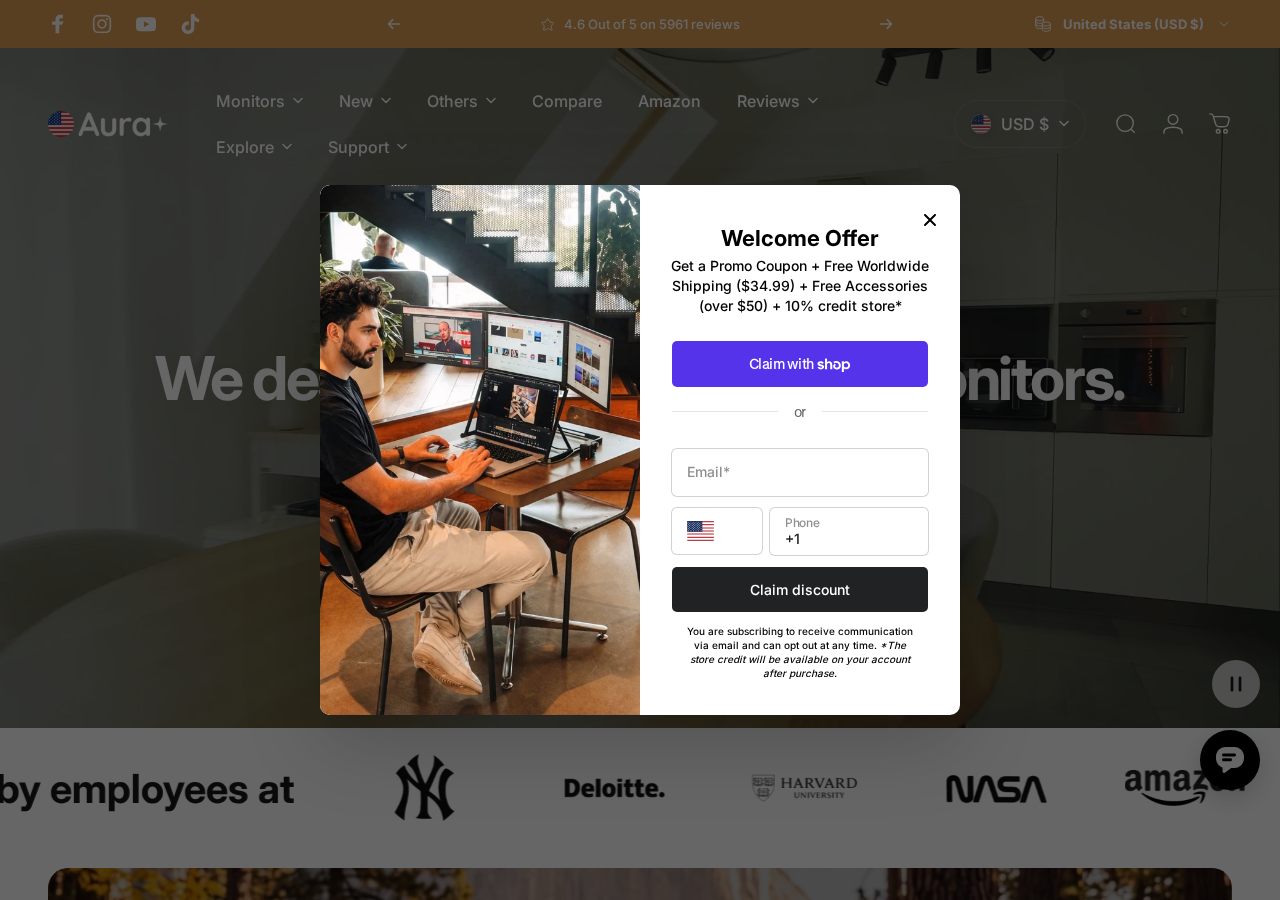
Rima material closely resembled triple-screen products promoted by Aura Displays, an independent seller with its own product pages and pricing.
Aura’s comparable systems were listed around $499 to $549 during our review, depending on model and current promotion.
This does not implicate Aura in Rima’s campaign. It highlights the credibility Rima gained from imagery associated with more expensive hardware.
Rima’s wider storefront record raises serious concerns
The same Rima operation promoted a premium projector and a miniature jet boat through similarly dramatic offers.
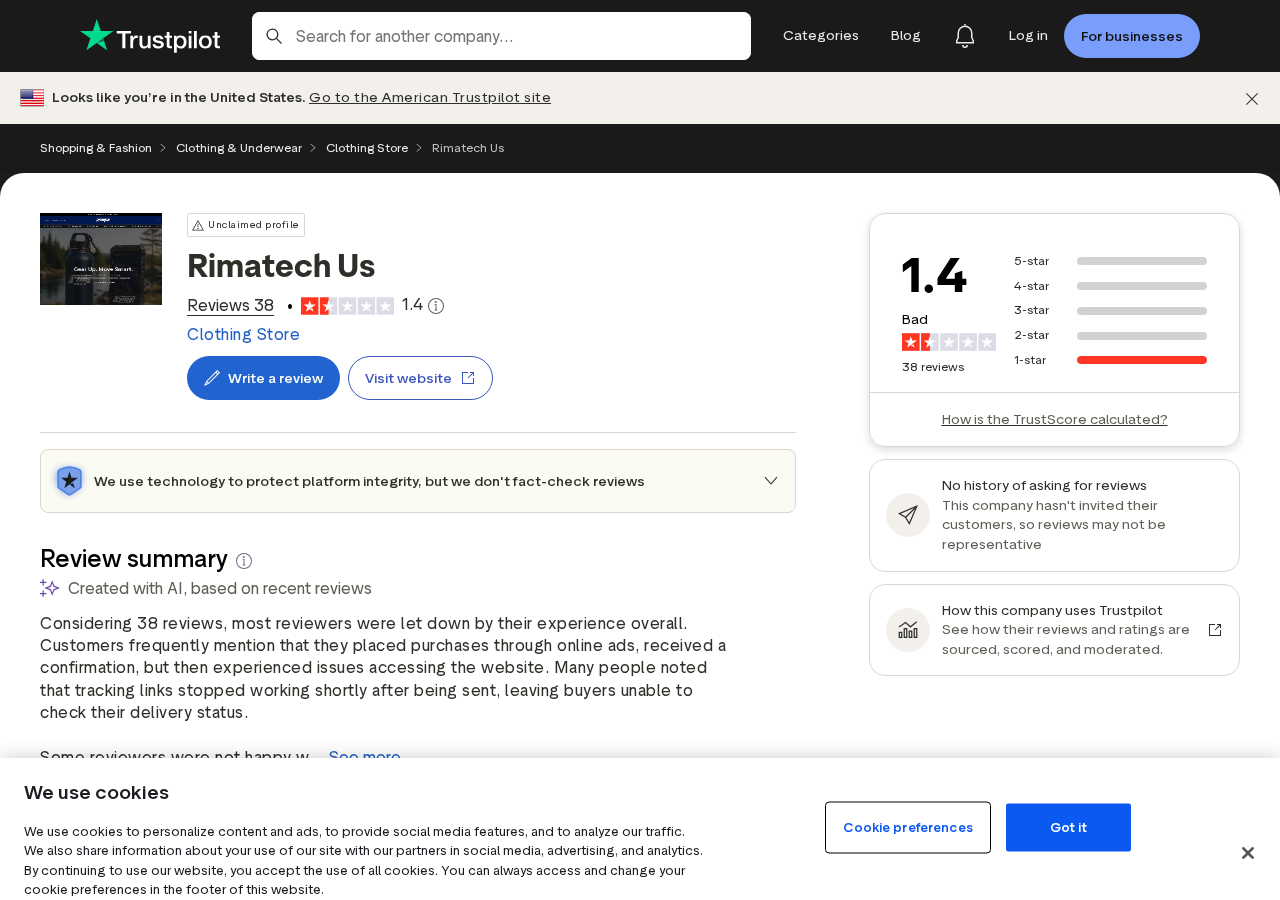
Its former rimatech-us.co store was unavailable during our check. Trustpilot displayed a 1.4 rating from 38 reviews, all shown as one-star.
Reviewers alleged missing parcels, useless tracking, and absent support. Individual reviews remain allegations, but the overall pattern is difficult to dismiss.
Our principal findings are:
- The $64 price is incompatible with the pictured class of hardware.
- The promotional design resembles a costlier branded triple-screen system.
- The storefront marketed unrelated futuristic products under one name.
- The original site no longer provides a normal customer path.
- Public complaints repeatedly describe fulfillment and communication failures.
What a Real Triple-Screen Laptop Extender Requires
A portable multi-monitor system is not simply two plastic panels. It requires working displays, hinges, controllers, cables, power management, and protective construction.
Compatibility can be complicated. Laptop width, operating system, USB-C capabilities, available ports, graphics support, and power delivery all matter.
A credible seller explains these limits before purchase. An advertisement focused only on productivity scenes hides the questions most likely to affect actual use.
Two panels create real component costs
Each side needs an LCD panel, backlight, controller electronics, housing, hinge, and data connection. Shipping also requires protective packaging.
Those components make a complete $64 system improbable, especially when the images suggest bright, thin, high-resolution displays.
A discount can reduce margin. It cannot remove the physical bill of materials, testing, warranty, and fulfillment costs.
USB-C does not guarantee video output
Some USB-C ports carry data and power but not a native video signal. Others support DisplayPort Alternate Mode or Thunderbolt.
Older systems may need HDMI plus USB power, while some multi-display setups rely on specialized drivers.
Any product advertised as universally compatible should provide a precise chart. “Plug and play” is not enough.
Weight and balance affect everyday usability
Two screens attached to a laptop lid add leverage. Weak hinges can drift backward, and narrow desks may not support the expanded width.
A legitimate listing includes dimensions, combined weight, supported laptop sizes, stand design, and protective carrying instructions.
Rima’s aspirational scenes made those engineering tradeoffs almost invisible.
How the Rima HoloDesk Scam Works
Step 1: The ad targets remote-work frustration
The video shows spreadsheets, meetings, design work, or code spread across three screens. One laptop suddenly feels like an office.
That visual speaks to students, travelers, freelancers, and remote employees before they consider technical compatibility.
The product is framed as a productivity breakthrough rather than an accessory that must match a specific computer.
Step 2: Expensive-looking footage supplies credibility
Polished product animation and premium hardware photographs suggest that Rima designed and manufactured the system.
Most viewers do not reverse-search individual frames. They assume the seller possesses the item shown in its own advertisement.
When imagery comes from another commercial product, that assumption becomes the central deception.
Step 3: The $64 price creates a low-risk illusion
$64 feels small compared with the supposed $459 reference price. The buyer imagines saving hundreds rather than risking the entire payment.
The anchor also discourages realistic comparison. A $499 product elsewhere looks overpriced once the visitor accepts Rima’s claimed discount.
Ask whether the same configuration has ever been sold at the crossed-out price. An unexplained reference figure proves little.
Step 4: Urgency interrupts compatibility checks
A countdown and warehouse-clearance message imply that reading port specifications could cost the deal.
That pressure is especially dangerous for electronics. Buyers need time to confirm screen size, operating system, video output, and return eligibility.
Reload the page in another browser. If the deadline restarts, it is a sales device rather than a real inventory event.
Step 5: The checkout can expand the order
Bundle buttons may highlight two or three units as the “best deal.” Accessories or warranties can appear as preselected add-ons.
Some deceptive funnels use ambiguous buttons so the customer approves a higher quantity than intended.
Verify the item count, shipping, taxes, and total on the final payment screen. Keep a dated screenshot.
Step 6: A confirmation email buys time
After payment, an automated receipt creates the feeling that a warehouse has started work. It may provide an unfamiliar tracking portal.
Several Rima reviewers alleged that parcels never arrived or tracking failed to show credible carrier movement.
Confirm every tracking number on the named carrier’s own website. Screenshots inside a seller portal are not independent evidence.
Step 7: Support friction protects the payment
Delayed template replies can push a customer beyond cancellation and dispute deadlines. Requests may be answered with another request to wait.
If something arrives, the seller may demand expensive return shipping or refuse to provide an authorized address.
A guarantee has little value when the company behind it cannot be reached and the storefront has disappeared.
Step 8: The campaign returns with a new name
The physical idea remains attractive even after Rima vanishes. New pages can reuse the same footage under another futuristic brand.
That is why searching only “Rima HoloDesk reviews” is insufficient. Search distinctive claims, images, price, and product configuration.
The next version may change the logo while preserving the same discount, timer, and checkout sequence.
Rima HoloDesk Compared With Aura Displays
Aura Displays offers multi-screen laptop accessories through a visible product catalog with named configurations and substantially higher prices.
The similarity between Rima imagery and Aura-style hardware does not establish that Rima could supply equivalent products.
It demonstrates why shoppers must trace pictures to their earliest commercial source instead of trusting the brand placed over them.
Price reveals the scale of the claim
Aura’s triple-screen systems were priced around $499 to $549 during our review. Sales can change, but the general hardware category remains expensive.
Rima’s $64 price was roughly the cost of one budget portable monitor, not two integrated panels with hinges and controllers.
An unfamiliar seller claiming an exceptional supply advantage should explain the model number, manufacturer, inventory, warranty, and independent reviews.
Configuration details matter more than lifestyle pictures
A real product page should state panel size, resolution, refresh rate, brightness, color coverage, weight, port requirements, and supported laptop widths.
It should explain whether a driver is required and how two external displays are recognized by Windows or macOS.
Without those facts, buyers cannot distinguish a working workstation accessory from a photograph and generic promise.
A legitimate competitor does not validate the copycat
Finding a real product that looks similar may actually disprove the bargain. It reveals where the pictures and believable details originated.
Order only through a seller whose identity and policies you have verified. Do not follow a link simply because the image matches something genuine.
Scammers depend on exactly that transfer of trust from the real manufacturer to the imitation storefront.
How to Investigate a Portable Monitor Deal
A few checks can uncover most recycled gadget offers before payment. Perform them outside the advertisement’s browser window.
- Reverse-search the cleanest product photograph.
- Search the exact marketing sentence inside quotation marks.
- Compare the claimed price with named products having identical specifications.
- Look for a manual and complete compatibility chart.
- Check domain history and independent complaint dates.
- Search the seller’s email, phone number, and address separately.
- Inspect whether a countdown restarts.
- Confirm the carrier outside the seller’s tracking page.
- Read return exclusions before opening the packaging.
A video review is useful only when it shows the reviewer connecting and using the exact named model continuously.
Montages of official product footage with an affiliate link do not establish that the reviewed seller ships that hardware.
What Could Arrive?
We cannot state what every customer received because the available complaints do not provide a complete verified order record.
Common outcomes in comparable gadget schemes include no delivery, a cheap unrelated item, one small monitor, or hardware far below the advertised specification.
Sometimes the parcel’s low declared weight exposes the mismatch before arrival. Two monitors and a mounting system cannot weigh like a padded envelope.
If a package comes, record it before opening. Keep every label because it connects the physical item to the disputed transaction.
Why This Offer Is More Than an Ordinary Bad Deal
A disappointing product is not automatically fraudulent. Cheap electronics often have weaker panels, thicker cases, and limited support while remaining honestly described.
HoloDesk crossed a more serious line because the price and presentation implied a class of hardware that the seller did not substantiate.
The marketing did not simply overstate brightness. It offered an entire premium multi-display workstation at a fraction of credible component cost.
The wider Rima catalog adds context. The same storefront made similarly improbable offers for unrelated high-value machines.
A specialist can explain design decisions and limitations. A rotating gadget seller usually repeats broad benefits while avoiding technical questions.
The site closure also changes the consumer risk. A normal bad purchase still has a merchant, warranty channel, and reachable return process.
Here, buyers faced public allegations of missing delivery and silence while the original storefront stopped operating normally.
That combination supports describing the offer as a scam pattern, not merely a low-quality accessory with enthusiastic advertising.
It does not prove every worker, affiliate, or platform knew the full operation. Responsibility must be tied to evidence.
Affiliates may repeat supplied claims without touching inventory. Social platforms may distribute the ad automatically after an account pays.
Consumers should report each layer anyway. Removing ads, payment access, and domains makes it harder for the same funnel to reach new buyers.
Future versions may use a different name and price. The decisive clues remain the stolen credibility, impossible economics, urgency, and absent accountability.
Remembering those clues provides better protection than memorizing “Rima HoloDesk,” a label that can disappear in one afternoon.
Company, Address, and Fulfillment Checks
Rima’s product range lacks a coherent manufacturing story
A projector, laptop display system, and personal jet boat require unrelated engineering, certification, parts, and service expertise.
Selling all three through similar miracle discounts suggests a marketing operation sourcing offers, not a documented technology manufacturer.
The dead domain leaves buyers without continuity
Rimatech-us.co did not provide a functioning storefront during our review. A closed site makes warranty and refund promises difficult to enforce.
Do not trust newly posted “replacement” contact details unless they match your receipt, payment record, or preserved policy.
A fulfillment address is not a headquarters
Parcel centers process returns for many merchants. Their staff may have no authority to approve refunds or explain the product.
Confirm the legal entity before shipping anything. Use tracked service only after receiving written return authorization.
Electronics need traceable responsibility
A genuine seller should identify the importer or responsible business, voltage requirements, certifications, warranty process, and safety contact.
Missing labels and anonymous adapters create practical safety risks even when a device powers on.
Check whether the named importer can be found outside the package. An unverifiable company cannot provide meaningful recall or electrical-safety support.
Photograph every compliance mark closely. A printed symbol alone does not prove testing, but missing markings make the risk easier to recognize.
For workplace purchases, consult the employer before connecting unknown hardware. Corporate security policies may prohibit unapproved display drivers and USB devices.
What to Do if You Have Fallen Victim to This Scam
- Capture the order trail. Save the original ad, landing page, quantity, total, receipt, tracking, and all support attempts.
- Verify tracking independently. Ask the named carrier whether it physically received the parcel and whether the destination matches your area.
- Cancel in writing. Use every address from the receipt and policy. State the order number, amount, and requested resolution clearly.
- Notify your payment provider. Explain non-delivery, wrong quantity, or materially misrepresented goods and provide the preserved evidence.
- Watch for additional charges. Review the statement for unfamiliar add-ons, warranties, or recurring payments connected to the merchant.
- Film the unboxing. Show the sealed label, package dimensions, contents, model numbers, cables, and condition in one continuous recording.
- Do not install unknown drivers. Obtain software from the verified hardware manufacturer, not a short link or file sent by the seller.
- Scan affected computers. Run Malwarebytes if you installed a driver, browser extension, or remote-support tool from an unverified source.
- Block deceptive advertising. AdGuard can reduce exposure to malicious redirects and recycled gadget ads, but still verify each merchant independently.
- Report the campaign. Send the ad account, domain, payment descriptor, and evidence to the platform and relevant consumer authority.
Is Your Device Infected? Run a Free Malware Scan
Slow performance, constant pop-ups, or strange behavior? These are classic signs of a malware infection. The fastest way to find out is to scan your device with Malwarebytes Free — one of the most trusted malware removal tools available.
The free version detects and removes the most common threats, including:
- Adware — the cause of those annoying pop-ups
- Browser hijackers — unwanted redirects and changed homepages
- Trojans and spyware — hidden programs stealing your data
- Potentially unwanted programs (PUPs) — software you never asked for
👉 Select your device below — Windows, Mac, or Android — then follow the simple steps to download Malwarebytes, scan your system, and remove any threats it finds. The scan usually takes 5 to 20 minutes.
Run a Malware Scan with Malwarebytes for Windows
Malwarebytes is one of the most popular and trusted anti-malware tools for Windows — and it’s completely free for removing infections. It catches threats that many antivirus programs miss, including adware, browser hijackers, and trojans. Follow the steps below to scan and clean your PC in just a few minutes.
Download Malwarebytes
Click the button below to download the latest version of Malwarebytes for Windows from the official source. The free version is all you need — it will scan your computer and remove adware, browser hijackers, and other malicious software at no cost.
Download MalwarebytesOfficial installer for Windows 11 and 10. Your download starts right away.Want real-time protection? See Malwarebytes Premium Malwarebytes Free for WindowsScans and removes malware at no cost
-
Install Malwarebytes
When the download finishes, open your Downloads folder and double-click the MBSetup file. If Windows shows a User Account Control pop-up, click “Yes” to allow the installation.

Follow the On-Screen Prompts to Install Malwarebytes
The setup wizard will walk you through a few quick screens:
-
Choose where you’re installing the program — “Personal Computer” or “Work Computer” — then click Next.

-
Malwarebytes will now install on your device. This usually takes under a minute.

-
When installation is complete, the “Welcome to Malwarebytes” screen will open automatically.

-
On the final screen, click Open Malwarebytes to launch the program.

-
Enable “Scan for Rootkits”
Before scanning, turn on rootkit detection so Malwarebytes can find even the most hidden threats. Click the Settings gear icon on the left side of the screen.

In the settings menu, find “Scan for rootkits” and click the toggle so it turns blue.

Done? Click “Dashboard” in the left pane to return to the main screen.
Start the Scan
Click the blue Scan button. Malwarebytes will automatically update its virus database and start checking your computer for malware.

-
Wait for the Scan to Finish
The scan checks your entire system for browser hijackers and other malicious programs, so it can take 5 to 20 minutes depending on your computer. Feel free to do something else — just check back occasionally to see the progress.

-
Quarantine the Detected Threats
When the scan is done, you’ll see a list of everything Malwarebytes found — malware, adware, and potentially unwanted programs. Click the “Quarantine” button to remove all of them at once.

Malwarebytes will now remove the malicious files and registry entries and move them safely into quarantine.

-
Restart Your Computer
Some threats can only be fully removed after a reboot. If Malwarebytes asks you to restart, click Yes. Once you’re logged back in, Malwarebytes has finished removing the threats it found.

That’s it — your Windows PC is now clean of trojans, adware, and other malware, and should be back to running smoothly.
If you are still having problems with your computer after completing these instructions, then please follow one of the steps:
- Run a computer scan with ESET Online Scanner
- Ask for help in our Windows Malware Removal Help & Support forum.
Run a Malware Scan with Malwarebytes for Mac
Malwarebytes for Mac is a free on-demand scanner that removes the malware other security software tends to miss — adware, browser hijackers, and unwanted programs included. Cleaning an infected Mac with Malwarebytes has always been completely free, and it’s our go-to recommendation. Follow the steps below to scan and clean your Mac in just a few minutes.
-
Download Malwarebytes for Mac
Click the button below to download the latest version of Malwarebytes for Mac.
Download MalwarebytesOfficial installer for macOS. Your download starts right away.Want real-time protection? See Malwarebytes PremiumMalwarebytes Free for MacScans and removes malware at no cost -
Open the Malwarebytes setup file
When the download finishes, open your Downloads folder and double-click the setup file to begin the installation.

-
Follow the On-Screen Prompts to Install Malwarebytes
The Malwarebytes for Mac Installer will guide you through a few quick screens. Click “Continue” and keep following the prompts until the installation completes.



When the installation is complete, Malwarebytes opens to the Welcome to Malwarebytes screen. Click “Get started“.
-
Select “Personal Computer” or “Work Computer”
Malwarebytes will ask what type of computer you’re installing it on. Click either Personal Computer or Work Computer, whichever applies.

-
Start the Scan
Click the “Scan” button. Malwarebytes will automatically update its detection database and begin checking your Mac for malware.

-
Wait for the Scan to Finish
Malwarebytes will scan your Mac for adware, browser hijackers, and other malicious programs. This can take a few minutes, so feel free to do something else — just check back occasionally to see the progress.

-
Quarantine the Detected Threats
When the scan is done, you’ll see a list of everything Malwarebytes found. Click the “Quarantine” button to remove all the threats at once.

-
Restart Your Mac
Malwarebytes will now remove all the malicious files it found. Some threats can only be fully removed after a reboot — if Malwarebytes asks you to restart, allow it. Once you’re logged back in, your Mac is clean.

That’s it — your Mac is now free of adware, rogue browser extensions, and other potentially harmful software.
If you are still experiencing problems while trying to remove a malicious program from your computer, please ask for help in our Mac Malware Removal Help & Support forum.
Run a Malware Scan with Malwarebytes for Android
Malwarebytes for Android automatically detects and removes dangerous threats like malware and ransomware so you don’t have to worry about your most-used device being compromised. Aggressive detection of adware and potentially unwanted programs keeps your Android phone or tablet running smooth.
-
Download Malwarebytes for Android.
You can download Malwarebytes for Android by clicking the link below.
Get Malwarebytes for AndroidOpens Google Play in a new tab.Want real-time protection? See Malwarebytes Premium for AndroidMalwarebytes for AndroidScans your phone and removes malware at no cost -
Install Malwarebytes for Android on your phone.
In the Google Play Store, tap “Install” to install Malwarebytes for Android on your device.

When the installation process has finished, tap “Open” to begin using Malwarebytes for Android. You can also open Malwarebytes by tapping on its icon in your phone menu or home screen.

-
Follow the on-screen prompts to complete the setup process
When Malwarebytes will open, you will see the Malwarebytes Setup Wizard which will guide you through a series of permissions and other setup options.
This is the first of two screens that explain the difference between the Premium and Free versions. Swipe this screen to continue.
Tap on “Got it” to proceed to the next step.
Malwarebytes for Android will now ask for a set of permissions that are required to scan your device and protect it from malware. Tap on “Give permission” to continue.
Tap on “Allow” to permit Malwarebytes to access the files on your phone.
-
Update database and run a scan with Malwarebytes for Android
You will now be prompted to update the Malwarebytes database and run a full system scan.

Click on “Update database” to update the Malwarebytes for Android definitions to the latest version, then click on “Run full scan” to perform a system scan.

-
Wait for the Malwarebytes scan to complete.
Malwarebytes will now start scanning your phone for adware and other malicious apps. This process can take a few minutes, so we suggest you do something else and periodically check on the status of the scan to see when it is finished.

-
Click on “Remove Selected”.
When the scan has been completed, you will be presented with a screen showing the malware infections that Malwarebytes for Android has detected. To remove the malicious apps that Malwarebytes has found, tap on the “Remove Selected” button.

-
Restart your phone.
Malwarebytes for Android will now remove all the malicious apps that it has found. To complete the malware removal process, Malwarebytes may ask you to restart your device.
That’s it — your Android phone is now clean — no more malicious apps, adware, or browser redirects.
If you are still having problems with your phone after completing these instructions, then please follow one of the steps:
- Restore your phone to factory settings by going to Settings > General management > Reset > Factory data reset.
- Ask for help in our Mobile Malware Removal Help & Support forum.
Stay Protected: Block Ads and Malicious Sites
Now that your device is clean, keep it that way. Most infections start with a malicious ad or a fake download button — so blocking them at the source is your best defense.
We recommend AdGuard, which blocks malicious ads, phishing pages, and dangerous redirects before they can reach you.
👉 Download AdGuard and browse safely
Frequently Asked Questions
Is Rima HoloDesk a real triple-screen monitor?
The type of accessory is real, but evidence does not support Rima’s $64 offer as a trustworthy source for the pictured premium hardware.
Is Rima HoloDesk connected to Aura Displays?
We found visual similarity, not a legitimate partnership. Aura should be evaluated separately through its own official channels.
Why is $64 unrealistic?
Two displays, controllers, hinges, cables, packaging, support, and shipping create costs inconsistent with the promoted configuration at that price.
Is rimatech-us.co still online?
The storefront was unavailable during our check. A later return would not erase the documented complaints or resolve the identity questions.
Will a bank refund the purchase?
That depends on payment method, deadline, documentation, and local rules. Contact the issuer promptly and describe the transaction accurately.
How can I safely buy a laptop screen extender?
Choose a traceable seller, verify compatibility, read independent hands-on tests, use protected payment, and reject prices that contradict the hardware shown.
The Bottom Line
Rima HoloDesk used attractive productivity footage and an implausible $64 price to market hardware resembling far more expensive triple-screen systems.
With the store unavailable and customer complaints concentrated around fulfillment and support, buyers should avoid the offer and recognize its pattern under future names.

Join the discussion
0 commentsShare your experience or ask a question about this article.
Discussion
Start the conversation
Have a question or something useful to share? Add the first comment.