


A bonus announcement is easy to notice in a crowded work inbox. This one says the payment has been approved and a statement is ready.
It sounds like a routine place to find the final amount. Before you sign in, check how your employer actually shares that information.
Overview
The November bonus announcement promises a statement
The performance bonus email scam presents itself as a message from an Account Department.
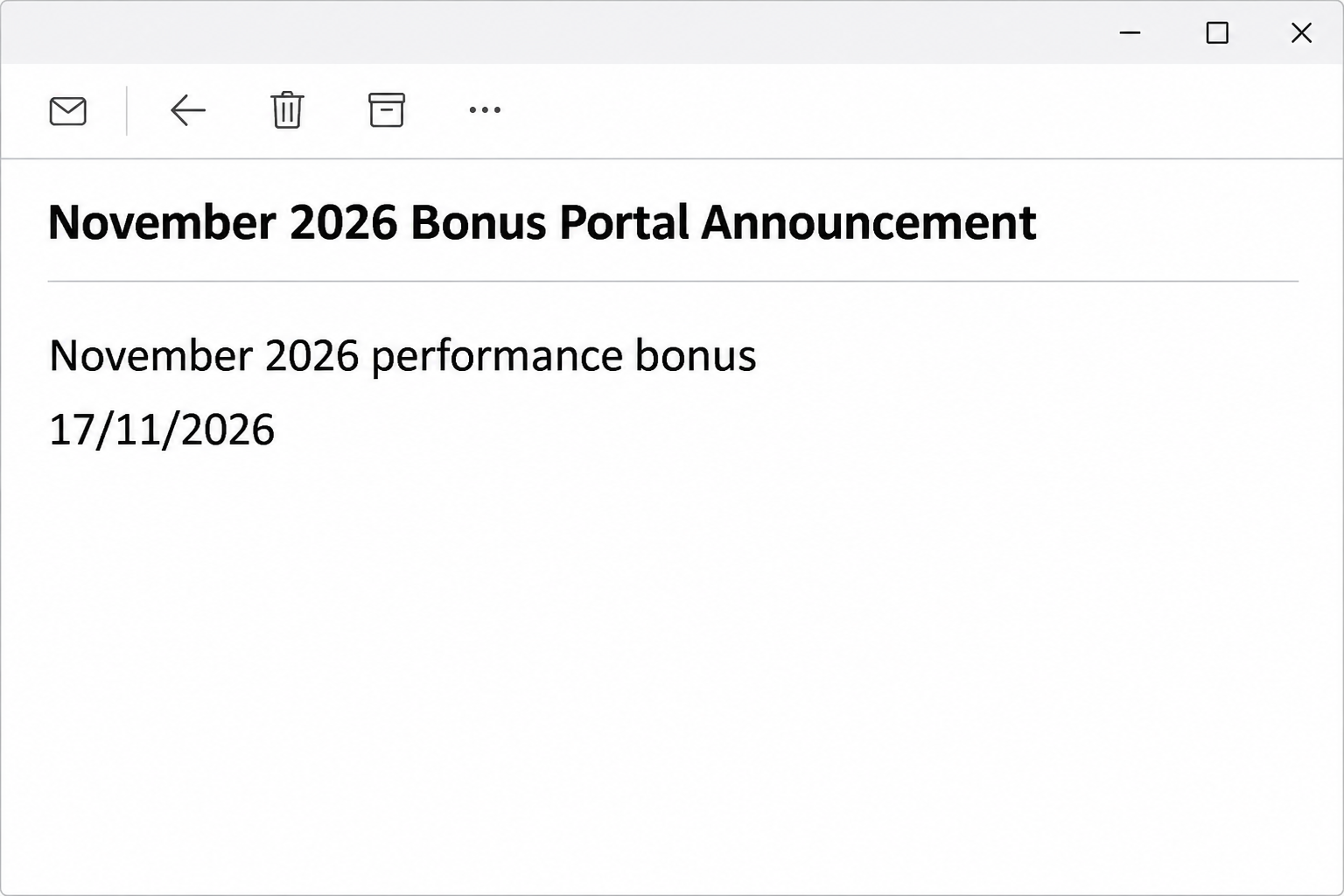
Its subject announces a November 2026 bonus portal, and the body says the recipient’s bonus is approved.
The notice promises a breakdown covering the bonus amount, taxes, and the final payment. It asks the employee to access the statement by November 17, 2026.
That date belongs to the documented message. It is not a confirmed employer deadline, and it should not be treated as a current instruction to complete an overdue task.
The email never establishes who approved a payment or where it appears in a real payroll record. Those are the first questions to take to your employer.
Why the supposed statement is an email-account risk
The reported link opened a counterfeit Zoho sign-in, not a verified bonus record. Its password request was presented as the way to access Mail.
An employee expecting compensation information might overlook that change. The message told them to use their normal work credentials, making an unrelated sign-in seem like part of payroll.
Zoho is the legitimate service whose interface was copied. The email doesn’t prove that Zoho, your employer, or anyone handling payroll sent it.
A stolen mailbox password can matter even when payroll uses a completely separate application. The inbox may hold pay statements, work conversations, and reset messages for other services.
The clues to compare with your own notice
Don’t follow the link just to check which form appears. You can identify the reported lure from the message and verify a real bonus through other channels.
- The subject names a November 2026 bonus portal announcement.
- The body claims approval before showing a verified compensation record.
- It tells the employee to use standard credentials.
- The requested statement includes taxes and the final payment amount.
- A confidentiality footer says not to share or forward the notice.
Confidential compensation is normal, so that footer isn’t automatically suspicious. What matters is who issued the request and whether the sign-in belongs to the service your workplace uses.
How the Performance Bonus Email Scam Works
Step 1: Good news gives you a reason to read immediately
A bonus message doesn’t have to threaten account deletion to get attention. The promise of a payment can make someone eager to see whether it is larger than expected.
The notice says approval is already complete. That turns the remaining action into an apparently small administrative step, not a decision about whether the offer is real.
It also avoids announcing an amount in the message itself. The reader has a practical reason to open the supposed statement rather than simply file the email.
If you expected compensation news, use the payroll portal or person you already know. A matching pay period doesn’t authenticate the route the email supplies.
Step 2: The statement description makes the request sound like payroll
A breakdown of taxes and final pay is exactly the kind of document an employee may want to keep. The email borrows that familiar purpose.
But a list of what the statement supposedly contains is not a statement. It doesn’t show a real calculation, approval, or payment scheduled in your employer’s system.
If you handle payroll, don’t confirm someone’s bonus from this notice. Find the actual record and communicate through your organization’s established private channel.
If you are the employee, ask whether any action is genuinely required. Some workplaces publish a payslip without requiring a special acknowledgment or new sign-in.
Step 3: “Standard credentials” masks a sensitive request
The phrase sounds like ordinary workplace guidance. It suggests you can use the login you already remember without setting up another account or learning a new process.
That is precisely why an unfamiliar page requesting the same password is risky. The credential is useful outside the fake bonus screen.
Your company may legitimately use single sign-on for multiple applications. Confirm the identity service from your usual portal rather than assuming any familiar-looking prompt is part of it.
A new payroll integration can be verified through IT or HR. It shouldn’t require you to test the page by supplying a current password first.
Step 4: A copied Zoho Mail screen replaces the promised bonus
The recorded destination asked for a password on a page imitating Zoho. An email account sign-in doesn’t establish that a bonus statement is available there.
The role of the form is important even if the employee also uses Zoho at work. A copied screen is not the same thing as a legitimate session.
If your password manager doesn’t recognize the page, don’t work around it by typing manually. Close the page and open the service through your normal route.
If you’ve already submitted details, the next screen doesn’t decide whether the password was exposed. Treat the submission itself as the event to report.
Step 5: A compromised inbox can be used in later workplace fraud
With access to work mail, an intruder could find payroll discussions or reach colleagues from a familiar address. Those are possible consequences, not confirmed outcomes for every recipient.
For someone who works in HR or finance, that exposure may include records about other employees. Let the responsible team assess it instead of trying to investigate alone.
A later request to change salary deposit details needs its own verification. Knowing about a real bonus doesn’t authorize anyone to redirect the money.
Keep the actual payment decision with payroll and the possible mailbox incident with IT. One team’s answer does not automatically settle the other team’s question.
How to Check a Bonus Without the Announcement
Use the payroll channel you already have
Open the employee app or HR portal you used for the last pay statement. If you work for multiple organizations, make sure the account and pay period are correct.
Look for the statement or approved compensation notice there. If it hasn’t appeared, ask payroll through the staff directory or a contact you used before this email.
Don’t send a tax form, prior payslip, or full salary history just to ask whether the message is genuine. A subject and receiving time are usually enough to start.
If the organization changed its payroll provider, confirm the change through its existing internal announcements. Use the documented onboarding process rather than the email’s new sign-in route.
Keep confidentiality without excluding support
Sensitive compensation details belong in a private conversation. That doesn’t prevent you from asking IT whether a login page is authorized or HR whether a notice was sent.
You can report the suspicious route without sharing the amount of a genuine bonus with coworkers. Use your employer’s confidential security reporting tools where available.
If someone forwards the notice to you for advice, don’t open it as a test. Tell them where to verify it and let security examine the original safely.
If the deadline in your copy has passed, don’t treat that as a reason to rush. A real employer can explain whether anything needs attention through a known channel.
What to Do if You Have Fallen Victim to This Scam
-
If you only read it, verify the payment independently.
Ask payroll whether a bonus statement is available and whether any employee action is required. Report the unsolicited message through the workplace’s phishing process.
Leave the button unused, even if your employer confirms a real bonus. The actual payment and the suspicious email can exist independently.
-
If you opened the site, stop before providing further details.
Close the page and note what it asked for. If a browser filled a field or a sign-in prompt arrived on another device, mention that when reporting.
Don’t revisit the page to learn which provider it copies. IT can investigate from the original email without asking you to interact again.
-
If you entered a Zoho password, secure the real account promptly.
Use the known Zoho account route or your organization’s support desk. Change the password through that route and ask about terminating unfamiliar sessions.
Review account recovery information and sign-in methods, following Zoho’s account-security guidance. Don’t place the password in a ticket or email report.
-
Tell your administrator if you approved a second step.
A password, a one-time code, and an approved sign-in prompt are different disclosures. Explain which happened and when, rather than simply saying you clicked.
Ask the team to check active access, mailbox rules, forwarding, and connected applications as appropriate. Don’t assume changing the password removes every existing session.
-
Protect accounts that share the password or use the inbox for recovery.
Replace reused passwords, giving each service a different one. Prioritize work tools, financial accounts, and the account that controls recovery for the exposed mailbox.
If you discover unfamiliar sent mail or changed settings, preserve details for IT. Avoid deleting records the team may need to establish what occurred.
-
Alert payroll if payment instructions or employee data were affected.
Confirm any direct-deposit change with the employee through an established channel. Put an unfamiliar instruction on hold until the authorized team can review it.
If money was redirected, the organization should contact its bank promptly. A password reset doesn’t reverse a transaction or answer which records were accessed.
Questions to Resolve With Your Employer After an Exposure
Ask whether your account was successfully accessed, not just whether a password was reset.
The timing of the email and account activity can help distinguish an attempted login from an active session.
Ask payroll whether any request used your name after that time. A false deposit-change message can need action even when the pay statement itself remains unchanged.
If your team shares a payroll inbox, identify which person entered credentials. The organization can then focus account recovery without unnecessarily interrupting every account that received the email.
Finally, agree on the normal place to find future compensation announcements. That gives employees a clear answer next time a bonus notice arrives out of context.
If a real bonus was scheduled, keep the bank deposit and pay statement as the payment record. A successful payroll deposit doesn’t cancel the separate account exposure.
If IT temporarily restricts an account, ask how payroll will contact you safely in the meantime. Don’t use that interruption as a reason to resume the phishing conversation.
If you get another copied bonus notice, report the new receiving time without trying the link. Security can compare messages while you continue using the approved payroll route.
Frequently Asked Questions
Does the announcement prove my employer approved a bonus?
The message claims approval but isn’t a payroll record. Confirm the amount or eligibility through your employer’s existing portal or a verified payroll contact.
Don’t assume a genuine bonus announcement and this email are connected. You can check the payment without following the supplied statement link.
Why would a bonus statement ask for my Zoho Mail password?
The documented phishing page uses a familiar mail interface to collect a login. That request is different from accessing a verified statement through your organization’s payroll system.
If your company really uses Zoho for related services, start from the app or portal it already provides. Familiar branding doesn’t authenticate an outside page.
Is the November 17 deadline still something I need to meet?
It is a date printed in the original specimen, not an employer-confirmed obligation. A copied or delayed email may keep that date long after it has passed.
Ask payroll whether a real task is pending. Don’t hurry through a sign-in just because a suspicious note makes the matter look overdue.
Does the confidentiality footer stop me reporting the email?
No, you can report a suspected phishing attempt through your employer’s approved confidential channel. Avoid posting salary information publicly or sharing it with unrelated colleagues.
Your security team can investigate the sign-in route while payroll checks the payment claim. Neither needs your account password to answer those questions.
What if I use a different provider rather than Zoho?
Act on the credentials you actually provided. If you entered another mailbox’s password, secure that mailbox through its real provider and report the mismatch.
The documented example copied Zoho, but that doesn’t prove every recipient saw the same page. Describe your own interaction rather than assuming the exact form was identical.
Can I lose a real bonus by deleting this message?
Deleting a fraudulent email doesn’t change an employer’s compensation record. If a real acknowledgment is required, your payroll team can tell you how to complete it safely.
If you already supplied a login, deal with that exposure promptly. The security incident and your genuine bonus should be handled through their separate authorized channels.
The Bottom Line
Don’t use the bonus announcement to reach payroll or sign in to Mail. Check your employer’s established compensation channel and report the imitation notice.
If you entered a password or approved access, involve IT now. Then let payroll verify whether any payment-related requests need attention.

Join the discussion
0 commentsShare your experience or ask a question about this article.
Community experiences
Did this happen to you?
Your experience could help someone recognize the same scam. Submit a private report for our team to review.
I experienced this tooReports are reviewed before publication. Sharing publicly is always your choice.
Discussion
Start the conversation
Have a question or something useful to share? Add the first comment.