


An IT notice says unused employee accounts are being removed. You know companies close old mailboxes, so the warning doesn’t immediately sound out of place.
Then it gives you 48 hours to confirm yours. Before opening the supposed document, check whether this cleanup actually exists.
Overview
The message claims your mailbox is on a deletion list
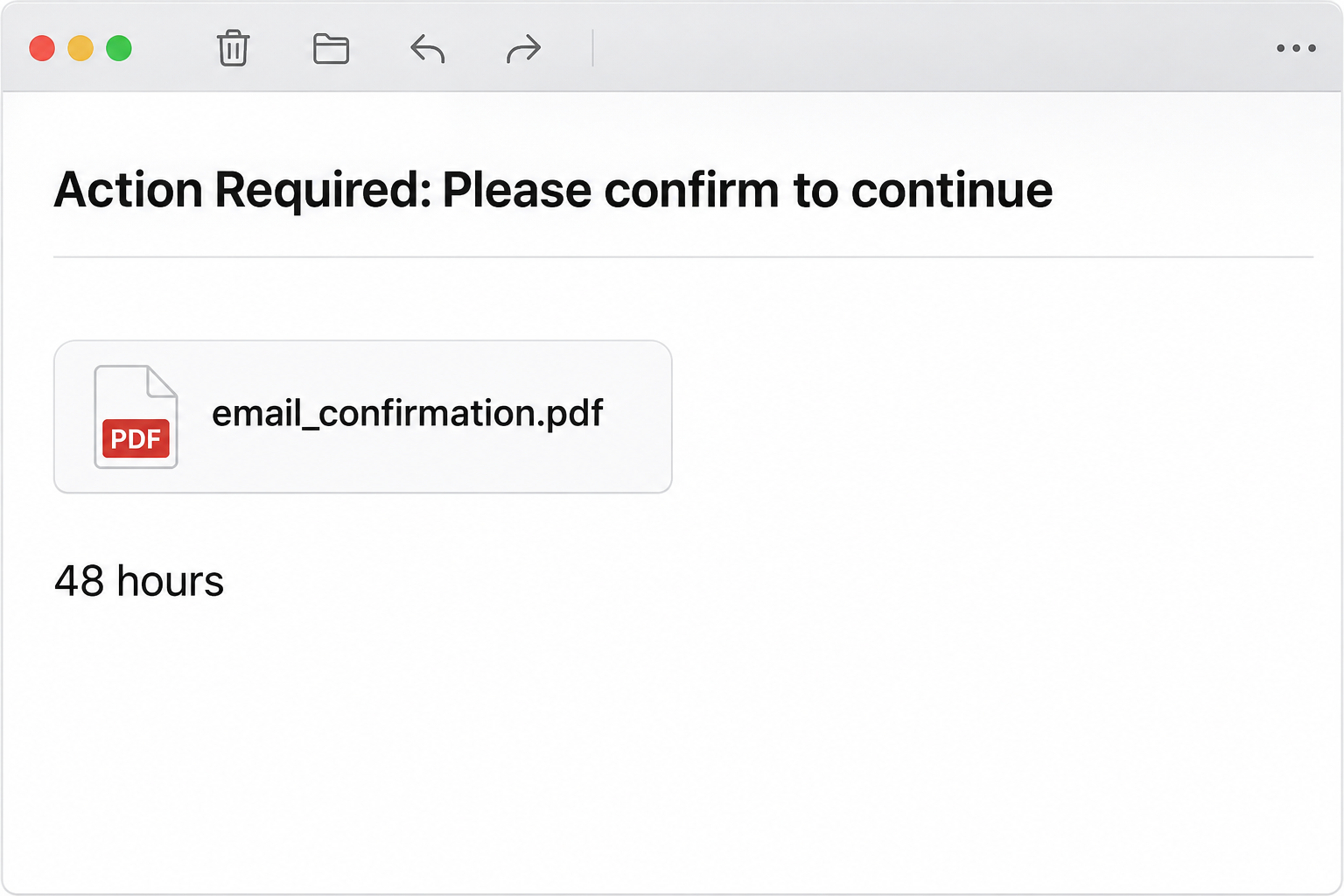
The employee accounts scheduled for deletion scam impersonates an IT support notice. It says a recent server update identified accounts belonging to former employees that are no longer needed.
The message then warns the recipient to confirm the account is still in use within 48 hours. Otherwise, it claims the mailbox will be disconnected and permanently removed.
That is not a real account-status record. The fact that your company might remove old accounts does not show that this email came from its administrators.
For an active employee, the demand can feel like a mistake that must be corrected quickly. Contact your support desk through the internal route you already use.
The supposed PDF leads to an imitation sign-in
The notice includes a document-shaped area labeled email_confirmation.pdf. In the reported example, the confirmation action went to a fake mailbox login rather than a verified PDF.
A Gmail-branded password page was shown in the documented route. Its appearance was intended to make the next step feel like an ordinary account check.
The document label doesn’t establish that an actual PDF was attached or downloaded. A box inside an email can be a link, not a file in the mailbox.
Seeing that page also doesn’t establish infection or account deletion. The immediate documented risk is disclosing a credential to an imitation sign-in.
The details that can make the request seem convincing
You can identify this case without trying the confirmation button. Compare the message with what your employer actually announced and how it normally handles account administration.
- The subject asks you to confirm before you can continue.
- The body mentions a mail-server update and unused employee accounts.
- It turns that explanation into a 48-hour deadline for the recipient.
- A PDF-style label suggests a confirmation document is available.
- The next page can display information about the current browser and visit.
A page knowing your browser, operating system, time, or approximate location hasn’t proved it belongs to IT. Those details are not the same as access to employment records.
For a remote worker, a displayed location may not match their physical location. A VPN or network route can affect it without explaining who operates the page.
How the Employee Account Deletion Email Scam Works
Step 1: A genuine administrative task supplies the cover story
Companies do retire accounts when staff leave. That makes a cleanup notice more plausible than a request with no obvious connection to how work systems operate.
The phishing email claims that such a cleanup has already started. It doesn’t identify a verified internal ticket, account owner, or administrator responsible for the alleged deletion.
A staff member may assume they were included by mistake and want to correct it without involving anyone. That reaction lets the notice become a task.
Ask your help desk whether the process exists. A real deactivation concern should be investigated through the organization, not through a confirmation page chosen by the message.
Step 2: An inactive-account claim becomes your personal deadline
The email shifts from accounts that are supposedly unused to the one you’re reading from. It gives you two days to prove the account still matters.
That makes inaction sound dangerous even when mail is working. A person may click just to avoid losing access before their next shift or a holiday.
Do not argue with the sender about whether you’re still employed. A reply isn’t needed to establish your status with your actual employer.
If you are a contractor or recently changed roles, verify with your manager and support team. A real account-lifecycle question and a phishing notice can exist separately.
If you are already using a replacement account, ask which identity the organization wants retained. Don’t reopen an old one through a link that claims to protect it.
Step 3: A document-shaped box makes confirmation look routine
The label email_confirmation.pdf makes the requested action look like paperwork. It can feel less consequential than an instruction to provide a password.
But the reported control did not establish that you were opening a real confirmation form. It directed the browser to an unrelated login page.
Look at the workflow rather than the file extension in the message. Your organization can tell you where a real document or account request would be stored.
Don’t try to save or open the item in a different program to prove what it is. Report the original email safely instead of testing its components.
Step 4: The fake page uses familiar branding and live visit details
The documented example copied Gmail and asked for a password. A familiar sign-in screen can seem like an expected checkpoint before reaching the supposed form.
Information about the current browser or operating system can strengthen that impression. It can look like the page is already checking the computer that belongs to your workplace.
Ordinary websites can obtain some visit details without being connected to your employer. A rough location may come from the network rather than from a personnel database.
Treat those details as something the page can display, not as permission to trust it. Return to your organization’s normal identity portal if a sign-in is needed.
Step 5: Mailbox exposure remains after the deletion threat has passed
If someone submits a working credential and an intruder succeeds in signing in, the immediate issue is unauthorized account access. The original deletion story may disappear entirely.
The mailbox may contain work discussions, identity documents, or recovery messages for other services. Possible exposure depends on the account and what access was obtained.
Someone who only received the email has a different problem from someone who approved a login prompt. Tell IT which action you took rather than assuming the worst.
If the fake page shows an error after submission, report the submitted password anyway. A failed-looking page is not a reliable record of what it received.
How to Check a Real Employee Account Notice
Ask the account owner through an independent channel
Use your company’s service desk, staff directory, or established IT chat. Ask whether a cleanup was announced and whether your account has a real pending action.
Give the account identifier and the email’s time if needed, without sending credentials. A legitimate administrator can find the account without asking you to prove the current password.
If your manager received the same notice, that does not make it genuine. Security may need to investigate several copies rather than approve them one by one.
Ask how an authorized cleanup would be announced and who can approve an exception. That gives you a way to handle a genuine access concern without this message.
For a shared inbox, identify which team owns it. A person who reads the mailbox may not be responsible for retention, account changes, or billing.
Separate employment status from mailbox access
A real account can be removed because a contract ended, a service changed, or someone moved to a different system. Your organization should be able to explain its own decision.
Do not assume that this suspicious email tells you anything about your employment. Ask your manager or the account sponsor if you’re concerned about an actual status change.
If you legitimately need to preserve records before an approved account closure, follow the organization’s retention and export rules. Don’t send work files to a personal address as a precaution.
If access really stops, use the existing recovery or support route. A working link in the phishing email is not a fallback support service.
Preserve useful details without collecting new ones
The original notice, receiving time, account used, and actions taken give IT a starting point. You don’t need to revisit the page to supply a current screenshot.
If a browser automatically filled a password, mention that uncertainty. The team can review relevant activity rather than relying on your memory of a brief screen.
If you’re investigating on behalf of a colleague, do not ask them to send you their password. Help them reach the actual team responsible for account recovery.
What to Do if You Have Fallen Victim to This Scam
-
If you did nothing, report the notice and leave the confirmation unused.
Use the workplace phishing report route and verify any real account concern through the help desk. Keep the email if the team requests the original.
Don’t forward the active document card to coworkers as a warning. Share the subject and the authorized reporting route instead.
-
If you clicked, close the external page and record your actions.
Say whether you only saw it, entered information, downloaded anything, or approved a prompt. Distinguish those actions even if they happened close together.
If the site showed your location or browser, you don’t need to investigate it further. IT can review the route without you interacting again.
-
If you entered a password, recover the affected identity immediately.
Start through your real provider or organization identity portal from a trusted device. Ask the administrator about resetting the password and ending unfamiliar sessions.
For a personal Google account, Google’s compromised-account guidance explains the recovery and security checks. A work account may require your administrator’s process instead.
-
Tell the administrator about any verification code or prompt.
Explain what you approved and when. Don’t accept another request from the same page or an unexpected caller who offers to cancel the first one.
Ask support to check recovery information and sign-in methods as well as sessions. A password reset by itself may not answer every access question.
-
Review what the account could expose.
Have the team check forwarding, rules, delegated access, connected applications, and unfamiliar messages as appropriate. Keep details of unexpected activity rather than deleting records immediately.
If the inbox handles customer or employee information, tell the person responsible for that information. Let the organization determine the scope and necessary notifications.
-
Confirm your genuine account status after containment.
Ask whether the account is active, whether any actual maintenance is scheduled, and where future requests will be announced. Keep that answer separate from the phishing deadline.
If someone sent deceptive messages from your account, warn recipients through another channel. Make clear where they should verify a legitimate request from you.
If You Already Opened the Supposed PDF
Describe what actually opened rather than relying on the label. A browser page asking for a password is different from a document in a PDF reader.
If something downloaded, don’t open it again to identify the format. Tell IT the displayed name and where the file appears in the download record.
If you ran a separate file or installed anything, report that as an additional device incident. Those actions may require cleanup beyond protecting the mailbox.
The PDF-style image alone is not evidence of a malicious executable. Keeping those facts separate helps avoid unnecessary resets while ensuring a real execution event isn’t missed.
Frequently Asked Questions
Is my employer actually planning to delete my account?
This message does not establish that. Confirm the account’s status through your existing help desk or account sponsor, especially if your contract or role recently changed.
You can take a genuine account notice seriously without using the suspicious email. A real administrator can explain any pending change independently.
Does email_confirmation.pdf mean there is a real PDF attached?
Not necessarily, because a document card can be part of the email body. The reported confirmation control led to a phishing page.
If you downloaded something from your own copy, tell your support team. Don’t assume that its contents match the label or that every recipient received a file.
Why did the page show my browser and current location?
Some visit information can be available to an ordinary website, and location can be estimated from the network. It does not authenticate the page.
The display doesn’t prove that your employer tracked the visit or that someone read your files. Focus on what you submitted or approved.
What if the page used my real email provider’s branding?
Copied branding is part of the lure. The documented example resembled Gmail, but it wasn’t a verified Google sign-in reached through an authorized work process.
Open your provider from a known address or app when you need to authenticate. Ask IT whether the workflow is expected before entering credentials.
Can I ignore the email if the 48 hours have passed?
You should not use the phishing control even after the deadline. If your real account has a problem, check it through official support.
If you already supplied a password, that exposure still needs attention. The timer ending doesn’t revoke anything you disclosed to the page.
Should I back up every work email before checking with IT?
Don’t export confidential messages or forward them to a personal account because of an unverified deletion threat. That can create an additional data-handling problem.
Let the organization explain any real retention or migration requirement. If you need a backup, use its authorized storage and export procedures.
The Bottom Line
Don’t confirm an employee account through this deletion notice. Ask your real IT team whether any action is pending and report the imitation message.
If you used the fake sign-in, recover the account and review access promptly. The mailbox exposure is the issue to address, not the email’s 48-hour threat.

Join the discussion
0 commentsShare your experience or ask a question about this article.
Community experiences
Did this happen to you?
Your experience could help someone recognize the same scam. Submit a private report for our team to review.
I experienced this tooReports are reviewed before publication. Sharing publicly is always your choice.
Discussion
Start the conversation
Have a question or something useful to share? Add the first comment.