


A table of mail settings can look more authoritative than a dramatic security warning. The abbreviations are familiar, and the numbers resemble something a help desk would send.
This email puts a password task beside those settings. Before changing anything, separate the technical information from the request attached to it.
Overview
The email uses server settings to ask for a password
The Confirm Email Information scam presents itself as an automated account notice. Its subject says email settings are required, while the body threatens termination unless the recipient confirms information.
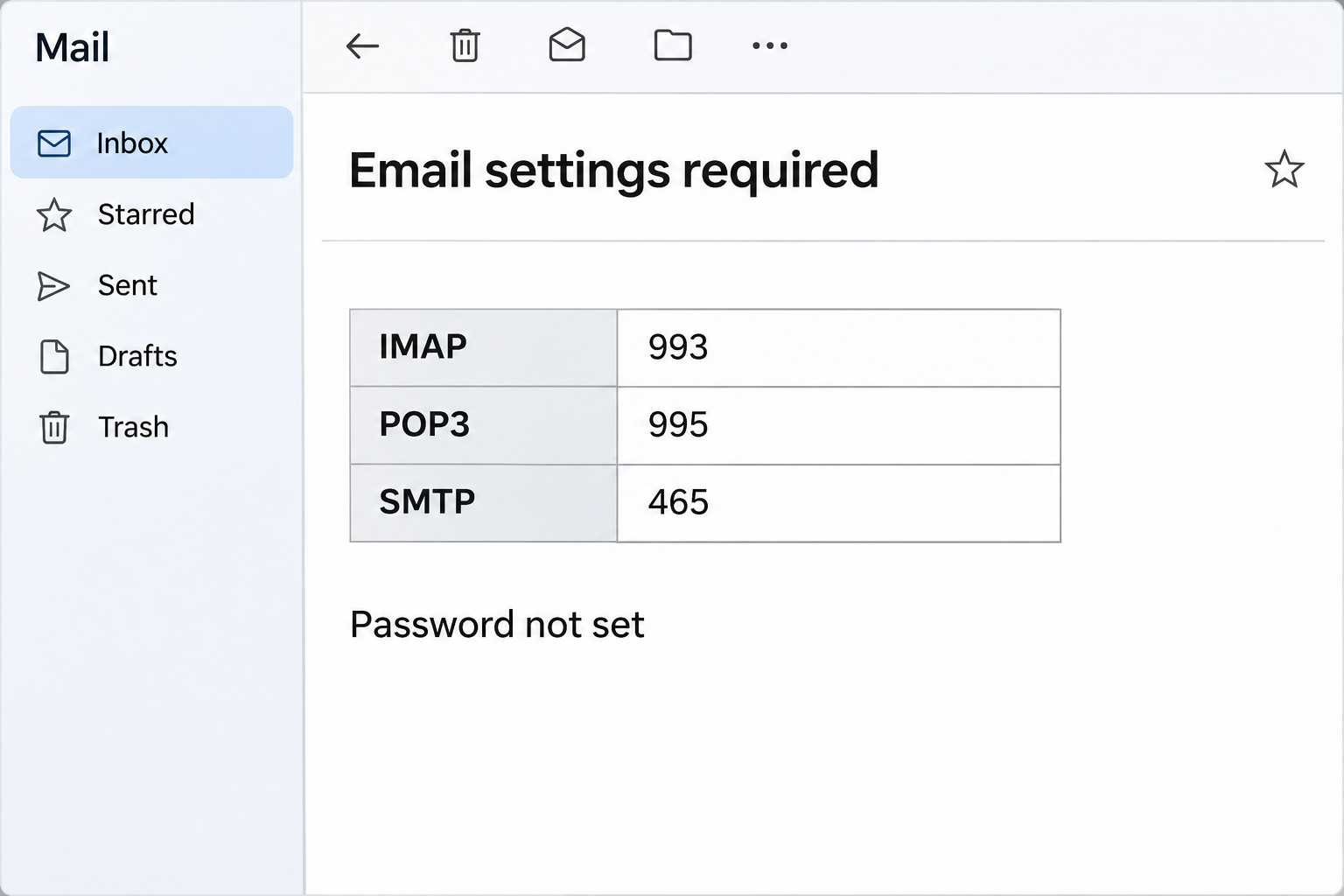
The message displays a table with SSL/TLS, incoming and outgoing servers, and familiar mail protocol names. Beside those details it presents the password as not set.
Controls invite the reader to insert a password. They lead away from the email to a website rather than to the settings of a mail application.
That is the crucial distinction: the email is asking for an account credential, not demonstrating that an app’s configuration is broken or that the mailbox faces deletion.
Which table details make the message recognizable
The sample combines actual-looking technical information with an invented task. You can recognize the pattern without testing any of the controls.
- The incoming-mail row lists IMAP on 993 and POP3 on 995.
- The outgoing section includes SMTP on 465.
- The table also repeats a POP3 entry in the outgoing section.
- A password-status line says the credential isn’t set.
- The body links confirmation to avoiding account termination.
Those ports are not inherently suspicious. They appear in legitimate secure mail configurations, which is why they make convenient camouflage in an unrelated password request.
The destination was an imitation mailbox sync page
The reported links went to a hosted HTML page. In the documented example, it mimicked a Google-style mailbox synchronization screen and requested account credentials.
The recipient address was carried in the link, helping the page look as though it recognized the account. A prefilled address is not proof of a trusted session.
The available example does not show a real configuration change, an account termination, or software installation. The immediate documented mechanism is credential phishing.
If you provided a password, account recovery is the practical priority. If you merely received the table, there is no reason to alter a working mail app because of it.
How the Confirm Email Information Scam Works
Step 1: A configuration table makes the task sound technical
An ordinary user may not know which settings their mail app uses. A formatted table can therefore feel like information that came directly from the service.
The message doesn’t need to explain any observed failure. It assigns a password problem to the account and gives you a set of familiar-looking values around it.
If mail has been working normally, don’t change it just because this table appeared. Look for an actual symptom before accepting an unexpected diagnosis.
For work mail, ask the people who manage the service. They can check an account without requiring you to insert the password into an email-shaped instruction.
Step 2: Real port numbers give credibility to a false demand
IMAP and POP retrieve mail, while SMTP is used to submit outgoing messages. The numbers in the table resemble common encrypted connection settings for those services.
A legitimate setup may include these same values. That doesn’t prove that your provider produced the email, nor does it establish that any of them need changing.
The table’s repeated outgoing POP3 reference is another reason not to treat it as a reliable configuration guide. But correct formatting wouldn’t authenticate it either.
Compare an actual setup issue with settings from the provider’s own help area. Don’t replace working values with those from an unsolicited message.
Step 3: “Password not set” turns a label into a personal obligation
The table’s status line makes the recipient feel responsible for completing a missing field. It does not show the password state of the genuine account.
A mail app can forget a saved password while the underlying account remains valid. That is different from the account not having a password at all.
If a real app needs authentication, open that app yourself and follow the provider’s supported sign-in process. Don’t treat the email as the interface where the problem must be solved.
An app-specific password or organization sign-in can also be part of a legitimate setup. Only use the process your actual provider documents, not a substitute offered by this notice.
Step 4: The insertion control becomes an external mailbox sign-in
The reported action opened a page posing as a mailbox sync screen. The requested account name and password were not being entered into your existing mail application’s preferences.
The page could use the email address in the link to select or personalize its appearance. Knowing the address doesn’t mean it has authenticated the account holder.
Close the page if the connection between the task and the destination doesn’t make sense. A copied Google interface cannot repair a random hosting provider’s mail settings.
You don’t need to finish the form to see whether it eventually shows real instructions. Restart from your known account or provider dashboard instead.
Step 5: A submitted password creates an account problem even if mail still works
A mailbox can keep receiving messages after its password is exposed. Normal delivery doesn’t tell you whether someone attempted a separate sign-in or obtained an active session.
An intruder could look for recovery messages, change forwarding, or send requests to your contacts if access succeeds. The article does not establish that these happened to every recipient.
Give the administrator the time of the disclosure and the account used. That is more useful than telling them you fixed or failed to fix the table.
If the same password works on another service, protect that service independently. One mail-client setting cannot resolve reused credentials across unrelated accounts.
What a Real Mail Setup Process Looks Like
Find the instructions from your actual provider
A real hosting panel may supply a table of settings. cPanel’s Set Up Mail Client documentation describes how users reach those settings from their own account.
That documentation also allows users to send configuration instructions by email. Receiving a settings table is therefore not, by itself, proof of a scam.
The issue here is the unsolicited termination threat and the password request on an unrelated page. Verify the source and purpose instead of rejecting every technical notice.
If your employer provides an onboarding guide, use that guide or ask support which identity method applies. Don’t add an account based only on instructions that arrived unexpectedly.
Identify the app and the real symptom
Decide whether the issue concerns receiving, sending, or signing in. A connection failure on one device may have a different explanation from a service problem affecting everyone.
If you have independently verified webmail access, compare it with your app. Recent messages in webmail can help show that the mailbox itself remains available.
Before removing or replacing a mail profile, ask how messages are stored. Older local downloads may not all exist on the server, so a rushed deletion can lose useful data.
Don’t turn off connection security or ignore certificate warnings to make an unverified table work. Confirm the correct host and supported configuration with the provider.
Keep passwords out of troubleshooting messages
You can describe the affected app, error, and time without sending a password. A support ticket should identify the symptom, not contain the credential required to access the account.
If support needs a screenshot, omit private messages, authentication codes, and saved secrets. A cropped error or settings name is often enough to start.
If you previously changed settings in response to the email, tell support what changed. Let them compare with the correct configuration before changing additional values.
Don’t confuse a saved password with a sign-in method
Some applications store credentials locally, while others open the provider’s own authentication flow. A table inside an email cannot tell you which method your current app should use.
If support asks you to reauthenticate, open the installed application or authorized portal yourself. Confirm the account and service before approving a prompt on another device.
On shared computers, make sure the prompt relates to your own account. Signing in with someone else’s address to test the setup can create a second problem.
If you can’t remember whether an app-specific password exists, check through the provider’s security settings with support. Don’t generate a new one for a page from the email.
After a legitimate repair, verify sending and receiving with a normal test message that contains no confidential material. Check the result in the app and the expected destination.
If the account is still failing, keep the real error and its timestamp for support. Repeatedly retrying the suspicious form won’t tell you which connection needs attention.
What to Do if You Have Fallen Victim to This Scam
-
Ignore the table if you haven’t interacted with it.
Report it through your mail provider or employer’s security process. Check any real mail symptom separately rather than trying either password control.
Don’t reply with screenshots of your normal settings. The sender doesn’t need more information about how your actual account is configured.
-
If you opened the external page, stop the synchronization attempt.
Close it and record whether you entered or autofilled anything. Don’t reopen it to determine whether the copied design changes for another email address.
If the account is managed by work or school, report the original email and the approximate time you visited the page.
-
If you submitted a password, replace it through the real service.
Start from an established app, bookmark, or provider account. Use a trusted device, and let your administrator coordinate the reset for a managed login.
If the credential was reused, change it on those other services too. The new passwords should be different so one disclosure doesn’t affect the others.
-
Check sign-ins and recovery details in the genuine account.
Review unfamiliar sessions and the email or phone methods used for recovery. Tell the provider if you can’t get in or find changes you didn’t make.
For an exposed Google account, follow Google’s compromised-account instructions, not the sync page that came from the message.
-
Review connected mail clients and account rules.
Ask support to check forwarding, filtering, delegated access, and app access where appropriate. The working app on your own device isn’t the only possible connection.
If an app-specific password was exposed, ask how to revoke and replace that credential. Don’t assume changing one setting revokes every type of access.
-
Report any additional action as a separate event.
If a later page downloaded a file, asked for a code, or requested remote access, tell support exactly what happened. Those are not ordinary mail configuration requirements.
If all you did was submit credentials, focus first on account recovery. A device scan can’t change the password or remove an authorized mailbox session by itself.
Frequently Asked Questions
Are IMAP 993, POP3 995, and SMTP 465 fake settings?
They are common values in secure mail configurations, including settings documented by cPanel. The values are not the reason this particular message is deceptive.
The message uses them to support an unverified password request. Obtain your own service’s configuration through its normal help or account interface.
Can a provider email me real configuration instructions?
Yes, some services offer that option as part of account setup. A table arriving by email doesn’t automatically make it phishing or a legitimate provider request.
Verify whether you requested it and which setup process it belongs to. Don’t enter a password into an unrelated page merely because the table looks familiar.
Does “Password not set” mean someone removed my password?
The line is part of the suspicious message, not a reading from your genuine account. It does not establish that anyone changed or removed a credential.
If you cannot sign in normally, use official support or recovery. Don’t try to fix the account by completing the table’s request.
Why did the sync page already know my email address?
The documented link included the recipient address, which could be displayed or used to personalize the page. That does not establish a trusted account session.
Treat the address as information the sender already had. Only use your known provider route to decide where to authenticate.
Should I delete my mail app and reinstall it?
Not because of this email alone. A functioning app doesn’t need to be replaced to respond to an unsolicited account threat.
If an actual problem exists, troubleshoot it with the provider. Back up any local-only messages before making changes that remove an account or its stored mail.
Will the account be terminated if I ignore the notice?
The email doesn’t establish any scheduled termination. Your provider or administrator can confirm a real account status without using the supplied controls.
If you already typed a password, secure the account promptly. You can ignore the threat while still responding seriously to the credential exposure.
The Bottom Line
Don’t insert a password through the email or its mailbox sync page. Keep a working configuration unchanged and check any real issue through your provider.
If you submitted credentials, recover the account through its trusted route and review current access. That response is separate from correcting mail settings.

Join the discussion
0 commentsShare your experience or ask a question about this article.
Community experiences
Did this happen to you?
Your experience could help someone recognize the same scam. Submit a private report for our team to review.
I experienced this tooReports are reviewed before publication. Sharing publicly is always your choice.
Discussion
Start the conversation
Have a question or something useful to share? Add the first comment.