Wolf Gold Casino Scam Exposed: Fake Celebrity Ads and Withdrawal Fee Trap
Written by: Lapain Epuran
Published on:
A polished casino advertisement promises famous backers, effortless winnings, and a balance large enough to solve almost any financial problem.
The first deposit appears small beside the possible reward. What happens when the player tries to withdraw tells the real story.
Overview
A fake casino campaign built around borrowed credibility
The Wolf Gold casino scam uses social advertisements, fabricated endorsements, and a realistic gaming interface to persuade visitors that a remarkable opportunity is legitimate.
Documented promotions have invoked technology leaders such as Mark Cuban, Elon Musk, and Sundar Pichai without credible evidence that they endorsed the operation.
The names may be written into headlines, paired with altered clips, or implied through fake interviews. Celebrity familiarity replaces normal licensing and ownership checks.
The balance is designed to feel withdrawable
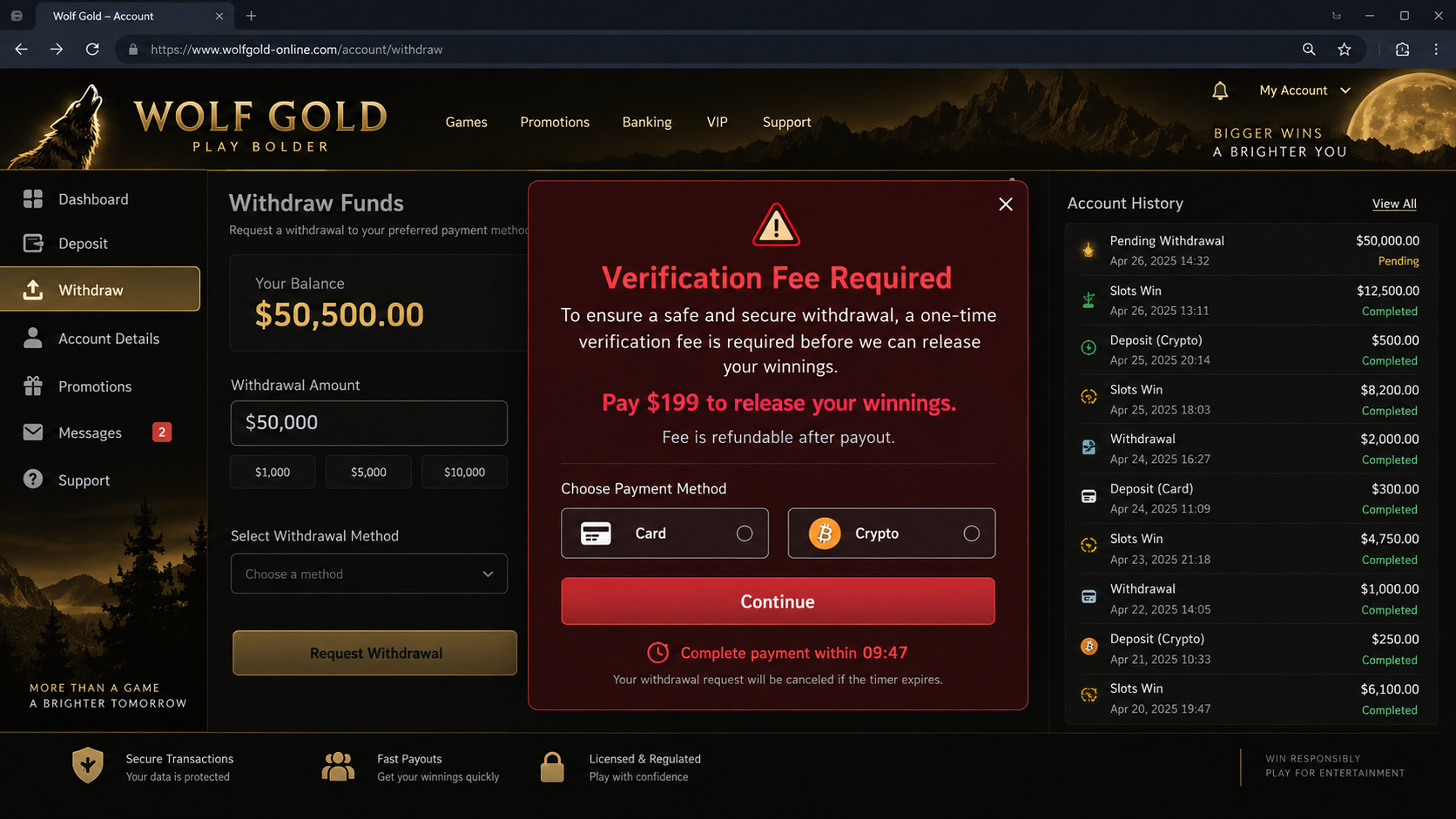
After registration, the site may award a bonus or generate rapid wins. A dashboard can display $50,500 or another impressive figure.
Numbers inside an unlicensed webpage are not proof of money held for the user. The operator can change a database value without funding any payout.
The illusion becomes profitable when the visitor is asked to pay a verification, processing, tax, or release fee before withdrawing.
An important distinction about the name Wolf Gold
Pragmatic Play has a legitimate slot title called Wolf Gold. The deceptive campaign investigated here is not evidence that the unrelated game provider runs this scam.
Fraudsters frequently choose names resembling existing games, casinos, or entertainment products. Search results then mix the imitation with genuine references.
Ads claim public figures support a new or secret casino.
A small deposit is framed as required by law or needed for activation.
The interface shows unusually fast winnings and a large account balance.
Withdrawal requires another payment before funds can supposedly be released.
Each paid fee may be followed by a new obstacle.
The examined funnel used wolf-play.online, but that address can vanish. Recognition depends on the sequence, not one domain.
Is Wolf Gold Casino Real?
The scam pages can look functional, yet appearance is not licensing. A working deposit button and animated slot reels do not establish a legitimate gambling operator.
We found no reliable support for the campaign’s claimed celebrity endorsements, guaranteed outcomes, or assertion that a $20 deposit protects the player from loss.
Legitimate gambling always involves risk. A casino claiming there is no possibility of losing contradicts the basic mathematics and regulation of real wagering.
A lawful operator normally identifies its company, gambling license, regulator, jurisdiction, responsible-gaming controls, withdrawal policy, and age restrictions in verifiable form.
A license number printed in a footer means little unless it matches the named company in the regulator’s own public register.
The fraud becomes unmistakable when withdrawal depends on sending fresh money. Genuine platforms deduct legitimate fees from a balance or explain them before play.
How the Wolf Gold Casino Scam Works
Step 1: A sensational social ad stops the scroll
The advertisement may announce a revolutionary casino supposedly created or endorsed by a famous entrepreneur. Luxury imagery and winning comments create immediate excitement.
Some versions imply that media companies tried to suppress the opportunity. That conspiracy angle makes missing mainstream coverage seem like further proof.
Engagement counters and comments can be fabricated, purchased, or copied. A busy comment section is not independent verification of payouts.
Step 2: A public figure is made to appear involved
The page may use a stolen photograph, edited television clip, artificial voice, or invented quotation. Modern tools can produce persuasive material from publicly available footage.
Look for mismatched lip movement, unusual pauses, shifting facial details, generic captions, or a claim absent from the person’s verified accounts.
Never confirm an endorsement by clicking more links inside the same advertisement. Search the public figure’s official channels and reputable news coverage separately.
Step 3: The landing page removes normal gambling risk
The visitor is told that special algorithms, promotional credits, regulatory rules, or influential investors make losses impossible or highly unlikely.
One documented pitch said a $20 deposit was required by American law. That invented explanation turns a payment request into something that sounds mandatory.
Real laws do not require consumers to send money to an unknown casino before receiving a celebrity-backed promotional balance.
Step 4: Registration captures identity and contact details
The form may request a name, email, telephone number, date of birth, address, and password before revealing withdrawal conditions.
Those details can support repeated calls, targeted gambling offers, account recovery attacks, or resale to other fraud groups.
Using a familiar password creates broader danger. The operator can test that combination against email, shopping, and financial accounts.
Step 5: A small deposit changes the relationship
The first payment is deliberately modest, often around $20. It proves the victim’s card or cryptocurrency wallet works and creates psychological commitment.
After paying once, leaving means accepting that the deposit is gone. Continuing seems like the only route to recover it and collect the displayed winnings.
Cryptocurrency is especially attractive to scammers because transfers are difficult to reverse and can be moved rapidly through multiple addresses.
Step 6: The account appears to win dramatically
The site may simulate spins, credit a welcome bonus, or simply display a large balance. Results can be scripted independently of any fair gaming system.
A visible transaction history does not prove genuine play. Every entry can be generated by the same code that renders the dashboard.
The victim is encouraged to imagine what the money will buy before encountering any real withdrawal test.
Step 7: Withdrawal triggers an advance-fee demand
When the player requests payment, the system introduces a verification fee, tax, insurance charge, liquidity deposit, or anti-money-laundering requirement.
The fee might be $199 while the fake balance shows $50,500. That comparison makes another payment appear rational.
Scammers insist the fee cannot be taken from the balance because the displayed balance is not real money under their control.
Step 8: Each payment creates another barrier
After one fee is paid, the site may demand identity validation, wallet activation, cross-border tax, account upgrading, or a final transfer charge.
The supposed winnings remain one payment away. That moving finish line is the defining behavior of an advance-fee fraud.
Eventually, support stops answering, the account is locked, or the website disappears. A new domain can relaunch the same artwork under another casino name.
Why the On-Screen Balance Is Not Evidence
A bank balance represents a claim against a regulated financial institution. A number on an anonymous casino webpage may represent nothing beyond website text.
Scam dashboards often include deposit history, timestamps, game rounds, support chat, identity badges, and withdrawal status. Detail makes the fiction feel operational.
Ask whether any independent party confirms custody of funds. A blockchain deposit proves money entered an address, not that the displayed winnings exist.
Likewise, a card charge proves the merchant collected payment. It does not validate the games, license, bonus, or ability to pay winners.
Small early withdrawals can also be strategic. Some schemes pay a modest amount to build confidence before encouraging a much larger deposit.
Never send money to unlock money. Taxes and legitimate compliance checks are not paid through gift cards, personal wallets, or hurried crypto transfers to support agents.
How to Verify an Online Casino
Start with the legal operator name, not the marketing brand. The terms should identify a registered entity and the jurisdiction responsible for gambling activity.
Visit the regulator’s website independently and search its license register. Confirm that the exact domain and company appear together.
Check whether the casino accepts players in your location. A site offering unrestricted access everywhere may be ignoring local licensing rules.
Read the withdrawal policy before depositing. Look for wagering requirements, identity checks, processing limits, excluded payment methods, and bonus restrictions.
Search for the domain’s age, archived versions, and ownership history. A brand claiming years of success from a recently registered address warrants suspicion.
Test support with specific licensing questions. Generic assurances about “international certification” do not replace a verifiable regulator and registration number.
Remember that a familiar game title does not authenticate the operator. Scammers can copy screenshots and name genuine software providers without permission.
Why Victims Keep Paying After the First Fee
The displayed jackpot changes the scale of every later decision. A $199 fee feels small when the screen promises $50,500.
That comparison is artificial, but emotionally powerful. The victim evaluates the fee against fictional winnings instead of money already lost.
Support agents reinforce urgency by announcing deadlines, expiring verification, or a supervisor’s special approval. Time pressure prevents consultation with someone independent.
They may also praise persistence and describe the victim as unusually lucky. Flattery converts skepticism into fear of abandoning a rare opportunity.
After multiple payments, sunk-cost thinking becomes stronger. Walking away feels like causing the loss, although further transfers cannot make the balance genuine.
Scammers sometimes allow a tiny payout first. That controlled payment trains the victim to believe larger withdrawals require only stricter compliance.
Requests can become more personal over time. An agent may discuss family goals, debt, medical expenses, or retirement plans to shape new pressure.
Secrecy is another tool. The victim may be told that banks misunderstand gambling profits or relatives will jeopardize confidential access.
Breaking that isolation is protective. Show the entire conversation to a trusted person who has no emotional investment in the promised balance.
Write down money actually sent and money actually received. Exclude every figure visible only inside the casino dashboard.
That simple accounting often reveals the truth: the only verified cash flow travels from the player toward the operator.
Stopping is not forfeiting a fortune. It prevents an invented fortune from extracting another real payment.
Do not negotiate for a reduced release charge. A smaller fee still rewards the deception and confirms that more pressure may succeed.
If an agent becomes threatening, end contact and preserve the messages. Legitimate compliance departments do not intimidate customers into funding withdrawals.
Emotional recovery may take longer than financial reporting. Professional counseling or a fraud-victim support group can help without judgment.
Company, Address, and Fulfillment Checks
No clear operator means no accountable casino
A trustworthy gambling site tells players which company holds their deposits and owes their withdrawals. A logo alone cannot enter contracts or answer complaints.
If the legal entity changes across terms, payment pages, and support messages, stop before providing funds or identity documents.
Virtual addresses do not establish operations
An impressive office address may belong to a mailbox provider, formation agent, residence, or unrelated business. Search the suite and compare public records.
For remote gambling, the critical address is the one tied to the licensed operator in the regulator’s database, not a decorative contact page.
Support numbers can be part of the trap
Fraudulent agents may answer quickly while deposits are possible, then become evasive during withdrawal. Responsiveness alone does not prove legitimacy.
Never grant remote device access to a casino representative. Do not share one-time codes, wallet seed phrases, or screen images containing financial details.
There is no product warehouse to blame
This scheme delivers digital theater rather than physical merchandise. The operational chain may include ad buyers, domain registrars, payment processors, and crypto wallets.
Identifying one service provider does not prove it knowingly joined the fraud. Preserve transaction identifiers so investigators can follow the correct payment path.
Warning Signs That Should End the Conversation
A celebrity supposedly guarantees a casino, gambling system, or effortless income opportunity.
The advertisement promises players cannot lose or will receive a fixed return.
A $20 deposit is falsely described as a legal requirement.
The casino displays huge winnings almost immediately after registration.
Withdrawal depends on paying a separate verification, tax, or unlocking fee.
Support requests cryptocurrency, gift cards, or transfers to a personal account.
The license cannot be matched to the exact domain in an official register.
The operator pressures the victim to keep the opportunity secret.
One warning may justify additional checking. Several appearing together indicate that continuing will probably increase the loss.
Stop communicating before confronting the operator. Arguments often reveal which emotional pressure might extract one final payment.
What to Do if You Paid the Wolf Gold Casino
Stop every new payment. Ignore claims that one final fee will unlock the balance. Advance-fee demands usually multiply after compliance.
Capture the account evidence. Save the URL, advertisements, balance, deposit history, withdrawal denial, chat logs, emails, and payment instructions.
Contact the payment provider. Ask the card issuer, bank, exchange, or wallet service about fraud procedures and possible transaction holds.
Protect submitted identity documents. If you uploaded identification, consider a credit freeze or fraud alert and watch for new accounts.
Change exposed passwords. Use unique replacements, secure the email account first, and enable strong multifactor authentication.
Reject recovery agents. Anyone promising guaranteed retrieval for an upfront fee may be targeting the victim a second time.
Check the device. Remove remote-access tools, run Malwarebytes, and use AdGuard to limit malicious casino advertisements and redirects.
Report payment identifiers. Provide wallet addresses, transaction hashes, card descriptors, telephone numbers, and domains to appropriate authorities.
Discuss the loss with someone trusted. Shame helps fraudsters isolate victims. A calm second person can interrupt further pressure.
Is Your Device Infected? Run a Free Malware Scan
Slow performance, constant pop-ups, or strange behavior? These are classic signs of a malware infection. The fastest way to find out is to scan your device with Malwarebytes Anti-Malware Free — one of the most trusted malware removal tools available.
The free version detects and removes the most common threats, including:
Adware — the cause of those annoying pop-ups
Browser hijackers — unwanted redirects and changed homepages
Trojans and spyware — hidden programs stealing your data
Potentially unwanted programs (PUPs) — software you never asked for
👉 Select your device below — Windows, Mac, or Android — then follow the simple steps to download Malwarebytes, scan your system, and remove any threats it finds. The whole process takes about 5 minutes.
Malwarebytes for WindowsMalwarebytes for MacMalwarebytes for Android
Run a Malware Scan with Malwarebytes for Windows
Malwarebytes is one of the most popular and trusted anti-malware tools for Windows — and it’s completely free for removing infections. It catches threats that many antivirus programs miss, including adware, browser hijackers, and trojans. Follow the steps below to scan and clean your PC in just a few minutes.
Download Malwarebytes
Click the button below to download the latest version of Malwarebytes for Windows from the official source. The free version is all you need — it will scan your computer and remove adware, browser hijackers, and other malicious software at no cost.
(The link opens in a new page where your download will start)
Install Malwarebytes
When the download finishes, open your Downloads folder and double-click the MBSetup file. If Windows shows a User Account Control pop-up, click “Yes” to allow the installation.
Follow the On-Screen Prompts to Install Malwarebytes
The setup wizard will walk you through a few quick screens:
Choose where you’re installing the program — “Personal Computer” or “Work Computer” — then click Next.
Malwarebytes will now install on your device. This usually takes under a minute.
When installation is complete, the “Welcome to Malwarebytes” screen will open automatically.
On the final screen, click Open Malwarebytes to launch the program.
Enable “Scan for Rootkits”
Before scanning, turn on rootkit detection so Malwarebytes can find even the most hidden threats. Click the Settings gear icon on the left side of the screen.
In the settings menu, find “Scan for rootkits” and click the toggle so it turns blue.
Done? Click “Dashboard” in the left pane to return to the main screen.
Start the Scan
Click the blue Scan button. Malwarebytes will automatically update its virus database and start checking your computer for malware.
Wait for the Scan to Finish
The scan checks your entire system for browser hijackers and other malicious programs, so it can take several minutes. Feel free to do something else — just check back occasionally to see the progress.
Quarantine the Detected Threats
When the scan is done, you’ll see a list of everything Malwarebytes found — malware, adware, and potentially unwanted programs. Click the “Quarantine” button to remove all of them at once.
Malwarebytes will now remove the malicious files and registry entries and move them safely into quarantine.
Restart Your Computer
Some threats can only be fully removed after a reboot. If Malwarebytes asks you to restart, click Yes. Once you’re logged back in, your PC is clean and you can continue with the next steps in this guide.
When the scan finishes, click Quarantine to remove everything Malwarebytes found. That’s it — your Windows PC is now clean of trojans, adware, and other malware, and should be back to running smoothly.
If your current antivirus allowed this malicious program on your computer, you may want to consider purchasing Malwarebytes Premium to protect against these types of threats in the future. If you are still having problems with your computer after completing these instructions, then please follow one of the steps:
Malwarebytes for Mac is a free on-demand scanner that removes the malware other security software tends to miss — adware, browser hijackers, and unwanted programs included. Cleaning an infected Mac with Malwarebytes has always been completely free, and it’s our go-to recommendation. Follow the steps below to scan and clean your Mac in just a few minutes.
Download Malwarebytes for Mac
Click the button below to download the latest version of Malwarebytes for Mac.
When the download finishes, open your Downloads folder and double-click the setup file to begin the installation.
Follow the On-Screen Prompts to Install Malwarebytes
The Malwarebytes for Mac Installer will guide you through a few quick screens. Click “Continue” and keep following the prompts until the installation completes.
When the installation is complete, Malwarebytes opens to the Welcome to Malwarebytes screen. Click “Get started“.
Select “Personal Computer” or “Work Computer”
Malwarebytes will ask what type of computer you’re installing it on. Click either Personal Computer or Work Computer, whichever applies.
Start the Scan
Click the “Scan” button. Malwarebytes will automatically update its detection database and begin checking your Mac for malware.
Wait for the Scan to Finish
Malwarebytes will scan your Mac for adware, browser hijackers, and other malicious programs. This can take a few minutes, so feel free to do something else — just check back occasionally to see the progress.
Quarantine the Detected Threats
When the scan is done, you’ll see a list of everything Malwarebytes found. Click the “Quarantine” button to remove all the threats at once.
Restart Your Mac
Malwarebytes will now remove all the malicious files it found. Some threats can only be fully removed after a reboot — if Malwarebytes asks you to restart, allow it. Once you’re logged back in, your Mac is clean.
Once the scan is done, remove every threat it detected. Your Mac is now free of adware, rogue browser extensions, and other potentially harmful software.
If your current antivirus allowed a malicious program on your computer, you might want to consider purchasing the full-featured version of Malwarebytes Anti-Malware to protect against these types of threats in the future. If you are still experiencing problems while trying to remove a malicious program from your computer, please ask for help in our Mac Malware Removal Help & Support forum.
Run a Malware Scan with Malwarebytes for Android
Malwarebytes for Android automatically detects and removes dangerous threats like malware and ransomware so you don’t have to worry about your most-used device being compromised. Aggressive detection of adware and potentially unwanted programs keeps your Android phone or tablet running smooth.
Download Malwarebytes for Android.
You can download Malwarebytes for Android by clicking the link below.
In the Google Play Store, tap “Install” to install Malwarebytes for Android on your device.
When the installation process has finished, tap “Open” to begin using Malwarebytes for Android. You can also open Malwarebytes by tapping on its icon in your phone menu or home screen.
Follow the on-screen prompts to complete the setup process
When Malwarebytes will open, you will see the Malwarebytes Setup Wizard which will guide you through a series of permissions and other setup options. This is the first of two screens that explain the difference between the Premium and Free versions. Swipe this screen to continue. Tap on “Got it” to proceed to the next step. Malwarebytes for Android will now ask for a set of permissions that are required to scan your device and protect it from malware. Tap on “Give permission” to continue. Tap on “Allow” to permit Malwarebytes to access the files on your phone.
Update database and run a scan with Malwarebytes for Android
You will now be prompted to update the Malwarebytes database and run a full system scan.
Click on “Update database” to update the Malwarebytes for Android definitions to the latest version, then click on “Run full scan” to perform a system scan.
Wait for the Malwarebytes scan to complete.
Malwarebytes will now start scanning your phone for adware and other malicious apps. This process can take a few minutes, so we suggest you do something else and periodically check on the status of the scan to see when it is finished.
Click on “Remove Selected”.
When the scan has been completed, you will be presented with a screen showing the malware infections that Malwarebytes for Android has detected. To remove the malicious apps that Malwarebytes has found, tap on the “Remove Selected” button.
Restart your phone.
Malwarebytes for Android will now remove all the malicious apps that it has found. To complete the malware removal process, Malwarebytes may ask you to restart your device.
After the scan, tap Remove Selected to delete all detected threats. Your Android phone is now clean — no more malicious apps, adware, or browser redirects.
If your current antivirus allowed a malicious app on your phone, you may want to consider purchasing the full-featured version of Malwarebytes to protect against these types of threats in the future. If you are still having problems with your phone after completing these instructions, then please follow one of the steps:
Restore your phone to factory settings by going to Settings > General management > Reset > Factory data reset.
Now that your device is clean, keep it that way. Most infections start with a malicious ad or a fake download button — so blocking them at the source is your best defense.
We recommend AdGuard, which blocks malicious ads, phishing pages, and dangerous redirects before they can reach you.
We found no credible evidence supporting those campaign claims. Treat celebrity casino promotions as fabricated unless verified through the person’s authentic public channels.
Is Pragmatic Play connected to this scam?
No evidence reviewed connects the legitimate provider’s Wolf Gold slot to the deceptive wolf-play.online campaign. Fraudsters can borrow existing product names.
Why does my account show $50,500?
The operator controls the dashboard and can display any figure. A screen balance is not proof that withdrawable funds exist.
Should I pay the withdrawal verification fee?
No. Sending another payment usually produces another invented barrier. Contact the original payment provider and document the demand instead.
Can cryptocurrency sent to the casino be reversed?
Blockchain transfers are generally irreversible, but report the wallet and transaction hash promptly to the exchange, wallet provider, and law enforcement.
How do I recognize the same scheme under another name?
Watch for celebrity promotion, guaranteed winnings, a token first deposit, instant large balances, and fees required before withdrawal.
The Bottom Line
The Wolf Gold campaign is an advance-fee casino trap built from borrowed fame, simulated winnings, and a withdrawal that always requires more money.
Do not confuse it with unrelated legitimate games. Verify operators through official regulators, and never pay a fee to release a balance visible only on-screen.
10 Rules to Avoid Online Scams
Here are 10 practical safety rules to help you avoid malware, online shopping scams, crypto scams, and other online fraud. Each tip includes a quick “if you already got hit” action.
Stop and verify before you click, log in, download, or pay.
Most scams win by creating urgency. Verify using a trusted method: type the website address yourself, use the official app, or call a known number (not the one in the message).
If you already clicked: close the page, do not enter passwords, and run a malware scan.
Keep your operating system, browser, and apps updated.
Updates patch security holes used by malware and malicious ads. Turn on automatic updates where possible.
If you saw a scary “update now” pop-up: close it and update only through your device settings or the official app store.
Use layered protection: antivirus plus an ad blocker.
Antivirus helps block malware. An ad blocker reduces scam redirects, phishing pages, and malvertising.
If your browser is acting weird: remove unknown extensions, reset the browser, then run a full scan.
Install apps, software, and extensions only from official sources.
Avoid cracked software, “keygens,” and random downloads. During installs, choose Custom/Advanced and decline bundled offers you do not recognize.
If you already installed something suspicious: uninstall it, restart, and scan again.
Treat links and attachments as untrusted by default.
Phishing often impersonates delivery services, banks, and popular brands. If it is unexpected, do not open attachments or log in through the message.
If you entered credentials: change the password immediately and enable 2FA.
Shop safely: research the store, then pay with protection.
Be cautious with brand-new stores, “closing sale” stories, and prices that make no sense. Prefer credit cards or PayPal for dispute options. Avoid wire transfers, gift cards, and crypto payments.
If you already paid: contact your card issuer or PayPal quickly to dispute the transaction.
Crypto rule: never pay a “fee” to withdraw or recover money.
Common patterns include fake profits, then “tax,” “gas,” or “verification” fees. Another is a “recovery agent” who demands upfront crypto.
If you already sent crypto: stop paying, save evidence (wallet addresses, TXIDs, chats), and report the scam to the platform used.
Secure your accounts with unique passwords and 2FA (start with email).
Use a password manager and unique passwords for every account. Enable 2FA using an authenticator app when possible.
If you suspect an account takeover: change passwords, sign out of all devices, and review recent logins and recovery settings.
Back up important files and keep one backup offline.
Backups protect you from ransomware and device failure. Keep at least one backup on an external drive that is not always connected.
If you suspect infection: do not connect backup drives until the system is clean.
If you think you are a victim: stop losses, document evidence, and escalate fast.
Move quickly. Speed matters for disputes, account recovery, and limiting damage.
Stop payments and contact: do not send more money or respond to the scammer.
Call your bank or card issuer: block transactions, replace the card if needed, and start a dispute or chargeback.
Secure your email first: change the email password, enable 2FA, and remove unfamiliar recovery options.
Secure other accounts: change passwords, enable 2FA, and log out of all sessions.
Scan your device: remove suspicious apps or extensions, then run a full malware scan.
Save evidence: screenshots, emails, order pages, tracking pages, wallet addresses, TXIDs, and chat logs.
Report it: to the payment provider, marketplace, social platform, exchange, or wallet service involved.
These rules are intentionally simple. Most online losses happen when decisions are rushed. Slow down, verify independently, and use payment methods and account controls that give you recourse.
Hello! I'm Lapain Epuran, your go-to source for detailed and honest product reviews. From tech gadgets to miracle cures, I provide insights to help you make informed choices. Join me as we discover what's truly worth your time and money.