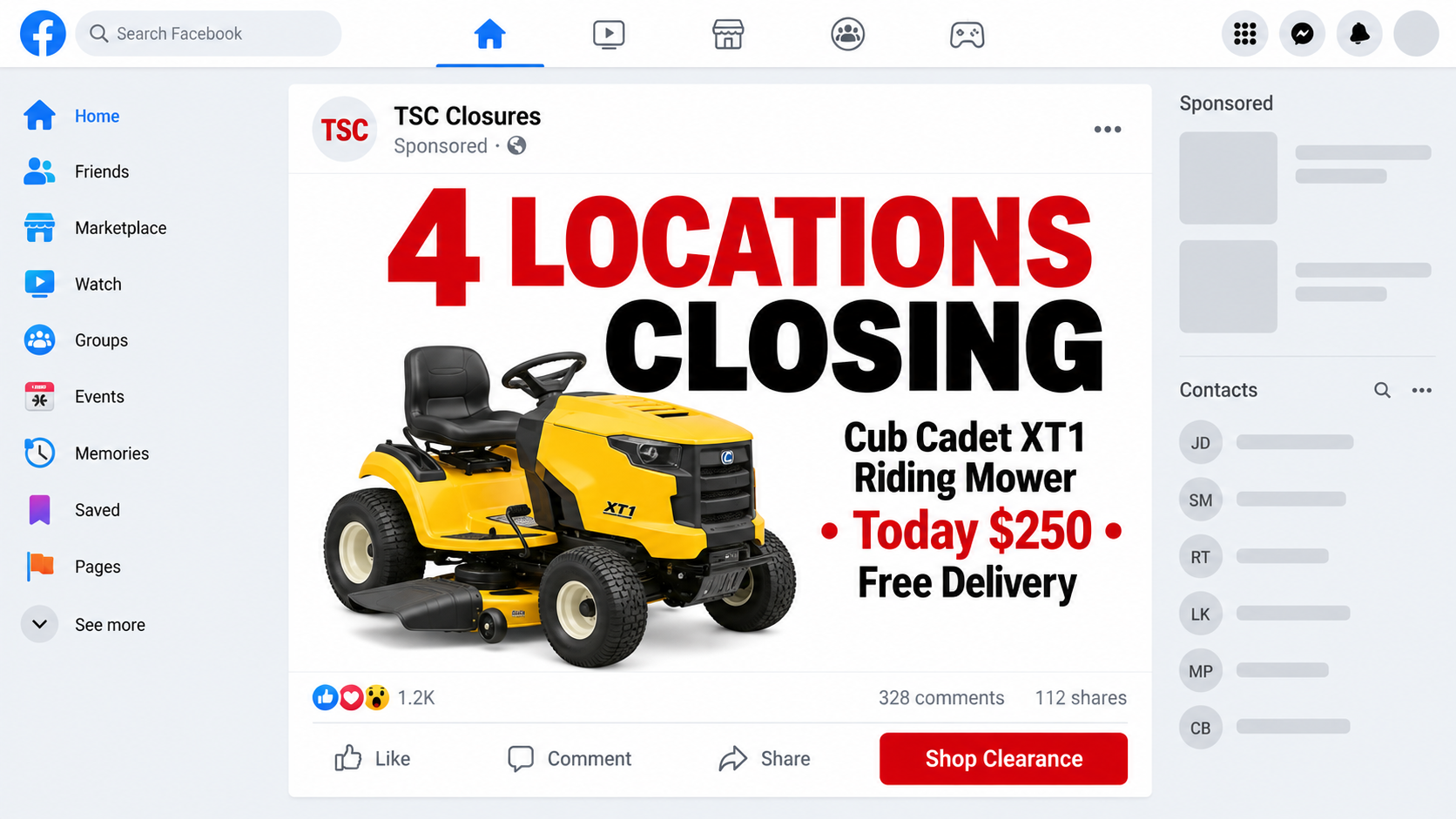
A $250 riding mower sounds like the kind of clearance bargain people tell their neighbors about before the remaining stock disappears.
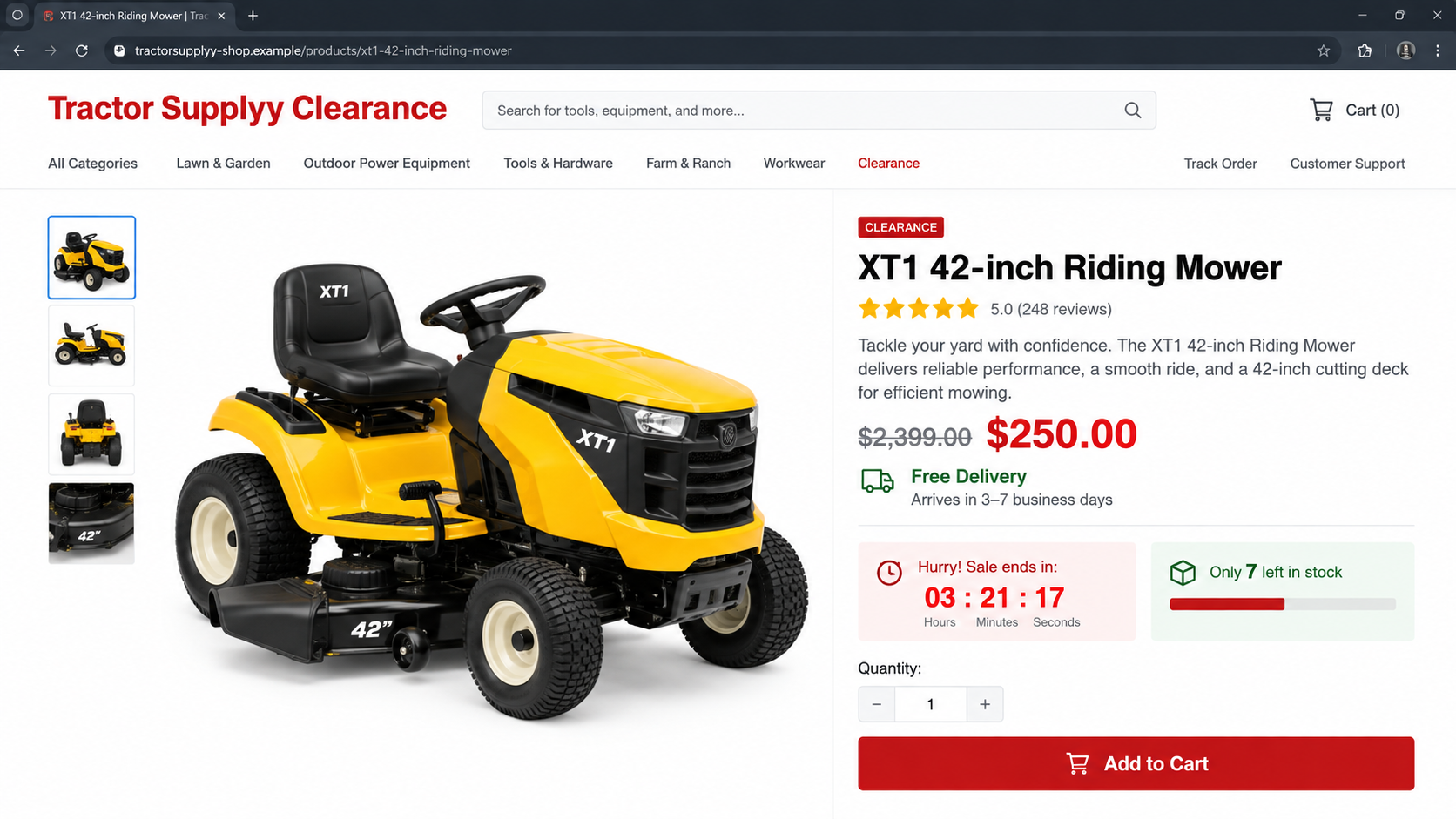
The advertisement supplies a closing-store explanation, familiar colors, and a believable product photograph. The web address tells a very different story.
Overview
A fake closure sale explains an impossible price
The Tractor Supply mower giveaway scam claims local stores are closing and must clear Cub Cadet riding mowers for about $250.
A genuine mower of the pictured type normally costs far more. The closure story gives shoppers a reason to suspend that comparison.
Neither Tractor Supply nor Cub Cadet should be blamed for the fraudulent page. Their names and product images are copied without authorization.
The store address is a deliberate imitation
One documented campaign used tractorssupplyy.com, adding letters to resemble the real retailer. Similar campaigns can use different misspellings, paths, or newly registered domains.
The fake site reproduces retail colors, navigation, product cards, reviews, and checkout language. A convincing page design does not establish ownership.
Free delivery makes the offer even less plausible. Shipping a heavy riding mower usually requires specialized freight, scheduling, and substantial cost.
The objective is payment and personal data
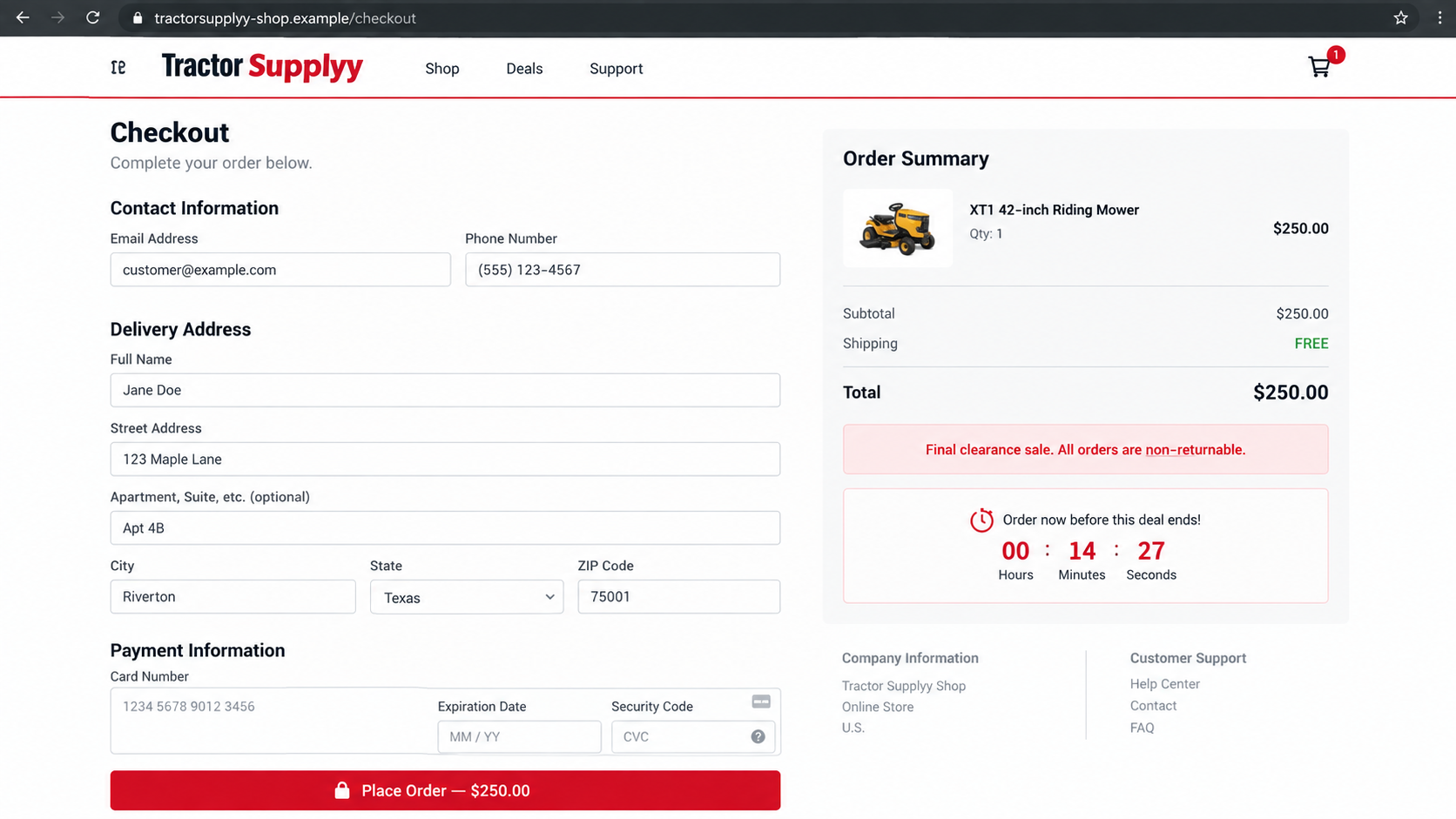
Shoppers are pushed toward a card form before they can investigate. The site may charge the advertised amount, attempt additional debits, or retain card data.
No mower may ship. Victims can instead receive false tracking, a tiny substitute, or excuses that extend beyond the dispute window.
A social page announces urgent store closures without official confirmation.
The domain imitates Tractor Supply but is not the retailer’s address.
A high-value mower is offered at an economically implausible price.
Free nationwide delivery ignores the reality of freight shipping.
Terms, ownership, support, and return details are missing or unreliable.
This is not a secret clearance channel. It is a retail impersonation scheme built to collect money and information before the cloned storefront disappears.
Is the $250 Tractor Supply Mower Deal Real?
No credible retailer can routinely sell new riding mowers for a fraction of normal cost, absorb freight delivery, and remain financially viable.
Clearance discounts do happen, including on floor models or damaged boxes. They remain visible through official store systems and involve real inventory at named locations.
A Facebook page called TSC Closures or a similar label does not become official by using a retailer’s logo and photographs.
Social platforms allow page names that resemble businesses. Check page transparency, creation date, prior names, contact information, and destination domain.
The extra letters in tractorssupplyy.com are a classic typosquatting signal. Fraudsters depend on readers recognizing the overall shape instead of inspecting each character.
The legitimate retailer’s website should be opened independently. Search the item number there or telephone a local store using its verified listing.
If staff cannot find the closure promotion, do not trust a comment claiming that another shopper received the mower.
Fraudulent pages can delete skeptical comments, post their own endorsements, and show fabricated order counters. None creates real inventory.
How the Tractor Supply Mower Giveaway Scam Works
Step 1: A fake social page announces several store closures
The advertisement claims four locations, a regional warehouse, or the entire chain must liquidate stock immediately.
Closure language makes the price seem temporary rather than impossible. It also explains why buyers supposedly cannot wait for normal verification.
The post may ask users to comment, share, or tag friends. Engagement expands reach and places endorsements from familiar contacts beneath the offer.
Actual business closures are usually reported by the company, local news, landlords, or public notices. A lone advertising page is poor evidence.
Step 2: Borrowed photographs make the inventory look tangible
The post displays a Cub Cadet mower in a store, warehouse, or clean product image. Those photographs can be copied from legitimate listings.
A precise model description increases credibility. The scammer does not need to own the mower to repeat specifications found elsewhere.
Look for mismatched backgrounds, cropped watermarks, inconsistent prices, and text that refers to another country or product.
Step 3: The link opens a typosquatted storefront
The destination resembles Tractor Supply but contains added letters, substituted characters, an unusual ending, or an unrelated path.
Mobile browsers often shorten the address bar. Shoppers see the page logo and product before noticing the domain.
HTTPS does not prove legitimacy. Encryption protects data in transit, including data sent securely to a scammer.
Step 4: A cloned product page manufactures confidence
The site copies menus, category labels, delivery icons, warranty badges, and reviews. These familiar elements reduce the feeling of leaving the real retailer.
Inventory numbers and recent-purchase pop-ups may update automatically. They are simple scripts, not access to a warehouse system.
Review photographs can be stolen from marketplaces or other products. Search distinctive sentences and images before treating them as customer evidence.
Step 5: The price and delivery promise force a quick decision
A timer, low-stock warning, or final closure date tells buyers they will lose thousands in savings by checking first.
Free delivery removes the last visible cost. In reality, moving a riding mower requires weight, dimensions, destination access, and freight coordination.
The absence of delivery questions is itself a warning. A legitimate seller needs more than a standard parcel address for equipment of this size.
Step 6: Checkout collects identity and card details
The form requests a full name, address, telephone number, email, and payment information. It may display familiar card symbols and generic security seals.
Some fraudulent stores process the payment through an unrelated merchant. Others capture the card and report that authorization failed, encouraging another attempt.
Repeated attempts can expose multiple cards. Stop after an unexplained failure and call the issuer rather than trying a different payment method.
Step 7: False tracking delays complaints
The customer may receive an order number and a tracking link that shows label created, processing, or international movement.
A tiny package can be mailed to generate delivered status. The shipment might contain a tool, accessory, or worthless object instead of a mower.
Tracking can also belong to another address in the same area. Ask the carrier for written confirmation of package weight and destination compatibility.
Step 8: The website disappears or denies the refund
Support may blame customs, freight congestion, address errors, or warehouse processing while the card dispute deadline approaches.
The return address can belong to a fulfillment center that never handled the advertised mower. Sending a substitute back may cost more than it is worth.
Once complaints spread, the operator can abandon the domain and copy the store under another spelling, retailer, or clearance story.
Why Riding Mowers Are Effective Bait
Riding mowers are expensive, recognizable, and seasonal. A large discount can reach homeowners precisely when they expect equipment promotions.
The product is also difficult to verify remotely. Buyers cannot inspect a serial number, engine, deck, or delivery preparation through a social advertisement.
A closure narrative makes imperfect support feel plausible. Victims may excuse missing telephone service because they imagine overwhelmed liquidation staff.
Free freight sounds like another clearance concession. Many shoppers have limited experience with equipment shipping and cannot estimate its real cost.
The scam exploits local sharing. A trusted friend may repost the advertisement without buying, unintentionally supplying social proof.
Comments such as mine arrived or only two left can be posted by fake profiles. Look for account history rather than isolated enthusiasm.
Seasonal timing encourages urgency. A homeowner with growing grass may accept more risk to avoid waiting for another sale.
The exact brand can change. Similar fake stores advertise generators, sheds, grills, tool chests, tractors, snowblowers, and patio furniture.
The Freight Details Expose the False Store
A riding mower is not an ordinary doorstep parcel. The seller must know its crated weight, dimensions, fuel condition, battery preparation, and unloading requirements.
Residential delivery can require a liftgate, appointment, accessible roadway, and adult signature. Some destinations also need terminal pickup or additional rural service.
A legitimate listing explains whether the machine arrives assembled, whether fluids are installed, and who handles damage discovered during delivery.
The fake store usually asks only for the same address fields used for a shirt. That mismatch reveals there is no credible freight plan.
Carrier names deserve verification. Contact the company through its official website and provide the tracking number without using links supplied by the seller.
Ask whether the shipment weight matches a mower and whether the destination postal code matches yours. Privacy rules may limit details, but obvious mismatches can be documented.
A tracking event in your town is not enough. Scammers sometimes reuse valid tracking for another customer or mail a lightweight object nearby.
Photograph any parcel before opening it. Capture the label, dimensions, scale weight, contents, and packaging in one continuous record where practical.
Refuse severely damaged freight only after understanding the carrier’s procedure. With a fake seller, accepting or refusing a token parcel can affect later evidence.
Keep delivery cameras and carrier notices. They can show that no freight truck or mower ever arrived on the date claimed by the merchant.
How to Check a Mower Listing Before Paying
Type the retailer’s official address yourself and search for the exact model. Do not use a sponsored link to perform the verification.
Call a local store through the number shown on the official store locator. Ask whether the location is closing and whether the online price is recognized.
Compare normal prices across established dealers. A discount exceeding ordinary margins needs a specific, independently verifiable reason.
Inspect the web address one character at a time. Watch for extra letters, hyphens, reversed words, uncommon endings, and subdomains before the real-looking text.
Search the domain age and company name. A recently created store claiming years of reviews deserves immediate skepticism.
Read the shipping policy for freight weight, delivery appointment, curbside terms, assembly, and damage inspection. Generic parcel language does not fit a mower.
Check the return policy. Sending heavy equipment internationally at the buyer’s expense would make a refund effectively impossible.
Use a credit card when dealing with a verified merchant. Avoid wire transfers, cryptocurrency, gift cards, payment applications to individuals, and bank transfers.
Take screenshots of the listing, total, seller, policy, and promised date. A fake store can edit its page after purchase.
Company, Address, and Fulfillment Checks
The logo is not the legal seller
Find the entity accepting payment in the terms and checkout. A copied Tractor Supply header does not identify who controls the order.
Compare the company with the card descriptor and confirmation. Unrelated names or missing registration details are major warning signs.
The address may belong to somebody else
Search and map the address before paying. Fraudulent stores commonly copy a real warehouse, dealership, house, mailbox, or unrelated business.
Call the business through an independently located number. Never assume an address printed in the fake store proves inventory exists there.
Phone and email support may be theatrical
Ask for the mower’s serial number, freight carrier, pickup option, warranty registration, and exact stock location. A legitimate equipment seller can answer.
Generic replies, messaging-only support, and telephone numbers used by multiple stores suggest the operator cannot provide real after-sales service.
A fulfillment parcel cannot contain a mower
If tracking shows a lightweight international packet, it is not the advertised riding mower. Save the recorded weight and delivery evidence.
Do not let a token shipment close the dispute. Explain the difference between the ordered equipment and whatever the parcel contained.
Warning Signs of a Fake Equipment Store
The store exists only through a social advertisement or newly created page.
The domain is a misspelling of a recognized retailer.
Every expensive product has the same extraordinary discount.
Heavy equipment includes free parcel-style delivery everywhere.
The page lacks a verifiable dealer address and telephone number.
Company names differ between policies, checkout, and the card statement.
Reviews appear only on the seller’s own website.
The checkout requests irreversible payment or several repeated card attempts.
No single design flaw proves fraud, but this combination describes an operation with no believable path from warehouse to customer.
When the deal depends on preventing verification, walking away is not missing a bargain. It is avoiding a payment problem.
What to Do if You Fell Victim to the Tractor Supply Mower Scam
Save every detail immediately. Capture the advertisement, page transparency, domain, listing, checkout, terms, receipt, messages, tracking, and card descriptor before deletion.
Contact the card issuer now. Explain that a typosquatted retailer accepted payment for equipment that was never credibly available.
Ask about card replacement. The form may have captured full payment credentials even if the order later showed an error.
Document non-delivery or substitution. Save carrier weight, package dimensions, delivery photograph, label, contents, and any written destination confirmation.
Open the correct dispute. Describe counterfeit storefront, misrepresentation, non-delivery, or goods not as described, using the issuer’s accurate category.
Reject delay tactics. Do not let repeated processing, customs, or reshipping promises carry the transaction beyond dispute deadlines.
Protect reused accounts. Change any password submitted, enable multifactor authentication, and watch email for fake freight or refund messages.
Examine affected devices. Let Malwarebytes check anything downloaded by the fake store. AdGuard can block many repeat ads leading toward cloned clearance pages.
Report the impersonation. Notify Tractor Supply, Cub Cadet, the social platform, domain registrar, payment provider, and consumer-protection authority.
Is Your Device Infected? Run a Free Malware Scan
Slow performance, constant pop-ups, or strange behavior? These are classic signs of a malware infection. The fastest way to find out is to scan your device with Malwarebytes Anti-Malware Free — one of the most trusted malware removal tools available.
The free version detects and removes the most common threats, including:
Adware — the cause of those annoying pop-ups
Browser hijackers — unwanted redirects and changed homepages
Trojans and spyware — hidden programs stealing your data
Potentially unwanted programs (PUPs) — software you never asked for
👉 Select your device below — Windows, Mac, or Android — then follow the simple steps to download Malwarebytes, scan your system, and remove any threats it finds. The whole process takes about 5 minutes.
Malwarebytes for WindowsMalwarebytes for MacMalwarebytes for Android
Run a Malware Scan with Malwarebytes for Windows
Malwarebytes is one of the most popular and trusted anti-malware tools for Windows — and it’s completely free for removing infections. It catches threats that many antivirus programs miss, including adware, browser hijackers, and trojans. Follow the steps below to scan and clean your PC in just a few minutes.
Download Malwarebytes
Click the button below to download the latest version of Malwarebytes for Windows from the official source. The free version is all you need — it will scan your computer and remove adware, browser hijackers, and other malicious software at no cost.
(The link opens in a new page where your download will start)
Install Malwarebytes
When the download finishes, open your Downloads folder and double-click the MBSetup file. If Windows shows a User Account Control pop-up, click “Yes” to allow the installation.
Follow the On-Screen Prompts to Install Malwarebytes
The setup wizard will walk you through a few quick screens:
Choose where you’re installing the program — “Personal Computer” or “Work Computer” — then click Next.
Malwarebytes will now install on your device. This usually takes under a minute.
When installation is complete, the “Welcome to Malwarebytes” screen will open automatically.
On the final screen, click Open Malwarebytes to launch the program.
Enable “Scan for Rootkits”
Before scanning, turn on rootkit detection so Malwarebytes can find even the most hidden threats. Click the Settings gear icon on the left side of the screen.
In the settings menu, find “Scan for rootkits” and click the toggle so it turns blue.
Done? Click “Dashboard” in the left pane to return to the main screen.
Start the Scan
Click the blue Scan button. Malwarebytes will automatically update its virus database and start checking your computer for malware.
Wait for the Scan to Finish
The scan checks your entire system for browser hijackers and other malicious programs, so it can take several minutes. Feel free to do something else — just check back occasionally to see the progress.
Quarantine the Detected Threats
When the scan is done, you’ll see a list of everything Malwarebytes found — malware, adware, and potentially unwanted programs. Click the “Quarantine” button to remove all of them at once.
Malwarebytes will now remove the malicious files and registry entries and move them safely into quarantine.
Restart Your Computer
Some threats can only be fully removed after a reboot. If Malwarebytes asks you to restart, click Yes. Once you’re logged back in, your PC is clean and you can continue with the next steps in this guide.
When the scan finishes, click Quarantine to remove everything Malwarebytes found. That’s it — your Windows PC is now clean of trojans, adware, and other malware, and should be back to running smoothly.
If your current antivirus allowed this malicious program on your computer, you may want to consider purchasing Malwarebytes Premium to protect against these types of threats in the future. If you are still having problems with your computer after completing these instructions, then please follow one of the steps:
Malwarebytes for Mac is a free on-demand scanner that removes the malware other security software tends to miss — adware, browser hijackers, and unwanted programs included. Cleaning an infected Mac with Malwarebytes has always been completely free, and it’s our go-to recommendation. Follow the steps below to scan and clean your Mac in just a few minutes.
Download Malwarebytes for Mac
Click the button below to download the latest version of Malwarebytes for Mac.
When the download finishes, open your Downloads folder and double-click the setup file to begin the installation.
Follow the On-Screen Prompts to Install Malwarebytes
The Malwarebytes for Mac Installer will guide you through a few quick screens. Click “Continue” and keep following the prompts until the installation completes.
When the installation is complete, Malwarebytes opens to the Welcome to Malwarebytes screen. Click “Get started“.
Select “Personal Computer” or “Work Computer”
Malwarebytes will ask what type of computer you’re installing it on. Click either Personal Computer or Work Computer, whichever applies.
Start the Scan
Click the “Scan” button. Malwarebytes will automatically update its detection database and begin checking your Mac for malware.
Wait for the Scan to Finish
Malwarebytes will scan your Mac for adware, browser hijackers, and other malicious programs. This can take a few minutes, so feel free to do something else — just check back occasionally to see the progress.
Quarantine the Detected Threats
When the scan is done, you’ll see a list of everything Malwarebytes found. Click the “Quarantine” button to remove all the threats at once.
Restart Your Mac
Malwarebytes will now remove all the malicious files it found. Some threats can only be fully removed after a reboot — if Malwarebytes asks you to restart, allow it. Once you’re logged back in, your Mac is clean.
Once the scan is done, remove every threat it detected. Your Mac is now free of adware, rogue browser extensions, and other potentially harmful software.
If your current antivirus allowed a malicious program on your computer, you might want to consider purchasing the full-featured version of Malwarebytes Anti-Malware to protect against these types of threats in the future. If you are still experiencing problems while trying to remove a malicious program from your computer, please ask for help in our Mac Malware Removal Help & Support forum.
Run a Malware Scan with Malwarebytes for Android
Malwarebytes for Android automatically detects and removes dangerous threats like malware and ransomware so you don’t have to worry about your most-used device being compromised. Aggressive detection of adware and potentially unwanted programs keeps your Android phone or tablet running smooth.
Download Malwarebytes for Android.
You can download Malwarebytes for Android by clicking the link below.
In the Google Play Store, tap “Install” to install Malwarebytes for Android on your device.
When the installation process has finished, tap “Open” to begin using Malwarebytes for Android. You can also open Malwarebytes by tapping on its icon in your phone menu or home screen.
Follow the on-screen prompts to complete the setup process
When Malwarebytes will open, you will see the Malwarebytes Setup Wizard which will guide you through a series of permissions and other setup options. This is the first of two screens that explain the difference between the Premium and Free versions. Swipe this screen to continue. Tap on “Got it” to proceed to the next step. Malwarebytes for Android will now ask for a set of permissions that are required to scan your device and protect it from malware. Tap on “Give permission” to continue. Tap on “Allow” to permit Malwarebytes to access the files on your phone.
Update database and run a scan with Malwarebytes for Android
You will now be prompted to update the Malwarebytes database and run a full system scan.
Click on “Update database” to update the Malwarebytes for Android definitions to the latest version, then click on “Run full scan” to perform a system scan.
Wait for the Malwarebytes scan to complete.
Malwarebytes will now start scanning your phone for adware and other malicious apps. This process can take a few minutes, so we suggest you do something else and periodically check on the status of the scan to see when it is finished.
Click on “Remove Selected”.
When the scan has been completed, you will be presented with a screen showing the malware infections that Malwarebytes for Android has detected. To remove the malicious apps that Malwarebytes has found, tap on the “Remove Selected” button.
Restart your phone.
Malwarebytes for Android will now remove all the malicious apps that it has found. To complete the malware removal process, Malwarebytes may ask you to restart your device.
After the scan, tap Remove Selected to delete all detected threats. Your Android phone is now clean — no more malicious apps, adware, or browser redirects.
If your current antivirus allowed a malicious app on your phone, you may want to consider purchasing the full-featured version of Malwarebytes to protect against these types of threats in the future. If you are still having problems with your phone after completing these instructions, then please follow one of the steps:
Restore your phone to factory settings by going to Settings > General management > Reset > Factory data reset.
Now that your device is clean, keep it that way. Most infections start with a malicious ad or a fake download button — so blocking them at the source is your best defense.
We recommend AdGuard, which blocks malicious ads, phishing pages, and dangerous redirects before they can reach you.
Is Tractor Supply selling Cub Cadet mowers for $250?
Verify any exceptional price through the retailer’s official website or local store. A social page and misspelled domain do not represent Tractor Supply.
Could a store closure explain the low price?
Real liquidation exists, but it should be confirmed through official announcements, local reporting, and store staff. It does not excuse an imitation domain.
Why does the fake site offer free delivery?
Free delivery removes buyer hesitation. The promise ignores the substantial freight requirements of safely transporting a riding mower.
What if I received a tracking number?
Tracking proves only that something may have shipped. Compare carrier weight, dimensions, destination, and contents with the mower order.
Can Tractor Supply refund the payment?
The real retailer cannot reverse a payment processed by an impersonator. Contact the card issuer and actual payment merchant while reporting the fake store.
Will the scammers use my card again?
They may. Tell the issuer the card entered a fraudulent site, review transactions closely, and follow the issuer’s replacement recommendation.
The Bottom Line
The fake $250 Tractor Supply mower offer combines a closure story, copied products, and a lookalike domain to turn an impossible bargain into an urgent payment.
Check equipment deals through official stores, calculate the reality of freight, and preserve evidence quickly if a cloned storefront already received your money.
10 Rules to Avoid Online Scams
Here are 10 practical safety rules to help you avoid malware, online shopping scams, crypto scams, and other online fraud. Each tip includes a quick “if you already got hit” action.
Stop and verify before you click, log in, download, or pay.
Most scams win by creating urgency. Verify using a trusted method: type the website address yourself, use the official app, or call a known number (not the one in the message).
If you already clicked: close the page, do not enter passwords, and run a malware scan.
Keep your operating system, browser, and apps updated.
Updates patch security holes used by malware and malicious ads. Turn on automatic updates where possible.
If you saw a scary “update now” pop-up: close it and update only through your device settings or the official app store.
Use layered protection: antivirus plus an ad blocker.
Antivirus helps block malware. An ad blocker reduces scam redirects, phishing pages, and malvertising.
If your browser is acting weird: remove unknown extensions, reset the browser, then run a full scan.
Install apps, software, and extensions only from official sources.
Avoid cracked software, “keygens,” and random downloads. During installs, choose Custom/Advanced and decline bundled offers you do not recognize.
If you already installed something suspicious: uninstall it, restart, and scan again.
Treat links and attachments as untrusted by default.
Phishing often impersonates delivery services, banks, and popular brands. If it is unexpected, do not open attachments or log in through the message.
If you entered credentials: change the password immediately and enable 2FA.
Shop safely: research the store, then pay with protection.
Be cautious with brand-new stores, “closing sale” stories, and prices that make no sense. Prefer credit cards or PayPal for dispute options. Avoid wire transfers, gift cards, and crypto payments.
If you already paid: contact your card issuer or PayPal quickly to dispute the transaction.
Crypto rule: never pay a “fee” to withdraw or recover money.
Common patterns include fake profits, then “tax,” “gas,” or “verification” fees. Another is a “recovery agent” who demands upfront crypto.
If you already sent crypto: stop paying, save evidence (wallet addresses, TXIDs, chats), and report the scam to the platform used.
Secure your accounts with unique passwords and 2FA (start with email).
Use a password manager and unique passwords for every account. Enable 2FA using an authenticator app when possible.
If you suspect an account takeover: change passwords, sign out of all devices, and review recent logins and recovery settings.
Back up important files and keep one backup offline.
Backups protect you from ransomware and device failure. Keep at least one backup on an external drive that is not always connected.
If you suspect infection: do not connect backup drives until the system is clean.
If you think you are a victim: stop losses, document evidence, and escalate fast.
Move quickly. Speed matters for disputes, account recovery, and limiting damage.
Stop payments and contact: do not send more money or respond to the scammer.
Call your bank or card issuer: block transactions, replace the card if needed, and start a dispute or chargeback.
Secure your email first: change the email password, enable 2FA, and remove unfamiliar recovery options.
Secure other accounts: change passwords, enable 2FA, and log out of all sessions.
Scan your device: remove suspicious apps or extensions, then run a full malware scan.
Save evidence: screenshots, emails, order pages, tracking pages, wallet addresses, TXIDs, and chat logs.
Report it: to the payment provider, marketplace, social platform, exchange, or wallet service involved.
These rules are intentionally simple. Most online losses happen when decisions are rushed. Slow down, verify independently, and use payment methods and account controls that give you recourse.
Hello! I'm Lapain Epuran, your go-to source for detailed and honest product reviews. From tech gadgets to miracle cures, I provide insights to help you make informed choices. Join me as we discover what's truly worth your time and money.