


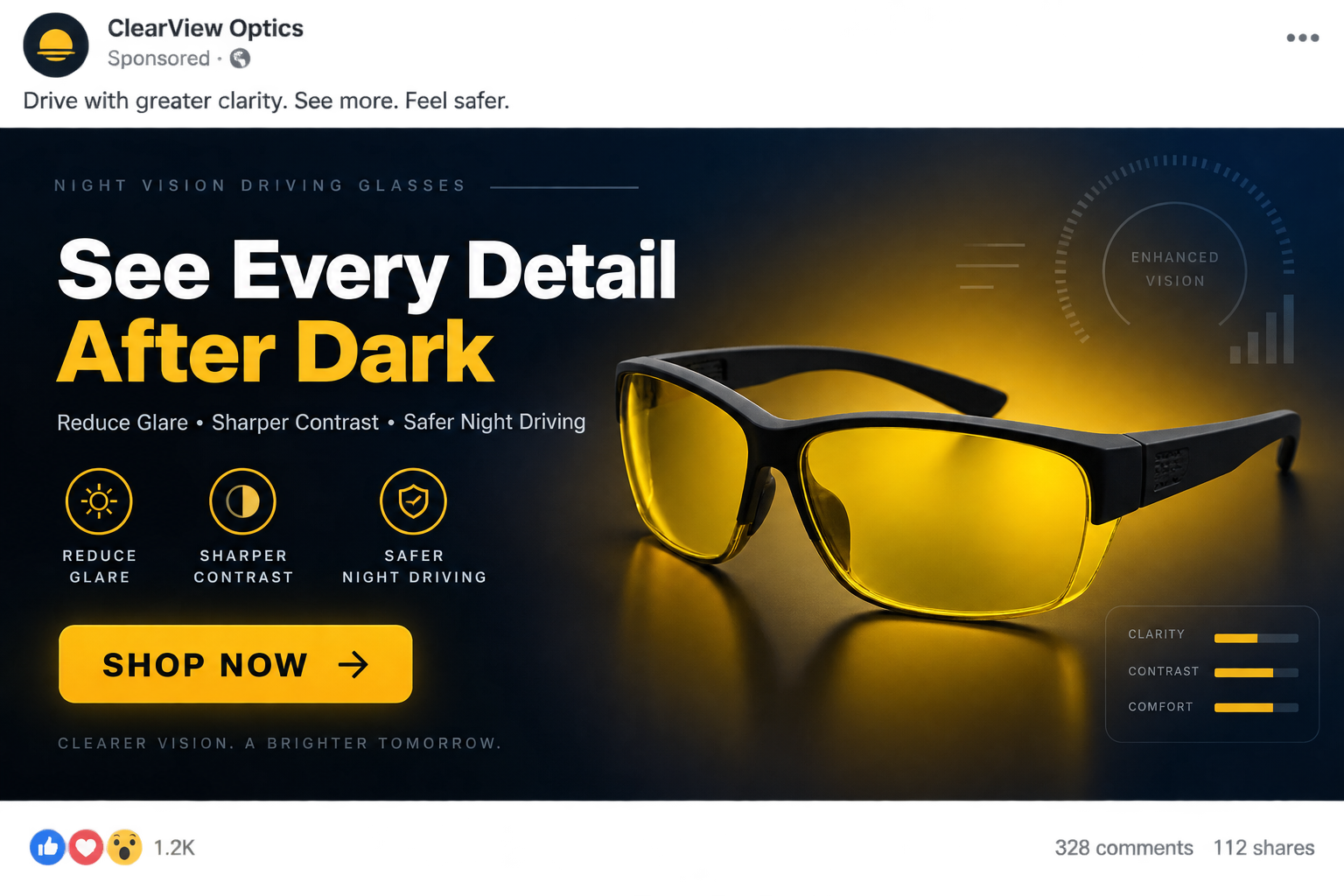
Yellow driving glasses promise a calmer road after sunset, especially when modern headlights turn every wet street into a field of glare.
The lenses certainly change what drivers see. The important question is whether that change delivers the safety improvement suggested by the advertisements.
Overview
The product is real, but the name creates expectations
Yellow-tinted glasses are ordinary eyewear. Sellers often rename them night vision glasses, driving enhancers, anti-glare lenses, or high-definition night lenses.
That language can imply technology the product does not contain. These glasses do not amplify light, reveal hidden objects, or function like electronic night-vision equipment.
They filter part of the visible spectrum. The resulting warmer color may feel more comfortable, yet comfort and improved driving performance are different claims.
The strongest safety promises are not supported
A controlled nighttime driving study tested yellow lenses while participants detected pedestrians around oncoming headlight glare. The glasses did not improve detection performance.
Researchers found no evidence that the lenses reduced the harmful effect of headlight glare. Some results suggested responses could become slower in certain situations.
That matters because any tint reduces some incoming light. At night, drivers already have less light available for recognizing hazards, signs, cyclists, and pedestrians.
Marketing quality varies widely between sellers
Some established eyewear stores describe tint, coatings, fit, and return terms accurately. Other stores use dramatic simulations and unsupported accident-prevention language.
A cheap pair can be resold through several temporary storefronts under changing names. Identical frames may appear with very different prices and invented technical descriptions.
- Yellow tint may increase subjective contrast in some conditions.
- It does not create additional light or electronic night vision.
- Research has not demonstrated safer nighttime hazard detection.
- Dark or poorly made lenses can reduce already limited visibility.
- Return policies and lens quality differ significantly between sellers.
The right conclusion is not that every yellow lens is fraudulent. It is that safety claims deserve much more scrutiny than a simple product photograph provides.
What Yellow Night Driving Glasses Actually Do
Yellow lenses absorb portions of blue and violet light. That changes color balance and can make some edges appear more pronounced to the wearer.
The visual effect is immediate, which helps the sales pitch. A customer can put them on indoors and notice a warmer, apparently sharper scene.
Noticeable does not automatically mean useful. Human vision depends on brightness, contrast, adaptation, eye health, glare recovery, and the quality of the windshield.
A lens cannot selectively remove only the troublesome light from an approaching headlamp. It also filters light coming from dim objects the driver needs to detect.
Anti-reflective coatings are different from yellow tint. A properly applied coating can reduce reflections from the surfaces of a prescription lens without deliberately darkening everything.
Polarized sunglasses can reduce daytime reflections from horizontal surfaces, but they are not appropriate for dark roads. They reduce transmission and can affect display visibility.
Marketing often blends these separate concepts. Words such as polarized, anti-glare, night vision, and HD may appear together without meaningful specifications or testing.
Ask for measurable information instead: visible light transmission, lens material, optical quality, coating type, impact standard, warranty, and the seller’s legal identity.
How the Night Vision Glasses Sales Pitch Works
Step 1: An advertisement begins with a familiar driving fear
The video shows blooming headlights, rain, darkness, or a driver squinting. It frames ordinary nighttime difficulty as an urgent problem requiring a special device.
Some ads say newer LED headlights have made normal glasses obsolete. Others suggest ageing eyes can be restored instantly by filtering one color.
The concern is genuine. Glare recovery can worsen with age, cataracts, dry eyes, uncorrected vision, dirty glass, and certain medications.
The advertisement then offers a universal explanation, usually excess blue light. Real nighttime vision is more complicated than that single cause.
Step 2: A dramatic comparison simulates the promised improvement
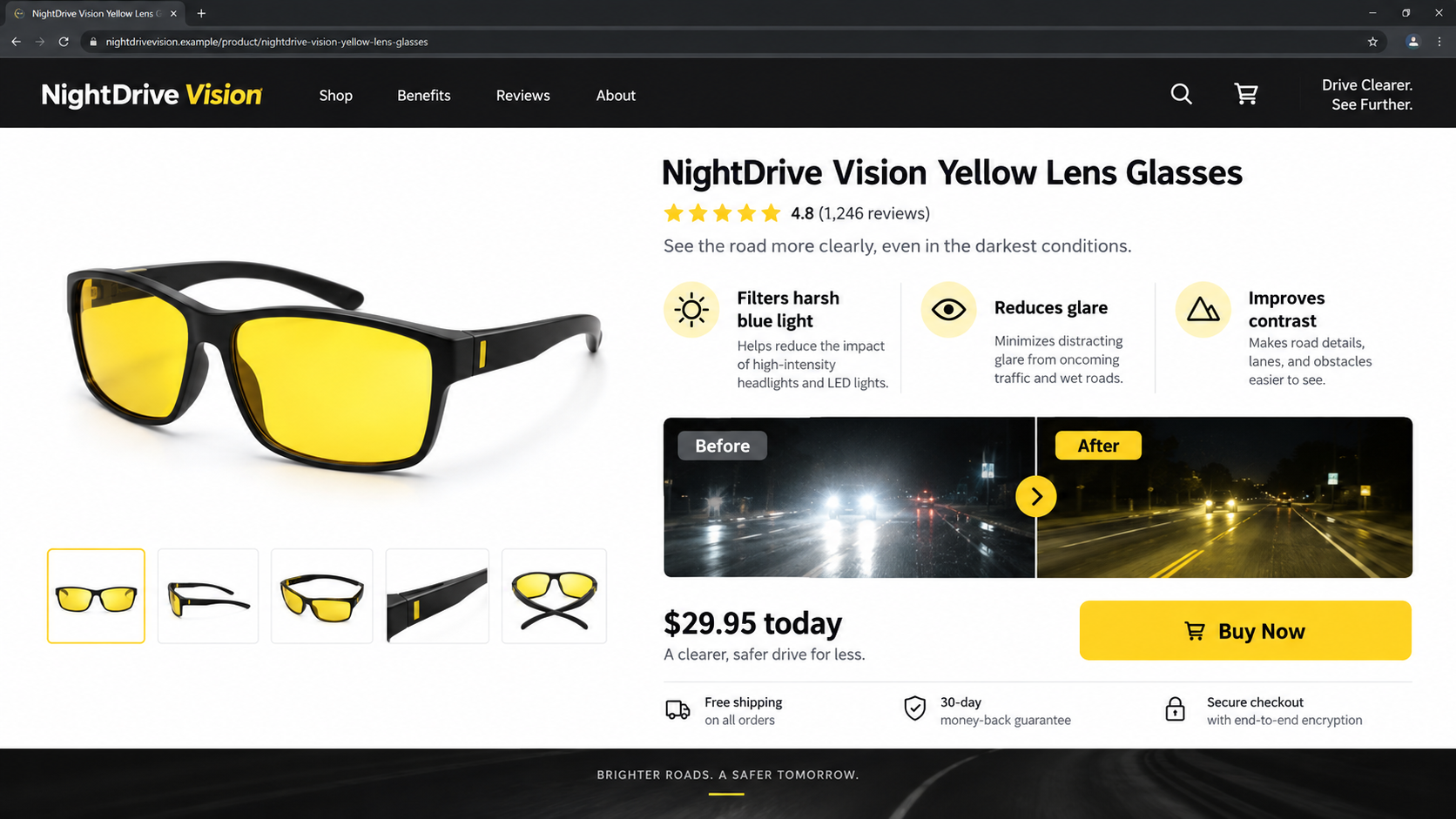
A split screen may show one side washed out and the other crisp, golden, and detailed. That comparison is created for persuasion.
Camera exposure, contrast, color grading, and digital glare effects can change the entire scene. A tinted lens alone does not reproduce an edited video.
Look for independent testing under controlled conditions. A demonstration produced by the seller cannot establish shorter reaction time or safer hazard recognition.
Step 3: Technical-sounding labels replace useful specifications
Terms such as military grade, nano-layer, HD vision, blue-light blocker, and optical enhancement sound precise while revealing little about actual performance.
A credible product page should identify lens transmission, compliance standards, manufacturer, frame measurements, coating, and whether the lenses fit over prescription eyewear.
If every claim concerns feelings such as clarity and confidence, but no test method appears, the presentation is marketing rather than evidence.
Step 4: The offer turns a commodity product into a premium invention
Similar frames can often be found from wholesale marketplaces or unrelated brands. A polished landing page may price them as a proprietary breakthrough.
That markup is not automatically illegal. The concern is whether the seller invented benefits, concealed the product’s origin, or created a false discount.
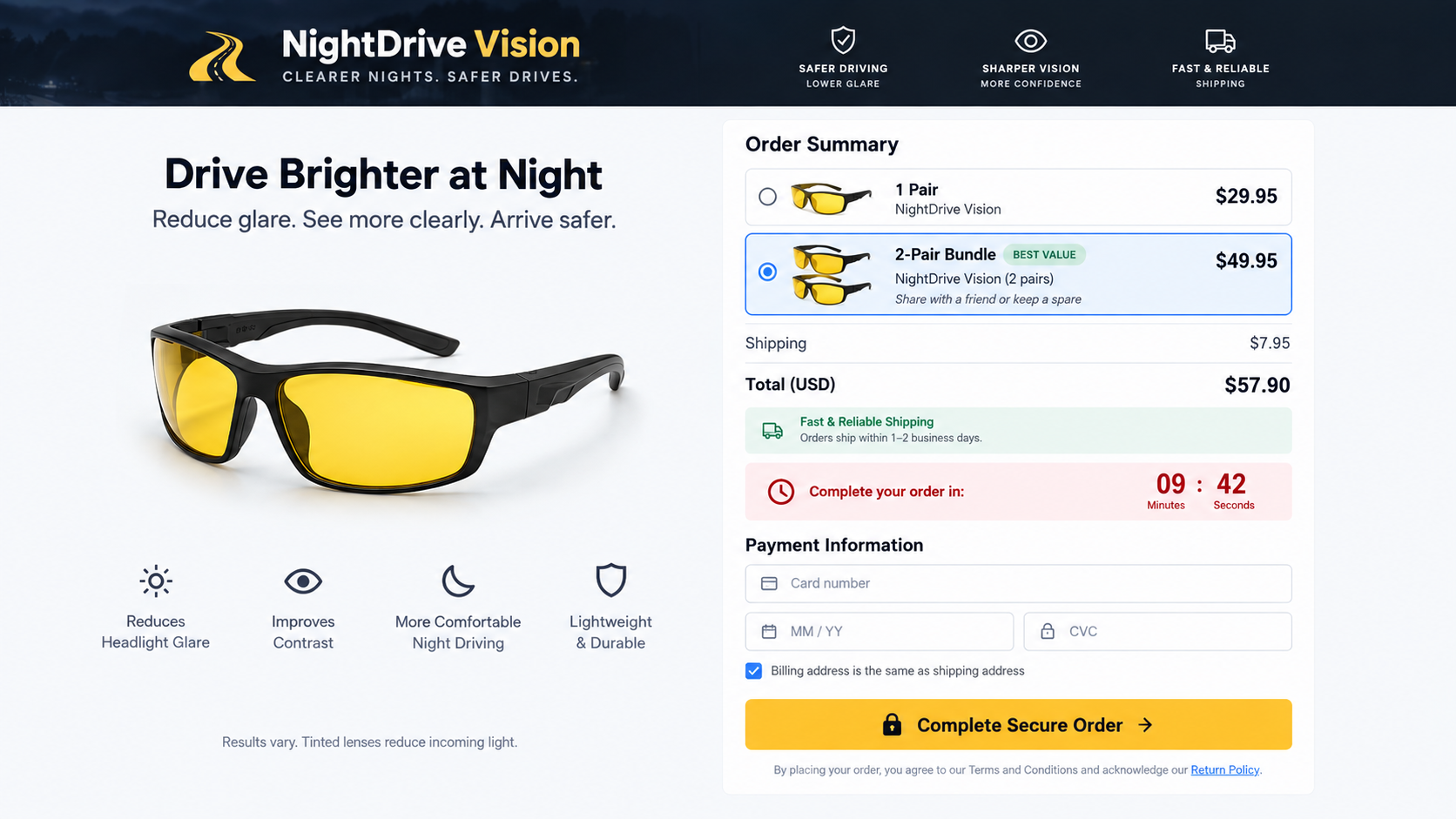
Countdown clocks and low-stock messages can restart after refreshing. When urgency is artificial, it prevents comparison shopping and careful policy review.
Step 5: Quantity selectors and bundles increase the order
A customer chooses one pair, yet the page emphasizes family packs, upgraded cases, cleaning kits, and additional protection plans.
Preselected bundles can make the highlighted price look like the single-pair cost. The real total may not become obvious until late in checkout.
Read each line before payment. Confirm quantity, shipping, taxes, warranties, and whether an optional club or recurring plan has been added.
Step 6: The checkout makes the return policy difficult to evaluate
Prominent badges may promise satisfaction while the legal policy imposes short deadlines, return postage, restocking fees, or unopened-package conditions.
Some pages provide no usable business address before purchase. Others list a returns warehouse that cannot answer questions about advertising or refunds.
A guarantee is valuable only when the responsible company is identifiable, reachable, and willing to honor it without creating new obstacles.
Step 7: Follow-up offers continue after the first purchase
The submitted email and telephone number can trigger abandoned-cart messages, discount offers, surveys, or advertising for unrelated driving accessories.
A weak seller may share customer details with marketing partners under broad privacy language. That can produce calls that appear connected to the original purchase.
Do not give callers verification codes or additional card information. Contact the merchant through the details recorded in the original receipt.
Why the Glasses Can Feel Helpful Without Improving Safety
Visual comfort is personal. A warmer view may feel softer than harsh white lighting, particularly during brief indoor demonstrations or twilight.
Expectation also matters. When someone anticipates clearer vision, the noticeable color change can be interpreted as proof that every detail has improved.
Yellow tint may make certain contrasts seem stronger, yet that benefit comes with reduced light transmission. A pleasant picture is not a reaction-time measurement.
Driving involves unexpected hazards, not static scenery. A pedestrian in dark clothing can occupy a dim part of the road outside the brightest headlight beam.
A driver might also feel more confident and travel faster while wearing the glasses. Increased confidence without improved detection can create additional risk.
Wet pavement, scratched windshields, interior reflections, and dirty lenses scatter light. Addressing those problems often helps more than adding another tinted surface.
Prescription accuracy is equally important. Small uncorrected refractive errors can become more noticeable when pupils enlarge in darkness.
Cataracts scatter light inside the eye and commonly cause halos. No over-the-counter yellow lens can diagnose or reverse that condition.
If glare suddenly worsens, affects one eye, or accompanies pain, flashes, or vision loss, seek professional eye care instead of relying on a gadget.
Evidence and Safety Claims to Examine
Advertisements frequently cite customer reviews instead of performance research. Reviews can describe comfort, fit, delivery, or appearance, but they cannot prove accident prevention.
A controlled study compares conditions fairly, measures detection or reaction, and accounts for glare intensity. It does not merely ask participants which color they prefer.
The widely discussed nighttime driving experiment found no pedestrian-detection advantage for yellow lenses. That directly challenges broad claims of safer night driving.
Professional eye guidance also warns that tinted lenses reduce available light. This is especially relevant on unlit roads and around low-contrast hazards.
Look carefully when a page says doctors recommend the product without naming a clinician, institution, publication, or test. Anonymous authority is not evidence.
Before-and-after photographs are particularly weak. Exposure settings can brighten shadows, suppress highlights, sharpen edges, and alter color independently of any lens.
Certification logos should be verifiable. A graphic reading tested, approved, or registered may refer to manufacturing paperwork rather than proven driving benefits.
Even a compliant frame can be marketed dishonestly. Product safety standards and advertising substantiation answer different questions.
Company, Address, and Fulfillment Checks
Find the legal seller before paying
A brand name on the frame may not be the company accepting the order. Compare the footer, terms, privacy policy, receipt, and card descriptor.
Missing registration details, copied policies, or several conflicting company names make refunds harder. Take screenshots before submitting payment.
Test the address instead of trusting it
Search the complete address and inspect what operates there. It may be a virtual mailbox, apartment, unrelated shop, or third-party fulfillment warehouse.
A warehouse can send packages without manufacturing the glasses or controlling the advertisement. Its presence does not verify performance claims.
Call support with specific questions
Ask who manufactures the lenses, where returns go, what deductions apply, and whether the purchase creates any continuing membership or warranty charge.
Unanswered email, generic scripts, and agents unable to locate the exact product are warning signs. Record dates and case numbers.
Inspect the product when it arrives
Check for distortion by moving the glasses across a straight edge. Stop using them if the line bends, jumps, or appears uneven.
Loose frames, sharp edges, unclear markings, or headaches suggest poor quality. Do not test questionable eyewear during active driving.
How to Evaluate a Pair Before Driving
- Compare the seller’s price with visually identical frames from established retailers.
- Confirm visible light transmission and any recognized optical or impact standards.
- Read the complete refund policy before opening or removing protective films.
- Check for distortion indoors using vertical lines and printed text.
- Test fit and dashboard readability while the vehicle remains parked.
- Never use dark sunglasses or heavily tinted lenses for nighttime driving.
- Stop immediately if the lenses create blur, double images, dizziness, or reduced peripheral awareness.
A parking-area comparison cannot prove road safety, but it can expose obvious distortion or an unsafe fit before the product enters traffic.
Keep the packaging and order confirmation until the return window closes. Photograph defects and request written instructions rather than relying on a telephone promise.
If a seller cites a laboratory, request the complete test and confirm it measured nighttime hazard detection rather than color preference or daytime contrast.
Better Ways to Reduce Nighttime Glare
Start with a comprehensive eye examination. Updated prescriptions, cataract evaluation, and dry-eye treatment can address causes a tinted lens cannot.
Clean both sides of the windshield. Interior film is easy to overlook and becomes highly visible when oncoming headlights strike it.
Replace worn wiper blades and repair heavily scratched glass. Water streaks and surface damage spread points of light across a larger area.
Clean headlamp covers and verify their alignment. Clouded lenses reduce useful illumination while scattering light toward other drivers.
Dim interior screens and avoid bright cabin lighting. Preserving dark adaptation helps the eyes respond to lower-contrast objects beyond the dashboard.
Look toward the right edge of the lane when approaching glare, without losing awareness of traffic. Reduce speed when visibility is genuinely limited.
Use prescription lenses with a professionally recommended anti-reflective coating when appropriate. Keep them clean and free from scratches.
Do not stare directly at approaching headlights. Give the eyes time to recover, especially after leaving a brightly lit area.
If fatigue is affecting focus, stop safely. No lens can compensate for impaired attention, slow reactions, or microsleep.
What to Do if You Bought Night Vision Driving Glasses
- Do not assume the product proves its own claims. Treat a warmer or more comfortable view as a personal impression, not evidence of safer driving.
- Inspect the order immediately. Confirm quantity, total, shipping, add-ons, and any warranty or membership shown on the receipt.
- Test optical quality while parked. Check straight lines, dashboard readability, peripheral vision, reflections, and fit without entering traffic.
- Stop using unsafe lenses. Remove them if they darken hazards, distort shapes, cause headaches, or make signs harder to read.
- Request a refund in writing. Quote the advertised claim, order number, delivery date, and policy. Save every response and tracking record.
- Challenge unauthorized charges. Contact the card issuer if the seller added products, subscriptions, or amounts you did not knowingly approve.
- Report deceptive advertising. Send the advertisement and checkout evidence to the platform and relevant consumer-protection authority.
- Secure the device if redirects occurred. Run Malwarebytes after suspicious downloads, and use AdGuard to reduce repeated malicious advertisements and pop-ups.
- Address the underlying vision problem. Arrange an eye examination and check the windshield, wipers, lights, and prescription before the next night journey.
Is Your Device Infected? Run a Free Malware Scan
Slow performance, constant pop-ups, or strange behavior? These are classic signs of a malware infection. The fastest way to find out is to scan your device with Malwarebytes Free — one of the most trusted malware removal tools available.
The free version detects and removes the most common threats, including:
- Adware — the cause of those annoying pop-ups
- Browser hijackers — unwanted redirects and changed homepages
- Trojans and spyware — hidden programs stealing your data
- Potentially unwanted programs (PUPs) — software you never asked for
👉 Select your device below — Windows, Mac, or Android — then follow the simple steps to download Malwarebytes, scan your system, and remove any threats it finds. The scan usually takes 5 to 20 minutes.
Run a Malware Scan with Malwarebytes for Windows
Malwarebytes is one of the most popular and trusted anti-malware tools for Windows — and it’s completely free for removing infections. It catches threats that many antivirus programs miss, including adware, browser hijackers, and trojans. Follow the steps below to scan and clean your PC in just a few minutes.
Download Malwarebytes
Click the button below to download the latest version of Malwarebytes for Windows from the official source. The free version is all you need — it will scan your computer and remove adware, browser hijackers, and other malicious software at no cost.
Download MalwarebytesOfficial installer for Windows 11 and 10. Your download starts right away.Want real-time protection? See Malwarebytes Premium Malwarebytes Free for WindowsScans and removes malware at no cost
-
Install Malwarebytes
When the download finishes, open your Downloads folder and double-click the MBSetup file. If Windows shows a User Account Control pop-up, click “Yes” to allow the installation.

Follow the On-Screen Prompts to Install Malwarebytes
The setup wizard will walk you through a few quick screens:
-
Choose where you’re installing the program — “Personal Computer” or “Work Computer” — then click Next.

-
Malwarebytes will now install on your device. This usually takes under a minute.

-
When installation is complete, the “Welcome to Malwarebytes” screen will open automatically.

-
On the final screen, click Open Malwarebytes to launch the program.

-
Enable “Scan for Rootkits”
Before scanning, turn on rootkit detection so Malwarebytes can find even the most hidden threats. Click the Settings gear icon on the left side of the screen.

In the settings menu, find “Scan for rootkits” and click the toggle so it turns blue.

Done? Click “Dashboard” in the left pane to return to the main screen.
Start the Scan
Click the blue Scan button. Malwarebytes will automatically update its virus database and start checking your computer for malware.

-
Wait for the Scan to Finish
The scan checks your entire system for browser hijackers and other malicious programs, so it can take 5 to 20 minutes depending on your computer. Feel free to do something else — just check back occasionally to see the progress.

-
Quarantine the Detected Threats
When the scan is done, you’ll see a list of everything Malwarebytes found — malware, adware, and potentially unwanted programs. Click the “Quarantine” button to remove all of them at once.

Malwarebytes will now remove the malicious files and registry entries and move them safely into quarantine.

-
Restart Your Computer
Some threats can only be fully removed after a reboot. If Malwarebytes asks you to restart, click Yes. Once you’re logged back in, Malwarebytes has finished removing the threats it found.

That’s it — your Windows PC is now clean of trojans, adware, and other malware, and should be back to running smoothly.
If you are still having problems with your computer after completing these instructions, then please follow one of the steps:
- Run a computer scan with ESET Online Scanner
- Ask for help in our Windows Malware Removal Help & Support forum.
Run a Malware Scan with Malwarebytes for Mac
Malwarebytes for Mac is a free on-demand scanner that removes the malware other security software tends to miss — adware, browser hijackers, and unwanted programs included. Cleaning an infected Mac with Malwarebytes has always been completely free, and it’s our go-to recommendation. Follow the steps below to scan and clean your Mac in just a few minutes.
-
Download Malwarebytes for Mac
Click the button below to download the latest version of Malwarebytes for Mac.
Download MalwarebytesOfficial installer for macOS. Your download starts right away.Want real-time protection? See Malwarebytes PremiumMalwarebytes Free for MacScans and removes malware at no cost -
Open the Malwarebytes setup file
When the download finishes, open your Downloads folder and double-click the setup file to begin the installation.

-
Follow the On-Screen Prompts to Install Malwarebytes
The Malwarebytes for Mac Installer will guide you through a few quick screens. Click “Continue” and keep following the prompts until the installation completes.



When the installation is complete, Malwarebytes opens to the Welcome to Malwarebytes screen. Click “Get started“.
-
Select “Personal Computer” or “Work Computer”
Malwarebytes will ask what type of computer you’re installing it on. Click either Personal Computer or Work Computer, whichever applies.

-
Start the Scan
Click the “Scan” button. Malwarebytes will automatically update its detection database and begin checking your Mac for malware.

-
Wait for the Scan to Finish
Malwarebytes will scan your Mac for adware, browser hijackers, and other malicious programs. This can take a few minutes, so feel free to do something else — just check back occasionally to see the progress.

-
Quarantine the Detected Threats
When the scan is done, you’ll see a list of everything Malwarebytes found. Click the “Quarantine” button to remove all the threats at once.

-
Restart Your Mac
Malwarebytes will now remove all the malicious files it found. Some threats can only be fully removed after a reboot — if Malwarebytes asks you to restart, allow it. Once you’re logged back in, your Mac is clean.

That’s it — your Mac is now free of adware, rogue browser extensions, and other potentially harmful software.
If you are still experiencing problems while trying to remove a malicious program from your computer, please ask for help in our Mac Malware Removal Help & Support forum.
Run a Malware Scan with Malwarebytes for Android
Malwarebytes for Android automatically detects and removes dangerous threats like malware and ransomware so you don’t have to worry about your most-used device being compromised. Aggressive detection of adware and potentially unwanted programs keeps your Android phone or tablet running smooth.
-
Download Malwarebytes for Android.
You can download Malwarebytes for Android by clicking the link below.
Get Malwarebytes for AndroidOpens Google Play in a new tab.Want real-time protection? See Malwarebytes Premium for AndroidMalwarebytes for AndroidScans your phone and removes malware at no cost -
Install Malwarebytes for Android on your phone.
In the Google Play Store, tap “Install” to install Malwarebytes for Android on your device.

When the installation process has finished, tap “Open” to begin using Malwarebytes for Android. You can also open Malwarebytes by tapping on its icon in your phone menu or home screen.

-
Follow the on-screen prompts to complete the setup process
When Malwarebytes will open, you will see the Malwarebytes Setup Wizard which will guide you through a series of permissions and other setup options.
This is the first of two screens that explain the difference between the Premium and Free versions. Swipe this screen to continue.
Tap on “Got it” to proceed to the next step.
Malwarebytes for Android will now ask for a set of permissions that are required to scan your device and protect it from malware. Tap on “Give permission” to continue.
Tap on “Allow” to permit Malwarebytes to access the files on your phone.
-
Update database and run a scan with Malwarebytes for Android
You will now be prompted to update the Malwarebytes database and run a full system scan.

Click on “Update database” to update the Malwarebytes for Android definitions to the latest version, then click on “Run full scan” to perform a system scan.

-
Wait for the Malwarebytes scan to complete.
Malwarebytes will now start scanning your phone for adware and other malicious apps. This process can take a few minutes, so we suggest you do something else and periodically check on the status of the scan to see when it is finished.

-
Click on “Remove Selected”.
When the scan has been completed, you will be presented with a screen showing the malware infections that Malwarebytes for Android has detected. To remove the malicious apps that Malwarebytes has found, tap on the “Remove Selected” button.

-
Restart your phone.
Malwarebytes for Android will now remove all the malicious apps that it has found. To complete the malware removal process, Malwarebytes may ask you to restart your device.
That’s it — your Android phone is now clean — no more malicious apps, adware, or browser redirects.
If you are still having problems with your phone after completing these instructions, then please follow one of the steps:
- Restore your phone to factory settings by going to Settings > General management > Reset > Factory data reset.
- Ask for help in our Mobile Malware Removal Help & Support forum.
Stay Protected: Block Ads and Malicious Sites
Now that your device is clean, keep it that way. Most infections start with a malicious ad or a fake download button — so blocking them at the source is your best defense.
We recommend AdGuard, which blocks malicious ads, phishing pages, and dangerous redirects before they can reach you.
👉 Download AdGuard and browse safely
Frequently Asked Questions
Do yellow glasses provide real night vision?
No. They tint incoming light but do not amplify it. Electronic night-vision systems use sensors and displays, which ordinary glasses do not contain.
Can yellow lenses reduce the feeling of glare?
Some wearers report greater comfort. Controlled research has not shown that yellow lenses improve nighttime pedestrian detection around headlight glare.
Are all night driving glasses a scam?
No. The physical product is real. The problem arises when sellers promise unsupported safety benefits, use false urgency, or conceal commercial terms.
Can I wear polarized sunglasses at night?
Dark or polarized sunglasses reduce light and are generally unsuitable after dark. Ask an eye-care professional about prescription and coating options instead.
Why do the images in advertisements look clearer?
Sellers can alter exposure, color, contrast, sharpness, and glare digitally. A promotional comparison does not reproduce a controlled view through the lens.
What should I do when headlights suddenly seem worse?
Clean the vehicle glass and lights, then arrange an eye examination. Sudden or one-sided visual change deserves prompt professional assessment.
The Bottom Line
Yellow night driving glasses can change color and comfort, but persuasive advertisements often stretch that simple effect into an unsupported promise of safer vision.
Check the evidence, seller, and refund terms. More importantly, address eye health and vehicle visibility before trusting a tint with a safety-critical job.

Join the discussion
0 commentsShare your experience or ask a question about this article.
Discussion
Start the conversation
Have a question or something useful to share? Add the first comment.