


A one-minute survey offering a $500 shopping coupon can feel like an unusually generous thank-you, especially when a familiar retailer appears beside it.
The page asks easy questions and keeps the reward visible. What happens after those questions explains why the invitation deserves a closer look.
Overview
A generic name creates an official impression
The National Consumer Survey name sounds governmental or industrywide, yet deceptive promotions use it without identifying a real research organization behind the offer.
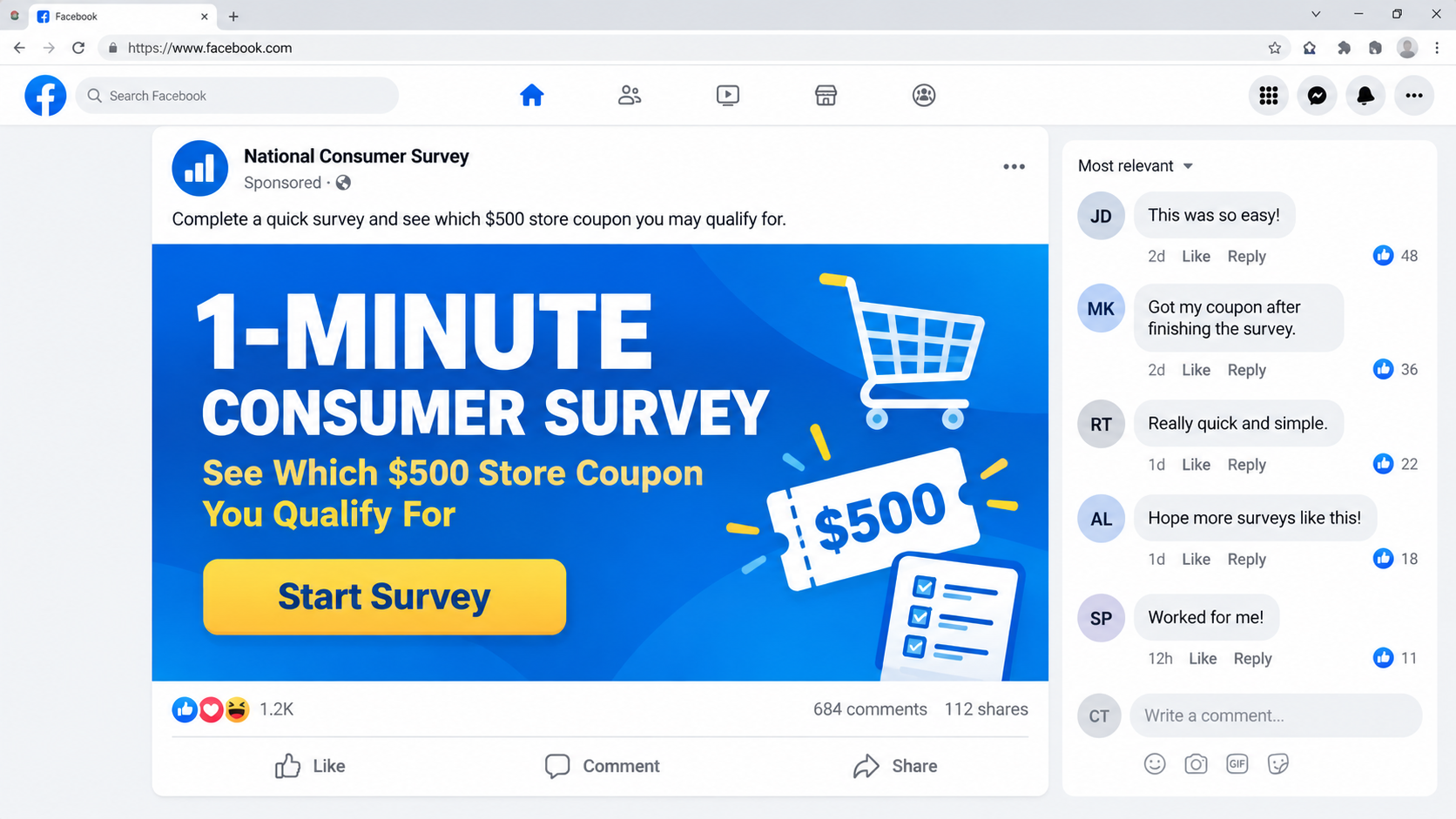
Advertisements may reference Walmart or another major retailer, display store colors, and claim shoppers can earn a $500 coupon in about one minute.
The retailer is not running the campaign. Its identity is borrowed to make an unrelated lead-generation and payment funnel look familiar.
The questionnaire is only the entrance
The initial questions concern shopping habits, household preferences, or product categories. They are designed to feel harmless and move almost every visitor forward.
After completion, the page may announce eligibility for a reward, request contact details, or redirect through several unrelated domains.
The promised coupon usually remains just out of reach. Each new step asks for more information, another offer, or a small payment.
The real value comes from the visitor
Names, addresses, telephone numbers, email addresses, and shopping interests can be sold as marketing leads even when no coupon is delivered.
A shipping or verification charge introduces card details. Fine print can convert that small payment into recurring billing for an unrelated membership.
- The advertisement impersonates recognizable retailers without authorization.
- The survey accepts nearly any combination of answers.
- Visitors are passed between disposable and unrelated domains.
- The $500 coupon is not clearly issued by the named retailer.
- Personal data, card details, or subscription consent may be collected.
This is not meaningful consumer research. The questionnaire is a conversion device that turns curiosity about a coupon into valuable data and possible charges.
Is the National Consumer Survey $500 Coupon Real?
Legitimate retailers sometimes request feedback and offer modest incentives. That ordinary practice helps the fake invitation blend into a customer’s inbox or social feed.
A genuine survey should identify its sponsor, privacy policy, reward rules, eligibility, and fulfillment process before collecting sensitive information.
The deceptive version provides a generic survey name, uses copied retailer imagery, and sends users to addresses that have no verifiable connection with the store.
Some advertisements show AI-generated presenters or distorted storefront signs. Artificial people can deliver a convincing testimonial without any real customer standing behind it.
Recent campaign pages used the ncs-coupons.com name, but one domain should not define the warning. Operators can replace it whenever complaints accumulate.
The safest test is simple: open the retailer’s official app or type its website yourself. If the coupon is absent there, do not continue.
Do not ask the survey page whether it is genuine. Its chat, testimonials, security badges, and support details are controlled by the same people seeking conversion.
How the National Consumer Survey Scam Works
Step 1: A social advertisement promises an unusually large coupon
The promotion often appears on Facebook or another advertising platform. It says selected shoppers can receive $500 after answering a very short survey.
A large reward makes the request feel worthwhile, while the one-minute promise removes the usual hesitation associated with long questionnaires.
The advertisement may feature a cheerful presenter, a shopping cart, store shelves, or a receipt. None proves that the retailer approved the campaign.
AI-generated video makes rapid variation inexpensive. Operators can change the speaker, retailer, value, and country while preserving the same underlying funnel.
Step 2: The click passes through advertising and filtering links
The displayed link may differ from the actual destination. Tracking services record the advertisement, visitor location, device, and campaign partner before forwarding the browser.
Some routes send security scanners and investigators elsewhere while allowing targeted mobile visitors to reach the active survey.
Redirection also separates the public advertisement from the final payment page. When one domain is blocked, another can replace only that stage.
Step 3: Easy questions create participation and trust
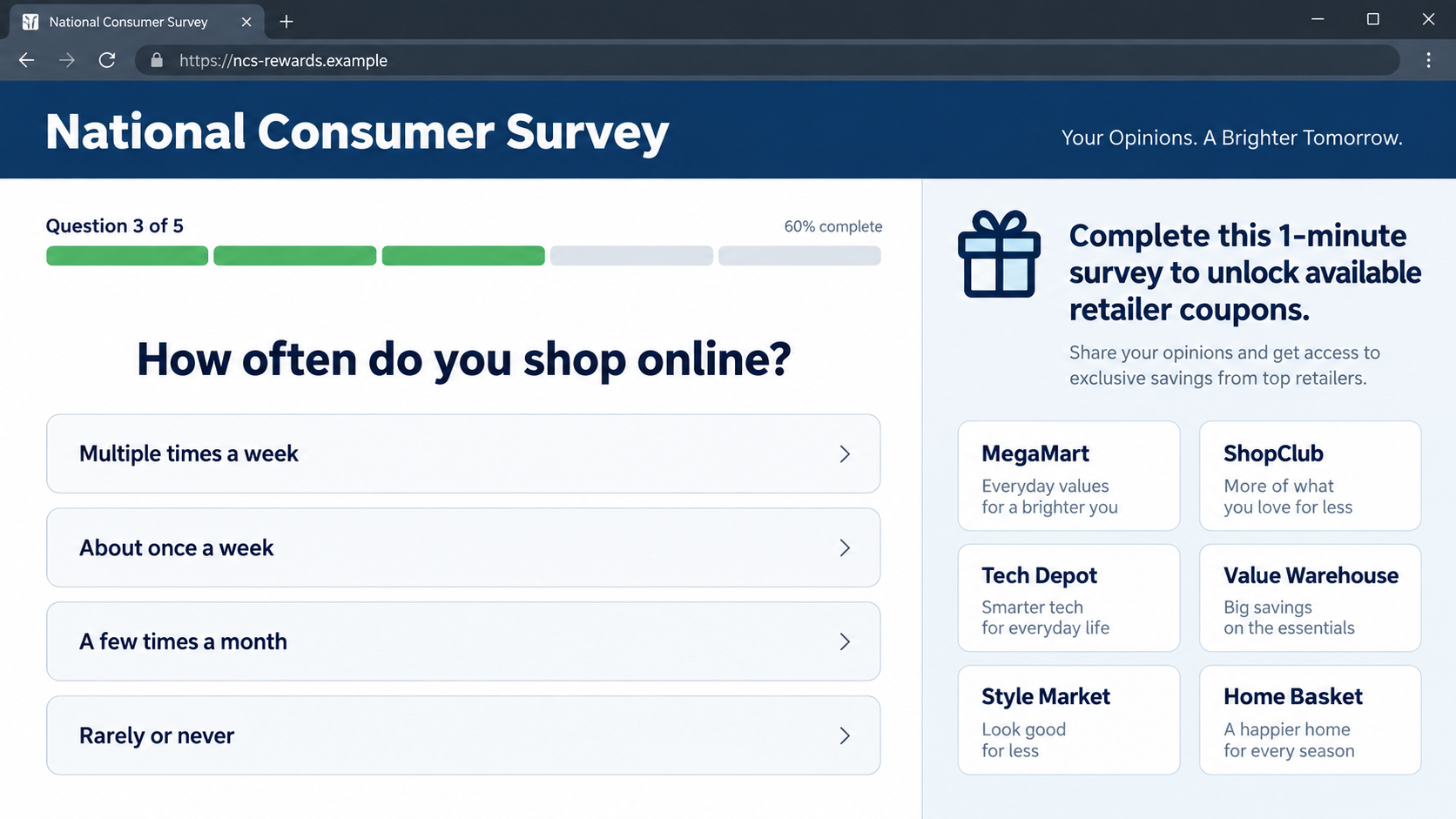
The page asks where the visitor shops, how often, and which departments they prefer. The questions appear plausible but rarely affect the outcome.
A real research survey may disqualify participants or vary questions according to answers. A reward funnel mainly needs continued clicking.
Progress bars and encouraging messages create momentum. After investing time, the visitor becomes less willing to abandon a reward that seems close.
Step 4: The page announces that the visitor qualifies
Nearly everyone receives congratulations. A timer or remaining-coupon counter then creates pressure to claim the offer immediately.
These counters can be page scripts rather than live inventory. Refreshing the page may restore the same deadline and quantity.
Comments and winner stories can also be fixed design elements. They should not be treated as independent customer reports.
Step 5: Contact details turn the visitor into a lead
The next screen requests an email, telephone number, postal address, age range, and household information under the pretext of confirming eligibility.
That profile can support marketing calls, text campaigns, insurance offers, sweepstakes, and future scams tailored to the visitor’s interests.
Broad consent language may authorize numerous partners to contact the user. The list can be hidden behind a small link or expandable paragraph.
Step 6: Additional offers replace the promised coupon
The visitor may need to complete partner deals, install applications, request quotes, subscribe to services, or answer further surveys.
Each offer can generate an affiliate payment for the campaign operator. The visitor keeps progressing because the original $500 coupon remains implied.
Some requirements cost more than the supposed reward. Others demand purchases across several categories before eligibility is reviewed.
Step 7: A small charge exposes the card
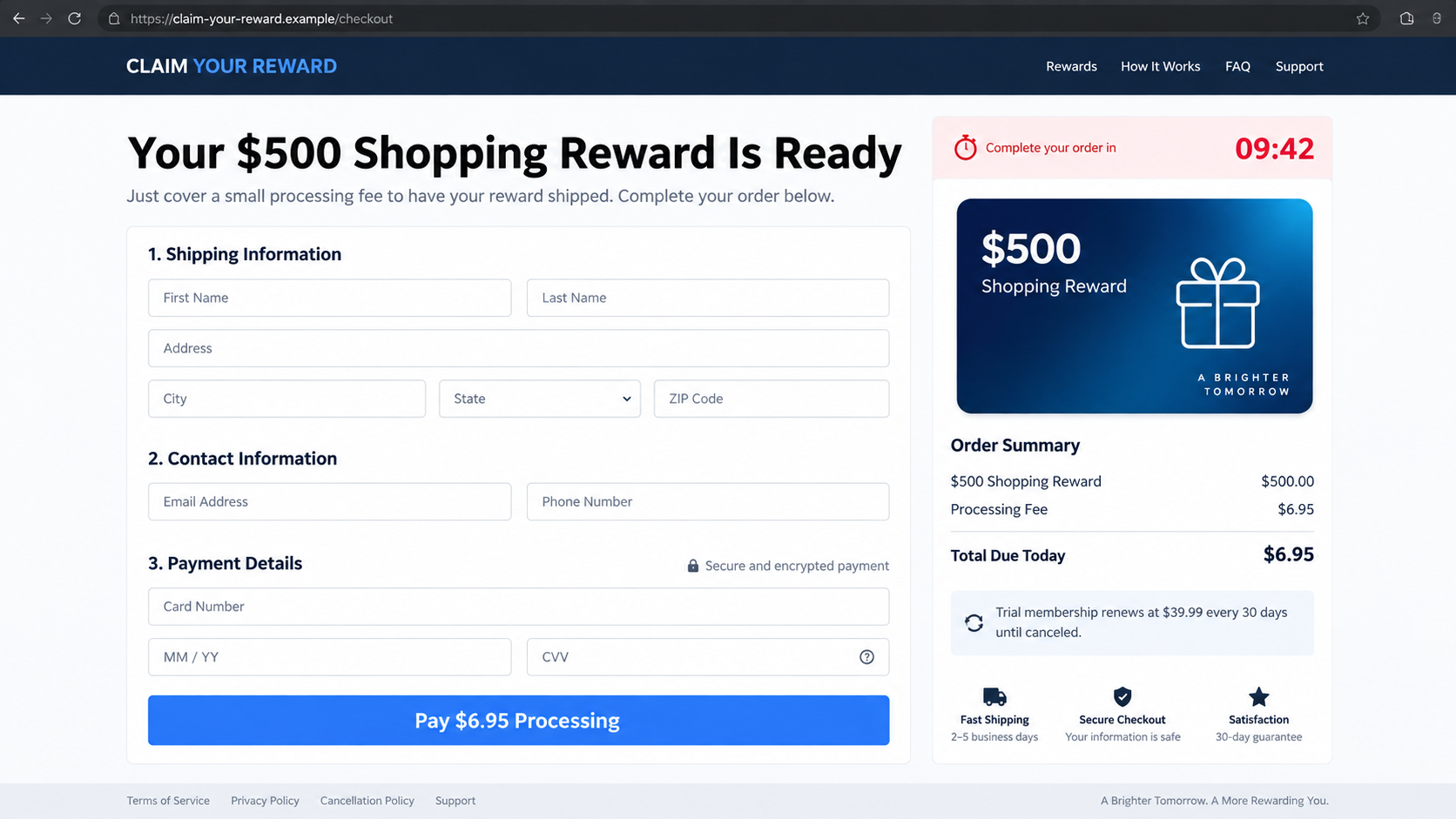
A page may request $1, $6.95, or another modest amount for delivery, activation, identity checking, or coupon processing.
Real retailer coupons do not require an unrelated website to validate a payment card. The small amount lowers suspicion and confirms that the card works.
Fine print can describe a trial that renews for $39.99 or another amount. The subscription may have no relationship to the retailer or coupon.
Step 8: The coupon disappears while contact and billing continue
After payment, the user may receive a generic voucher, discount list, low-value item, or nothing that resembles the advertised $500 store coupon.
Charges can appear under an unfamiliar descriptor. Support may insist that terms were accepted, even when the headline repeatedly described a free reward.
The original domain can vanish while a billing account continues. That makes saved receipts, terms, and bank records essential.
Why the Campaign Looks Convincing
Most people recognize the retailers used in these advertisements. A familiar brand shortens the mental distance between an unknown link and a trusted shopping experience.
The survey format also feels normal. Receipts, loyalty apps, and customer-service emails routinely request feedback, so the first screen does not look threatening.
The campaign asks for information gradually. Clicking an answer feels less consequential than handing a stranger a complete personal profile.
By the time the payment form appears, the visitor has completed several tasks and received congratulations. That sequence creates emotional ownership of the coupon.
Mobile screens hide context. The domain, footer, recurring terms, and partner list may sit outside the visible area while the reward remains prominent.
AI presenters strengthen the illusion of a real announcement. Natural speech and familiar surroundings can distract from malformed signs, strange hands, or inconsistent labels.
Advertisements can target people who recently discussed shopping or visited retail websites. Relevant timing does not prove access to an actual purchase record.
A small initial fee also feels manageable. Victims often focus on the $500 contrast rather than the future rights granted to the merchant.
How AI Advertising Expands the Survey Campaign
Older coupon scams relied on copied banners and simple emails. Generative tools now let operators produce persuasive presenters, voices, storefronts, and testimonials quickly.
One advertisement can be remade for several retailers without filming anything new. The coupon value, uniform, background, and script can change within hours.
Artificial presenters may look like employees, journalists, shoppers, or consumer advocates. Their confidence is part of the design, not proof of personal experience.
Look closely for letters that change between frames, malformed logos, unnatural lip movement, repeated gestures, inconsistent earrings, or objects blending into hands.
Those flaws are useful clues, but flawless video should not earn trust either. Verify the promotion through the retailer, domain, and published rules.
Scammers can also create hundreds of enthusiastic comments and profile images. Volume does not make testimonials independent when the campaign controls the conversation.
Report the advertisement itself, not only the final website. Advertising platforms need the creative, page name, library identifier, destination, and viewing date.
Saving the video before it disappears helps brands and investigators connect replacements. Remove personal notifications and account details from anything shared publicly.
What Information the Funnel Can Collect
Even before a form is submitted, the site can record an internet address, approximate location, browser, device type, language, and referring advertisement.
Survey answers reveal household composition, shopping frequency, preferred stores, product interests, income range, and purchase intentions.
An email and telephone number connect those interests to a reachable person. Marketers can classify the lead according to responsiveness and spending signals.
A postal address may be used for delivery, identity matching, property profiling, or future messages that mention the local area.
Card details create immediate financial risk. Even when a payment processor stores the number, the merchant can submit charges under the agreement presented.
Password requests are especially dangerous. A coupon survey has no valid reason to ask for a retailer, email, social-media, or banking password.
Browser-notification permission can create persistent pop-ups after the page closes. Remove the site through browser settings instead of clicking later alerts.
Downloaded coupon files or mobile profiles should not be opened. A legitimate discount can be displayed in an official account without installing unknown software.
Data can be shared among affiliates. One submission may therefore produce messages from several names that never appeared on the original page.
Expect follow-up stories about package fees, coupon expiration, account verification, refunds, or survey support. Prior knowledge of your details proves only data access.
Company, Address, and Fulfillment Checks
The survey name may identify nobody
Search for the legal entity behind National Consumer Survey, not just the label at the top. Generic names can conceal who receives and sells information.
Compare the privacy notice, terms, footer, payment page, confirmation email, and card statement. Conflicting entities show a fragmented operation.
The listed address may be a mailbox
Map the full address and search it in quotation marks. It may lead to a virtual office, residential property, or unrelated fulfillment center.
A return warehouse cannot verify that a retailer sponsored the coupon. It may process packages for dozens of changing marketing brands.
Support details can be disposable
Test the telephone number before paying. Ask who sponsors the survey, who issues the coupon, and which exact company will appear on the card.
Unanswered email, scripted replies, or staff unable to name the advertised retailer indicate that the page lacks accountable support.
A delivered trinket does not validate the offer
Some funnels ship a low-value item to defend the transaction. That does not transform it into the promised $500 coupon.
Inspect unknown electronics, cosmetics, or supplements carefully. Mass-produced goods can lack reliable labeling, instructions, testing, or traceable manufacturer information.
How to Check a Retail Survey Safely
- Type the retailer’s official address instead of using the advertisement link.
- Look for the survey inside the authenticated loyalty account or original receipt.
- Compare the sender and destination domains character by character.
- Search the exact promotion wording with the word scam or complaint.
- Read reward rules before providing an email or telephone number.
- Reject any coupon that requires card details, shipping, activation, or trial enrollment.
- Close pages that redirect through several unrelated domain names.
- Ignore countdowns, winner comments, and stock counters that cannot be independently verified.
Contact the retailer through its app, receipt, or verified website. Do not call the number printed inside the questionable survey.
A genuine representative should be able to locate the promotion using its name and rules. If they cannot, treat the page as impersonation.
What to Do if You Fell Victim to the National Consumer Survey Scam
- Preserve the complete route. Save the advertisement, sender, web addresses, survey screens, terms, receipt, messages, and card descriptor before domains disappear.
- Contact the card issuer immediately. Explain that an impersonating coupon funnel obtained the card and may initiate recurring charges.
- Review every transaction. Search for small verification amounts, shipping fees, trial debits, and unfamiliar monthly merchants across several statements.
- Cancel in writing. Notify each identified billing company, demand confirmation, and keep copies. Closing the survey page does not stop a subscription.
- Dispute accurately. Separate any small payment you intentionally entered from renewals, duplicate orders, or additional charges you never approved.
- Protect compromised accounts. Change any password entered or reused, enable multifactor authentication, and review email forwarding and recovery settings.
- Reduce further contact. Block deceptive senders, revoke browser notifications, withdraw marketing consent, and expect follow-up refund or delivery stories.
- Inspect the device. Use Malwarebytes if the survey downloaded anything, then add AdGuard to limit the deceptive ads and pop-ups that may revisit you.
- Report the campaign. Notify the impersonated retailer, advertising platform, domain provider, payment company, and appropriate consumer-protection authority.
Is Your Device Infected? Run a Free Malware Scan
Slow performance, constant pop-ups, or strange behavior? These are classic signs of a malware infection. The fastest way to find out is to scan your device with Malwarebytes Free — one of the most trusted malware removal tools available.
The free version detects and removes the most common threats, including:
- Adware — the cause of those annoying pop-ups
- Browser hijackers — unwanted redirects and changed homepages
- Trojans and spyware — hidden programs stealing your data
- Potentially unwanted programs (PUPs) — software you never asked for
👉 Select your device below — Windows, Mac, or Android — then follow the simple steps to download Malwarebytes, scan your system, and remove any threats it finds. The scan usually takes 5 to 20 minutes.
Run a Malware Scan with Malwarebytes for Windows
Malwarebytes is one of the most popular and trusted anti-malware tools for Windows — and it’s completely free for removing infections. It catches threats that many antivirus programs miss, including adware, browser hijackers, and trojans. Follow the steps below to scan and clean your PC in just a few minutes.
Download Malwarebytes
Click the button below to download the latest version of Malwarebytes for Windows from the official source. The free version is all you need — it will scan your computer and remove adware, browser hijackers, and other malicious software at no cost.
Download MalwarebytesOfficial installer for Windows 11 and 10. Your download starts right away.Want real-time protection? See Malwarebytes Premium Malwarebytes Free for WindowsScans and removes malware at no cost
-
Install Malwarebytes
When the download finishes, open your Downloads folder and double-click the MBSetup file. If Windows shows a User Account Control pop-up, click “Yes” to allow the installation.

Follow the On-Screen Prompts to Install Malwarebytes
The setup wizard will walk you through a few quick screens:
-
Choose where you’re installing the program — “Personal Computer” or “Work Computer” — then click Next.

-
Malwarebytes will now install on your device. This usually takes under a minute.

-
When installation is complete, the “Welcome to Malwarebytes” screen will open automatically.

-
On the final screen, click Open Malwarebytes to launch the program.

-
Enable “Scan for Rootkits”
Before scanning, turn on rootkit detection so Malwarebytes can find even the most hidden threats. Click the Settings gear icon on the left side of the screen.

In the settings menu, find “Scan for rootkits” and click the toggle so it turns blue.

Done? Click “Dashboard” in the left pane to return to the main screen.
Start the Scan
Click the blue Scan button. Malwarebytes will automatically update its virus database and start checking your computer for malware.

-
Wait for the Scan to Finish
The scan checks your entire system for browser hijackers and other malicious programs, so it can take 5 to 20 minutes depending on your computer. Feel free to do something else — just check back occasionally to see the progress.

-
Quarantine the Detected Threats
When the scan is done, you’ll see a list of everything Malwarebytes found — malware, adware, and potentially unwanted programs. Click the “Quarantine” button to remove all of them at once.

Malwarebytes will now remove the malicious files and registry entries and move them safely into quarantine.

-
Restart Your Computer
Some threats can only be fully removed after a reboot. If Malwarebytes asks you to restart, click Yes. Once you’re logged back in, Malwarebytes has finished removing the threats it found.

That’s it — your Windows PC is now clean of trojans, adware, and other malware, and should be back to running smoothly.
If you are still having problems with your computer after completing these instructions, then please follow one of the steps:
- Run a computer scan with ESET Online Scanner
- Ask for help in our Windows Malware Removal Help & Support forum.
Run a Malware Scan with Malwarebytes for Mac
Malwarebytes for Mac is a free on-demand scanner that removes the malware other security software tends to miss — adware, browser hijackers, and unwanted programs included. Cleaning an infected Mac with Malwarebytes has always been completely free, and it’s our go-to recommendation. Follow the steps below to scan and clean your Mac in just a few minutes.
-
Download Malwarebytes for Mac
Click the button below to download the latest version of Malwarebytes for Mac.
Download MalwarebytesOfficial installer for macOS. Your download starts right away.Want real-time protection? See Malwarebytes PremiumMalwarebytes Free for MacScans and removes malware at no cost -
Open the Malwarebytes setup file
When the download finishes, open your Downloads folder and double-click the setup file to begin the installation.

-
Follow the On-Screen Prompts to Install Malwarebytes
The Malwarebytes for Mac Installer will guide you through a few quick screens. Click “Continue” and keep following the prompts until the installation completes.



When the installation is complete, Malwarebytes opens to the Welcome to Malwarebytes screen. Click “Get started“.
-
Select “Personal Computer” or “Work Computer”
Malwarebytes will ask what type of computer you’re installing it on. Click either Personal Computer or Work Computer, whichever applies.

-
Start the Scan
Click the “Scan” button. Malwarebytes will automatically update its detection database and begin checking your Mac for malware.

-
Wait for the Scan to Finish
Malwarebytes will scan your Mac for adware, browser hijackers, and other malicious programs. This can take a few minutes, so feel free to do something else — just check back occasionally to see the progress.

-
Quarantine the Detected Threats
When the scan is done, you’ll see a list of everything Malwarebytes found. Click the “Quarantine” button to remove all the threats at once.

-
Restart Your Mac
Malwarebytes will now remove all the malicious files it found. Some threats can only be fully removed after a reboot — if Malwarebytes asks you to restart, allow it. Once you’re logged back in, your Mac is clean.

That’s it — your Mac is now free of adware, rogue browser extensions, and other potentially harmful software.
If you are still experiencing problems while trying to remove a malicious program from your computer, please ask for help in our Mac Malware Removal Help & Support forum.
Run a Malware Scan with Malwarebytes for Android
Malwarebytes for Android automatically detects and removes dangerous threats like malware and ransomware so you don’t have to worry about your most-used device being compromised. Aggressive detection of adware and potentially unwanted programs keeps your Android phone or tablet running smooth.
-
Download Malwarebytes for Android.
You can download Malwarebytes for Android by clicking the link below.
Get Malwarebytes for AndroidOpens Google Play in a new tab.Want real-time protection? See Malwarebytes Premium for AndroidMalwarebytes for AndroidScans your phone and removes malware at no cost -
Install Malwarebytes for Android on your phone.
In the Google Play Store, tap “Install” to install Malwarebytes for Android on your device.

When the installation process has finished, tap “Open” to begin using Malwarebytes for Android. You can also open Malwarebytes by tapping on its icon in your phone menu or home screen.

-
Follow the on-screen prompts to complete the setup process
When Malwarebytes will open, you will see the Malwarebytes Setup Wizard which will guide you through a series of permissions and other setup options.
This is the first of two screens that explain the difference between the Premium and Free versions. Swipe this screen to continue.
Tap on “Got it” to proceed to the next step.
Malwarebytes for Android will now ask for a set of permissions that are required to scan your device and protect it from malware. Tap on “Give permission” to continue.
Tap on “Allow” to permit Malwarebytes to access the files on your phone.
-
Update database and run a scan with Malwarebytes for Android
You will now be prompted to update the Malwarebytes database and run a full system scan.

Click on “Update database” to update the Malwarebytes for Android definitions to the latest version, then click on “Run full scan” to perform a system scan.

-
Wait for the Malwarebytes scan to complete.
Malwarebytes will now start scanning your phone for adware and other malicious apps. This process can take a few minutes, so we suggest you do something else and periodically check on the status of the scan to see when it is finished.

-
Click on “Remove Selected”.
When the scan has been completed, you will be presented with a screen showing the malware infections that Malwarebytes for Android has detected. To remove the malicious apps that Malwarebytes has found, tap on the “Remove Selected” button.

-
Restart your phone.
Malwarebytes for Android will now remove all the malicious apps that it has found. To complete the malware removal process, Malwarebytes may ask you to restart your device.
That’s it — your Android phone is now clean — no more malicious apps, adware, or browser redirects.
If you are still having problems with your phone after completing these instructions, then please follow one of the steps:
- Restore your phone to factory settings by going to Settings > General management > Reset > Factory data reset.
- Ask for help in our Mobile Malware Removal Help & Support forum.
Stay Protected: Block Ads and Malicious Sites
Now that your device is clean, keep it that way. Most infections start with a malicious ad or a fake download button — so blocking them at the source is your best defense.
We recommend AdGuard, which blocks malicious ads, phishing pages, and dangerous redirects before they can reach you.
👉 Download AdGuard and browse safely
Frequently Asked Questions
Is National Consumer Survey a government program?
The generic name does not establish government affiliation. Verify the named organization, web domain, privacy notice, and sponsor before sharing information.
Does Walmart offer a $500 coupon for one-minute surveys?
Do not trust that claim from an outside advertisement. Confirm promotions through Walmart’s official website, app, receipt, or verified customer service.
Why does every answer qualify?
The questions create engagement rather than select research participants. A predetermined winning result is a strong sign of a conversion funnel.
What if the page asks only for shipping?
A small shipping payment still exposes the card. Read for trials, renewals, partner offers, and consent language before entering anything.
Can I get my information removed?
You can send deletion and consent requests, but complete recovery is uncertain. Strengthen account security and remain alert for tailored follow-up contact.
What if I already received a coupon?
Check its issuer, conditions, and actual value through the retailer. A low-value voucher does not excuse impersonation or hidden recurring billing.
The Bottom Line
The National Consumer Survey scam uses a trusted retailer and effortless $500 reward to collect personal data, sell leads, and sometimes initiate hidden charges.
Verify surveys inside official channels, never pay to unlock a coupon, and act quickly when a questionable page has received your card or credentials.

Join the discussion
0 commentsShare your experience or ask a question about this article.
Discussion
Start the conversation
Have a question or something useful to share? Add the first comment.