

The job advertisement looks ordinary: cleaning, administration, truck driving, customer service, or remote work. The pay is attractive, the schedule is flexible, and a recruiter replies almost immediately.
There is only one unusual step. Before the interview or onboarding can continue, the applicant must install an app sent through Messenger, WhatsApp, or a website link.
The employer does not exist. The “recruitment app” is the part of the application process the scammers actually care about.
Overview
The ads target ordinary job searches
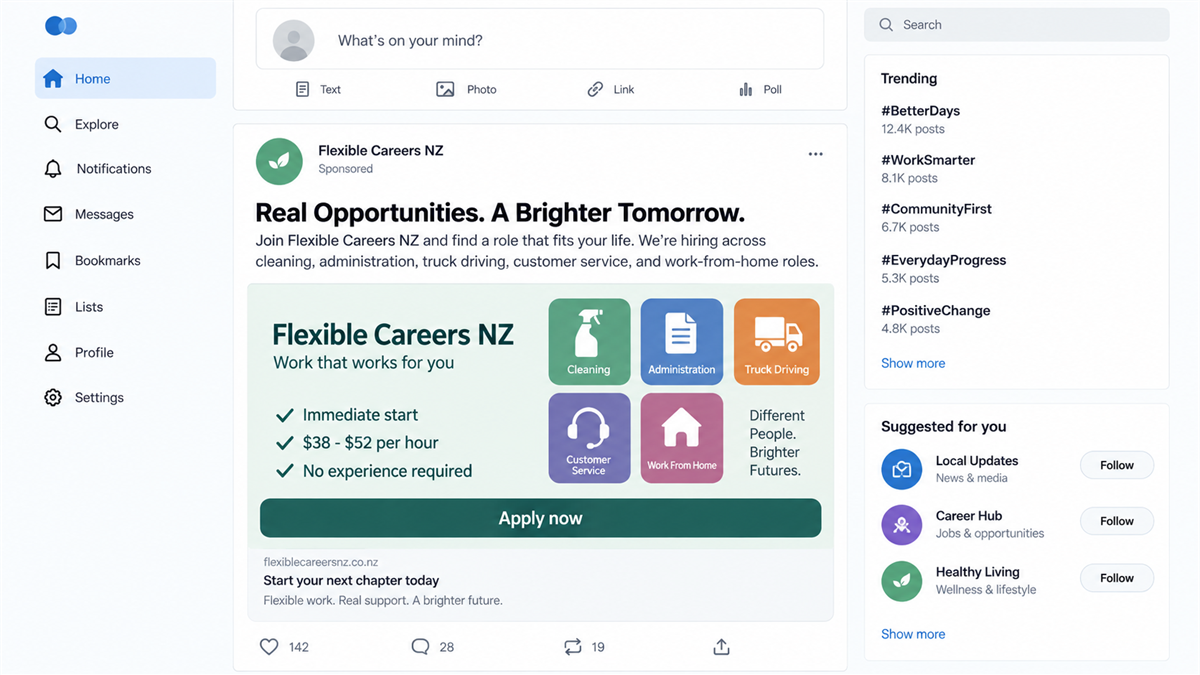
Westpac New Zealand issued a September 2026 alert after receiving reports involving multiple social media pages advertising fake jobs and recruitment opportunities. The observed roles included cleaning, administration, truck driving, customer service, and work-from-home positions.
These are broad categories with large pools of applicants. The scam does not need a rare qualification or a highly paid executive target. It reaches people who may be applying to several jobs and expecting recruiters to respond through social media.
The advertisements can use AI-generated workplace images, copied company names, vague locations, and flexible conditions. A fast reply feels encouraging to someone tired of waiting for genuine employers.
The recruiter makes an app part of hiring
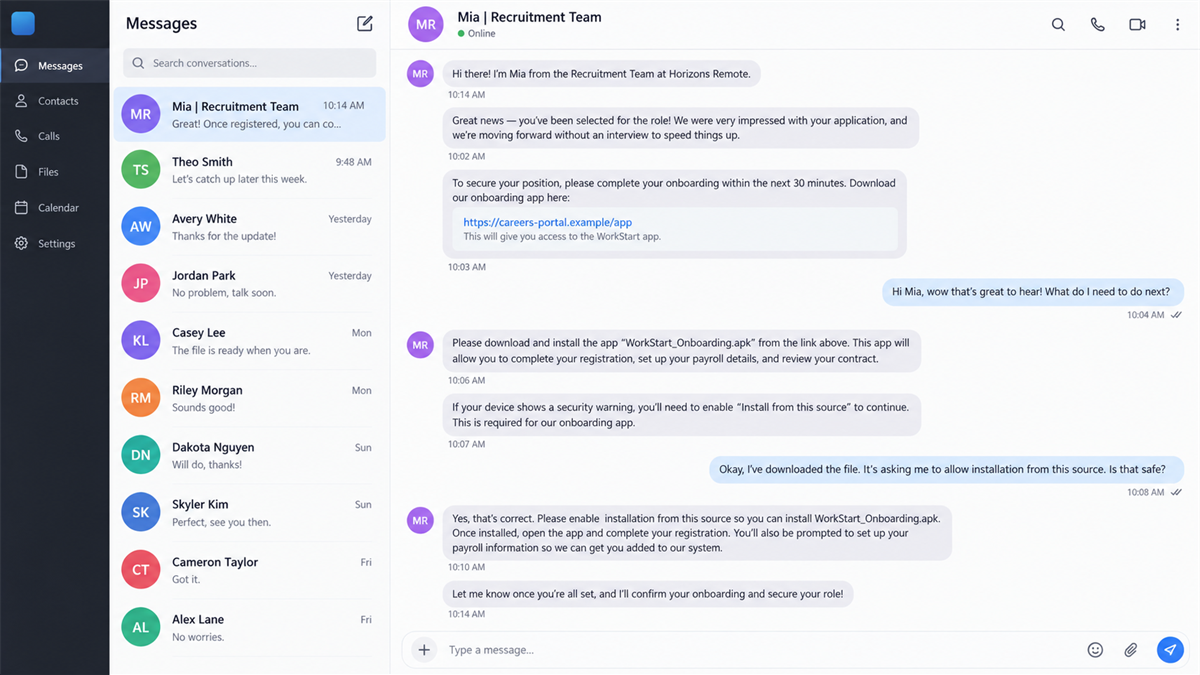
After the applicant shows interest, the fake recruiter moves the conversation to Messenger, WhatsApp, Telegram, text, or email. The applicant is told to download an app for registration, onboarding, identity verification, training, scheduling, or access to available jobs.
The software is not supplied through a verified employer portal or established app-store listing. It may arrive as a direct Android package, desktop installer, profile, or link to an unfamiliar download page.
Westpac warns that these applications may contain malware designed to compromise devices, steal passwords, harvest personal information, or give scammers access to online accounts.
The job story can hide several kinds of theft
Malware is one possible outcome, but the recruitment conversation can also collect identity documents, banking details, addresses, tax information, and account credentials. Some versions add fees for training, equipment, background checks, or access to assignments.
The same victim can be exploited more than once. Stolen documents support identity fraud, installed software can expose accounts, and a fake payroll form can collect bank information. A later “task job” may pressure the applicant to deposit money or move stolen funds.
- A social media page advertises easy work with unusually fast hiring.
- The role description is vague and the employer is difficult to verify.
- A recruiter keeps communication inside messaging apps.
- The applicant must install software before a meaningful interview.
- The download comes from a direct link rather than a verified store or company portal.
- The app or follow-up forms request passwords, banking data, identity documents, or payment.
Why Applicants Follow the Download Instructions
Real hiring already uses many unfamiliar platforms
Legitimate employers use applicant tracking systems, video interviews, background-check portals, scheduling tools, and digital onboarding. A job seeker may encounter a new service with every application.
Scammers exploit that complexity. An unfamiliar app does not immediately seem wrong when the recruiter describes it as the company’s standard hiring system.
Speed feels like success
A quick response can feel like relief after weeks of applications. The fake recruiter praises the candidate, says the vacancy is nearly filled, and presents the download as the final step before approval.
That speed is a warning when it replaces ordinary assessment. A genuine employer normally discusses experience, location, responsibilities, availability, pay, and work authorization before demanding software installation.
Access requests are disguised as onboarding
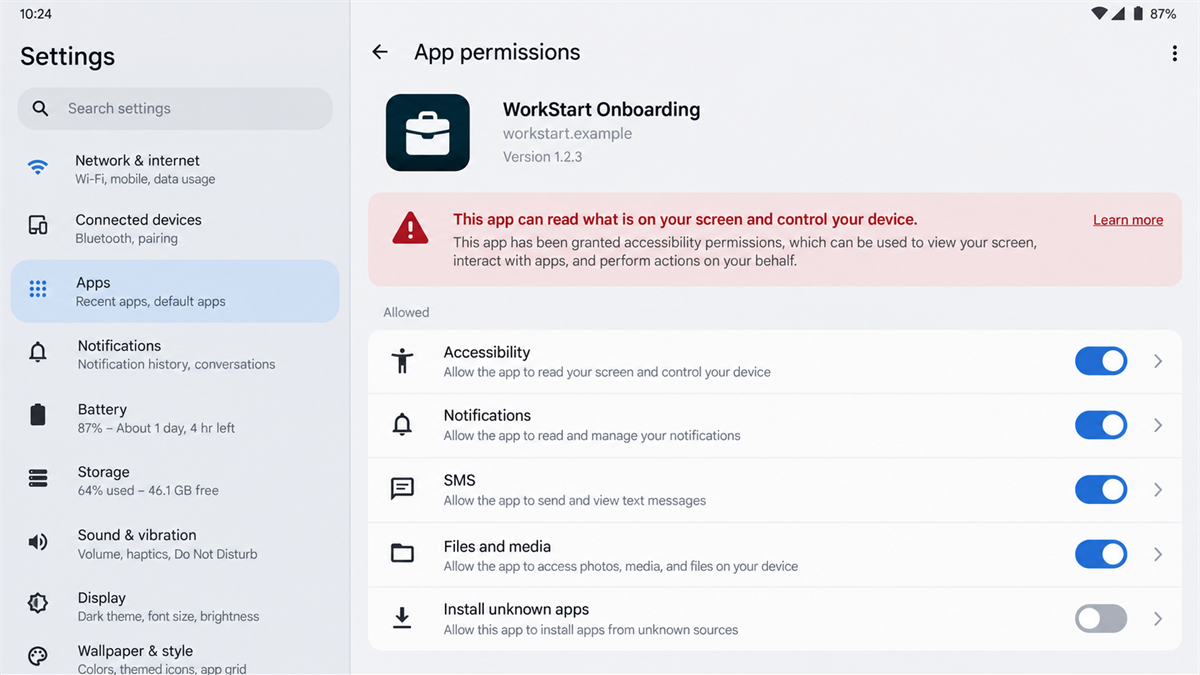
A malicious app may request accessibility access, notification reading, screen sharing, contact access, SMS permissions, or installation rights. The recruiter can describe each request as necessary for identity checks or communication.
Those permissions can expose one-time codes, banking screens, messages, and account activity. A job application does not require control over the applicant’s entire device.
Company and Checkout Checks
The social page is not proof of an employer
Review when the page was created, whether it has changed names, and whether posts, staff profiles, addresses, and website links match a real registered business. Several unrelated job types on a new page are a serious warning.
Contact the employer through the telephone number or careers page published on its independently found website. Do not ask the recruiter to verify themselves using contact details they supplied.
The recruiter identity may be copied
Scammers can use the name and photograph of a real human resources employee. A LinkedIn profile that exists does not prove the person messaging you controls it or sent the offer.
Compare the sender’s email domain, profile history, writing, and contact method with the company’s official staff directory. Call the main switchboard and ask whether the vacancy and recruiter are genuine.
The download source reveals the risk
A direct APK, ZIP file, cloud-storage link, or newly registered download domain bypasses the controls of a normal app marketplace and employer portal. An app-store listing with no history or only a handful of generic reviews also deserves caution.
Check the publisher, permissions, privacy policy, version history, and official company documentation. The app name alone can be changed to match any employer.
The fee or installation is the hidden checkout
Some fake jobs ask for money, but this campaign can profit before a fee appears. Installing the app gives the operator a route to passwords, accounts, and identity data.
Legitimate employers do not require applicants to pay for access to vacancies, send cryptocurrency for onboarding, buy gift cards, or install unverified software from a chat link.
How the Fake Job App Scam Works
Step 1: A broad social ad promises easy work
The campaign posts vacancies in community groups, marketplace feeds, sponsored ads, and newly created recruitment pages. Flexible hours, remote work, immediate starts, and strong pay attract a wide audience.
The description may avoid a precise workplace, manager, or daily duty. That vagueness lets the same page advertise many roles without building a real company story.
Step 2: The fake recruiter moves into private messages
After the applicant comments or submits interest, a recruiter starts a direct conversation. Private messaging prevents other users from seeing contradictory answers or warning the applicant.
The recruiter may ask a few simple questions to make the exchange feel like screening, then announce that the candidate qualifies for the next stage.
Step 3: Urgency replaces a normal interview
The applicant is told that places are filling, an onboarding window is closing, or the recruiter needs an immediate response. The supposed offer arrives with little discussion of experience or references.
Pressure helps the operator skip the questions a real interview would answer, including who supervises the role, where work occurs, how payroll operates, and what legal entity employs the worker.
Step 4: The recruiter sends an app or installer
The download is described as a registration, verification, training, roster, or payroll tool. It arrives through a direct link, attachment, or website controlled by the scammers.
On Android, the victim may be told to allow installation from an unknown source. On a computer, the file may imitate a familiar meeting or onboarding application.
Step 5: Permissions and forms expose the victim
The app asks for access that does not fit recruitment. Notification access can reveal security codes, accessibility access can observe and control screens, and SMS access can expose messages.
Forms may request passport or driver license images, tax numbers, bank details, passwords, and selfies. The recruiter frames the collection as payroll or identity verification.
Step 6: The stolen access becomes money
Attackers may enter email, social, banking, and shopping accounts, intercept codes, or use identity documents for new fraud. A compromised social account can advertise the same fake jobs to the victim’s contacts.
Some victims are moved into task scams or money-mule activity. They may be asked to receive funds, purchase cryptocurrency, reship goods, or transfer money while believing those actions are job duties.
How to Verify the Job Before Installing Anything
Search for the company’s official website and careers page without using the advertisement link. Confirm that the same vacancy, location, and application process appear there. A copied company name is not enough.
Call the employer’s main number and ask for human resources. Use a number from a trusted business registry or official site, not one sent by the recruiter. Ask whether the person, role, and required app are recognized.
Request a written job description, legal employer name, physical or registered address, pay basis, manager, interview schedule, and privacy notice. A scammer may provide documents, so verify the details independently.
If software is genuinely required, obtain its name from the official employer and download it from the developer’s verified store page. Compare the publisher before installing and deny permissions unrelated to its stated function.
Why Job Applications Contain Valuable Data
A normal application can include a full name, address, phone number, employment history, references, and copies of qualifications. When a scammer controls the form, each ordinary hiring detail becomes material for identity theft or a more convincing follow-up approach.
Bank information is especially sensitive. A genuine employer may request payroll details after a formal offer and verified onboarding, but a social media recruiter does not need them before an interview. Early payroll forms are often a pretext for collection.
References can become new targets too. Warn anyone whose name or contact information you supplied, and tell them not to trust unexpected messages claiming to confirm your employment.
Warning Signs of a Fake Recruitment App
- The recruiter offers the job before a meaningful interview.
- Communication stays only on Messenger, WhatsApp, Telegram, or text.
- The employer page is new, thin, or filled with AI-generated images.
- Multiple unrelated roles use the same vague description.
- The app comes from a direct link or unknown store.
- The installer asks you to disable security warnings.
- The app requests accessibility, SMS, notification, or screen-control access.
- The recruiter asks for fees, gift cards, crypto, or money transfers.
A real opportunity will survive a verification call and a reasonable delay. An employer that threatens to withdraw the offer because you want to confirm its identity is giving you a reason to walk away.
What to Do if You Have Fallen Victim to This Scam
- Stop contact with the recruiter. Do not argue, send more documents, or accept a different download. Block the accounts after preserving the evidence.
- Disconnect the affected device. Turn off mobile data, Wi-Fi, or Ethernet if the app was installed. This can interrupt remote access while you prepare cleanup.
- Remove dangerous permissions and the app. Revoke accessibility, notification, SMS, device administrator, screen-sharing, and unknown-source installation access before uninstalling.
- Scan with Malwarebytes. Run an updated full scan to detect known malicious packages, installers, persistence components, and related threats left behind by the fake recruitment app.
- Change passwords from a clean device. Prioritize email, banking, social media, cloud storage, and any account open while the malicious app had screen or notification access.
- Contact the bank. If banking details, codes, or screens were exposed, ask the fraud team to review sessions, devices, payees, digital wallets, and transactions.
- Protect your identity. If you sent identity documents, contact the issuing authority and your national identity-support service. Consider fraud alerts or credit monitoring where available.
- Use AdGuard to reduce malicious ad exposure. AdGuard can block known scam pages and harmful advertising routes. It cannot verify recruiters, so company checks remain essential.
- Report the campaign. Report the page and advertisement to the social platform, notify the impersonated employer, and file a report with local police or the national cybercrime service.
- Avoid recovery and replacement-job scams. Criminals may return with an offer to clean the device, recover money, or place you in another role for a fee. Do not pay them.
If the device was used for work, tell the employer’s security team before reconnecting it. Corporate passwords, customer data, VPN sessions, and browser cookies may require an incident response beyond uninstalling the visible app.
Frequently Asked Questions
Are these fake job ads a confirmed campaign?
Yes. Westpac NZ reported multiple social media pages using fake recruitment ads and app-download instructions in its September 2026 scam alert.
What kinds of jobs do the ads promote?
Reported examples include cleaning, administration, truck driving, customer service, and work-from-home roles. The page can change job titles while keeping the same download trap.
Do legitimate employers ever use onboarding apps?
Yes, but the employer and app should be independently verifiable. Download required software only through an official company portal or verified store listing.
What permissions are especially dangerous?
Accessibility, notification reading, SMS, device administration, screen sharing, and permission to install other apps can expose accounts or give broad control.
What if I sent my ID but installed nothing?
Report the identity exposure, contact the document issuer or identity-support service, monitor credit and accounts, and preserve the recruiter conversation.
Should a job applicant ever pay a recruitment fee?
Do not pay an unknown recruiter for access to a vacancy, onboarding, equipment, gift cards, crypto, or training. Verify any genuine cost directly with the employer.
The Bottom Line
The fake job app scam turns hope into an installation prompt. The advertised role, rapid approval, and recruiter conversation exist to make unverified software feel like a normal hiring requirement.
A real employer can be reached independently and can explain its process before asking for sensitive information. Verify the company first, refuse direct-link apps, and treat unusual device permissions as a reason to end the application.








