

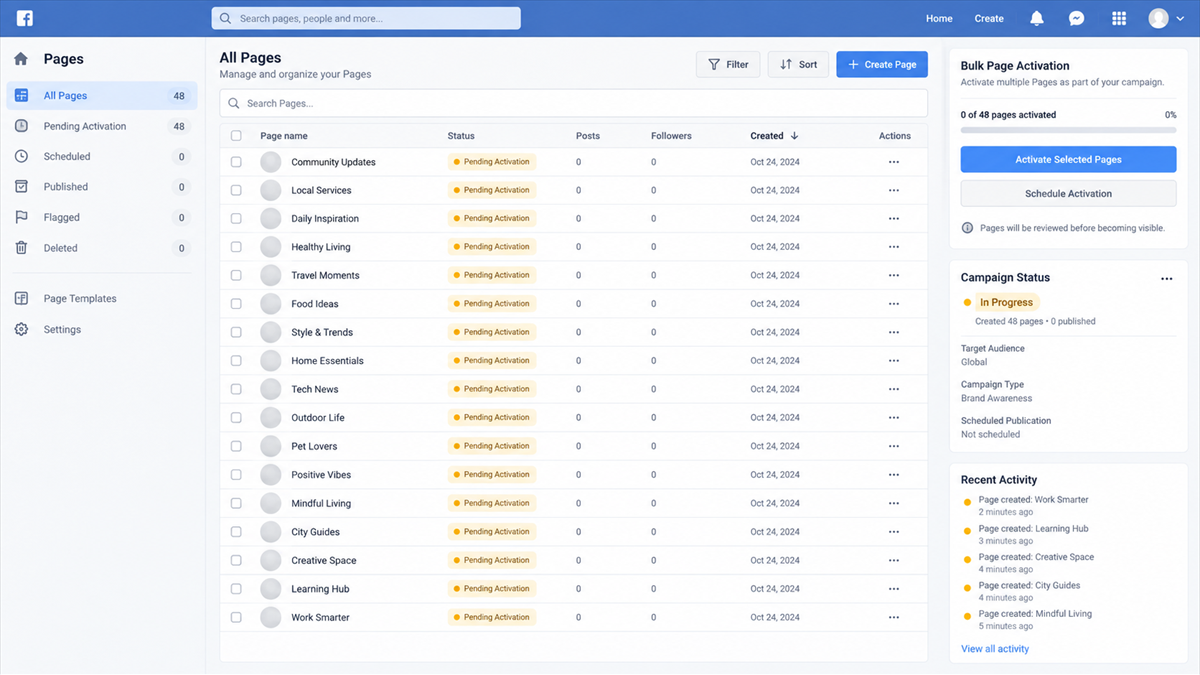
An empty social-media page looks harmless. It has no scam ad, no fake store, and no investment pitch to report. It may not even have a proper profile image. That quiet appearance is precisely why it can be useful to an organized fraud network.
Scammers can prepare enormous inventories of pages before a campaign begins, then activate or repurpose them when they need fresh identities. By the time one page is reported, replacements are already waiting.
This report explains what Meta and the Singapore Police Force found, how these dormant pages fit into mass scam campaigns, and what users should check before trusting an advertisement or seller.
Overview
What a shell page is
A shell page is a social-media Page created in advance and kept mostly empty. On its own, it may not display content that obviously violates platform rules. The page becomes valuable when a scam network later adds branding, ads, posts, contact details, or links and turns it into part of a live campaign.
This prebuilt inventory helps criminals operate at scale. A network does not need to create every page after enforcement begins. It can rotate to accounts and pages that already exist.
What authorities confirmed
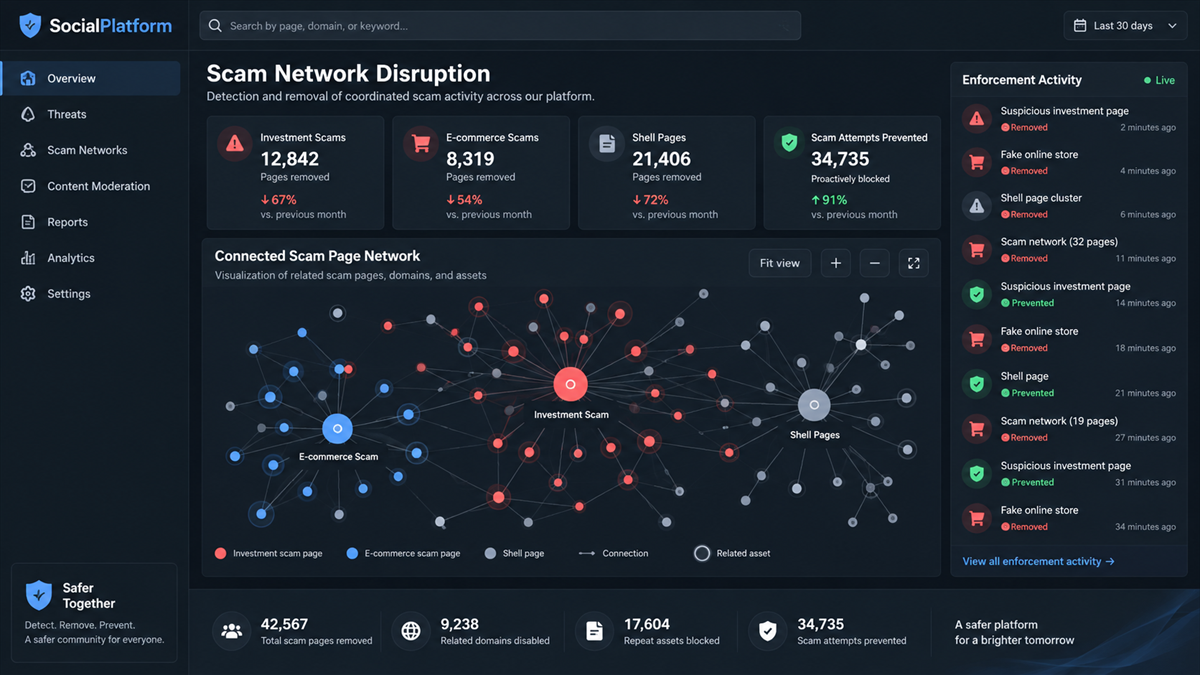
Meta said information from the Singapore Police Force identified a newer scam vector involving shell pages. In July 2026, Meta took action against more than 3.6 million of these pages before they could be used.
The same 2026 partnership led Meta to act against more than 113,000 entities and pages connected to fraud and scams, predominantly investment scams, and more than 33,600 entities involved in seasonal e-commerce scams.
What users should watch for
A newly branded or thinly populated page is not automatically fraudulent. The warning comes from the combination of page history, offer, payment path, and pressure. Be cautious when you see:
- A page with little history suddenly running aggressive ads.
- Guaranteed investment returns or risk-free profits.
- Deep discounts on well-known brands from an unknown seller.
- A countdown, stock warning, or claim that the offer ends today.
- Instructions to continue on WhatsApp, Telegram, or another private app.
- Payment by bank transfer, cryptocurrency, gift card, or an unfamiliar checkout.
- Comments that look repetitive, generic, or recently created.
The Scale Is Confirmed, Not Speculation
Meta published the findings on September 22, 2026, describing coordinated work with the Singapore Police Force. The partnership uses shared information to identify connected infrastructure, not just remove one reported account at a time.
Between January and June 2026, signals from police led Meta to act against more than 113,000 entities and pages tied to fraud and scams on Facebook and Instagram. Meta said the content predominantly involved investment scams promising guaranteed or high returns.
In a separate seasonal operation, more than 33,600 entities were actioned for e-commerce scams that used misleading pricing, fake promotions for known brands, exaggerated product claims, urgency, and scarcity. The full figures and explanation appear in Meta’s official report on its work with the Singapore Police Force.
The shell-page number was even larger. More than 3.6 million pages were removed before activation. The scale shows why a scam page that appeared yesterday may not be an isolated opportunist. It can be one disposable front inside a much larger system.
How Shell Pages Become Scam Campaigns
Step 1: Scammers create pages in bulk
The network prepares social-media pages before it needs them. Names may be generic, profiles incomplete, and timelines empty. The pages can remain inactive while the operators build other parts of the campaign.
Bulk creation spreads risk. If one page is detected, the network has alternatives. Older creation dates can also make a later rebrand look less obviously new.
Step 2: The pages are aged or kept dormant
A page with no active scam content may avoid attention from users and automated review. Some networks may add harmless posts or minimal activity, while others simply wait.
The key point is readiness. The page exists before the ad, storefront, or investment group appears, reducing the time needed to launch a replacement.
Step 3: One page receives a convincing identity
When activated, the page can become a discount retailer, investment educator, customer-support account, celebrity fan page, or local business. Names, logos, banners, and posts can be changed quickly.
The scammer may copy content from a legitimate company or use generated images and reviews. A professional appearance does not reveal how recently the identity was assembled.
Step 4: Paid ads push the offer to a large audience
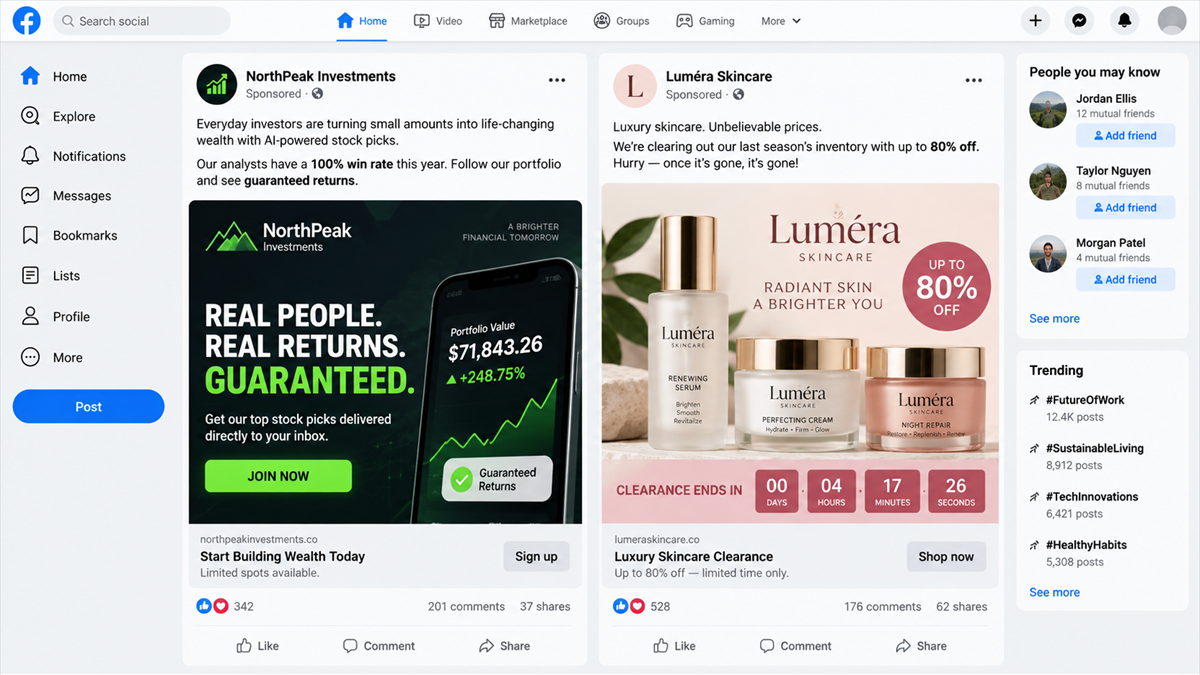
The network buys advertising or uses compromised accounts to spread posts. Meta’s examples include too-good-to-be-true stock tips and luxury skincare discounts from pages with little history.
Investment ads often promise guaranteed returns, insider access, or private groups. E-commerce ads use dramatic markdowns, fake scarcity, and a familiar brand name. Both seek a fast click before the user studies the page.
The fake CommBank car giveaway ads show how a familiar brand and social promotion can become the front door to credential theft. Shell-page networks make it easier to replace that front door repeatedly.
Step 5: Victims leave the platform
The ad can send the user to a fake shop, lead form, messaging group, or fraudulent trading platform. Moving off-platform gives the scammer more control over what the victim sees and reduces the chance that warnings appear beside the offer.
A shop may collect card details and never deliver. An investment funnel may collect a phone number, assign a fake adviser, and pressure the victim to deposit into a fabricated platform.
Step 6: The page is replaced after reports begin
When users complain or the platform acts, the operator can abandon the page. A waiting shell page receives a new identity and resumes the campaign with another link, name, or advertisement.
This rotation makes individual reports feel ineffective, but reports still matter. They provide signals that platforms and law enforcement can connect across pages, payment accounts, domains, and advertising patterns.
The Main Scams Behind the Pages
Meta said the largest confirmed group in the 2026 findings involved investment scams. These operations advertise high or guaranteed returns, move victims into private messaging groups, and present fake dashboards that appear to show profits.
The second major group involved e-commerce scams. A page advertises a recognizable product or luxury brand at an implausible discount. The destination may be a fake store, a low-quality product funnel, or a checkout built to collect payment details.
Shell pages can support other impersonation schemes too, but users should not assume that every empty page is malicious. The confirmed concern is organized networks stockpiling pages for future scam campaigns, not ordinary new businesses creating a page before launch.
The same infrastructure can be reused across several themes. A page prepared for a seasonal sale can later become an investment club, a customer-support profile, or another retail brand. That flexibility is why the page name alone may tell investigators very little about the network behind it.
Criminal groups also separate roles. One team can create and age accounts, another can produce advertisements, and another can handle payments or private chats. The person answering a victim may never control the page that delivered the lead. Looking at connected domains, payment accounts, and ad assets is therefore more useful than treating every page as a standalone scam.
Red Flags in Scam Ads and Pages
Evaluate the page and the offer together. A long-standing page can be compromised, and a new page can be legitimate, so no single profile detail is decisive.
- The page name recently changed or does not match its older posts.
- Page transparency information shows a different country or identity than the seller claims.
- The offer promises guaranteed income, zero risk, or a secret investment method.
- A well-known product is discounted far below every authorized retailer.
- The ad sends users to a domain unrelated to the brand.
- The seller insists on a private chat and avoids questions in public comments.
- Reviews repeat the same phrases or come from profiles with little history.
- Payment protection is removed through crypto, wire, gift card, or friends-and-family transfer.
Company and Checkout Checks
Open the page transparency details
Check when the page was created, whether its name changed, and where its managers are located when that information is available. A mismatch does not prove fraud, but it can expose a hastily repurposed identity.
Find the business outside the ad
Search for the company’s official website, registered details, and verified social accounts independently. Do not assume the ad’s link is official because the page uses a copied logo.
Inspect the destination domain
Read the entire hostname before entering information. Look-alike spellings, unrelated domains, very new sites, and redirects through several addresses are warning signs.
Keep payment protection
Use a credit card or payment method with dispute rights when buying from an unfamiliar seller. Do not move to an irreversible method because the page offers an extra discount or claims card payments are temporarily unavailable.
What to Do if You Have Fallen Victim to This Scam
- Stop communicating with the page or adviser. Do not send another payment to unlock an order, profit, withdrawal, or refund.
- Contact the payment provider. Report the transaction as fraud and ask about blocking, recall, chargeback, or card replacement options.
- Save the evidence. Capture the ad, page URL, transparency details, messages, destination domain, receipts, and payment recipient before the page disappears.
- Report the page and advertisement. Use the platform’s fraud reporting tools, not only a public comment.
- Secure exposed accounts. Change reused passwords, enable multi-factor authentication, and revoke unfamiliar sessions.
- Protect card and identity data. If the checkout collected documents or card details, contact the issuer and monitor for new accounts or charges.
- Scan the device if a file was downloaded. A reputable tool such as Malwarebytes can check for malware delivered through the page or destination site.
- Report the scam to authorities. Use the official fraud-reporting service in your country and include the page and payment details.
AdGuard can block many known malicious domains, trackers, and deceptive ads before they load. It is a helpful layer, but a new domain or newly activated page may not yet be known, so seller and payment checks remain essential.
How to Reduce Exposure to Mass Scam Campaigns
Do not treat an advertisement as verification. Platforms review enormous volumes of content, and criminals continually change pages, domains, and accounts. The presence of a paid placement only means someone purchased distribution.
Use page-transparency tools, independent search, and protected payment methods. For investments, check the person and firm with the relevant financial regulator before sharing contact details or joining a private group.
Report early. One thin page may be connected to thousands of others. A report that includes the ad, destination link, and payment route gives investigators more useful signals than a screenshot of the page name alone.
Consider keeping screenshots before engaging with an unfamiliar promotion. Scam pages can change names, delete posts, or disappear after collecting payments. Capturing the page URL, the ad library entry, and the final checkout domain preserves the links between stages of the operation.
For investment offers, never rely on a registration number shown in the ad. Look up the firm and representative in the regulator’s own database, compare contact details, and call the number in that independent record. Cloning the name of a licensed company is a common way to make a fraudulent pitch appear regulated.
For shopping ads, compare the price with several established retailers and read the seller’s return policy before checkout. A copied brand story and a countdown timer are not substitutes for a verifiable business address, reachable support, and a payment method with buyer protection.
Frequently Asked Questions
Is every empty Facebook Page a scam?
No. New and legitimate pages can be empty. Meta’s warning concerns large networks of pages prepared as future scam infrastructure. Judge the page alongside its offer, history, destination, and payment method.
How can an empty page be harmful?
It can be activated later with a fake business identity, scam ads, and malicious links. Preparing pages in advance gives a criminal network replacements when active pages are removed.
Does a sponsored label mean the advertiser was verified?
No. A sponsored label means the placement was paid for. It does not guarantee that the seller, investment, product claim, or destination website is legitimate.
What page information should I check?
Review creation date, name changes, manager locations when shown, posting history, contact details, and the domain used by the ad. Look for inconsistencies rather than one perfect clue.
Why do scam pages move people to messaging apps?
Private chats let scammers apply pressure, send payment instructions, and continue after an ad or page is removed. They also reduce public questions that could warn other users.
Can I recover money paid to a fake store or investment platform?
Recovery depends on the payment method and speed of reporting. Contact the bank or card provider immediately. Do not pay an unsolicited recovery service that promises guaranteed results.
The Bottom Line
Meta and the Singapore Police Force confirmed that shell pages are being prepared at extraordinary scale for future scam campaigns. More than 3.6 million were actioned before activation, alongside major investment and e-commerce scam networks.
An empty or recently transformed page is not proof by itself. The danger appears when thin history meets an unbelievable offer, a strange destination, private-message pressure, and unprotected payment. Verify the business outside the ad before trusting the page.








