

A message about an unfamiliar card purchase creates an instant decision: ignore it and risk losing money, or call the number and stop the payment. That forced choice is exactly what the sender wants.
The purchase details may look specific, the bank name may be familiar, and the message may not contain a clickable link. Instead, it offers a phone number that appears to be the safest way to get help.
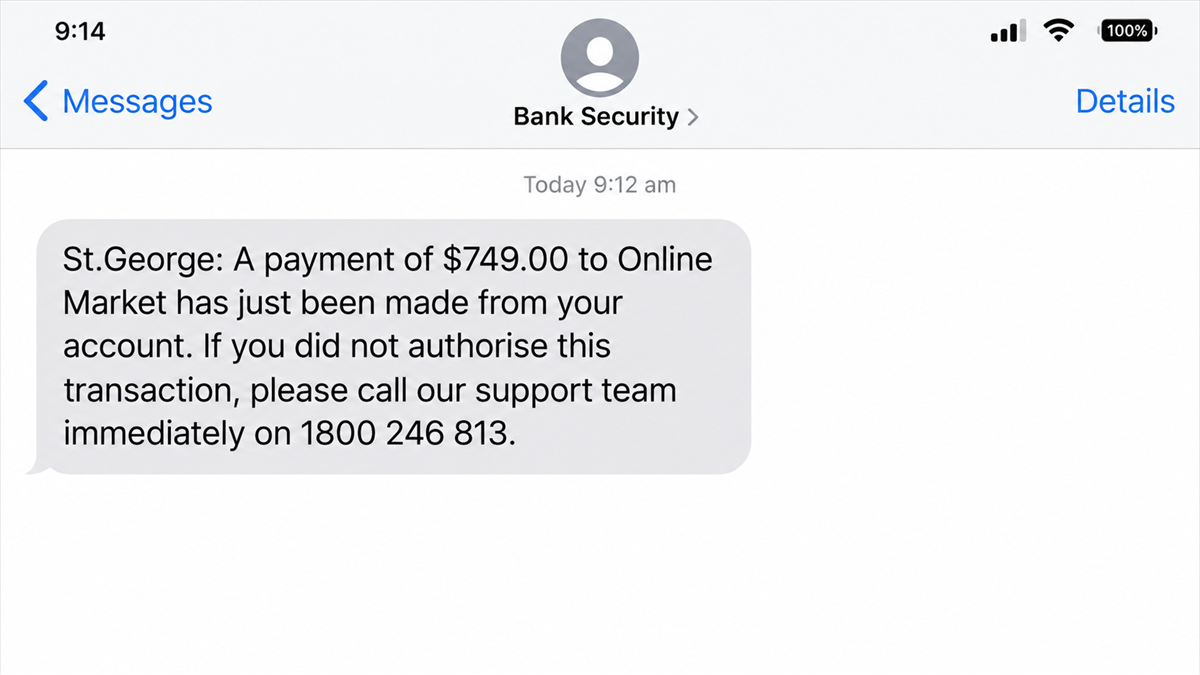
This report explains the current St.George payment verification scam and what can happen after the victim calls the number in the alert.
Overview
What the fake alert says
The message claims a recent payment needs attention. It displays an alleged purchase and tells the recipient to call immediately if they do not recognize the transaction. The amount, merchant, and wording can vary, but the purpose is to trigger a fast response.
The warning may arrive by SMS or email and can carry St.George branding. Some versions avoid a link entirely, making the message feel less like ordinary phishing. The dangerous element is the phone number.
What happens if you call
The number does not belong to St.George. It connects the caller to a scammer who poses as a fraud or security representative. The conversation is designed to collect personal information, card details, online-banking credentials, security codes, or authorization for a transfer.
The criminal may already know the victim’s name or partial details. That information can be used to make the call feel like a normal bank verification process while the scammer guides the victim toward actions that expose the account.
The safest response
Do not reply, click, or call the contact details inside an unexpected payment warning. Instead:
- Open the official banking app independently and review transactions.
- Call the number printed on the back of your card or listed on the official bank website.
- Tell the real bank that you received a suspicious payment alert.
- Preserve a screenshot before deleting the message.
- Never read a one-time security code to an inbound caller.
St.George Has Confirmed the Scam
St.George published a September 2026 warning about this exact payment verification scam. The bank says the message displays details of an alleged purchase and directs recipients to call a phone number immediately if the activity is not recognized.
The bank confirms that the number shown in the scam is not an official St.George contact. Calling it may connect the victim with a scammer attempting to obtain personal or banking information that can then be used to access accounts.
This is important because the scam is not being inferred from one online complaint. It is an active impersonation campaign confirmed by the organization being imitated. The warning is available on the official St.George latest scams page.
St.George advises customers not to call numbers or click links included in unexpected payment messages. The bank directs customers to use contact details obtained from its official website.
How the Fake Payment Alert Scam Works
Step 1: A believable transaction is invented
The scam begins with a purchase the recipient does not remember making. The merchant may be an online store, subscription service, electronics seller, airline, or marketplace. The amount is chosen to be concerning but plausible.
A specific-looking transaction creates urgency and curiosity. The victim is less likely to inspect the sender when the message appears to reveal an active theft.
Step 2: The message provides a fraudulent support number
Instead of asking the recipient to sign in, the alert says to call if the charge is unauthorized. That structure imitates genuine fraud notifications and can bypass the suspicion many people now have about links in text messages.
The number may be local-looking, toll-free-looking, or formatted to resemble a bank helpline. Phone-number appearance does not prove ownership, and caller ID on return calls can also be manipulated.
Step 3: A fake fraud agent answers
The person who answers uses a script. They may thank the caller for reporting the charge, ask identity questions, and describe additional suspicious activity. The calm, procedural tone is meant to convert the criminal’s number into a trusted support channel.
Any details the victim confirms can become building blocks for account takeover. Even seemingly harmless answers can help a scammer pass later security checks or target the victim more precisely.
Step 4: The victim is moved into a verification process
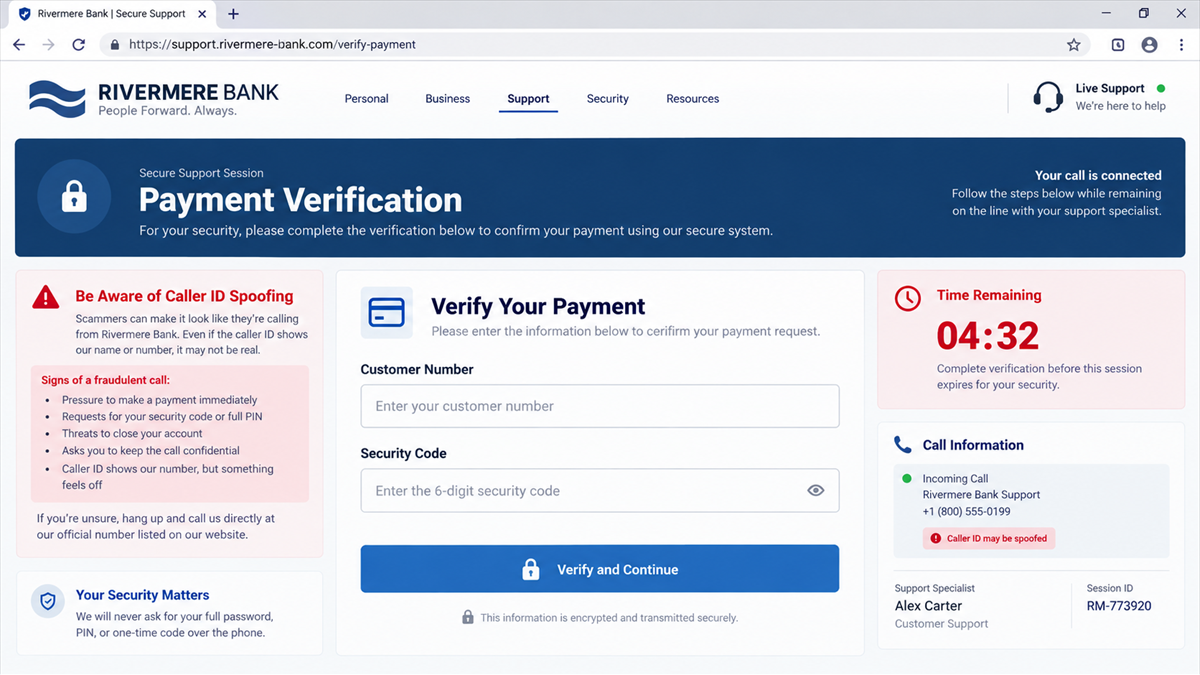
The fake agent may ask for a customer number, card number, date of birth, address, password, or security code. They can send a real one-time code by attempting a login or transaction against the victim’s actual account.
The message containing that code may explicitly say not to share it. The scammer will reframe it as a cancellation or verification code. It is actually the key needed to approve the action the criminal started.
Step 5: The scammer tries to take control
With credentials and a code, the criminal may sign in, add a payee, change contact information, register a device, or initiate a transfer. Another version asks the victim to install remote-access software so the fake agent can supposedly remove the charge.
Remote access gives the scammer visibility and control over the screen. The victim may be told to hide the banking app, cover the screen, or avoid touching the device while the supposed investigation runs.
Step 6: A transfer is disguised as protection
Some callback scams claim the account is compromised and money must be moved to a safe account. The destination belongs to the scammers or a money mule. Banks do not protect customer funds by asking people to transfer them to a new account supplied during an unexpected call.
The criminal may split the payment, use instant transfers, or move money through cryptocurrency to make recovery more difficult.
Step 7: The original fake charge becomes a distraction
The alleged purchase may never have existed. Its only purpose was to make the victim call. While the caller focuses on canceling that transaction, the scammer creates the real unauthorized activity.
This reversal is what makes the scam effective. The person believes they are preventing fraud while being guided through the steps that enable it.
Why Call-Back Phishing Feels Safer
People have learned not to click suspicious links, so criminals increasingly replace the link with a telephone number. Calling feels active and cautious. The victim believes they are contacting support, not responding to a request for information.
The scam also begins with a security concern. A caller may forgive unusual questions because a fraud investigation is expected to involve verification. The distinction is who initiated the channel: the victim called a number chosen by the scammer.
Voice conversations create momentum. A practiced operator can answer objections, add new threats, and prevent the victim from checking the official app. That live pressure is harder to sustain in a static phishing page.
The callback also helps the criminal screen potential victims. Someone who calls is worried enough to engage and may already believe the transaction is real. The operator can invest time in that person, while unanswered messages cost the network almost nothing.
The request for a security code mirrors other bank impersonation campaigns, including the fake PNC fraud-department calls and texts. The brand changes, but the code still authorizes the criminal’s action rather than canceling it.
Scammers can combine the text with information from data breaches or earlier phishing. Knowing a customer’s name, phone number, bank, or last four card digits can make the conversation sound informed. None of those details prove the caller can see the account.
Red Flags in the Message and Call
- The alert is unexpected and uses an urgent call-to-action.
- The number differs from the one on the bank’s official website or your card.
- The caller asks for a password, PIN, full card number, or one-time code.
- You are told the code will cancel a payment or verify the fraud case.
- The agent asks you to install screen-sharing or remote-access software.
- You are instructed to move money to a safe, secure, holding, or reserve account.
- The caller discourages you from visiting a branch or calling the bank separately.
- The supposed agent becomes aggressive when you pause or question the process.
A real bank may contact a customer about suspected fraud, but you can always end the interaction and call back through an independently verified number. A legitimate representative will not punish you for protecting the account that way.
Company and Checkout Checks
Use the number on the card
The back of your physical card and the bank’s official app are safer sources than the message. Start a fresh call. Do not redial, use recent calls, or let the suspicious caller transfer you.
Review activity inside the official app
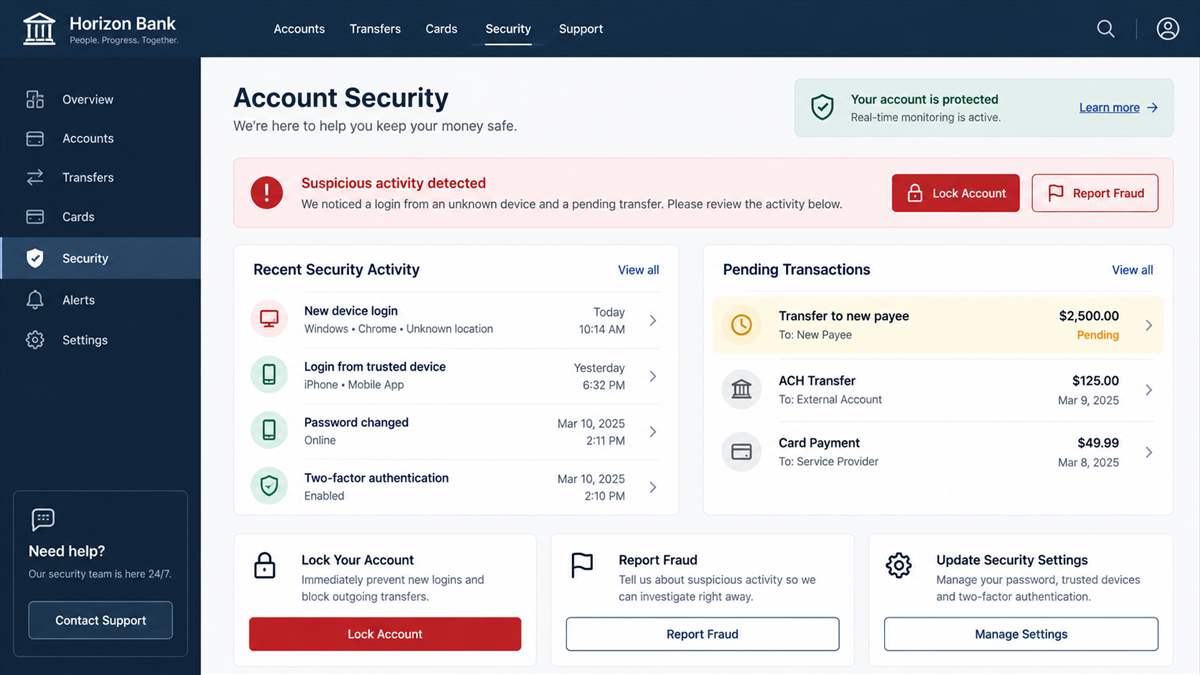
Open the app from its normal icon, not from a link. Check posted and pending transactions. If the alleged purchase is absent, that is another sign the message was only bait.
Check what the code actually says
One-time-code messages often describe the action being approved. Read the entire message. If it says the code is for a login, payment, device registration, or password reset, sharing it authorizes that event.
Verify the support channel
Search results and advertisements can also display fake support numbers. Use the bank’s official website reached by typing its address, the official app, a branch, or the printed card number.
What to Do if You Have Fallen Victim to This Scam
- End the call. Do not continue arguing or wait while the scammer claims to reverse a payment.
- Contact St.George through an official channel. Explain that you called a fraudulent number and list every detail or code you shared.
- Lock cards and online access. Use the official app if it is still under your control, or ask the bank to block access and replace affected cards.
- Report transactions immediately. Identify pending transfers, new payees, changed contact details, or unfamiliar devices.
- Change banking and email passwords. Use a clean device and unique passwords. Email security matters because it can be used to reset banking access.
- Remove remote-access software. Disconnect the affected device, uninstall the tool only after preserving relevant details, and scan with a reputable product such as Malwarebytes.
- Warn your mobile provider if needed. If the scammer collected identity details or your service suddenly stops, ask about SIM-swap protection.
- Preserve and report the message. St.George asks customers to forward suspicious emails or screenshots to its reporting channels before deleting them.
AdGuard can reduce exposure to phishing pages and malicious advertisements, but it does not make a number inside a scam message trustworthy. Always rebuild the contact path from the bank’s official sources.
How to Handle Any Unexpected Bank Alert
Pause before interacting with the message. Take a screenshot, then open the official app or type the bank’s known web address yourself. If the charge is real, the bank can handle it through those normal channels.
Keep contact details saved before an emergency. A verified bank number in your contacts makes it easier to ignore whatever number appears in an urgent text.
Finally, make one-time codes a hard boundary. No caller needs a code that was sent privately to you. If someone asks for it, end the call and contact the institution independently.
Households and small businesses should use the same rule across every bank: an urgent message can be investigated, but only through a channel already trusted before the message arrived. This removes the scammer’s control over both the problem and the supposed solution.
If several people can access a business account, tell the others about the alert before anyone responds. Criminals sometimes send the same message to multiple contacts and succeed when the second recipient acts after the first one correctly ignores it.
Frequently Asked Questions
Is the payment shown in the message real?
It may be completely invented. Check the official banking app or call the verified bank number. Do not use the message’s link or telephone number to investigate it.
Can a fake bank text arrive in a real message thread?
Sender information can be spoofed, and some devices group messages by displayed sender. A familiar thread is not proof that the latest message came from the bank.
Why would a scam text use a phone number instead of a link?
The number makes the victim initiate contact and can feel safer than clicking. It also gives a live operator a chance to overcome doubts and request codes or transfers.
Will St.George ever call about suspected fraud?
A bank may contact customers about account security. You can still hang up and call St.George through the number on your card or its official website. Never rely on the inbound caller’s contact details.
What if I only called but shared nothing?
End contact, block the number, and monitor your accounts. The scammers now know your number is active, so expect possible follow-up attempts and report the original message.
What if I shared a one-time code?
Contact the bank immediately. The code may have approved a login, transaction, or account change. Ask the bank to secure access and review recent activity.
The Bottom Line
The St.George payment verification alert is a confirmed callback scam. The alleged purchase creates fear, but the fraudulent phone number is the real path into the victim’s account.
Do not call the number in the message. Check the official app, use the number on your card, and tell the bank immediately if you shared information, installed software, or approved any code.

Reviews & discussion
0 commentsShare a firsthand experience, or ask a question.
Community reviews
st.george
Moderated reader experiences, not an editorial verdict.
Start the conversation
Have a question or something useful to share? Add the first comment.