

A request to verify your identity can sound routine when it appears to come from the government registry that holds your company details. A deadline makes it feel even harder to postpone.
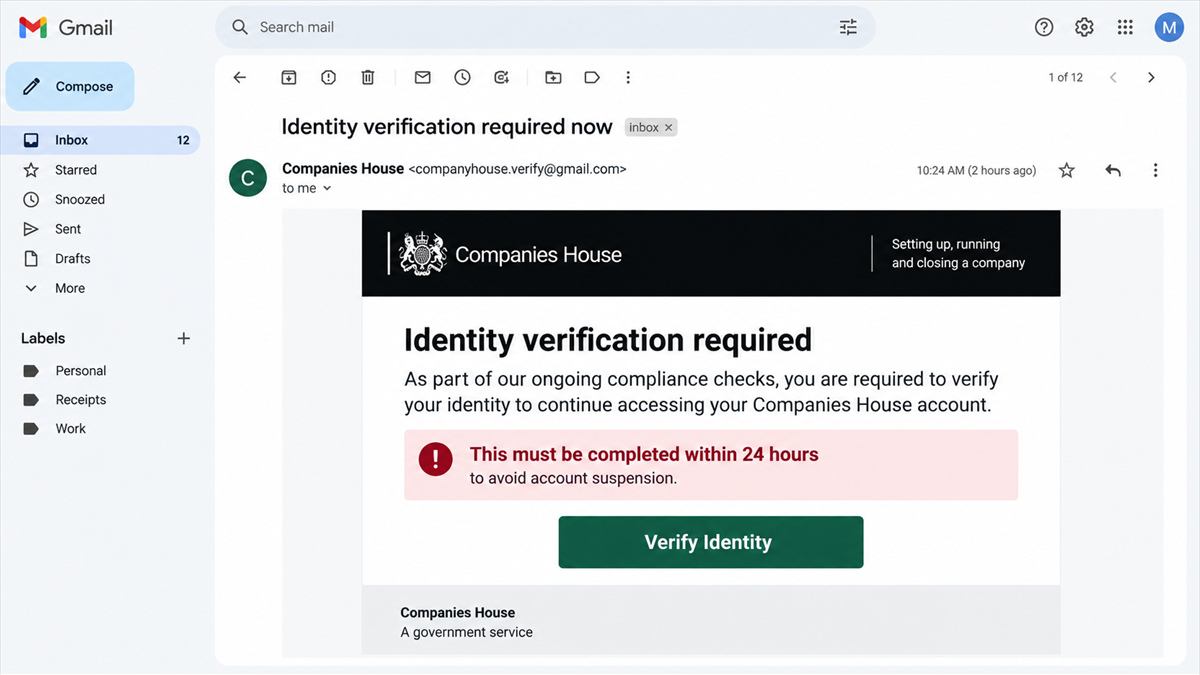
The email may use Companies House branding, mention WebFiling, and claim that access will be limited if a director does not complete a new check. The button leads away from the real service.
This report explains the confirmed Companies House identity-verification emails, what the fake process can collect, and how to verify a genuine registry message without using the sender’s link.
Overview
What the email claims
The message says identity verification is required now or within a short deadline. It may refer to a director, registered email address, company account, or changes to the WebFiling service. A large button invites the recipient to start or complete verification.
Some examples come from a free Gmail address. Others use look-alike domains designed to resemble official government mail. Copied logos and familiar language can make the sender line easier to overlook.
What the fake check is designed to collect
The link can lead to a counterfeit sign-in or identity-check page. It may request an email address, WebFiling credentials, authentication code, passport or driving-licence image, personal address, date of birth, payment details, or company information.
That data can support account takeover, identity theft, targeted business fraud, and further impersonation. A passport image and company role are especially valuable because they can be reused in scams against banks, suppliers, employees, and other organizations.
The fastest safety checks
Companies House gives clear guidance for suspicious emails:
- Real Companies House email addresses end in
.gov.uk. - Do not open a link or attachment from a suspicious message.
- Do not share personal information in response to the email.
- Report the message to Companies House through its official phishing address.
- Open Companies House services independently instead of using the email button.
Companies House Has Published the Scam Examples
This is a confirmed phishing campaign, not an allegation based on a single complaint. The UK government page for scams impersonating Companies House includes multiple examples of known identity-verification emails.
The official examples include a Gmail account telling recipients to verify their identity, an email imitating messages sent to registered company addresses, a message using HMRC branding, and a demand to verify identity within 24 hours using a one-time reference number.
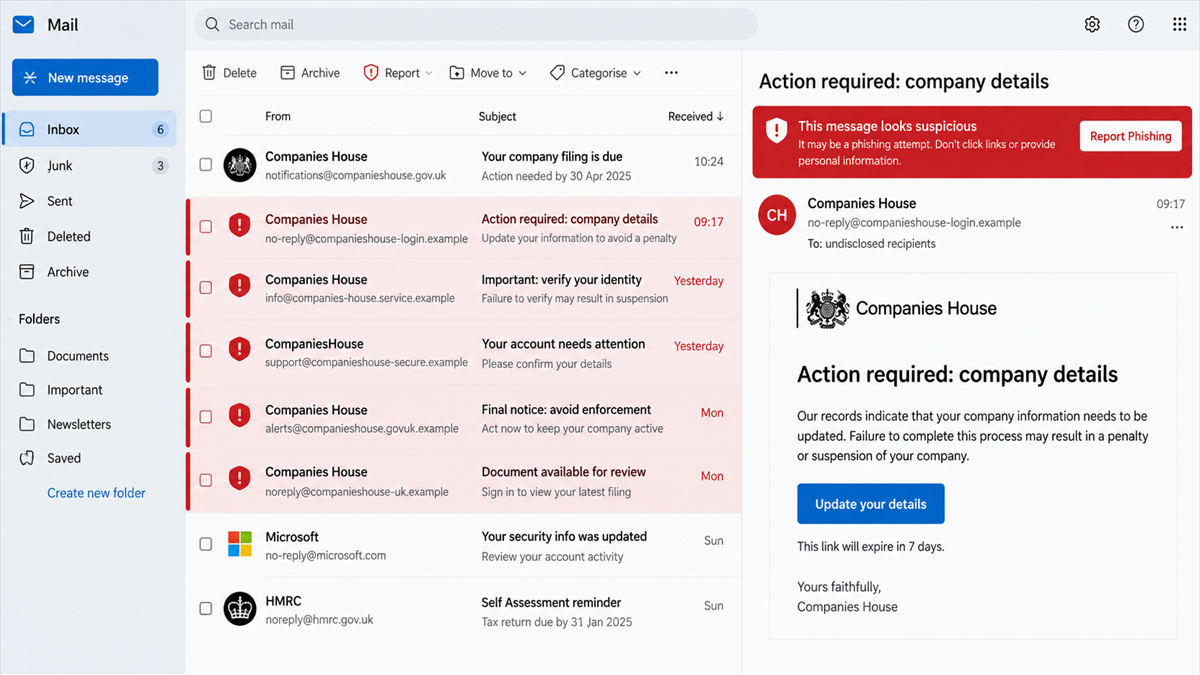
Companies House also lists fraudulent sender domains used in impersonation emails. The names use extra words, misleading government-style phrases, and look-alike spellings. The current guidance and samples are available on the official GOV.UK Companies House scam page.
The page was updated in July 2026 to add a new scam email telling customers to verify their identity now. That timing matters because criminals often exploit real administrative changes and public awareness campaigns to make fake compliance requests feel expected.
How the Fake Companies House Email Works
Step 1: The scam reaches a company contact
The email may go to a director, owner, accountant, company secretary, or registered business address. Company information is publicly available, so the scammer can personalize the message with a real company name or number.
Personalization does not prove access to Companies House systems. Public records, data brokers, breaches, and business websites can provide enough information to create a convincing greeting.
Step 2: A real obligation is turned into urgency
The message refers to identity verification, WebFiling changes, KYC or KYB checks, a registered email address, or an account update. These are familiar compliance concepts, which lowers suspicion.
A short deadline changes the recipient’s priorities. The email may threaten restricted access, delayed filings, penalties, or an incomplete company record if the action is not finished immediately.
Step 3: The sender address is disguised
The display name may say Companies House even when the actual address uses Gmail or an unrelated domain. More sophisticated messages use a look-alike domain with words such as secure, notification, filing, or government.
The critical check is the full address after the @ symbol. Companies House says genuine emails come from an address ending in .gov.uk.
Step 4: The button opens a counterfeit portal
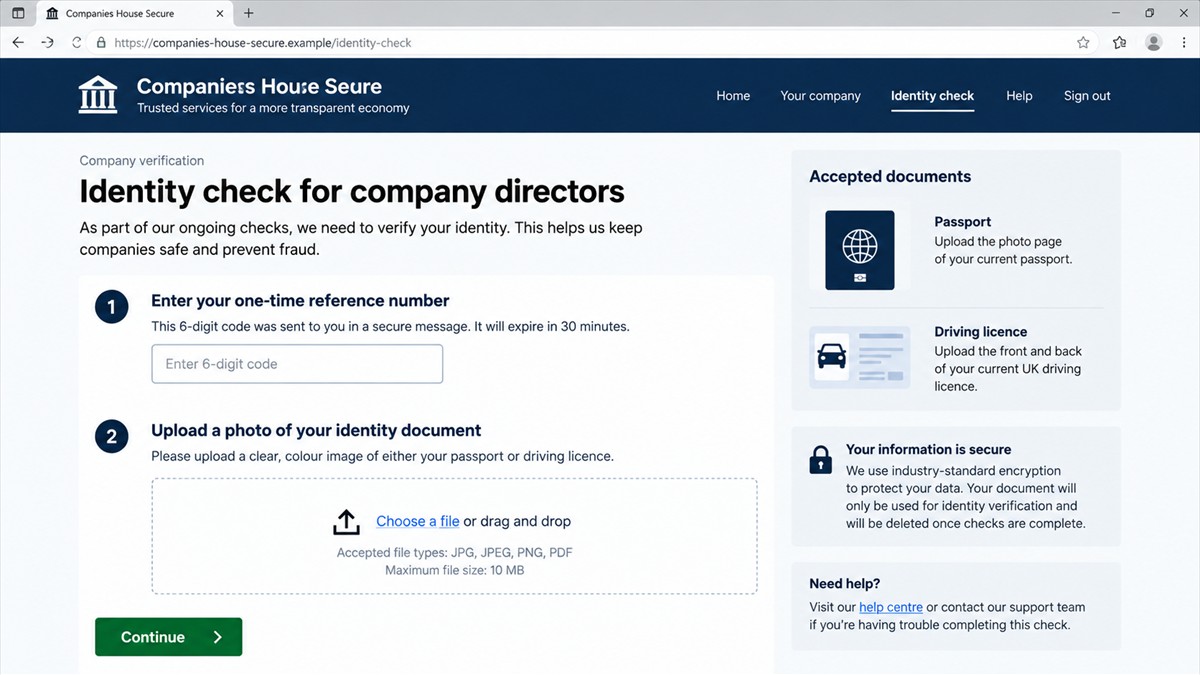
The destination imitates a government service with a navy header, official-style wording, and numbered verification steps. It may ask for a reference number and then request identity documents.
A padlock icon does not establish that the site belongs to the government. It only means the connection to that particular domain is encrypted. Read the complete hostname.
Step 5: Credentials and documents are collected
The page can request sign-in details before showing the document upload. If the victim reuses an email password, the loss can spread beyond the company registry account.
Passport, driving-licence, selfie, and address information can be packaged for identity fraud. Company credentials may also let criminals view or alter account information, prepare more convincing invoice fraud, or target other directors.
Step 6: A code completes the takeover
The fake site or an operator may ask for a one-time code. The code could be generated by a real service because the scammer is attempting a login at the same time.
Never enter or read out a code unless you independently started the exact action described in the code message. A phishing page can relay the code to the real site in real time.
Step 7: The victim sees a false confirmation
After submission, the page may display a success message or redirect to the real GOV.UK website. That final redirect can hide the theft by making the process appear complete.
No immediate error appears because the fake portal was built to collect, not validate. The victim may only discover the problem after an account change, suspicious filing, payment request, or identity-fraud alert.
Why Business Registry Phishing Is Dangerous
The scam combines personal identity data with corporate authority. A director’s document and company details can help a criminal impersonate someone who is trusted to approve filings, bank requests, contracts, or supplier changes.
Business inboxes also connect many systems. A compromised email account may contain invoices, employee records, tax documents, password resets, and conversations with banks or accountants. One fake verification form can become the first stage of a larger business-email-compromise operation.
The same trust problem appears in Meta Business phishing emails that steal account logins: the message borrows a real administrative task and directs it into a counterfeit portal controlled by the attacker.
Real identity-verification requirements create background noise that scammers exploit. The correct response is not to ignore every registry notice, but to separate the message from the action: open the official service independently and check what is actually required.
The public nature of company records also makes the email feel more personal than it really is. A scammer can automate messages that include the correct legal name, company number, registered address, and officer name. Those details are not secrets and should never be treated as proof that the sender has access to a government account.
Once a business email account is compromised, the attacker can study normal language and timing before sending anything. A later request to change supplier bank details or approve an urgent payment may look far more convincing than the original phishing email. Fast containment protects both the company and everyone who trusts its messages.
Red Flags in the Email and Verification Page
- The sender uses Gmail or an address that does not end in
.gov.uk. - The domain contains Companies House words but is not on GOV.UK.
- The message demands action within 24 hours or threatens account restrictions.
- A button hides the destination instead of showing a recognizable official URL.
- The page requests a passport, driving licence, selfie, or payment before you reach the official service.
- The email mixes Companies House and HMRC branding without a clear reason.
- A one-time reference number is presented as proof that the message is genuine.
- The site asks for an email password rather than using the normal government sign-in flow.
Good grammar and correct logos do not make the request authentic. Modern phishing kits reproduce professional layouts, and the best examples deliberately avoid obvious errors.
Company and Checkout Checks
Expand the full sender address
Do not rely on the display name. Open the message details and read the entire sender domain. An address that merely contains government words is not the same as one ending in .gov.uk.
Open GOV.UK independently
Use a saved bookmark or type the Companies House service address yourself. Sign in normally and look for the required action. Do not copy the suspicious link into another browser.
Verify through official support
If the request remains unclear, contact Companies House using the number or email published on GOV.UK. Do not use the reply address or telephone number inside the suspicious message.
Separate filing access from identity documents
Ask which service needs the document, why it is required, and how the official guidance says to submit it. A generic upload page reached from email should never be the only explanation.
What to Do if You Have Fallen Victim to This Scam
- Stop using the fake page. Close it and do not submit more information, even if it claims the first attempt failed.
- Change exposed passwords. Use a clean device and update the affected email, Companies House, and any account that reused the same password.
- Secure the email account. Revoke unknown sessions, check forwarding rules and recovery methods, and enable multi-factor authentication.
- Contact Companies House. Report the phishing message and ask how to protect the company record or account.
- Protect identity documents. Follow guidance from the passport or driving-licence authority and monitor for identity misuse.
- Notify the business and its advisers. Warn other directors, finance staff, accountants, and IT support so they do not trust follow-up requests.
- Check the device. If you downloaded an attachment or software, scan with a reputable tool such as Malwarebytes and seek professional help if the device handles sensitive business data.
- Report financial exposure. Contact the bank immediately if card, account, or payment information was entered.
AdGuard can block known phishing domains and deceptive redirects, providing another layer against common campaigns. It cannot guarantee that a newly registered look-alike site will be recognized, so the sender and domain checks remain essential.
How Businesses Can Reduce the Risk
Give registry and identity-verification responsibilities to specific people. Staff should know that an unexpected message must be checked inside the official service, not completed from the inbox.
Use unique passwords and multi-factor authentication for business email and filing accounts. Protect the registered email address especially carefully, because it can become the target for convincing, company-specific messages.
Create a simple internal reporting path. A director who receives a suspicious notice should be able to forward it to finance or IT without clicking. Quick internal warnings can stop the same campaign from succeeding against another employee.
Review who has access to the registered email address and remove accounts that are no longer needed. Shared inboxes should have named owners, audit logs, and a documented recovery process rather than one password passed among several people.
Businesses should also verify changes to supplier or director details through a second channel. If a compromised inbox sends an unusual request, a known telephone number or in-person confirmation can prevent the identity theft from turning into a payment loss.
Keep a record of genuine filing and verification activity. When staff know who initiated a change, which official service was used, and when it should complete, an unexpected email is easier to challenge. Unplanned compliance requests should pause the process, not accelerate it.
That pause can prevent a routine-looking email from becoming a company-wide incident.
Frequently Asked Questions
Are Companies House identity checks real?
Companies House can have legitimate identity-verification requirements. The scam abuses that real topic. Start from GOV.UK independently and follow the instructions shown in the official service.
How can I tell whether the sender is genuine?
Companies House says genuine email addresses end in .gov.uk. Expand the full sender address and still avoid using unexpected links when you can open the service directly.
Does a one-time reference number prove the email is real?
No. A scammer can invent a reference number and print it in a professional template. Verify the request inside the official account or through official support.
What if I uploaded my passport but no password?
The document alone can enable identity theft and targeted fraud. Report it to Companies House and the issuing authority, preserve evidence, and monitor for misuse.
Can the fake page have HTTPS and a padlock?
Yes. HTTPS encrypts the connection to the domain; it does not certify that the operator is Companies House. The exact hostname and ownership still matter.
Where should I report a suspicious Companies House email?
Use the reporting address and instructions published on the official GOV.UK guidance page. Do not reply to the suspicious sender or use contact details inside the message.
The Bottom Line
Fake Companies House identity emails exploit a real administrative task to steal credentials, documents, and business information. The UK government has published multiple confirmed examples, including urgent verification requests and messages from Gmail or look-alike domains.
Do not use the email button. Open GOV.UK independently, verify the request inside the official service, and report the message if the sender or destination does not match the genuine Companies House channels.

Join the discussion
0 commentsShare your experience or ask a question about this article.
Discussion
Start the conversation
Have a question or something useful to share? Add the first comment.