

A software download page can look polished, familiar, and completely ordinary while delivering something very different from the program shown on the screen. That is what makes the latest counterfeit installer campaign so easy to underestimate.
The page may carry the right product colors, navigation tabs, and download language. The file may even have a believable installer name. The danger only becomes visible after the download has already crossed the line from website to computer.
This report explains what investigators found, how the trap moves from a copied download page to a persistent infection, and what to do if you opened one of these installers.
Overview
What this scam looks like
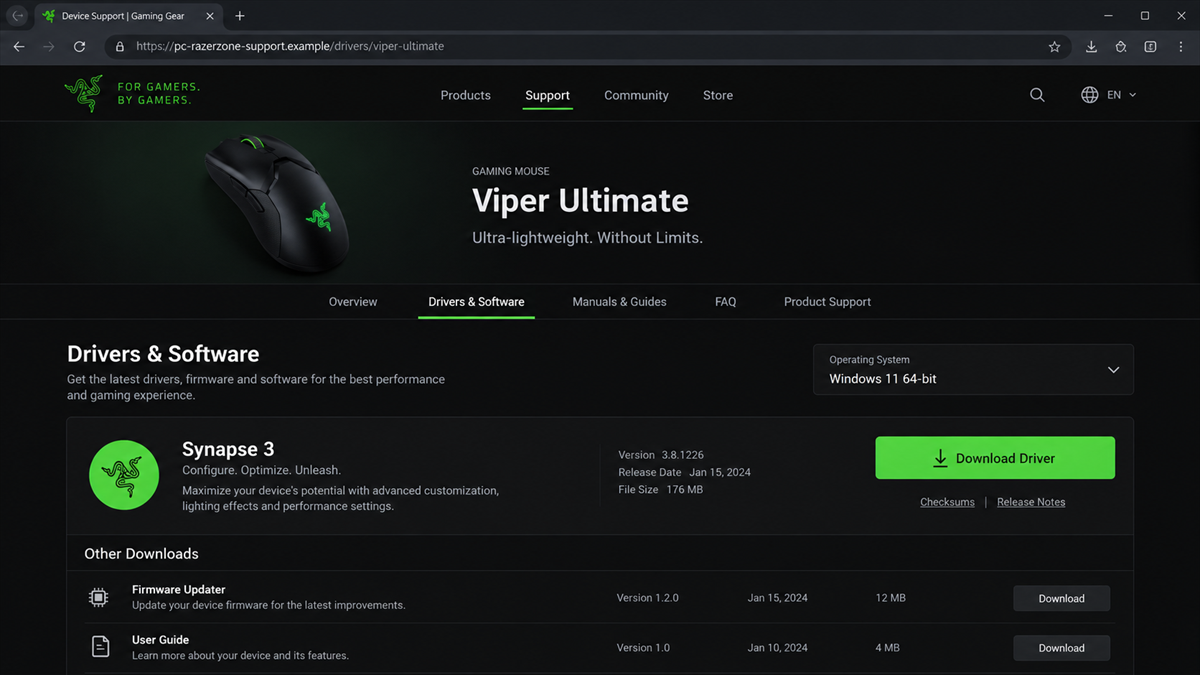
The campaign uses professionally built websites that impersonate well-known software and hardware vendors. A visitor sees what appears to be an official download page for a browser, security product, gaming accessory, PDF tool, cloud-storage client, or another familiar utility. The page then offers a prominent button for an installer or driver.
The downloaded archive is not a legitimate installer. It is a delivery package built to start a multi-stage infection. Microsoft documented this campaign in September 2026 and said affected devices appeared across several industries, including healthcare, manufacturing, gaming, technology, logistics, government, and higher education.
Why the page can pass a quick glance
The scammers do not rely on a crude pop-up with obvious spelling errors. They register look-alike domains, clone recognizable layouts, and match each page to the software a visitor expects. Some domains include the real brand name, while others add regional or product words that make the address feel plausible.
That visual familiarity is the hook. People searching for a driver or utility are already expecting to download and run a file, so the scam does not need to invent an unusual request. It simply replaces the expected installer with a malicious one.
The quickest way to judge it
Treat any third-party or unfamiliar download page as untrusted until you confirm it through the vendor’s official website. The page is especially dangerous when it combines several of these signs:
- The domain is close to a known brand but is not the brand’s normal domain.
- The site appeared through a search result, advertisement, forum link, or unsolicited message.
- The download arrives as a ZIP archive with a generic or changing filename.
- Windows shows an unknown publisher, an unexpected security prompt, or a request for administrator rights.
- The page offers software that the legitimate vendor distributes somewhere else.
What Microsoft Confirmed About the Campaign
This is not a theory based on one unhappy downloader. Microsoft’s security researchers traced a live counterfeit-software campaign from the lure page through installation, persistence, defense evasion, and command-and-control activity. Microsoft said the activity was observed predominantly around China-based operations and Chinese-speaking users, although the impersonated products are known internationally.
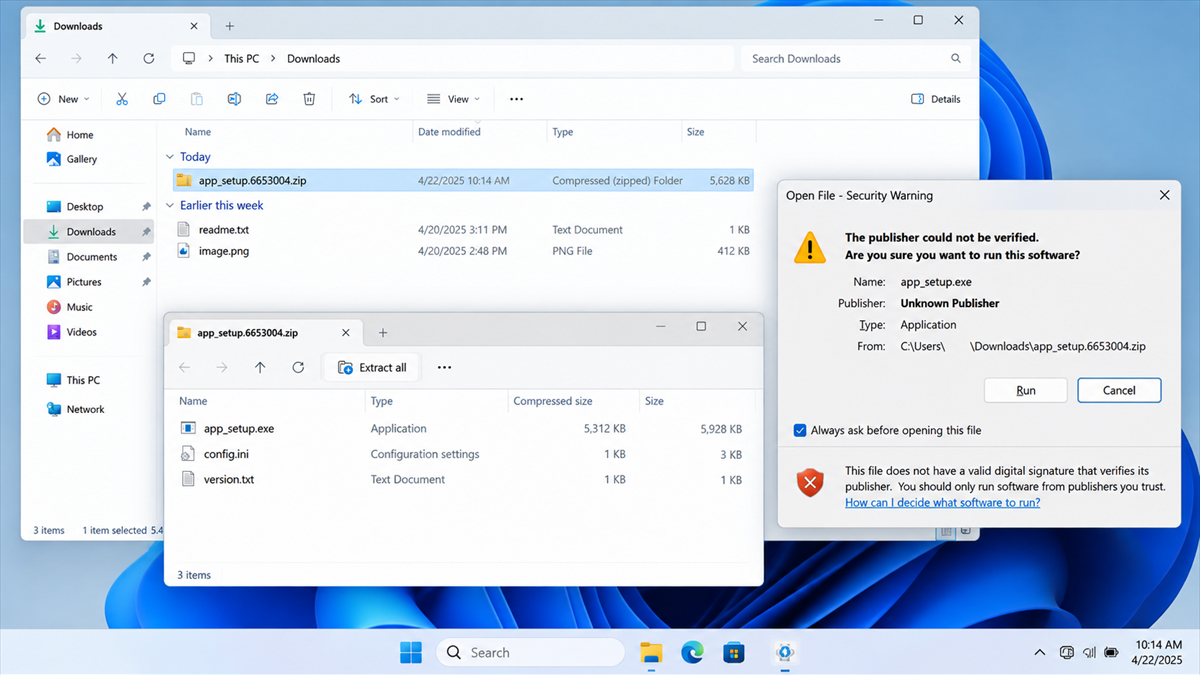
One documented entry point was a fake Razer page at a look-alike domain. The page delivered a ZIP archive named app_setup.6653004.zip. Microsoft observed two different copies of the same-named archive arrive within roughly 69 seconds, evidence that the server could regenerate the payload for individual requests.
The researchers also identified pages impersonating Microsoft Edge, Kaspersky, Sejda PDF, DiskGenius, Baidu Netdisk, draw.io, SteelSeries, Calibre, and other tools. Although the brands were unrelated, the sites led into shared delivery infrastructure. That is an important clue: this was a coordinated distribution operation, not a single fake download page.
The full technical findings are available in Microsoft’s report on the deceptive software download campaign.
How the Fake Software Download Scam Works
Step 1: A search or link leads to the copied site
The victim is looking for a legitimate program, driver, or update. A search result, advertisement, reposted link, or message points to a site whose name and appearance resemble the real vendor. Because the visitor arrived with the intention to download software, the page does not have to overcome much skepticism.
The domain is the part most likely to expose the trick. It may contain the brand name but add words, hyphens, regional endings, or an unfamiliar country-level structure. A brand name inside a web address does not prove that the brand owns the site.
Step 2: The fake page offers a convincing installer
The page presents a large download control, version details, product imagery, and other elements copied from normal support pages. Clicking the button retrieves a ZIP archive or executable from a separate delivery host.
That second host may look unrelated to the page. Scammers can rotate delivery domains and change file contents while keeping the same visible filename. This makes simple blocklists and one-time hash checks less reliable.
Step 3: The archive hides a wrapped executable
Inside the archive is an installer-like executable with a generated name. It may use familiar icons or labels, but it is not the official setup file. Running it starts the first malicious stage.
A security warning about an unknown publisher is not a minor inconvenience to click through. On a download that supposedly came from a major software company, a missing or unexpected digital signature is a serious reason to stop.
Step 4: The loader establishes a foothold
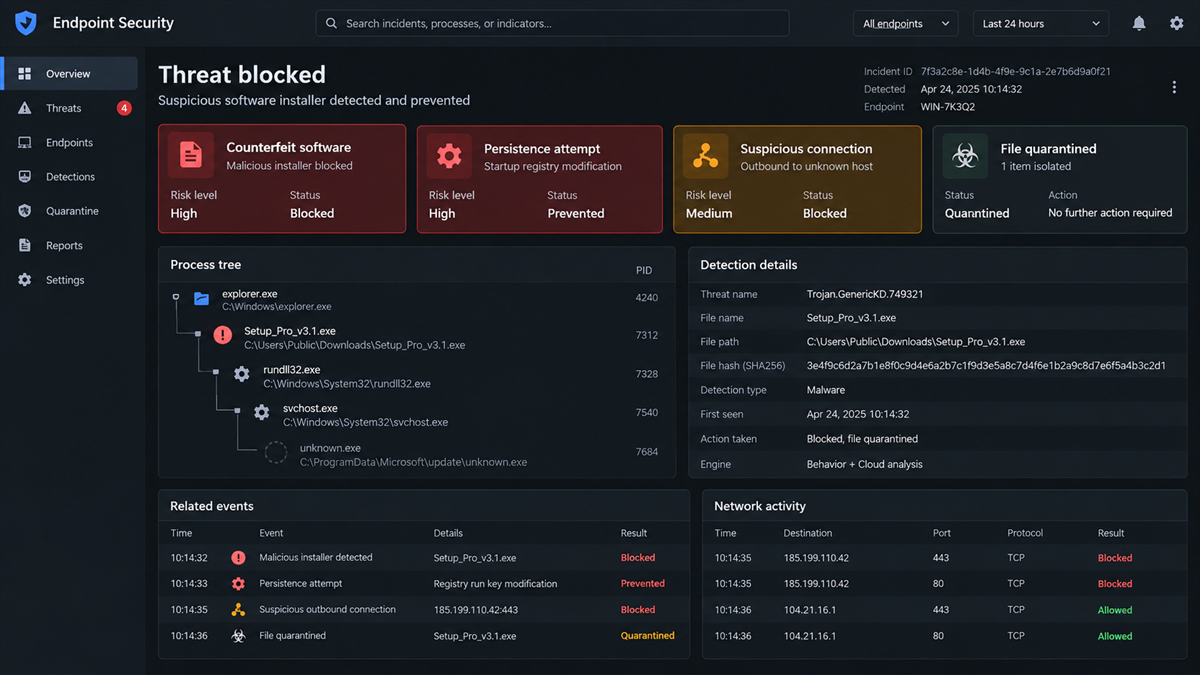
Once executed, the wrapped installer drops or launches additional components. Microsoft described a chain that can create randomized paths and use multiple stages, making the infection harder to identify by filename alone.
The program then attempts to survive restarts and operate with greater privileges. Persistence matters because closing the fake installer window does not necessarily end the activity. The visible setup process can disappear while the malicious component continues in the background.
Step 5: Security defenses are weakened
The campaign includes techniques intended to avoid analysis and interfere with defensive tools. A victim may see little or no immediate sign that anything is wrong. The absence of a ransom note, pop-up, or obvious slowdown is not evidence that the installer was safe.
This quiet period gives the attacker time to establish communication with remote infrastructure. From there, the compromised system can receive commands, expose information, or serve as a platform for further activity.
Step 6: The compromised computer contacts the attacker
The final stages connect to command-and-control servers. At this point, the incident is no longer about receiving the wrong software. An attacker may have a persistent presence on the computer and the ability to change what happens next.
The outcome can vary by payload and victim. That is why anyone who ran the file should respond as if the system may be compromised rather than merely deleting the original ZIP archive.
Why These Counterfeit Download Pages Are Effective
Software downloads create a perfect moment for social engineering. The user expects an executable, expects a security prompt, and may expect the installation to request elevated permissions. Behaviors that would look alarming in another context can feel normal during setup.
The campaign also spreads risk across many recognizable products. A person may know how to find the official site for one brand but search casually for a less familiar utility. The scammers only need one copied page to meet someone at the wrong moment.
MalwareTips has also documented how fake download ads can send the first click to malware. In this campaign, the counterfeit vendor page is the convincing final stage before the malicious archive arrives.
Dynamic payload generation adds another advantage. If each download can have different contents or a different hash, a malicious file may not match the exact sample that a security product or researcher saw earlier. Behavior-based protection and cautious download habits become especially important.
Red Flags That the Download Page Is Fake
Look beyond the page design. A polished layout can be copied in minutes, while ownership and distribution channels are harder to fake. Pause if the address bar, download host, file signature, or installation behavior does not match the vendor.
- The page uses a brand name inside a longer, unfamiliar domain.
- The download link changes to a completely different hostname.
- The archive has a generic name such as app_setup, install, update, or driver package.
- The executable has no trusted publisher or uses a publisher unrelated to the product.
- The installer asks you to disable antivirus protection or ignore multiple warnings.
- The site claims to offer a browser or security tool that is normally available from an official store or vendor page.
- The page lacks a verifiable company identity, support channel, or consistent legal information.
A domain ending such as .com.cn is not inherently malicious. The issue is the full combination: a look-alike name, an impersonated brand, a delivery host controlled by someone else, and a file that does not verify as the legitimate product.
Company and Checkout Checks
Check the real vendor domain
Do not decide from the logo or page title. Find the vendor’s official website independently, preferably from packaging, a verified social account, an existing application, or a trusted app store. Compare the complete hostname character by character.
Check the publisher signature
On Windows, inspect the file’s Properties and Digital Signatures tabs before running it. A valid signature is not a universal guarantee, but a missing, invalid, or unrelated publisher on a major brand’s installer is a strong warning.
Check the delivery path
Notice whether the button sends you to the vendor’s infrastructure or an unrelated host. Reputable vendors may use content-delivery networks, but those paths should still be documented and the resulting file should verify correctly.
Check support and update channels
If the software is already installed, use its built-in update function. For hardware drivers, begin with the manufacturer’s support page reached from the official home page. Avoid downloading updates from an advertisement or a link pasted into a message.
What to Do if You Have Fallen Victim to This Scam
- Disconnect the computer from the network. Turn off Wi-Fi or unplug Ethernet to interrupt active communication while you assess the system.
- Do not run the file again. Preserve the filename, download URL, and time of the event, but do not reopen the archive or installer.
- Run a full security scan. Update your existing security product from a trusted connection. A tool such as Malwarebytes can help check for malicious loaders, persistence components, and related threats.
- Use an offline or second-opinion scan if needed. A persistent threat may interfere with normal tools. Follow your security vendor’s recovery guidance or seek professional help for a business device.
- Change passwords from a clean device. Prioritize email, banking, password-manager, work, and social accounts. Do not change them on the potentially infected computer.
- Revoke sessions and review multi-factor settings. Sign out unknown devices, replace backup codes, and remove unfamiliar recovery methods or app passwords.
- Notify your employer or school. If the computer accessed an organizational network, report the incident quickly so defenders can look for related traffic and affected accounts.
- Consider a clean reinstall. When a persistent implant is confirmed or cannot be ruled out, rebuilding the system from trusted media is safer than assuming one deleted file solved the problem.
After recovery, an ad and tracker blocker such as AdGuard can reduce exposure to malicious advertising and deceptive redirects. It is a useful extra layer, but it cannot make an installer safe after you choose to download and run it.
How to Download Software Safely
Start at the source. Type the vendor’s known address yourself or use a verified bookmark. If you discover a product through search, ignore sponsored placements and confirm the official domain before downloading.
Prefer official app stores and built-in update mechanisms where available. Keep Windows, the browser, and security software current so reputation checks and behavioral protections have the latest information.
Save the installer before running it. Check its signature, scan it, and compare its version or hash with information published by the vendor when that information is available. These small pauses are far cheaper than investigating a compromised computer.
Frequently Asked Questions
Is every third-party software download site a scam?
No. Some legitimate mirrors and distributors exist. The risk is that a copied page can look nearly identical to an authorized source. Use the vendor’s official links and verify the file instead of trusting appearance alone.
What is Silver Fox malware?
Silver Fox is a label used by security researchers for a cluster of malicious activity. Microsoft assessed with moderate confidence that the counterfeit installer activity was consistent with the group also tracked as Yinhu.
Can a ZIP file infect a computer without being opened?
Simply downloading a ZIP is usually not the same as executing its contents. The major danger begins when a user extracts and runs the included executable. Delete suspicious downloads without opening them and scan the system.
Does a familiar brand logo prove a download is official?
No. Logos, screenshots, and page layouts are easy to copy. The domain, file signature, delivery path, and official vendor instructions are more meaningful checks.
Is an unknown publisher warning always malicious?
Not always, especially with small independent software. For an installer claiming to come from a major known vendor, however, an unknown or unrelated publisher is a serious warning that should not be ignored.
Should I reset Windows after running the installer?
If security tools confirm a persistent compromise, or if you cannot establish what ran, a clean reinstall from trusted media may be the safest response. Back up only personal data that has been scanned, not suspicious programs or installers.
The Bottom Line
These counterfeit software pages are not harmless download mirrors. Microsoft traced them to a coordinated campaign that delivered changing malicious installers and established persistent access on affected systems. The most reliable defense is to make the domain and publisher prove themselves before any file runs.
If you already opened one of the installers, treat the event as a possible compromise. Disconnect, scan, secure accounts from a clean device, and escalate the incident when the computer belongs to a workplace or school.

Join the discussion
0 commentsShare your experience or ask a question about this article.
Discussion
Start the conversation
Have a question or something useful to share? Add the first comment.