

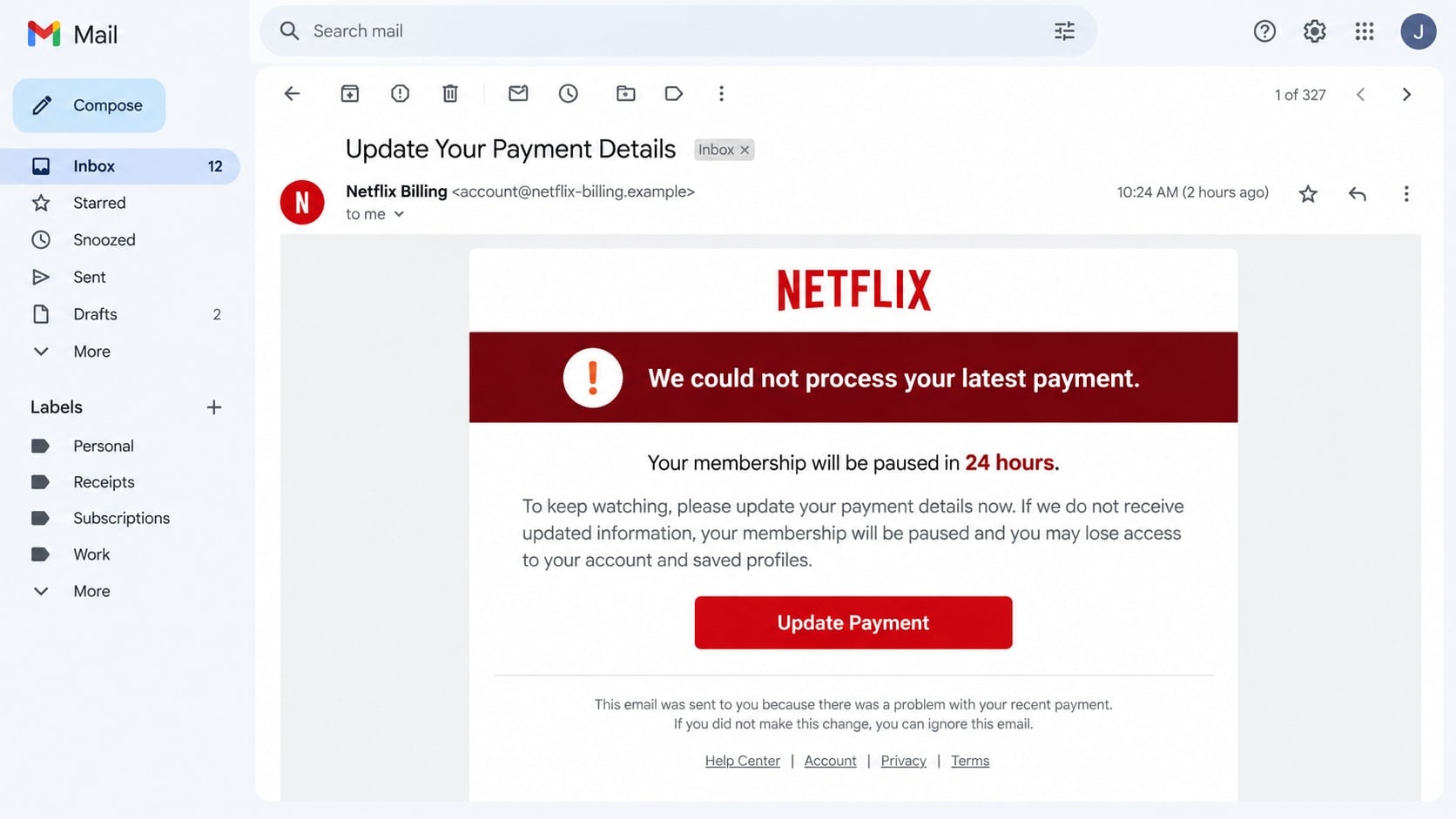
A Netflix email says the latest payment failed and your membership will be paused unless you update the card today. It arrives at just the right moment to make an evening without streaming feel like the problem.
The real risk begins when the billing button opens.
Overview
The email claims a subscription payment was declined
The Netflix payment update scam is a phishing message that invents a problem with a membership. It may say a card expired, a bank declined the charge, or an account will be suspended unless the payment method is updated.
Because millions of people use streaming services, the sender does not need an accurate customer list. A large campaign will reach some real Netflix members simply by chance, and the familiar subject makes the warning feel relevant.
A copied billing page collects valuable information
The button leads to a website designed to resemble Netflix. The first page may ask for the account email and password. A second page requests the card number, expiration date, security code, billing address, and phone number.
Some versions also request a one-time banking code. That code is not needed to “validate” a card. It may authorize a transaction, add a card to a digital wallet, or approve the criminal’s access.
The final redirect hides what just happened
After the information is submitted, the fake page may display a success message and send the visitor to the genuine Netflix website. The victim sees a normal page and may assume the payment update worked.
- The email creates a short deadline or threatens suspension.
- The sender address does not match an official Netflix domain.
- The button opens an unfamiliar or misspelled website.
- The form asks for a password and full card information.
- A bank code is requested inside the same unexpected session.
- The page redirects to Netflix after collecting the data.
Why the Fake Billing Notice Gets Attention
A failed subscription payment is believable. Cards expire, banks replace accounts, and recurring charges are sometimes blocked. The scenario is ordinary enough that a recipient may act before asking whether the email itself is genuine.
The scam also promises a simple solution. Instead of contacting support or losing access, the reader is offered one button and a short form. That convenience is the lure.
Polished campaigns copy Netflix artwork, plan names, footer text, and color choices. They may include the recipient’s name or a plausible billing date. These elements can be copied or assembled from leaked information and are not proof of origin.
Netflix’s official phishing guidance says it will not ask for a Netflix password or payment information in an email or text. Netflix also warns against making payments through a third-party website or vendor.
How the Netflix Payment Update Scam Works
Step 1: A failed-payment email creates urgency
The subject line may say “Update your payment method,” “Membership on hold,” or “We could not process your payment.” The body gives the impression that access will end within a few hours.
Other versions promise a refund for an overcharge or a free extension after verification. The story changes, but the objective is the same: make the recipient open a payment page without navigating through the real account.
Step 2: The button sends the visitor to a lookalike domain
The displayed words may mention Netflix, while the actual link points elsewhere. The domain can contain words such as billing, secure, member, or update to look reassuring at a glance.
A padlock does not settle the question. Fraudulent sites can use HTTPS too. The complete hostname must belong to the company, and the session should be opened independently rather than through an unexpected message.
Step 3: A fake sign-in form captures the account password
The visitor sees a familiar red-and-black page and is asked to sign in. The form may reject the first attempt, prompting the victim to retype a password or try another one.
Stolen Netflix credentials can be sold, used to change the account’s email, or tested against other services. Password reuse turns a streaming phishing page into a path toward email, shopping, or financial accounts.
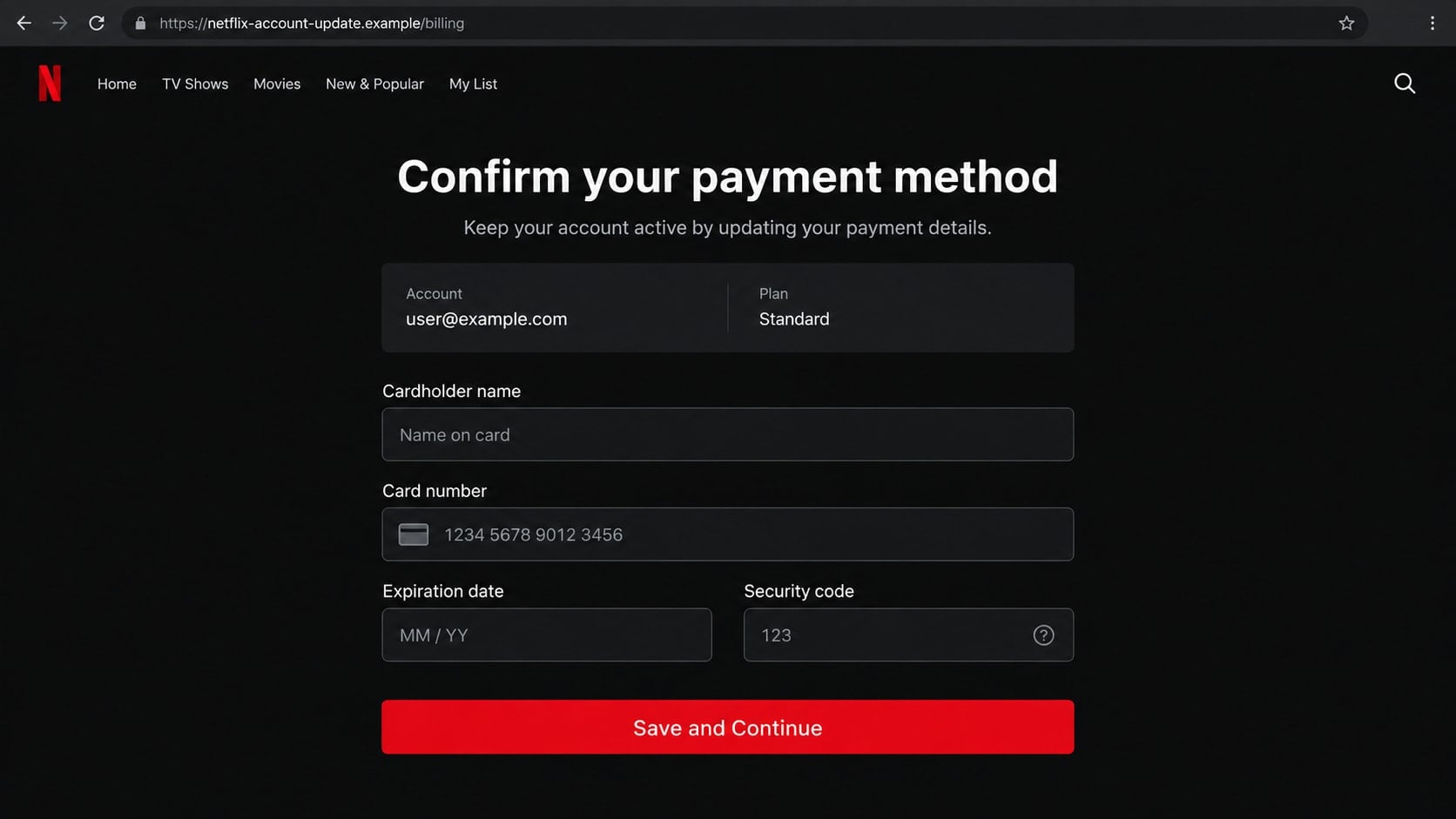
Step 4: The billing form asks for card and identity data
The next screen requests the cardholder’s name, card number, expiration date, security code, address, and phone number. A real-looking order summary may show a plan and monthly price.
That collection is broader than a normal payment correction reached inside an authenticated account. It gives the criminal enough information to attempt purchases and makes later impersonation calls sound more convincing.
Step 5: A code or bank approval completes the theft
If the criminal attempts a live transaction, the victim may receive a genuine security code from the bank. The phishing page presents a matching field and calls the code a billing confirmation.
Entering the code may authorize something entirely different from a Netflix subscription. Transaction details in the bank’s message should be read carefully, and no code should be supplied through a page reached from unsolicited email.
Step 6: A success page reduces immediate suspicion
The final screen may say the membership is active again. It can then redirect to Netflix, where a browser session or public landing page appears normal.
The fake page cannot update the real account. If service continues, that may simply be because no genuine payment problem existed. The stolen data can be used minutes later or stored for a later attack.
How to Check a Netflix Billing Problem Safely
Close the email and open Netflix using its app, a saved bookmark, or a manually typed address. Sign in there and review the membership and billing page. A real payment problem should be visible inside the account.
Look at the card statement separately. A failed attempt may not appear, but an alleged completed charge or refund should be verified through the bank rather than through screenshots in an email.
Do not call telephone numbers included in an unexpected billing message. Search results can also contain misleading support advertisements, so start with the service’s official help center.
If the message is fraudulent, Netflix asks users to forward suspicious emails to phishing@netflix.com. Text messages can be forwarded using the instructions in Netflix’s help page.
Identity, Contact, and Payment Checks
Compare the sender and reply-to addresses
Open the full sender details. A message can display “Netflix Support” while using a free mailbox or an unrelated domain. The reply-to address may also differ from the visible sender.
Do not assume that a familiar logo or red color scheme confirms the message. Those are visual assets, not security controls.
Check the destination before entering anything
On a computer, hover over the button without clicking. On a phone, use the mail app’s link-preview feature cautiously. If the domain is hidden, shortened, misspelled, or unrelated, do not continue.
The safest route is still to open the account independently. There is no need to use the supplied link to correct a genuine billing issue.
Keep passwords and bank codes separate
A streaming account password should not be reused for email or banking. Unique passwords limit the harm when one service or phishing page is compromised.
Never type a bank security code into a streaming form unless the bank’s own message clearly describes the exact transaction you intentionally started. When in doubt, cancel and contact the bank.
Verify charges through the card issuer
Use the number printed on the card or the issuer’s official app. A scammer may claim that a temporary charge is harmless or that a refund requires another payment.
Legitimate refunds go through the original payment channel. They do not require gift cards, cryptocurrency, remote access, or a transfer to an individual.
Common Variations of the Scam
Not every campaign uses a failed payment. One version claims the plan price is increasing and asks the member to confirm the current rate. Another promises several free months for completing a short survey.
A fake account-lock notice may claim a sign-in from another country. It invites the recipient to “secure” the account on the same type of cloned page. The fear of an intruder becomes the reason the victim hands credentials to the real intruder.
Some emails include an attached invoice or QR code. Scanning a QR code simply moves the link to a phone, where the full domain is harder to inspect. The same independent-account rule applies.
Phone scams can follow the phishing submission. The caller knows the victim’s name, card ending, or address because the victim just entered it. That knowledge may be new to the criminal, but it is presented as evidence of an established customer relationship.
What Criminals Can Do With the Submitted Information
A Netflix password has value beyond streaming access. An intruder can change the profile, email address, or plan, then sell access to someone else. More importantly, the same credentials may unlock other accounts when the victim reused the password.
Card details can be tested with small online purchases before a larger charge is attempted. The billing address and telephone number help the transaction appear consistent with the cardholder and can make a later call sound legitimate.
Information does not always get used immediately. Stolen records may be bundled, sold, and revisited weeks later. Continue reviewing statements even if nothing suspicious appears on the first day.
The email address can also be targeted with more convincing messages. A criminal may refer to the attempted Netflix update and pretend to be a bank investigator, card-security employee, or refund specialist.
Watch for password-reset notices, new-device alerts, small card authorizations, and calls that know the last four digits of the card. Those signals deserve action even when the original Netflix account still appears normal.
Never let a follow-up caller guide you back to the fraudulent page. Start a fresh contact with the service or bank using information you obtained independently.
What to Do if You Have Fallen Victim to This Scam
- Leave the page and stop responding. Do not submit more information to “finish” the update. Close the tab and end any call that followed the message.
- Change the Netflix password from the official site. Use a new, unique password, sign out all devices, and confirm that the email address, phone number, plan, and payment method are still yours.
- Secure every account that reused the password. Start with email because it can reset other services. Enable multifactor authentication and review active sessions and forwarding rules.
- Call the card issuer immediately. If card information was entered, ask the fraud department whether the card should be locked or replaced. Review pending and completed charges and dispute unauthorized transactions.
- Tell the bank about any security code you entered. Explain exactly what the code message said and what page requested it. The bank may need to block a transaction, digital wallet, or new device enrollment.
- Remove downloaded files or remote tools. If the page instructed you to install software, disconnect the device and uninstall the program. Revoke unattended access and check startup settings.
- Scan the device with Malwarebytes. Update Malwarebytes and run a complete scan if you opened an attachment, downloaded a file, or installed anything. A clean scan does not replace account recovery, but it can identify malware or unwanted tools.
- Consider AdGuard for safer browsing. AdGuard can block many deceptive ads, trackers, and known malicious destinations. Keep the browser and operating system updated as well.
- Report and preserve the phishing message. Forward it to
phishing@netflix.com, report it to the email provider, and retain the sender address, headers, URL, screenshots, and bank records. - Watch for personalized follow-ups. Treat calls about refunds, fraud investigations, or account recovery as untrusted until independently verified. Never pay an upfront fee to recover stolen funds.
Frequently Asked Questions
Does Netflix send payment update emails?
Netflix can notify members about account and billing matters. However, it says it will not ask for passwords or payment details within an email or text. Verify any warning inside the account opened independently.
Will Netflix suspend my account immediately?
A real billing issue should appear in the official account. Do not let a deadline in an unsolicited message push you into using its link. Opening the genuine app or site takes only a moment.
Is a Netflix page safe if it has a padlock?
Not necessarily. The padlock means the connection to that domain is encrypted. It does not prove that the domain belongs to Netflix. Read the complete address and avoid pages reached through suspicious messages.
What if I only entered my Netflix password?
Change it immediately and sign out all devices. Change any other account that used the same or a similar password, especially the connected email account.
Can Netflix reverse a fraudulent card charge?
Contact both Netflix through its official help center and the card issuer. The correct dispute path depends on whether the charge actually came from Netflix or from a criminal using the stolen card elsewhere.
How should I report a fake Netflix message?
Forward the email to phishing@netflix.com without changing it, then use the mail provider’s phishing-report control. For a text, follow Netflix’s official forwarding instructions and block the sender.
The Bottom Line
The Netflix payment update scam succeeds by turning a believable billing problem into an urgent shortcut. The branded email and polished form are only scenery around a request for credentials, card information, and security codes.
Skip the message’s link and inspect the real account directly. If information was entered, secure the Netflix and email accounts, contact the bank, and preserve the evidence before deleting the message.








