

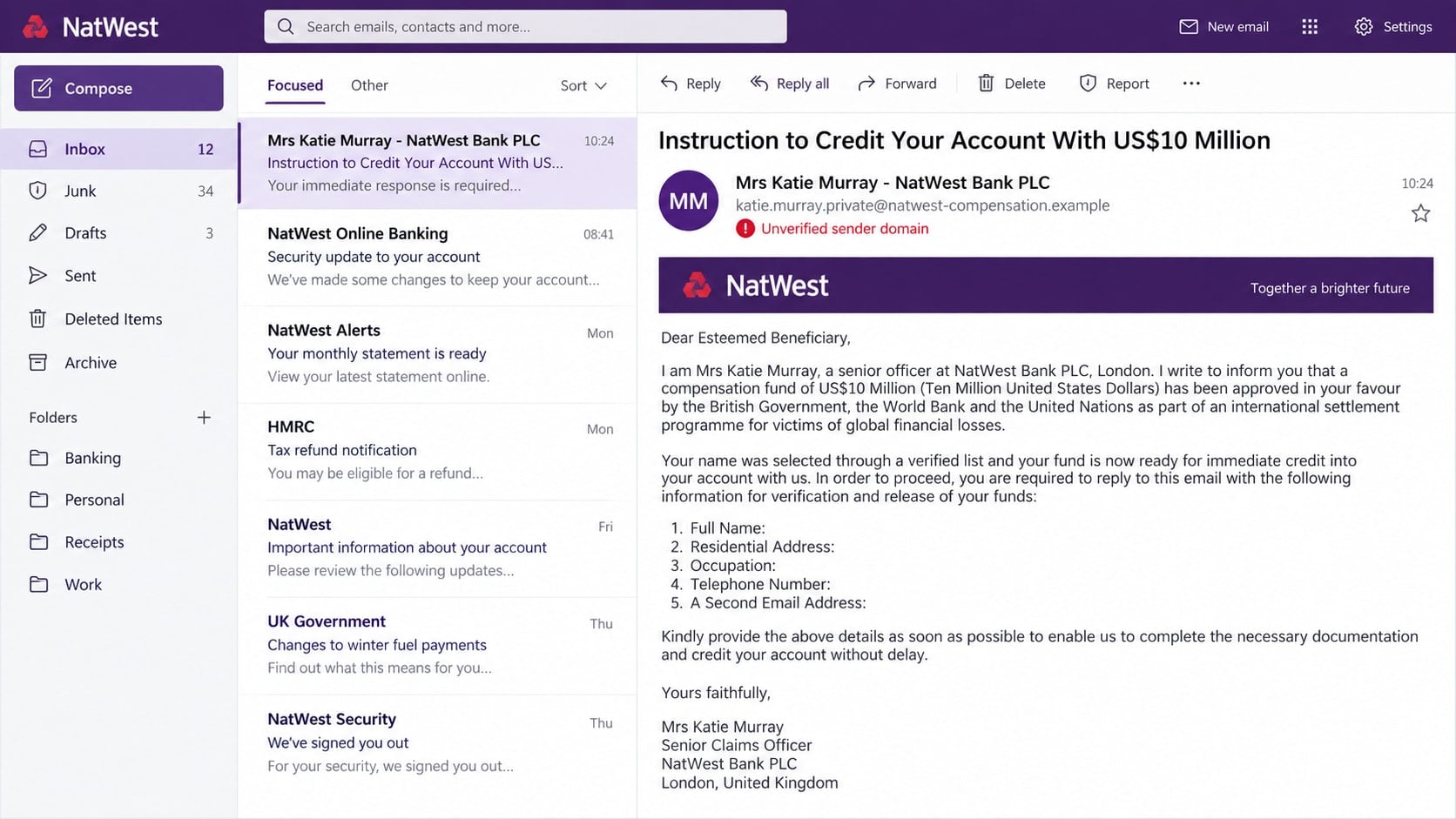
An email signed by “Mrs Katie Murray” at NatWest says $10 million in compensation has been approved in your name. It refers to the British Government, the World Bank, and the United Nations, then asks for a private reply.
The impressive names are there to make an impossible payment feel official.
Overview
The email promises a $10 million compensation payment
The Katie Murray NatWest scam email is an advance-fee and identity-theft scheme. It claims that a large fund has been approved for the recipient after a review involving NatWest, the UK government, and international organizations.
The recipient did not apply for this compensation and is not given a verifiable case history. The enormous amount is intended to overpower ordinary skepticism and keep the conversation going.
A real executive’s name is used without authorization
The sender signs the message as Katie Murray, a real senior NatWest Group executive. Her public position makes the story appear credible, but it does not mean she sent the email or handles private compensation claims.
Scammers regularly copy the names, titles, logos, and office details of real people. Identity can be imitated in an email far more easily than it can be verified.
The first reply begins a longer payment scam
The message initially requests a full name, address, occupation, telephone number, and second email. Later replies can demand identification documents, bank details, and fees described as taxes, authorization charges, certificates, or transfer costs.
- You are promised money you never applied to receive.
- Several major institutions are named without a verifiable case.
- The sender uses an unofficial or private email address.
- You are told to stop speaking with other banks or agents.
- Personal and banking details are requested by reply.
- A fee appears before the supposed funds can be released.
Why the Message Uses a Real Banking Executive
A real name gives the recipient something that appears searchable. Finding a matching executive profile can feel like confirmation, even though the search only proves that the person exists, not that the mailbox belongs to them.
Senior executives do not personally select strangers for multimillion compensation. Their title is used because it suggests authority and access to money that an ordinary support employee would not have.
The email may copy a London address, registration number, reference codes, and formal banking phrases. These details create administrative noise around a claim that has no legitimate origin.
NatWest’s official phishing guidance says the bank will never ask customers for personal information by email or request a full PIN or password. Suspicious messages can be forwarded to phishing@natwest.com.
How the Katie Murray NatWest Scam Email Works
Step 1: An unsolicited email announces the fund
The subject says instructions have been issued to credit the recipient’s account with $10 million. The body claims earlier attempts to release money were blocked by corrupt agents or banking problems.
This backstory explains why the reader has never heard of the fund. It also creates a villain that the fake NatWest contact supposedly intends to overcome.
Step 2: Famous organizations lend false authority
The email may mention the British Government, World Bank, United Nations, or an international anti-corruption programme. None of these names is accompanied by a case that can be confirmed through the organization’s official channel.
Stacking institutions together makes the claim sound important while making responsibility difficult to trace. If one name raises questions, the sender points to another.
Step 3: The recipient is moved to a private conversation
The sender asks the recipient to reply to a private email and provide a second Gmail or Hotmail address “for security.” Moving away from official channels protects the scammer, not the recipient.
The first response confirms that the address is active and that the person is interested. Future messages can then be tailored using the name, job, location, and phone number supplied.
Step 4: Forms and documents make the claim look procedural
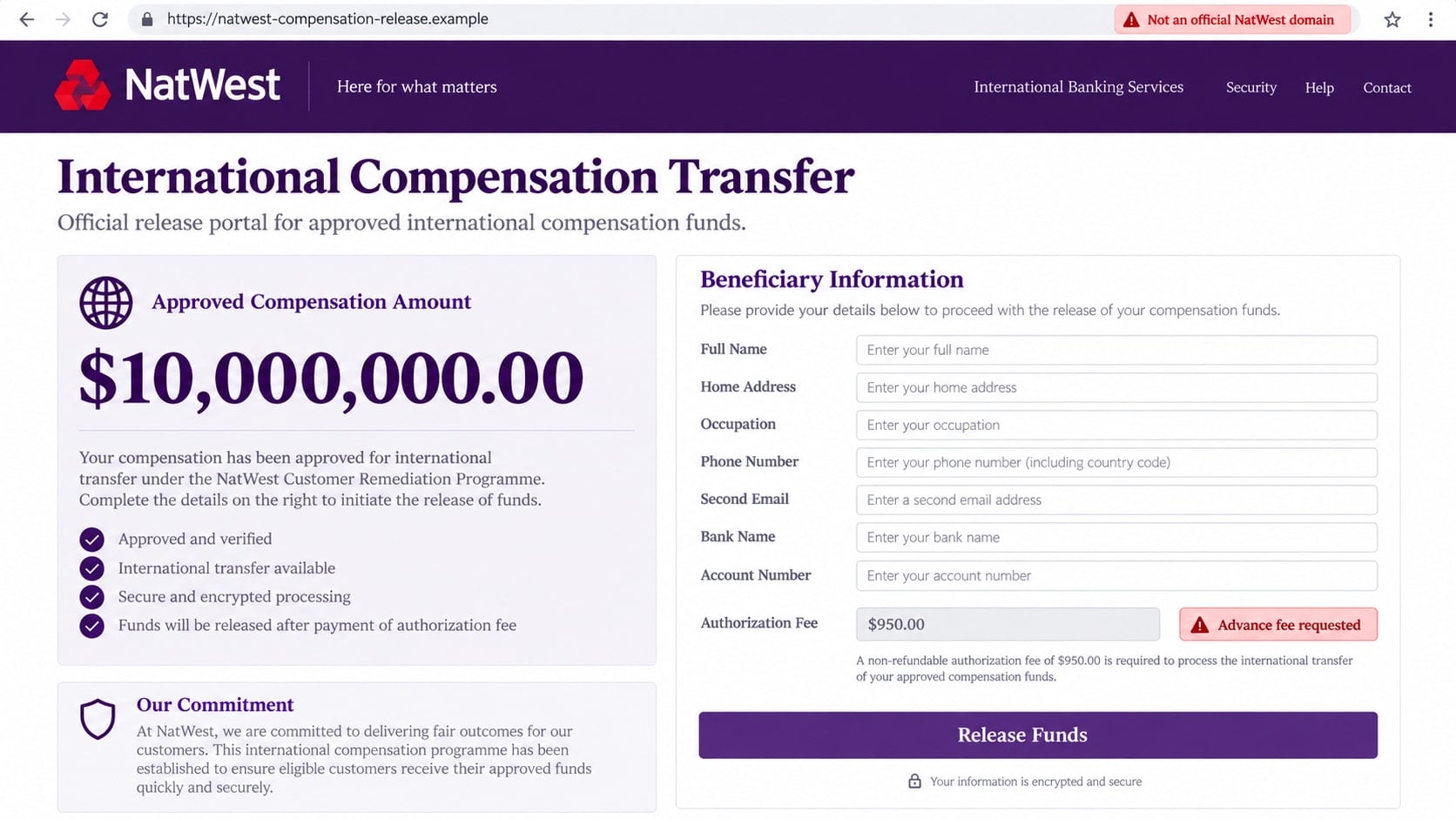
The scammer may send a beneficiary form, transfer certificate, affidavit, or link to a fake banking portal. Stamps, signatures, and reference numbers give each new request the appearance of progress.
These documents are props. A professional design does not connect the paperwork to NatWest, a government, or an international organization.
Step 5: An advance fee blocks the final release
Just before the payment is supposedly ready, a cost appears. It may be called a $950 authorization fee, anti-money-laundering certificate, tax clearance, insurance payment, or international transfer charge.
The fee is small compared with $10 million, which makes paying it feel rational. Once it is sent, another charge replaces it. The promised fund never arrives.
Step 6: Pressure and secrecy keep the payments going
The victim is told that delays will cancel the claim, that bank staff may interfere, or that the transaction is confidential. The scammer may switch roles and write as a lawyer, government official, courier, or transfer officer.
Each new identity confirms the same false story. The victim can lose money repeatedly while believing the process has reached its last obstacle.
What the Email Gets Wrong
No legitimate bank selects strangers to receive a private $10 million compensation payment. A real settlement or government programme has public rules, eligibility criteria, official notices, and a traceable claims process.
The message’s language may be formal but illogical. It claims several independent institutions approved the payment, yet asks the recipient to use a private mailbox and avoid contact with anyone else.
The address may imitate NatWest while using an unrelated domain. A display name and signature block are not secure identifiers, and a sender can write any executive title beneath a message.
The request for an occupation, second email, and complete contact details is also unusual. Those fields help the criminal build a profile and maintain contact if one mailbox is blocked.
Identity, Contact, and Payment Checks
Inspect the complete sender and reply-to addresses
Expand the email details and compare the domains with NatWest’s official website. A NatWest display name can hide a free mailbox or a domain containing unrelated extra words.
Check whether replies are directed somewhere different from the visible sender. That mismatch is common in executive impersonation fraud.
Verify the person through the organization
Do not use phone numbers or links supplied in the email. Contact NatWest through its app, official website, or the number on a genuine card and ask whether the communication exists.
Finding Katie Murray’s real title online does not authenticate the message. Only a channel controlled by NatWest can confirm bank communication.
Demand a verifiable public claims process
A genuine compensation programme can explain the legal basis, eligibility, administrator, and official application route. It does not depend on a secret reply to a private address.
Contact every named institution independently. If none can confirm the reference, stop communicating.
Reject every release fee and unusual payment method
Do not send a transfer, cryptocurrency, gift card, or cash to release a windfall. Advance fees are the income source of the scheme, not a step toward receiving money.
A request to pay an individual, agent, or unrelated company is especially clear evidence that the banking story is false.
What Happens After You Reply
The first reply may receive a warm, professional response thanking the recipient for cooperation. The scammer uses small confirmations to create commitment before introducing money.
Identity documents may be requested for a “beneficiary file.” Copies of a passport, driver’s license, utility bill, or bank statement can later support identity theft and more convincing impersonation.
The criminal may also send credentials for a fake online bank showing the $10 million balance. The balance is just text in a website controlled by the scammer and cannot be withdrawn.
When the victim questions a fee, a second character may appear and confirm it. The apparent lawyer, central bank officer, or courier is often the same group using another mailbox.
Why the Story Mentions Earlier Fees and Hard Times
The email may say investigators discovered that the recipient has already paid charges while trying to release another fund. That wording is not accidental. It is designed for people who previously answered inheritance, lottery, grant, or compensation messages.
Fraud groups trade contact lists that label responsive recipients. A person who paid once may receive a new approach claiming that a government or bank has recovered the lost money. The new story presents itself as the solution to the earlier scam.
The message also uses sympathy. It acknowledges financial hardship and promises that this process will avoid dishonest agents. That reassurance can lower defenses precisely because it seems to recognize what went wrong before.
A legitimate bank does not secretly reimburse fraud losses with an unrelated $10 million transfer. Recovery is handled through documented disputes, law enforcement, court orders, or an identified compensation programme.
If the email describes a scam you previously experienced, assume your details circulated among criminals. Tell the bank about both contacts and be especially cautious with anyone who already knows the amount or payment method.
Documents and Requests That May Arrive Next
After a reply, the sender may attach a certificate carrying government seals, a NatWest logo, or a signature attributed to an executive. It may be called a fund-release order, affidavit, beneficiary certificate, or anti-money-laundering approval.
A fake courier notice can claim that a bank card, cheque, or diplomatic package is ready for delivery. The recipient is then asked to pay insurance or shipping to a person or small company.
A supposed lawyer may request a passport copy and utility bill to prepare legal documents. A tax agent may demand part of the fund before the transfer. Each role adds another official-looking layer around the same unsupported promise.
- A beneficiary form requests extensive identity and banking details.
- A certificate says payment is approved but cannot be verified publicly.
- A courier asks for insurance before delivering a card or cheque.
- A lawyer uses a free mailbox and demands a document fee.
- A tax officer requests payment to an individual or cryptocurrency wallet.
- A fake online bank displays a balance that cannot be withdrawn.
Do not sign or return these documents. Preserve copies for reporting, but contact the named organization through a separate official channel.
What to Do if You Have Fallen Victim to This Scam
- Stop all communication. Do not explain that you discovered the scam. Block the addresses and numbers after saving the evidence.
- Contact your real bank immediately. Use the official app, website, or number on the card. Explain every detail shared and payment sent, and ask about recalls, blocks, and additional account monitoring.
- Secure email accounts. Change passwords, enable multifactor authentication, review active sessions and forwarding rules, and remove recovery details you do not recognize.
- Protect identity documents. If you sent a passport, license, bank statement, or extensive personal data, report the exposure and monitor financial and credit accounts for misuse.
- Change reused passwords. A password entered on a linked page must be replaced everywhere it was reused. Start with email, banking, and government accounts.
- Report each payment route. Contact the bank, money-transfer service, cryptocurrency exchange, or gift card issuer. Keep receipts and request recovery even when success is uncertain.
- Run a Malwarebytes scan. If you opened an attachment or installed software, update Malwarebytes and run a complete scan. Remove suspicious files and obtain trusted technical help if remote access occurred.
- Use AdGuard as an added web safeguard. AdGuard can block many known phishing sites, malicious advertisements, and trackers. It cannot reverse a payment, so complete the financial steps first.
- Report the message. Forward it to
phishing@natwest.comandreport@phishing.gov.uk. Report financial loss through the UK’s official fraud-reporting channel and provide the saved evidence. - Expect recovery impersonators. Anyone guaranteeing the return of funds for an upfront fee is continuing the scam. Verify every contact independently.
Frequently Asked Questions
Did Katie Murray really send the NatWest email?
No evidence in the message proves that. Scammers are using the name and title of a real executive. A private compensation email from an unofficial domain should be treated as impersonation.
Is the $10 million compensation fund real?
No verifiable claims process supports the promise. Unsolicited windfalls involving secret transfers, private email replies, and advance fees are classic fraud patterns.
Why does the email mention the World Bank and United Nations?
Famous institutions make the story sound authoritative. Their names can be typed into a fraudulent email, so contact each organization through official channels before believing any claim.
What if I replied but did not send money?
Stop contact, save the messages, and be alert for targeted follow-ups. Secure the email account and monitor any service connected to personal information you disclosed.
Can an advance fee ever be required for compensation?
Not through this private, unsolicited process. Do not send money to release a prize, inheritance, settlement, or secret fund. Verify legitimate costs with the official administrator independently.
Where should I report the email?
Forward it to phishing@natwest.com and the UK National Cyber Security Centre at report@phishing.gov.uk. Contact your bank immediately if you shared banking details or sent money.
The Bottom Line
The Katie Murray NatWest scam email uses a real executive’s identity and a fictitious $10 million fund to begin an advance-fee scheme. Official names, reference numbers, and formal documents cannot make an unsolicited windfall real.
Do not reply, disclose identity data, or pay a release fee. Verify the communication through NatWest’s official channels and act quickly if information or money has already been sent.

Join the discussion
0 commentsShare your experience or ask a question about this article.
Discussion
Start the conversation
Have a question or something useful to share? Add the first comment.