

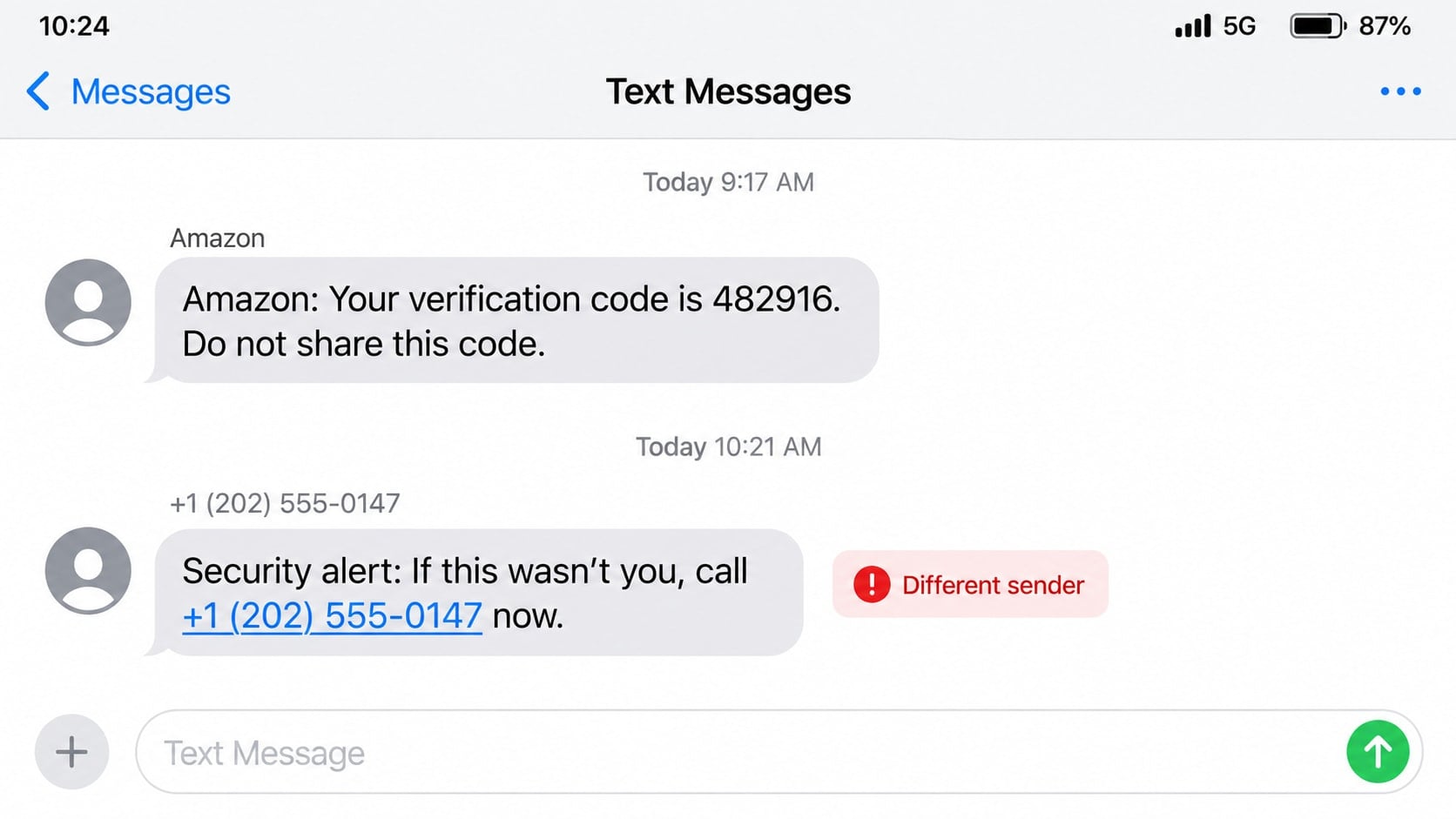
An Amazon verification code appears even though you are not signing in. Minutes later, another text or phone call says the account is under attack and asks you to read that code back.
The first message may be real. The person explaining it is the danger.
Overview
An unexpected code creates a believable security event
The Amazon verification code scam often begins when a real one-time password arrives by text or email. The recipient did not request it, so the message naturally feels like evidence that someone is trying to enter the account.
That may be exactly what is happening. A criminal can enter an email address and stolen password on the genuine Amazon site, causing Amazon to send a legitimate code to the account owner.
A fake helper asks the victim to reveal the code
A second message or call claims to come from Amazon security. The supposed agent says the code is needed to cancel an order, block the intruder, confirm the account holder, or close a fraudulent support case.
The code actually protects the account from the caller. Sharing it may let the criminal complete a sign-in, reset a password, add a device, or approve a sensitive change.
Some versions replace the call with a phishing link
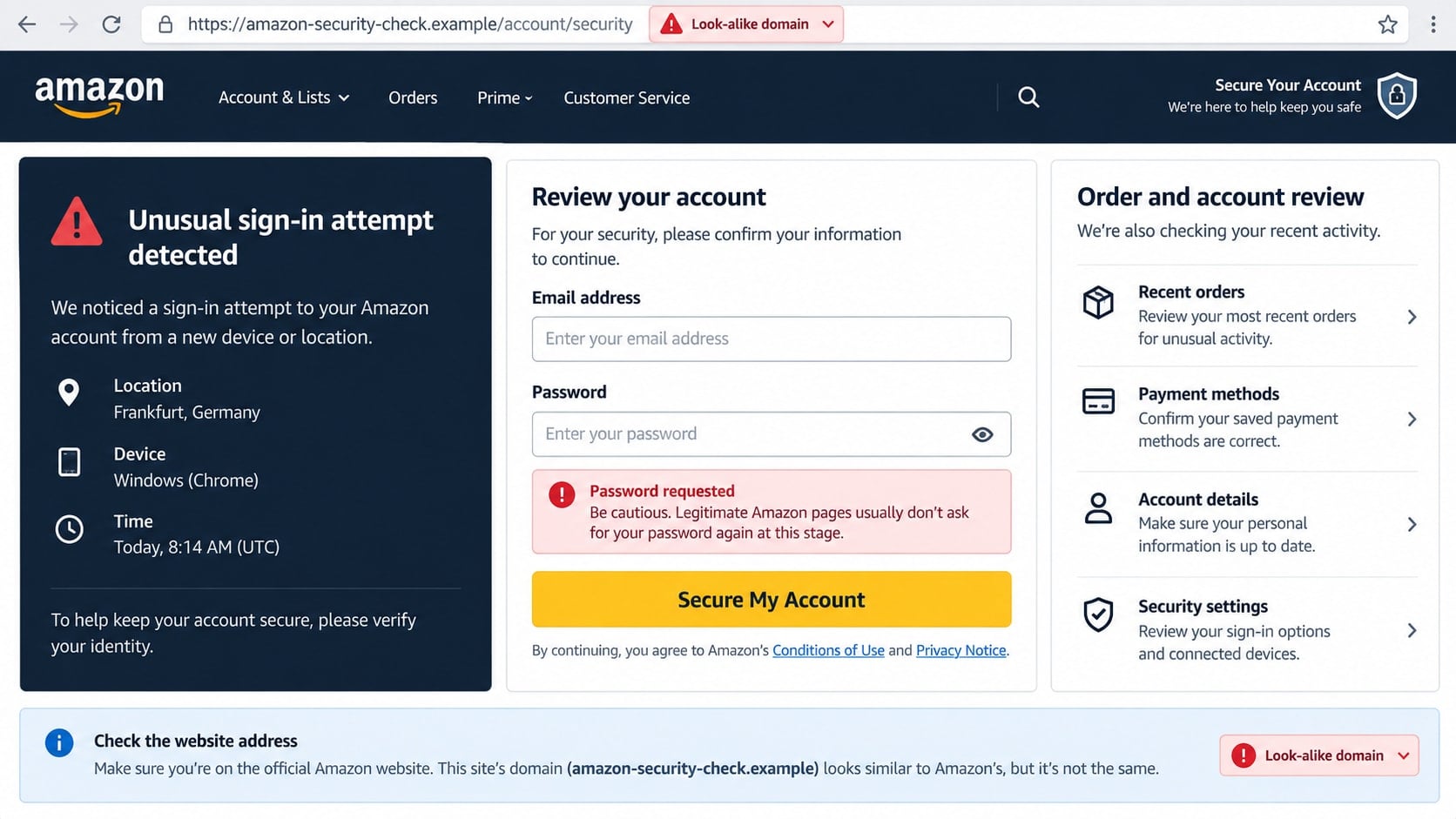
Instead of asking for the code directly, the follow-up message sends the recipient to a fake security page. The form requests an Amazon password and then the current verification code.
- A code arrives for an action you did not start.
- A different sender contacts you shortly afterward.
- The caller says the code is needed to stop fraud.
- A link opens a domain that is not owned by Amazon.
- The conversation includes a fake order or unfamiliar device.
- You are pressured to remain on the call and act immediately.
Why a Real Code Does Not Make the Caller Real
Security codes are generated automatically. The person who triggered one does not need to work for Amazon, and receiving a genuine message does not authenticate the next person who calls.
The scammer may already know the email address, phone number, and an old or reused password. That information can come from an unrelated breach. The verification code is the final barrier, which is why the attacker needs the victim’s cooperation.
A caller may quote a fake order number, device location, or last four card digits. Some of these details may be guesses; others may come from leaked or previously submitted information. None changes the rule that a one-time code must remain private.
Amazon’s security guidance consistently tells customers not to share one-time passwords. If an unexpected code arrives, go to the account directly and review activity without replying to the sender.
How the Amazon Verification Code Scam Works
Step 1: The attacker gathers an email and possible password
The criminal starts with data from a breach, malware log, previous phishing page, or password list. They may not know whether the password still works, but they can test it against a shopping account.
Password reuse makes this stage much easier. Credentials exposed by a small forum or old app can still unlock a valuable retail account years later.
Step 2: A sign-in attempt triggers a genuine Amazon code
If Amazon requires additional verification, it sends a code to the registered phone or email. The wording may even say not to share it. The message itself can be legitimate.
The unexpected code alarms the account owner. That emotion prepares the person to accept help from the next message or call, especially if it arrives immediately.
Step 3: The scammer impersonates account security
The caller says an expensive order, Prime charge, or sign-in from another location was detected. They offer to cancel the activity before the card is charged.
Professional language and a calm tone can be more effective than obvious threats. The agent may claim that reading the code confirms the recipient is the true owner.
Step 4: The code completes the attacker’s action
As the victim reads or submits the digits, the criminal enters them on the real Amazon page. The code may complete a login while the caller pretends it is cancelling one.
Timing matters because codes expire quickly. That is why the caller discourages questions, keeps the victim on the line, and asks for each new code as soon as it arrives.
Step 5: The account is changed or used for purchases
Once inside, the attacker can review saved addresses, order history, payment methods, gift card balances, and personal information. They may change recovery details or create orders designed to avoid immediate notice.
The account can also be used to support further scams. A criminal might contact family members, abuse stored gift value, or use order details to make later impersonation more convincing.
Step 6: The victim is drawn into a larger payment scam
Some callers claim the account contains suspicious purchases that require a refund. They may transfer the call to a fake bank department, request remote access, or instruct the victim to buy gift cards for “verification.”
At that point, the code theft has become a broader impersonation scheme. Every new department, transfer, and urgent payment is controlled by the same criminal group.
What to Do With an Unexpected Amazon Code
Do not reply, click a link, or call a number in a follow-up message. Open the Amazon app or type the address yourself. Review recent orders, archived orders, login information, addresses, payment methods, and gift card activity.
Change the password if there is any possibility that it was exposed. Choose a password not used anywhere else. If the account supports passkeys or two-step verification, enable the strongest option available.
Check the email account connected to Amazon. An attacker with email access can hide order notices, reset passwords, and restore access after you change the retail password.
If the code keeps arriving, contact Amazon through its official customer-service route. Repeated codes can indicate repeated login attempts, but the codes should still never be shared.
Identity, Contact, and Payment Checks
Separate the code sender from the follow-up sender
Look at the conversation carefully. A genuine automated code and a fraudulent follow-up may arrive from different numbers or message threads.
Even when they appear in one thread, sender identification can be spoofed or abused. The code’s warning not to share it remains the safest instruction.
Check the account without using the message
Open the official app or a saved bookmark. Do not follow a security link just because it includes the Amazon name or an order number.
If the alleged order is absent, the caller’s story is false. If an unfamiliar order is present, use the official account controls and support channels.
Verify support through official contact routes
End incoming calls and start a new support request from inside the account. Do not trust a number in a text, email, pop-up, search advertisement, or caller ID display.
A genuine representative does not need the one-time password sent to you. Anyone asking for it is attempting to cross a security boundary.
Refuse unusual payments and remote access
Amazon does not secure an account by asking for gift cards, cryptocurrency, cash, or a transfer to a safe account. It also does not need remote control of your computer to cancel an order.
End the conversation if those requests appear. Contact the bank separately if card or account information may have been exposed.
Warning Signs During a Fake Security Call
The caller may know enough to sound prepared, but the requests reveal the fraud. Pay attention to what the person asks you to do, not how confident they sound.
- Read a one-time password or approve a sign-in notification.
- Install remote-access software to cancel an order.
- Move money because a bank account is supposedly linked to the fraud.
- Buy gift cards and reveal the numbers as a security procedure.
- Stay on the line while entering passwords or speaking with the bank.
- Hide the situation from family, bank employees, or store staff.
- Accept a transfer to another unverified “department.”
Real account recovery does not require secrecy. A legitimate support employee can document a case and allow you to reconnect through a public, verifiable channel.
What an Intruder May Change Inside the Account
An account takeover is not always obvious. The attacker may add an address, archive an order, or make a small digital purchase rather than immediately placing an expensive order that triggers attention.
Gift card balances are attractive because they can be spent without charging a bank card. Review balance history and gift-card claims, not only ordinary orders.
Check household profiles, subscriptions, digital content, connected devices, and third-party access. An intruder can create persistence through a setting that remains after the main password is changed.
Order history contains names, addresses, and purchasing habits. Those details can be used in delivery scams, refund fraud, and calls that refer to a real item bought months earlier.
A compromised account can also hide evidence through email changes or filters. Compare the address shown in Amazon with the one you expect, then inspect the mailbox for deleted notices and forwarding rules.
Continue monitoring after recovery. A criminal who lost access may retry password resets, call with a new story, or use the captured personal information against another service.
Review notification preferences as well. An intruder may disable order updates or move alerts to an address you rarely check. Restore the expected email and phone settings, then save screenshots of unfamiliar changes before removing them. Those records can help Amazon and the card issuer understand when the takeover occurred.
What to Do if You Have Fallen Victim to This Scam
- End the call and stop sharing codes. Deny any new sign-in prompts. If remote access is active, disconnect the affected device from the internet.
- Change the Amazon password from a trusted device. Sign out unknown sessions, review recovery details, and remove unfamiliar addresses, payment methods, passkeys, or devices.
- Secure the connected email account. Change its password, review forwarding rules and recovery options, and enable multifactor authentication. Email access can let the criminal retake the shopping account.
- Inspect orders and stored value. Check current, cancelled, archived, digital, and gift-card activity. Contact Amazon through the official account for every item you do not recognize.
- Notify card issuers and banks. If payment details were exposed or unauthorized orders appear, call the number on the card. Ask about blocking transactions, replacing the card, and disputing charges.
- Remove remote-control software. Uninstall any tool the caller requested, disable unattended access, and check startup applications. Obtain trusted technical help if the attacker controlled the screen.
- Run a complete Malwarebytes scan. Update Malwarebytes and scan the device for malware, browser changes, and unwanted remote tools. Quarantine detected items and restart if instructed.
- Add AdGuard for future web protection. AdGuard can block many known phishing destinations, malicious ads, and tracking links. It cannot recover an account, so finish the security steps first.
- Preserve and report the evidence. Save the texts, email headers, phone numbers, URLs, order details, and payment records. Report suspicious communication through Amazon’s official reporting page and to the FTC.
- Prepare for follow-up impersonation. Criminals may pose as Amazon, a bank, police, or a recovery company. Verify every contact independently and reject any request for another code or advance fee.
Frequently Asked Questions
Why did Amazon send a code I did not request?
Someone may have entered your email, phone number, or credentials during a sign-in or recovery attempt. It can also result from an innocent typing mistake. Review the account directly and change the password if needed.
Is the verification-code message itself fake?
It may be genuine. The scam often depends on a real code triggered by the attacker. A legitimate code still must not be shared with a caller, sender, or unverified page.
Can Amazon support ask me for the code?
Do not provide a one-time password to anyone who contacts you. The code is meant for the sign-in or action you personally started, not for a support representative to read back.
What if I shared a code but the account still works?
Act immediately. Change the password, sign out sessions, review orders and settings, and secure the email account. Continued access does not mean the attacker failed or left.
Can caller ID prove the call is from Amazon?
No. Caller ID can be spoofed, and search results can contain fraudulent support numbers. End the incoming call and start a new support request from the official app or website.
Should I remove my saved payment methods?
Remove anything unfamiliar and consider removing stored cards while the account is being secured. Also contact the issuer if an attacker accessed the account or if unauthorized charges appear.
The Bottom Line
The Amazon verification code scam works because one part of the story may be real: an automated security code. The criminal turns that legitimate warning into a conversation that asks you to defeat the protection yourself.
Never share the digits, never approve an action you did not start, and check the account through the official app or website. If a code was disclosed, secure Amazon, email, and payment accounts immediately.

Join the discussion
0 commentsShare your experience or ask a question about this article.
Discussion
Start the conversation
Have a question or something useful to share? Add the first comment.