

A tiny magnetic tracker promising worldwide car protection without monthly fees sounds like a simple answer to a frightening problem.
Tracee 2.0 is sold with GPS language, motion alerts, and anti-theft confidence. Its own technical specifications tell a more precise story.
Overview
What Tracee 2.0 Promises
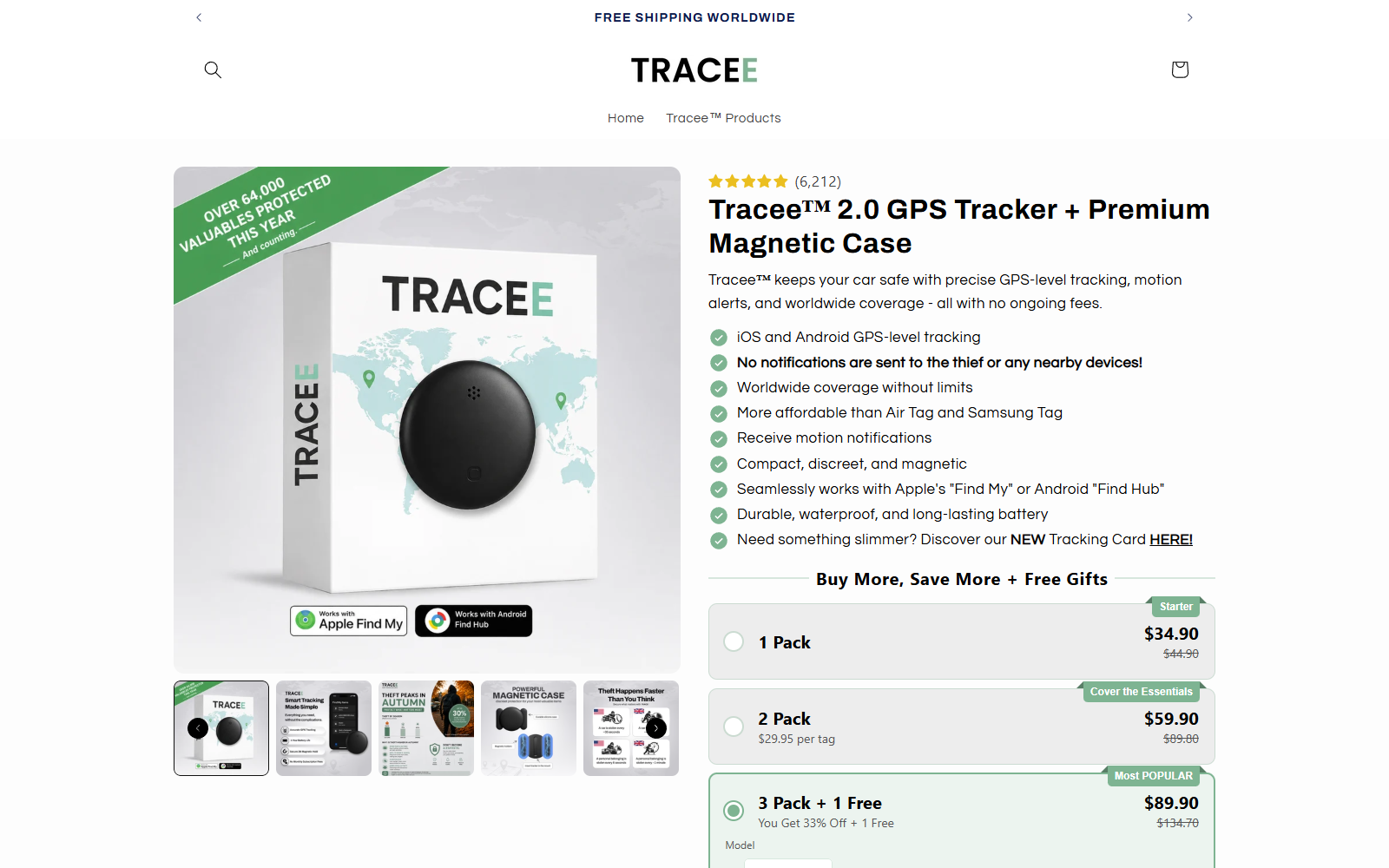
Tracee 2.0 is a small battery-powered tag supplied with a magnetic case for attaching it to a vehicle or another valuable item.
The sales page advertises precise GPS-level tracking, motion alerts, worldwide coverage, a 12-month battery, and no recurring subscription.
It also says the tracker works with Apple’s Find My network or Android’s Find Hub.
One especially strong statement says no notifications are sent to a thief or nearby devices.
What the Specifications Actually Describe
The technical section lists Bluetooth Low Energy 5.1, a replaceable CR2032 battery, and compatibility with crowd-location networks.
It does not list a GPS receiver, cellular modem, SIM card, data plan, satellite antenna, or direct mobile connection.
That makes Tracee a Bluetooth finding tag, not a conventional live GPS tracker.
Its location depends on compatible nearby phones detecting the tag and anonymously relaying information through Apple or Google’s network.
Why the Difference Matters
A Bluetooth crowd tracker can be useful for keys, luggage, bags, or a parked car in an area with many compatible phones.
It may update slowly or not at all in remote locations, underground parking, low-traffic areas, or after a thief disables it.
Apple and Google also operate unwanted-tracker protections. Nearby people may receive alerts when an unfamiliar compatible tag travels with them.
Before buying, compare the advertising with these practical limits:
- Location updates depend on nearby participating phones.
- The device does not advertise an independent cellular connection.
- Anti-stalking alerts may reveal a hidden tag.
- Motion alerts depend on the tag, network, app, and detection timing.
- Worldwide availability does not mean continuous worldwide tracking.
- A magnetic case does not guarantee the device remains attached.
GPS-Level Tracking Is Not the Same as GPS
A true GPS tracker calculates location from navigation satellites. To send that location remotely, it usually needs cellular, satellite, or another communications service.
That hardware requires more power and often creates a monthly connectivity cost.
A Bluetooth tag broadcasts a short-range signal. Nearby participating phones detect it and report an approximate location through a large device network.
The owner then sees the most recently reported position in Find My or Find Hub.
Both approaches can display a dot on a map, but the path to that dot is fundamentally different.
Tracee’s phrase GPS-level may describe the user experience it hopes to approximate. It should not be mistaken for independent satellite and cellular hardware.
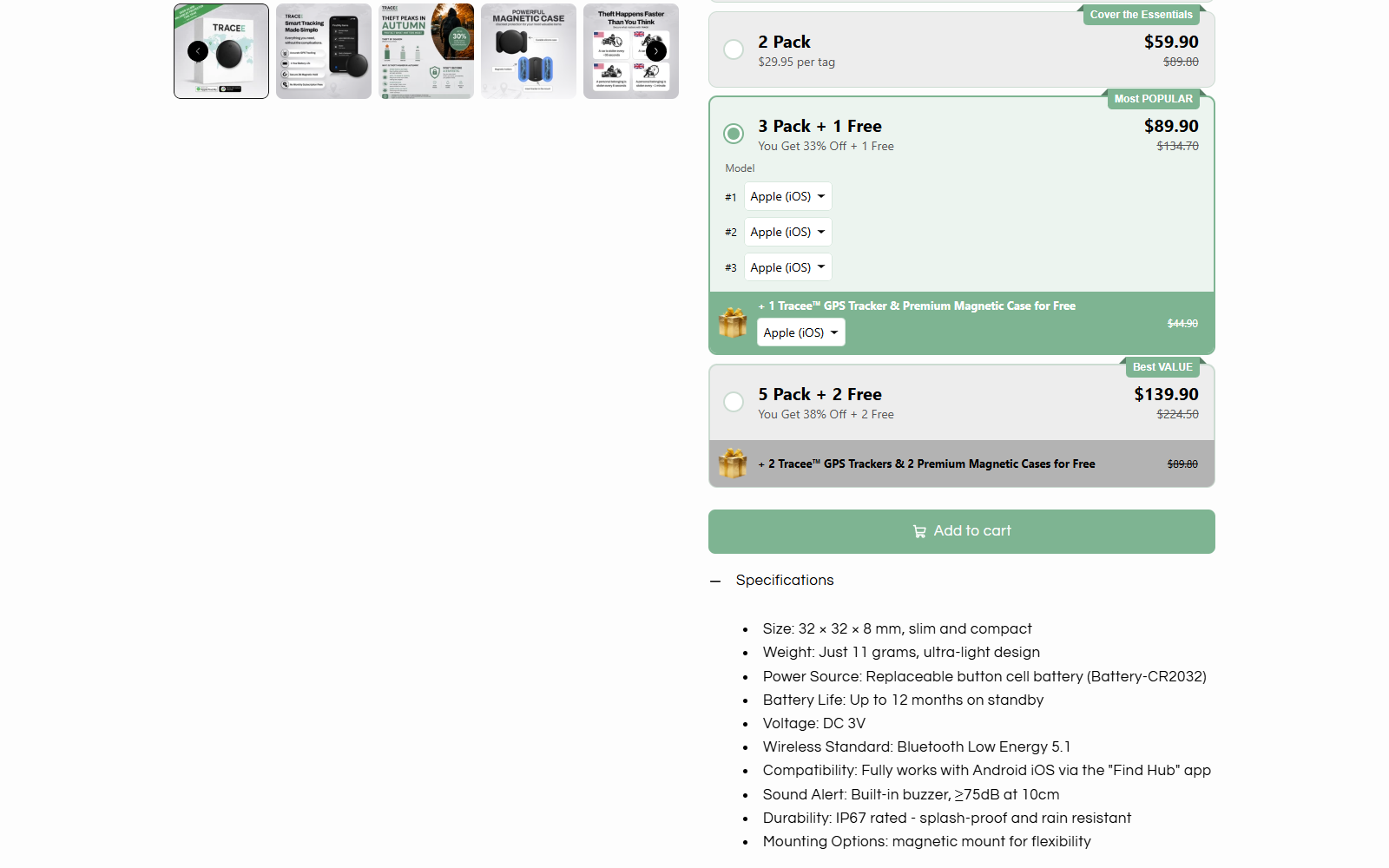
The specifications above are unusually revealing. They identify exactly the low-power Bluetooth technology expected in a crowd-network tag.
They also explain the long battery life. A device making frequent cellular connections generally uses much more energy than a Bluetooth beacon.
The limitation is not that Bluetooth tags are useless. The problem is advertising that can make shoppers expect a different class of tracker.
A buyer expecting live routes, instant movement updates, remote engine information, or guaranteed rural coverage may be disappointed.
Nearby People May Receive Tracker Alerts
Google explains that an unknown Find Hub-compatible tag moving with someone can trigger an alert on that person’s Android device.
Apple provides similar warnings for Find My accessories detected traveling with someone who does not own them.
These protections exist to deter stalking and other covert surveillance. They are intentional parts of the networks Tracee says it uses.
Therefore, the statement that no notifications go to a thief or nearby devices is too broad.
An alert may not appear immediately, and behavior can vary by phone, system version, separation time, movement, and network rules.
Still, no legitimate seller can promise that compatible operating systems will never reveal an unknown tag.
How the Tracee 2.0 Sales Funnel Works
Step 1: Vehicle Theft Creates Urgency
The page begins with the fear of losing a car or valuable possession and being unable to recover it.
A discreet magnetic device appears to offer control without installation, wiring, or a visit to a professional security shop.
That emotional setup encourages shoppers to read GPS-level as ordinary GPS.
Step 2: Familiar Network Names Increase Trust
Apple Find My and Android Find Hub are established services. Their names reassure buyers that the tag can connect to a large detection network.
However, network compatibility also brings network rules, privacy safeguards, and anti-stalking alerts.
The seller cannot selectively keep the broad coverage while guaranteeing the safety warnings never occur.
Step 3: Technical Language Stays Just Ambiguous Enough
The prominent copy emphasizes GPS-level tracking and worldwide coverage. The precise Bluetooth specification appears farther down.
A careful reader can discover the real technology, but many buyers make decisions from the first product panel.
That placement allows a correct technical detail to coexist with a stronger impression created above it.
Step 4: Bundle Defaults Increase the Order
The purchase area offers one, two, four, and seven trackers through discounted packages.
During our review, a larger multi-pack appeared selected in the bundle area rather than the single unit.
Check the active radio button, device platform, quantity, gifts, and final total before adding anything to the cart.
Step 5: No Subscription Sounds Like Exceptional Value
Tracee contrasts its one-time purchase with trackers requiring monthly fees.
The absence of a subscription makes sense because Apple and Google crowd networks perform the location relay instead of a dedicated cellular plan.
That advantage should be evaluated alongside the slower and less predictable nature of crowd-based updates.
Step 6: Return Conditions Appear After the Promise
The refund page offers 30 days, but it requires a legitimate reason, supporting evidence when possible, and original packaging.
Customers pay return shipping. Shipped orders cannot be canceled, and the page warns that false claims may be investigated by a legal team.
This is more restrictive than a simple no-questions guarantee. Save the page before ordering.
Company, Address, and Fulfillment Checks
The Store Names a Brand and a Latvian Entity
The terms call the operator Tracee Tech without a complete legal-company description.
The privacy policy later identifies SIA Tracee Tech, a telephone number beginning with Latvia’s country code, and an address in Riga, Latvia.
Buyers should confirm that this entity appears on the invoice, card statement, and return authorization.
The Listed Address Needs Context
The privacy contact is Zirņu iela 4, 76, Rīga 1013, Latvia.
The site does not clearly state whether that location is headquarters, a registered office, customer support, fulfillment, or a privacy correspondence address.
Ask where physical returns go before paying. A privacy address is not necessarily a return depot.
Support Channels Do Not Match Perfectly
The general contact page uses support@traceetech.com and promises a response within 24 hours.
The privacy policy lists info@traceetech.com and a Latvian telephone number. The refund page refers generally to the support team.
Multiple channels can be legitimate, but the seller should explain which one controls order cancellations and returns.
The Manufacturer Is Not Clearly Identified
The reviewed pages describe dimensions, battery, wireless standard, and durability, yet they do not clearly name the original hardware manufacturer.
A shopper should request the certification IDs, exact model number, anti-stalking compatibility documentation, and country of manufacture.
Generic Bluetooth tags are widely available. Branding and a magnetic case do not establish unique tracking performance.
The Refund Policy Adds Practical Obstacles
Tracee states that shipped orders cannot be canceled. A cancellation request must arrive within 24 hours and before dispatch.
A return must involve a legitimate reason such as a defect or failure to perform as described.
The buyer may need photographs or video, must preserve packaging and accessories, and pays return postage.
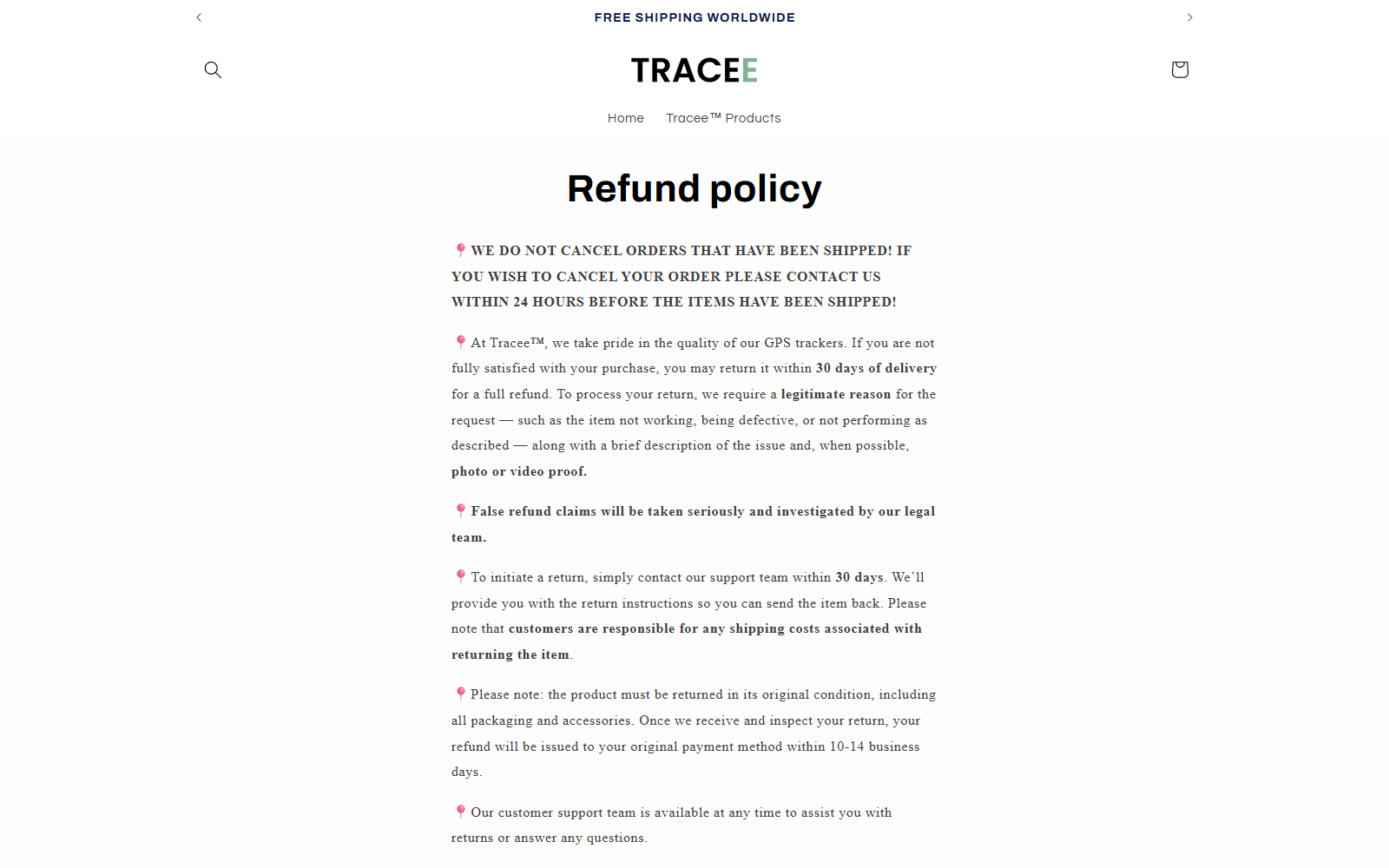
The page’s legal-team warning may discourage ordinary customers from making valid claims.
A buyer should remain factual and organized. Record setup steps, phone model, operating system, locations tested, update delays, and any unknown-tracker alerts.
If the product was represented as real-time GPS but behaves as a Bluetooth crowd tag, describe that specific difference.
Do not damage the device while testing. Keep the magnetic shell, battery, instructions, packaging, and all included gifts.
When a Bluetooth Tag Is and Is Not Suitable
Reasonable Uses
- Finding keys or a bag in populated areas
- Locating luggage after nearby phones detect it
- Checking the last reported location of a parked vehicle
- Adding a secondary recovery signal alongside proper vehicle security
Unrealistic Expectations
- Continuous second-by-second route tracking
- Guaranteed updates in remote or underground locations
- Permanent concealment from a person carrying the tag
- Police-grade theft recovery from a consumer Bluetooth beacon
- Reliable movement alerts without nearby network participation
For high-value vehicles, consider a professionally installed cellular GPS system, immobilizer, alarm, and manufacturer tracking service.
Even then, no device guarantees recovery. Contact police rather than confronting a suspected thief.
What a Real Cellular GPS Tracker Usually Needs
A genuine vehicle tracker normally finds position through satellite navigation and sends it through a cellular or other wide-area connection.
That communication requires a modem, network coverage, data service, power management, and supporting infrastructure. Those costs do not vanish because an advertisement says no subscription.
Some devices include service temporarily or recover costs through a higher purchase price. The seller should state that arrangement plainly.
Useful specifications include cellular bands, countries, update interval, battery endurance, roaming limits, application provider, and renewal price.
A replaceable CR2032 coin cell and Bluetooth 5.1 indicate a crowd-finding tag, not continuous cellular vehicle telemetry.
That does not make the item useless. It means the product must be judged as a Bluetooth tag with network-assisted location.
Test the Tracker Before Depending on It
Pair the device while time remains to return it. Confirm that the official app recognizes the exact model and displays expected safety notices.
Leave the tag with a trusted person and move away with your phone. Observe when another compatible device updates its location.
Repeat the test in a busy area and a quiet area. Crowd density can change performance dramatically.
Check whether the tag emits sound or triggers an unknown-tracker alert on a nearby phone. Never promise secrecy based on sales copy.
Test battery status, map timestamps, location history, separation alerts, and account recovery. A pin without a recent timestamp may describe an old encounter.
For vehicle protection, combine any tag with physical security, an alarm, insurance, and professional tracking when continuous monitoring matters.
Privacy and Misuse Risks
Tracking technology can help recover property, but it can also be abused to follow people without consent.
Use it only for property you own or may monitor. Never hide a tracker on another person, their vehicle, or their belongings.
If your phone reports an unknown tag traveling with you, follow its safety instructions, preserve evidence, and contact authorities when you feel threatened.
A responsible seller should explain these protections. Marketing that promises complete invisibility ignores why Apple and Google built unwanted-tracking alerts.
What to Do if You Have Fallen Victim to This Scam
- Capture the exact advertising. Save the GPS-level, worldwide coverage, motion alert, anti-notification, price, bundle, cancellation, and refund statements shown during purchase.
- Test methodically. Record the phone model, app, operating system, route, update times, network conditions, and whether an unknown-tracker warning appeared.
- Contact Tracee promptly. Explain the precise mismatch, include the order number and evidence, and request the remedy before the 30-day period expires.
- Preserve return eligibility. Keep every accessory and package. Do not mail anything without written instructions and use tracked shipping.
- Ask the card issuer for help when necessary. Distinguish technical disappointment from a documented misrepresentation or unprocessed authorized return.
- Secure accounts used during setup. Remove the tag, change reused passwords, and revoke access if you entered credentials into an unexpected application.
- Scan the purchasing device. Malwarebytes can detect unwanted downloads. AdGuard can block many deceptive ads and known malicious redirections.
- Report misleading tracking claims. Send screenshots to consumer authorities, the advertising platform, Apple or Google when relevant, and your payment provider.
Frequently Asked Questions
Is Tracee 2.0 a real GPS tracker?
Its specifications describe Bluetooth Low Energy 5.1 and Find My or Find Hub. That is a crowd-network tag, not conventional cellular GPS hardware.
Can Tracee show a location worldwide?
It may report locations wherever compatible nearby phones detect it. Coverage is not continuous or guaranteed merely because the network operates internationally.
Will a thief receive a tracker warning?
Possibly. Apple and Google provide alerts for unknown compatible trackers moving with someone. Timing varies, but a no-warning guarantee is not reliable.
Does Tracee require a subscription?
The seller says no. Crowd-network tags generally avoid cellular fees because nearby phones relay location through Apple or Google’s service.
Is the product itself a scam?
The page appears to sell a real Bluetooth tag. The concern is that GPS-style language may create expectations beyond the listed technology.
Can I return Tracee if it disappoints me?
The policy allows 30 days but demands a legitimate reason, original condition, and customer-paid postage. Obtain authorization and document the performance issue.
The Bottom Line
Tracee 2.0 may function as a Bluetooth finding tag. It should not be purchased with the expectation of independent, continuous, cellular GPS tracking.
The technical specifications, anti-stalking alerts, bundle selection, and restrictive return wording deserve attention. Buy only if those limitations fit your real use case.








