

Paying a federal violation notice is not something most people do often. That unfamiliarity creates a dangerous gap: a polished payment page can look official even when the visitor has no clear picture of what the real site should look like.
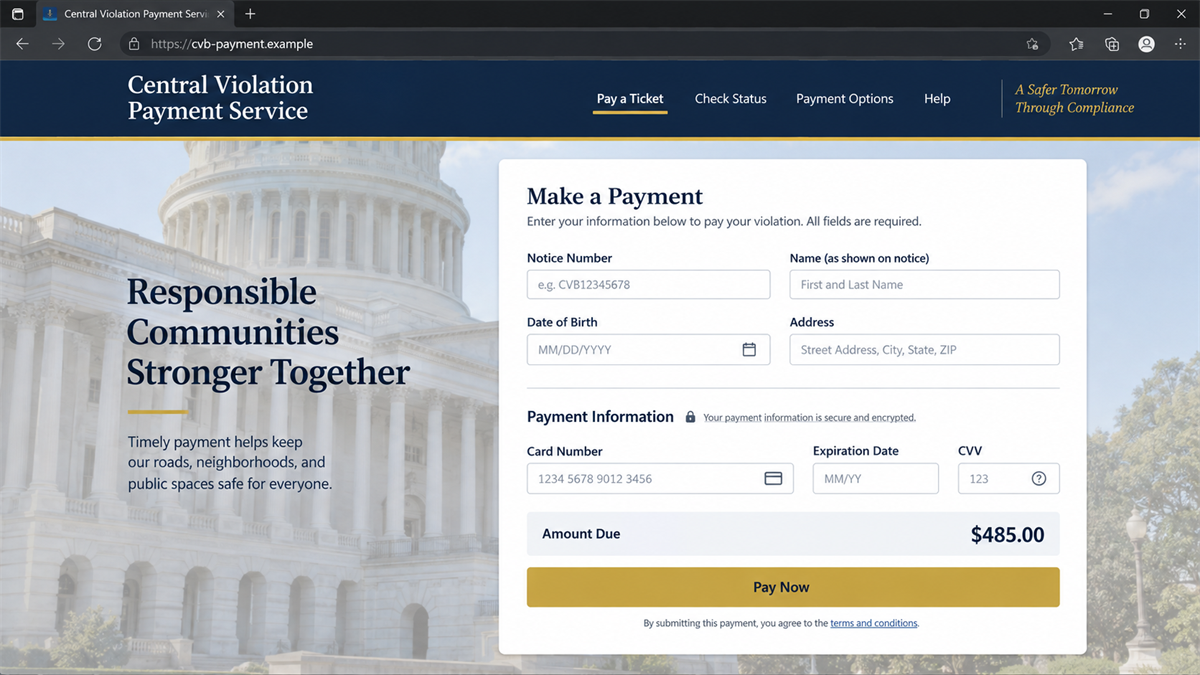
A copycat website can fill that gap with government-style colors, a notice-number field, and a familiar card form. Everything appears ready to settle the ticket in minutes.
The problem is not a hidden convenience fee or confusing terms. The U.S. Courts have warned that a fake website is impersonating the Central Violations Bureau and may fraudulently collect personal and financial information.
Overview
What the fake site pretends to be
The Central Violations Bureau, usually called the CVB, handles notices associated with certain violations issued on federal property. A scam site imitates that payment role so a visitor believes they are entering details into an official U.S. Courts service.
The page may use words such as federal, court, violations, bureau, notice, or secure payment. It can ask for a notice number, name, address, date of birth, and card details. A convincing layout does not establish a government connection.
What the scammer can steal
A single fake form can collect enough information for several types of abuse. Card number, expiration date, CVV, billing address, legal name, date of birth, phone number, and email address can be used for unauthorized charges, identity theft, targeted phishing, or account-recovery attempts.
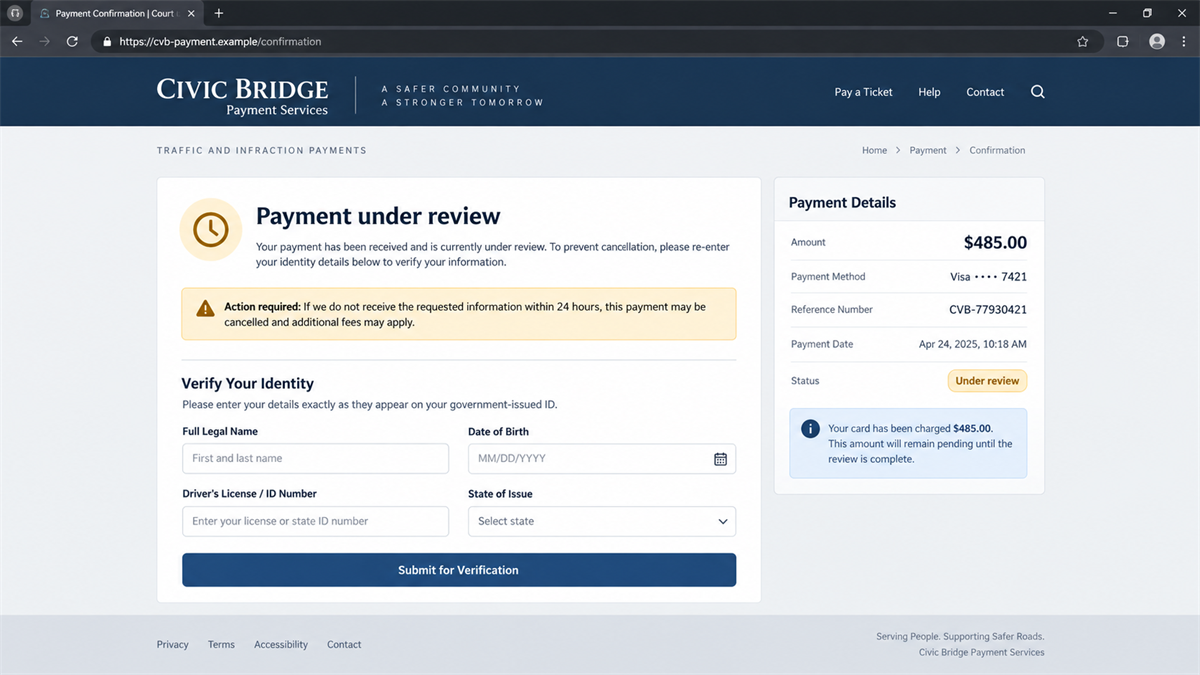
The site may charge the card immediately, show a false error, or claim the payment is under review. A failure message can persuade the victim to submit a second card, giving the criminals another set of financial details.
Why this is a confirmed scam
The Eastern District of New York’s official scam-alert page says a fake website is currently impersonating the Central Violations Bureau and may try to collect personal or financial information fraudulently. The court identifies cvb.uscourts.gov as the only official website for paying a U.S. District Court Violation Notice online.
Watch for these warning signs:
- The domain is anything other than the official CVB address.
- A sponsored result or unsolicited message supplies the payment link.
- The page asks for more identity data than needed to locate the notice.
- A failed payment leads to repeated card-entry requests.
- The site threatens immediate arrest, license loss, or extra penalties.
- Support details cannot be confirmed on an official .gov page.
How Victims Reach the Copycat Page
A fake payment website is only useful if people can be directed to it. Criminals may promote it through search ads, phishing emails, text messages, QR codes, social posts, or domains chosen to resemble the real service.
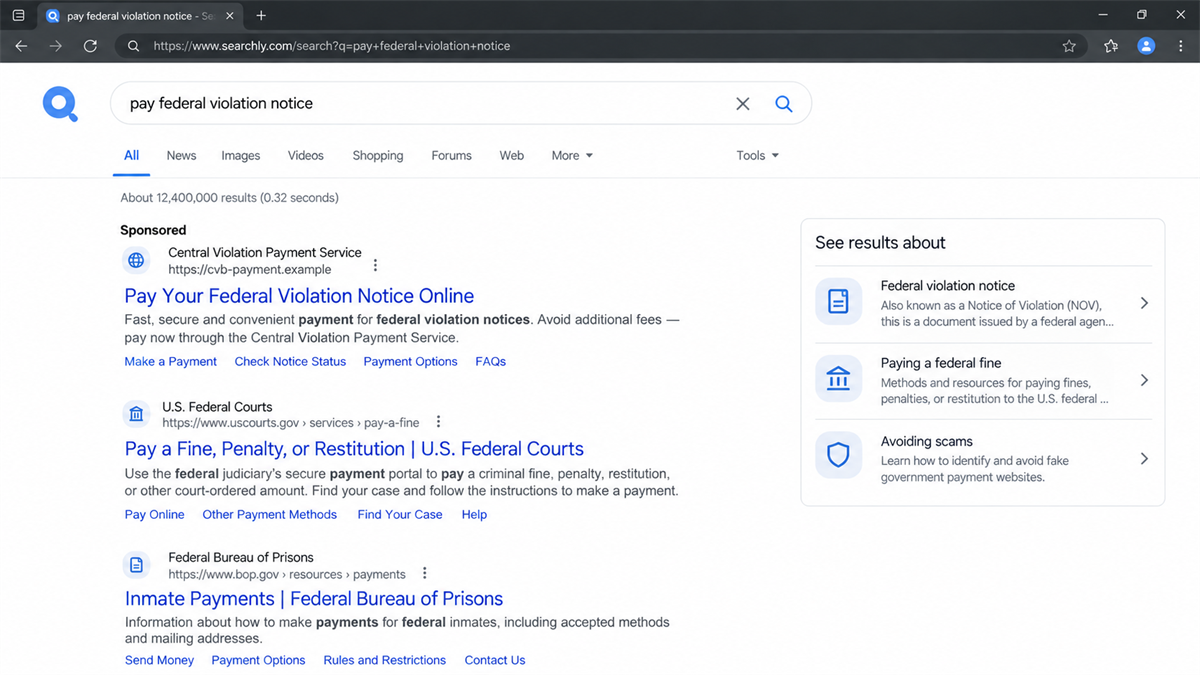
Search is particularly effective because the victim is already trying to pay. A result near the top can feel safer than a link in an unexpected text, especially when it carries a polished title such as “Pay Your Federal Violation Notice Online.” Placement, however, is not verification.
The phrase used in the search can make the problem worse. A person may type only a notice number, “federal ticket payment,” or wording copied from a document. A deceptive advertiser can match those phrases without having any relationship to the court.
On a phone, the visible result may show a reassuring headline while the full hostname is shortened. Opening the browser’s address bar and reading the domain from right to left is worth the pause. The registered hostname matters more than every word and image displayed below it.
A scammer can also pair the site with a threatening message. The recipient is told a notice is overdue or a payment was rejected, then receives a direct link. The manufactured deadline reduces the chance that the person will search for the correct government page independently.
Lookalike domains are built for a glance, not careful reading. Extra words, swapped letters, added hyphens, and commercial extensions can disappear in a long mobile address bar. A government-looking page can still be hosted on a privately controlled domain.
The site may also copy accessibility links, privacy text, help pages, or images of public buildings. Those decorative elements are easy to reproduce. They do not prove the payment is connected to the judiciary.
Even a padlock is not enough. HTTPS means the browser connection is encrypted. It does not mean the recipient of the encrypted data is the Central Violations Bureau.
How the Fake Federal Ticket Payment Site Works
Step 1: The victim is pushed toward a payment search
A real notice, a fake reminder, or simple uncertainty sends the person online to find the payment service. The scam does not always require a fabricated ticket. It can intercept someone who genuinely needs the CVB.
Step 2: A misleading link appears credible
The victim sees a search result, message link, or QR code with official-sounding text. The domain is close enough to the expected service that it is not questioned. On a small screen, only the page title may be visible.
Step 3: The fake site finds or invents a balance
The visitor enters a notice number or personal details. A scam page can accept almost any value and display a balance, which creates the illusion that it queried a government database. A result on the page is not proof that a real notice exists.
Step 4: The form harvests identity and card data
The checkout requests a card number, CVV, expiration date, address, and additional identity fields. When the visitor submits the form, the information goes to the site operator rather than the court.
Step 5: A confirmation keeps the victim calm
The page may issue a reference number and claim the payment is pending or complete. That screen can delay a report while criminals test the card or use the personal data elsewhere.
Step 6: The site asks for another action
A follow-up error may request another card, identity document, bank login, or verification code. The first submission has already caused exposure. Entering more information only expands it.
The Red Flags on a Federal Payment Page
The domain is the most important check. The official court warning says the only online site for paying a U.S. District Court Violation Notice is cvb.uscourts.gov. A commercial domain is not made official because it contains CVB or U.S. Courts in its name.
Be suspicious of pages that overplay urgency. A countdown, a threat of arrest within hours, or a claim that the opportunity to pay will disappear is designed to keep you from checking the notice. Close the page and use the contact information on the physical notice or an independently opened government website.
Look at the information sequence. A legitimate service should not need your email password, bank login, full Social Security number, or remote access to a device to accept a ticket payment. Requests outside the ordinary payment process indicate a separate goal.
Payment failures deserve caution too. Criminals sometimes display an error after capturing the card. Do not keep trying different cards on the same page. Contact the issuer of the first card and verify the service before making another attempt.
Company and Checkout Checks
Check the exact web address
Type cvb.uscourts.gov yourself or reach it from an official U.S. Courts page. Do not trust a sponsored result, a saved link from an unknown source, or a QR code attached to a message.
Check the notice independently
Use the identifying information on the original violation notice and contact the CVB through details published on the official site. A fake website can claim any balance it wants; only the official system can confirm the notice.
Check the payment request
Review the amount, payee, and method before submitting. Stop if the site asks for gift cards, cryptocurrency, wire transfer, or payment to an individual. Those methods do not belong in a normal federal ticket checkout.
Check the confirmation outside the site
A receipt page generated by the same website is not independent proof. Confirm payment status through the official CVB channel. If the official system has no record, contact the card issuer promptly.
What to Do if You Have Fallen Victim to This Scam
- Call the card issuer now. Use the number on the card or the issuer’s official app. Explain that card details were entered on an impersonation website and ask whether the card should be replaced.
- Dispute unauthorized charges. Save the amount, date, merchant descriptor, screenshots, and any fake receipt. Follow the issuer’s fraud process and keep the case number.
- Contact the Central Violations Bureau through official details. Verify whether a real violation exists and whether any payment was received. The U.S. Courts warning lists the CVB’s official website and published support information.
- Protect exposed identity information. If the site collected date of birth, driver’s-license data, Social Security information, or an identity document, visit IdentityTheft.gov for a recovery plan and consider a credit freeze.
- Change reused passwords. If the fake site asked for a password, replace it anywhere it was reused. Turn on multifactor authentication and review recovery addresses and active sessions.
- Check the device if anything was downloaded. A normal payment page does not require a special viewer or support tool. If software was installed, disconnect the device and scan it with a reputable security product such as Malwarebytes.
- Report the fake site. Send the URL, screenshots, messages, and payment details to the CVB, the FBI’s IC3, the FTC, the hosting provider, and the search or messaging platform that delivered the link.
- Block repeat lures. Remove the bookmark, block the sender, and consider an ad and tracker blocker such as AdGuard to reduce exposure to known malicious ads. Still verify government payment sites manually.
How to Pay Without Trusting the Wrong Site
Begin with the paper notice or an official government page, not a general web search. Manually typing the known address takes a few seconds and removes the paid-result layer that scammers can exploit.
If a search is unavoidable, read the visible domain before clicking and again after the page loads. Redirects can change the destination. On mobile, tap the address bar so the full hostname is visible.
Keep a record of the official confirmation and check that the card statement uses the expected descriptor. If anything differs, contact the CVB and the issuer separately. Do not call a support number displayed only on the questionable page.
If another person is helping with the payment, make sure both of you are looking at the same official address. Screenshots sent through chat can hide the address bar, and reading a link aloud can miss a swapped letter. Share the official U.S. Courts page rather than a search result.
Organizations that assist clients with fines should bookmark the official site and document the payment procedure. A known route reduces the chance that a staff member will choose a paid result under time pressure. Bookmarks should still be reviewed periodically in case a device or browser profile has been tampered with.
When in doubt, pause the payment and call the CVB through the number published on the official site. A short delay is safer than sending card and identity details to an unverified page.
Related ticket scams often arrive by text and pretend to represent state courts or motor-vehicle agencies. MalwareTips has covered how fake ticket texts spread from city to city. The CVB copycat is a different doorway, but the safety check is the same: open the official agency site yourself.
Frequently Asked Questions
What is the Central Violations Bureau?
The CVB processes certain violation notices issued on federal property and supports federal courts with those cases. Its official online payment address is part of the uscourts.gov domain.
What is the only official CVB payment website?
The U.S. Courts warning identifies cvb.uscourts.gov as the only official website for paying a U.S. District Court Violation Notice online.
Can a fake payment site appear in search results?
Yes. Criminals can use ads, search manipulation, or lookalike page titles. A high position does not make a result official. Check the domain before entering information.
Does a padlock mean the site is safe?
No. The padlock only shows that traffic between the browser and that site is encrypted. It does not prove the operator is a government agency.
What if the fake site said my payment failed?
Assume the entered card details were captured even if no charge is visible. Contact the issuer, monitor the account, and do not try another card on the same site.
Should I still pay the real violation?
Verify the notice and payment status with the CVB through its official website or published phone number. A payment to a scammer does not necessarily satisfy a real violation.
The Bottom Line
The fake CVB website is not merely an unofficial payment helper. The U.S. Courts warn that it impersonates the Central Violations Bureau and may collect personal and financial information fraudulently.
Do not judge a federal payment page by its design, padlock, or search position. Judge it by the exact domain. For a U.S. District Court Violation Notice, the court identifies cvb.uscourts.gov as the official online payment site.
Read the official U.S. Courts scam alert, verify the notice separately, and contact the card issuer quickly if any information was entered on a copycat page.








