

It’s strange how the messages all feel familiar, even when they claim to be from completely different places.
North Carolina. Illinois. California. New York. Alabama. One city one day, another state the next. Different dates, different “final notice” deadlines, different links.
But then you see the same detail again, like a fingerprint.
Administrative Code 15C-16.003.
If you’ve received one of these texts, you’re not imagining the pattern. That code is one of the most common “tells” in a fast-moving wave of DMV-style scam texts, and scammers keep reusing it for a reason.
This article breaks down what these 15C-16.003 scam texts are, why they’re spreading, how the scam works step by step, how to spot the fake texts and fake sites, and what to do if you already clicked.
Scam Overview
Administrative Code 15C-16.003 scam texts are part of a nationwide smishing campaign. Smishing is phishing delivered through SMS or iMessage. Instead of trying to “hack” a DMV system, scammers aim for something easier: your attention, your fear, and your impulse to act quickly.
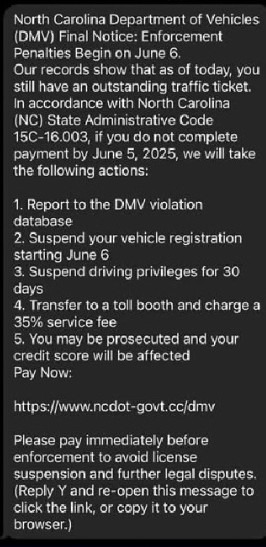
The text message usually claims you have an outstanding traffic ticket or an unpaid toll violation. It often opens with “Final Notice” and warns that “enforcement penalties” are about to begin. Then it lists consequences that feel urgent and personal.
Common threats include:
- Reporting you to a “DMV violation database”
- Suspending your vehicle registration
- Suspending your driver’s license or driving privileges for 30 days
- Charging an extra 35% fee
- Prosecution or “legal proceedings”
- Credit score damage
The Federal Trade Commission has specifically warned about scam texts that use this exact playbook, including the “DMV violation database” threat, suspensions, and the extra 35% service fee.
Why 15C-16.003 is showing up in so many different states
Here’s the short version: scammers reuse what works.
The code “15C-16.003” looks official. It looks like something that could exist inside a government rulebook. Most people won’t verify it. And in a panic, many people assume the sender must know what they’re talking about.
That’s why the same code appears across different locations.
News reports and public warnings have called out this exact pattern. For example:
- North Carolina coverage noted that the text refers to 15C-16.003, a section of the North Carolina state code that does not exist, which is a major clue the text is phony.
- Illinois officials and media warned residents about scam texts that cite “Code 15C-16.003” and threaten registration and license suspension.
- California-area warnings show the same script, including “California State Administrative Code 15C-16.003,” plus the same list of penalties and the 35% fee.
- New York coverage reported DMV warnings about “final notice” scam texts citing “New York State Administrative code 15c-16.003.”
- Alabama’s Department of Revenue posted a scam alert showing the same template, including “State Administrative Code 15C-16.003.”
- Connecticut police warnings noted there is no such code and that these DMV texts are fake.
The important point is not whether the code is real in any given state. The point is that scammers are using it as a reusable prop.
Why these texts feel so convincing, even when they’re nonsense
If you’ve ever read one of these messages and felt your heart rate jump, that reaction is normal. The scam is designed to create that exact physical urgency.
It works because it uses a tight set of psychological triggers:
1) Authority
DMV language carries weight. Even people who hate dealing with the DMV still respect what it can do. The scam borrows that authority by using official-sounding agency names and legal-looking formatting.
2) Fear stacking
The text rarely threatens one consequence. It threatens five.
Registration suspension plus license suspension plus collections plus a 35% fee plus prosecution plus credit score damage is meant to overwhelm you. The more consequences listed, the more likely you are to think, “I cannot risk ignoring this.”
3) Fast deadlines
Many versions demand action within 24 hours or by the next day. That deadline is not about law. It’s about preventing you from verifying the claim through official channels.
4) “Small payment” strategy
A lot of these scam sites present a small balance due. Often it’s in the $5 to $15 range, or similar “feels plausible” amounts. As you mentioned, newer waves may use numbers like $9.96 or $11.94.
Small fees reduce suspicion. People think, “It’s not worth the hassle, I’ll just pay.”
But that “small payment” is the gateway to the real goal: credit card theft.
What scammers really want from you
These scams are rarely about the money you pay on the page. The real prize is the information you type in.
Scam portals commonly collect:
- Full name
- Phone number
- Home address
- Email address
- Sometimes vehicle or license details
- Credit card number, expiration date, and CVV
Once scammers have those details, they can:
- Run test transactions and then larger unauthorized charges
- Sell your card data
- Bundle your identity details and sell them to other scammers
- Target you again later with “refund” scams or “collections” threats
This is why the FTC and many state agencies emphasize the same basic warning: do not click links in unexpected DMV or ticket texts, and do not pay through text message portals.
How widespread is this scam?
It’s widespread enough that multiple state agencies and major news outlets have published alerts about it. The scam “travels” well because it’s basically plug-and-play:
- Replace the state name
- Replace the date
- Swap the link
- Keep the same fear script, including “15C-16.003”
That’s why you can see the same exact “15C-16.003” line in messages claiming to be from totally different states.
In other words, 15C-16.003 has become a signature.
Not because it’s meaningful, but because it’s useful.
How The Scam Works
Here’s how Administrative Code 15C-16.003 scam texts typically unfold, step by step, from the first buzz in your pocket to the moment a victim realizes their card is compromised.
Step 1: Bulk texts are sent to huge lists of phone numbers
This is not personalized enforcement. It’s mass messaging.
Scammers send the same script to thousands, sometimes millions, of phone numbers at once. They don’t care whether you have tickets. They only care that a percentage of people will panic and click.
Numbers can come from:
- Data breaches and leaked lists
- Purchased marketing databases
- Randomized number targeting
That’s why people with spotless driving records still receive the text.
Step 2: The message uses “Final Notice” language to trigger urgency
The scam usually opens with:
- “Final Notice”
- “Enforcement begins on [date]”
- “Payment required by [tomorrow]”
- “Pay within 24 hours”
This framing is meant to make you feel like you already missed earlier warnings, so you must act now.
The FTC describes these messages as unexpected “overdue traffic ticket” texts that push immediate payment and threaten escalating consequences.
Step 3: The scam inserts the 15C-16.003 line as credibility bait
This is where the scam plants its “official proof.”
Even when the message claims to be from different states, the code often stays the same: Administrative Code 15C-16.003.
Why?
Because it looks official to people who don’t have time to verify it.
News reports have explicitly pointed out that the code is fake in the context the text uses, which is one reason it’s such a strong red flag. (News Observer)
Step 4: A list of scary penalties is used to overwhelm skepticism
Next comes the pressure list. Many versions include:
- “Report to the DMV violation database”
- “Suspend vehicle registration”
- “Suspend driving privileges for 30 days”
- “Transfer to a toll booth and charge a 35% service fee”
- “You may be prosecuted and your credit score will be affected”
It’s the same structure again and again because it works. The FTC warning repeats this same set of threats nearly word-for-word.
Step 5: The link appears as the “escape hatch”
Right when you feel the most uneasy, the text offers relief:
- “Pay Now”
- “Settle immediately”
- “Avoid enforcement penalties”
This is the funnel’s key moment. The scam is built so the link feels like the simplest way to make the anxiety disappear.
Step 6: The URL is engineered to look official at a glance
The scam link is rarely random-looking. It usually includes official-looking terms such as:
- dmv
- dot
- gov
- the state name or abbreviation
But these words can be inserted into any URL.
What matters is the actual domain.
A common trick is to include “gov” in the middle of the link, while the site ends in something that is obviously not a government domain, like:
- .cc
- .vip
- .win
- .xyz
That “looks real fast, looks fake slow” effect is intentional.
Step 7: The fake portal asks for personal info first
Many phishing pages start by asking for:
- Name
- Address
- Phone number
- Email address
This makes the site feel like a legitimate billing portal. It also helps scammers build a “profile” they can reuse or sell.
Step 8: The site collects credit card details
Next comes the real prize:
- Card number
- Expiration date
- CVV
- Billing address
Often the amount requested is small. But the goal is not the $10. The goal is your card data.
Step 9: A fake “payment successful” screen delays your response
Many scam sites show a confirmation screen to reduce suspicion and buy time.
That delay matters. The longer you wait to call your bank, the more time scammers have to run charges.
Step 10: Fraud begins, often starting with test charges
Card thieves frequently begin with a small transaction to verify the card works.
Then they move to larger transactions, digital purchases, or resell the card details to other criminals.
Step 11: Victims may receive follow-up scams
Once you click or respond, you may be targeted again with:
- “Payment failed, try again”
- “Refund issued, confirm your details”
- “Collections notice, pay immediately”
This is one reason it’s important not only to fix the immediate card problem, but also to expect follow-ups.
What To Do If You Have Fallen Victim to This Scam
If you clicked a 15C-16.003 scam link or entered information, you can still limit the damage. The key is acting quickly and calmly.
Here’s a step-by-step plan.
- Stop interacting with the text
- Do not click again
- Do not reply “Y”
- Do not try to “resolve” it through the same link
- If you entered card details, call your bank or card issuer immediately
Ask them to:
- Cancel the compromised card
- Issue a replacement
- Review recent and pending transactions
- Dispute any unauthorized charges
- Check your account for small test charges
Look for:
- Small charges you don’t recognize
- Pending transactions from unfamiliar merchants
- Charges that appear shortly after you submitted the form
- Turn on transaction alerts
Enable alerts for:
- All purchases
- Online transactions
- Card-not-present activity
- If you entered personal information, protect your identity
Consider:
- Placing a fraud alert with credit bureaus
- Freezing your credit if you shared extensive identity details
- Monitoring your credit report for new accounts
- Change passwords if you reused any credentials
Start with:
- Email passwords
- Banking and payment apps
- Mobile carrier account login
Turn on 2-factor authentication wherever you can.
- Report the scam
- Report to the FTC if you’re in the U.S. (they track these campaigns)
- Report the text as spam to your mobile carrier (many support forwarding spam texts)
- Report to your state’s DMV or consumer protection office if they have a reporting page
- Verify any real ticket or toll status safely
Do not use the link in the text.
Instead:
- Search for your state DMV or toll agency manually
- Use the official website you find in search results from trusted domains
- Call the official number listed on the agency website, not the number in the text
- Save screenshots for documentation
Keep:
- The full message
- The sender number
- The link
- Any pages you saw (screenshots only)
This helps with disputes and reports.
- Watch for follow-up scams for 30 to 60 days
Be cautious with:
- “Refund” messages
- “Collections” threats
- Calls claiming to be your bank or DMV
If a call feels urgent, hang up and call back using a verified number.
The Bottom Line
Administrative Code 15C-16.003 scam texts are spreading because scammers found a script that reliably triggers panic, and they’re reusing it across state lines.
The code is the recurring fingerprint. The threats are the pressure. The “Pay Now” link is the trap.
Consumer protection warnings and state alerts have repeatedly called out this exact template, including the “DMV violation database” language, the 35% fee threat, and the fake “15C-16.003” citation.
If you take only one rule with you, make it this:
Never pay a DMV, toll, or ticket notice through a link in an unexpected text.
Slow down, verify through official sources you find yourself, and the scam collapses the moment you stop rushing.
FAQ: Administrative Code 15C-16.003 Scam Texts
What are “Administrative Code 15C-16.003” scam texts?
These are fraudulent text messages that claim you have an outstanding traffic ticket, unpaid toll, or DMV violation and must pay immediately to avoid penalties. The messages often cite “Administrative Code 15C-16.003” to sound official. The real goal is to get you to click a link to a fake payment portal and steal your credit card information and personal data.
Why do scammers keep using “Administrative Code 15C-16.003”?
Because it looks believable and most people won’t verify it. Scammers reuse successful scripts across different cities and states. “15C-16.003” has become a kind of copy-paste signature that makes the message feel legal and authoritative, even when it’s fake.
Is Administrative Code 15C-16.003 a real law?
In the context these texts use it, it is commonly flagged as a scam indicator. Multiple warnings and reports highlight that the code reference does not match legitimate state administrative codes in the way the text implies. Scammers include it to intimidate you and make the message feel official.
Why do these texts claim they’ll suspend my license or registration?
Because fear works. Threatening license suspension or registration suspension pushes people to act quickly without checking. Scammers know drivers are more likely to pay immediately if they believe they could lose the ability to drive.
What do these scam texts usually say?
Most versions include:
- “Final Notice” or “Enforcement Penalties Begin on [date]”
- A claim that you have an outstanding traffic ticket or unpaid violation
- The phrase “Administrative Code 15C-16.003”
- A list of penalties such as license suspension, registration suspension, collections, and credit reporting
- A “Pay Now” link
- Sometimes instructions like “Reply Y and reopen the message to click the link”
Why do they often mention a 35% fee?
It’s a pressure tactic. Many scam templates include a line about a “35% service fee” or “fees up to 35%” to make the consequences feel immediate and expensive. It’s meant to trigger panic, not reflect real policy.
The message looks like it’s from my city or state. How can it still be a scam?
Scammers change the city name, agency name, and enforcement date to match different locations. The core script stays the same, including the “15C-16.003” line. It’s a template that can be adapted quickly, which is why people in many states see nearly identical messages.
How can I tell if the link in the text is fake?
Look closely at the web address. Scam links often:
- Use odd domain endings like .cc, .vip, .win, .xyz, or .top
- Include “dmv,” “dot,” “gov,” or a state name in the middle to look official
- Hide the real domain behind extra words (for example: “state.gov-something.cc”)
If it’s not a verified official government or toll agency domain you can confirm independently, do not click it.
What happens if I click the link?
You are usually sent to a fake payment portal designed to steal information. The site may ask for:
- Full name
- Address
- Phone number
- Vehicle details (sometimes)
- Credit/debit card number, expiration date, and CVV
Even if the requested amount looks small, entering your card data can lead to unauthorized charges and ongoing fraud.
Why do scammers ask for small amounts like $5 to $15?
Small amounts feel believable and “not worth arguing about.” It lowers suspicion and increases the chance you’ll pay quickly. But the real objective is your card details and personal information, which can be used for much larger fraud.
What if I clicked but didn’t enter any information?
Close the page and do not return. You’re safer than someone who entered details, but you should still:
- Watch for follow-up scam texts or calls
- Avoid clicking any future links
- Run a security scan if your phone prompted downloads or permissions
What if I entered my credit card information?
Act immediately:
- Call your bank or card issuer and explain your card was entered on a phishing website.
- Cancel the compromised card and request a replacement.
- Review recent and pending transactions.
- Dispute any unauthorized charges.
- Turn on transaction alerts for faster detection.
What if I entered my name, address, or other personal data?
If you provided personal information, consider:
- Placing a fraud alert with the credit bureaus
- Freezing your credit for stronger protection
- Monitoring credit reports for new accounts you didn’t open
- Watching for follow-up scams using your real details
Should I reply “Y” if the message tells me to?
No. Replying can confirm your number is active, which may lead to more scam attempts. It also increases the chance you’ll continue engaging and eventually click the link.
How do I report these 15C-16.003 scam texts?
You can report them through:
- Your mobile carrier’s spam reporting (many support forwarding to 7726)
- The FTC’s fraud reporting system (U.S.)
- Your state DMV or consumer protection office (using official websites you find independently)
- Local police if you lost money or suspect identity theft
How can I check if I actually have a real ticket or toll violation?
Do not use the link in the text. Instead:
- Search for your DMV or toll agency official site yourself
- Use a known official portal or app you already trust
- Call official phone numbers listed on verified government websites
This is the safest way to confirm whether anything is actually owed.
Why am I getting these texts even if I have no violations?
Because scammers send these messages in bulk. They are not checking records. They only need a small percentage of people to believe the message and pay.
What is the safest rule to remember about “15C-16.003” texts?
If a text claims you owe money and cites “Administrative Code 15C-16.003,” treat it as a major warning sign. Do not click, do not reply, and verify through official sources you locate yourself. That one habit prevents most of the damage these scams cause.








