

A phone upgrade call can sound like a reward for being a loyal customer. The caller knows the network, offers a better handset for less money, and handles the order while you stay on the line.
Then a real package arrives. That delivery seems to prove the offer was genuine, even when the box contains a different and more expensive phone than the one discussed.
The “mistake” is the second half of the scam. The caller provides return instructions, the valuable handset goes to an address controlled by criminals, and the victim is left with the network account and the bill.
Overview
What the caller offers
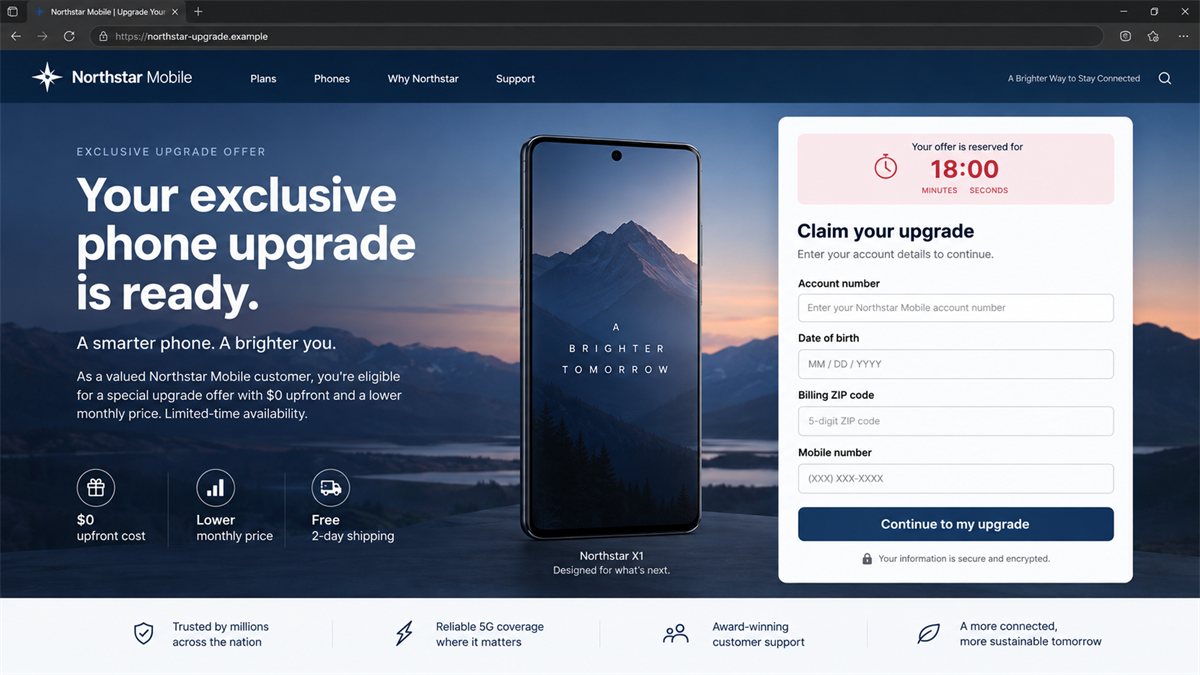
The scammer poses as a mobile network or an authorized upgrade team. The offer may include a new phone, a lower monthly price, free accessories, or no upfront cost. To “check eligibility,” the caller asks for account, identity, payment, or security details.
Some versions use a call, while others begin with a text, ad, or website. The branding can change. The important part is that the approach is unsolicited and the customer is pulled into a separate sales channel instead of upgrading through the provider’s official account.
Why a real phone arrives
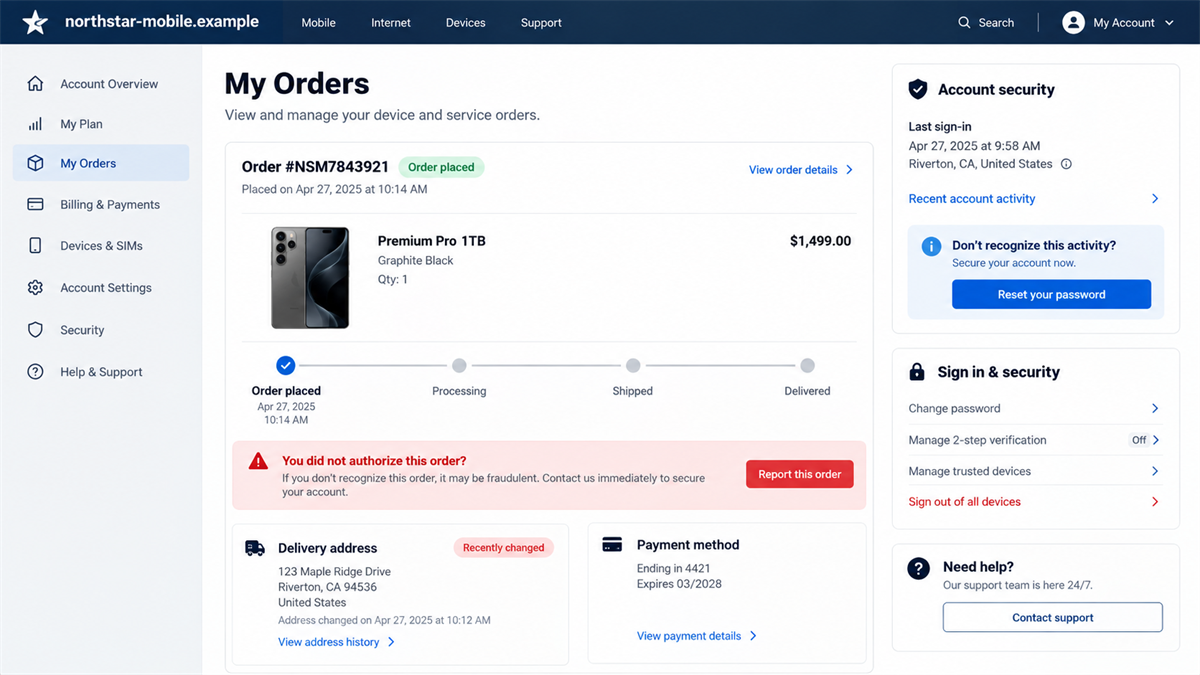
The criminals use the stolen details to place an order with the genuine network provider. That is why the package, tracking, and handset can all be real. The victim may receive a premium device that was never requested or a different model from the one promised.
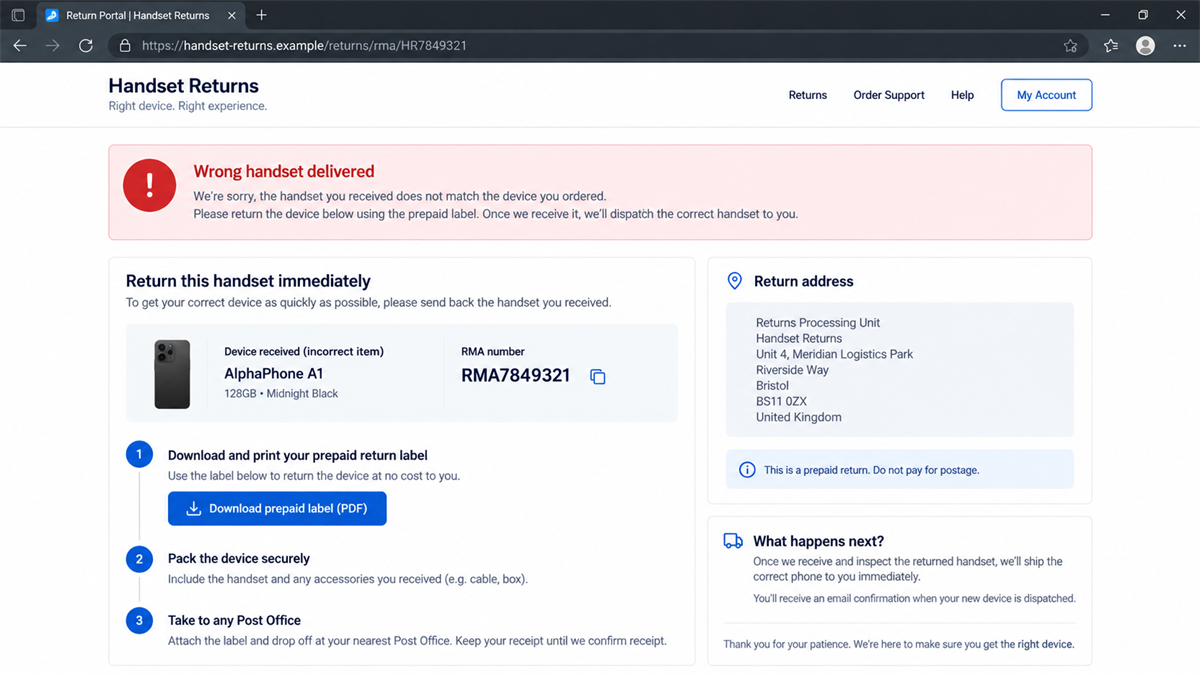
The fraudster then calls again or directs the victim to fake customer service. They apologize for the error and say the wrong handset must be returned before the correct phone can be sent. The return address belongs to the criminal network, not the mobile provider.
Why this is a confirmed scam
Lincolnshire Police described this method after five men were jailed in September 2026 for their roles in a sophisticated mobile phone fraud. Police said the operation handled about 1,635 devices and caused an estimated £1.635 million loss to network providers.
The confirmed warning signs are:
- An unexpected caller offers a discounted phone upgrade.
- The caller asks for personal, banking, account, or one-time-code information.
- A genuine provider order appears that you did not place yourself.
- The delivered handset is more expensive or different from the promised phone.
- A caller tells you to return it using a label or address they provide.
- The promised replacement never appears in your official provider account.
Why the Delivered Phone Makes the Lie Stronger
Most scam warnings tell people to be suspicious when nothing arrives. This scheme reverses that expectation. A sealed box from a genuine network can make the victim feel silly for having doubted the caller.
The real delivery works because the criminal is not selling a fake phone. They are using the victim’s account to acquire a genuine high-value handset. The provider sees what appears to be an authenticated customer order, while the victim believes it is part of the promotional upgrade.
The handset itself may be selected for resale value rather than because it matches anything discussed. A criminal can promise a midrange model, order the most expensive device available on finance, and rely on the victim to treat the mismatch as a warehouse error.
Provider notifications may arrive during the call, but the scammer explains them as normal confirmation steps. This is why every order email and security-code message should be read independently instead of interpreted by the person asking for the code.
A wrong item is also believable. Retailers and networks make shipping mistakes, so an apology and return label do not automatically sound criminal. The fraudster uses a normal customer-service process as camouflage.
The caller may keep the victim away from the real provider by saying the promotion is handled by a special partner team. That explains why the price, model, or return address does not match the main account.
Criminals may also know enough customer information to sound like an insider. A name, mobile number, provider, or upgrade date can come from breached data, earlier phishing, or information shared during the first call. Knowledge is not authorization.
Once the package is delivered, urgency returns. The victim is told the handset must be sent back that day to avoid charges or to release the correct model. That pressure is meant to prevent a call to the network’s real support team.
How the Phone Upgrade Scam Works
Step 1: A fake network representative makes contact
The criminal calls, texts, or advertises an exclusive upgrade. The offer is attractive but plausible: a better device, lower monthly cost, or early eligibility for a loyal customer.
Step 2: The victim gives account and security details
The caller asks questions supposedly needed to confirm the account. They may request date of birth, address, billing information, account number, password reset details, or a one-time verification code. Those answers enable the next step.
Step 3: The criminal orders a valuable handset
Using the genuine provider’s systems, the scammer places an order on the victim’s account. A premium handset is sent to the customer’s real address so the provider’s fraud controls see a familiar destination.
Step 4: The wrong phone arrives
The victim opens the parcel and finds a model that does not match the offer. Before they contact the provider independently, the fraudster calls or guides them to a fake support number.
Step 5: Fake support supplies return instructions
The scammer says there was a warehouse error and promises to ship the right device after the return. A prepaid label, return portal, or ordinary-looking UK address makes the process feel legitimate.
Step 6: The phone goes to a mule address
The victim posts the genuine handset to an address controlled by the fraudsters. Police said the returned devices in the confirmed operation were diverted to mule addresses. The criminals can then resell them.
Step 7: The account holder keeps the liability
No correct replacement arrives. The real provider shows an expensive order on the account, while its official returns system has no record of receiving the device. The customer must now prove that the order and diversion were fraudulent.
The Warning Signs Before and After Delivery
An unsolicited upgrade call is not automatically a scam, but it should never be used as the place to authenticate the customer. End the call and open the provider’s official app or website. If the offer is genuine, the provider can confirm it there.
One-time codes deserve special attention. Read the whole message before sharing or entering anything. It may say the code authorizes a purchase, password reset, SIM change, or new device. A caller who asks you to read it aloud may be using it to complete an order.
If an unexpected phone arrives, do not use return instructions supplied by the same caller who arranged the upgrade. The genuine parcel does not validate the caller. Contact the provider through the official account and ask it to confirm the order and issue a return directly.
Compare the return address with the provider’s confirmation. A residential address, small forwarding unit, unrelated shop, or label that does not appear in the official account is a serious warning. Keep the phone secure while the provider investigates.
Company and Checkout Checks
Check the offer in your official account
Sign in through the provider’s app or typed website address. Look for upgrade eligibility, plan changes, device orders, and messages. A special offer that exists only in an incoming call should not be trusted.
Check every security code
Never give a one-time code to an unsolicited caller. The code message often explains the action being approved. If it references an order or account change you did not start, contact the provider immediately.
Check the order and delivery details
Review the model, price, finance term, delivery address, and time of order in the real account. Report any unfamiliar activity before opening links or calling numbers in related messages.
Check the return inside the provider’s system
A legitimate return should have a record, reference, and label issued by the real provider. Call the provider through a known number and verify the destination before handing the parcel to anyone.
What to Do if You Have Fallen Victim to This Scam
- Contact the mobile provider immediately. Use the official app, website, or number on a statement. Report an unauthorized order and ask the provider to lock the account, stop shipment if possible, and record the fraud.
- Do not return an unexpected phone to the caller’s address. Keep the handset, packaging, label, and delivery record secure. Follow only the provider’s verified return process.
- Change account credentials. Reset the provider password and email password, sign out unknown sessions, remove unfamiliar trusted devices, and add a strong account PIN or port-out lock if available.
- Tell the provider which codes were shared. The fraud team needs to know whether a one-time code, account number, billing detail, or password reset was exposed.
- Contact the bank or card issuer. If payment details were given, ask for monitoring or replacement and dispute unauthorized charges. Check whether the scammer changed the payment method on the mobile account.
- Report the fraud to police. Preserve phone numbers, messages, call times, parcel tracking, return labels, addresses, and payment records. In the UK, also report through the national fraud reporting service.
- Check devices used with fake links. If you installed an app or remote-support tool, disconnect the device and scan it with a trusted product such as Malwarebytes. Change important passwords from a clean device.
- Block follow-up attempts. Criminals may pose as the provider, bank, police, or a recovery service. AdGuard can reduce exposure to known malicious ads and pages, but verify every account contact through an independent official channel.
How to Upgrade a Phone Safely
Initiate the upgrade yourself. Use the provider’s app, type the address, visit a known store, or call the number on the official website. Do not let an unexpected caller define the channel and the verification process.
Before confirming, read the device price, plan term, trade-in requirements, and delivery address. Save the official order confirmation. If the caller’s verbal promise is not reflected in the provider’s account, stop.
For an unexpected delivery, photograph the sealed parcel, shipping label, serial or IMEI information visible on the box, and its contents. Do not activate the handset or insert your SIM unless the provider instructs you to do so. Those records can help connect the device to the unauthorized order.
If a return is required, generate the label while signed in to the official account or have the provider email it during a verified support session. Check that the return reference appears in the account before shipping, use tracked service, and retain the acceptance receipt.
Turn on provider alerts for orders, SIM changes, password resets, and number transfers. Add a unique account PIN and ask whether the network supports extra protection against SIM swapping or unauthorized porting.
MalwareTips has explained how a fake mobile discount call can steal a one-time PIN. Upgrade fraud uses that same moment of trust, then adds a real device and a bogus return to complete the theft.
Frequently Asked Questions
Can a scammer really order a phone from my provider?
Yes. If the scammer obtains enough account and security information, they may place an order through the genuine provider. That is why a real parcel does not prove the original caller was legitimate.
Why send the phone to my real address?
The real address can make the order look normal to the provider. The scammer then uses a fake return story to divert the handset after delivery.
What should I do with an unexpected handset?
Keep it secure and contact the provider through an official channel. Do not send it to an address or courier supplied by the caller. Ask the provider to issue and confirm any legitimate return.
Should I share a verification code with network support?
Do not share a one-time code with an unsolicited caller. Read the message. If it authorizes an action, enter it only in a process you started through the provider’s official site or app.
Can tracking prove the return was legitimate?
Tracking proves where the parcel went, not who controlled the address. A fraudster can provide a working prepaid label. The destination must be verified with the real provider.
Will I have to pay for the stolen phone?
The outcome depends on the provider, evidence, jurisdiction, and timing. Report the unauthorized order quickly, preserve the handset or shipping proof, and follow the provider’s formal fraud and complaint process.
The Bottom Line
The phone upgrade scam is persuasive because part of it is real. A genuine network processes an order and a genuine premium handset arrives. The deception lies in who placed the order and where the “return” goes.
Never use the original caller’s return instructions for an unexpected device. Verify the order inside the official provider account and obtain the return directly from the provider.
Lincolnshire Police’s confirmed fraud case shows the scale this method can reach. The safest upgrade is one you start, verify, and complete entirely through a channel you chose yourself.








