

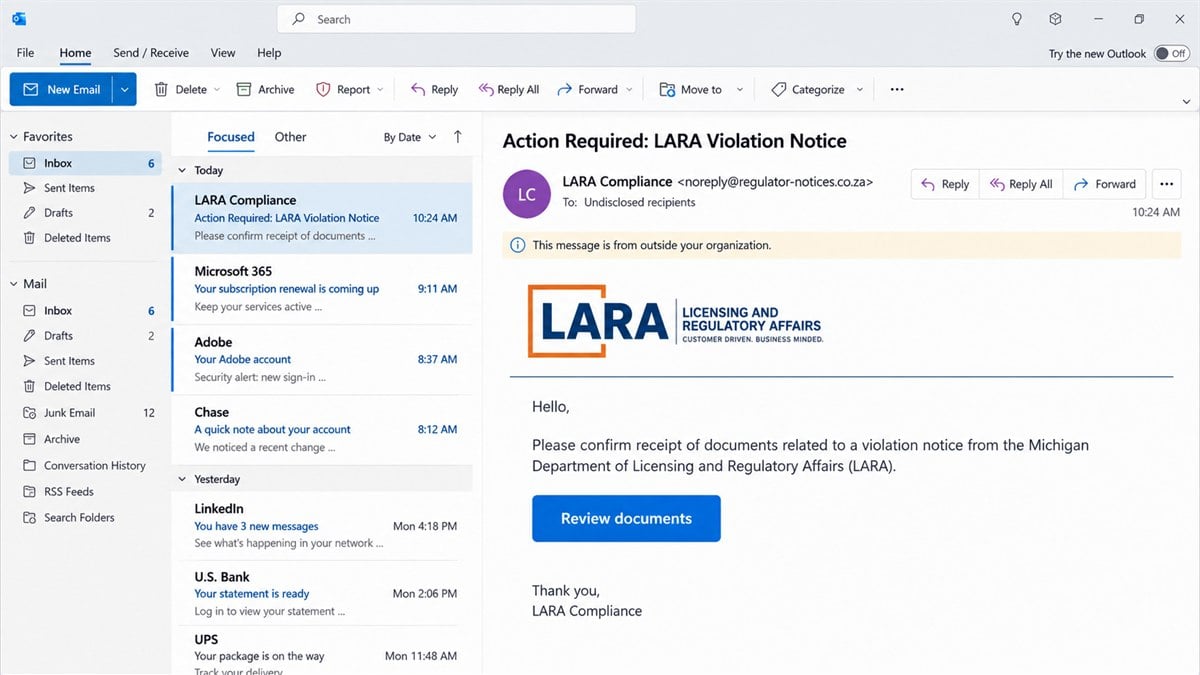
An email says Michigan regulators have opened a violation file in your name. It carries a department logo, a Lansing address, a reference number, and the name of someone who appears to work inside state government.
The first request is almost disarmingly small: confirm that you received the documents. That polite follow-up can feel safer than an obvious demand for money.
Before replying, opening an attachment, or using the “secure” file link, look at the part of the message the display name is trying to hide.
Overview
The message impersonates a real Michigan department
LARA is the Michigan Department of Licensing and Regulatory Affairs. It oversees professional licensing, corporations, construction codes, and other regulated activities, so a message carrying its name can sound serious to a business owner or licensed professional.
The department has now identified fraudulent communications that impersonate its staff. Michigan’s published example uses the subject “LARA Violation Notice” and asks the recipient to confirm receipt of documents.
The visible sender name is not the real address
In the confirmed example, the display name includes a convincing michigan.gov address. The actual address enclosed behind it ends in entry.co.za, a domain unrelated to Michigan government.
That mismatch is the decisive clue. Email applications often emphasize the friendly display name while placing the real sending address in smaller text or behind a tap. A familiar name is only a label chosen by the sender.
The reply is meant to start a longer theft
The example does not begin with a crude demand for gift cards. It asks whether documents were received and supplies a file-sharing link. A reply tells the operator that the address is active and that the recipient takes the alleged violation seriously.
- The subject creates legal and professional anxiety.
- A real agency name supplies instant authority.
- A copied signature contains authentic-looking contact details.
- The hidden sender domain contradicts the display name.
- A document link can lead to credential theft or a payment form.
- A reply can trigger calls, invoices, and more targeted messages.
This is a confirmed agency-impersonation scam, not a dispute about whether LARA is legitimate. The real department is warning people that criminals are borrowing its identity.
How the LARA Violation Notice Email Scam Works
Step 1: The scammer finds a plausible target
Professional and business information is unusually easy to personalize. Public licensing databases, corporate filings, business websites, staff biographies, and social profiles can reveal a name, job title, employer, license type, and state.
A criminal does not need access to a confidential government file to write a believable opening. A nurse, contractor, real-estate professional, accountant, salon owner, or company officer already has a reason to care about a regulatory notice.
Step 2: The subject line creates a private emergency
“Action Required” and “Violation Notice” suggest that a formal process is already underway. The reference number gives the impression that the recipient is seeing one case in a larger administrative system.
The email may avoid explaining the alleged violation. That omission is useful to the scammer because uncertainty encourages the recipient to open the document rather than dismiss a claim that is obviously wrong.
Step 3: Real details are copied into the signature
The footer can contain a genuine government mailing address, telephone number, slogan, confidentiality notice, and logo. Those items are copied from public pages or authentic correspondence.
None of them authenticates the message. A signature is ordinary text and images. The sending domain, message headers, and confirmation through a separately located official channel carry more weight.
Step 4: The first reply lowers the victim’s guard
The sender asks for confirmation instead of payment. Once the recipient replies, an alleged compliance officer can answer with the person’s name, repeat the case number, and describe the situation as a routine administrative matter.
That exchange creates continuity. The next request no longer arrives from a complete stranger; it arrives inside a conversation the victim has already accepted as real.
Step 5: A document portal collects valuable data
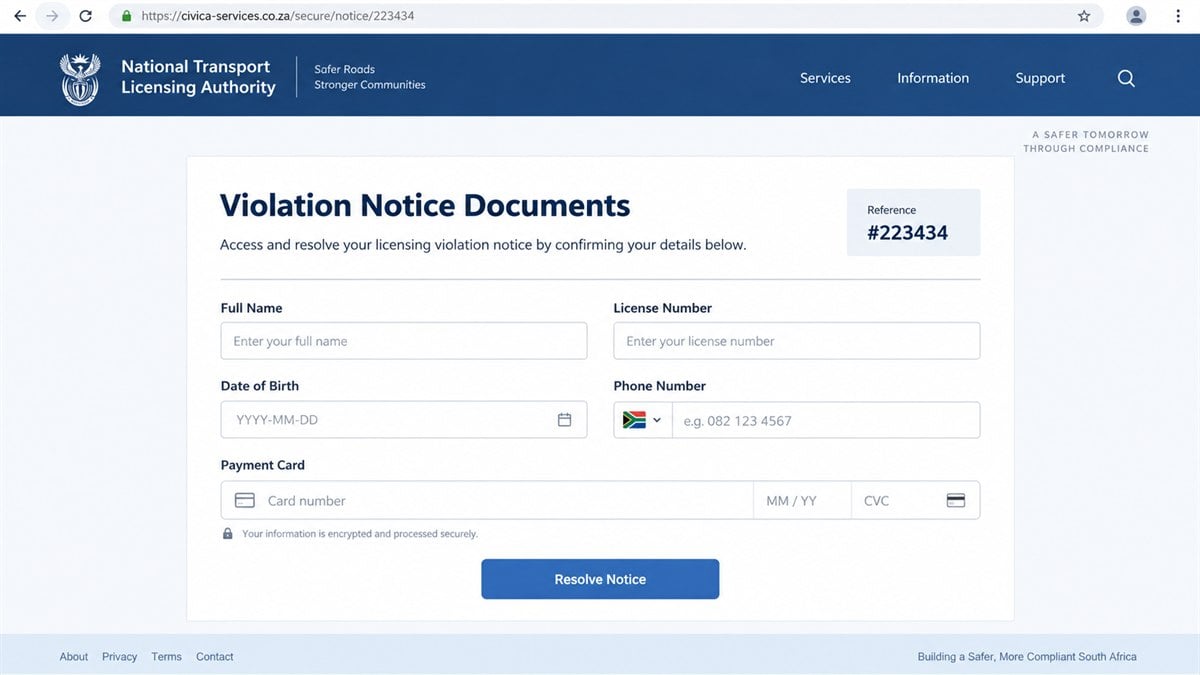
The link may open a lookalike government portal, a fake Microsoft sign-in, a forged electronic-signature page, or a form asking for a license number and identity details. An attachment can also carry a link hidden inside a PDF.
A fake sign-in steals credentials. A compliance form can collect a date of birth, address, telephone number, professional identifier, and payment card. Those details support account takeover, identity theft, and later impersonation calls.
Step 6: A fee appears as the way to protect the license
After the victim has opened the supposed notice, the operator may introduce an administrative penalty, filing fee, bond, reinstatement payment, or identity-verification charge. The amount can grow once the victim shows willingness to pay.
Pressure often increases at this stage. The recipient may be told that a deadline is minutes away, that public disciplinary action is imminent, or that contacting anyone else will delay resolution.
What the Real LARA Warning Says
Michigan’s alert is direct: LARA says it has identified fraudulent communications impersonating department staff. The department says these messages may request payment or personal information.
LARA also states that it will never ask for credit card numbers or other personal information by phone, text, email, or mail. Suspicious LARA-related fraud can be reported to the fraud address published on the department’s own website.
The confirmed sample was sent on September 22, 2026. Its display line presented “LARA Michigan Department of Licensing and Regulatory Affairs” and included a michigan.gov-looking address before revealing an unrelated address at a South African domain.
The sender asked whether the recipient had received documents that supposedly required a signature. The signature used a named person, a real-looking Lansing post-office box, telephone and fax numbers, a department label, and a secure-file invitation.
That combination explains why the email deserves more than a quick glance. Almost every visible element can be copied. The actual route used to send the email exposes the contradiction.
Company, Address, and Fulfillment Checks
The full sender address must match the agency
Expand the sender details before doing anything else. On a phone, tap the display name. In a desktop mail client, open message details or view the headers.
A Michigan government message should not originate from an unrelated commercial or foreign domain. Added words, misspellings, free-mail accounts, and mismatched reply-to addresses are reasons to stop.
The agency contact must be found independently
Do not call the telephone number in the questionable email and do not use its link. Type michigan.gov yourself, locate the relevant licensing division, and ask whether the case or communication exists.
This matters even when the number displayed in the signature is genuine. A scammer can paste a real number beside a malicious button, then rely on the victim choosing the button.
The claimed employee and case must exist internally
Ask the department to confirm the employee, bureau, case reference, delivery method, and action actually required. A copied employee name does not prove that the employee sent the message.
Do not supply new information while checking. The agency should be able to locate a genuine matter from records it already holds or tell you how to sign in through its official portal.
The document chain must lead back to an official account
A real notice should remain verifiable after you leave the email. If it exists only behind the sender’s link, only in an attachment, or only during a pressured call, the chain has not been authenticated.
Save the message, full headers, attachment names, and destination URLs without forwarding them to colleagues casually. Your security team or agency contact may need the originals to investigate.
Why This Email Feels More Convincing Than Ordinary Phishing
Many phishing messages fail because the story has nothing to do with the recipient. Licensing data changes that. A person who actually holds a state credential cannot dismiss the possibility of an official notice as easily as an invented lottery win.
The alleged problem also touches income and reputation. Losing a professional license could interrupt work, alarm an employer, or become visible to clients. The scammer turns those reasonable concerns into pressure to act before verifying.
The restrained opening is another advantage. “Did you receive the documents?” resembles an everyday workplace follow-up. It avoids the spelling errors, impossible prize, and immediate payment demand people associate with obvious scams.
The message may arrive during business hours and imitate the tone of an administrator. A reference number, legal disclaimer, and precise address create the visual rhythm of official correspondence even though none of them proves where the email originated.
Similar tactics appear in fake Companies House emails, where public corporate information and a real government body’s name are used to obtain identity documents. The recurring lesson is to verify the delivery channel, not the logo.
Warning Signs in a Fake Regulatory Notice
- The sender name claims to be a government department, but the real address uses another domain.
- The subject announces a violation without identifying the rule, date, location, or prior correspondence.
- The message asks you to confirm receipt before providing verifiable details.
- A secure-document button hides the destination until clicked.
- The reply-to address differs from the visible sender.
- The signature copies real contact information but the email route is unrelated.
- You are asked to sign in with Microsoft, Google, or webmail credentials to see a state notice.
- A fee is required to prevent immediate suspension or public action.
- Payment must be made by wire, gift card, cryptocurrency, or an unfamiliar processor.
- The sender discourages independent contact with the licensing office, employer, lawyer, or bank.
One sign is enough to pause. A collection of them is a reason to treat the message as hostile until the real department confirms otherwise.
What to Do if You Have Fallen Victim to This Scam
- Stop the conversation. Do not reply again, sign the document, or pay a second fee. Preserve the message instead of deleting it immediately.
- Contact LARA independently. Use contact details typed from michigan.gov. Ask the appropriate bureau whether any violation, document request, or payment exists in your record.
- Report the impersonation. Send the suspicious material to the LARA fraud contact published on the official warning page. Include full headers and the destination URL when safe to do so.
- Change exposed passwords. If a fake portal collected email or Microsoft credentials, change the password from a clean device, sign out other sessions, and enable multifactor authentication.
- Secure professional accounts. Review licensing portals, business email, cloud storage, payroll, and electronic-signature services for unknown logins, forwarding rules, or recovery changes.
- Call the card issuer or bank. Report any payment as fraud, replace the card when advised, and ask whether transfers can be recalled. Do not rely on a refund number supplied by the scammer.
- Protect identity records. If a Social Security number, driver’s license, or date of birth was exposed, place appropriate fraud alerts or credit freezes and monitor new-account activity.
- Scan downloaded files. If you opened an attachment or installed anything, run a complete Malwarebytes scan. A scan can detect malicious files, but it cannot recover credentials already submitted to a fake page.
- Block repeat pages. AdGuard can reduce access to known phishing and malicious advertising domains. It cannot authenticate an official notice, so independent agency verification remains essential.
- Notify your workplace. Tell the security or compliance team if the address, device, or license is connected with an employer. Other staff may have received the same campaign.
- File a federal report. Submit the message to the FTC at ReportFraud.ftc.gov and, when credentials, money, or business systems were targeted, file with the FBI’s IC3.
Frequently Asked Questions
Is LARA a real Michigan government department?
Yes. The Michigan Department of Licensing and Regulatory Affairs is real. The scam is the fraudulent email impersonating its staff, not the department itself.
Does a michigan.gov address in the display name prove the email is real?
No. A sender can type a government address into the display-name field. Expand the sender details and inspect the actual address and reply-to domain.
What was suspicious about the confirmed LARA example?
The message announced a LARA violation notice and displayed government branding, but the actual sender address ended in an unrelated entry.co.za domain.
Should I open the document just to see what the violation is?
No. Confirm the case through an independently located LARA contact first. A document link may lead to a credential, identity, or card-harvesting page.
What if the phone number in the signature is real?
A real number can be copied into a fake signature. Locate the number yourself on michigan.gov and call it without using any link or instruction in the email.
Can replying to the email cause harm even if I did not pay?
Yes. A reply confirms that the address is active and that the regulatory story got your attention. Expect more tailored emails or calls and report the contact.
The Bottom Line
The LARA violation notice email is a confirmed impersonation scam built from real government details and one hidden contradiction. The display name points toward Michigan, while the actual sender domain points somewhere else.
Do not let a logo, reference number, or copied signature decide whether a regulatory message is genuine. Leave the email, contact the department through its official website, and verify the case before opening documents, supplying information, or paying anything.








