

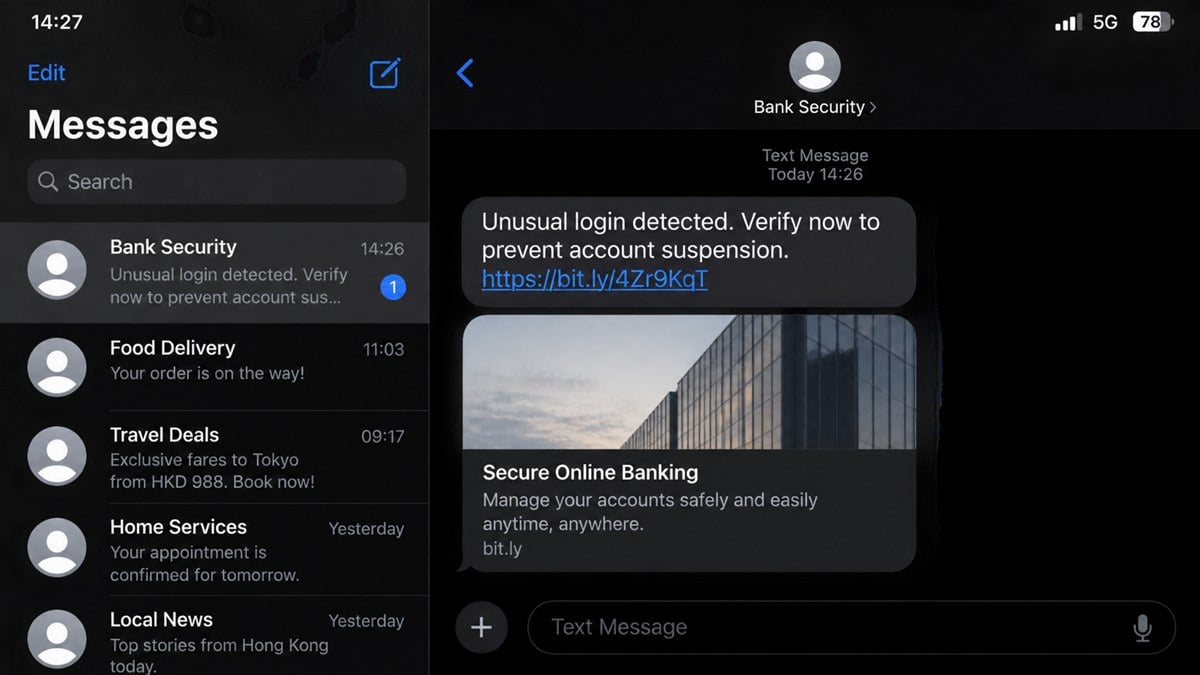
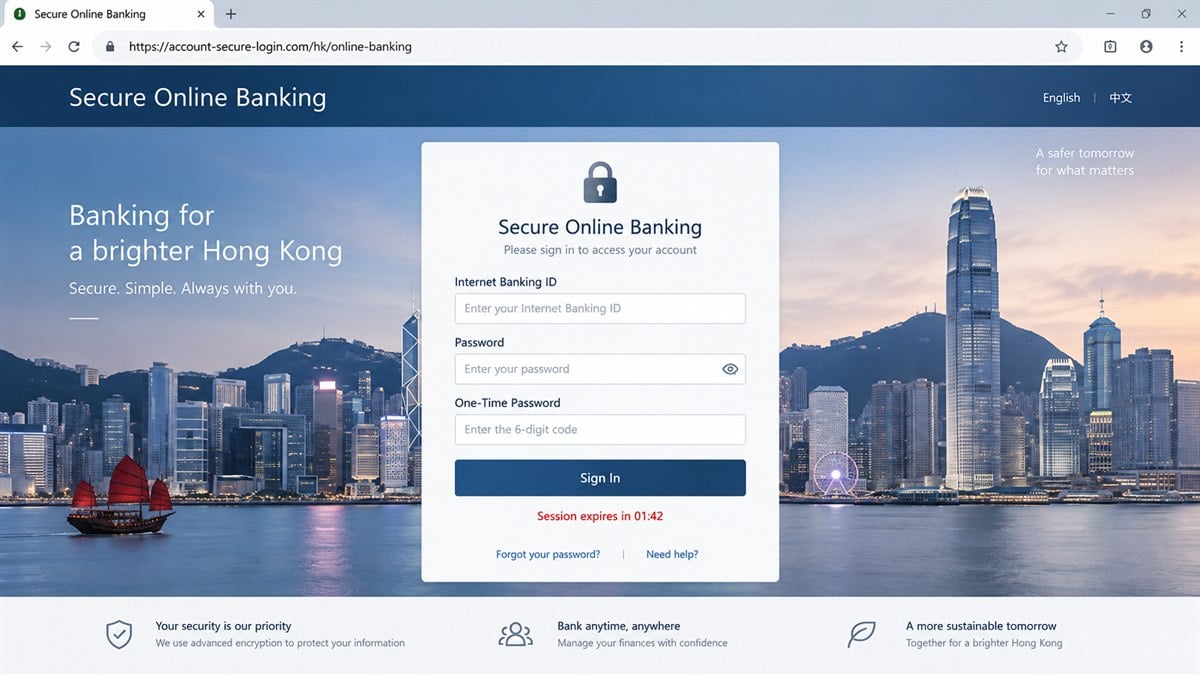
A text says someone just signed in to your bank account. The link opens a polished login page with the right colors, a security padlock, and a field for the one-time code arriving on your phone.
The page looks ready to stop a theft. In reality, the person waiting for that code may be the one trying to get into the account.
A new official warning shows how widely the same playbook is being used across several Hong Kong bank brands.
Overview
Five banks reported fraudulent login sites
On September 24, 2026, Hong Kong authorities warned about fraudulent websites and internet-banking login screens connected with five reported bank impersonation campaigns.
The named institutions were Bank of East Asia, Shanghai Commercial Bank, Chong Hing Bank, Chiyu Banking Corporation, and OCBC Bank (Hong Kong). The banks are legitimate. Criminals are copying their identities.
The fake page collects the keys to the account
A phishing site can ask for an online-banking ID, password, card details, security answers, and a one-time password. Some pages relay those entries to the criminal in real time.
The victim believes the code is stopping an unusual login. The criminal may be using it to complete a genuine login, add a payee, authorize a transfer, or register a device.
Banks do not send transaction links this way
The Hong Kong Monetary Authority repeatedly reminds customers that banks do not send SMS or email links directing them to a bank website to carry out transactions.
Banks also do not request login passwords or one-time passwords by phone, email, or SMS, including through an embedded link.
- A text or email creates an account emergency.
- The link uses the bank’s name in an unofficial domain.
- A copied login screen collects credentials.
- A countdown discourages domain checking.
- The page asks for the one-time password.
- The criminal uses the information against the real bank.
- A follow-up caller may pose as the fraud team.
The specific brand can change from one message to the next. The safety check does not: leave the message and open the bank’s official app or type its address yourself.
How the Hong Kong Bank Phishing Scam Works
Step 1: A believable bank event is invented
The message may report a new device, overseas login, FPS transfer, card purchase, payee addition, account suspension, or expiring security certificate. Each event sounds urgent enough to justify immediate action.
Mass campaigns do not always know the recipient’s bank. Sending several brand versions across a large telephone list will still reach real customers of each institution.
Step 2: The sender name hides the origin
The phone may group the message under a label such as Bank Security or the name of a real institution. Email can use a copied logo and official-looking display address.
Those labels can be manipulated. They do not establish that the message came through the bank’s authenticated channel or that its link belongs to the bank.
Step 3: A lookalike domain leads to a copied login
The domain may contain the bank name plus words such as secure, hk, account, verify, online, or login. A hyphen or extra subdomain helps the full address look familiar on a narrow screen.
The page may reproduce language options, security notices, promotional photography, branch information, and a digital-banking layout. Copying the visible page does not copy ownership of the domain.
Step 4: Credentials are relayed in real time
When the victim submits an Internet Banking ID and password, the phishing operator can enter them at the real bank. If the bank asks for another factor, the fake page immediately displays a matching field.
This live relay explains why the page may reject a correct code and ask for another. The first code expired, authorized a different step, or was already consumed by the criminal.
Step 5: The one-time password authorizes the attack
A genuine bank message often describes what the code is for. The phishing page tries to overwrite that meaning with phrases such as verify identity, cancel transfer, or secure account.
Entering the code can approve the action in the bank’s message. It does not become a cancellation code because a fake page says so.
Step 6: Money or account control moves quickly
Once inside, the criminal may transfer funds, add a new payee, change contact details, raise limits, enroll a device, or obtain account information for a later impersonation call.
The operator may keep the victim busy with a progress screen while those actions occur. A fake “verification complete” message buys time before the customer checks the real app.
Step 7: A fake fraud-team call extends the scheme
A caller can quote the name, bank, attempted login, and information just submitted. The apparent knowledge makes the caller sound like an investigator reviewing the alert.
The victim may then be told to move remaining funds to a safe account or share another code. The second stage uses data collected by the first.
What the September 24 Alert Confirms
The Hong Kong government’s September 24 notice identifies fraudulent websites and internet-banking login screens reported in connection with the five banks.
The alert brings several reports together because the risk is broader than one brand. Customers may encounter different logos and domains while the credential and one-time-code theft operates in the same way.
The authorities direct anyone who supplied personal information or completed a transaction through the fraudulent sites to contact the relevant bank using official information and report the matter to police.
Customers should avoid searching only for the suspicious domain. A brand-new phishing address may have little reputation data. The bank’s independently located domain and app provide the more useful comparison.
Do not interpret the warning as evidence that the real banks were operating the sites or that every bank message is fraudulent. It confirms active impersonation campaigns and the need to authenticate each contact.
Company, Address, and Fulfillment Checks
The registered domain must belong to the bank
Read from right to left around the domain ending. Words appearing before an unrelated .com, .net, .top, .vip, or country-code domain do not make that address part of the bank.
A padlock indicates encryption between the browser and that domain. Criminals can obtain certificates too. Encryption does not prove the site is the bank.
The account must be checked in the official app
Close the text and open the banking app from the device’s home screen. Review security alerts, devices, transfers, payees, contact details, and card activity.
Do not let a caller direct the app session or ask what appears on screen. The independent check works only when the incoming contact no longer controls the process.
Support must be reached through a trusted number
Use the number on the physical card, an official statement, the app, or the bank’s website typed independently. Do not call the number inside the suspicious message or search advertisement.
Explain exactly which credentials and codes were entered. The bank can respond more effectively when it knows whether the exposure involved a card, account password, device enrollment, or transfer approval.
Every code must be matched to its real action
Read the bank’s SMS or app prompt word by word. Look for the amount, beneficiary, merchant, device, wallet, or login event connected with the code.
If the action is not yours, do not enter the code anywhere and do not read it aloud. Contact the bank from a separate trusted route.
Why a Perfect Copy Can Still Be Easy to Reject
People often spend too much time judging fonts, logos, grammar, and visual quality. Those signs can help, but a phishing kit can copy the real page almost exactly.
The stronger test is how you arrived. If an unexpected text or email delivered the transaction link, the path already conflicts with the HKMA’s warning.
The next test is the domain. A fake page can copy every pixel except ownership of the bank’s real address. Long subdomains and familiar keywords are decoration around that fact.
The final test is the request for secrets. A bank will not ask for a login password or one-time password by phone, email, or SMS. A page opened from those channels should not receive them.
MalwareTips has examined the wider infrastructure behind Smishing Triad text campaigns. The brand and language change, while mobile credential pages and live code theft remain reusable.
Warning Signs in Fake Bank Login Messages
- The message announces a login or transfer you cannot verify in the official app.
- An embedded link claims to cancel or review a transaction.
- The domain contains the bank name but does not belong to the bank.
- A countdown says the account will lock within minutes.
- The page asks for a full password and one-time password together.
- A correct code is rejected and another is requested.
- The bank’s real warning message describes a different action from the webpage.
- A caller tells you to keep the incident secret.
- You are asked to move money to a safe or protected account.
- The support number appears only in the suspicious contact.
Even a message without spelling mistakes can be fraudulent. Domain ownership, official-app activity, and an independently dialed bank number provide stronger evidence.
If You Entered a Password but Not the Code
Act immediately. The attacker may already have tested the password and may be waiting for another route around multifactor authentication.
Open the official app or call the bank, change the password, end unknown sessions, review registered devices, and confirm that contact details and payees remain correct.
Do not assume the account is safe because a one-time code was withheld. Reused credentials may expose email, shopping, or other financial accounts, so change any duplicate password as well.
What to Do if You Have Fallen Victim to This Scam
- Call the real bank now. Use the card, official app, or independently typed website. State that credentials or an OTP were entered on a fraudulent login site.
- Block unauthorized activity. Ask the bank to secure online access, stop transfers, remove unknown devices or payees, and replace cards when necessary.
- Change exposed credentials. Use a clean device, create a unique banking password, and secure the connected email account first if it may also be compromised.
- Review every code and alert. Save the bank’s messages because they may reveal the transaction, device, or enrollment the criminal attempted.
- Preserve the phishing evidence. Record the sender, full URL, screenshots, time, call numbers, transaction references, and any beneficiary information without revisiting the site.
- Report to police. Follow the reporting details in the official bank or government alert and provide financial records and communication evidence.
- Protect identity information. If an identification number, address, or document was supplied, ask the bank and relevant authority what monitoring or replacement is appropriate.
- Scan the device. If the page downloaded an app, profile, extension, or file, remove it and run a complete Malwarebytes scan.
- Block known scam infrastructure. AdGuard can reduce access to known phishing domains and malicious ads, but it cannot validate a bank page reached through a new domain.
- Reject recovery calls. Bank and police contacts should be verified independently. A second caller promising to recover funds for a fee may be the same operation.
Frequently Asked Questions
Are the five named Hong Kong banks scams?
No. They are legitimate banks being impersonated by fraudulent websites and login screens. The warning concerns the copycat sites.
Can a bank text me about suspicious activity?
A bank may send alerts, but HKMA says banks do not send embedded SMS or email links directing customers to conduct transactions on a website.
Does HTTPS mean the login page is genuine?
No. HTTPS protects the connection to the domain shown. It does not prove that the domain belongs to the bank.
Why does the fake site need my one-time password?
The criminal may be relaying your credentials to the real bank and needs the code to finish a login, transfer, payee change, or device enrollment.
What if the message names a real transaction?
Open the bank’s official app or call the number on the card. Do not use the message link even when the transaction details appear accurate.
Can I recover money sent through the phishing attack?
Recovery is not guaranteed, but speed matters. Contact the bank immediately, request holds or recalls, preserve records, and report to police.
The Bottom Line
The latest Hong Kong alert shows one phishing method moving across five bank identities. A copied login screen turns a security warning into the route through which credentials and one-time codes are stolen.
The safest habit is deliberately simple. Treat every embedded banking link as untrusted, even when the message uses the correct logo and arrives under a familiar sender label. A genuine alert will still be visible or verifiable after you leave the message and approach the bank through its own app, card number, or official website.
That short detour can prevent both an account takeover and the difficult recovery process that follows one.
Do not fight an account takeover through the link that announced it. Open the official bank app or dial a trusted number, then verify the event where the criminal cannot control the page, call, or conversation.

Join the discussion
0 commentsShare your experience or ask a question about this article.
Discussion
Start the conversation
Have a question or something useful to share? Add the first comment.