

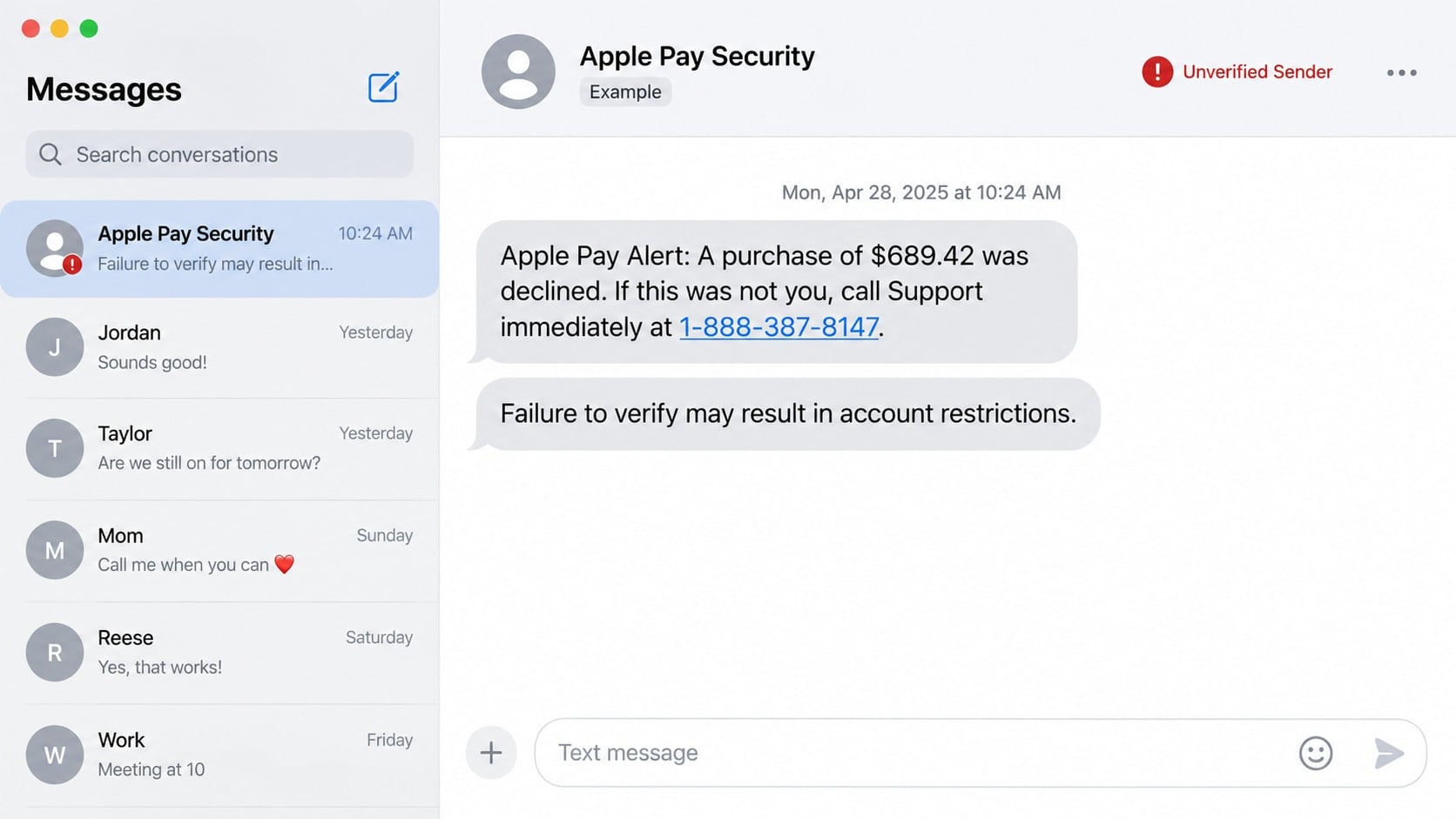
A text says a large Apple Pay purchase was declined and tells you to call 888-387-8147 before more charges appear. The warning lands at exactly the wrong moment: it sounds urgent, expensive, and just plausible enough to deserve attention.
The number in that message is the trap. What happens after the call can put far more than one disputed purchase at risk.
Overview
The text invents an Apple Pay emergency
The message reports an unfamiliar purchase, declined transaction, locked wallet, or suspicious sign-in. It may name a recognizable merchant and include a believable amount to make the alert feel specific.
Recipients are told to call 888-387-8147 if they did not authorize the activity. The wording makes the phone call appear to be the safe way to protect the account.
The phone number reaches an impersonator
The person answering may introduce themselves as Apple Support, Apple Pay security, or a fraud investigator. A professional greeting and case number help turn an unsolicited text into an apparently official support session.
That caller is not working for Apple. The conversation is designed to obtain account credentials, verification codes, payment information, gift cards, or remote access to a device.
The fake solution creates the real loss
The supposed agent may say the victim must verify an Apple Account, cancel a pending transfer, or move money to a protected location. Each instruction gives the scammer more control.
The reported Apple Pay charge is usually bait. The immediate danger begins when the recipient calls the number and follows the stranger’s directions.
- An unsolicited message warns about an Apple Pay purchase or account restriction.
- The text creates urgency and supplies 888-387-8147 as a support number.
- The caller asks for a password, device passcode, or six-digit verification code.
- The caller sends a link to an imitation Apple Account page.
- Remote-access software, gift cards, crypto, or a money transfer may be requested.
- The recipient is discouraged from contacting Apple or the bank independently.
Why an Apple Pay Warning Can Trigger Such a Fast Reaction
Payment alerts are supposed to interrupt us. A message about an unknown purchase naturally creates the fear that someone is spending money right now. Calling a number can feel faster than inspecting an account.
Scammers use that instinct against the recipient. They choose an amount large enough to feel serious, but not so unusual that it immediately looks absurd.
The message may also claim the purchase was declined. That wording lowers suspicion because it sounds like a security system already noticed the problem. In reality, the scammer is borrowing the language of fraud prevention.
Apple is a familiar name, and Apple Pay is connected to cards, devices, and an Apple Account. A recipient may not know which company should handle a specific problem, making a supplied phone number seem convenient.
The text does not need to know whether the recipient uses Apple Pay. It can be sent widely and wait for the smaller group of people who recognize the service and happen to be worried.
How the Apple Pay 888-387-8147 Scam Works
Step 1: A false transaction alert creates urgency
The opening message claims that Apple Pay detected a purchase, transfer, new device, or account change. It may say action is required within minutes to prevent additional charges.
Some versions use awkward grammar, while others look polished. A sender name such as Apple Security proves nothing because names displayed in text threads can be manipulated or saved by messaging systems.
The alert often omits useful transaction details. Instead of providing a path to review activity inside a trusted app, it makes 888-387-8147 the only obvious response.
Step 2: The recipient calls a fake support desk
An agent may answer quickly with a scripted company greeting. Background call-center noise, hold music, and transfers between departments are easy to reproduce and do not authenticate the operation.
The impersonator asks for a name, email address, phone number, and perhaps the last four digits of a card. Information already found in data leaks may be repeated back to build confidence.
A case or employee number may be provided. These details sound accountable, but only the organization being impersonated could confirm whether they are real.
Step 3: The caller invents a compromised account
After a brief pause, the agent may claim that several devices, purchases, or Apple Cash transfers are connected to the account. The diagnosis arrives without legitimate access to Apple’s systems.
The victim may be told that criminals opened an account in another state or that a bank card is being used overseas. Fear makes the next request seem like part of a security procedure.
The caller may insist that hanging up will make the victim liable for the loss. This is pressure, not a real fraud policy.
Step 4: Credentials or verification codes are collected
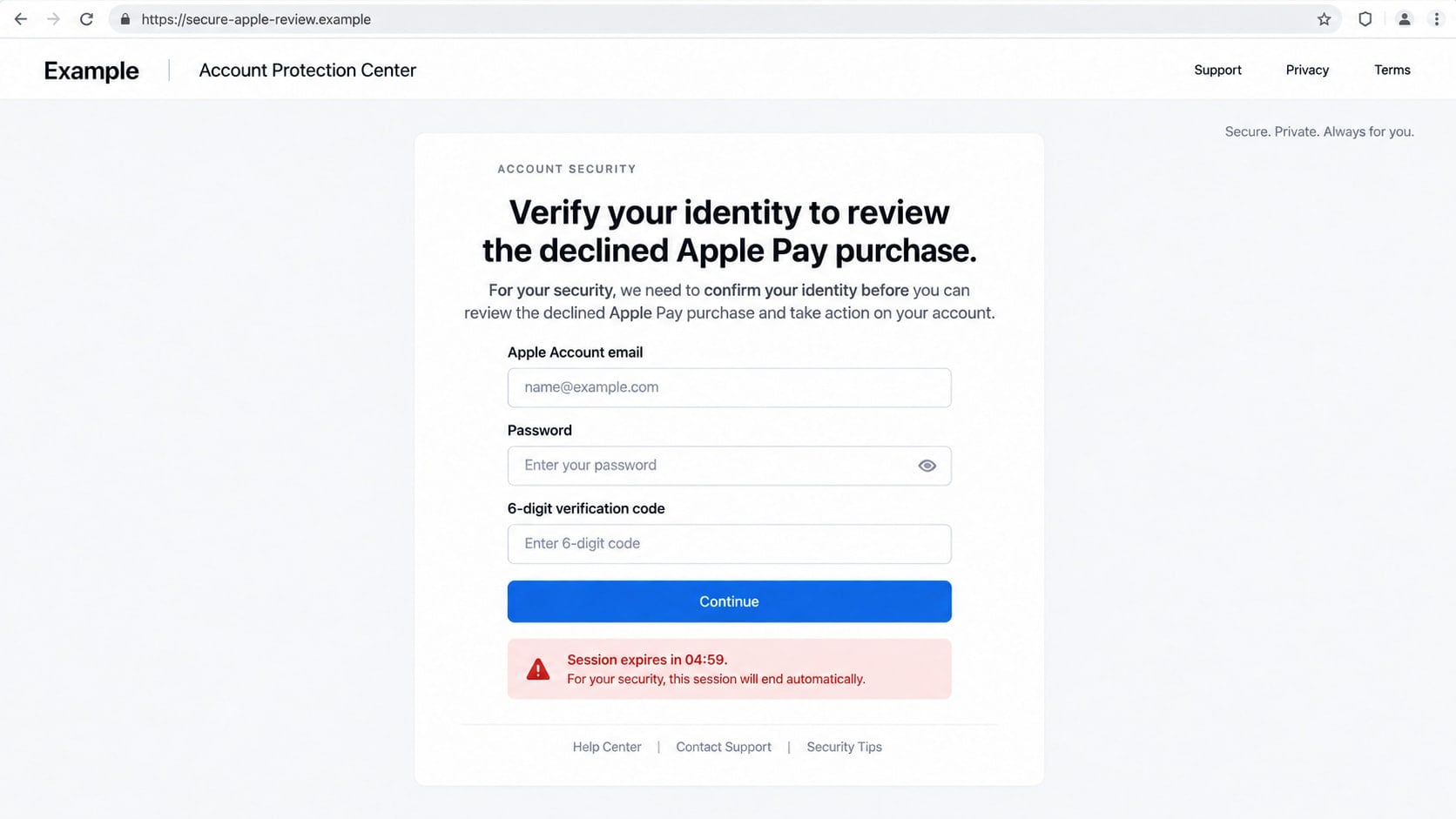
The scammer may send a link to a convincing sign-in page. It requests an Apple Account email, password, and six-digit code while claiming that the information is needed to cancel the purchase.
If the victim enters those details, the scammer can attempt a real sign-in at the same time. The genuine verification code then approves the scammer’s session, not a refund.
Another version asks the victim to read a code over the phone. Apple says its support representatives do not ask for an Apple Account password, device passcode, or two-factor authentication code.
Step 5: Remote access or a money transfer is introduced
The agent may claim that a secure diagnostic tool is required. The download is usually legitimate remote-control software used in an illegitimate way, allowing the stranger to see the screen and operate the device.
Once connected, the scammer can observe passwords, open financial sites, alter what appears in a browser, or install additional software. Victims may be told to keep the screen private while an alleged refund is processed.
Other callers demand Apple Gift Cards, cryptocurrency, wire transfers, or money moved to a so-called safe account. No real fraud department protects funds this way.
Step 6: The scammers keep escalating the emergency
If one payment succeeds, a new obstacle appears. The transfer was supposedly entered incorrectly, a tax is due, or an account must be unlocked with another payment.
The fraud can continue through follow-up calls from fake bank investigators, supervisors, or law-enforcement officers. Different voices do not mean different organizations are involved.
Victims may later receive recovery offers from people who already know the details. A stranger promising to retrieve stolen money for an upfront fee is usually extending the same fraud.
Identity, Contact, and Payment Checks
Review activity inside trusted apps
Do not use a link or phone number from the alert. Open Wallet, your card issuer’s app, and your Apple Account settings through the device or a bookmarked address.
A genuine transaction should be visible through an independent account record. If the alleged $689.42 purchase exists only in a text, there is nothing in that message to cancel.
Find support details independently
Use Apple’s official Support app or type Apple’s support address yourself. For a card charge, call the number printed on the back of the card or shown in the bank’s official app.
Do not assume 888-387-8147 is safe because it is toll-free. Telephone prefixes describe routing, not ownership or legitimacy.
Protect every authentication code
A verification code authorizes an action. Read the surrounding notification carefully, and deny any sign-in or password reset you did not start.
No support representative needs the code to identify you. Someone requesting it may already have your password and need only the final factor.
Reject unusual payment instructions
Apple, a bank, and law enforcement will not ask you to buy gift cards, send crypto, or move savings to protect them from a charge. These methods are chosen because reversal is difficult.
A legitimate refund does not require remote control of your device or access to online banking. End the call when either request appears.
What a Real Apple Security Response Looks Like
A legitimate warning gives you a way to examine activity in an account you reach independently. It does not punish you for hanging up and verifying the situation through official channels.
If an Apple Account sign-in is attempted on a new device, trusted devices may display a notification. You can choose not to allow it. An unsolicited code is a warning that someone may be trying to sign in.
Apple advises users never to share passwords, device passcodes, or verification codes. It also advises people not to follow links or save attachments from suspicious messages.
For a questionable App Store purchase, type reportaproblem.apple.com yourself. For an unknown card transaction through Apple Pay, contact the card issuer using the trusted number on the card.
A real representative will not object when you end an unexpected call and start a fresh contact through an official channel. Resistance to independent verification is itself a warning sign.
What to Do if You Have Fallen Victim to This Scam
- End the call and stop all communication. Do not make another payment or follow instructions about secrecy. Save the text, phone number, links, receipts, and any remote-access program name.
- Secure your Apple Account. Change the password from a trusted device, confirm two-factor authentication, review trusted phone numbers, and remove devices you do not recognize at account.apple.com.
- Contact your bank or card issuer. Use the number on the card or inside the official banking app. Report every unauthorized transaction and ask about blocks, disputes, transfers, and replacement cards.
- Disconnect remote access. Turn off network access, uninstall software the caller requested, and review installed applications. If the stranger controlled the device, change financial and email passwords from another clean device.
- Run a complete security scan. Update the operating system and use Malwarebytes to scan for malicious or unwanted software. A clean result does not reverse exposed passwords, so complete the account steps too.
- Block known malicious destinations. AdGuard can reduce exposure to many phishing, tracking, and malicious domains. It adds a useful layer, but it cannot make an unknown support number trustworthy.
- Protect your mobile number. Ask the carrier to add an account PIN and watch for unexpected loss of service. That can signal an attempted SIM swap used to intercept codes.
- Report the fraud. Send a screenshot of the suspicious Apple-themed text to reportphishing@apple.com. Report financial loss at ReportFraud.ftc.gov and internet-enabled theft at IC3.gov.
- Ignore recovery callers. Scammers may return with a promise to recover the money. Do not pay anyone who contacts you unexpectedly or asks for another fee, code, or remote session.
How to Report 888-387-8147 Without Calling It
Take screenshots that show the full message, sender information, date, and phone number. Preserve the conversation before deleting or blocking it.
Most messaging apps let you report junk or spam from the thread. Your mobile carrier may also accept forwarded scam texts at 7726, although procedures vary.
Apple accepts screenshots of suspicious Apple-themed SMS messages at reportphishing@apple.com. Include the context but remove unrelated private conversations from the image.
When reporting to the FTC or IC3, list the phone number, claimed company, amount mentioned, payment method, and actual loss. Those operational details are more useful than simply writing that the caller seemed suspicious.
Why Caller ID and Toll-Free Numbers Are Not Proof
A scam text can display a sender name, and a follow-up call can show a familiar company or local number. Caller ID information can be spoofed, so the screen does not prove where a call originated.
Toll-free numbers can be obtained by ordinary businesses, temporary operators, and fraud groups. The 888 prefix does not mean Apple reviewed or owns the line.
Search results can also be manipulated. Fake support numbers appear in ads, copied forum posts, and low-quality directories. The safest contact path begins on the company’s official site or app, not a general search result.
Even if 888-387-8147 later stops working, a message using the same story and a different number follows the same pattern. Judge the request, not only the specific number.
Frequently Asked Questions
Is 888-387-8147 an official Apple Support number?
No. The number has been promoted in messages tied to fake Apple Pay and Apple support alerts. Use contact information obtained directly from Apple’s official Support app or website.
What if the Apple Pay charge appears real?
Open Wallet and your card issuer’s app independently. If the transaction appears there, report it through the issuer’s trusted channel. Do not call the number from the text.
Can a scammer use my verification code?
Yes. A live code can approve a sign-in, password reset, or other sensitive action. Never read it to an unexpected caller or enter it on a page opened from an unsolicited message.
Is it safe to let support view my screen?
Not when the contact began with an unexpected fraud alert. Remote access can expose accounts and let the operator control the device. End the session and secure accounts from another device.
Does a declined charge mean no money was taken?
Not necessarily, but the text itself cannot establish what happened. Check authoritative records in Wallet and with the card issuer. The scam depends on reacting before doing that.
Should I reply STOP to the message?
Do not engage with an obvious scam. A reply may confirm that the number is active. Capture evidence, use the messaging app’s report option, and block the sender.
The Bottom Line
The Apple Pay 888-387-8147 scam turns a fake purchase warning into a live conversation with an impersonator. The safest response is to avoid the supplied number and check every claim through trusted apps and official contact details.
Never share a password, passcode, or verification code with an unexpected caller. If you already did, act quickly across your Apple Account, bank accounts, device, and mobile number, then preserve the evidence and report the fraud.








