

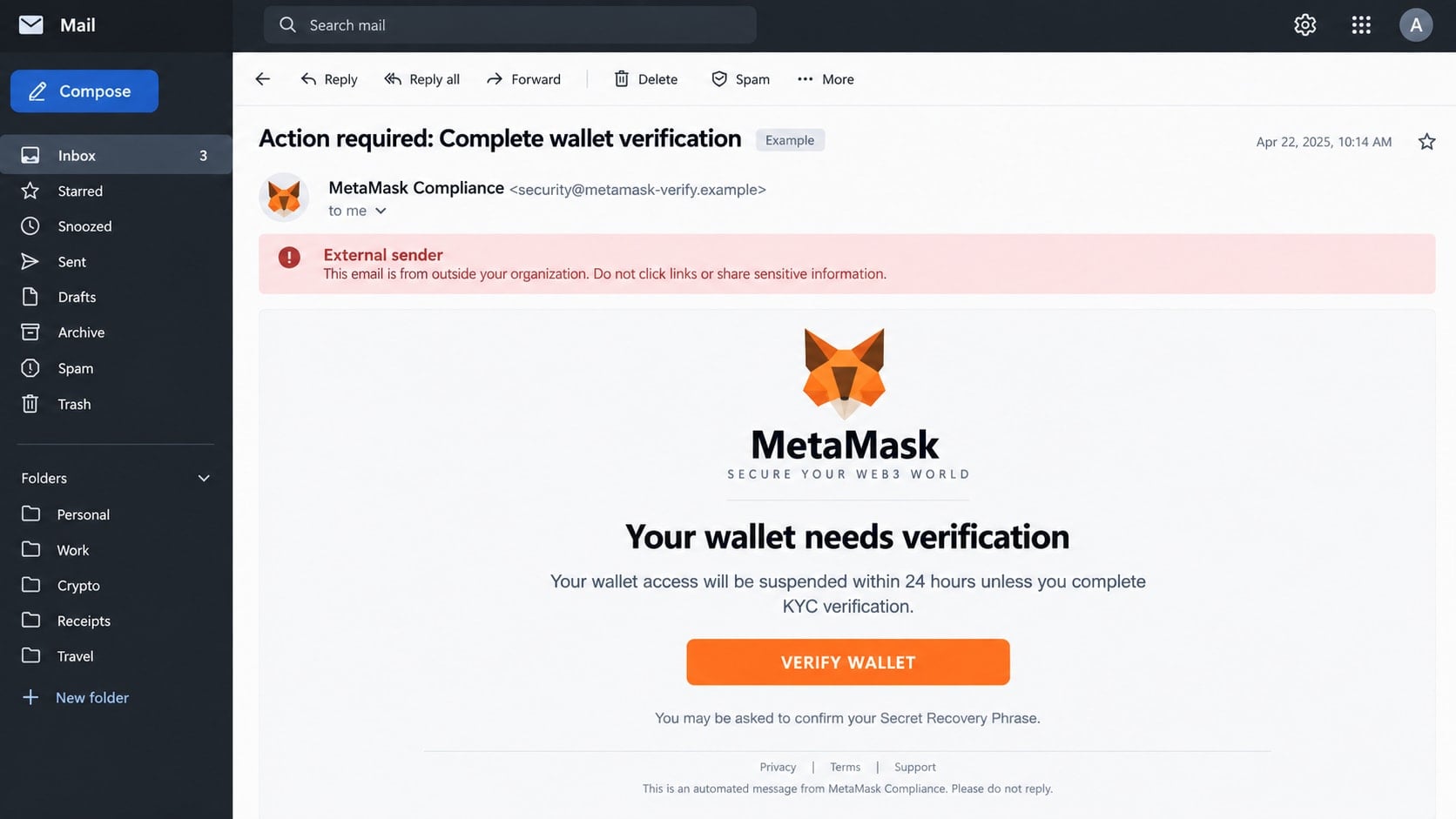
An email says your MetaMask wallet is about to be suspended unless you complete an urgent verification. The message looks polished, uses familiar wallet language, and offers one button that promises to keep your crypto accessible.
That button does not protect the wallet. It leads toward the one secret that can give a thief permanent control of everything inside it.
Overview
The email invents a wallet suspension or KYC deadline
The message claims that a MetaMask wallet is restricted, out of date, unverified, or subject to a new compliance review. It may threaten suspension within 24 hours unless the recipient completes KYC.
Other versions mention unusual activity, a failed update, an expiring wallet, or a security migration. The story changes, but the instruction is consistent: click immediately.
The link opens a convincing imitation
The destination copies colors, wallet language, and familiar account screens. Its address may contain words such as metamask, wallet, security, portfolio, update, or verification while using an unrelated domain.
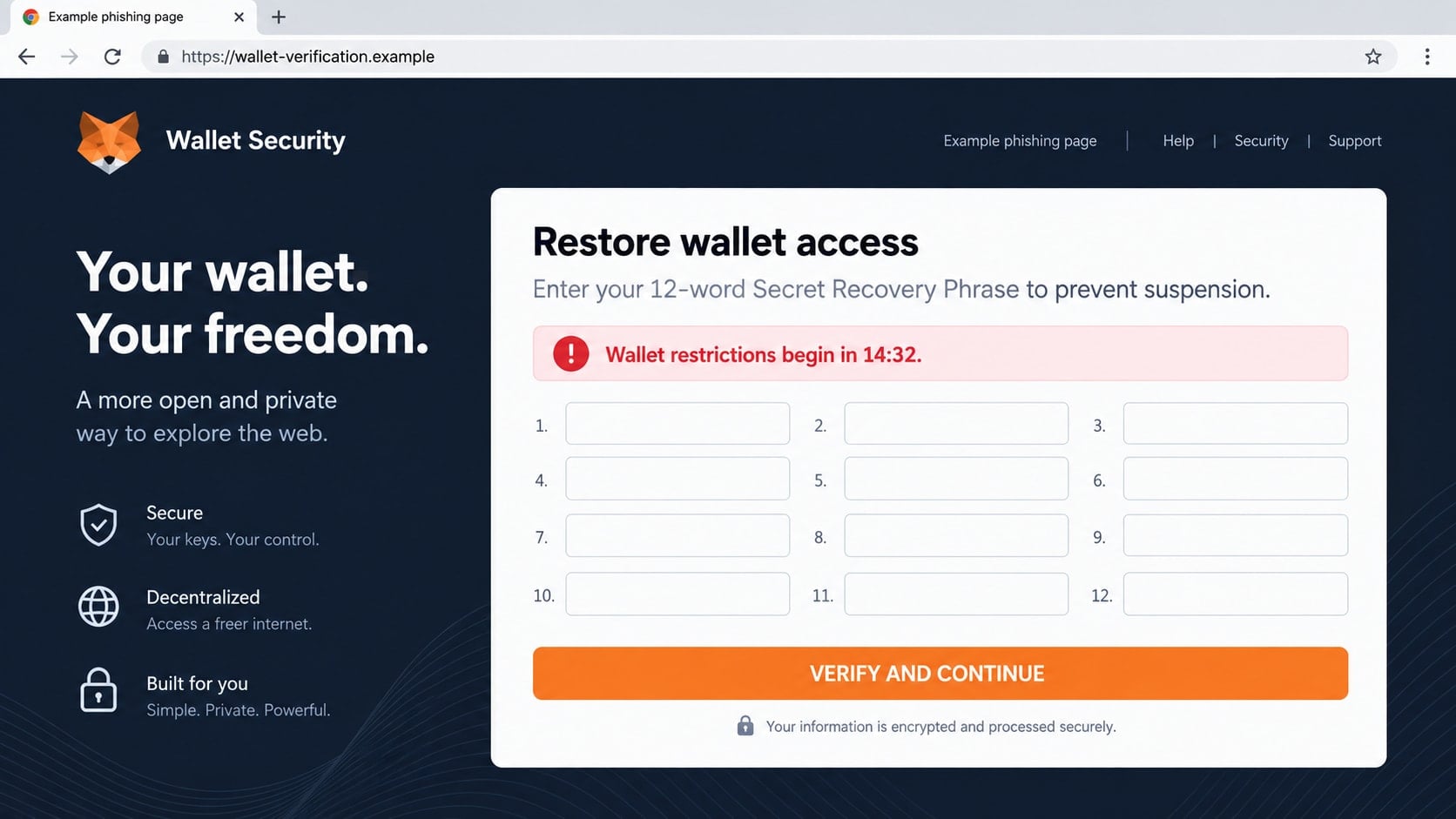
The page eventually asks for a Secret Recovery Phrase, private key, password, or wallet connection. A countdown and warnings discourage the visitor from inspecting the address.
The recovery phrase gives the thief the wallet
A Secret Recovery Phrase is not an ordinary account password. Anyone who obtains it can recreate the wallet elsewhere and transfer assets without needing the victim’s browser extension.
MetaMask states that it will never ask for the phrase. Entering it into an unsolicited website can compromise every account derived from that phrase.
- The email was unexpected and refers to a wallet suspension or verification.
- The sender uses an unrelated or subtly misspelled domain.
- The recipient is pressured to complete KYC or an update quickly.
- A button opens a site outside the official MetaMask domain.
- The page asks for a Secret Recovery Phrase or private key.
- The message promises that entering the phrase will restore or secure the wallet.
Why This Email Can Look Convincing Even to Experienced Crypto Users
Crypto users regularly see security warnings, network changes, token approvals, and software updates. A message that borrows those concepts can sound technical without making a verifiable claim.
The sender may also copy real branding and link to genuine help pages alongside the malicious button. One legitimate link does not make every link in the email safe.
Wallet balances can be public. A scammer who connects an email address to a public wallet may mention a real token or transaction, making the message feel personally researched.
Fear of irreversible loss is powerful. Crypto transfers are difficult to reverse, so the suggestion that a wallet may be frozen or drained encourages a fast response.
The email often frames the recovery phrase request as a security check. That reverses reality: the phrase is the master secret and should never be supplied to a website because an email requested it.
How the MetaMask Email Scam Works
Step 1: A mass email impersonates wallet support
The recipient receives a message with a subject such as “Wallet verification required,” “KYC deadline,” or “Security update failed.” The display name says MetaMask even when the actual sender address does not.
Some campaigns use stolen mailing lists, while others send millions of messages without knowing who owns crypto. A MetaMask user who receives one by chance may assume the account was specifically identified.
The email may include a support case number, the recipient’s name, or a partial address found in a breach. Personalization shows access to data, not access to the wallet.
Step 2: A deadline discourages independent checking
The message says that wallet access will be suspended, assets may become inaccessible, or a transaction cannot be stopped after the deadline. A “Verify Wallet” button is presented as the only solution.
MetaMask does not perform general KYC to keep a self-custody wallet active. KYC may apply when a user separately buys crypto through a provider or uses a regulated product, but that does not justify an email asking for wallet secrets.
A threat to close the wallet is especially misleading. A phishing sender cannot disable a self-custody wallet merely because the recipient ignores an email.
Step 3: The button hides a lookalike domain
The visible button may say “Secure My Wallet,” but the underlying address leads elsewhere. On mobile screens, a long domain can be difficult to inspect before the page loads.
The fake site may use HTTPS and show a padlock. Encryption only means the browser connection is encrypted; it does not prove the operator is MetaMask.
Visitors may be asked to choose a wallet, connect through a QR code, or begin a restoration process. Each route creates a plausible reason for the next request.
Step 4: The page requests the Secret Recovery Phrase
A grid asks the visitor to enter 12 or 24 words in order. The page may claim that the phrase is encrypted locally, never stored, or required to synchronize the wallet.
Those assurances are meaningless on a hostile site. The words can be transmitted to the scammer as soon as they are typed, even before the final button is pressed.
Some pages intentionally reject the first entry and ask for it again. This can help the thief collect a corrected phrase if the victim made a typing mistake.
Step 5: The attacker imports the wallet and moves assets
With a valid recovery phrase, the thief can restore the wallet on another device. They do not need the victim’s extension password because that password protects only the local installation.
Liquid tokens may be transferred first, followed by NFTs and assets on other supported networks. Automated tools can monitor the wallet and move incoming funds later.
If the victim has approved malicious smart contracts, token allowances can create additional loss. Revoking approvals helps with dangerous permissions but cannot make a disclosed recovery phrase secret again.
Step 6: A fake error delays the victim’s response
After submission, the page may show “Verification pending” or “Network congestion.” That message buys time while the attacker imports the wallet and prepares transactions.
The victim may receive a follow-up email saying the review succeeded. By the time missing assets are noticed, they may have moved through several addresses or exchanges.
Later, recovery scammers may promise to reverse blockchain transfers for a fee. They often target people who publicly ask for help and cannot guarantee recovery.
Identity, Contact, and Payment Checks
Inspect the complete sender address
A display name can be typed by anyone. Expand the sender details and look at the domain after the @ symbol, not just the word MetaMask before it.
Official support email is connected to a ticket the user opened. An unsolicited wallet suspension notice should not be trusted because its graphics resemble earlier messages.
Open the wallet independently
Do not click the email button. Open the installed MetaMask extension or app directly and review activity there. Type the official support address yourself if guidance is needed.
A real wallet issue should be observable through trusted software. A deadline found only in an email is not evidence that the wallet will stop working.
Keep the recovery phrase completely offline
Never enter the phrase into a page reached through email, search ads, social messages, or support chats. MetaMask representatives do not need it to investigate a ticket.
Do not photograph, email, or cloud-sync the phrase. An offline physical backup reduces the number of systems that can expose it.
Read every wallet request before approving it
A connection request is not the same as sharing a recovery phrase, but it can still lead to dangerous signatures or token approvals. Confirm the site, network, asset, and permission.
Reject unexplained signature requests. A site claiming to verify ownership does not need unlimited permission to move tokens.
The Difference Between a Wallet Password and a Recovery Phrase
The MetaMask password unlocks one local installation. If someone learns it but cannot access that device or its stored vault, the password alone may not recreate the wallet elsewhere.
The Secret Recovery Phrase is fundamentally different. It can generate the wallet’s accounts and keys on another compatible installation, which is why it must remain secret.
Changing the local password does not invalidate a stolen recovery phrase. If the phrase was exposed, the safe response is to create a new wallet with a new phrase and move remaining assets.
Private keys carry similar risk for the individual accounts they control. They should not be pasted into verification forms, sent to support, or shared with anyone offering to fix a transaction.
A hardware wallet adds protection by keeping keys away from ordinary browser storage, but it cannot protect assets if a user reveals the phrase or approves a malicious transaction.
What to Do if You Have Fallen Victim to This Scam
- Stop interacting with the email and site. Disconnect the wallet, close the page, and do not answer follow-up support messages. Preserve the sender address, headers, URL, screenshots, and transaction hashes.
- Move remaining assets if the phrase was exposed. On a clean device, create a completely new wallet with a new recovery phrase. Transfer remaining assets promptly and never reuse the compromised phrase.
- Review token approvals. Use a trusted approval checker linked from the relevant network’s official resources. Revoke permissions you do not recognize, while understanding that revocation cannot repair a leaked phrase.
- Secure connected accounts. Change passwords for email, exchanges, and cloud accounts. Enable strong multi-factor authentication and review active sessions, withdrawal addresses, and API keys.
- Scan the device. Remove suspicious extensions or applications and run a full Malwarebytes scan. If software was installed from the phishing page, handle wallet recovery from a different clean device.
- Block repeat phishing attempts. AdGuard can help block many known phishing and tracking domains. It is an additional barrier, not a substitute for checking wallet prompts and protecting the recovery phrase.
- Notify exchanges quickly. If stolen assets reach an identifiable exchange deposit address, contact the exchange with transaction hashes and a police or fraud report. A freeze is not guaranteed, but speed matters.
- Report the campaign. Contact MetaMask through the official Support site, report the email to the provider, and submit financial fraud details to ReportFraud.ftc.gov and IC3.gov.
- Avoid recovery fraud. Do not pay social media accounts or supposed hackers who promise guaranteed retrieval. Never give them a phrase, private key, remote access, or an upfront fee.
How to Preserve Useful Evidence From a Crypto Phishing Attack
Save the original email instead of only taking a cropped screenshot. Full headers can contain routing details that help a mail provider investigate the sender’s infrastructure.
Record the complete phishing URL without revisiting it. If the browser history contains the address, copy it as text while avoiding another connection to the page.
Keep transaction hashes, wallet addresses, token contract addresses, timestamps, and the network used. Blockchain records are public, but investigators need the exact identifiers.
Write a short timeline while the sequence is fresh. Include when the email arrived, when the phrase or signature was provided, and when unauthorized transfers appeared.
Do not publish the recovery phrase as evidence. It remains dangerous even after assets appear to be gone because future deposits can still be taken.
Why Changing the Password Is Not Enough
A local wallet password encrypts data on a particular browser or device. The recovery phrase sits above that password in the control structure.
When an attacker imports the phrase, they create their own local password. The victim’s password change does not affect the attacker’s installation.
This is why “reset your MetaMask password” is incomplete advice after phrase theft. The compromised wallet should be treated as permanently observable and controllable by the thief.
New assets should not be sent to it later. A sweeper may remain ready to transfer deposits automatically, even when the wallet looks quiet for weeks.
Frequently Asked Questions
Does MetaMask require KYC to keep a wallet active?
No general KYC process is required to prevent a self-custody wallet from being suspended. Separate purchase providers or regulated products may have their own checks, but they do not need your recovery phrase.
Will MetaMask email me about a locked wallet?
MetaMask says it does not send unsolicited account emails. Support correspondence follows a ticket you opened, and marketing messages follow a signup. Treat an unexpected suspension email as phishing.
Can support ask for part of my recovery phrase?
No. Sharing even part of the phrase weakens its secrecy, and a legitimate support representative will not request any of it. Do not send screenshots of the phrase either.
What if I entered the phrase but no crypto has moved?
Assume the phrase is compromised. Create a new wallet on a clean device and move assets while you still can. Waiting for the first theft gives the attacker more time.
Can MetaMask reverse a stolen crypto transfer?
Blockchain transactions generally cannot be reversed by the wallet provider. Reporting may help flag infrastructure or identify an exchange destination, but it does not guarantee recovery.
Is a wallet connection always dangerous?
No, but the site and each requested permission must be evaluated. A simple connection exposes less than a recovery phrase, while a malicious approval or signature can still put assets at risk.
The Bottom Line
The MetaMask email scam uses a fake suspension, KYC review, or security update to push recipients onto a page that requests wallet secrets. No email deadline makes it safe to disclose a Secret Recovery Phrase.
Open the wallet and support resources independently, inspect every domain, and reject unexplained requests. If the phrase was entered, move remaining assets to a newly created wallet immediately and treat the old phrase as permanently compromised.








