

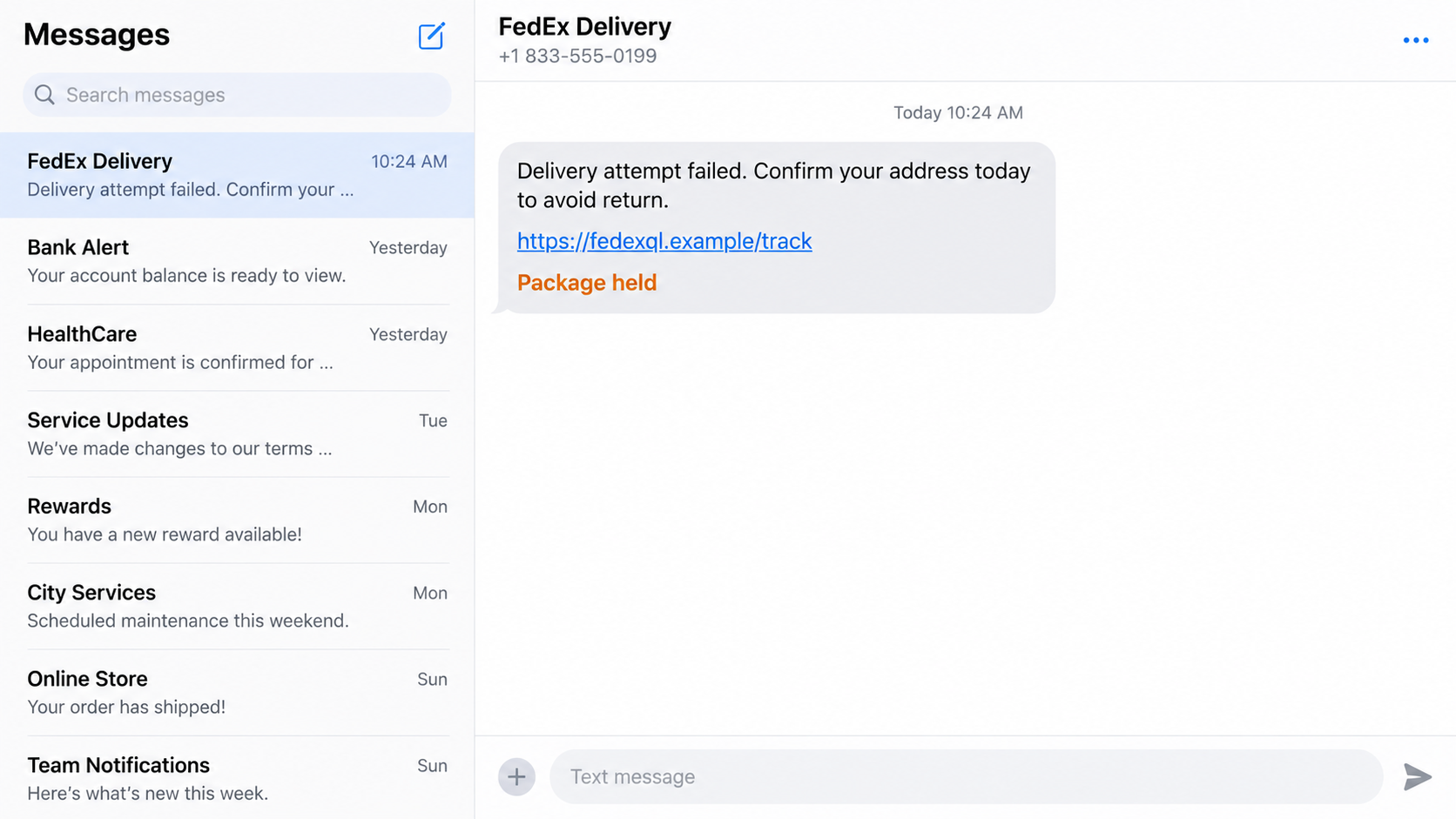
A delivery text says your address is incomplete and a package will be returned unless you act today. The link even begins with a familiar courier name, followed by two easy-to-miss letters: “fedexql.”
That small, easily overlooked change is the doorway into a much larger personal and financial theft attempt.
Overview
Fedexql is a lookalike string, not proof of a FedEx website
Scammers register web addresses that place a trusted brand beside extra letters, hyphens, words, or unusual domain endings. “Fedexql” is one such lookalike string used in delivery-themed phishing and smishing links.
A domain can contain the word FedEx without belonging to FedEx. The controlling part of a web address must be inspected carefully, and a padlock only says the connection is encrypted. It does not certify the business behind the site.
The message invents a delivery problem
The text or email claims that a package cannot be delivered because of an incomplete address, unpaid customs charge, missed attempt, or required rescheduling fee. It threatens a return or disposal deadline to make the recipient open the link quickly.
The story works even when no specific parcel is named. Many people are expecting a delivery, and those who are not may wonder whether a gift, delayed order, or family shipment is involved.
The small fee hides a data-harvesting page
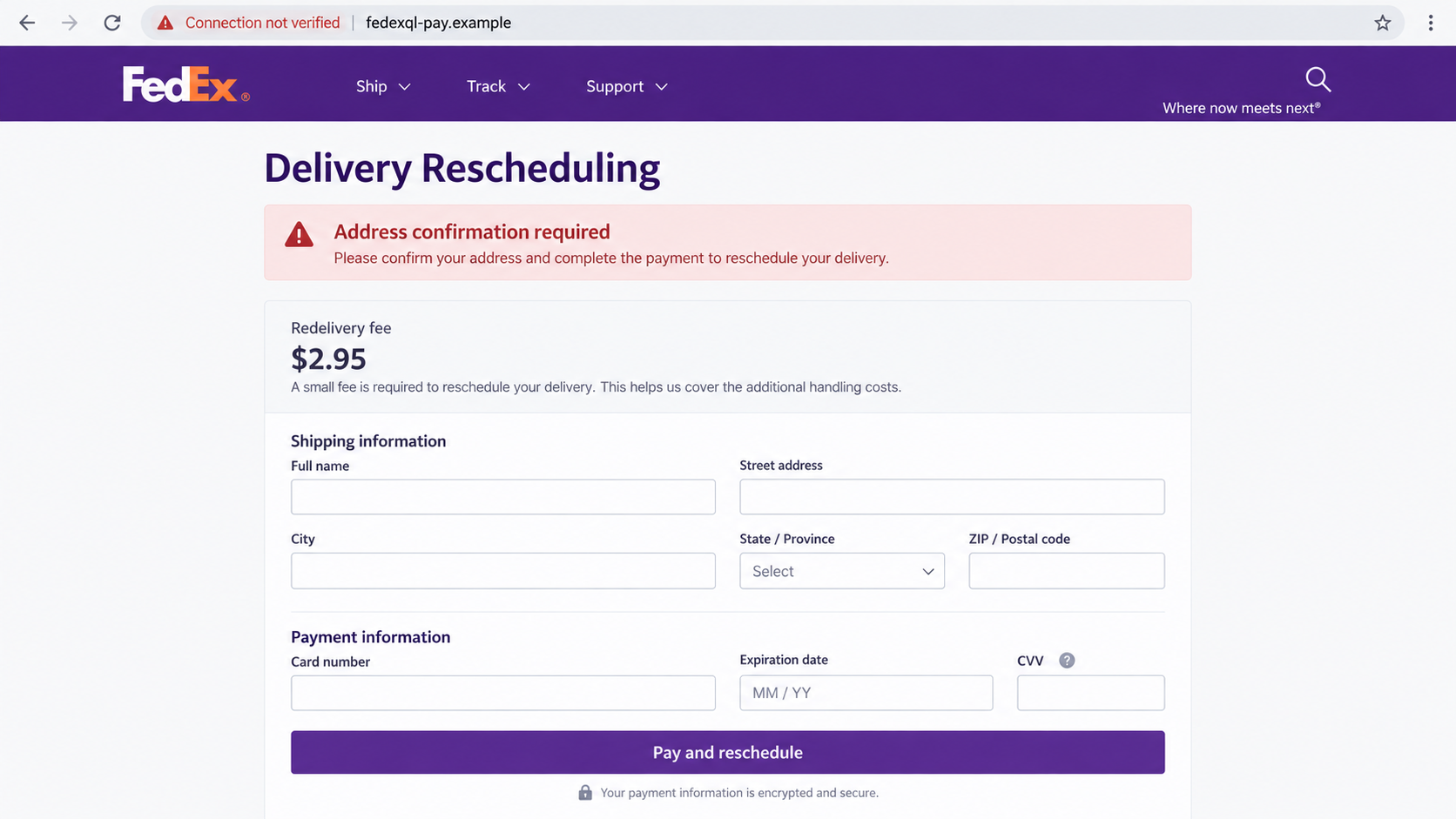
The fake site may request a name, street address, phone number, email address, and card details for a fee such as $2.95. A low amount reduces hesitation while giving criminals everything needed for fraudulent charges and follow-up impersonation.
Some versions also capture a FedEx login, banking password, or one-time verification code. Others redirect through several domains, deliver malicious files, or enroll the card in recurring charges.
- An unexpected message reports a failed or delayed delivery.
- The sender creates a same-day deadline or threatens to return the parcel.
- A link contains “fedexql” or another altered FedEx-like string.
- The page requests personal information and a small redelivery fee.
- The form collects full card details and may request a verification code.
- Stolen data is used for charges, identity fraud, or further phishing.
Why the Domain Name Is the Most Important Clue
Browsers read domains from right to left around the final registered name. Scammers exploit the fact that people often read from the beginning and stop once they see a trusted word.
For example, a page at fedexql-pay.example is controlled under the fictional domain “fedexql-pay.example,” not fedex.com. Likewise, fedex.com.delivery-check.example belongs to “delivery-check.example” because the FedEx text appears only in a subdomain.
Shortened links make inspection harder by hiding the destination until the redirect occurs. QR codes create the same problem because the user may scan first and examine later.
FedEx warns customers about messages that claim there is a shipment problem, demand urgent payment, or use misspelled website addresses. The company says it does not request account credentials or identity information through unsolicited email or text.
A genuine international shipment can involve duties or taxes, so the presence of a fee alone is not conclusive. The safe test is to leave the message and check the tracking number or amount through a FedEx channel you reached independently.
How the Fedexql Scam Works
Step 1: A high-volume delivery message finds the right moment
Criminals distribute thousands of texts or emails without knowing who has a package. Online shopping makes the message statistically likely to reach recipients who are waiting for something.
The wording is intentionally broad. “Your delivery” and “your address” feel personal while avoiding a merchant name, accurate tracking history, or other details that would be difficult to obtain.
Step 2: Urgency discourages independent tracking
The notice says the package will be returned, destroyed, or charged storage fees within hours. That deadline directs attention toward the button instead of the sender, tracking number, or domain.
A real carrier does not need to punish a recipient for taking a few minutes to verify a message. When a notice makes independent checking feel dangerous, the urgency itself is evidence of manipulation.
Step 3: The altered domain borrows the FedEx name
The link may display “FedEx” prominently while inserting “ql,” “support,” “track,” or a country abbreviation into the registered domain. On a narrow screen, the decisive ending may be pushed out of view.
The destination then copies colors, navigation, tracking language, and logos. Visual resemblance is cheap to reproduce and cannot establish ownership.
Step 4: A small payment form captures valuable data
The page asks for an address before displaying a modest rescheduling or redelivery charge. This sequence makes the form feel like an ordinary checkout and collects identity information even if the payment fails.
The card number, expiration date, CVV, billing address, and phone number can support online purchases or be sold as a verified record. The $2.95 amount is a lure, not the likely limit of the loss.
Step 5: A verification prompt approves the criminal’s transaction
After the card is submitted, the site may say the payment failed and request a code sent by the bank. At that moment, criminals may be attempting a larger purchase, adding the card to a wallet, or signing in to an account.
A code belongs only in the bank or merchant flow you personally started. Entering it into the phishing page can approve an action completely different from the tiny delivery fee shown on screen.
Step 6: The stolen profile fuels additional scams
Victims may receive calls from fake bank agents who know the submitted name, card ending, address, and alleged delivery. That knowledge is used to sound authoritative and request another code or money transfer.
The same phone number and email address may be targeted with toll notices, tax alerts, account warnings, and refund offers. Each follow-up is easier because the first form confirmed that the recipient responds to urgent messages.
What the Fake Delivery Page Tries to Learn
The address section is not harmless pre-checkout information. A full name, mobile number, email address, and current street address create a verified identity package that can support account recovery attempts and more convincing impersonation calls.
Card fields reveal the account number, expiration date, and security code. When billing and contact details match the bank’s records, criminals have a better chance of passing automated risk checks during online purchases.
The page may test the card with a small authorization. A failed or reversed charge does not mean the information was rejected; it may show the criminals which cards are active and which banks require additional verification.
A later code prompt can identify the issuing bank and reveal that the victim is available in real time. Criminals can coordinate a larger transaction while the victim believes the code confirms a $2.95 delivery payment.
Browser notification permission creates another route into the same person. If granted, the site can send fake virus warnings, bank alerts, prize notices, and delivery reminders long after the original tab closes.
Some pages request a FedEx username and password before showing the payment form. Reused credentials may then be tested against email, retailers, and financial services through automated credential-stuffing attacks.
Location, language, browser type, and network information are collected automatically by many sites. Combined with submitted data, those details help attackers tailor follow-up messages to the victim’s region and services.
This is why the displayed fee understates the risk. The phishing form is not selling redelivery; it is assembling a reusable profile while measuring how quickly the victim responds to pressure.
Victims sometimes assume card replacement is unnecessary because no charge posted. That is risky: criminals can store the details, wait until attention fades, and try merchants with different verification rules.
Business recipients face an additional danger when work email, shipping credentials, or company cards are entered. The incident should be reported promptly to the employer’s security and finance teams so shared accounts and payment controls can be reviewed.
Parents and older relatives may need help checking delivery texts because the message fits an everyday activity. A household rule to verify every unexpected package notice through the retailer’s order page removes most of the scammer’s advantage.
Delivery companies also provide account histories and tracking tools that preserve a consistent record. A one-off text that cannot be matched to those records should never override information already visible in the verified retailer or carrier account.
Company, Address, and Fulfillment Checks
Read the registered domain, not the brand-shaped text
Pause before tapping. On a computer, hover over the link; on a mobile device, press and hold only to preview the destination without opening it. Look for extra words, letters, hyphens, or an unexpected ending.
Do not assume a domain is legitimate because it starts with “fedex.” For U.S. tracking and support, type fedex.com yourself or use the official app already installed from a trusted store.
Match the message to a real tracking record
Find the tracking number in the retailer’s order page or original confirmation. Enter it manually at the carrier’s official site rather than copying a number from the suspicious message.
A vague notice without a valid tracking history should not be allowed to collect any information. If duties are genuinely due, verify them through the official FedEx Import Tool or a known customer-service channel.
Reject surprise payment and code requests
A tiny charge is not harmless when the page asks for a complete card profile. Close the site if the link arrived unexpectedly or if the requested information exceeds what is necessary.
Never enter a bank verification code into a delivery page unless you independently confirmed the transaction and amount. Read the bank’s code message carefully because it often states what is actually being approved.
Check the message through a separate route
Contact the retailer, sender, or carrier using information from an existing account, receipt, or official website. Do not call a number printed in the suspicious text.
FedEx accepts suspicious emails at abuse@fedex.com. Preserve the sender, full link, and screenshot before reporting, but do not revisit a harmful page solely to gather evidence.
What to Do if You Have Fallen Victim to This Scam
- Close the page and stop responding. Do not retry the fee, submit another card, or call a number shown after the form.
- Contact the card issuer now. Use the number on the card or in the bank’s official app. Explain that the full card details were entered on a phishing site and ask about blocking, replacement, disputed charges, and digital-wallet tokens.
- Change exposed passwords. If a FedEx, email, or reused password was submitted, replace it from a clean device and enable multi-factor authentication. Change every account using the same password.
- Review bank and carrier activity. Look for small test charges, pending authorizations, new payees, wallet enrollments, password resets, or changes to contact details.
- Protect identity information. If the form collected a Social Security number or other sensitive identifier, use the appropriate credit freezes and fraud alerts for your country.
- Remove suspicious software. If the page downloaded a file or told you to install an app, disconnect if necessary and run a reputable scan such as Malwarebytes before using the device for banking.
- Block malicious ads and redirects. A content blocker such as AdGuard can reduce exposure to known malicious pages, but it cannot make a previously submitted card safe.
- Report the campaign. Send the message to abuse@fedex.com, forward the text to 7726 where supported, and report financial loss to the FTC, IC3, local police, and your bank.
Keep screenshots, URLs, timestamps, card alerts, and bank case numbers. Do not publish your full tracking number, address, or card details when warning others.
Frequently Asked Questions
Is every message containing “fedexql” a scam?
Treat a link containing that altered string as unsafe unless FedEx independently confirms it. The presence of the brand plus unexplained letters is a classic lookalike-domain warning.
Does the browser padlock mean the site is legitimate?
No. It means data is encrypted between the browser and that site. Criminals can obtain certificates for phishing domains, so the padlock does not verify FedEx ownership.
Can FedEx legitimately request duties by text?
FedEx says international shipments may involve secure payment links for duties and taxes. Verify any message and amount through official tracking or the FedEx Import Tool before paying.
What if I clicked but entered nothing?
Risk is lower, but close the page, clear any granted notification permission, delete downloads, and scan the device if anything installed or behaved unexpectedly.
Why do scammers display such a small fee?
A small fee feels routine and encourages completion of the card form. The criminals value the complete card and identity profile more than the displayed charge.
Where can I check a real package?
Use the order record from the seller and manually visit fedex.com or open the official FedEx app. Do not begin from the suspicious message.
The Bottom Line
The Fedexql scam relies on one visual shortcut: seeing “FedEx” and ignoring what comes after it. The fake delivery problem leads to a convincing payment form built to capture identity and card information.
Leave the message, open the carrier through a trusted route, and verify the tracking record there. A real delivery can wait long enough for that careful independent check; a scammer’s deadline should never decide where you enter your card.








