

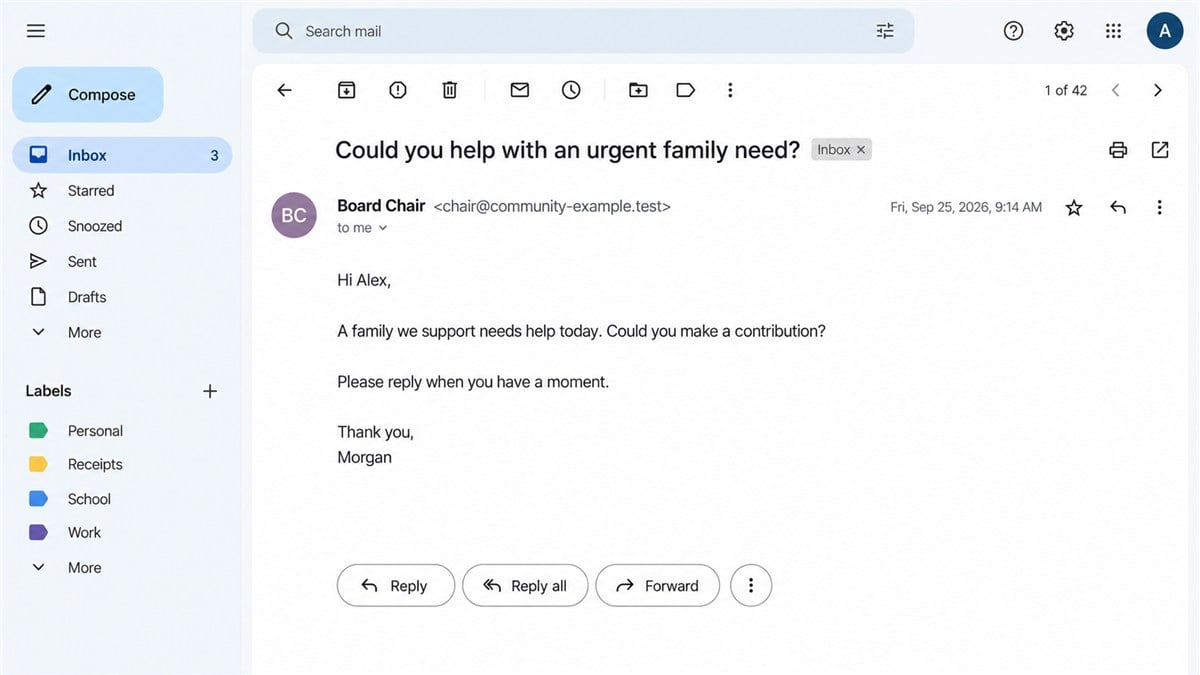
An email arrives from the chair of a charity you know. A family needs urgent help, and the message asks whether you can make a contribution today.
The request feels personal. You recognize the name, understand the cause, and want to help. It is easy to read the next reply as a practical detail rather than a new warning sign.
The charity chair email scam exploits that familiarity. The question to settle is who is actually directing the donation.
Overview
A trusted person’s identity is used to request money
This is an impersonation scheme: a criminal writes as though they are a charity leader, trustee, executive, or another person the recipient trusts. The message can ask for an urgent contribution, a transfer, or gift cards supposedly needed to help someone.
Authorities have documented the underlying fraud. The FBI describes business email compromise involving requests from supposed authority figures. The Charity Commission’s fundraising guidance specifically warns about fraudulent use of charity identities and phishing emails seeking donations.
This article explains that established scheme. It does not accuse a named charity or treat an anonymous online account as proof of a particular organization’s security breach.
The payment route is where the request needs checking
A genuine charity can raise money by email, and a real emergency can require a quick response. Neither fact means that an unexpected instruction to send funds somewhere new should be accepted without verification.
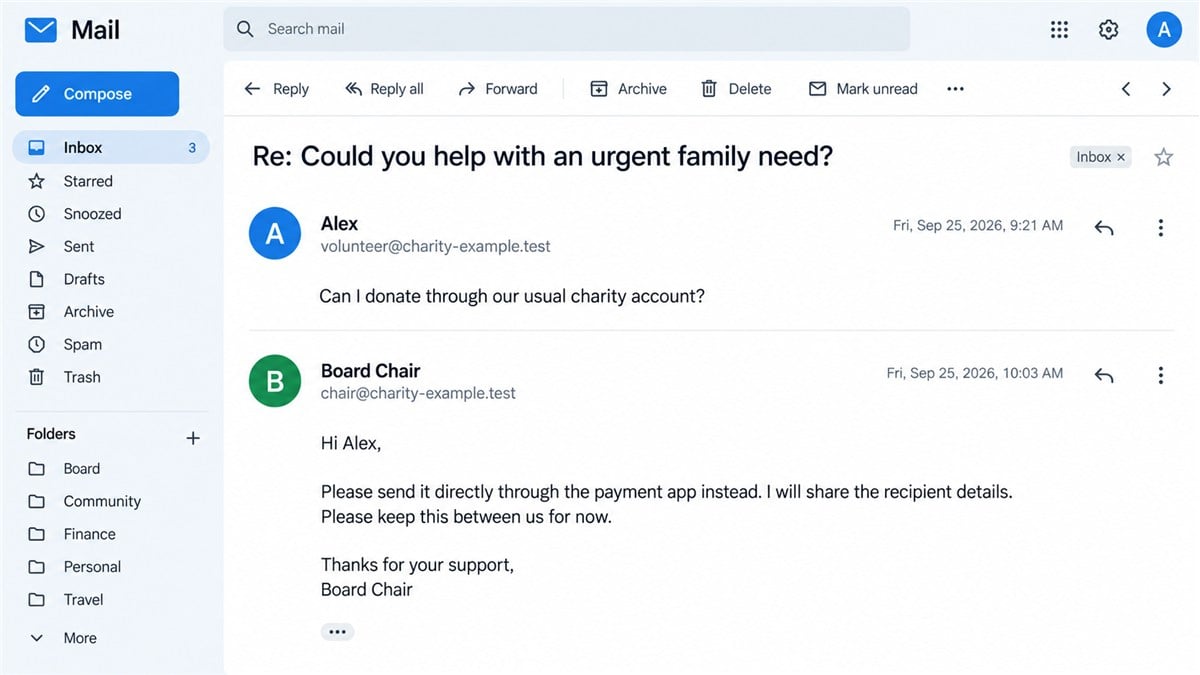
Pay attention when a conversation moves away from the charity’s normal donation process. The request may become more private, use a personal payment handle, or ask for gift-card codes instead of a recorded contribution.
- Verify the request with the person through a known contact route.
- Use the charity’s established donation process where possible.
- Check any new recipient details independently.
- Do not send gift-card codes to someone claiming to direct charitable payments.
- Ask another authorized person when the usual process is being bypassed.
A familiar address does not settle who wrote the message
Some impersonation emails come from lookalike addresses or misleading display names. Others can come from compromised accounts. You cannot determine which happened simply from a screenshot of a friendly request.
A reply inside the same thread is not independent verification. If an attacker controls the sender or reply route, they can answer questions and keep the conversation moving.
The images here are fictional reconstructions. They illustrate the request and the change in payment route without presenting invented correspondence as a real charity’s message.
Why This Request Can Slip Past Experienced Readers
This differs from fake foundation grant emails promising you money. Here, the impostor asks you to provide it. Both approaches borrow a charitable identity, but the familiar relationship makes this request feel personal.
A fake prize or unbelievable investment return can be easy to reject. A request from someone you already help is different. It fits your role, your relationships, and your reasons for supporting the organization.
The message can also flatter without sounding extravagant. It may acknowledge your generosity or suggest that the chair thought of you personally. That creates a social reason to answer quickly.
The urgent family story narrows attention to whether you can help. You may start deciding on an amount before checking the sender. The scammer does not need to persuade you that charity is worthwhile; you already believe that.
Once you reply, the conversation can feel established. A new payment instruction may be processed as logistics rather than a separate decision. That is the moment to slow down and verify the recipient.
Good procedures protect the relationship as well as the funds. Calling a chair or treasurer to confirm an unusual request is not an accusation. It is a way to make sure the intended beneficiary receives the help.
How the Charity Chair Email Scam Works
Step 1: A recognizable name creates the opening
The message appears to come from someone with a reason to contact you. A board chair, executive, pastor, or volunteer coordinator can be a convincing choice because their requests often involve other people’s needs.
Public websites and directories can reveal names and roles. A scammer does not necessarily need access to internal records to choose a plausible identity. Do not assume that knowing the organization proves inside access.
Step 2: A believable need invites a quick reply
The first email may avoid specific payment instructions. It can simply ask whether you are available or willing to help. That low-pressure opening encourages a response and identifies someone likely to continue.
You can be compassionate while postponing the transaction. Ask for the request to go through the charity’s normal channel, then confirm it with a known person outside the email thread.
Step 3: The conversation shifts toward a different recipient
The supposed leader may explain that the money should go directly to a family, an intermediary, or another account. Direct assistance can exist in legitimate charity work, but an unverified email cannot establish who will actually receive the payment.
Check the change before authorizing anything. Use a number already in your records, not a new number supplied as part of the request. If the contact is unavailable, involve another authorized person.
Step 4: Urgency discourages normal controls
A deadline, an unavailable treasurer, or a request for discretion can make the normal process seem inconvenient. The recipient may be asked to act personally and sort out reimbursement or documentation later.
That is exactly when a second check is useful. A legitimate emergency should have an escalation process. It should not depend on one person silently overriding all the organization’s payment controls.
Step 5: Funds or gift-card codes leave your control
With a transfer, the money goes to the specified recipient. With gift cards, sharing the number and PIN can allow someone else to use their value. A photograph of the card can expose the same information.
The FTC’s warning about emails impersonating a boss describes this authority-based gift-card request. The same verification principle applies when the title in the signature belongs to a charity leader.
Step 6: Follow-up requests exploit the first payment
Someone who has already helped may be asked for another contribution, a correction, or an extra purchase. Do not treat the earlier payment as evidence that the relationship was genuine.
If anything feels wrong, stop and verify immediately. You do not need certainty about every part of the story before contacting your payment provider or the real charity.
Company, Charity, and Recipient Checks
Confirm the person, not just the charity
Finding a real charity with the right name is only the beginning. The scam may depend on impersonating a genuine organization. Check whether the actual chair or staff member made the request.
Use an established phone number, an in-person conversation, or another known channel. A new social profile with the same name does not provide a second source of verification.
A copied address cannot authenticate a donation request
A footer may contain the charity’s real address and registration details. Those can be copied from public records. They do not connect the message’s payment instructions to the organization.
If you consult a charity register, use it to locate and compare official details. Do not infer that the person writing the message is authorized simply because the organization appears in the register.
Ask the treasurer about a new payment route
The person responsible for financial administration should be able to explain the approved route and how the contribution will be recorded. A sudden request to avoid that person deserves a pause.
Keep beneficiary privacy in mind. You can verify that a payment is authorized without circulating a family’s sensitive circumstances or demanding unnecessary personal documents.
Trace the contribution to the intended organization
Before paying, compare the recipient details with independently verified instructions. If you intend to donate through the charity, make sure the payment actually uses its approved process.
Afterward, retain the receipt and confirmation. If records do not match, contact the charity and payment provider promptly. Do not accept a new fee as the price of getting a missing receipt or correcting an alleged mistake.
A Simple Rule for Boards and Volunteer Teams
For example, a volunteer receives a request to help a family before the end of the day. The reply introduces a new payment handle. The volunteer calls the chair on a saved number, learns that no request was sent, and alerts the treasurer. No further conversation with the impersonator is needed.
That example is a verification routine, not a report about a named charity. Its value is the pause between receiving new instructions and sending money. Make that pause part of ordinary practice, even when the amount seems small.
Agree in advance that unusual payment requests need a second check, regardless of who appears to make them. Applying the same rule to the chair and a new volunteer removes the social discomfort of challenging someone senior.
Choose a verification channel before an incident occurs. A saved phone number or established internal contact list is more useful than searching for a person while an urgent email is demanding attention.
Define what counts as unusual: a new recipient, a personal payment account, gift cards, secrecy, or an instruction to bypass normal approval. Staff should know whom to contact if the usual approver is unavailable.
Make it easy to report near misses. Someone who replies but stops before paying can provide valuable information about an attempt. Blame can discourage the next person from speaking up while there is still time to intervene.
If a leader’s name is being misused, warn the relevant people through an established channel. Describe the false request without reproducing active links or exposing beneficiary details. A clear warning should tell readers how to verify future requests.
What to Do if You Have Fallen Victim to This Scam
-
Stop further payments. End the email exchange and do not buy another card or send a correction transfer. Move communication with the real charity to a known phone number or established channel.
-
Contact the payment provider immediately. Tell your bank or payment app that an impersonator directed the transaction. Provide the recipient and reference. Ask what actions remain available. A payment you authorized under deception may need to be reported differently from an unauthorized account transaction.
-
If gift cards were involved, contact the issuer. Keep the card and receipt. Explain that the codes were shared with a scammer and ask whether any value can be protected. The FTC provides gift-card reporting guidance. Recovery is not guaranteed.
-
Tell the real charity privately. Explain which identity was used and how the request reached you. The organization may need to warn others or investigate an account. Do not publicly claim that its mailbox was hacked unless that has been established.
-
Preserve the original messages. Keep email headers where available, payment records, gift-card receipts, and screenshots. Note the dates and actions taken. Share evidence through trusted reporting channels rather than posting private conversations in public.
-
Secure any credentials you disclosed. If a link led you to a login page and you entered a password, change it through the genuine service. Review sessions and recovery details, and replace reused passwords. A donation scam can expose an account as well as money.
-
Check downloads or installed software. If you opened a suspicious attachment or installed a suggested app, seek trusted technical help. Malwarebytes can help detect malicious software. AdGuard can reduce exposure to known malicious pages and ads, but neither can confirm that a familiar sender is really your chair.
-
Report the fraud and reject recovery pitches. Use the official fraud-reporting service for your location. If organizational funds were involved, notify the appropriate responsible people. Ignore strangers offering guaranteed recovery, especially if they ask for an advance payment or account access.
Frequently Asked Questions
Does this mean the charity itself is fraudulent?
No. The scheme involves someone impersonating a trusted person or organization. A real charity can be the impersonation target and have no connection to the criminal request.
What if the email uses the chair’s real address?
Verify through another known channel. A familiar address can be misused, and display names can be misleading. A reply within the same thread does not provide independent confirmation.
Is asking for a donation by email always suspicious?
No. Legitimate charities use email. The concern is an unverified identity or payment instruction, particularly when the request changes the usual recipient, requires secrecy, or bypasses normal controls.
Can a scammer know our board members without hacking us?
Yes. Names, positions, and contact details may be public. Knowing those details does not establish access to internal systems or prove that the sender belongs to the organization.
Should I keep talking to collect more evidence?
No. Preserve what you already have and report it. Continuing can expose more information or create further pressure. You do not need to investigate the person yourself.
What is the quickest way to check an urgent request?
Call the person using a number you already trust, or ask another authorized person through an established channel. If neither is available, wait before paying.
The Bottom Line
The charity chair email scam turns a trusted name and a worthy cause into an unverified payment request. The most useful check is a direct conversation outside the suspicious thread.
Keep helping the causes you trust, using payment routes you have verified. If you already sent money or codes, contact the provider promptly and tell the real organization so it can help protect others.








