

InnerFlo promises a quieter moment at the end of a noisy day. A short quiz leads toward a listening plan built around your goals.
For some customers, the question comes later, when a charge appears and the subscription is nowhere in the phone settings they normally check.
Overview
A Real Audio Service With Recurring Billing
InnerFlo is a real digital service offering audio sessions for relaxation, sleep, focus, and related wellness goals. It also has an app-store listing.
That matters when assessing complaints. This is not evidence of an entirely imaginary app or a website that necessarily delivers nothing.
The central consumer concern is the subscription: how a trial converts, where cancellation happens, and whether an unwanted payment qualifies for a refund.
What the Current Terms Say
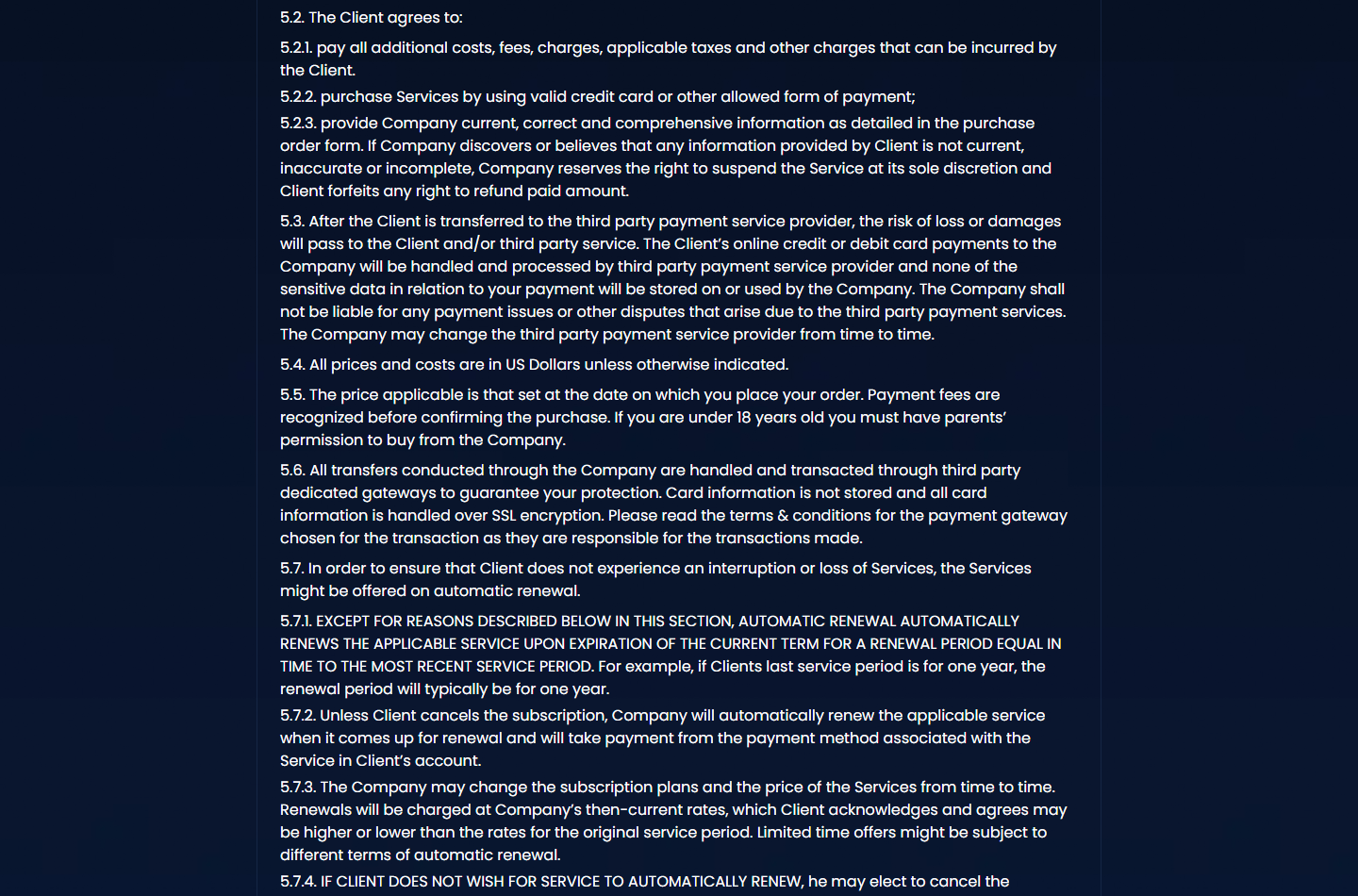
The reviewed terms provide for automatic renewal and direct customers to cancel at least 48 hours before the current period ends.
They distinguish website purchases from Apple or Google subscriptions. A plan bought on the website cannot be managed through the phone’s app-store subscription list.
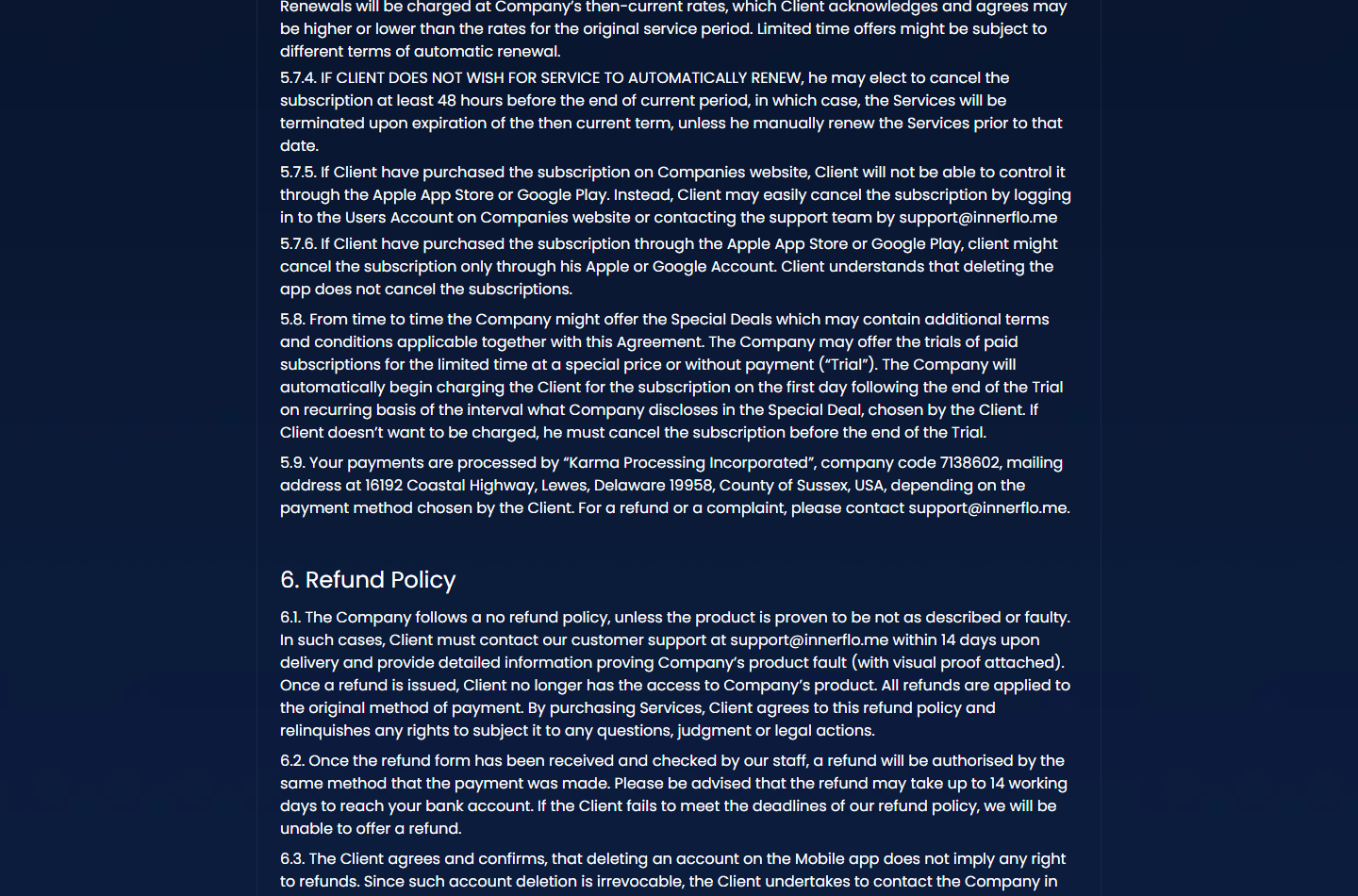
The refund section is restrictive, describing exceptions for faulty or misdescribed content and a 14-day contact requirement with supporting evidence.
- Identify the company that actually billed you.
- Find the renewal date and full recurring price.
- Use the cancellation route matching the purchase channel.
- Save confirmation that renewal has been disabled.
- Request any refund separately and explain the specific issue.
Why Customers Call It a Subscription Trap
Public complaints describe surprise renewals, confusion about billing controls, and refund frustration. The company says the terms are disclosed and provides account-based cancellation instructions.
Those accounts deserve attention, but they do not establish that every charge lacked authorization. Individual checkout records remain important.
Our finding is a real service with subscription and refund risks that deserve clear explanation. We did not buy a plan or test a paid account.
The Missing Subscription in Your Phone Settings
Many people reasonably associate an app with Apple or Google billing. That assumption can fail when the original purchase happened in a web browser.
The installed app may simply provide access to a membership purchased elsewhere. Your phone’s subscription screen then has no record of that web agreement.
Deleting the app removes software from the device. It does not instruct a separate web merchant to stop charging for account access.
The receipt is a better starting point than the app icon. It should reveal the seller, billing channel, amount, and contact route.
If you cannot find it, check every email address you might have used and search junk folders. Sign-in and payment addresses may differ.
Once you identify the channel, use its actual cancellation controls. Repeatedly checking an unrelated subscription list wastes time as the renewal deadline approaches.
How the InnerFlo Subscription Funnel Works
Step 1: A Wellness Goal Starts the Conversation
The service introduces a personalized plan around concerns such as rest, stress, or concentration. A quiz helps the visitor focus on their own situation.
Answering several questions can create a feeling of investment before the financial terms appear. That is a familiar sales technique, not proof of fraud.
Still, completing a quiz does not create an obligation to purchase. Pause when the offer appears and assess its price independently of the time already spent.
Make sure the stated benefit matches what you want from an audio library. Broad wellness language should not be mistaken for a medical assessment.
Step 2: The Initial Price Gets Most of the Attention
An introductory period can make trying a service feel inexpensive. The important comparison includes the price and duration after that initial period.
A trial is not automatically a single purchase. Under the reviewed terms, trial access can move into recurring billing unless it is canceled.
Record the end date when you subscribe. Do not depend on remembering it after a busy week or receiving a reminder at the right moment.
Offers may differ between visitors, countries, and dates. Use your own checkout record rather than assuming another customer’s price applies to you.
Step 3: Extra Offers Can Complicate the Order
Some public reviewers describe additional offers during signup. The company characterizes optional offers as choices customers can decline.
Our review did not establish the exact sequence every buyer receives. The practical safeguard is to check each acceptance and the complete confirmation.
Distinguish additional content from a longer membership term or another recurring product. Similar buttons can represent different financial commitments.
If you only want the original plan, verify that the receipt reflects that decision. Ask about any unexplained line item immediately.
Step 4: Billing Continues While the App Goes Unused
A subscription usually bills for continuing access, not the number of sessions played. Forgetting about the app can therefore leave the agreement active.
This becomes frustrating when a listener tries a few tracks, decides they are not useful, and assumes no further action is necessary.
The current terms do not treat inactivity as cancellation. The relevant event is an actual request through the appropriate account or payment channel.
Put a reminder comfortably before the stated deadline. That leaves time to resolve a login problem or locate a missing receipt.
Step 5: The Cancellation Route Depends on Where You Paid
Website subscribers should use the website account or the support route described in the terms. App-store subscribers should manage the plan through their store account.
The reviewed web terms ask for at least 48 hours’ notice before period end. Avoid leaving the request until the final evening.
If a retention offer appears, consider whether accepting it changes the agreement. Continue until the account clearly confirms cancellation if that is your intention.
A help article or support conversation is not itself proof that billing stopped. Save the final status and the date it takes effect.
Step 6: A Refund Request Faces a Separate Review
Canceling future renewal does not automatically reverse a payment already taken. InnerFlo’s reviewed refund language sets a narrower standard than simply not enjoying the service.
Explain the actual issue: inaccessible content, a mismatch with the description, a duplicate payment, or a charge after a documented cancellation.
Provide useful evidence rather than repeatedly sending a general demand. Screenshots, timestamps, receipts, and support records help establish the sequence.
Contract wording is not the final statement of every consumer right. Applicable law and payment-provider rules may also affect the available remedy.
Company, Address, and Fulfillment Checks
Two Company Names Appear in the Terms
The terms identify Karma Processing Incorporated, company code 7138602, and an associated company, UAB Nefolld, code 307616026.
They describe payment and service responsibilities that can depend on the payment method. Match those names against your receipt before drawing conclusions about an unfamiliar charge.
We have not independently audited either company’s accounts or ownership. Naming a business in terms provides a lead, not blanket assurance about every transaction.
The Delaware Address Is a Registered-Agent Location
The listed mailing address is 16192 Coastal Highway, Lewes, Delaware 19958. Delaware’s official registered-agent directory lists Harvard Business Services at that address.
It should not be interpreted as proof of an InnerFlo audio studio, clinic, or staffed customer-service office.
Registered-agent arrangements are common and lawful. Their existence does not prove fraud, but the distinction matters when evaluating claims about where a business operates.
Support Exists, but Keep the Conversation Documented
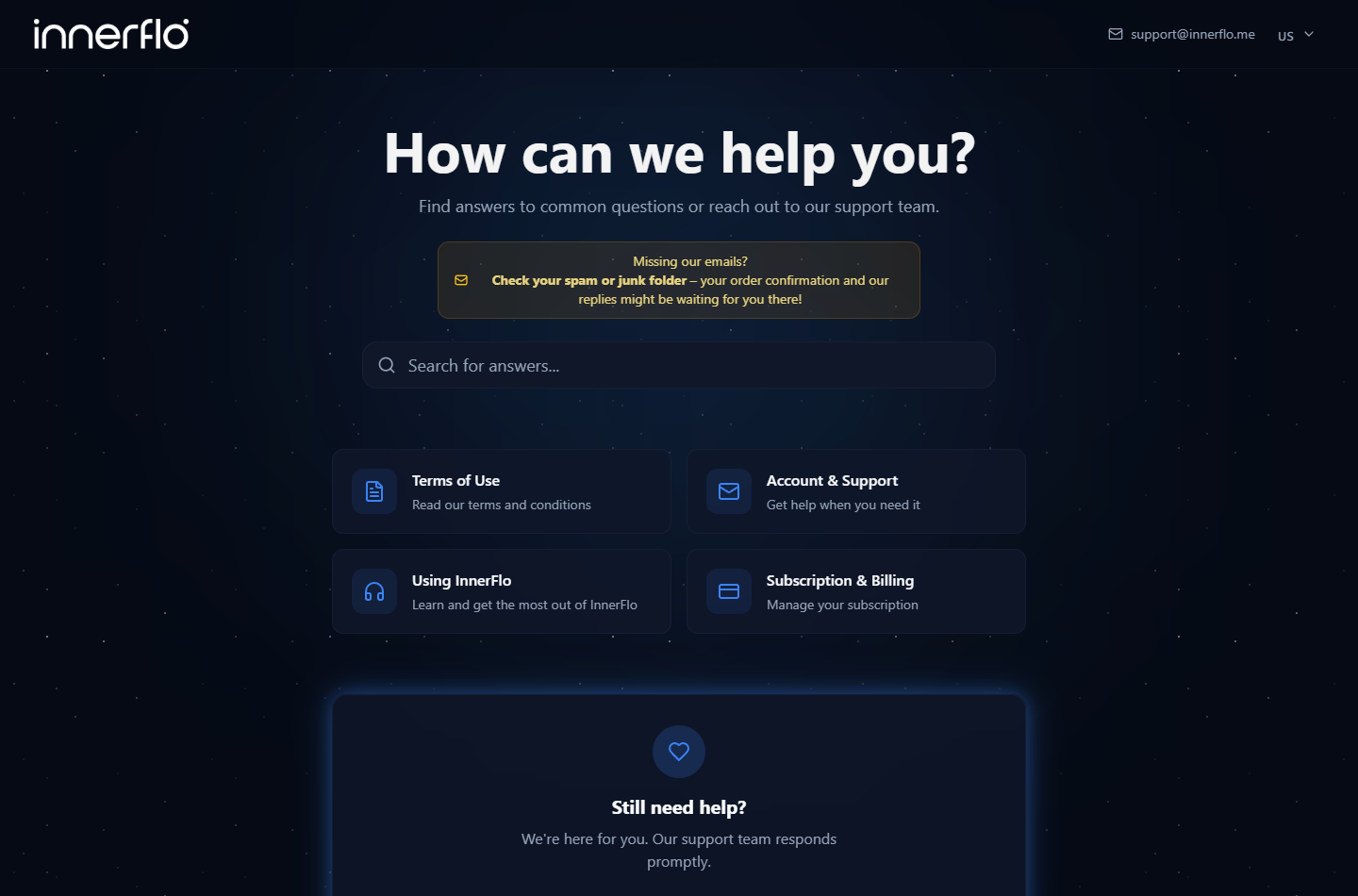
The official help center lists support@innerflo.me and sections covering account access, service use, and subscription management.
We verified that published route, not its response time for a real paid account. Public reports include both satisfied users and unresolved complaints.
Use the email connected to your purchase and retain the ticket number. Avoid sending full card numbers or passwords in an ordinary email.
Digital Delivery Has Its Own Traceability Questions
No warehouse or refill package is involved here. The relevant delivery record is access to the promised digital content.
Keep screenshots of login errors, compatibility requirements, missing features, or unavailable sessions if those form the basis of a complaint.
For claims about tailored frequencies or specific health outcomes, ask what supports the particular program. A functioning audio player does not validate every promotional benefit.
What a Useful Review Can and Cannot Tell You
A listener may sincerely find the sessions relaxing. Another may dislike the sound or feel the price is too high. Both experiences can be real.
Separate those opinions from billing evidence. A review saying a charge was unexpected does not by itself show what the checkout disclosed.
Equally, a company’s statement that terms were available does not establish that every presentation was clear or every cancellation was handled correctly.
The strongest billing account contains dates, the selected offer, the renewal amount, cancellation confirmation, and the merchant’s response.
A star average compresses very different experiences into one number. Read the details closest to your own concern instead of treating the score as a verdict.
For health expectations, relaxing audio should not delay appropriate care for persistent symptoms. A wellness subscription is not a substitute for individualized clinical guidance.
A Five-Minute Account Check Before Renewal
Open the receipt first. Write down the original payment date, the service period, and the next amount if it is listed.
Next, sign in using the same account details. Confirm whether renewal is enabled and whether more than one plan or add-on appears.
Compare the displayed end date with the cancellation deadline. Time zones can matter when a request is made close to a cutoff.
If anything conflicts, send one focused message containing the two records and ask which will control the next charge.
Do not delete your account while you still need its records. Preserve the evidence and resolve cancellation before removing access to your history.
A short check now is more useful than trying to reconstruct the signup weeks after an unwanted payment.
What to Do if You Have an Unexpected InnerFlo Charge
- Identify the billing channel.
Compare the bank descriptor with your receipt. Determine whether the payment went through the website, Apple, Google, or another named payment provider.
If you never recognize the purchase after checking household users and receipts, tell your bank promptly. Do not assume every unknown descriptor is this service.
- Disable renewal through the correct route.
Use the website account for a web purchase or the relevant store account for an in-app subscription. Save the resulting confirmation.
When account access fails, contact support@innerflo.me with your purchase email and order details. Clearly request cancellation of future billing.
- Make a separate, specific refund request.
State the amount, date, reason, and remedy requested. Attach evidence of any access failure, misleading description, duplicate charge, or earlier cancellation.
Ask which policy provision applies to the decision. Do not accept an explanation about future cancellation as an answer to a past-charge dispute.
- Preserve the account and correspondence.
Download receipts and screenshot the subscription status before deleting anything. Keep complete messages, including dates and ticket references.
If you receive a promised refund, note the stated processing period and verify that the money actually arrives through the original payment method.
- Escalate with an accurate timeline.
Ask your payment provider about dispute options and deadlines if direct resolution fails. Supply the records that show what happened.
Describe a cancellation disagreement as such. Do not label an originally authorized payment stolen-card fraud merely because you later regretted the subscription.
- Secure accounts if a separate suspicious interaction occurred.
If a fake support page persuaded you to install software, scan with Malwarebytes. Change reused passwords through the genuine account pages.
AdGuard can help limit intrusive advertising and known malicious destinations. It does not terminate memberships or resolve a billing disagreement.
- Check the next statement and report unresolved conduct.
Monitor the next expected renewal date even after cancellation. If another charge appears, add it to the existing case with the earlier confirmation.
For unresolved misleading billing, report the documented facts to your consumer-protection authority. Avoid paid recovery services promising guaranteed refunds.
Frequently Asked Questions
Is InnerFlo a fake app?
No. We found a real audio service, app listing, and support resources. The concerns examined here involve recurring billing, cancellation, and refund conditions.
Why is InnerFlo missing from my Apple subscriptions?
You may have purchased on its website. Web subscriptions are managed separately from Apple’s subscription list, even when you use an iPhone app.
Does deleting InnerFlo stop payments?
No. Cancel the actual subscription through the channel used to buy it. Removing the app alone does not end a separate billing agreement.
How early should I cancel a web subscription?
The reviewed terms specify at least 48 hours before the current period ends. Check your own offer and act earlier to allow time for problems.
Does InnerFlo automatically refund unused access?
The reviewed policy does not promise that. Explain the specific basis for your request and consider applicable consumer rights and payment-provider procedures.
Does its mailing address prove the company is fake?
No. It is a registered-agent location, a common business arrangement. It also does not establish a physical studio or support office.
The Bottom Line
InnerFlo is a real service, but its renewal rules and restrictive refund terms deserve attention before a trial becomes a longer commitment.
Follow the receipt to the correct cancellation channel, retain confirmation, and address refunds separately. Clear records offer the best starting point when a charge is disputed.








