

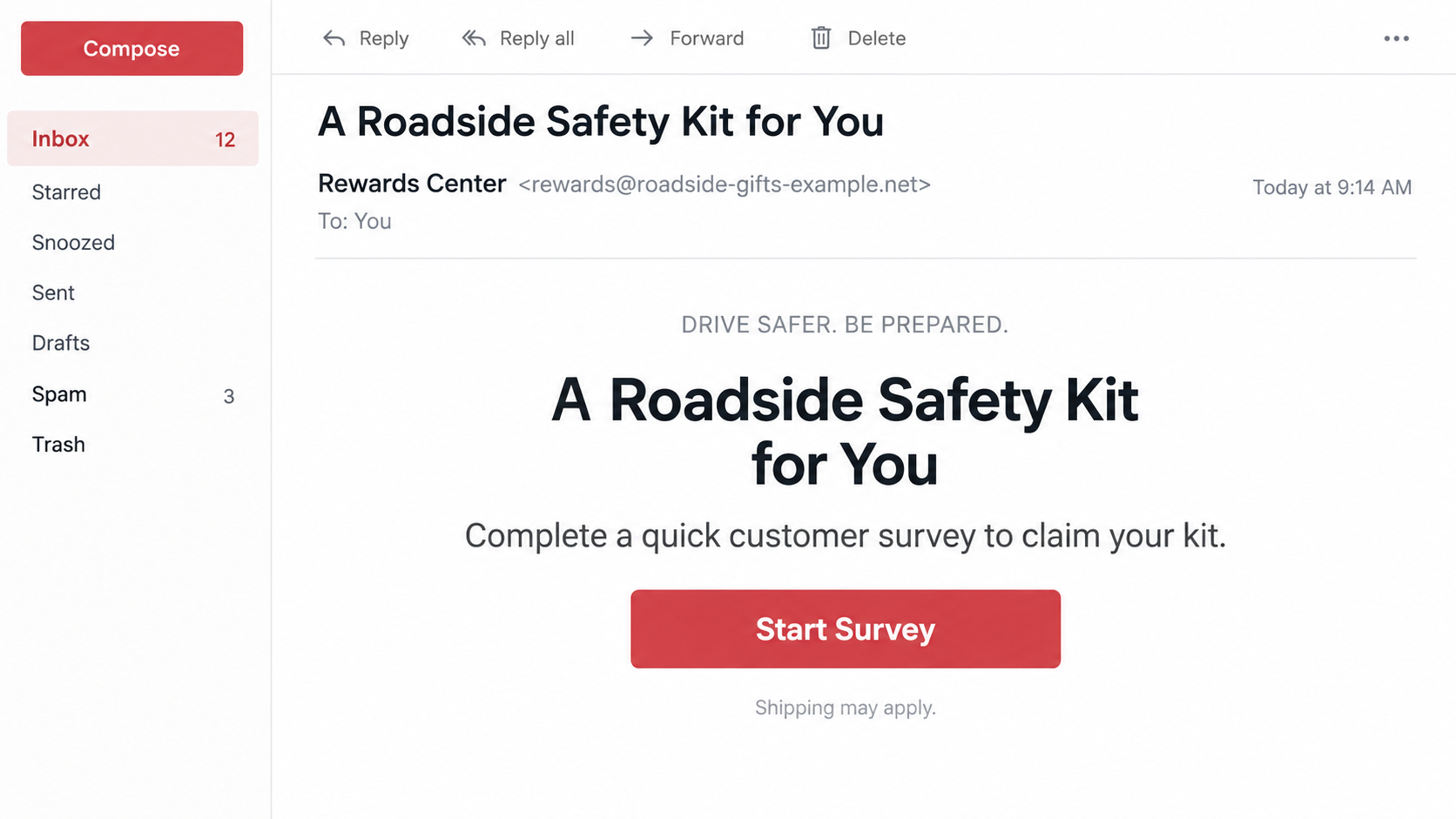
The message offers something practical instead of a jackpot: a roadside safety kit for drivers. A quick survey appears to be the only thing standing between you and a useful item in the trunk.
It is a modest promise, and that is part of its appeal. The small print, the sender, and the page after the survey deserve more attention than the picture of the reward.
Overview
The offer borrows State Farm’s name without authorization
State Farm warns that fraudulent emails and texts offer car emergency kits, fire safety kits, or dash cameras in exchange for a survey, loyalty, or a supposed reward. The insurer says it does not offer these items in exchange for a survey and did not authorize the messages.
That statement is more useful than guessing from an email’s design. A recipient may genuinely be a State Farm customer, and the message may refer to driving or insurance, but those facts do not make a giveaway official.
The survey can be a bridge to a payment form
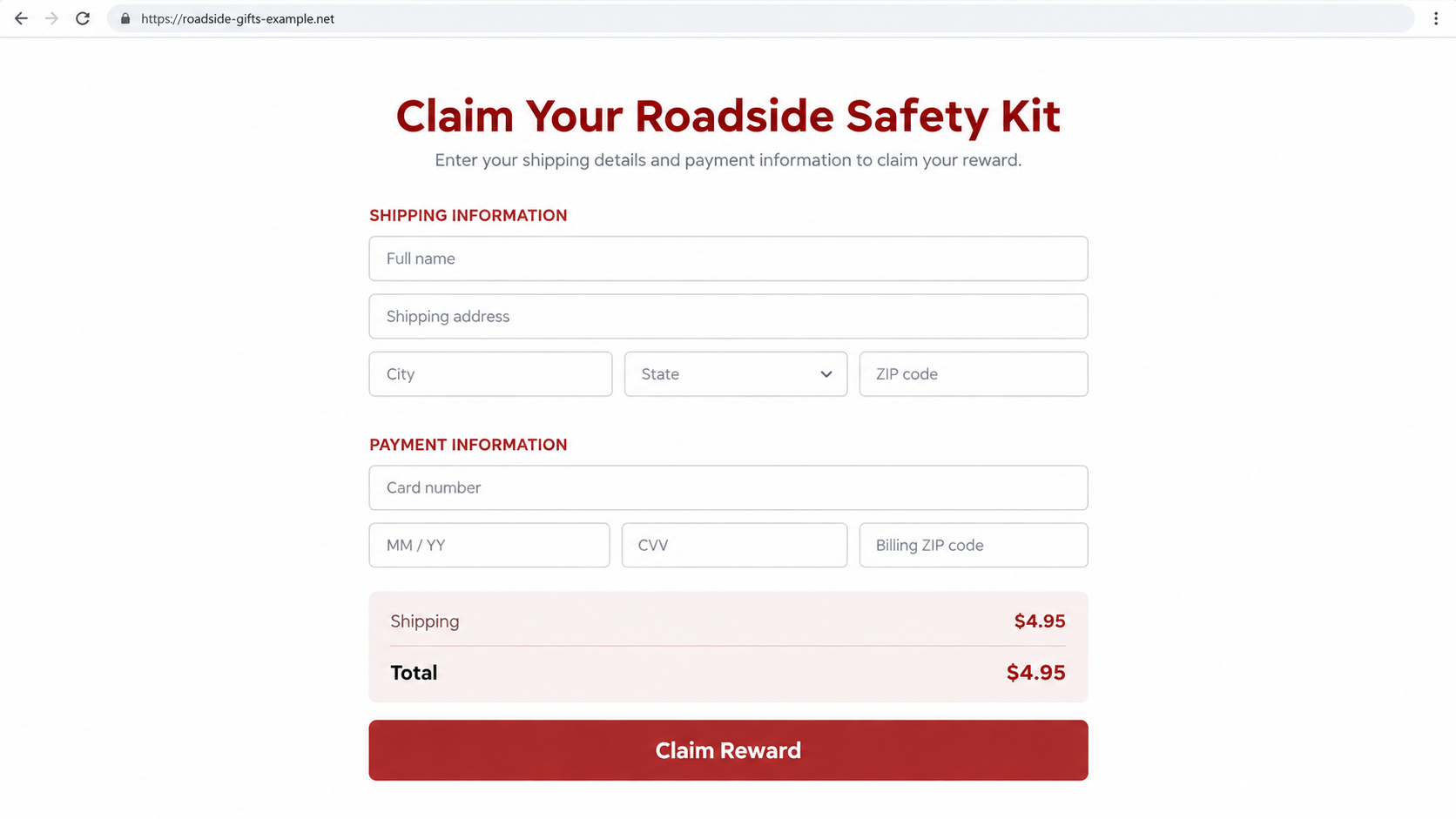
Some versions of reward scams ask a few easy questions before revealing a shipping page. An agent’s public warning also describes a dash-camera variation that asks for a small shipping fee. The fee makes the offer seem nearly free while introducing a card-entry step.
Not every recipient sees the same page or charge. The image below is an illustrative, nonfunctional reconstruction of one possible checkout pattern, not evidence that a particular live page charged exactly $4.95.
The real risk is what the visitor submits
A survey may collect a name, address, phone number, email, policy-related information, or payment card. Some funnels can lead to unwanted charges or more targeted phishing. The precise outcome depends on the site and terms actually shown to a user, so do not assume every kit message has identical billing.
These signs should interrupt the claim process:
- An unexpected text or email promises a State Farm-branded kit for a survey.
- The link leads to a domain you cannot verify through State Farm.
- “Free” becomes a card request at the end of the questions.
- The page requests insurance credentials or a one-time code.
- The offer has a countdown or says only a few kits remain.
Why a Roadside Kit Is a Better Lure Than a Huge Prize
Drivers can imagine using jumper cables, a warning triangle, or a first-aid pouch. A safety kit sounds relevant to car insurance, so the sender does not need to explain why an insurer would mention it.
The reward also feels small enough to be believable. An extravagant cash prize invites skepticism; an inexpensive kit can feel like a loyalty gesture. That psychological difference can make a short survey seem like a fair exchange.
Scammers often make the first questions harmless: vehicle type, driving habits, or customer satisfaction. Each answer keeps the visitor moving toward the next screen. By the time a payment form appears, the person may feel they have already invested time in the claim.
None of this proves that every page behind such a message collects card data. It explains why the format is useful to fraudsters. The specific fact State Farm has confirmed is simpler: these survey-for-reward messages are unauthorized and should not be used to claim an official kit.
The careful distinction matters if you are deciding whether to dispute a charge. Save the exact offer and checkout terms you saw rather than relying on a generic warning, because the merchant and billing details can vary from one link to another.
How the State Farm Roadside Kit Scam Works
Step 1: An unsolicited message presents a practical reward
The first contact may say you have been selected for a free emergency kit, dash camera, or fire-safety item. It may describe a customer appreciation program or use a friendly “thank you for your loyalty” tone. That language makes the request sound like marketing rather than a demand.
Because it arrives unexpectedly, the message itself is the first thing to verify. State Farm’s official warning says it does not run a survey exchange for these items. A customer should not treat a recognizable company name as proof that the promotion exists.
Step 2: The button moves the visitor to an unrelated survey
“Claim now” or “Start survey” can hide the true destination. The landing page may have a red color scheme, a satisfaction questionnaire, or a progress bar. A page can look like a customer-feedback tool while belonging to a third-party domain.
Look at the exact web address, not just the logo and headline. If you arrived from a suspicious email, opening the same site in a new tab does not make it safer. The better test is whether State Farm itself, reached independently, confirms that exact promotion.
Step 3: Easy questions build momentum and collect data
The survey can ask where you drive, whether you own a policy, or which reward you prefer. Ordinary questions make the journey feel low risk. They can also tell the operator which follow-up pitch is most likely to work.
A name and address may later be used in personalized emails. A phone number can feed calls that seem to know your insurance situation. These are plausible uses of submitted data, not a claim that every survey operator follows the same script.
Step 4: A “small” shipping charge changes the bargain
The final page may describe the kit as free but request a card for postage. An insurer agent has warned about a related dash-camera offer involving a small shipping fee. Such a fee can lower resistance because it appears minor compared with the advertised reward.
Before any card entry, examine the total price and every term on the page. A checkout that hides recurring charges, leaves the merchant name unclear, or provides no workable support route creates risks beyond the initial shipping amount. Do not assume a subscription exists unless the actual terms show one.
Step 5: The confirmation screen masks an uncertain outcome
A progress bar can finish, an order number can appear, and a delivery estimate can be promised. Those screens are controlled by the same site that made the offer. They do not prove that a kit will arrive or that the card will only be charged once.
Check your card account independently. If a charge appears, the descriptor may name a merchant unrelated to State Farm. Save it because it can help your bank locate the transaction, but do not assume that the descriptor identifies the insurer or a legitimate reward program.
Step 6: Follow-up messages can extract more
If a visitor provides details, another message may claim a delivery problem, an address error, or a failed payment. It can request a second card or a login to “finish” the claim. The original kit story becomes a reason to keep engaging.
Stop at the first inconsistency. A real State Farm offer can be confirmed by your known agent. A sender who insists that you must use only their link or pay another fee is avoiding that independent check.
Identity, Address, Support, and Reward Checks
The insurer’s name does not identify the sender
State Farm’s official security page says the survey-for-kit messages were not authorized. The brand in an email or text may have been copied. Confirm promotions through a known agent or the company’s website, not through the page making the claim.
The survey domain is the real destination
A reward link can use a domain that has no obvious relationship to an insurer. It may redirect several times before the form appears. If the page obscures who operates it or supplies only a generic privacy policy, do not give it a mailing address or card.
The support path should work before any payment
Look for a clear merchant name, contact method, and refund or cancellation instructions. An email that cannot be answered and a form that offers no meaningful support leave a buyer with fewer options if a charge appears. State Farm’s own agent can tell you whether the promotion is connected to your policy.
The reward’s origin and terms must be traceable
What exactly ships, who sends it, when is it due, and what happens if it never arrives? An image of a kit answers none of these questions. If the page will not identify the responsible seller or fully disclose the payment terms, do not treat the offer as a safe purchase.
How to Verify the Message Without Taking the Survey
Start with the official State Farm security page. Its alert about emergency kits and dash cameras is direct: the insurer does not offer these items for a survey. That lets you make a decision without opening the promotional link.
If you are a customer, ask your existing agent about the message. Use the number on your policy documents, an earlier trusted contact record, or the official website. Do not ask the suspicious email for a number to “verify” itself.
Do not assume an offer is genuine because it mentions your name. Marketing lists, public information, and old data breaches can give senders plausible details. The test is whether the company independently confirms the promotion and its exact terms.
For an email, you can forward the message to abuse@statefarm.com. For a text, State Farm suggests using your phone’s junk-reporting function. Preserve screenshots if you have already entered data or need to dispute a charge.
What to Do if You Have Fallen Victim to This Scam
- Stop at the page you reached. Do not complete more survey questions, submit another card, or call a number shown only on that page. Save the message, URL, order screen, and any payment terms you saw. A clear timeline helps your bank and the company understand what happened.
- Contact your card issuer if you entered a payment method. Use the number printed on the card or the issuer’s official app. Ask it to review any charge, stop further unauthorized billing, and advise whether the card should be replaced. If terms suggested a recurring plan, explain that detail specifically.
- Secure any account whose password or code you entered. A reward survey should not need your insurance, email, or banking password. Change exposed credentials through the genuine service, enable multifactor authentication, and report a shared one-time code promptly.
- Check what personal information was disclosed. If you supplied only a name and address, stay alert for tailored follow-up messages. If you gave a Social Security number or identity document, use IdentityTheft.gov to plan stronger protections, including fraud alerts or a credit freeze where appropriate.
- Report the impostor offer to State Farm. Forward suspicious email to abuse@statefarm.com and tell your verified local agent if you interacted with it. State Farm’s security page explains how to report messages and what to do after sharing information.
- Scan only when device exposure warrants it. If you downloaded an attachment or installed an app from the reward page, run Malwarebytes or another reputable scanner. AdGuard can help reduce exposure to malicious ads and known scam pages, but neither tool refunds a card charge or substitutes for contacting the issuer.
- Report the fraud and ignore recovery pitches. In the United States, you can report the incident through the FTC’s portal. If someone later says they can recover your money or force delivery of the kit for a fee, verify them independently and do not pay upfront.
Frequently Asked Questions
Is State Farm giving away emergency roadside kits for surveys?
State Farm’s security page says it does not offer car emergency kits, fire safety kits, or dash cameras in exchange for a survey. The circulating messages using that premise were not authorized by the company.
Does a small shipping fee make the offer legitimate?
No. A low fee can still expose a card to unauthorized charges. Verify the merchant, promotion, and complete terms before paying, and remember that State Farm has rejected the survey-for-reward claim.
What if I answered the survey but did not enter a card?
Stop there and keep a copy of what you submitted. Watch for follow-up calls or emails using those details. Change passwords only if you actually entered credentials or have other evidence of account access.
Can I trust a reward page with a State Farm logo?
No. A logo is easy to copy. Check the domain and confirm the promotion through the insurer’s official site or an agent reached using a number you already trust.
What if I was charged but never received a kit?
Contact your card issuer and provide the transaction, website, message, and any delivery promise. Ask about a dispute and whether additional charges can be blocked. Do not provide another card to a sender who promises to fix the order.
Where should I report the message?
State Farm directs recipients to report suspicious email to abuse@statefarm.com and to use junk-reporting tools for texts. You can also report financial fraud to the FTC.
The Bottom Line
The State Farm roadside kit scam wraps an unauthorized survey in a practical reward. The modest value is what makes the link tempting, but the brand claim has already been contradicted by the insurer.
Skip the survey, verify through a known agent, and do not pay “shipping” to a site you cannot identify. If you entered a card or password, deal with the payment and account risks first.








