

Your bank says your account is on hold. The text looks urgent, and the link promises a quick fix. When the account holds your rent or grocery money, waiting even a few minutes can feel risky.
That is the opening used by the NCB account-on-hold text scam reported in Jamaica. The most revealing detail is not the warning. It is where the message asks you to go next.
Overview
What the NCB account-on-hold text says
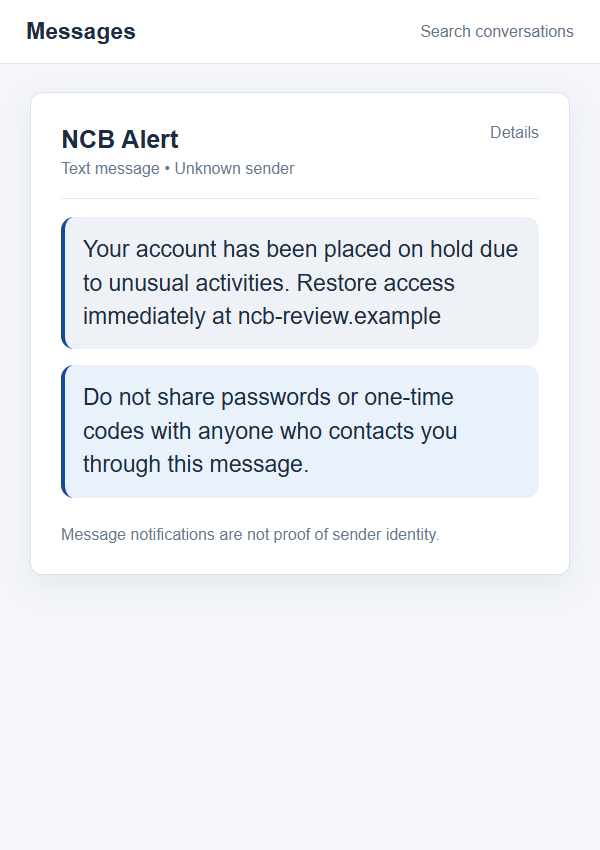
The reported message claims an NCB account has been put on hold because of “unusual activities.” It urges the recipient to restore access immediately through a link. One observed version used a domain resembling ncbonlinefiles[.]info, not the bank’s known website.
This is an impersonation attempt against National Commercial Bank Jamaica, a real financial institution. The claim inside the text does not establish that the recipient’s account has actually been restricted. A person without an NCB account can receive the same message if the sender is casting a wide net.
Why the link is decisive
NCB’s own fraud-alert guidance says the bank will not send a link in phishing-style email or SMS notices. It advises people to capture and report suspicious messages rather than following their URLs.
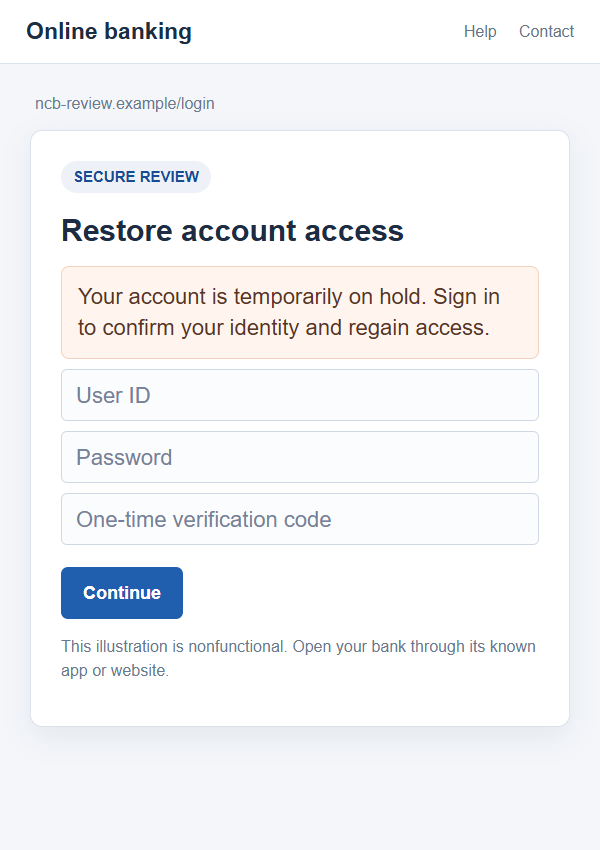
A counterfeit page may ask for an online-banking user ID, password, card information, PIN, or one-time code. The exact fields depend on the attacker. The danger begins when the victim treats a page reached from an unexpected text as the bank’s login or recovery flow.
What is and is not confirmed
The observed message and its off-brand domain support a phishing warning. Public reporting does not prove how many people received it, whether the website remains online, or that every visitor lost money. The domain is included here only in defanged form so readers can recognize the pattern without a clickable route.
Remember these practical points:
- A bank name in the sender label is not proof of origin.
- “Unusual activity” can be a legitimate concern, but the text link is not how to verify it.
- An unfamiliar domain can imitate a real login page closely.
- A one-time code is an account-access key, not a harmless confirmation number.
- NCB has official fraud-reporting and customer-care channels you can open independently.
Why the Account Hold Story Feels Plausible
Most people have seen genuine security checks from banks. A login from a new place, a declined card, or an unusual transfer may prompt a real notice. Scammers borrow that familiar language because it puts the reader in a problem-solving mindset.
The account-on-hold claim is more powerful than a generic promotion. It suggests ordinary life is suddenly interrupted: a bill might not clear, a card might stop working, or a transfer might be delayed. The fake “restore” link then looks like a shortcut back to normal.
The message may use a local number or display an NCB-looking sender name. Neither is an authentication method. Phone numbers and labels can be spoofed, while bulk text services can make a campaign look more official than it is.
Spelling mistakes can be a clue, but perfect spelling would not make the request safe. A convincing phishing page can reproduce colors, menus, security badges, and help text from a genuine bank. The trust test is the route you used to reach it, not the surface polish after you land there.
The screenshots in this article are nonfunctional reconstructions. They illustrate the text and a possible credential form, not a confirmed capture of the exact destination used in every NCB-themed message. The example-only address is intentionally inactive.
How the NCB Account-on-Hold Text Scam Works
Step 1: The attacker sends a security-sounding SMS
The message announces an account hold due to unusual activity. That is broad enough to reach customers who have recently made a payment and people who have no relationship with NCB at all. The sender hopes enough recipients will worry and tap through.
It may ask for immediate action or imply your funds are inaccessible until you comply. The urgency is strategic. It narrows the time you spend checking the bank’s official guidance or speaking to someone you trust.
Step 2: The link sends you to a bank-like address
An attacker chooses a web address that contains a bank abbreviation or words such as online, files, secure, or restore. Those terms make the address look administrative, but they do not connect it to NCB. In the reported example, the link did not use the bank’s official domain.
A padlock beside the address is not a verdict. It means the browser is encrypting traffic to the site. A phishing site can use HTTPS just as a legitimate site can. The decisive question is who controls the domain and why you arrived there from a surprise text.
Step 3: A fake sign-in form collects credentials
The page may show a logo or “account security” heading, then ask for login details. Submitting those details can give an attacker access to the real online-banking account. A failed login message on the fake page does not mean the submitted password vanished.
Some pages ask for card numbers or a PIN as part of “verification.” Those requests can support unauthorized transactions or identity theft. Do not type banking credentials into a page opened from an unsolicited SMS, even if it appears to know your name.
Step 4: A one-time code completes the takeover attempt
After entering a password, you may receive a genuine one-time code from the bank because someone is trying to sign in or authorize an action. The fraudulent page may ask you to type that code. Giving it to the page can allow the attacker to finish a login or payment attempt.
This stage is especially deceptive because the code itself may come from a real NCB notification channel. The code’s authenticity does not make the page that asked for it authentic. Never share or enter a code into a workflow you did not initiate through the bank’s verified app or website.
Step 5: The attacker may pivot to calls or new messages
If you abandon the form after entering some details, the scammer may still have enough information to call and sound knowledgeable. They may claim to be from a fraud team, request another code, or instruct you to move money to a “safe” account.
End that conversation and contact NCB yourself. A caller who knows the details you just typed may be the same person who received them. Familiar information should raise caution, not settle the caller’s identity.
Four Checks Before You Respond to an NCB Alert
Check NCB’s no-link rule
NCB states that links purporting to come from it in these messages are fake. That is simpler than trying to judge each new domain by appearance. A text that asks you to click through to restore access fails the bank’s own test.
Save a screenshot, then use the bank’s official app or type its known website yourself. If your account truly has an issue, it should be visible through a channel you opened independently or confirmed by customer care.
Check the full domain, not the label
A sender called “NCB Alert” and a domain containing the letters NCB can both be attacker-controlled. Read the complete host name if you need to document it, but do not click a suspicious link just to inspect it. A brand fragment inside a longer address is not bank ownership.
Short links are no safer. They hide the destination until you follow them. Treat an unsolicited shortened URL requesting banking access as a reason to stop and verify elsewhere.
Check what information is requested
A message that wants a password, PIN, full card number, or one-time passcode is trying to cross a critical boundary. A security notice can tell you to check your account, but a surprise link should not become the place where you surrender the keys to it.
Be wary of “verification” forms that ask several fields in sequence. Fraudulent sites may collect an ID first, then a password, then a code, making each request feel like an ordinary next step.
Check with NCB through published channels
Use the bank’s security center for current reporting instructions, or call its customer-care number from that site or your card. Do not use the number printed in an alarming text or a popup on its linked page.
If you need to report the SMS, preserve its sender and URL. NCB’s guidance explains how to forward suspicious messages. Its contact information can change, so consult the current official page rather than copying a number from a third-party warning.
What if Your NCB Account Really Is Restricted?
A phishing text can coincide with a genuine banking issue. That coincidence does not authenticate the text. Open NCB’s official app or website separately and see whether an account notice appears there.
If you cannot sign in, contact customer care through the bank’s published contact route. Describe the message and ask whether a hold exists. Do not read out a one-time code to an inbound caller, even if they say they are helping to remove the restriction.
A real bank employee can guide you through official recovery options without requiring you to pay a stranger, send funds to a new account, or use an unknown webpage. If you are pressured to do any of those things, stop and escalate through another verified bank channel.
Once the account is safe, report the phishing attempt. Reporting helps the bank recognize active domains and message wording. It does not require you to test the suspicious page or keep communicating with its sender.
What to Do if You Have Fallen Victim to This Scam
- Contact NCB immediately through its official route. Use the app, your card, or the bank’s published report-fraud page. Explain which details you entered and whether you supplied a one-time code. Ask the bank to secure online banking, review recent transfers and payees, and advise on account or card restrictions.
- Change the exposed password from a clean route. Type the bank’s official address or use its app, not the SMS link. If the same password was used for email or another service, change those too. A unique password limits the damage if the fraudulent form captured it.
- Review activity and preserve the timeline. Save screenshots of the text, the defanged domain, any follow-up calls, and transaction alerts. Record exactly when you submitted each item. This helps the bank distinguish a credential exposure from an unauthorized transfer or card purchase.
- Report unauthorized transactions promptly. Tell NCB which payments or transfers you did not approve. Ask what dispute or fraud-report process applies and keep the case number. Do not rely on the fake page’s “account restored” message to conclude that your account is safe.
- Secure the device if software was involved. Most SMS phishing focuses on credentials, but an app download or remote-access request adds a different risk. If you installed anything from the link, disconnect and run a trusted scan such as Malwarebytes. AdGuard can help block some malicious destinations and intrusive ads later, but it does not undo a disclosed password or code.
- Warn anyone with shared access. A family member or business colleague might see a later message that references your account. Tell them not to answer inbound “fraud team” calls or supply codes. Coordinate account recovery through one verified NCB channel so the scammer cannot divide your attention.
- Report the message and watch for a second pitch. Follow NCB’s current instructions for suspicious SMS and report the attempt to relevant authorities. Ignore anyone who offers to “recover” funds for an upfront fee or asks you to move money into a protected account. Those requests can be a continuation of the same fraud.
Frequently Asked Questions
Is an “NCB account on hold” text always fake?
The wording alone does not prove authenticity. The reported version with an unfamiliar restoration link is phishing, and NCB says it will not send such links. Check your account through the official app or website rather than the text.
What is the danger in the ncbonlinefiles[.]info address?
It is an observed off-brand address in a reported scam message, not the bank’s official site. The exact domain can change. Do not make safety depend on memorizing one string; use NCB’s no-link guidance.
Can clicking the link alone empty my account?
Many of these attacks need you to submit credentials, card details, or a code. Still, close the page and avoid downloads. If you entered any banking data, contact NCB immediately, regardless of whether a transaction appears yet.
Why would a real one-time code arrive after a fake page?
The attacker may be trying to use the credentials you typed to sign in or approve an action. The real bank sends the code because that action was attempted. Do not put the code into a page opened from the text or read it to a caller.
How should I report the suspicious SMS?
Take a screenshot and use NCB’s current fraud-reporting instructions on its official site. Your mobile carrier may also provide a spam-report option. Do not reply to the suspicious sender to ask whether it is genuine.
Should I change my PIN if I only entered my password?
Tell NCB exactly what you shared and follow its advice. A password alone can require immediate reset and session review; a disclosed PIN or one-time code may call for additional controls. Do not guess that the risk is over because you stopped before the last form field.
The Bottom Line
The NCB account-on-hold text uses a security problem to pull customers to a bank-like page. The bank’s own guidance gives a clear boundary: it does not send login links in these unsolicited messages.
Leave the text, open NCB through a route you chose, and report any details you entered as soon as possible. The fastest way to solve a real account problem is through the bank itself, not through a link selected by someone who wants your credentials.








