

A text says a traffic ticket is overdue and your driving privileges are about to be suspended. It looks official enough to make you pause, even if you cannot remember receiving a citation.
For people in Hawaiʻi, that uncertainty is exactly what a Hawaii traffic summons scam text exploits. Before paying a surprise fine, there is a straightforward way to separate a real court record from a scare tactic.
Overview
The message impersonates a traffic authority
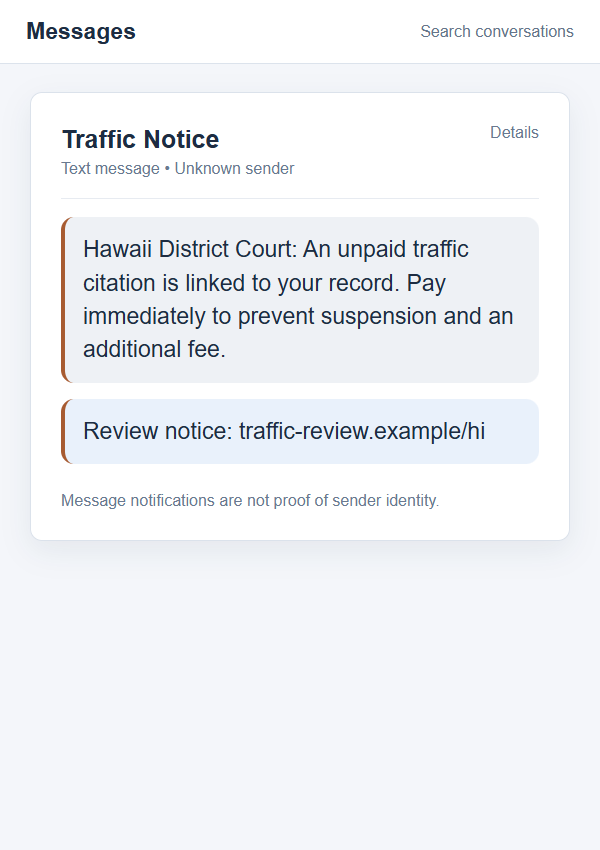
The Hawaiʻi traffic summons scam arrives as an unsolicited text about an unpaid citation. It may claim to come from a “District Court,” a “DMV,” or another official-sounding office. The message warns that a license or registration will be suspended unless the recipient pays promptly through a link.
The Hawaiʻi State Judiciary warned in February 2026 that people statewide were receiving texts about nonexistent traffic citations. Those messages were not from the courts or motor-vehicle authorities. Their links should not be opened.
The payment page is the real destination
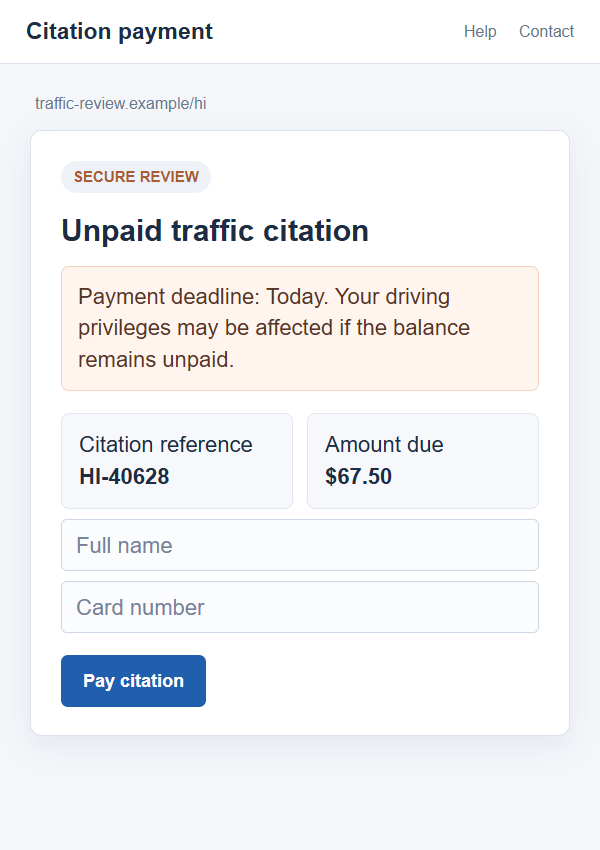
A link can lead to a page styled like a citation lookup or government payment portal. A case number, deadline, and modest amount may be displayed to make the request feel routine. None of those elements proves a case exists in the court’s system.
The fraudster wants a payment, personal information, card details, or a combination of them. Some versions may also seek a driver’s license number or address. The exact page and amount can change quickly, so the safe test is not whether a particular example URL looks familiar.
What a genuine court matter looks like
The Judiciary says it generally handles unpaid-citation communication by U.S. mail. It does not send unsolicited texts, calls, or emails demanding payment or personal information for court matters. An exception can apply when you first contact the court with a specific question.
Use this short comparison before taking action:
- An unexpected text with a payment link is not a verified court notice.
- A real citation should have a record you can check through eCourt Kōkua.
- A threatened suspension is a pressure tactic, not evidence of an actual court order.
- The number displayed as sender can be spoofed or changed.
- A court case is handled through published Judiciary channels, not a link chosen by a stranger.
Why the Hawaii Court Story Gets Attention
Traffic fines are plausible. Most drivers know that a forgotten ticket can become more expensive, and few want to discover a problem at a police stop or registration renewal. Scammers turn that ordinary anxiety into a rushed payment decision.
The wording often leaves out details a real citation would have, such as the violation date, location, officer, or case history. That vagueness lets one message fit many recipients. The recipient fills in the missing context from memory: a recent parking stop, a rental car, or a trip through an unfamiliar area.
Official-sounding labels do another part of the work. “District Court” and “DMV” are familiar enough to seem credible even when the sender has no government connection. A fake page can reproduce a seal, typography, or form fields in minutes. Visual polish should never replace a lookup in the actual court database.
The scam may also bundle several consequences together. License suspension, registration trouble, extra penalties, and arrest sound frightening, but a list of threats in a text is not a court order. The official warning described bogus threats to driving privileges and vehicle registration tied to nonexistent citations.
The images in this report are nonfunctional reconstructions, not captures of a specific victim’s message. Their example-only address cannot collect payment. They show how a message and follow-up page can create a convincing sequence while offering no independent proof of a citation.
How the Hawaii Traffic Summons Text Scam Works
Step 1: A broad text claims an unpaid citation
The first message says a traffic violation or court balance is attached to your record. It may use your state, county, or a generic agency name rather than a precise citation. If your number is in the sender’s target list, the message can arrive even when you have never had a ticket.
Some recipients will genuinely be worried about a past stop or camera notice. The sender does not need to know your driving history. The scam succeeds when the possibility of a ticket feels more important than verifying whether one exists.
Step 2: The warning creates a deadline
The text says payment is due “today” or “immediately.” It may add a threatened license or registration suspension and a new fee. The deadline is there to make a normal research step, checking the court’s site, feel too slow.
Real court procedures can have deadlines, but those deadlines are documented in official records and notices. A surprising SMS does not become legitimate by adding a countdown or legal vocabulary. Slow down and confirm the case before paying anything.
Step 3: A link opens a lookalike payment screen
The address may contain words such as traffic, citation, court, or Hawaiʻi. Those words can be registered by anyone on an unrelated domain. A page can show an invented citation reference and amount without querying the Judiciary’s records.
Watch for a form that asks for a name, address, date of birth, driver’s license details, or a payment card before it shows a verifiable case. A secure-looking padlock only means the browser has an encrypted connection to that site. It does not establish that the site belongs to the court.
Step 4: Payment and identity details are collected
Once the visitor submits a card, the information may be used for unauthorized charges or sold to others. If the page asks for a driver’s license number and address, the risk extends beyond the displayed “fine.” A small payment amount can make the request seem harmless while the underlying data is valuable.
A fake page may show “processing failed” and ask you to try another card. Do not repeat the attempt. A failed confirmation does not mean the first submission was not received. Contact the issuer using a trusted channel if you entered a card on a suspicious site.
Step 5: A receipt or follow-up message reinforces the lie
Some fraudulent portals produce a receipt-looking screen or send another text. That can make a victim believe the matter is resolved, even though no official case was paid. Other versions may demand an additional “release” or “processing” fee after the first payment.
Only a check through the real Judiciary system can establish whether a citation exists and what its status is. A receipt generated by an unverified webpage belongs to that webpage, not to a court record.
Four Checks Before You Pay a Hawaii Traffic Fine
Search the official case system
The Judiciary directs people to eCourt Kōkua through its official website. Search by first and last name and, where appropriate, license plate number. If you have a citation, use the case-search function to see its status.
Do not treat a lack of search results as a reason to pay a text link “just in case.” If the situation is unclear, contact the Judiciary’s Traffic Violations Bureau using contact information you found on the official court website.
Check the route by which the notice arrived
The Judiciary says unpaid-citation notices are generally mailed. It does not initiate a payment demand by text, call, or email unless you contacted it first about a specific question. That distinction is more useful than scrutinizing a seal or logo in the message.
Save the suspicious text as evidence if you need to report it, then leave the thread. Do not reply with your name or citation number to “confirm” the case. A reply only connects you with the sender of the text.
Check the entire web address
An official court link should be reached from the Judiciary’s website that you opened independently. Do not trust a domain simply because it starts with “hawaii,” contains “court,” or ends with a believable path such as /pay-citation.
Be especially cautious when the page asks for a card before showing a real record. The place to verify a case is the official case system, not an unfamiliar form presented by a surprise SMS.
Check the demand against court guidance
The Judiciary warns that the courts will not demand payment by prepaid card, gift card, wire transfer, cryptocurrency, or payment app to prevent arrest or jail. It also says staff will not ask for Social Security numbers or card details over an unsolicited call or email.
If a message threatens multiple punishments for immediate nonpayment, compare that language with the official warning. Pressure is not proof. A real obligation can be handled through official channels after verification.
What if You Really Do Have an Unpaid Ticket?
A scam text and a real citation are not mutually exclusive. You could have a valid ticket and still receive an unrelated fake demand. That is why “I remember a stop” is not enough to authenticate the link.
Start with the citation document or eCourt Kōkua. Match the case number, name, date, and amount. If there is a question about payment, use the court’s published instructions or contact the Traffic Violations Bureau in the relevant circuit.
If you paid the suspicious site, do not assume the official balance has been cleared. Confirm the status directly. You may need to address the genuine citation separately while disputing the fraudulent card payment with your issuer.
A person who has never been cited can use the same process to put the text in perspective. The point of verification is not to prove a negative through conversation with a stranger. It is to check the authoritative record and then stop engaging with the unverified sender.
What to Do if You Have Fallen Victim to This Scam
- Stop using the page and save the evidence. Keep the text, sender number, full URL, screenshot, receipt, and time of payment. Do not enter more information to see whether the page is still active. A screenshot can help the bank or authorities understand what was presented to you.
- Contact your card issuer immediately. Call the number on your card or open its official app. Explain that you entered card details on a suspected fake traffic-fine page. Ask about blocking the card, replacing it, disputing charges, and watching for attempts that may not have posted yet.
- Check the actual citation record. Navigate independently to the Hawaiʻi Judiciary’s website and search eCourt Kōkua. If there is a genuine unpaid ticket, follow official instructions. The fraudulent payment should not be assumed to satisfy a real court balance.
- Protect identity data you shared. If you entered a driver’s license number, date of birth, or Social Security number, tell the relevant agency and ask what protective steps apply. Consider a fraud alert or credit freeze if sensitive identity information was exposed, and monitor mail and accounts for unexpected activity.
- Change any password you reused on the page. A payment scam may also request an email or account login. Change that password directly on the genuine service, turn on multifactor authentication, and review recent sessions. Do not use a password-reset link in the suspicious text.
- Scan only if you downloaded something. Opening a page is not the same as installing malware. If the site had you download an app, file, or browser extension, remove it and use a reputable scanner such as Malwarebytes. AdGuard can help reduce future exposure to malicious ads and destinations, but it cannot recover a payment or replace a bank dispute.
- Report the attempt and avoid recovery offers. Report the text through your carrier, the FTC, and relevant local channels. If someone later claims they can erase the citation or recover your payment for an upfront fee, verify them independently. The scammer may use details you entered to make the follow-up sound personal.
Frequently Asked Questions
Does the Hawaii court text people about unpaid traffic tickets?
The Judiciary says it does not initiate texts, calls, or emails demanding payment for unpaid citations, except when you first contacted it with a specific question. It generally sends official unpaid-citation communication by U.S. mail.
What if the text uses a real court name?
A real name can be copied into a fraudulent message. It does not verify the sender or the link. Look for the case independently in eCourt Kōkua and use contact details from the Judiciary’s official website.
Can the sender number be spoofed?
Yes. A displayed number or sender label can be misleading. The Judiciary has also warned about callers impersonating court and law-enforcement staff. Judge the request by the official record and communication policy, not the caller ID.
Is a small online fine safe to pay?
No amount makes an unverified payment portal trustworthy. A small fee can be used to collect a full card number and personal details. Confirm the citation and use an official payment route before entering a card.
What should I do if I paid but no citation appears?
Contact your card issuer at once and describe the transaction as a suspected scam payment. Save the text and receipt. You can also report the fake notice to the appropriate authorities, but do not revisit the same website to request a refund.
Can I ignore the text if I might have a real ticket?
You should ignore its link, not a legitimate court obligation. Check eCourt Kōkua or contact the Traffic Violations Bureau independently. That lets you handle a real citation without giving the sender of the text your payment information.
The Bottom Line
The Hawaii traffic summons text scam borrows court language to turn uncertainty into an immediate payment. The Judiciary has confirmed that unsolicited messages about bogus unpaid citations are circulating, and it directs people to verify cases through official channels.
Do not pay from the text. Check the court record yourself, then contact your card issuer promptly if you already entered details. A real ticket will still be there after you take a few minutes to verify it; a scammer needs you to act before you do.

Join the discussion
0 commentsShare your experience or ask a question about this article.
Discussion
Start the conversation
Have a question or something useful to share? Add the first comment.