

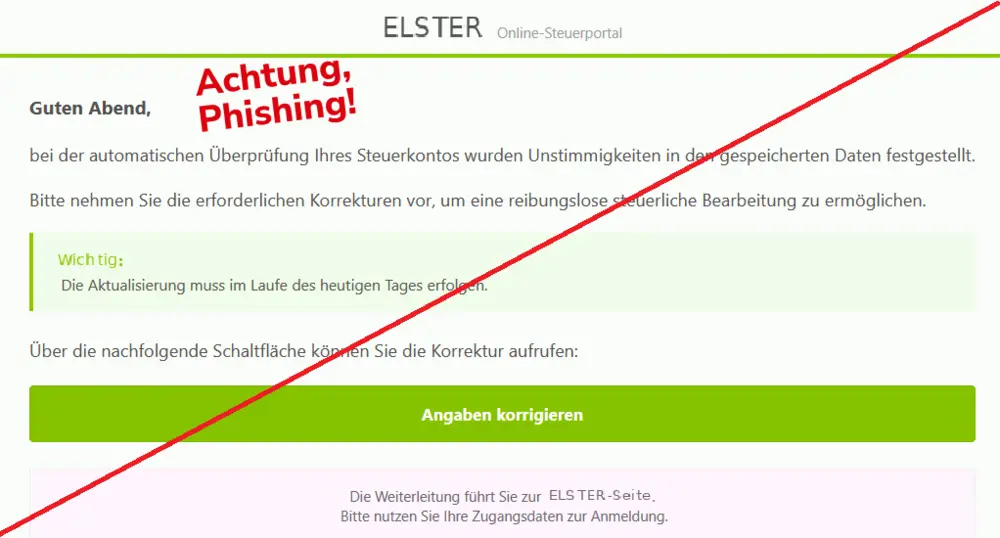
An email says something is wrong with your tax account. It looks like a routine ELSTER notice, and the green button offers a quick way to put things right.
The deadline is today. If this ELSTER email scam has reached your inbox, take a closer look before letting that timer decide your next move.
Overview
A tax-account problem with no explanation
The message impersonates ELSTER, Germany’s electronic tax-filing service. It claims an automated check found inconsistent account information.
You are told to correct it immediately, but the email never identifies a particular tax return, field, or mistake you can check.
That missing detail matters. Instead of giving you something concrete to investigate, the message gives you a task: follow its link and log in.
The worry about unfinished tax business does the rest.
The September 24, 2026 alert in the Verbraucherzentrale’s Phishing Radar identifies this correction demand as phishing.
The captured message above shows the same-day deadline and the invitation to enter login details.
The real ELSTER service is being impersonated
This is not a complaint about ELSTER or a dispute over somebody’s tax bill.
Criminals are borrowing the tax portal’s identity to persuade recipients to give information to a different website.
ELSTER’s official security guidance warns about forged tax-administration messages. It also stresses that your personal authentication credentials and electronic certificate must not be handed to other people.
A notice that copies the service’s name does not prove that anybody has inspected your return. Nor does receiving it establish that your tax account was hacked.
Treat the message as an impersonation attempt, then check any genuine tax matters separately.
The details to recognize, even if the design changes
Do not rely on spotting one exact subject line. A sender can alter the greeting, move the deadline, or replace the destination address without changing the trick.
These are the useful warning signs in this version:
- An unspecified inconsistency supposedly discovered in your tax account.
- A correction demanded before the day is over.
- A prominent button instead of a clear explanation of the issue.
- A request to sign in after following the email’s route.
- No independently verified connection between that route and your real account.
The short deadline and vague problem work together.
You are encouraged to act before asking which piece of information is wrong, who checked it, or why your usual route into ELSTER is not being used.
Why a Small Tax Correction Can Feel Urgent
You do not have to believe an outrageous promise for this email to catch your attention. Many people already have a tax task they meant to finish.
A correction notice fits easily into that background worry.
If you recently filed a return, changed your address, or discussed paperwork with an accountant, the timing can seem personal.
But a message landing at a relevant moment is not proof that its sender knows anything about those events.
The friendly-looking button also makes the request feel manageable. Rather than asking you to send money immediately, it offers to help you solve a problem.
That is precisely when it is worth checking who controls the page you are about to use.
There is no need to decide your entire tax situation from an inbox preview.
A real question about your records can be checked through your established account, tax office, or adviser. The email’s timer should not choose that route for you.
How the ELSTER Email Scam Works
Step 1: An official-looking notice interrupts your day
The first stage is the unsolicited email. The captured version uses the ELSTER name, green styling, and formal administrative language to make its claim seem ordinary rather than suspicious.
Nothing in that appearance establishes the sender’s authority.
A criminal does not need access to the tax administration’s systems to copy a heading or arrange a message like an account notice.
For the recipient, the important question is not whether the design looks plausible. It is whether the request can be confirmed through a channel the sender does not control.
Step 2: A vague error becomes a same-day deadline
The message then turns an unexplained inconsistency into something you must fix immediately. It gives urgency a prominent place while leaving the supposed error undefined.
This makes the action seem more important than the evidence.
You may find yourself thinking about avoiding a delay in tax processing instead of asking whether there is a genuine correction to make.
Do not reply with your tax number to help the sender locate the problem.
That would give an unverified contact more information without establishing that the contact has any right to request it.
Step 3: The correction button supplies the login route
The email offers a button labeled “Angaben korrigieren,” meaning “correct details.” Its accompanying wording tells the recipient to sign in.
This is the point where a believable message can lead to an untrusted destination.
A button’s label says nothing about the address behind it. Even a page with the right colors can be a form operated by someone else.
The form can collect what you type without successfully logging you into anything.
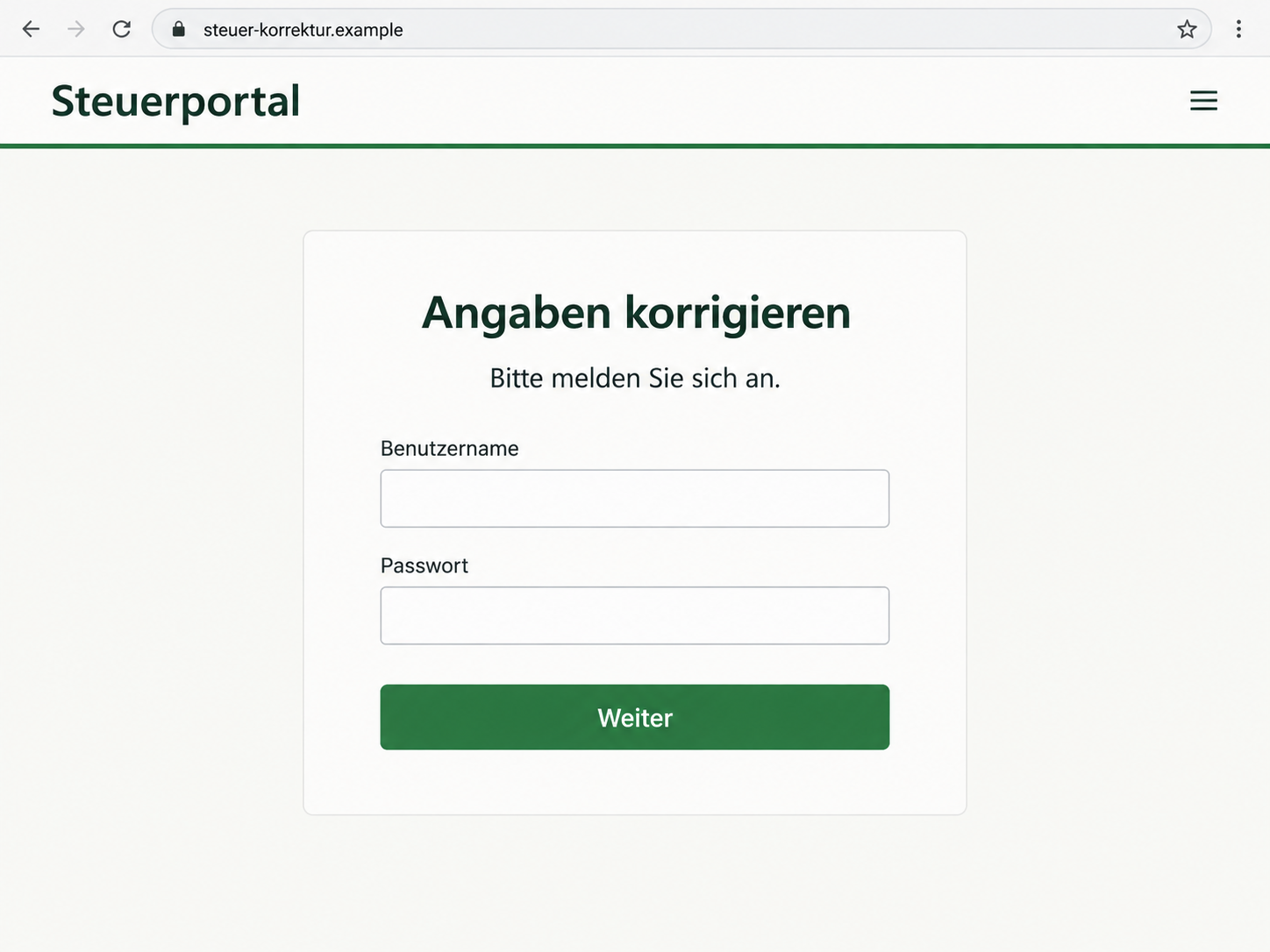
The illustrative reconstruction below shows that kind of login trap on a fictional address.
It is not a capture of the campaign’s destination, and its fields should not be read as a verified list of what every version requests.
Step 4: Information leaves your control
If you submit information to a phishing page, assume its operator may have received it.
An error message, blank page, or redirect afterward does not tell you whether the submission was stored.
The consequences depend on what you supplied. An email address is different from a reused password.
A certificate file and its password require a different response from a bank account number. Write down the actual exposure instead of assuming the worst or dismissing everything.
The documented email does not prove that every recipient loses money or that every destination installs malware. Its confirmed danger is the deceptive route to data entry.
Any additional requests you encountered should be reported as part of your own case.
Who Sent the Email, and Where Does the Link Go?
The ELSTER name is not the sender’s identity
An inbox may display a friendly name more prominently than the underlying address.
Expand the sender information if you need to preserve evidence, but do not treat a familiar display name as authentication.
Equally, do not assume an unfamiliar person named in a signature is the criminal. Signatures can be copied.
The evidence supports impersonation, not an accusation against whichever name appears at the bottom.
A web address matters more than a green header
Start a fresh visit to the official ELSTER service using a trusted bookmark or an address you type yourself.
Avoid an emailed shortcut and avoid choosing a sponsored search result just because it appears first.
For comparison, a fictional address such as elster.example is not ELSTER simply because it contains the name.
A padlock would only describe the connection to that site, not who is entitled to receive your tax information.
Get help outside the suspicious conversation
Use contact details from the official portal or tax correspondence you already trust. If an accountant handles your filing, contact that person through your established number or email thread.
Do not use a reply, a phone number supplied by a follow-up caller, or an attached support form to verify the original email.
All of those may keep the conversation inside the same untrusted channel.
Follow the request back to a real account task
You should be able to explain what you are correcting and why. A page that simply demands more identity details after every submission has not established a legitimate tax purpose.
If your official account shows no matching issue, ask the tax office before supplying anything else.
The absence of a notice is useful context, although your tax office remains the appropriate place to resolve uncertainty about an actual filing.
Check the Notice Without Sharing More Data
Close the message first. Then open your normal ELSTER route and look for relevant correspondence. Keeping these actions separate prevents the suspicious email from choosing where you authenticate.
If you use a certificate file, be especially careful about unexpected upload requests. A familiar filename does not make the receiving website trustworthy.
Never send the certificate to a supposed support agent as an email attachment.
If a page asks for card information to correct a spelling mistake or verify a tax account, stop.
The request needs an independently confirmed explanation, not another reassuring paragraph on the same page.
You can also compare the message with the official phishing warning without revisiting its link. The goal is not to outsmart the site or test it with made-up details.
The goal is to avoid giving it another opportunity to collect information.
When helping a parent or partner, ask what they actually did: read the email, opened the link, entered a password, uploaded a file, or approved something. Those are different events.
A calm, specific account makes the next call much more useful.
What to Do if You Have Fallen Victim to This Scam
Stop using the suspicious page. You do not need to complete its remaining steps to undo anything. Work through the actions that match what you shared.
-
Record the exposure while you remember it. Note the time, the address shown in your browser, and the types of information you entered. Save the original email if possible.
Do not put passwords or certificate files into an ordinary incident-report email.
If you only read the message, report it as phishing and remove it. Reading an email alone does not establish that your tax account or device has been compromised.
-
Contact the real ELSTER support or tax administration. Explain whether you entered credentials, uploaded a certificate, or approved an authentication request.
Ask which access credentials need to be revoked or renewed for your particular login method.
Do not assume deleting a certificate from your own computer invalidates a copy already obtained by someone else.
Follow the official recovery process rather than relying on a local file deletion.
-
Change any exposed, reused password. Use a trusted device and the affected service’s official settings.
If that password also protects your email, secure the mailbox promptly because it may receive other account recovery messages.
Check available sign-in history and recovery settings. Remove unfamiliar access where the service provides that option, and enable additional authentication when available.
-
Tell your bank if financial information was entered. Describe the difference between sharing an IBAN, card details, online-banking credentials, or an approval code.
Ask the bank which protective action fits the exposure.
If you notice an unfamiliar payment, report that transaction specifically and ask about stopping or disputing it.
Do not wait for the promised correction or a supposed refund to finish processing.
-
Check the device if you downloaded or installed anything. A phishing form can steal data without installing malware.
However, an unexpected attachment, browser extension, or support app deserves a separate device check.
Malwarebytes can help scan for malicious software.
If you installed remote-access software at the sender’s direction, disconnect the device and seek trusted help before using it for tax or banking access.
-
Report the impersonation and preserve useful records. Send the suspicious message through your email provider’s phishing-report function.
Report suspected identity misuse or financial loss to the police, keeping the incident reference with your bank and tax correspondence.
MalwareTips also explains how phishing links can misuse trusted-looking addresses. A familiar part of a link is not enough to authenticate the destination.
Keep evidence private rather than posting your tax details in a public warning.
-
Expect possible follow-up messages. Someone who has your contact information may claim to be investigating the first email.
Do not share codes or pay a recovery fee to an unsolicited caller.
AdGuard can help block some malicious destinations and deceptive ads when its relevant protections are enabled.
It cannot retract information already submitted, replace account recovery, or guarantee that a newly created phishing page will be blocked.
Frequently Asked Questions
Is the ELSTER correction email a real tax notice?
The same-day correction message discussed here is a documented phishing email. Do not use its button.
Check any actual account issue through the official ELSTER service or your tax office independently.
Does ELSTER ever send legitimate email?
Yes, genuine communications can exist. That does not authenticate this request.
The safe distinction is whether you independently verify the message and use a trusted route to your account, rather than supplying credentials through an unsolicited correction link.
Can the sender see my tax return just because I received this?
Receiving the email does not demonstrate access to your return. The vague wording can fit many recipients.
If you supplied authentication information, contact official support to assess the actual risk to your account.
What if the page said my login failed?
A failure message does not mean your submission was discarded. Treat any password or sensitive file you supplied as exposed and follow the appropriate recovery steps.
Do not keep trying different passwords on that page.
Should I delete my ELSTER account immediately?
Do not make a disruptive account change solely because a scam email arrived.
If access credentials were exposed, contact the tax administration and follow its instructions about securing, renewing, or replacing access.
Is a certificate file more sensitive than an email address?
Yes. A certificate used for authentication is not ordinary contact information. Tell official support if you uploaded one and whether its password was also entered.
The correct response depends on the authentication method and the information disclosed.
The Bottom Line
The ELSTER email scam turns an unspecified tax problem into a rushed login request. A green button and a same-day deadline are not evidence that your account needs correcting.
Check through your usual ELSTER route, keep authentication files private, and act promptly if you shared access details.
You can take a tax concern seriously without trusting the email that raised it.








