

An email says your N26 account is temporarily restricted. To restore normal access, you supposedly need to complete an identity check before a deadline.
The heading calls it a “DSP2-Update,” which makes the request sound like banking paperwork you may have missed. That is the opening used by this N26 email scam.
Overview
A security check that starts in an unsolicited email
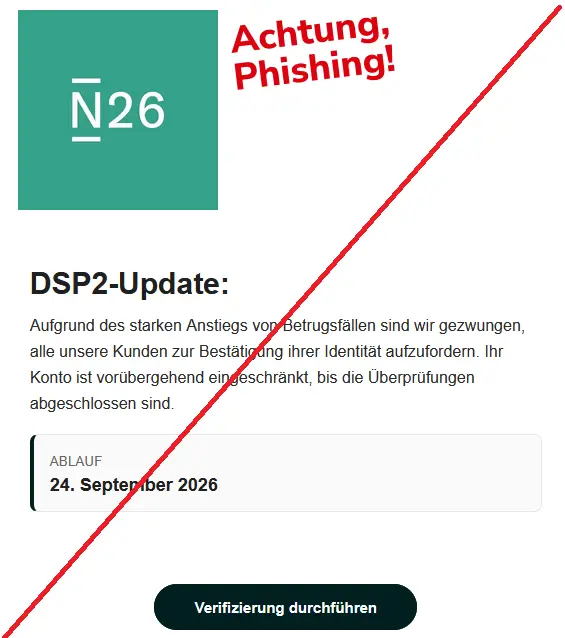
The message claims rising fraud has made an identity check necessary. It presents the restriction as already in place, leaving the recipient to resolve it through a verification button.
A September 23, 2026 Phishing Radar alert documents this N26 impersonation email. The captured version uses a September 24 expiration date and the “DSP2-Update” heading.
The allegation of fraud is part of the bait.
It does not establish that your account has experienced suspicious activity, that N26 has restricted it, or that the sender has access to the bank’s systems.
N26’s own warning contradicts the demand
In its official phishing guidance, N26 says it does not send time-critical email or text warnings demanding login information.
It also says identity verification is not requested outside its secure communication channels.
That is a much stronger reason to reject this demand than a hunch about the email’s grammar.
The message pushes the recipient toward the kind of pressured, external verification the bank warns against.
N26 is the impersonated bank, not the perpetrator. This article concerns a fraudulent message borrowing its identity.
It does not claim that the bank is a scam or that customer information was leaked by N26.
The warning signs that survive a new subject line
The sender can change dates and wording cheaply. Focus on the request rather than memorizing one screenshot. The recognizable combination is:
- An unexpected claim that your account is restricted.
- A security or regulatory-sounding explanation.
- A deadline presented as an ultimatum.
- A verification button leading away from your established banking route.
- A request to provide sensitive information to resolve the supposed problem.
None of those elements should replace checking your actual account.
Open the N26 app yourself, not from the email, and look for relevant information or contact support through the genuine service.
The Trick Is Making Fraud Prevention Sound Urgent
“Protect your account” is a persuasive instruction because it sounds like the responsible thing to do.
The email makes hesitation feel risky: if you do not complete the check, you might lose access to your money.
The unfamiliar acronym adds another layer. You may assume it refers to a requirement you do not fully understand and therefore should not question.
But a banking term in a heading is not proof that the message came from a bank.
You do not need to become an expert in payment rules to reject the link.
The immediate issue is simpler: who chose the page where you are being asked to identify yourself?
A real account concern should be handled through a channel you can authenticate independently.
That remains true even if the email looks polished, uses your preferred language, or arrives on a day when you genuinely need to make a payment.
How the N26 Email Scam Works
Step 1: A familiar bank identity lends credibility
The captured email places the N26 name prominently above the message.
Its simple layout resembles the sort of notice people expect from a digital bank, rather than an obviously extravagant offer.
A logo is not a security feature. Copying one does not require the sender to control an N26 account, let alone the bank’s communications system.
Receiving the email also does not prove you were individually selected.
The message describes a broad customer check and does not establish a genuine relationship between its sender and your own account.
Step 2: The sender claims your access is already limited
The email does not merely suggest reviewing your details at your convenience. It says the account is restricted pending checks, which gives the recipient a problem to solve immediately.
That framing can make the verification button feel like the only way forward.
In reality, you still have the option of opening the genuine app and asking the bank what, if anything, is required.
If the app itself is unavailable, do not take the outage as confirmation of the email.
A connection problem and an impersonation message can occur at the same time without being related.
Step 3: A deadline pushes you onto the sender’s route
The deadline narrows the time you feel you have to think. A recipient worried about paying rent or receiving wages may prioritize restoring access over checking the destination.
The button is where that pressure becomes actionable. Its wording promises verification, but the label cannot tell you who operates the website behind it.
Do not extend the conversation by replying with a question about the deadline. Ask through the genuine app instead.
A reassuring answer from an unverified sender does not make that sender trustworthy.
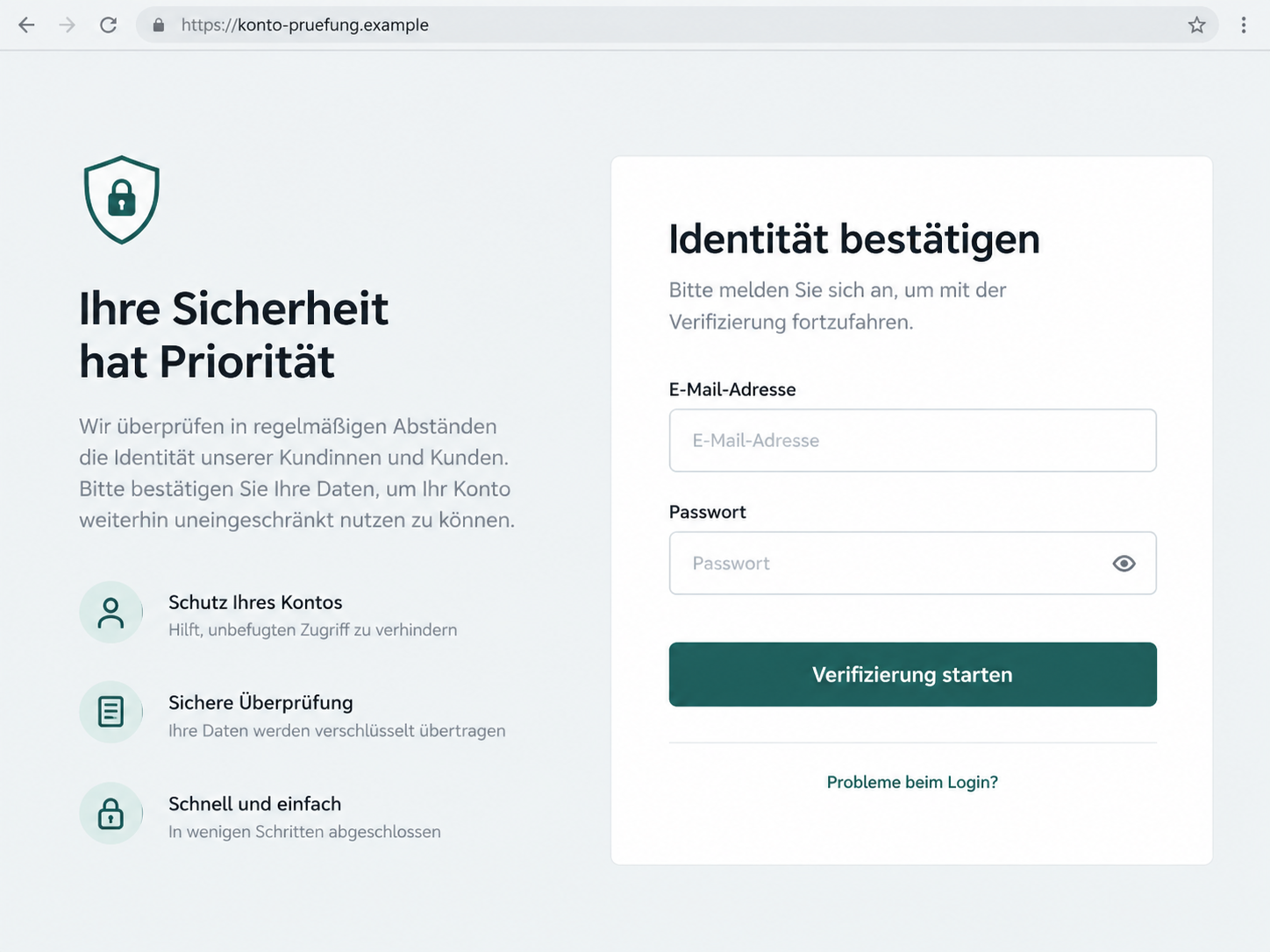
Step 4: A fake sign-in can capture real credentials
A fraudulent banking page can look convincing while collecting login information for someone else. It does not need to provide working banking features to do that damage.
The illustration below reconstructs this kind of identity-check login on a fictional domain.
It is not a capture of the campaign’s landing page, and we have not verified an identical set of fields for every version.
If you entered information, a later error or redirect is not reassurance. Treat submitted credentials as potentially exposed and contact the real bank rather than trying the form again.
Step 5: Further prompts can ask for more than a login
Phishing does not always stop at the first form.
If another screen, text, or caller asks for a code or an approval, read it as a new request involving a separate security boundary.
Do not approve a payment or device change because a webpage describes it as verification.
What matters is the action shown by the genuine banking service, not the explanation supplied alongside it by a stranger.
The documented email does not prove that every recipient reaches a second-factor theft stage.
This is a precaution for anyone who did see additional prompts, not a claim that a particular transfer occurred in every case.
Who Sent the Email, and Where Does the Link Go?
The bank is real; the sender still needs checking
Distinguish an institution from a message using its name. A copied N26 identity is not evidence that N26 wrote, approved, or delivered this request.
Likewise, a name in the sender field does not identify the actual operator.
Avoid accusing a named employee or another business on the strength of details an impersonator may have copied.
A familiar word inside an address is not enough
N26’s official guidance identifies app.n26.com/login as its web login address.
The safer habit is to use the installed app or an established bookmark, not compare a suspicious address while a timer is pressuring you.
A domain can contain a bank’s name without belonging to that bank.
The address konto-pruefung.example in our illustration is deliberately fictional and should never be treated as a place to enter information.
Use support you reach independently
Contact N26 through its official support channels.
A chat window embedded in the suspicious page is not an independent check; it may be part of the same attempt to persuade you.
Do not give an unsolicited caller remote access to your device to help with verification.
If the caller says the case is urgent, end the call and ask the bank yourself.
Trace the claim to your actual account
The relevant question is whether your genuine account shows a matching request or support confirms one. A convincing email cannot answer that question on its own.
If support needs you to complete a legitimate process, follow the verified instructions through the official service.
Do not return to the suspicious button just because the bank also performs identity checks in other circumstances.
A Real Banking Prompt Can Still Be Misused
Two-factor authentication is valuable, but it depends on understanding the action you are approving. A genuine notification can be triggered by someone attempting a real action with information obtained elsewhere.
For that reason, the appearance of a prompt in a real app does not validate the email that preceded it.
Ask whether you personally started the action and whether the details match what you intended.
If you see a new-device request, a payment, or an unfamiliar recipient, do not approve it to make the warning disappear.
Contact the bank through a trusted route and explain what is on screen.
There is also no need to move money to a supposed safe account because someone claims your current account is under attack.
An unsolicited instruction to transfer funds introduces a new risk, not a recovery shortcut.
When reporting, separate each event: entering a password, receiving a code, sharing that code, and approving an action.
Those details help support understand what may need to be blocked or reversed.
What to Do if You Have Fallen Victim to This Scam
Do not wait for the deadline in the email. If you shared account information, use the real bank’s help channels promptly and explain the exposure clearly.
-
Leave the fake page and stop approvals. Do not retry a failed login or submit a second password.
Decline unexpected requests and avoid following instructions from anyone who calls about the email.
If you only received the message, report it without using its link. An email appearing in your inbox is not itself proof that your balance or login is compromised.
-
Contact N26 through the genuine service. Use the app or independently opened official support pages. N26’s fraud-support guidance explains how to seek help.
Tell support exactly what you entered and whether you shared a code, approved a transaction, or enabled another device. Ask which immediate restrictions are appropriate for your account.
-
Secure exposed credentials. Change the affected password through the legitimate service using a trusted device. If you reused it for email or another account, replace it there too.
Review recovery information and available account-access records. Do not assume a password change alone resolves an action that has already been authorized; tell the bank about those actions separately.
-
Report unfamiliar payments immediately. Check the genuine account for transactions you do not recognize.
Give support the amount, time, recipient, and any reference shown, and ask about recall or dispute options.
Describe the event accurately, including any approval you were tricked into giving. Avoid promises about reimbursement. Your bank needs the facts to assess the available response.
-
Preserve the original email, not just a screenshot. N26 asks for suspicious emails to be forwarded to support@n26.com or preferably attached as an .eml file.
The original message helps preserve information a screenshot leaves out.
Keep a personal incident timeline as well. Do not include your banking password or full authentication codes in an ordinary email report.
-
Check for a separate device compromise if relevant. If you downloaded an attachment, installed software, or gave remote access, stop using that device for banking until it is checked.
Malwarebytes can help find malicious software. A clean scan does not invalidate a phishing report, because a website can collect credentials without installing anything.
We also examine a different banking verification lure in our Revolut phishing text investigation.
-
Keep recovery outside unsolicited messages. Report suspected financial loss or identity misuse to the police and keep the reference for your bank.
Be wary of anyone promising to recover the money for an advance fee.
AdGuard can help filter some malicious pages and deceptive ads with the relevant protections enabled.
It is an additional precaution, not a substitute for account recovery or a guarantee against new phishing domains.
Frequently Asked Questions
Is the N26 DSP2-Update email legitimate?
The deadline-based identity-check email shown here is a documented phishing attempt. Check your account through the genuine N26 app instead of following its verification button.
Does N26 ever need to verify a customer’s identity?
Legitimate identity checks can exist. That does not make an unsolicited, pressured request safe. Confirm any requirement through N26’s secure channels and complete it only through a verified route.
What if my account really is restricted?
Contact genuine N26 support. A real account problem does not authenticate a separate email, and the suspicious link is not a safe shortcut around the bank’s process.
Should I send N26 a screenshot of the email?
N26’s phishing guidance asks for the original email thread or an .eml attachment, rather than an email screenshot.
Keep screenshots for your own records if useful, but follow the bank’s reporting instructions.
Am I safe if I entered a password but no code?
Do not assume the password is harmless because you stopped before a code. Change it through the legitimate service and contact the bank.
Explain that no further code or approval was given so the exposure can be assessed accurately.
Does receiving this email mean N26 was breached?
No. The email does not establish how the sender obtained your address or prove a bank breach.
Its copied branding and broad account warning are evidence of impersonation, not evidence of access to N26’s systems.
The Bottom Line
The N26 email scam uses a security update and a supposed account restriction to rush you toward an untrusted verification page.
The deadline is not an official instruction. Open the real app to check, and contact N26 promptly if you shared information or approvals.
You do not need to trust an email to take the security of your bank account seriously.








