

An email claiming to come from Deutsche Rentenversicherung says a review has uncovered excess pension contributions. A refund of €387.44 is supposedly waiting for the right bank details.
The DRV refund email scam arrives with a deadline, a reference number, and an account-confirmation button. That tidy presentation leaves an important question unanswered.
Overview
A contribution refund offered through an email button
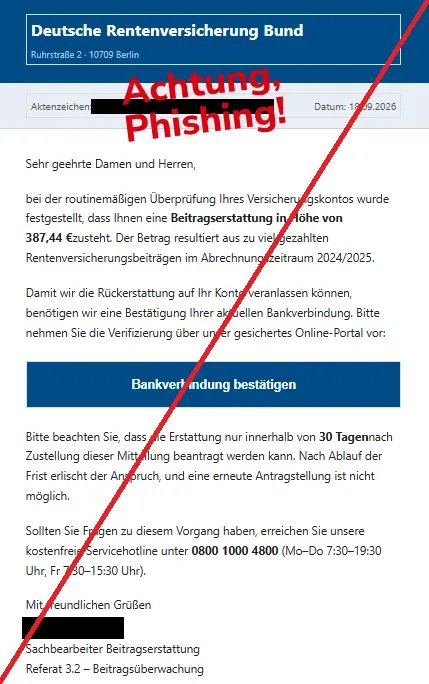
The message impersonates Germany’s pension insurance institution, Deutsche Rentenversicherung, often shortened to DRV.
It claims a review of earlier contributions produced a refund and asks the recipient to confirm bank information.
A September 18, 2026 Phishing Radar warning documents this €387.44 lure. The captured email refers to 2024/2025 and says the claim expires after 30 days.
Those details are part of the impersonation. They are not an assessment of your pension record or evidence that you have a refund to claim.
The request needs to be checked outside the message.
The real institution confirms an ongoing phishing problem
Deutsche Rentenversicherung has issued its own warning about a wave of phishing emails. Its examples include supposed contribution refunds and requests to enter personal or payment information through links.
The institution also says numerous fraudulent sites have been taken down. That supports treating this as an impersonation campaign, not merely one person’s disagreement about a genuine pension decision.
It does not tell us how many people received this exact email or how much money was lost through it.
We have not verified those figures and will not infer them from the existence of the warning.
What to recognize if your version looks different
Amounts, dates, names, and destination addresses can change. The central request is more useful to recognize than any one detail. In this example, the warning signs include:
- An unexpected claim that an account review found excess contributions.
- A precise refund amount presented without independently verified records.
- A request to confirm banking information through an email link.
- A claim that waiting will permanently end your entitlement.
- Official-looking contact details used to make the message feel trustworthy.
Receiving such an email is not proof that your pension account has been accessed.
It is a reason to reject the sender’s route and verify any genuine administrative question through the real institution.
Why This Refund Story Sounds Plausible
Pension contributions can feel complicated. An email about an adjustment may sound like something an administrator discovered in records you do not routinely review.
The message uses that uncertainty to its advantage. It presents the calculation as finished and asks only for the bank information needed to send the money.
The recipient is encouraged to complete a task, not examine the claim.
The reference to previous years adds a sense of background work. So does the exact amount. Neither detail proves that anyone reviewed your real contribution history.
The threatened loss of entitlement is another nudge. You may feel that checking too carefully could cost you money.
In reality, an unverified sender has no authority to define your pension rights or the process for a genuine refund.
You do not need to solve the pension calculation yourself. Ask the real institution whether there is a relevant notice or adjustment.
That is a far safer question than asking the suspicious form what information it wants next.
How the DRV Refund Email Scam Works
Step 1: An administrative-looking message claims authority
The email uses Deutsche Rentenversicherung’s identity, a reference line, and formal language. Its presentation suggests an office has reviewed a file and is notifying you of the result.
Copying a heading or adding a reference number does not require access to the pension system. Those details can be placed into a message intended for many recipients.
Do not supply your insurance number in a reply to help the sender locate your record. That gives an unverified contact more information before you have established any legitimate relationship.
Step 2: A precise refund creates a reason to continue
The promised amount makes the email feel concrete. It is large enough to matter but framed as an administrative correction rather than an extravagant prize.
That distinction can lower your guard. You may regard the money as something already owed to you, making the next step feel like collection rather than a financial decision.
But a number in an email is not a refund decision. Until you verify the underlying claim through the real institution, you do not know that the payment exists.
Step 3: Bank confirmation becomes the condition
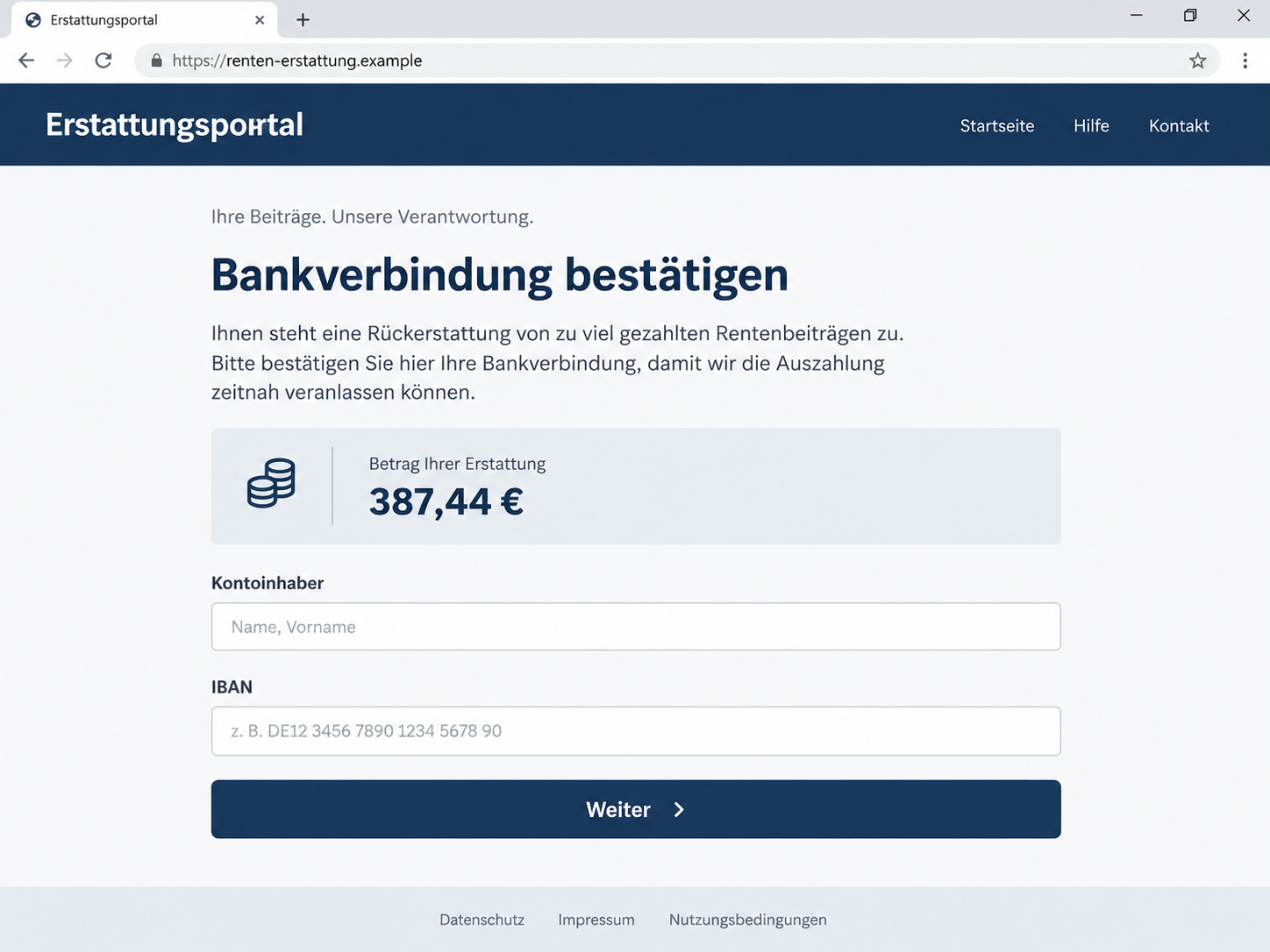
The message directs you to confirm your bank details through what it calls a secure portal.
The word “secure” describes the sender’s claim, not an independently verified property of the destination.
The illustrative form below uses a fictional address to show how a refund story can become a request for account information.
It is not a capture of the destination used in the documented email.
We have not verified every field or later screen in that destination.
Do not assume a particular request is safe merely because it was absent from a screenshot, or because the first page asks only for basic details.
Step 4: The deadline discourages independent checking
The email claims the opportunity disappears if you do not act within its stated period. That turns a supposed refund into something you might lose by being cautious.
Thirty days may seem less aggressive than a same-day warning, but the pressure serves the same purpose.
It encourages the recipient to treat the message as a pending task that must eventually be completed.
Do not keep the email as a reminder to use the link later.
If you want to investigate a real contribution question, make your own note to contact Deutsche Rentenversicherung through its official channels.
Step 5: Submitted information can outlast the page
A phishing page can disappear after information has been collected.
Its disappearance does not undo a submission, and a later failure to load does not tell you what the operator retained.
The response depends on the information involved. A name and IBAN are not the same as banking credentials, card details, identity documents, or a completed approval.
Report the actual fields and actions as accurately as you can.
If another person contacts you about the refund afterward, verify them independently. Details repeated from your submission can make a follow-up convincing without making it legitimate.
Who Sent the Email, and Where Does the Link Go?
DRV is the impersonated institution
This warning is about criminals using the institution’s identity. It is not an allegation that Deutsche Rentenversicherung is operating a fraudulent refund scheme.
Likewise, a staff name or department label in the email should not be treated as the operator’s real identity. Impersonators can copy names as easily as they copy a heading.
A Berlin address does not authenticate a link
The captured message includes office-style contact information. Even when a footer contains a real address or telephone number, it does not establish who controls the button’s destination.
Obtain contact information from the institution’s official website or trusted documents you already hold. Do not use the suspicious message as your directory for checking that same message.
Ask about the claim through official support
Explain that you received an unexpected contribution-refund email and want to know whether there is a genuine matter on your record.
You can do that without submitting bank details to the email’s form.
If you already disclosed information, describe the exposure and ask whether your pension-account details need attention.
Keep any instructions from the verified contact separate from demands made by the suspicious sender.
The payment should connect to verified records
A legitimate administrative matter should have a basis the institution can discuss through its established channels. A form that merely repeats the promised amount has not supplied that basis.
Do not pay a release fee, make a test transfer, or upload additional identity documents to persuade an unknown page to process the refund.
Each request would need independent verification, not just a continuation of the original story.
Help a Relative Check Without Taking Over Their Accounts
Messages using pension-related language may be forwarded to family members for help.
If someone asks whether this one is real, begin with the request in the message rather than criticizing the person for believing it.
Ask what they have already done. Reading the email, following the link, entering an IBAN, sharing a password, and approving a bank action are distinct events.
Knowing which occurred makes the next step clearer.
Help them find an independently verified contact route.
There is no need for you to collect their password, authentication codes, or complete pension records in order to make that call possible.
If they are frightened about losing the refund, separate the questions. Whether a genuine refund exists is for the institution to confirm.
Whether to keep using an unverified form can be answered now: stop.
Make a short private timeline together if information was shared.
It is easier to describe events accurately while the sequence is still fresh, especially if several screens or a follow-up call were involved.
What to Do if You Have Fallen Victim to This Scam
You can stop even if you have already started the process.
Do not finish another screen to cancel the request, and do not wait for a promised refund before reporting exposed information.
-
Leave the form and save existing evidence. Preserve the email, the web address if available, and a note of the information entered.
Keep any relevant messages or payment records in a private folder.
Do not revisit the suspicious site just to recreate every screen. Your original email and an accurate account of what happened are useful even without a perfect screenshot collection.
-
Contact Deutsche Rentenversicherung independently. Use the official website’s contact route, not a reply or button in the email.
Report the impersonation and ask about any genuine issue with your contribution record.
If personal or insurance information was disclosed, say exactly which details were involved.
Avoid sending extra sensitive documents through ordinary email unless the verified institution directs you to a suitable process.
-
Tell your bank about financial-data exposure. Distinguish between an IBAN, card details, banking credentials, and any authorization you completed. The appropriate response may differ significantly.
Review account activity and report unfamiliar transactions promptly.
Ask about the available protective measures and recovery options without assuming either that nothing can happen or that the account must automatically be closed.
-
Replace any password you entered. Use the genuine service on a trusted device.
If the password was reused, change it at other affected services, especially the email account used for account recovery.
Check available security settings, recovery contacts, and active sessions. If the page requested an identity document, mention that separately when reporting; a password change does not retract a document copy.
-
Address unexpected downloads or remote access. A data-entry scam does not require malware, but a downloaded attachment or installed app creates an additional concern.
Malwarebytes can help scan for malicious software. If someone obtained remote access, disconnect the device and arrange trusted assistance before returning to sensitive accounts.
Do not use a recovery service advertised by the suspicious sender.
-
Report misuse and keep the references. Use your email provider’s phishing-report option.
Contact the police about suspected identity misuse or financial loss, and keep the report number with your bank correspondence.
Our investigation of fake court-filing emails examines another phishing campaign built around official-looking administration. Share warnings without exposing your own insurance number, address, or account details.
-
Do not pay for a second supposed refund. Be cautious if a caller offers to release the payment, repair your records, or recover money for an upfront charge.
Verify any contact through the real institution.
AdGuard can add filtering against some known malicious pages and deceptive ads. It cannot validate a pension entitlement or erase submitted information, and newly created scam pages may escape filtering.
Frequently Asked Questions
Is the €387.44 pension refund email genuine?
The message shown here is documented phishing. Do not confirm banking details through its link. Ask Deutsche Rentenversicherung directly if you have a genuine question about contributions or a refund.
Does this warning mean pension contribution refunds never happen?
No. The scam warning does not decide anyone’s legitimate entitlement. It identifies a fraudulent approach that borrows the institution’s name. Real eligibility questions belong with the pension insurance institution.
Why does the email include a reference number and office details?
Those details make it resemble administrative correspondence. They can be copied or invented and do not authenticate the link. Use independently obtained contact information to check the underlying claim.
Can someone empty my account using only my IBAN?
An IBAN is not the same as a banking password or transfer approval.
Still, report its disclosure and any accompanying personal information to your bank, monitor activity, and follow the bank’s advice about the specific exposure.
What if I am not retired yet?
The email refers to contributions, so it can seem relevant before retirement as well. Your age or employment status does not make the message authentic.
Verify any actual pension-record question independently.
Should I ignore the 30-day deadline?
Do not treat the deadline in this fraudulent email as authoritative.
If a real administrative question concerns you, contact the institution promptly through its official channels rather than completing the suspicious form.
The Bottom Line
The DRV refund email scam turns a supposed contribution adjustment into a request for banking information. Its exact amount and official-looking footer do not establish a genuine payment.
Check the claim directly with Deutsche Rentenversicherung.
If you already submitted data, stop further requests, tell the relevant institution and bank what was exposed, and keep the recovery process outside unsolicited emails and calls.








