

For a lawyer or law-firm employee, a Notice of Electronic Filing is routine enough to deserve immediate attention. It may concern a client, a deadline, or a case no one wants to overlook.
The newest trap copies that rhythm. The first email does not always ask for a password or even contain the final malicious link. It simply tries to get a reply.
That small response tells the sender the inbox is active and the recipient is engaged. The dangerous document link arrives next, dressed as the natural continuation of a court notification.
Overview
What recipients see
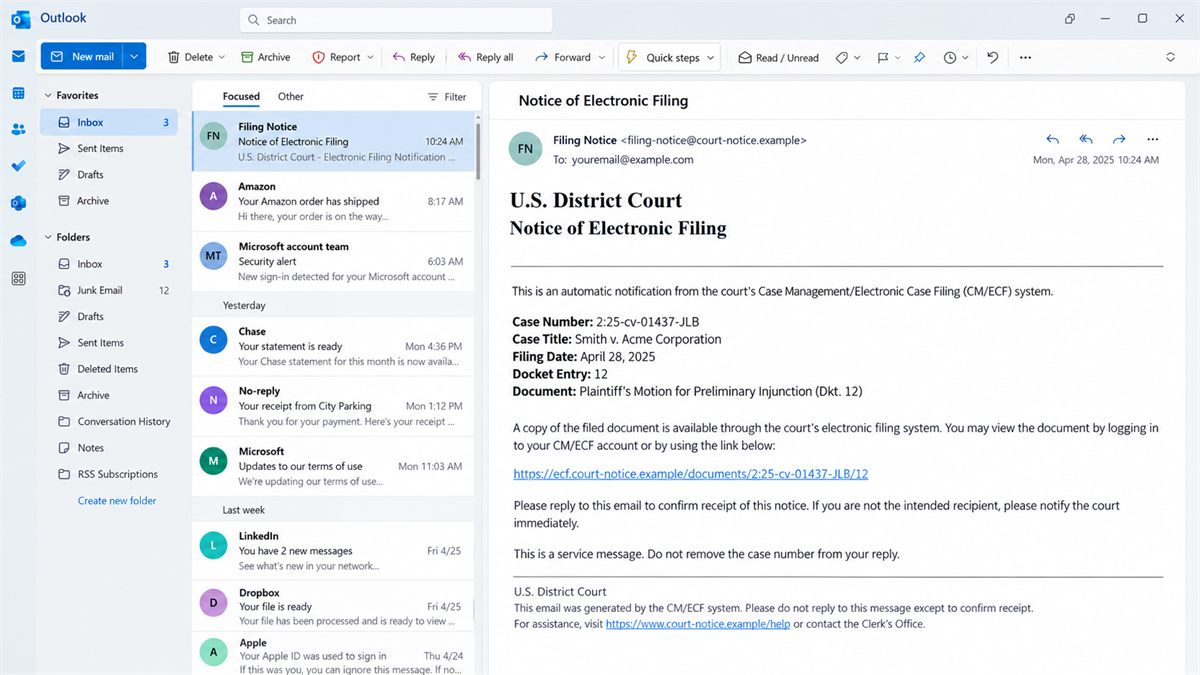
The email is made to resemble a Notice of Electronic Filing, often shortened to NEF, from a court’s electronic filing system. It may include a plausible case number, docket entry, filing date, party names, or language familiar to people who work with CM/ECF notifications.
Unlike a blunt password-reset lure, the message may initially ask the recipient to confirm receipt, answer a question, or reply for access. That makes it feel more like ordinary professional correspondence and can help the sender avoid automated link scanning on the first pass.
What happens after the reply
The Eastern District of New York warns that fake NEFs have been reported nationwide and are being sent to attorneys and law firms. According to the court, a recipient who replies receives a follow-up email containing a link to access a document, but the link leads to a malicious website.
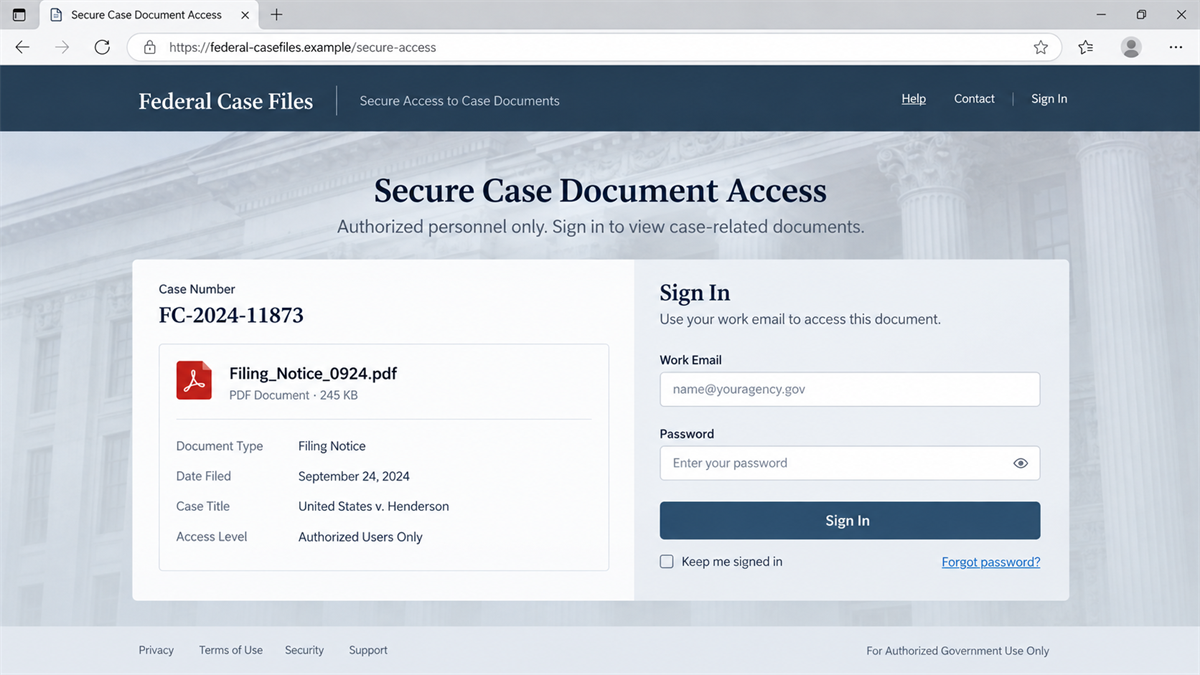
The second site may imitate a court document portal, cloud file-sharing service, or Microsoft 365 sign-in. It can ask for work credentials, present a malicious download, or route the visitor through several pages before the final theft. The precise page can change while the reply-first structure stays the same.
Why this is a confirmed scam
This is not speculation about an oddly formatted court email. A federal court has published a specific warning about nationwide reporting, the reply request, and the malicious follow-up link. The proper verification path is the official CM/ECF system, not the link or contact route inside the questionable email.
Important warning signs include:
- A court filing notice arrives for a case or attorney the recipient cannot place.
- The sender asks for a reply before providing document access.
- A follow-up message uses a non-court domain or a file-sharing page.
- The link asks for an email password, multifactor code, or software installation.
- The message creates an urgent deadline that is not visible in the official docket.
- The case details cannot be confirmed through CM/ECF or PACER.
Why a Fake NEF Can Look Convincing
Legal work is document-heavy and deadline-driven. A message that looks like a routine filing can receive less scrutiny than an unfamiliar invoice or prize notice. Criminals benefit from that normality.
Case information may also be public. A scammer does not need access to the court system to copy names, case numbers, filing language, or an attorney’s contact details. Publicly available data can be assembled into a tailored email that looks far more credible than generic spam.
The request to reply is an especially smart piece of social engineering. Replying feels less dangerous than clicking a link. It also begins a conversation, establishes that a real person is reading, and can cause the later email to appear in the same thread.
Threaded email can weaken suspicion. Once the first message and the recipient’s own reply appear above the follow-up, the conversation has visual history. The malicious button may look like a service response rather than a cold phishing link.
Shared and delegated mailboxes add another complication. A paralegal may assume an attorney requested the file, while the attorney assumes intake already checked it. Attackers benefit when responsibility is unclear, because each person sees just enough activity to believe someone else validated the message.
A real NEF can contain links that are time-sensitive or available for limited access, so expiration language is not automatically fraudulent. The distinction is where the notice leads and whether the case exists. Urgency should trigger the firm’s verification routine, not override it.
A busy employee may also assume that a partner, colleague, or client knows the case. Attackers count on people opening first and checking internally later. In a firm handling many matters, even a slightly unfamiliar case title can seem plausible.
The final page often looks cleaner than the email. A polished sign-in screen, a PDF icon, and an official color palette can create confidence. Yet a realistic design says nothing about who controls the domain or where entered credentials will go.
How the Fake Court Filing Email Scam Works
Step 1: The attacker selects a legal target
The campaign is aimed at attorneys and law firms because court notices fit their daily work and compromised mailboxes can contain valuable client information. Public firm directories, case dockets, professional profiles, and breached contact lists help attackers build target lists.
Step 2: A fake NEF lands in the inbox
The first email imitates court filing language and may contain enough case-style detail to appear routine. Instead of immediately presenting the payload, it asks the recipient to reply, confirm receipt, or request the protected document.
Step 3: The reply validates the target
When someone responds, the attacker learns that the address is monitored and that the lure has worked. The reply can also help the next message bypass simple filtering because it is part of an active conversation.
Step 4: A follow-up link delivers the trap
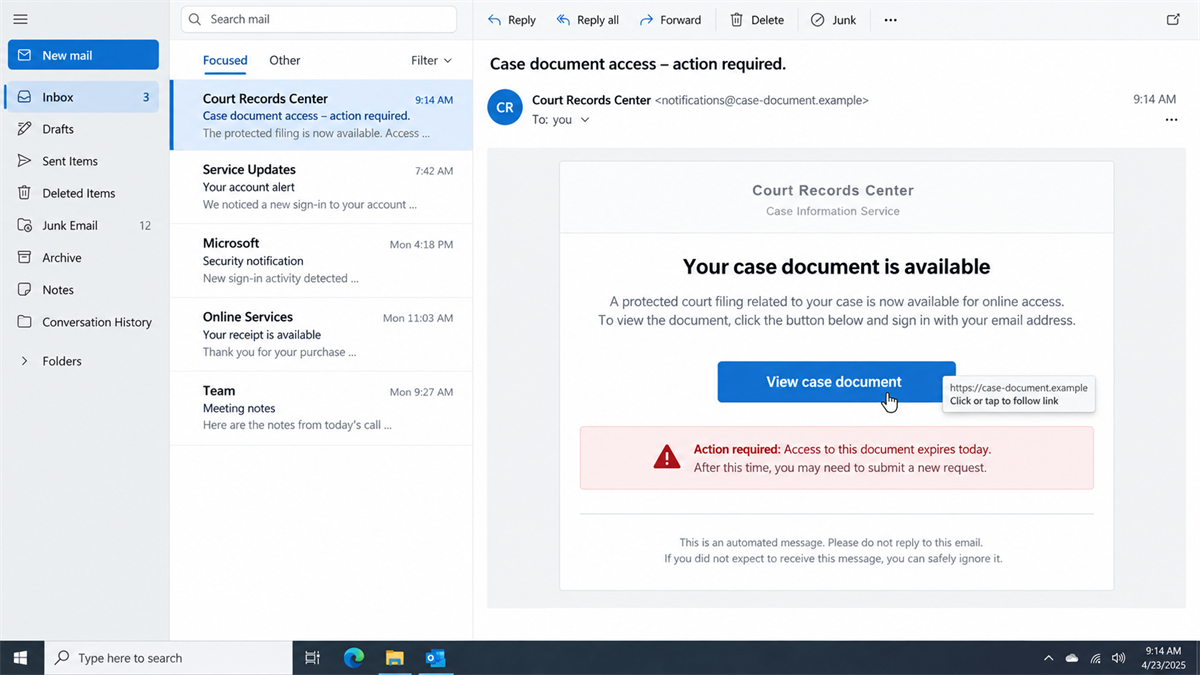
The attacker sends a link labeled as a filing, sealed document, docket attachment, or secure case portal. Hovering over it may reveal an unrelated domain, a newly registered address, or a link shortener. Sometimes the first redirect looks harmless before forwarding to the phishing page.
Step 5: The site asks for credentials or a download
A fake portal may request a work email and password, then claim the password is incorrect to capture a second attempt. Another version may offer a PDF, ZIP archive, or installer that introduces malware. A court notice should not require a recipient to install remote-access software.
Step 6: The stolen access is used inside the firm
With a mailbox or cloud account, criminals can read confidential messages, steal documents, create forwarding rules, impersonate lawyers, and target clients with payment-redirection emails. If malware was installed, the attacker may gain broader access to the workstation or network.
The Warning Signs in the Email and Portal
Start with relevance. If the case number, parties, jurisdiction, or assigned attorney do not line up with the firm’s records, do not reply to learn more. Look up the matter independently through the court’s official system.
Inspect the full sender address, reply-to address, and link destination. Display names are easy to copy. A domain that merely contains words such as court, filing, docket, federal, or ECF is not automatically connected to the judiciary.
Be cautious when a notice changes channels. A message that claims to come from CM/ECF but sends the recipient to a generic cloud page or an unfamiliar “secure document” domain deserves verification. The Eastern District of New York specifically advises validating cases and documents through CM/ECF.
Password requests are another decisive clue. A document page reached from an unexpected email should not be trusted with a work password. If a user believes authentication is required, they should close the page and navigate to the known service from a bookmark or typed address.
Company and Checkout Checks
Check the case in the official system
Search the case number and docket through CM/ECF or PACER using a saved bookmark or a manually entered official address. Do not use the email’s button to reach the verification source. If the entry is not present, treat the notice as hostile.
Check the sender and reply path
Expand the message headers or ask the firm’s IT team to do so. Compare the sender, return path, and reply-to domain. A message can display an official-looking name while replies go somewhere unrelated.
Check the document link without opening it
Hover over the button or copy the target into a plain text note without visiting it. Look for misspellings, extra words, URL shorteners, and domains that are not part of the official court system. Security staff can inspect the link in an isolated environment.
Check what the page requests
A fake checkout is not always a payment screen. In this scam, the valuable item can be a mailbox password, cloud session, multifactor approval, or downloaded program. Stop if a court-themed page asks for credentials through an unfamiliar domain or asks you to run software.
What to Do if You Have Fallen Victim to This Scam
- Stop interacting with the email and site. Do not send more replies, reopen the link, or download the file again. Preserve the message in its original form for investigation.
- Notify the firm’s security or IT team immediately. Give them the message, headers, link, time of access, credentials entered, files opened, and any multifactor prompts approved. Speed matters because attackers may create persistence within minutes.
- Change the affected password from a clean device. Use the organization’s normal password-reset path, revoke active sessions, and review registered recovery methods, app passwords, connected applications, and trusted devices.
- Inspect mailbox rules and delegated access. Look for hidden forwarding, automatic deletion, unfamiliar delegates, and rules targeting words such as invoice, payment, settlement, or wire.
- Contain a possible malware infection. If a file was downloaded or opened, disconnect the computer from the network and let the security team preserve evidence. A reputable scanner such as Malwarebytes can help identify common threats, but it should complement the firm’s incident response rather than replace it.
- Warn people exposed through the account. If the mailbox sent follow-up messages, contact recipients through a separate channel. Clients should verify any payment or bank-detail change directly with a known person.
- Report the campaign. Notify the relevant court, the FBI’s Internet Crime Complaint Center, and any professional or regulatory contacts required by the firm’s incident plan. Do not use contact details in the suspicious email.
- Block the infrastructure. Add the sender and domains to mail and web controls. An ad and tracker blocker such as AdGuard may stop some known malicious destinations in a browser, but organization-level email filtering and endpoint protection remain essential.
How Law Firms Can Reduce the Risk
Create a simple verification rule for unexpected court notices: no one replies, clicks, or signs in until the case is confirmed in CM/ECF or PACER. A predictable rule removes the need to make a judgment while a deadline-themed message is applying pressure.
Give staff a fast reporting path that does not require them to decide whether an email is malicious. A dedicated phishing button or security mailbox lets specialists inspect headers and links while the recipient continues with verified case work. Reporting should be treated as routine caution, not an admission of error.
Train staff on two-stage phishing, not just emails containing obvious links. The absence of a link in the first message is not proof of safety. A request to reply can be the opening move.
Use phishing-resistant multifactor authentication where possible, restrict legacy authentication, and alert on new forwarding rules or impossible sign-ins. Separate administrative accounts from everyday email use, and make sure cloud audit logs are retained long enough to investigate an incident.
MalwareTips has also documented how a fake security update can lead to credential theft. The common lesson is to leave the message and open the trusted service independently before entering a password.
Frequently Asked Questions
What is a Notice of Electronic Filing?
An NEF is an automated notice associated with activity in a court’s electronic case filing system. It can contain case and docket information. Because legal professionals expect these notices, scammers imitate them.
Are all unexpected NEFs fraudulent?
No. A notice can be legitimate even if one employee does not recognize it. The correct response is independent verification through CM/ECF, PACER, the responsible attorney, or the court using published contact details.
Why does the scam ask me to reply first?
A reply confirms the mailbox is active, creates an email thread, and signals that the recipient accepts the premise. The attacker can then send the malicious link as a seemingly expected response.
Can I trust a page that uses HTTPS?
No. HTTPS encrypts the connection to the site, but it does not prove the site belongs to a court. Phishing sites can obtain certificates and display a padlock just like legitimate sites.
What if I only replied and did not click?
Your account is not necessarily compromised, but the attacker now knows the address is active. Stop responding, report the message internally, and be alert for a more tailored follow-up.
What if I entered my password but MFA blocked the login?
Change the password immediately, revoke sessions, and notify security. Do not assume the account is safe. The password may be reused elsewhere, and repeated MFA prompts can be used to pressure a user into approving access.
The Bottom Line
The fake NEF campaign is dangerous because it looks like work. It borrows the language, timing, and document flow of a real court notice, then delays the malicious link until the recipient has replied.
That delay should not lower suspicion. It is part of the design. Verify the case and docket through the official filing system, and never sign in to a court-themed document page reached through an unverified email.
The Eastern District of New York’s scam alert confirms the nationwide reply-and-follow-up pattern. A few minutes spent checking CM/ECF can prevent a stolen mailbox from becoming a firm-wide incident.

Join the discussion
0 commentsShare your experience or ask a question about this article.
Discussion
Start the conversation
Have a question or something useful to share? Add the first comment.