

A payment goes wrong, and a page promising “Buyer Online Protection” offers an easy refund through Hong Kong’s FPS network.
The page looks built for a problem people really have. The danger appears when the supposed remedy starts asking for identity and bank details.
Overview
What the fake sites offer
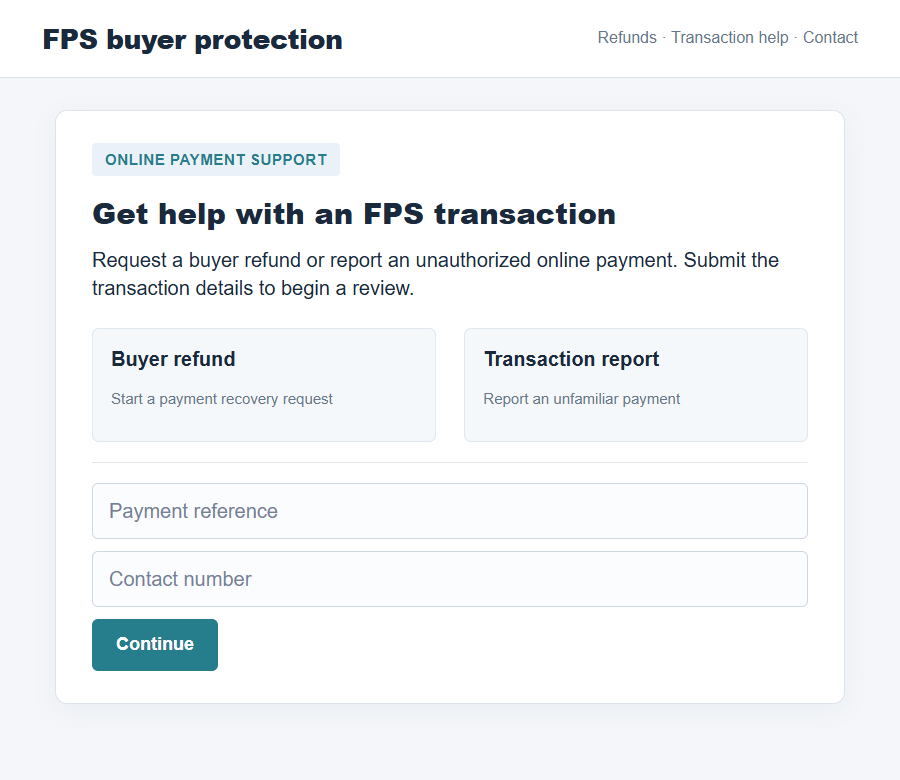
Hong Kong Interbank Clearing Limited warned about websites that pretend to provide buyer protection for Faster Payment System transactions. They advertise refunds and transaction help.
Some pages claim to handle unauthorized online transaction reports. Another version invites users to complete a real-name check to receive a cash reward.
The offer sounds reassuring after a disputed payment. That is why it can draw someone into sharing the information the site actually wants.
- A purported buyer-protection service for FPS payments.
- Claims about refunds and unauthorized transaction support.
- Requests for an identity document number, ID photo, and telephone number.
- Requests for bank information linked to a supposed virtual wallet.
- A handoff to WhatsApp customer service run by an impersonator.
What HKICL confirmed
In a September 2026 alert, HKICL identified three fraudulent domains: fpshk.cc, fpshkicl.homes, and refundrequesthk.xyz. They had no affiliation with it.
The alert separated two versions. The first two domains offered fake buyer protection, refund, and transaction-support functions for FPS payments.
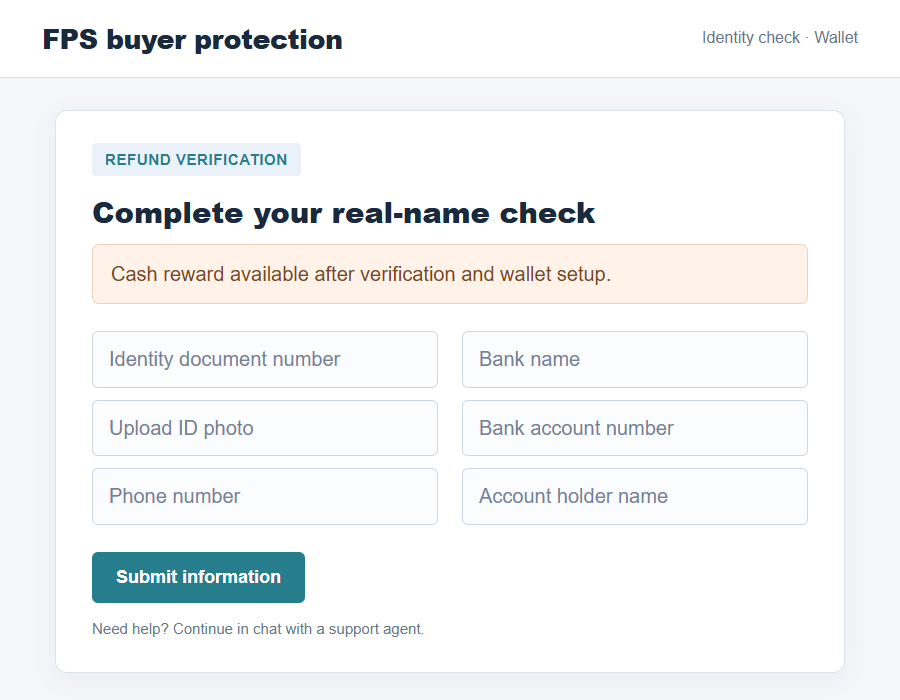
The third added a cash-reward pretext and asked for identity information. It also sought banking details for a supposed platform wallet.
HKICL said the third site directed users into a WhatsApp conversation with a fraudster posing as customer service.
The important distinction
FPS is a real payment system. HKICL is a real clearing organization. The scam is the website and support conversation falsely claiming to represent it.
HKICL said it does not normally provide FPS services directly to individual members of the public or proactively contact them in the way the sites imply.
The warning establishes the sites and data requests. It does not state how many people paid money, whether every visitor lost funds, or what each chat said.
Why a Refund Page Can Feel Credible
When a payment is disputed, people want one place to explain what happened and get money back. A page labeled buyer protection seems to answer that need.
A scammer can exploit confusion about who operates the payment rail, who holds the account, and who can investigate a transaction.
HKICL operates important payment infrastructure, but that does not mean it offers a consumer-facing refund desk through a website found in a message.
Your bank or payment service provider is usually the first place to report an unauthorized payment. The clearing network is not your personal account portal.
The fake pages blur that boundary. They use payment-system language to make a form and a chat handoff sound like normal dispute resolution.
The promise of a cash reward creates a second hook. A person who might ignore a simple refund form may continue when told verification unlocks money.
That reward claim does not establish that any legitimate benefit exists. It is part of the fraudulent page’s attempt to obtain more personal information.
The three domains named in the alert are examples reported at that time. New addresses can appear, so memorizing only those strings is not enough.
How the HKICL Buyer Online Protection Scam Works
Step 1: A page borrows the language of payment protection
The visitor reaches a site presented as an FPS buyer-protection service. It offers help with a refund or an unauthorized transaction.
The official alert does not say how each visitor was directed there. A link could circulate through different channels, but the documented issue begins at the false site.
The wording matters because it suggests a formal remedy rather than a private conversation. A person worried about a payment may lower their guard.
A familiar acronym can add authority. Yet a name resembling FPS or HKICL in a domain is not proof of ownership.
Step 2: The site asks the visitor to start a refund process
The first two domains described by HKICL imitate a “Buyer Online Protection” service. They offer refund, unauthorized-transaction reporting, and support options.
These functions sound exactly like what a distressed payer would search for. The page can turn uncertainty into a form submission.
HKICL identified the sites as fraudulent, so the apparent service should not be treated as an official dispute route.
Do not assume that a polished layout, padlock symbol, or working form makes the service legitimate. Those features can exist on an attacker-controlled site.
Step 3: A reward pretext asks for identity documents
HKICL said the refundrequesthk.xyz version also lured users with a cash reward tied to real-name verification.
The page requested a personal document number, an ID photo, and a telephone number. Together, those details could create a serious identity-exposure problem.
The public alert does not say exactly how stolen documents were later used. Treat the request as dangerous without inventing a downstream crime.
A refund claim does not require you to upload identity documents to an unfamiliar website simply because it uses official-sounding payment terms.
Step 4: Bank details are collected for a supposed wallet
The same site asked for bank name, account number, and account holder name to top up or withdraw money through a virtual wallet.
This changes the nature of the supposed refund. Instead of resolving a disputed payment with your bank, the page wants you inside its own invented process.
The official warning does not prove that every person who entered bank details lost money. It does show that the requests came from a fraudulent site.
Do not make a test transfer to see whether the wallet works. Sending money only increases your exposure to an operator you cannot verify.
Step 5: WhatsApp support keeps the fraudster in control
HKICL said the third site directed users to a WhatsApp chat with someone impersonating customer service.
A chat can make a fake service feel responsive. It also gives the fraudster a chance to request more details after the form has been submitted.
The representative may sound patient and informed, but the official alert identifies the handoff as part of the fraudulent operation.
Do not accept a chat agent’s assurance as verification of the site’s identity. The agent and the site can be controlled by the same people.
How to Tell the Real Organization From the Fake Pages
HKICL listed its genuine official websites as hkicl.com.hk and fps.hkicl.com.hk. Open them by typing the addresses yourself, not by following a message link.
Compare the whole domain, not just the first familiar letters. A name beginning with “fps” can still belong to a completely different operator.
Do not visit the fraudulent domains to test them. Their status and content may change, and a live visit can expose you to further prompts.
The alert says HKICL does not directly provide FPS services to individual members of the public under normal circumstances. That undercuts the supposed buyer-protection desk.
If a payment went wrong, open your bank’s known app or website and use its published support route. Explain the transaction rather than uploading documents elsewhere.
Be wary of a page that connects refund eligibility to a cash reward. Compensation offers can be used to distract from the actual data being collected.
Also be wary of a transfer from a website form to WhatsApp. An official-looking page does not authenticate a private chat account.
HKICL gave a general line, 2533 1111, for verifying suspicious communications claiming to come from it. Check the number on its official site before dialing.
What Your Information Exposure May Mean
Different submissions create different risks. Opening a page is not the same as uploading an ID photo or sending money.
If you only viewed the site, close it. Do not return through the same link to look for a deletion button or support form.
If you supplied your phone number, expect possible follow-up contact. A caller might already know you were seeking a refund and use that fact to sound credible.
If you submitted an ID photo and document number, report that exposure to police and ask your bank what identity-protection steps are appropriate.
If you entered bank details, ask your bank to monitor your account and explain whether any change of account credentials or additional safeguards are needed.
If you sent money, provide transaction references immediately. The bank can advise on recall or dispute options based on the payment method.
Keep screenshots of what you entered only if doing so is safe. Do not post your document image or full bank number in a public warning.
The exact next step depends on what you shared. A calm inventory of submitted information will help the bank and police give more useful advice.
Three Checks Before You Trust a Refund Offer
Check who actually holds your payment account
The bank or payment provider that holds your account can inspect its transactions. A site claiming to represent the payment network may not have access to your case.
Open the app you already use for that account. Find the support route there, then ask about the transaction by its date and reference.
If someone says you must instead use a new protection portal, ask your bank whether that portal is genuinely part of its dispute process.
Check the request, not just the page design
A believable layout can still contain an unreasonable request. In the HKICL warning, the false reward process sought an ID photo and document number.
The same site sought bank details for a virtual wallet. Those fields are not explained by a simple request to report an unauthorized FPS payment.
Ask what each piece of information is needed for and who will receive it. If the operator cannot be independently identified, stop.
Check where the conversation moves next
A handoff to WhatsApp is not automatically suspicious for every business. In this reported case, it was part of the fraudulent site’s customer-service impersonation.
Once the chat begins, the agent may know what you selected on the site. That familiarity can be manufactured because both channels belong to the same operation.
Do not share a one-time banking code, screen-sharing access, or another document because the agent says the refund is almost complete.
If you want to verify the interaction, exit the chat and contact HKICL or your bank through a route found independently.
Save the chat details before blocking the account if you have already provided information. Your report may help identify how the false page reached people.
Do not rely on a search result alone. Sponsored listings and lookalike names can lead back to the same impersonator.
The safest sequence is direct account provider, official organization website, then police if fraud is suspected. A random refund portal is not the starting point.
What to Do if You Have Fallen Victim to This Scam
- Stop using the site and WhatsApp contact. Do not upload more documents, transfer money, or follow fresh links sent by the supposed agent.
- Contact your bank directly. Explain the fake refund page, what account information you entered, and any payment you made.
- Report identity exposure. If you uploaded an ID photo or document number, tell police and ask what local protective steps apply.
- Save evidence carefully. Record the web address, chat account, messages, submitted fields, and transaction details without publicly sharing sensitive data.
- Verify through HKICL’s genuine route. Use its official site or published general line if you need to confirm whether a communication was authentic.
- Watch for follow-up impersonation. Anyone promising a guaranteed refund for another fee or another document upload may be extending the same scam.
- Report the fraudulent page. Send the information to police and the relevant browser or hosting abuse channel when possible.
If you downloaded a file or installed software from the page, scan the device with a reputable tool such as Malwarebytes and review account sessions.
AdGuard may help block known malicious pages and ads, but it cannot undo data already submitted. Bank and identity-protection actions come first.
Frequently Asked Questions
Is HKICL a real organization?
Yes. The warning concerns websites and a WhatsApp contact falsely claiming association with HKICL, not the real organization or FPS itself.
Does HKICL run Buyer Online Protection for individual FPS users?
HKICL said the named pages have no affiliation with it and that it does not normally provide FPS services directly to individual members of the public.
Are the listed fraudulent domains the only ones?
No. The September alert named three examples and noted that URL endings can vary. Verify the entire address and use official channels.
Should I upload my ID photo to claim a refund reward?
No. The reported reward and real-name verification request came from a fraudulent page seeking personal documents and contact information.
What if I only entered my phone number?
Stop engaging and be alert for follow-up calls or messages. Do not let someone use knowledge of your refund search as proof of legitimacy.
Who should handle a disputed FPS payment?
Start with your bank or payment provider through its official support channel. Report suspected fraud to police rather than relying on an unfamiliar buyer-protection page.
The Bottom Line
The HKICL Buyer Online Protection scam dressed a data-collection journey as help with FPS refunds. Its fake pages asked for identity and banking details.
Use your bank’s genuine dispute route, verify HKICL only through its official addresses, and do not follow a refund page into a private WhatsApp conversation.








