

An email says your store points expire tonight. A gift card, a tool set, or another tempting reward is waiting behind one button.
The retail reward email scam is easy to dismiss as ordinary spam. Its recent versions have a quieter trick that helps them reach real inboxes.
Overview
The visible offer is a prize you did not request
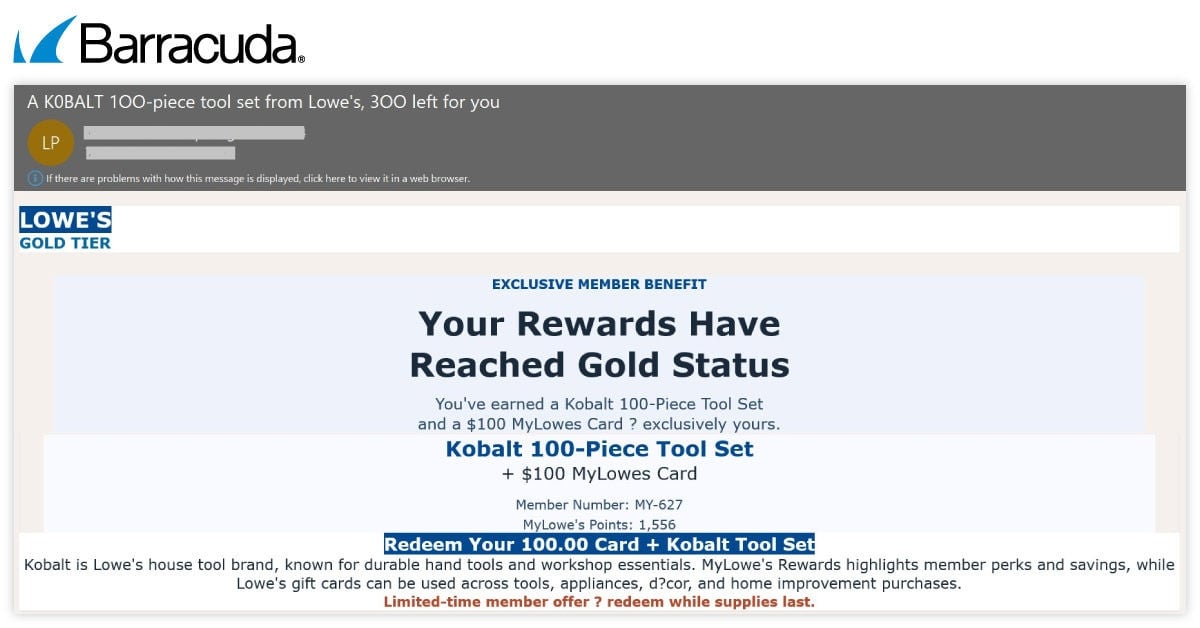
One captured message announces a Lowe’s loyalty reward: a Kobalt tool set and a $100 card. Another claims Walmart points will expire today.
Those are not notices we are attributing to the retailers. The scam uses familiar names and invented account benefits to pull readers toward a link.
The offers change, but the central request remains familiar: stop reading the email and follow its button to claim something supposedly reserved for you.
You do not need a loyalty account for this message to arrive. Bulk senders can make a reward sound personal without knowing your actual balance.
Barracuda documented the campaign, not just a single complaint
Barracuda’s threat researchers reported more than one million detected retail-themed phishing attacks using hidden-text tactics since April 2026.
That number counts detected attempts. It does not mean one million people clicked, lost money, or had a retailer account compromised.
The researchers reviewed message content and supplied examples of the visible lures. That is stronger evidence than an isolated customer asking whether a reward is genuine.
Their report does not establish a single checkout outcome for every recipient. Some landing pages may collect information; others may route elsewhere or disappear.
The unexpected part sits inside the email’s code
The recipient sees the offer. Behind it, the message includes ordinary-looking text concealed from view, which can change how automated filters interpret the email.
This technique is called text salting. It is not a hidden reward condition and it does not make the promised prize real.
- A recognizable retailer name supplies a quick reason to open the message.
- An expiring reward or points balance creates a reason to act immediately.
- Invisible filler text tries to soften the email’s suspicious signals.
- A claim button moves the reader from the inbox to an unverified destination.
- The safe check starts inside the retailer’s own app or independently entered website.
The present assessment is clear: these captured messages are phishing lures, not evidence that the real stores are offering the depicted prizes.
Why a Convincing Reward Email Can Still Be Fake
Loyalty programs have trained customers to expect points, coupons, and occasional special offers. Fraudsters borrow that language because it sounds routine.
A number such as “1,590 points” looks specific. Unless you verify it in your own account, it is simply a number the sender chose.
The same goes for a member ID, gold status, or a carefully named product. Specific detail can be invented as easily as a generic promise.
In the Lowe’s-themed example, the message pairs a Kobalt tool set with a store card. The combination makes the offer feel tangible and valuable.
In the Walmart-themed example, the alleged points expire today. That deadline invites a hurried click before the reader checks whether such points exist.
Retailers may run real promotions. The existence of legitimate promotions is exactly why an imitation can seem plausible at first glance.
The useful question is not whether a retailer ever sends offers. It is whether this offer appears in the account you opened independently.
A fake message may display a real logo or product image. Neither proves that the sender controls the retailer’s loyalty system.
Even the displayed sender name can be chosen by the person sending the email. Expand the actual address, but do not stop your check there.
Some attacks use compromised websites or lookalike domains to send messages. Technical mail authentication may therefore look less obviously broken than expected.
That is why “it landed in my inbox” is not a reliable safety test. Filters are valuable, but they do not make every delivered email trustworthy.
How the Retail Reward Email Scam Works
Step 1: The sender builds a reward around a familiar store
The lure borrows a retailer’s identity and a product or points story that fits its customers. It may promise a card, tool set, or limited redemption.
For a recipient who shops there, the subject line feels relevant. For someone who does not, the same message may simply look like a stray promotion.
The captured Lowe’s and Walmart examples show variation inside one broader pattern. Do not memorize one store name as the only warning sign.
A later version can change the brand, amount, product, and deadline while preserving the same request to click before verifying.
Step 2: Invisible filler changes what a filter reads
Barracuda found hidden stretches of harmless-looking copy inside the email. The person reading the rendered message would not ordinarily notice them.
Those extra words can dilute terms associated with a scam or alter the message’s apparent topic for automated analysis.
Some filler uses styling that crops text out of view, reduces its height to zero, or moves it beyond the visible edge.
Other versions insert zero-size characters into words. A person sees a normal phrase, while a simple text scanner sees separated fragments.
The hidden copy is not useful advice for the customer. Its role is to help the deceptive message survive checks before delivery.
A recipient generally cannot spot that by glancing at the email. The practical defense is to verify the offer, not to inspect HTML.
Step 3: The visible email asks for one small action
Once the message arrives, the claim button gives the reader a clear next step. It is deliberately easier than opening an app and checking benefits.
The Walmart-themed example frames the button as a way to view points and details. The wording does not reveal where the link actually goes.
The deadline makes independent checking feel expensive. If points expire today, the reader may think a few seconds of caution will cost the reward.
That pressure belongs to the sender’s story. An unverified email cannot establish the real state of your retailer account.
Step 4: The button leaves the trusted account behind
The decisive risk begins when the message directs you to a page chosen by the sender. It may resemble a retailer page without being one.
Its address might contain the store name, a promotional word, or a shortened redirect. Those surface clues do not establish ownership.
We do not have a verified final checkout for every example Barracuda captured. Do not assume each click produces the same form or charge.
However, submitting credentials, contact details, payment data, or a verification code to an unverified destination would give the operator something valuable.
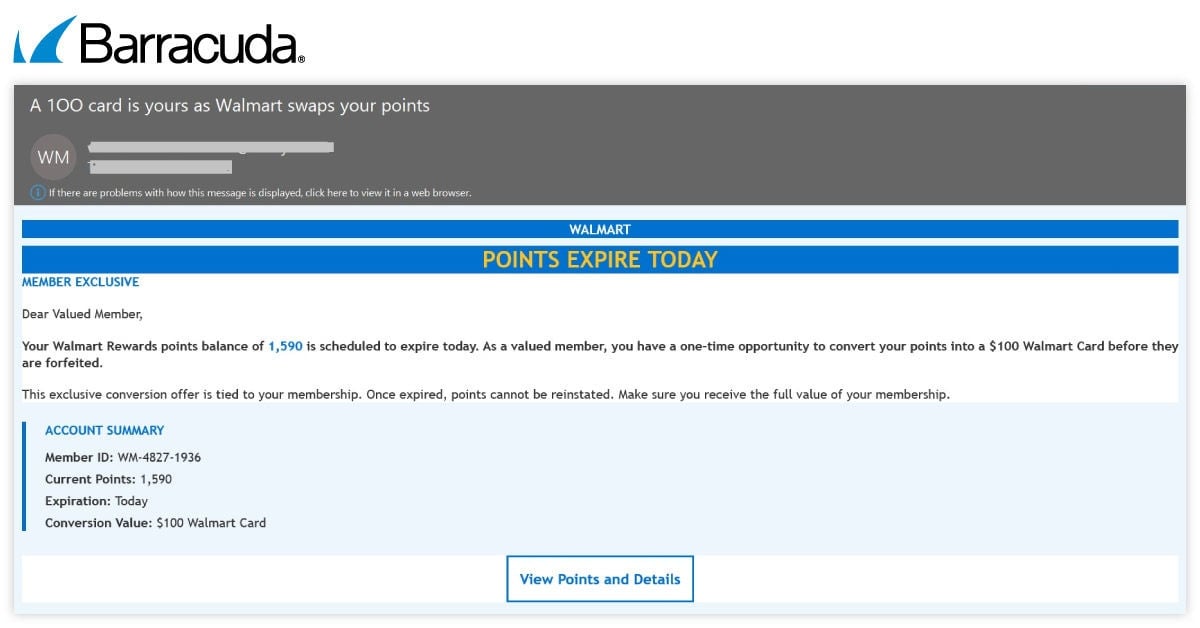
Notice how the second captured email changes the store and the reason to hurry. It keeps the reader focused on the imagined reward.
Step 5: The prize story can continue after the first page
A destination may ask for another click, a survey, account confirmation, or a shipping payment. Those are possible follow-on moves, not verified steps for every email.
Stop at the first unexpected request. A claimed reward does not justify disclosing a password, card number, or one-time code.
If the page redirects, keep the address chain for a report, but do not keep following it merely to discover how far the offer goes.
Fraud pages often change quickly. A dead link tomorrow would not make the original message safe or erase a disclosure made today.
What the Hidden Text Does and Does Not Tell You
“Text salting” describes a delivery tactic. It explains why a phishing email may evade screening, not what happened inside your retailer account.
It also does not mean an AI system was fully controlled by the attacker. The research describes attempts to distort automated classification.
The distinction matters because people sometimes hear “AI bypass” and assume all protections are pointless. That would give the scam too much credit.
Mail screening, reputation checks, and user reporting still remove many bad messages. The lesson is simply that the inbox is not a seal of authenticity.
Nor does the presence of a retailer’s brand establish that the retailer’s systems were breached. The brand is what the message imitates.
A real account notification should stand up to a separate check. Open the store app you already use and look for the same points or reward.
If your account shows no matching offer, treat the email as suspect. If it does show something, use the account’s own redemption path.
Never type a familiar retailer’s name into a search ad as your only verification route. A sponsored result can point somewhere else.
Use an established bookmark, the app already installed from a trusted store, or a website address you know independently.
Warning Signs in a Fake Points or Gift Card Offer
A countdown, “expires today” line, or unusually generous exchange rate deserves a pause. Legitimate rewards can expire, but urgency is also a common lure.
A message that claims a reward you cannot find in your account is more telling than imperfect grammar. Modern phishing can be neatly written.
Watch for a button that asks you to log in again, even though you already reached the offer from an email supposedly tied to your account.
A tiny delivery fee for a free gift can still expose a card. Read what the page actually requests before entering payment information.
Do not trust a browser padlock alone. Encryption protects a connection to a site; it does not tell you who operates that site.
A visible brand mark, product photo, or copied loyalty tier can be reproduced. Your independent account view remains the stronger check.
If you manage email for an organization, preserved headers and the original file can help security staff inspect hidden content and sender infrastructure.
For a personal inbox, you do not need specialist tools. Report the message as phishing and avoid its claim route.
What to Do if You Have Fallen Victim to This Scam
- Identify exactly what happened.
Receiving or reading the email is not the same as submitting information. Note whether you clicked, entered details, paid, or approved a login code.
That difference determines the next action. A clicked link without any input calls for caution, while an exposed password needs an immediate change.
- Leave the link and verify the retailer independently.
Close the page. Open the retailer’s own app or type its known address yourself, then check the actual loyalty balance and recent account activity.
If you see an unfamiliar order or account change, contact the retailer through its official support channel and explain the sequence.
- Secure any account whose credentials you entered.
Change the password on the real service, review active sessions, and enable or strengthen multifactor authentication. Replace reused passwords on other accounts.
If you gave an email password, treat that account as urgent because it may receive password-reset messages for other services.
- Contact the card issuer if payment details were shared.
Tell the issuer where you entered the card number and ask about monitoring, replacement, and disputes for any unauthorized transactions.
Do not rely on a support number printed inside the questionable email or page. Use the number on your card or official account.
- Preserve and report the evidence.
Keep the original email, sender details, URL, dates, and screenshots. Do not publish passwords, codes, full card numbers, or personal identifiers.
Use your mail provider’s phishing report tool. If money was lost, file a report with the appropriate consumer or cybercrime authority.
- Check the device only if the link introduced another risk.
If you downloaded a file, allowed notifications, or installed software, remove that permission or software and use a reputable security check such as Malwarebytes.
If the lure came through repeated malicious ads, AdGuard can reduce exposure. Neither product reverses a password or card disclosure already made.
Frequently Asked Questions
Is a Lowe’s or Walmart reward email always fake?
No. Real retailers send promotions. The captured messages discussed here are deceptive examples; verify any offer in the independently opened retailer account.
Does landing in my inbox mean the offer passed a safety check?
No. Mail filters reduce risk, but this campaign deliberately hides filler text to influence classification. Delivery is not authentication.
Did Barracuda say one million people lost a gift card?
No. Its figure refers to more than one million detected attacks using these tactics, not successful redemptions or confirmed victims.
Can I recognize text salting without opening email code?
Usually not reliably. Focus on the visible claim and whether the retailer’s own account confirms the reward.
What if I clicked but entered nothing?
Close the page, avoid later prompts, and check for downloaded files or browser notification permissions. A click alone does not prove account theft.
Why would a free reward ask for card information?
A page might call it shipping or verification. Do not pay through an unverified claim link; check the real retailer’s offer terms independently.
The Bottom Line
The retail reward email scam turns a familiar loyalty offer into a reason to leave your inbox and trust a sender-controlled link.
Hidden text may help that email arrive, but it cannot make the reward genuine. Verify the offer inside your own retailer account before claiming anything.








