

Eleven messages are supposedly trapped outside the inbox, and the mailbox may be deactivated today. For anyone expecting important mail, the warning creates instant pressure.
The awkward wording is easy to notice later. In the moment, fear of missing work or losing an account can make the green link feel necessary.
Overview
The warning invents a mailbox emergency
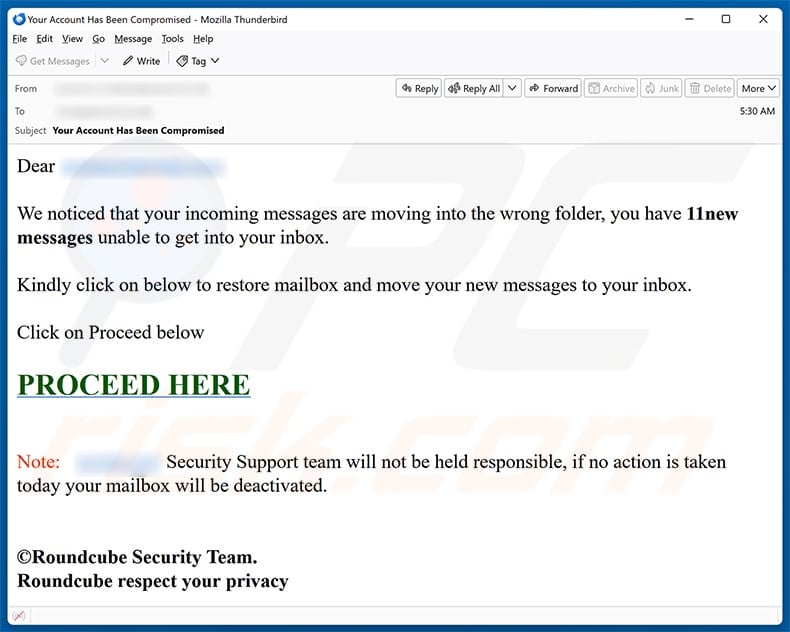
The subject says “Your Account Has Been Compromised,” while the body claims incoming messages are moving into the wrong folder.
It announces “11new messages” that cannot reach the inbox and offers a large “PROCEED HERE” link to restore delivery.
The message then threatens deactivation if no action is taken that day, compressing a technical-sounding problem into an urgent deadline.
No meaningful diagnostic information appears. There are no message IDs, server details, administrator contact, quota reading, or verifiable support ticket.
The number eleven creates specificity without supplying evidence that any messages exist.
The message impersonates Roundcube while the page imitates Google
The footer signs off as the “Roundcube Security Team,” borrowing the name of legitimate webmail software used by many hosting providers.
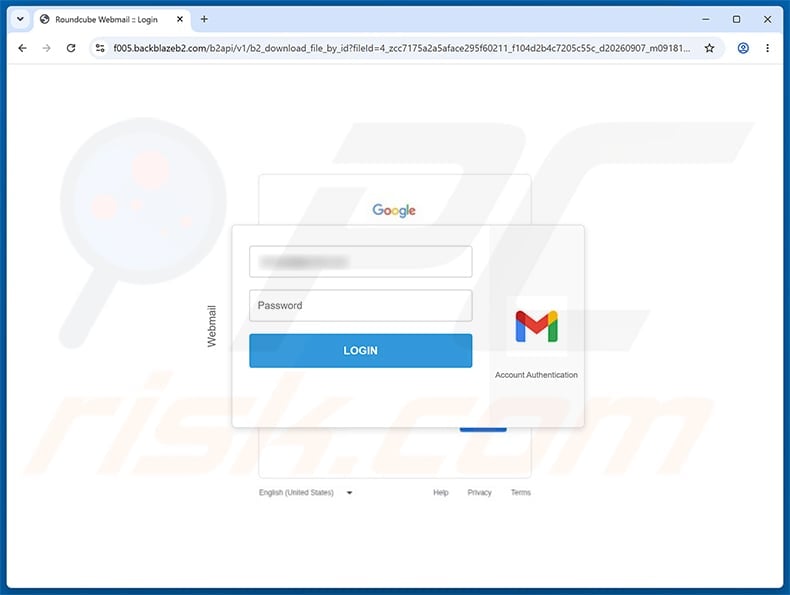
The examined link opened content hosted on f005.backblazeb2[.]com, part of a legitimate cloud-storage service abused to deliver a fraudulent page.
Its browser title referenced Roundcube Webmail, yet the visible form used Google and Gmail branding.
That mixed identity makes no operational sense. A real Roundcube administrator would not send users to an unrelated storage host for a Google password.
Neither Roundcube, Google, nor Backblaze created this phishing campaign.
The form is built to steal reusable email credentials
The fake page asks for an email address and password under the pretense of restoring mailbox delivery.
Submitted details go to the criminal operator, who can use them to access email and any other service protected by the same password.
Once inside, the attacker can read confidential mail, reset connected accounts, add forwarding rules, and impersonate the victim.
For business users, one compromised inbox may expose clients, invoices, internal documents, and trusted conversation threads.
- The subject and body describe different problems.
- “11new” contains an obvious spacing error.
- The message invents a same-day deactivation deadline.
- It claims Roundcube authority without identifying the actual mail provider.
- The link uses a cloud-storage hostname unrelated to the claimed service.
- The destination mixes Roundcube and Google branding.
- The page requests credentials rather than showing mailbox diagnostics.
- Receiving the message alone does not mean the account is compromised.
How the Scam Works
Step 1: The email targets uncertainty that users cannot easily observe
Most people cannot see whether a remote mail server is routing messages correctly.
The scam exploits that blind spot by claiming important mail exists but remains hidden from the inbox.
Because the supposed messages cannot be inspected, their absence becomes part of the story rather than evidence against it.
Employees may imagine a missed invoice, password reset, customer request, or manager’s instruction.
The lure works through possibility. It does not need to name a real sender or subject.
Step 2: A precise count makes the fabricated problem feel measured
Stating that eleven messages are affected sounds like information produced by a mail system.
The email never explains when those messages arrived, which folder received them, or how the sender obtained that count.
A legitimate administrator could provide server identity, mailbox address, timestamp, support case, and a safe route through the normal control panel.
Here, the count simply adds confidence to a generic mass message.
Numbers are not evidence when the recipient cannot verify their source.
Step 3: The deadline prevents consultation
Threatening deactivation today discourages the recipient from asking IT support, checking documentation, or waiting for a colleague’s opinion.
The wording also shifts responsibility, suggesting the “Security Support team” cannot help if the user fails to act.
Real providers may enforce storage or security policies, but they give account-specific notices through established dashboards and support routes.
A sudden ultimatum delivered from an unfamiliar sender deserves verification, not obedience.
Urgency is most dangerous when the requested action involves credentials.
Step 4: The link uses trusted infrastructure as camouflage
Backblaze B2 is a legitimate cloud-storage platform. Like many hosting services, it can be abused to store deceptive pages.
Seeing a recognizable infrastructure provider or HTTPS padlock does not make the content legitimate.
The padlock confirms encryption between browser and host. It does not confirm Roundcube, Google, or the user’s organization owns the page.
Attackers prefer reputable infrastructure because it loads reliably and may pass basic blocklists during the campaign’s early hours.
The relevant question is whether the complete hostname belongs to the service requesting the password.
Step 5: Conflicting brands widen the pool of potential victims
The email mentions Roundcube, but the destination asks for Google-styled credentials.
An attacker may use a flexible phishing kit that changes logos according to the address entered or simply accepts any provider.
Some victims rationalize the switch because Gmail addresses can be configured inside other mail clients.
That technical possibility does not justify entering a Google password on a Backblaze storage URL.
Authentication should always occur on the provider’s verified domain reached independently.
Step 6: The attacker establishes quiet persistence
After a successful sign-in, criminals often create forwarding rules that copy future messages to another address.
They may register an app password, authorize an OAuth application, add a recovery method, or preserve a browser session.
Changing the password without reviewing those settings can leave an alternate path open.
The attacker may also delete alerts and sent messages to reduce visible evidence.
Recovery must remove persistence, not merely prevent the old password from working.
Step 7: The compromised inbox creates more convincing scams
Private correspondence teaches the attacker how the victim writes, which people they trust, and which payments are expected.
Fraudulent requests can then be inserted into existing threads with authentic signatures and historical context.
Contacts may receive the same mailbox-warning link from a familiar address and trust it immediately.
At work, the intruder can target payroll, purchasing, shared drives, or account administrators.
Fast notification limits how long the stolen identity can be weaponized.
Why the Mixed Roundcube and Google Branding Matters
Roundcube is software, not one universal mailbox company
Organizations install Roundcube on many different domains and connect it to their own mail systems.
A legitimate security notice should identify the hosting provider or organization responsible for that particular mailbox.
“Roundcube Security Team” alone is vague because the software project does not manage every deployment.
Users should reach their known hosting control panel or administrator rather than following an unsolicited link.
A browser title can be written by anyone
The tab label “Roundcube Webmail :: Login” is page text chosen by whoever built the site.
It carries no more authority than the heading, logo, or colors displayed beneath it.
The address bar and independently verified service route matter far more than the title.
Attackers frequently copy familiar titles because users treat them as part of the browser rather than content supplied by the page.
The Google form contradicts the supposed repair task
Restoring mail routing is an administrative action. It is not accomplished by entering credentials into an unrelated Google-styled form.
If an organization uses Google Workspace, account security tasks belong on accounts.google.com or an authorized company identity domain.
If it uses Roundcube, Google branding should not suddenly replace the known provider.
The contradiction exposes a generic harvesting kit rather than a genuine diagnostic workflow.
Cloud hosting does not transfer trust to uploaded content
Legitimate platforms host files for millions of customers and cannot preapprove every page at creation time.
A malicious tenant can upload phishing content until reports or automated systems remove it.
Do not blame the infrastructure provider for the impersonation, but report the abusive URL so it can be investigated.
Treat every hosted file according to its owner and purpose, not only the reputation of the storage company.
Checks to Perform Before Responding to a Mailbox Alert
Look at the provider’s real status page
Open the mail service through a saved bookmark and check for administrator notices, storage warnings, or service incidents.
A genuine routing problem usually affects visible settings or produces a support record that can be confirmed independently.
Inspect full headers when possible
Headers reveal the sending path, authentication results, return address, and servers involved.
They can be complex, so forward the original message as an attachment to IT rather than copying only the visible body.
Ask the administrator through a known channel
Use a saved support address, internal ticket portal, or known telephone number.
Do not use contact details supplied inside the suspicious message because they may lead back to the attacker.
Test mail delivery safely
Send a harmless message from another account or ask a colleague to contact you, then inspect inbox, spam, rules, and forwarding settings.
Do not enter passwords into a surprise page to test whether unseen messages exist.
What to Do If You Fell Victim to This Scam
- Leave the page and preserve the email. Close the tab without submitting again, then save the original message and complete headers for investigation.
- Reset the password from a trusted device. Use the official provider page and create a unique password that does not resemble the exposed one.
- Revoke every active session. Sign out other devices, remove unknown browsers, and invalidate application passwords or long-lived tokens.
- Turn on multi-factor authentication. Choose an authenticator or hardware key when available, and confirm that recovery details were not changed.
- Audit mailbox configuration. Review forwarding, filters, rules, delegates, aliases, signatures, connected apps, sent items, trash, and login history.
- Contact the real administrator. Provide the timestamp, phishing URL, submitted information, affected device, and any unusual behavior observed afterward.
- Warn colleagues and contacts separately. Tell them to distrust recent links, payment changes, or document requests from the account until containment is confirmed.
- Scan the endpoint when needed. Run Malwarebytes and the built-in security scanner if the page downloaded or executed anything. AdGuard can block many harmful URLs but cannot remove account access.
- Monitor connected services. Check financial, cloud, shopping, and social accounts for password resets, new sessions, changed details, or unauthorized transactions.
Preventing Similar Mailbox Phishing
Make the login route predictable
Bookmark the official webmail and account-security pages used by the organization.
Employees should know that surprise messages never redefine where passwords are entered.
Display full sender addresses
Mobile interfaces often prioritize friendly display names. Expand the header before acting on security notifications.
Organizations can add external-sender banners, but users should treat them as context rather than a perfect detection system.
Require independent confirmation for urgent account claims
A same-day threat involving credentials should trigger a call or ticket through an established channel.
Security teams must reward verification instead of making employees fear punishment for slowing down.
Use unique credentials and strong authentication
Password reuse turns one phishing form into access across several services.
A password manager and phishing-resistant multi-factor method sharply reduce the damage from a single mistake.
Why This Email May Know Your Address
Bulk lists can come from old breaches
Email addresses circulate through historical data breaches, marketing databases, scraped websites, and infected contact lists.
Receiving the message does not prove the criminal hacked your current mailbox or specifically selected you.
A correct domain still reveals very little
Attackers can send the same template to thousands of addresses at one company after learning its public email pattern.
Knowing that employees use a particular domain does not prove the claim about hidden messages or account deactivation.
Tracking pixels can confirm engagement
Some spam contains remote images that report when a message is opened, depending on mail-client privacy settings.
Block automatic remote content for unknown senders and avoid replying, because both actions can confirm that the address is actively monitored.
Prior compromise can make later lures more specific
If a criminal already accessed a contact’s mailbox, the new message may arrive from a recognizable person or reference genuine work.
Verify through another channel even when the sender is familiar, especially when the request introduces a new login page.
Frequently Asked Questions
Are eleven messages really stuck in the wrong folder?
There is no evidence supporting that claim. The count is part of the lure and the link leads to credential phishing, not mailbox repair.
Is Roundcube itself compromised?
No evidence indicates Roundcube caused this campaign. Scammers are misusing its name, just as the fake page misuses Google branding.
Why is the phishing page hosted on Backblaze?
Criminals can abuse legitimate cloud-storage services to host files. The platform’s reputation does not authenticate the tenant or page requesting credentials.
Did opening the email expose my password?
Reading the message alone does not submit credentials. Risk rises after following the link, entering information, granting permissions, or downloading files.
What if I changed my password but suspicious mail continues?
Review forwarding rules, delegates, app passwords, OAuth access, recovery details, and active sessions. An attacker may have created persistence beyond the old password.
Should I reply and ask whether the warning is real?
No. Replying confirms the address is monitored. Contact the real mail provider or administrator through a saved, independently verified route.
The Bottom Line
The Incoming Messages Wrong Folder email creates an invisible problem, assigns it a precise count, and threatens immediate account closure to obtain a password.
Its Roundcube claim, Backblaze-hosted link, and Google-styled form do not form a legitimate security process. They form a credential-harvesting chain.
Delete the message if untouched. If information was submitted, secure the account thoroughly and involve the responsible administrator without delay.








