

A message about a job in Dubai’s financial sector can feel like the break you have been waiting for. The invitation may even carry familiar regulatory branding.
Before you send a passport or accept an interview, there is one important question: did the opportunity come through the regulator’s real hiring channels?
Overview
What the DFSA reported
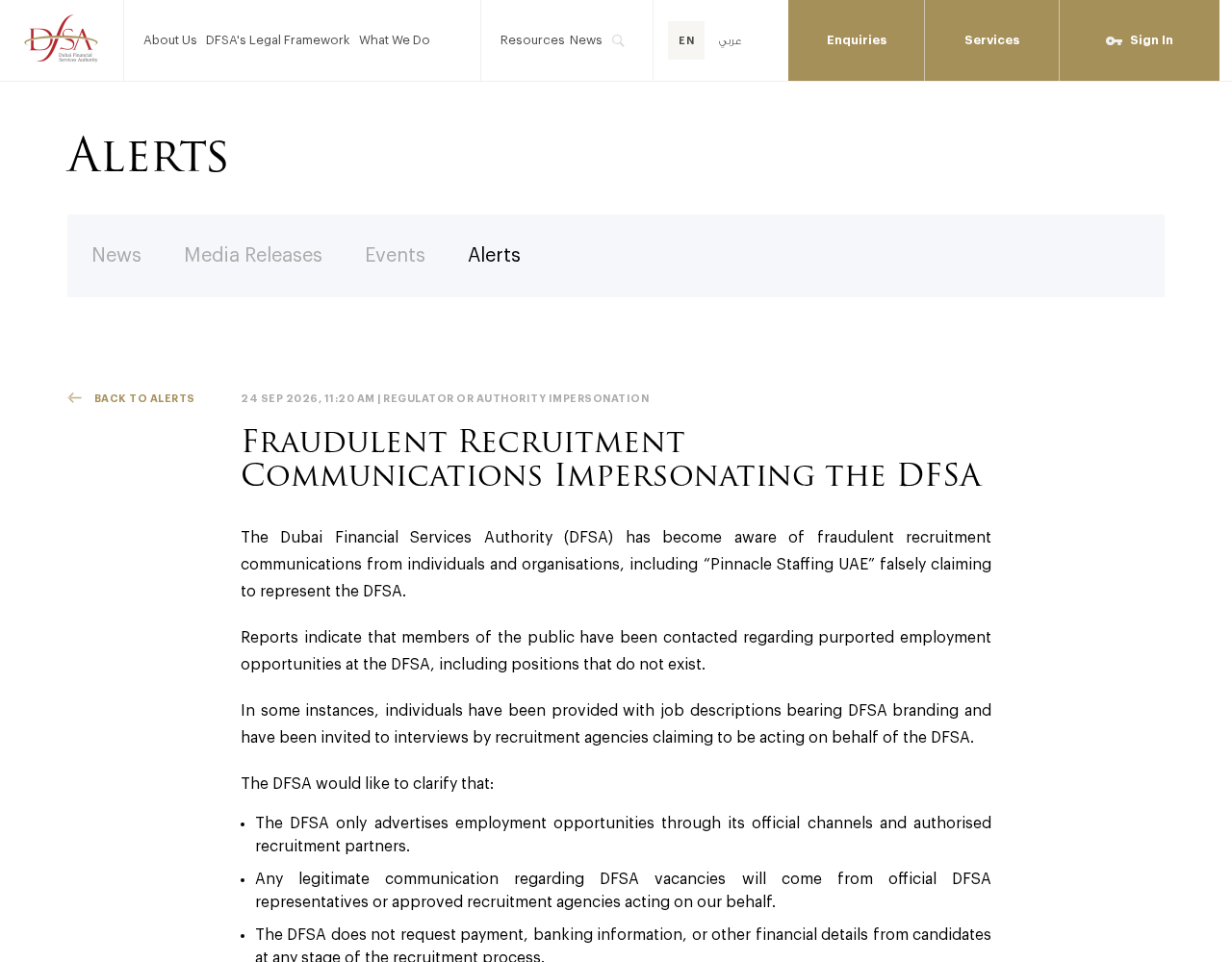
On September 24, 2026, the Dubai Financial Services Authority warned about fraudulent recruitment communications that claim to represent it.
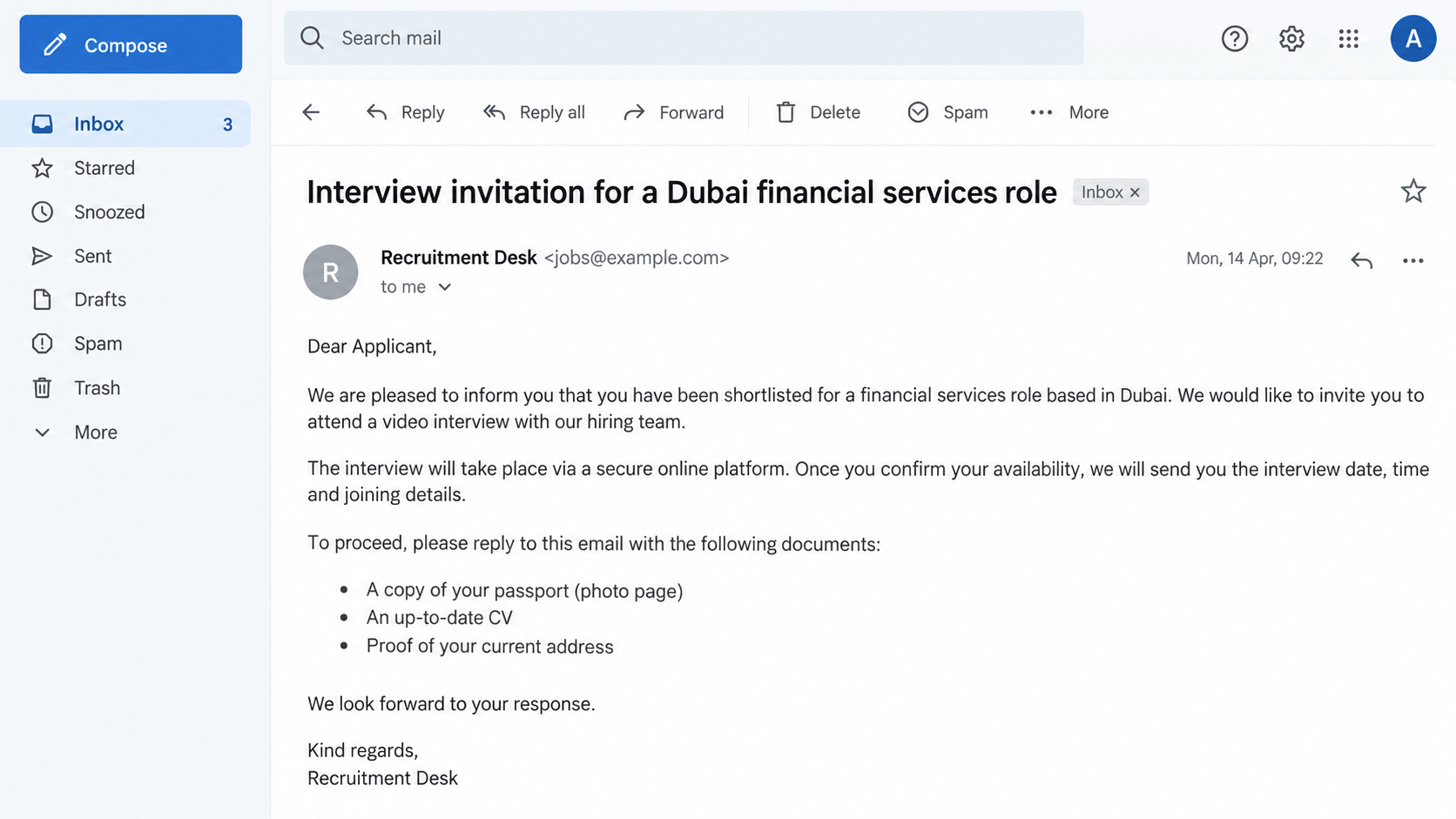
The authority says people were contacted about supposed employment opportunities, including positions that do not exist. Some received branded job descriptions and interview invitations.
The alert mentions individuals and organizations, including a name presented as “Pinnacle Staffing UAE,” that falsely claimed to recruit for the DFSA.
What genuine hiring looks like
The DFSA says it advertises jobs through its official channels and authorized recruitment partners. Legitimate messages come from its representatives or approved agencies.
It also states that it does not ask candidates for payment, banking information, or other financial details at any stage of recruitment.
That distinction matters. An agency can legitimately recruit for an organization, but a stranger’s assertion that it represents the DFSA is not enough.
The risk to applicants
A fake opening can draw out passports, identification, employment history, and financial details. Those records can be valuable even if no interview takes place.
The public alert confirms the false recruitment claim and nonexistent roles. It does not list every document requested or say how many candidates were affected.
- Claim: a vacancy at the Dubai Financial Services Authority.
- Credibility cues: DFSA branding, job descriptions, and interview invitations.
- Verification route: the authority’s official careers channels or an independently confirmed partner.
- Clear boundary: the DFSA does not charge applicants or request banking details.
Do not assume every Dubai-based recruitment message is fraudulent. The warning concerns communications that falsely claim a DFSA connection.
How the Fake DFSA Recruitment Scam Works
Step 1: Find someone receptive to a good job offer
Scammers benefit when a candidate is already searching for work. A finance professional may recognize the DFSA and see a regulator role as a career opportunity.
But a message can also reach someone who never applied. That difference should change how you evaluate an invitation to interview.
The DFSA alert says members of the public were contacted about purported jobs. It does not explain how names or contact details were obtained.
LinkedIn profiles, public resumes, and job boards may make a message sound tailored. They do not prove a recruiter has a mandate.
Step 2: Wrap the pitch in credible hiring materials
A job description with the authority’s name can resemble real recruitment paperwork. The DFSA says some recipients were given branded descriptions.
An interview invitation adds momentum. Once an appointment is on the calendar, candidates may feel they are already partway through a genuine selection process.
Neither a logo nor an organized schedule validates the opening. Both can be assembled without access to the authority’s systems.
Check whether the role appears through DFSA channels or through an agency the authority confirms as approved.
Step 3: Claim an agency relationship
The warning specifically names “Pinnacle Staffing UAE” among those falsely claiming to represent the DFSA. The alert does not authorize readers to generalize about every recruiter.
A fraudulent intermediary can make verification harder. It may explain why messages do not come directly from the authority and why the interview happens elsewhere.
Ask the DFSA, through its own published contact route, whether the agency and the exact vacancy are authorized. Do not rely on the agency’s reference letter.
If the agency says its mandate is confidential or cannot be checked, pause. A real candidate should not have to surrender documents before confirming the employer.
Step 4: Advance the candidate through a staged interview
The DFSA describes invitations to interviews. That is a powerful credibility cue because it resembles the sequence applicants expect from normal hiring.
A call or video meeting can also produce more personal information. A polite conversation is not evidence that the role exists.
Notice whether the recruiter can answer basic questions about the team, job posting, reporting line, and official application process.
If the opening is missing from legitimate channels, request independent confirmation before sharing further documents or attending another interview.
Step 5: Turn trust into access to information or money
The DFSA warns that it does not ask candidates for payment, banking information, or financial details. Any such request conflicts with its stated recruitment policy.
Even before a payment demand, a request for a passport scan or other sensitive record deserves scrutiny. Fake recruiters can collect identity material.
The alert does not say every reported contact demanded a fee. Avoid inventing a specific charge or treating a hypothetical follow-up as a confirmed event.
What is confirmed is enough to act: the purported DFSA vacancies and representation are false according to the authority.
Step 6: Use the candidate’s urgency against them
A job seeker may worry that questioning a recruiter will cost them an opportunity. Fraudsters can exploit that fear by setting short deadlines.
Real hiring can be time-sensitive, but verification is a normal professional step. A legitimate organization should not punish a candidate for checking its identity.
Keep your own timeline. Record when the message arrived, which role was named, and where the recruiter said the vacancy was posted.
Those details make a later report more useful and help you spot contradictions before anything sensitive leaves your hands.
How to Verify a DFSA Job Offer
Search from the authority’s own website
Type the DFSA website address yourself or use a trusted bookmark. Navigate to careers instead of clicking a link sent by a recruiter.
Look for the exact position, location, job reference, and application route. A similar title is not enough if the details do not match.
If no listing appears, that is a reason to ask, not a final diagnosis. Some legitimate recruitment may be handled by approved partners.
Confirm the partner, not just the person
Contact the authority through a published number or form. Ask whether the specific agency is authorized to recruit for the named role.
Do not call a verification number supplied in the suspicious message. It could route back to the same people running the approach.
Check the sender’s full domain and the destination of any application portal. Similar spelling and copied visual design can hide a different operator.
Limit documents until identity is established
A resume may be relatively routine, but a passport, bank statement, and financial details create greater risk. Share them only through verified channels.
Ask what information is needed now and why. The DFSA’s public position rules out applicant payments and requests for banking details.
Do not treat a non-disclosure agreement as proof of legitimacy. Anyone can attach one to an email.
Why a Branded Interview Is Not Enough
Employment fraud does not always begin with a crude payment demand. It may begin with a professional-looking process that gradually lowers a candidate’s guard.
A calendar invite can use a familiar video platform. A job description can match the language of real regulatory work. Both are easy to imitate.
Even an interviewer who knows the industry might be collecting information rather than evaluating candidates. Expertise in conversation is not a hiring mandate.
The DFSA’s alert is valuable because it supplies a direct test: verify the vacancy and recruiter through official or approved channels.
It also sets a clear line around money. A demand for an application, processing, or training payment is incompatible with the authority’s stated policy.
When the employer’s identity is uncertain, a good opportunity can wait long enough for a phone call or written confirmation from the real organization.
What to Check in a Supposed Job Description
Does the position actually exist?
A title can sound perfectly plausible for a financial regulator. That does not mean the organization has opened such a position.
Compare the description with the authority’s own careers information. Look for a reference number, reporting team, employment terms, and application route.
If the recruiter says the posting is private, ask the DFSA to confirm the opening without relying on the document.
The DFSA says some reported positions did not exist. A plausible role description is therefore not the end of the check.
Who controls the application link?
A form may collect a resume first and ask for more sensitive records later. Inspect the domain before entering information.
Do not accept a web address solely because it contains the authority’s name. Anyone can register a lookalike domain with additional words.
If the recruiter offers only a messaging-app upload or a personal mailbox, request a verified alternative.
Keep a copy of the page address. It can help the authority understand how the false vacancy was presented.
What is requested before an offer?
Application forms often ask for experience and contact details. Bank account information and payment are different, and the DFSA explicitly rules them out.
Even a request for identification should have a clear purpose and come through an employer or partner whose identity you confirmed.
A message that says a fee is refundable still asks you to take the risk first. The authority says applicants should not be charged.
Do not send a complete identity package simply because an interview went well. A pleasant call does not prove who will receive the files.
Why Candidates May Miss the Warning Signs
People often treat job applications as a numbers game. After many rejections, a promising reply can feel like relief rather than a reason to investigate.
Recruiters also routinely contact professionals who have not applied directly. That normal practice gives a fake agency a believable explanation for its first message.
The fix is not to ignore every opportunity. It is to separate career interest from verification of the employer’s actual mandate.
Take ten minutes to check the role before sharing a passport. That delay is unlikely to hurt a real candidacy.
If someone insists that a quick document upload is the only way to reserve an interview, ask the authority whether the process is genuine.
If the Message Came Through a Social Platform
A profile picture, professional biography, or connection count is not a background check. Such details can be copied from a real recruiter.
Search the recruiter’s name separately, then ask the agency’s main office to confirm the person and the DFSA assignment.
Move carefully if the conversation shifts from a professional platform to a private chat with disappearing messages.
Keep original URLs and message timestamps. They may be harder to retrieve after an account disappears or a profile name changes.
Do not let embarrassment stop you from reporting a convincing approach. The branding and interviews were designed to look credible.
What to Do if You Have Fallen Victim to This Scam
- End contact with the supposed recruiter. Do not send further documents, pay a charge, or join another interview until the DFSA confirms the role independently.
- Preserve the trail. Save emails, messaging handles, job descriptions, interview invitations, document-upload links, and names used during calls. Record what information you sent.
- Tell your bank promptly if financial information or money was shared. Ask about account protection, transaction disputes, and monitoring suited to your circumstances.
- Protect identity documents. If you sent a passport or national ID image, contact the issuing authority for guidance and watch for account applications you do not recognize.
- Secure affected accounts. Change any password entered into an unverified application page and enable multifactor authentication. Review email forwarding rules and recent sign-ins.
- Report the impersonation to the DFSA and local authorities. Use official contact details and explain the exact role, recruiter, dates, and documents involved.
If all you did was read a message, you can simply avoid its links and verify future opportunities. A suspicious contact does not automatically mean your device is infected.
If you downloaded software for a supposed interview or opened an unusual attachment, scan the device with Malwarebytes and consider AdGuard to reduce exposure to malicious redirects.
Frequently Asked Questions
Does the DFSA use recruitment agencies?
The authority says it can use authorized partners. The important question is whether it has approved the particular agency and vacancy you were offered.
Is every message using “Pinnacle Staffing UAE” fraudulent?
The DFSA alert names that label among contacts falsely claiming to represent it. Evaluate the specific representation, not unrelated activity by similarly named organizations.
Would the DFSA ask for a recruitment fee?
No. Its alert says it does not request payment, banking information, or other financial details from candidates at any recruitment stage.
What if I already attended an interview?
An interview does not establish the role was genuine. Save what was discussed and verify the vacancy with the authority before continuing.
Should I upload my passport to an application portal?
Only after confirming the employer, recruiter, and portal independently. A branded upload page can be built by someone with no authority to recruit.
Did the DFSA report confirmed financial losses?
The public warning describes deceptive recruitment communications and its hiring policy. It does not publish a count of candidates who lost money.
The Bottom Line
The fake DFSA recruitment approach borrows the authority’s reputation to make nonexistent positions and staged interviews look believable.
Check the exact job and recruiter through the DFSA’s own channels before sending documents. Never pay to pursue a role the authority supposedly offers.








