

A flexible online job sounds especially welcome when the application is quick and the first task appears to be waiting. Then someone asks you to pay before you can begin.
That small change matters more than the polished dashboard around it. Here is how to tell a real opportunity from a stranger using a familiar name.
Overview
The distinction that matters
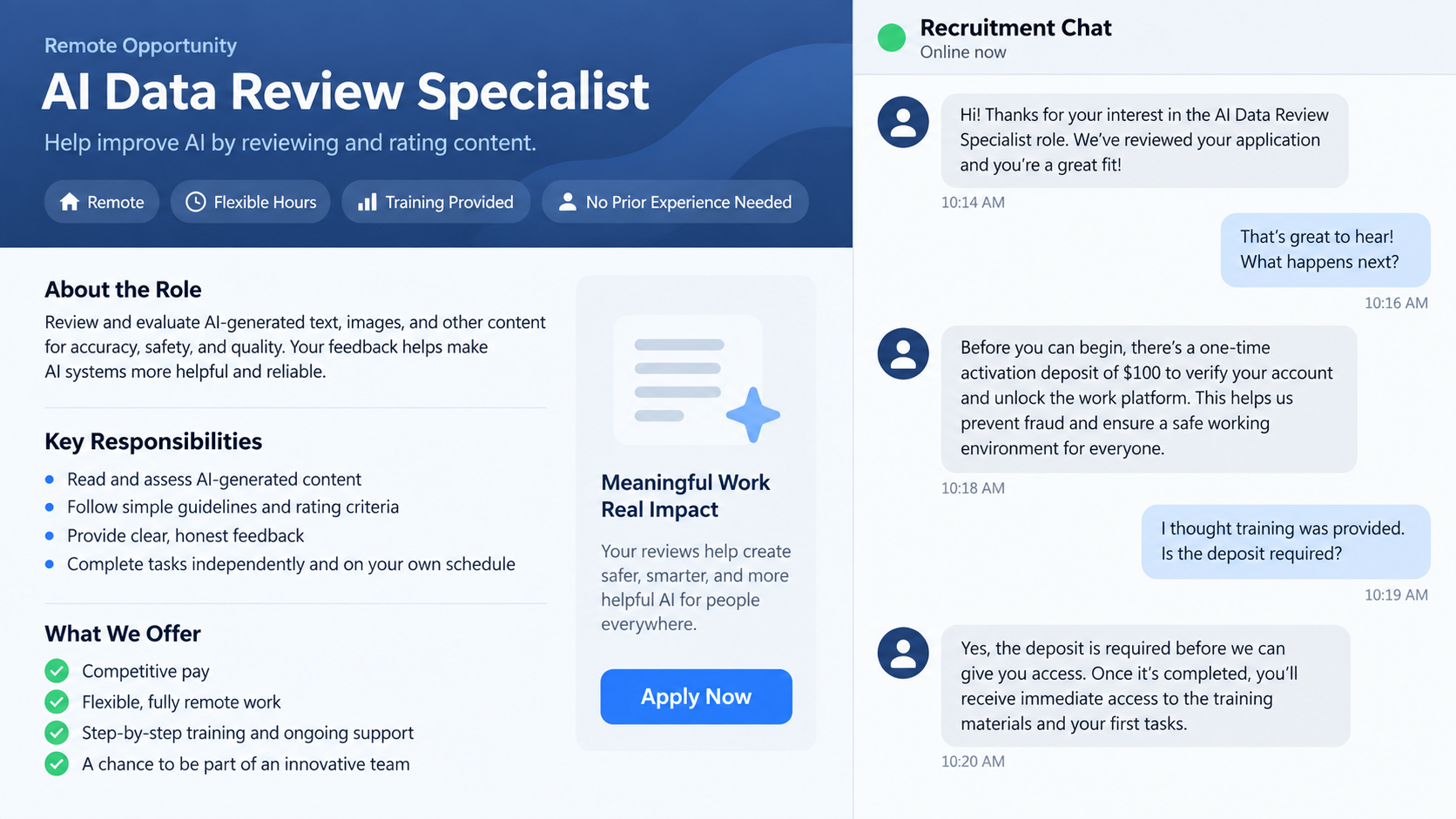
DataAnnotation is a real platform for paid AI-training work. The scam discussed here involves people impersonating its recruiters or creating a lookalike task site.
The impostor may promise easy remote work, then demand an activation deposit, training payment, or withdrawal fee. Paying that stranger does not create a legitimate job.
DataAnnotation’s own trust and safety guidance says applicants should never pay to apply or access work. That is the clearest line to remember.
Where the approach begins
A supposed recruiter may contact you by text, social media, a messaging app, or an unsolicited email. The pitch often sounds personal but gives few verifiable details.
Some approaches borrow the name and logo of a genuine company. Others lead to a separate dashboard that imitates an employer’s task queue.
- A stranger offers work without a normal application or assessment.
- The conversation moves to an unfamiliar site or private messaging group.
- Simple tasks appear to earn money on a screen.
- A payment is required to start, continue, or withdraw those earnings.
What is confirmed and what varies
The reported warning concerns impersonation and payment demands, not proof that every unusual DataAnnotation message uses the same website or script.
Scammers can change their contact accounts, domains, and claimed fees quickly. Treat the payment request and independent verification as stronger signals than a single screenshot.
You can check an opportunity through the company’s official site, reached by typing the address yourself. Do not rely on a link supplied by the alleged recruiter.
Why This Job Offer Feels Convincing
Remote AI work is real, and the promise of choosing your own hours can be appealing. A fake recruiter leans on that plausible setting.
The first message may mention writing, rating AI responses, or checking data. Those are familiar descriptions of work people have heard about.
The scammer may avoid a large upfront request. A smaller “verification” charge can seem like an administrative detail beside a promised weekly income.
Once you have spent time on a fake dashboard, walking away feels harder. The numbers on the screen make the opportunity seem more concrete than it is.
That is why a claim that you have earned a balance should not decide whether to send money. A website can display any number its operator chooses.
Some people encounter an unsolicited message after posting that they need work. The timing can make it seem like a relevant response to a real job search.
Others see a social post or advertisement with comments praising the opportunity. Those endorsements may be copied, fabricated, or unrelated to the person contacting you.
The safest starting question is not whether the logo looks right. It is whether the real company recognizes the recruiter, the process, and the payment demand.
How the DataAnnotation Impersonation Scam Works
Step 1: A recruiter appears outside the normal application path
The approach may come through a direct message rather than a job application you initiated. The sender says they are hiring for quick online tasks.
They might use a first name, a company-style avatar, and a description of flexible pay. None of those details verifies their employment.
Sometimes the pitch implies you have already been selected. Real employers usually need to assess a candidate before assigning paid work.
The sender may press you to answer immediately because places are “limited.” A deadline can prevent you from checking the real site’s hiring process.
Save the message and examine the full account name, email domain, and destination link. A display name alone is easy to copy.
Step 2: The conversation moves to a controlled channel
The fake recruiter may ask you to continue on a chat app or a site you have never used. This moves the discussion away from a job board’s protections.
They can then send instructions without a public company profile or searchable job listing. If the account disappears, finding the same person may be difficult.
A lookalike site might copy colors or words from the real platform. The domain and the payment rules matter more than the visual resemblance.
Do not create a password on a site that came solely from that message. Reused credentials could expose accounts you already own.
Open the authentic company website separately and compare its guidance. DataAnnotation explicitly warns that it does not charge applicants for access to work.
Step 3: Easy tasks create the impression of earnings
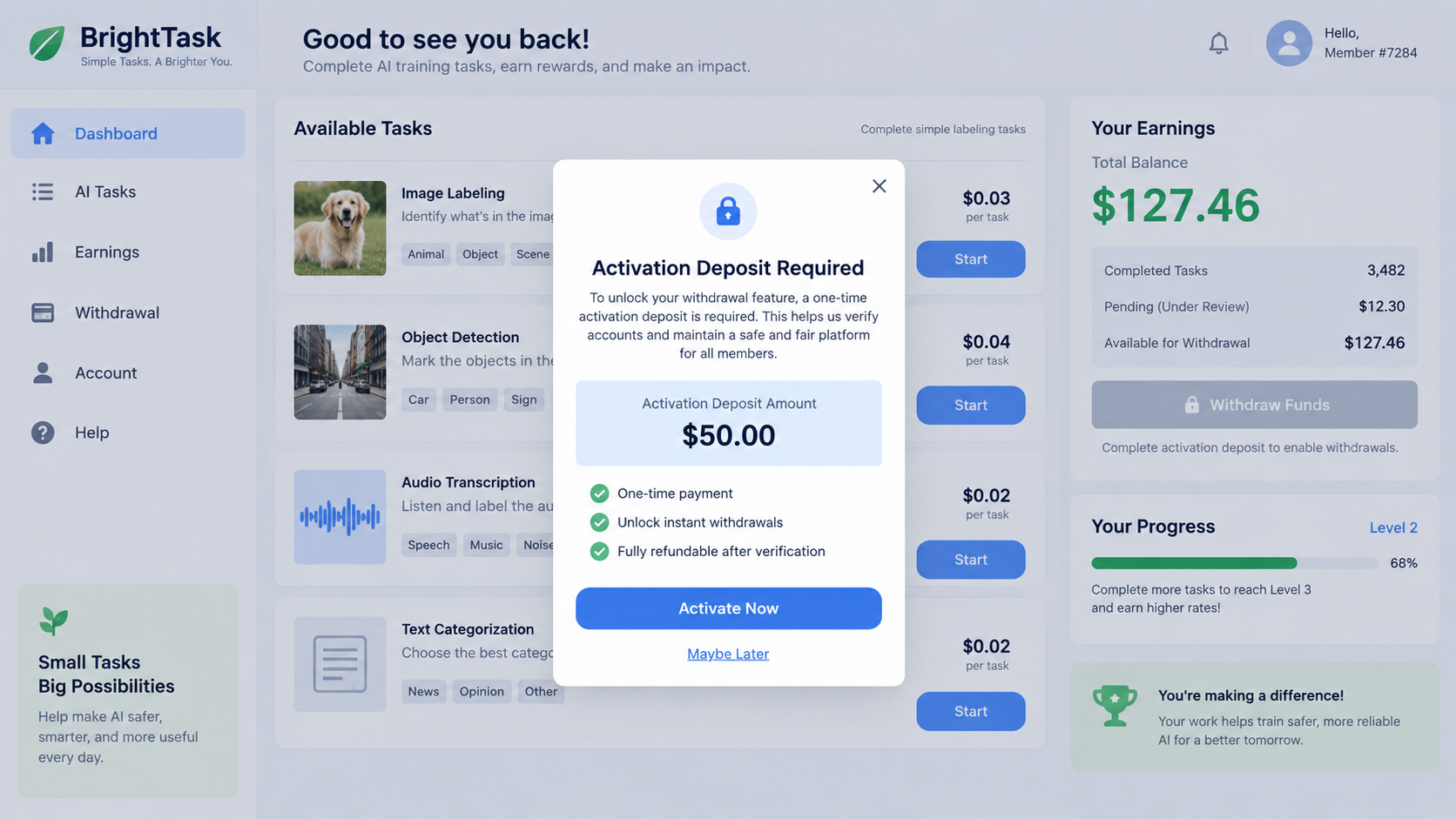
The site may show short clicks, ratings, or simple assignments. A balance increases after each activity, making the work feel productive.
The Federal Trade Commission has described task scams that use a similar illusion of growing earnings. A displayed balance is not proof of available money.
Some schemes allow a small early withdrawal to build confidence. Others simply show an amount that cannot be withdrawn at all.
The exact task can vary. What matters is who controls the account and whether the pay is real before the next request arrives.
Do not send additional identity documents just because a dashboard shows earnings. A fake balance should not become a reason to surrender more information.
Step 4: A fee is presented as the missing step
The recruiter may say an activation deposit is needed before assignments unlock. Later, the site may ask for a payment to release your supposed wages.
Other labels include training, verification, tax clearance, or an account upgrade. Changing the label does not change the basic demand.
The payment may be requested through cryptocurrency, a transfer app, a gift card, or another hard-to-reverse method. That is a serious warning sign.
Do not accept the explanation that you will be reimbursed from future earnings. A genuine employer should not require you to buy access to its job.
DataAnnotation says it does not ask workers to pay to apply or work. Use that official rule to end the conversation.
Step 5: The demand repeats or the contact vanishes
After one payment, a new obstacle may appear: an additional verification charge, a negative balance, or a larger minimum withdrawal.
Each payment can be framed as the last. The screen continues to show wages, but the person still cannot withdraw what it displays.
When the victim refuses, the recruiter may stop replying or claim the account is frozen. Threats about losing the balance are part of the pressure.
Some victims also face attempts to collect more personal data. A copy of an ID or banking details can create a separate identity risk.
Do not negotiate the release fee. Preserve the messages and payment records, then move directly to recovery steps.
How to Check a DataAnnotation Job Offer Safely
Start from the company’s official website rather than a recruiter link. Look for its application route and published safety advice.
Check whether the person contacting you uses an address and process that the company itself recognizes. A logo in an email signature is not enough.
Ask for the role title and a listing you can find independently. If the sender can only point you back to their private dashboard, be cautious.
Do not assume a search result is the official site just because it appears first. Sponsored results and lookalike domains can be convincing.
Review the address character by character before signing in. A familiar brand name placed inside a longer domain may still belong to someone else.
Search for the exact phrase used in the payment request. “Unlock earnings” and “deposit to receive tasks” are common warning patterns in task scams.
If the recruiter says the fee is temporary, ask where that rule appears on the genuine platform. The official guidance says there is no applicant payment.
Consider the way you were selected. A stranger offering immediate paid work without confirming your skills has not completed a meaningful hiring process.
Be careful with requests for screenshots of your bank account or cryptocurrency wallet. Those images can reveal details beyond what a legitimate application needs.
Never let a stranger remote-control your device to “help” you complete onboarding. That creates a risk unrelated to whether the job itself exists.
If you remain uncertain, contact the company through a channel listed on its actual website. Describe the recruiter’s account and ask whether the process is theirs.
What to Do if You Have Fallen Victim to This Scam
- Stop sending money. Do not pay an activation, tax, or withdrawal charge. Another payment rarely resolves a fake balance.
- Save the evidence. Keep the recruiter’s messages, site address, payment receipts, wallet addresses, and screenshots of the dashboard.
- Contact the payment provider immediately. Explain that you paid a job impersonator. Ask whether a transfer can be recalled or a card charge disputed.
- Secure accounts you used. Change a reused password from the official website. Turn on multifactor authentication and review recent sign-ins.
- Protect your identity. If you shared an ID or sensitive financial details, contact the relevant institution and consider a credit freeze or fraud alert.
- Check your device if you installed anything. Remove suspicious software with professional help and scan with a reputable tool such as Malwarebytes.
- Report the impersonation. Tell DataAnnotation through its official support route, report the account to the platform where it approached you, and file a complaint with the FTC.
- Watch for recovery impostors. Anyone promising to retrieve your money for an upfront charge may be targeting you again. Verify help independently.
Use the payment method to guide your next call. A card issuer, bank, transfer service, and cryptocurrency exchange each has different options and deadlines.
For a card payment, ask the issuer about dispute rights and whether the card number should be replaced. Monitor statements for further attempts.
For a bank transfer, call the bank’s fraud department immediately. Have the amount, date, receiving account, and reference number ready.
Cryptocurrency transfers are often difficult to reverse. Save the transaction ID and destination address for the exchange and law enforcement report.
If you entered a password on a fake site, change it wherever it was reused. Check email forwarding, recovery contacts, and unfamiliar devices.
If you gave a government ID, keep copies of what you submitted. Follow your country’s identity-theft guidance and watch for misuse.
AdGuard may help block some malicious sites and redirects, but it cannot recover money or confirm whether a recruiter is genuine. Independent verification remains essential.
Why Paying to Withdraw Is Such a Strong Warning
In a genuine job, the employer pays the worker for completed work. An unfamiliar site that asks a worker to fund a balance reverses that relationship.
A real payroll system may need tax information or a payment destination. That is different from asking a worker to transfer money to unlock wages.
The displayed balance is easy to manipulate because the site operator controls it. It is not a bank statement or proof of an enforceable payment.
Scammers often invoke a rule that appears only after you try to withdraw. A surprise rule appearing at the moment of payment is especially suspect.
They may tell you that previous deposits will be lost unless you pay more. That uses the money already spent to make another bad decision feel necessary.
Pause and calculate only what has actually reached your own bank or wallet. Ignore figures that exist solely on the recruiter’s dashboard.
Even if a small amount arrived earlier, it does not validate a larger request. Early payouts can be used to win trust before a bigger loss.
Frequently Asked Questions
Is DataAnnotation itself a scam?
No. This warning is about people misusing its name. Verify an application through the authentic site and follow its published trust guidance.
Does DataAnnotation charge an application fee?
Its official safety guidance says applicants do not pay to apply or access work. An outside recruiter demanding a deposit is not following that process.
Can a fake dashboard show real earnings?
It can display any amount the operator chooses. Only money successfully received in your own account is evidence that a payment occurred.
What if I only replied to the recruiter?
Stop the conversation and do not follow links. Save the account details, report it, and watch for further messages using the information you shared.
What if I uploaded my ID?
Keep a record of the upload and follow identity-theft advice in your location. Inform affected institutions if you also shared financial details.
Can Malwarebytes or AdGuard get my money back?
No. Security tools can help reduce certain device or web risks, but payment recovery depends on the provider and how quickly you report the transfer.
The Bottom Line
DataAnnotation impostors borrow a real company’s name to make a fake job or task dashboard seem credible. The decisive clue is a request to pay for access or withdrawal.
Apply through the official site, never fund a recruiter’s promise, and act quickly if you sent money or sensitive information.








