

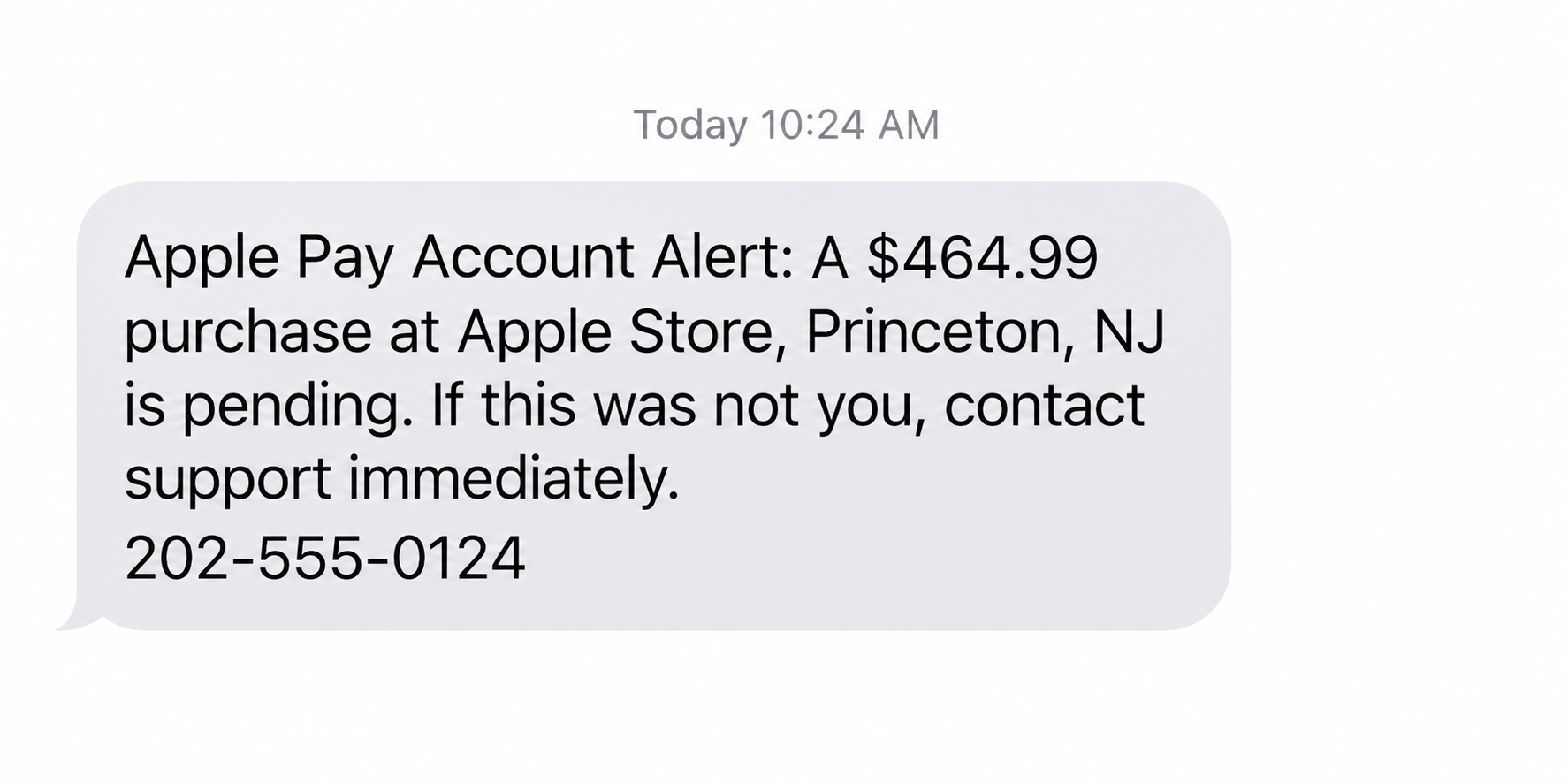
A text says a $464.99 Apple Pay purchase is on hold at an Apple Store in Princeton, New Jersey. You have one number to call if it was not yours.
The message seems to offer help. The urgent part is figuring out whether anything actually happened to your card.
Overview
The $464.99 Apple Pay Account Alert text
A reported Apple Pay Account Alert text claims there is a pending $464.99 purchase at an Apple Store in Princeton, New Jersey.
It also mentions unusual sign-in attempts and Apple Pay activation requests. The message says the purchase will proceed unless the recipient calls a support number.
The reported version lists +1-866-557-4631. That number appears in the suspicious message, not in Apple’s official support directions. Do not use it to verify the alert.
The exact amount, location, case number, and callback line can change. The mechanism depends on making a person call the number inside the text.
What makes the message deceptive
Apple is a real company, and Apple Pay is a real payment feature. The scam is the message and the attempt to move you to an unverified helper.
Apple’s social-engineering guidance describes scammers claiming that unauthorized Apple Pay charges occurred. They create urgency and then seek account information or security codes.
A screenshot of a text cannot prove a bank transaction. It tells you what the sender wants you to believe, not what your card issuer has recorded.
The quickest independent check
Open Wallet yourself and inspect the recent transactions for the relevant card. Then check the card issuer’s own app or contact the issuer directly.
- Do not call the number supplied in the text.
- Do not share an Apple Account password or verification code.
- Do not install a remote-support app on a stranger’s instruction.
- Use official Apple support only after navigating there yourself.
Apple notes that Wallet may not be the most complete record. For the most accurate transaction information, ask your card issuer.
Why This Message Feels More Convincing Than Ordinary Spam
The amount is specific. So is the store location. Those details give your mind a concrete scene to picture before you have any evidence of a payment.
The message combines two worries: a card charge and an account takeover. If one feels unlikely, the other may still keep you reading.
A case ID can add a bureaucratic sheen. Yet a random case number is easy to generate and cannot be verified by itself.
Then comes the apparent courtesy: “If this was you, no action is required.” It frames the sender as a neutral security team rather than a stranger demanding contact.
The next sentence reverses the calm. If the purchase is not yours, the text says you must call immediately or the charge will be processed.
That setup encourages a reflexive call. Many people will not first ask which card was used, whether a real authorization exists, or who owns the callback line.
Caller ID and message labels are not a guarantee. A display name can be typed by the sender, and phone numbers can be changed between waves.
Good grammar is not a guarantee either. This reported sample includes some awkward wording, but a cleaner copy could use the same tactic.
Apple does send legitimate account and transaction communications. The mistake is to declare every text fake based only on the channel.
Instead, treat an unexpected payment warning as an unverified claim. Open trusted apps and channels without following the route laid out in the message.
How the Apple Pay Account Alert Scam Works
Step 1: The text introduces a pending purchase
The sender names a merchant, city, and amount. In this reported example, it is a $464.99 Apple Store purchase in Princeton.
The word “pending” matters. It explains why you might not yet see a settled charge and gives the scammer room to insist that you must act first.
Some versions mention a pre-authorization. That technical-sounding word can be used even when the sender has no access to a real payment system.
A real pending card transaction may exist for unrelated reasons. The text alone cannot connect that transaction to the sender’s claimed case.
Do not assume a transaction is real because the amount seems plausible. Check the issuer’s records independently.
Step 2: Account warnings widen the threat
The reported message adds unauthorized sign-ins and Apple Pay activation attempts. These claims suggest the problem may continue beyond one purchase.
That can make a cardholder anxious about devices, passwords, and future charges. The caller can later choose whichever fear gets the strongest response.
There is no reason to believe a text sender can diagnose your Apple Account simply by writing those words. Look for account activity in Apple’s own settings.
If you receive an authentic security notification too, handle it through the Apple Account interface, not through the suspicious text’s number.
Step 3: A deadline moves you to a fake support line
The message says the transaction may proceed automatically within 24 hours unless you report it. The deadline narrows your chance to think.
When someone dials the supplied line, the recipient can be coached by a person who already knows the story in the text.
The agent may repeat the amount and case ID to sound credible. Repeating a value that was in the original message is not independent confirmation.
Apple advises people not to answer suspicious calls or messages claiming to be from Apple. Contact the company through its official channels instead.
For the payment itself, the card issuer is especially important. The issuer can confirm whether a real authorization or posted charge exists.
Step 4: The caller asks for a secret or access
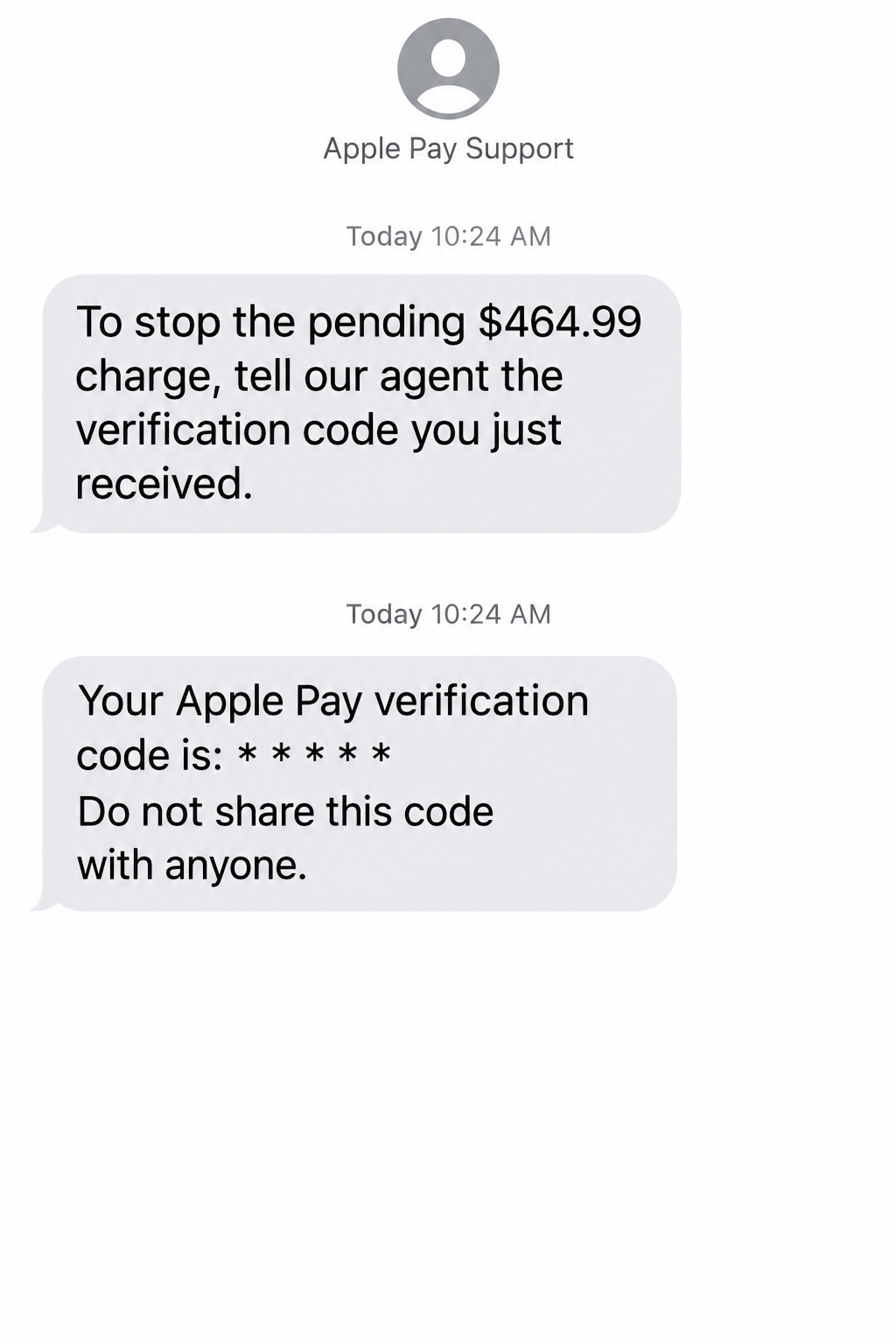
The reported text is the bait. A later caller may request an Apple Account password, a one-time code, full card details, or remote access.
Those are known social-engineering tactics, but not every recipient sees the same follow-up. Do not assume that one published sample documents every later request.
Apple says it will not ask you to provide your password, device passcode, or two-factor code to support. A legitimate helper does not need you to read a code aloud.
A verification code can authorize a sign-in or account change. Sharing it can create a real account compromise where the original charge was only a story.
A remote-access request is another red line. An impostor could watch your screen, guide payments, or collect information under a security pretext.
Step 5: The scammer may invent a reversal problem
Some support-impersonation scams move from “stop the payment” to “process the refund.” The caller may ask you to make a transfer or install software.
A legitimate card dispute starts with your card issuer. You do not need to send a separate payment to reverse an unauthorized charge.
If a caller says money must be moved to a safe account, stop. That is not a normal Apple Pay verification step.
After a person shares information, a second caller may claim the first case was mishandled. The same independent verification rule applies to every follow-up.
How to Check a Suspected Apple Pay Charge Safely
Open the Wallet app directly, tap the card named in any legitimate issuer alert, and review recent transactions. Do not use a link in the suspicious text.
Apple’s transaction-history instructions explain that Wallet may show Apple Pay and physical-card activity. Availability can vary by issuer.
The card issuer remains the most accurate source for transaction records. Use the issuer’s app, website, or the number printed on your card.
If the issuer confirms a pending authorization, ask what can be done now. Some pending items require monitoring until they post before a formal dispute.
If no transaction exists, save the text and report it. Continue to monitor the account, but do not let the sender’s deadline dictate an unnecessary payment.
Check the Apple Account separately if the message alleged sign-ins. Review trusted devices, contact details, and security notifications through account settings.
Do not enter a code into a page reached from the text. A real Apple Account sign-in should begin from an address or app you opened yourself.
If you have multiple cards in Wallet, inspect the issuer accounts for each plausible card. The text may avoid naming a card because the sender does not know one.
Keep a simple record of what you found. A screenshot of the suspicious text and issuer confirmation can help if you later report the attempt.
If You Also See a Real Pending Charge
A suspicious text and an actual pending card transaction can occur together. That does not make the text or its callback number authentic.
The transaction might be unrelated, or the sender might have learned about it through another compromise. Let the card issuer investigate that connection.
Ask the issuer for the merchant descriptor, amount, time, card used, and whether the item is an authorization or a posted charge.
A pending authorization is not always a completed purchase. The issuer can explain its dispute process and any temporary card protections available.
Do not let the fake helper take over the call while you are checking. Hang up, then start a fresh conversation with your issuer.
If you used Apple Pay in a store recently, compare the transaction against your own receipt. Similar amounts can create false alarms.
If a charge posts and you do not recognize it, document the discrepancy and follow the issuer’s dispute instructions promptly.
Do not assume Apple can reverse every card transaction directly. The underlying card issuer controls the payment account and can investigate unauthorized use.
Finally, watch for a second message claiming your dispute failed. A real case update should be visible through the issuer’s trusted channel.
Warning Signs in the Reported Text
The suspicious elements are not merely a typo or an unfamiliar number. They form a sequence that pushes you to the sender’s channel.
- A supposed payment warning offers only a number from the message as the solution.
- The case ID cannot be checked inside your real account.
- The text combines a purchase, sign-ins, and activation requests in one alarm.
- A 24-hour clock encourages a call before independent verification.
- The sender asks for codes, passwords, payment details, or remote access after contact.
The exact callback number is an indicator for this reported version, not a complete blacklist. A different number can carry the same script tomorrow.
Likewise, a number that appears on a search result is not automatically official. Navigate to Apple and your issuer independently.
What to Do if You Have Fallen Victim to This Scam
- Stop communicating with the number in the text. End the call and do not follow later instructions. Save the message, call log, and any pages you opened before blocking the sender.
- Contact your card issuer through a trusted channel. Ask whether the $464.99 transaction or any other suspicious authorization exists. If you supplied card details or sent money, ask about card replacement, disputes, and account monitoring.
- Secure your Apple Account if you shared credentials or a code. Change your password, review trusted devices and account details, and remove unfamiliar devices. Apple provides account-compromise instructions for these steps.
- Review any remote-access software you installed. Disconnect from the impostor, remove unfamiliar apps or profiles, and get help from Apple or another trusted professional if control of the device is uncertain. Scan affected computers with Malwarebytes when software was installed. AdGuard can reduce risky ad exposure, but it cannot revoke account access.
- Check for changes beyond the alleged purchase. Look for new Apple Account devices, altered recovery details, unfamiliar card activity, and messages about sign-in attempts. Tell your issuer and Apple what you actually observed.
- Report the impersonation. Apple says to email a screenshot of suspicious SMS to reportphishing@apple.com. You can also use Report Junk in Messages when available and report monetary loss to the FTC.
- Be cautious with follow-up offers. A person promising to recover funds or fix your account for a fee may be another scammer. Work through your issuer and official Apple support.
Frequently Asked Questions
Is the $464.99 Apple Store transaction real?
The text cannot establish that. Check Wallet, then confirm with the card issuer, which has the most accurate transaction record.
Is +1-866-557-4631 an Apple support number?
It appears in the reported suspicious text. Do not rely on that message to identify official support. Reach Apple through its own website or app.
Can I trust the case ID in the alert?
No. A case ID typed into a text is not proof that Apple or a bank opened a case. Verify through your own account.
Does Apple ever send legitimate security messages?
Yes. The existence of legitimate notifications does not validate an unexpected callback number. Review account activity using Apple settings and official support channels.
What if I called but did not share anything?
End contact, save the evidence, and check your card and Apple Account. A call alone does not prove that the caller gained access.
Should I share a verification code to cancel a charge?
No. Apple says support does not need your account password or verification code. A code can help someone else access your account.
The Bottom Line
The Apple Pay Account Alert scam turns a detailed $464.99 payment story into a reason to call an unverified number. The story is not a bank record.
Check the transaction with your issuer and the account with Apple, each through a channel you open yourself. Never trade a security code for a promised reversal.








