

Your listing has barely gone live when a buyer offers the asking price. They will arrange collection, handle the courier, and make everything easy.
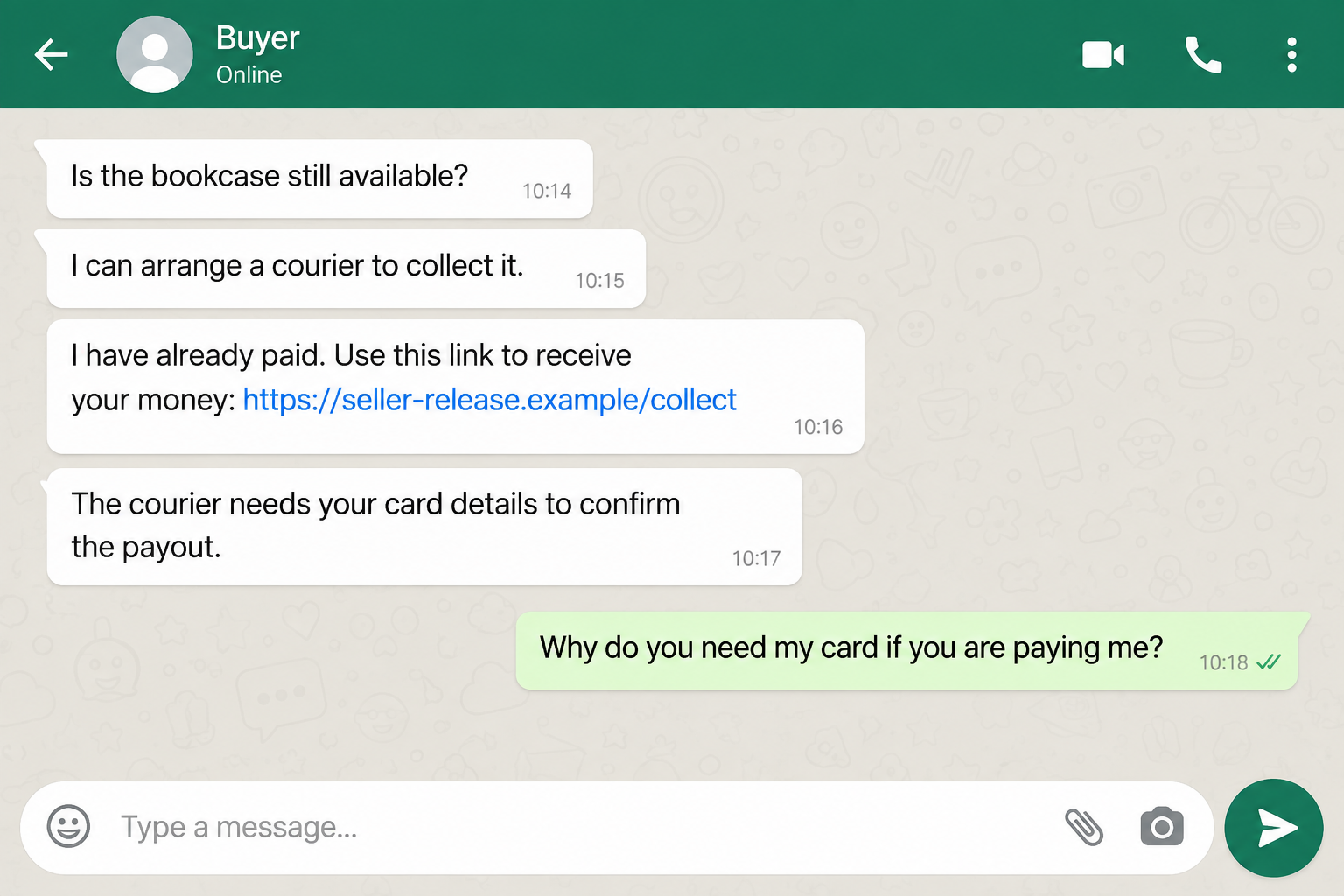
Then a link arrives so you can receive the payment. The Gumtree courier scam starts at exactly the moment selling your item seems almost finished.
Overview
The buyer turns a sale into a payment-verification task
This scam targets people selling genuine items. The supposed buyer claims to have paid, then directs the seller to an outside page to collect the money.
The page may ask for card details, an online banking login, or a verification code. Another version demands a courier insurance or payment-release fee.
The seller expects money to come in. Instead, the conversation creates a reason to hand over information or send money out.
Gumtree identifies these behaviors in its official fake-buyer warning. This is documented phishing and advance-fee fraud, not simply an awkward delivery arrangement.
Gumtree and the courier are being impersonated
The criminals borrow familiar names to make an unfamiliar payment process feel routine. The legitimate marketplace or delivery company is not the scammer.
A buyer can genuinely arrange collection. A seller can also legitimately receive payment electronically. Neither fact makes a stranger’s verification link trustworthy.
The decisive issue is what the link asks you to do and whether the transaction exists inside the service you opened independently.
A message saying payment is secured does not create an order. A courier logo does not prove that the courier controls the website.
The warning signs appear before you release the item
Watch for a combination of these requests:
- Enter card security details to receive a buyer’s payment.
- Pay insurance before a courier can release money.
- Share a banking code with the buyer or a supposed support agent.
- Use a payment link that arrived outside your marketplace account.
- Ignore your empty balance because the money is supposedly reserved.
- Act immediately because the collection slot is about to expire.
One rushed message does not establish fraud. A fake payment portal asking a seller to authorize an unrelated charge is a different matter.
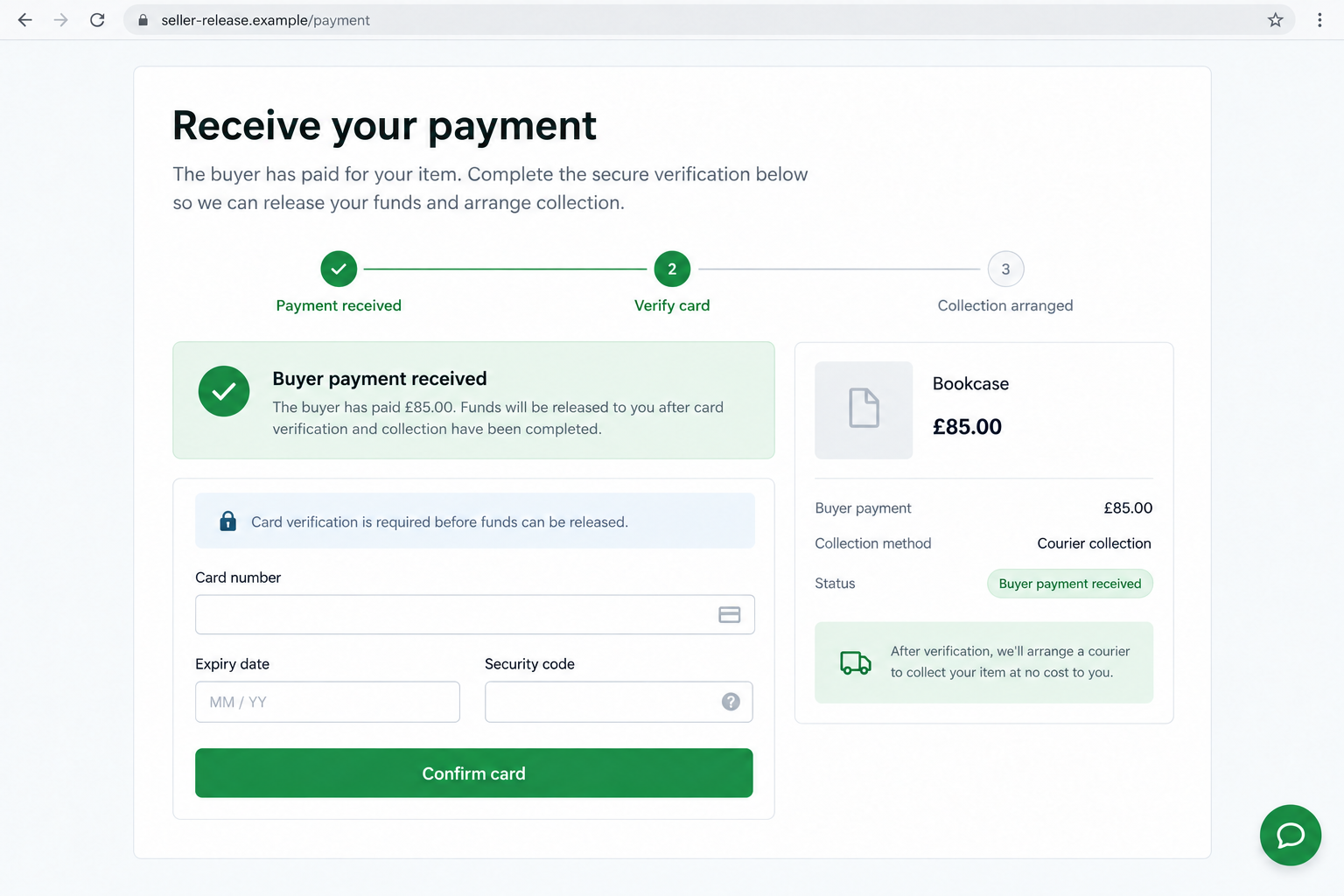
The screenshots here are fictional illustrations of the approach. The domains are deliberately nonfunctional, and the messages are not evidence against a particular Gumtree account.
Why the Courier Story Feels So Convenient
Selling furniture or bulky equipment involves practical headaches. Someone has to organize a vehicle, agree on a collection time, and work out how payment will happen.
A buyer who offers to solve all three problems can feel like a relief. That convenience is what makes the next unusual request easier to accept.
You may assume the courier needs extra information because you have never used that service before. The buyer presents themselves as the person who understands it.
That reverses the relationship. Instead of setting your sale terms, you begin following instructions from an unknown person who supposedly already paid you.
The claimed payment also creates pressure to cooperate. Refusing can feel unfair when someone insists their money is waiting and the driver is booked.
You do not owe a stranger access to your bank account because they announced a payment. Verification comes before cooperation, even if they sound inconvenienced.
How the Gumtree Courier Scam Works
Step 1: A supposed buyer offers an easy collection
The approach usually relates to something you actually listed. That gives the message a believable starting point without proving anything about the sender.
They may accept the price quickly and explain that work, distance, or a family commitment prevents them from collecting personally.
None of those explanations is inherently suspicious. The concern begins when the buyer insists that their particular courier-payment procedure is the only acceptable option.
Keep the discussion attached to the listing where possible. There is no need to provide additional identity documents just to discuss a collection time.
Step 2: The conversation moves to a payment link
A text, email, or private message arrives claiming the payment is ready. Sometimes the buyer asks for your email address so the confirmation can be sent.
The message may use marketplace branding, a delivery logo, an order number, and the correct item price. Those details can be copied from your conversation.
The link leads away from the process you chose. It may resemble a payment provider, a courier portal, or a seller-verification page.
Do not test its authenticity by entering information. Leave it and open your existing marketplace account through the normal app or a trusted bookmark.
Step 3: Receiving money requires giving something away
This is the key switch. The page demands information or payment from the seller before the supposed purchase money can be released.
In a phishing version, it requests card numbers and security codes. Other versions ask for bank credentials or a one-time code.
In an advance-fee version, the seller must pay an insurance charge, verification deposit, or release fee. The promised incoming payment remains unverified.
Gumtree’s seller safety guidance specifically warns about courier and payment-release links seeking these details.
Step 4: A code or second payment keeps the process moving
If you hesitate, the buyer may introduce a supposed support representative. Having two people repeat the same explanation does not make it independently verified.
A code request can be described as confirmation that you own the card. Read the actual message from your bank before doing anything with it.
If it authorizes a purchase or account change you did not initiate, stop. The buyer’s explanation cannot change the action described by your bank.
A failed verification message may be followed by a request for another card. Do not expose a second account because the first attempt apparently failed.
Step 5: The seller loses money, information, or the item
The damage depends on what happened. A seller who entered card details needs a different response from someone who only read the buyer’s message.
Someone who paid a release fee may lose that payment. Someone who disclosed account credentials may also face unauthorized access.
If the item was handed over before real payment arrived, there is a separate loss to report. A collection receipt cannot replace missing purchase money.
Do not assume the story ends when the buyer stops answering. Preserve the conversation and check the accounts connected to anything you disclosed.
Check the Transaction, Not the Buyer’s Screenshot
Start with your own account. Can you see an order, a payment, or a supported collection arrangement without using the buyer’s link?
If not, ask the actual platform or payment provider through its official help route. Avoid any support number supplied in the suspicious conversation.
The buyer may send a screen recording, an invoice, or an identification document. Those are not substitutes for checking the receiving account yourself.
Do not send your own passport in return. Exchanging sensitive documents with a stranger creates another risk without settling whether the payment is real.
Look at the complete website address, not just the familiar word at its beginning. Brand names can appear inside addresses owned by unrelated parties.
A padlock only concerns the connection to that site. It does not establish that the site belongs to Gumtree or that its payment claim is true.
Also separate the courier booking from the purchase. A real tracking number may show that a shipment was arranged; it does not prove you received payment.
There is no need to win an argument about this. You can simply decline an unfamiliar payment route and retain the item.
Real Platform Features Do Not Validate an Outside Link
A blanket rule that Gumtree never supports payments would be misleading. Features vary by country, category, and the current service offered.
Gumtree UK’s payment guidance describes limited eligible transactions and explains how to check payments independently.
That is why verification should happen inside the real service. The existence of a legitimate feature does not authenticate a message using its name.
Likewise, using a well-known courier is not evidence of wrongdoing. Criminals can impersonate that courier without the company being involved.
If a buyer proposes a different arrangement, ask yourself whether you can verify every important part without relying on information they supplied.
For a collection sale, agree on the payment method beforehand. If the arrangement changes at the last minute, pause the handover rather than improvising.
For an eligible platform order, follow the instructions shown within your account. Check the platform’s current protection rules before assuming your transaction qualifies.
A genuine buyer may decide your terms do not suit them. Losing a sale is preferable to authorizing an unexplained payment to keep someone happy.
What to Do if You Have Fallen Victim to This Scam
Before taking action, separate what you saw from what you did. Did you merely receive the link, enter information, authorize a payment, or release the item?
Write down the answer while the sequence is fresh. This helps your bank or the platform understand the exposure without relying on the buyer’s explanation.
If you cannot remember what a banking code authorized, keep the original bank message. Do not delete it along with the scam conversation.
Save suspicious links as text rather than repeatedly reopening them. The destination may change, and revisiting it will not make the transaction easier to verify.
Someone helping you should use their own trusted contact routes too. Forwarding the buyer’s support number to a relative simply extends the same unverified chain.
The most urgent task is protecting an exposed financial account. You can organize a detailed platform report after contacting the bank.
- Stop the sale and retain the item.
Do not pay another fee or supply another code. Save the conversation before blocking the buyer, provided doing so does not delay urgent bank contact.
If someone arrives to collect, do not argue or put yourself at risk. Refuse the handover safely and contact local police if threatened.
- Contact your card issuer if you entered card information.
Use the number printed on your card or the bank’s official app. Explain that you entered details on a fake courier-payment page.
Ask whether the card needs replacement and report any unfamiliar transactions. A temporary card lock can help while you contact support, but it is not the whole response.
- Secure any account whose login or code you shared.
Tell the bank or service exactly what the code message said. Include whether you approved a notification, disclosed a password, or changed an account setting.
Use a trusted device to change compromised passwords. Review recovery details and active sessions with the provider, particularly if the same password protected your email.
- Report payments accurately and promptly.
Give your payment provider the amount, recipient, time, reference, and explanation of the deception. Ask what recall or dispute options apply to that transaction.
Do not describe a payment you knowingly sent as an unauthorized card charge. Explain the scam honestly so the provider can assess the correct process.
- Preserve a useful evidence package.
Keep the listing address, buyer profile, messages, suspicious URL, payment receipt, and any courier details. Record when you first noticed the problem.
Store documents privately. Publishing a recipient’s address or identification can expose an uninvolved person whose details were also misused.
- Report the account and any shipment.
Use Gumtree’s help service to report the buyer and link. If goods have already been dispatched, ask the carrier whether interception remains possible.
Report the fraud through your local official reporting channel. A report creates a record, but it does not guarantee that payment or property will be recovered.
- Check device exposure only where it applies.
If the page prompted a download, extension, or remote-support installation, stop using that software and obtain help. A Malwarebytes scan can check for unwanted software.
AdGuard can reduce exposure to some malicious advertising and tracking. Neither tool retrieves a payment, replaces a compromised card, or proves a buyer is genuine.
If you only received the message and did not open links or provide information, blocking and reporting may be enough. A message alone does not prove compromise.
Be wary of anyone promising to recover your loss for an advance fee. Use your existing bank, platform, and official reporting routes instead.
Frequently Asked Questions
Is every Gumtree buyer who wants a courier a scammer?
No. The warning is a fake payment process, especially one requesting card security details, banking codes, or fees before you can receive money.
Why does the page already show my listing price?
The buyer can copy the price and item name from your advertisement or messages. Accurate listing details do not establish who operates the payment page.
Should I enter my card to receive the courier payment?
Do not enter it through an unexpected buyer-supplied link. Verify the transaction inside the official platform or ask your payment provider through a trusted contact route.
What if the buyer says the payment will expire?
Let it expire rather than approving an unexplained request. You can verify the claimed order independently before agreeing to any new collection or payment arrangement.
Can I trust an email with a real courier logo?
No logo can authenticate an email by itself. Check the booking with the courier independently, and check the purchase payment separately in your own account.
Do I need antivirus after opening the link?
Opening a page is not proof of infection. Downloads, installed extensions, unusual permissions, or remote access deserve closer attention. Disclosed financial details require bank action regardless.
The Bottom Line
The Gumtree courier scam uses an easy sale to introduce an unsafe payment request. You should not surrender banking access to collect money from a buyer.
Verify the order and payment through services you open yourself. If the only evidence exists in the buyer’s messages, keep the item and stop the transaction.








