

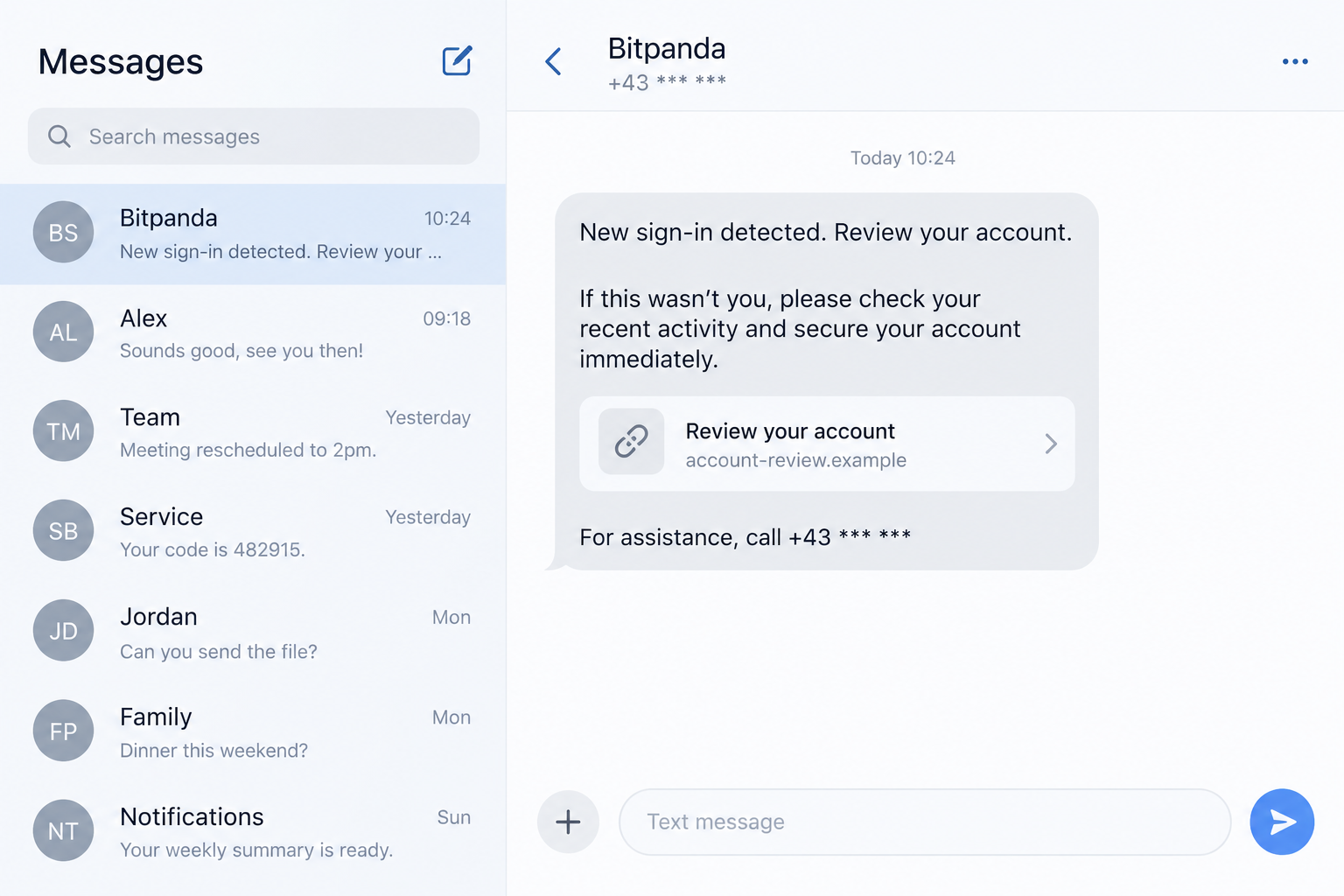
A security text says someone just signed into your Bitpanda account. It gives you a link and a callback route before any funds can supposedly move.
The message may even appear in a familiar conversation thread. That makes it easy to treat the warning as genuine before checking where it leads.
Overview
The security-alert impersonation
The Bitpanda SMS scam uses an urgent account warning to move a customer into a conversation or webpage selected by an impostor.
A report on OnlineThreatAlerts describes a text that appears connected to account safety and directs the recipient to act.
The warning may claim a new sign-in, blocked withdrawal, or suspicious transaction. Its purpose is to make independent verification feel risky or slow.
Bitpanda is a legitimate platform. The suspicious message and any impersonating helper are the scam, not the exchange named in the text.
What Bitpanda itself says
Bitpanda’s scam guidance warns that SMS sender information can be spoofed and fraudulent messages may appear alongside genuine ones.
It also warns against moving assets to a supposed safe wallet because of an unexpected warning. That instruction is a strong sign of impersonation.
Bitpanda offers an anti-phishing code feature for supported communications. Use current official guidance to understand where the code should appear.
Importantly, Bitpanda’s current support page offers scheduled calls. A blanket statement that the company never phones users would be inaccurate.
An unsolicited callback number inside a text still does not authenticate itself. Verify any support interaction by starting from the genuine app or support page.
Warning signs in the message or follow-up
- The text gives a link on an unrelated domain.
- A caller asks for a password, recovery phrase, or two-factor code.
- They tell you to transfer crypto into a “safe wallet.”
- The supposed agent discourages checking the app independently.
- The message’s urgency depends on calling its own number immediately.
- The page requests information before showing any account-specific evidence.
Both illustrations are fictional interface reconstructions. They show the phishing path without a functioning wallet address, login, or callback number.
Why the Alert Can Look Authentic
It appears to come from a known sender
A text can show a familiar sender label or sit near prior legitimate messages. That visual continuity is persuasive, especially during a security emergency.
Bitpanda specifically cautions that SMS spoofing can cause this effect. The conversation thread is not proof that the new content came from the company.
Read the instruction itself. A demand to use a new link or transfer assets can be suspicious regardless of the thread in which it appears.
If you receive a real account notification, opening the app yourself should let you investigate without following the text’s chosen route.
It creates a race against an imagined thief
Crypto transfers can be difficult to reverse, so a claim about an unauthorized withdrawal produces immediate fear. The scammer uses that fear to control timing.
They may tell you that minutes remain before a transaction clears. That deadline can prevent you from checking support details or thinking through the request.
A calm verification step is still faster than losing control of the account. Do not let the sender turn caution into apparent negligence.
Write down what the text claims, then inspect your account through the app you already have, not through the message.
“Safe wallet” language sounds protective
When a supposed helper says to move funds for protection, the action may sound like a security procedure. In crypto, the destination controls the result.
A transfer to an attacker-controlled wallet is not a freeze or reversal. It is an outgoing transfer that may be impossible to recover.
Some impersonators may insist you do the transfer yourself, avoiding any need to know your password. That does not make the instruction safe.
Use official account-freeze or support options where available. Never treat a wallet address from a text or caller as a custody safeguard.
How the Bitpanda SMS Scam Works
Step 1: A sudden account warning arrives
The text mentions a sign-in, withdrawal, or security check. It is written to be believable even if the sender does not know your account state.
A mass message can reach actual customers by chance. A targeted sender might know your email or phone number from unrelated data exposure.
Neither circumstance proves that Bitpanda’s systems have been compromised. The evidence is the message itself, not verified account activity.
Do not confirm your balance or holdings in a reply. That information can guide the next stage of the pitch.
Step 2: The message offers a preselected rescue route
The text may include a web link or ask you to call a number. Both routes keep you within the attacker’s controlled conversation.
The domain might contain security-related words. A familiar phrase in a URL is not evidence that Bitpanda owns the site.
If the text appears beside authentic messages, the same rule applies. Open the official app independently and inspect notifications there.
Use Bitpanda’s official support page if you need help. Do not choose a number solely because the alarming text supplied it.
Step 3: A page or agent asks you to “secure” the account
A fake page can request a login, two-factor code, or other account detail. A caller may instead ask you to follow instructions while remaining on the line.
The second image shows a fictional account-review page on an unrelated example domain. It illustrates how a security theme can disguise a mismatched destination.
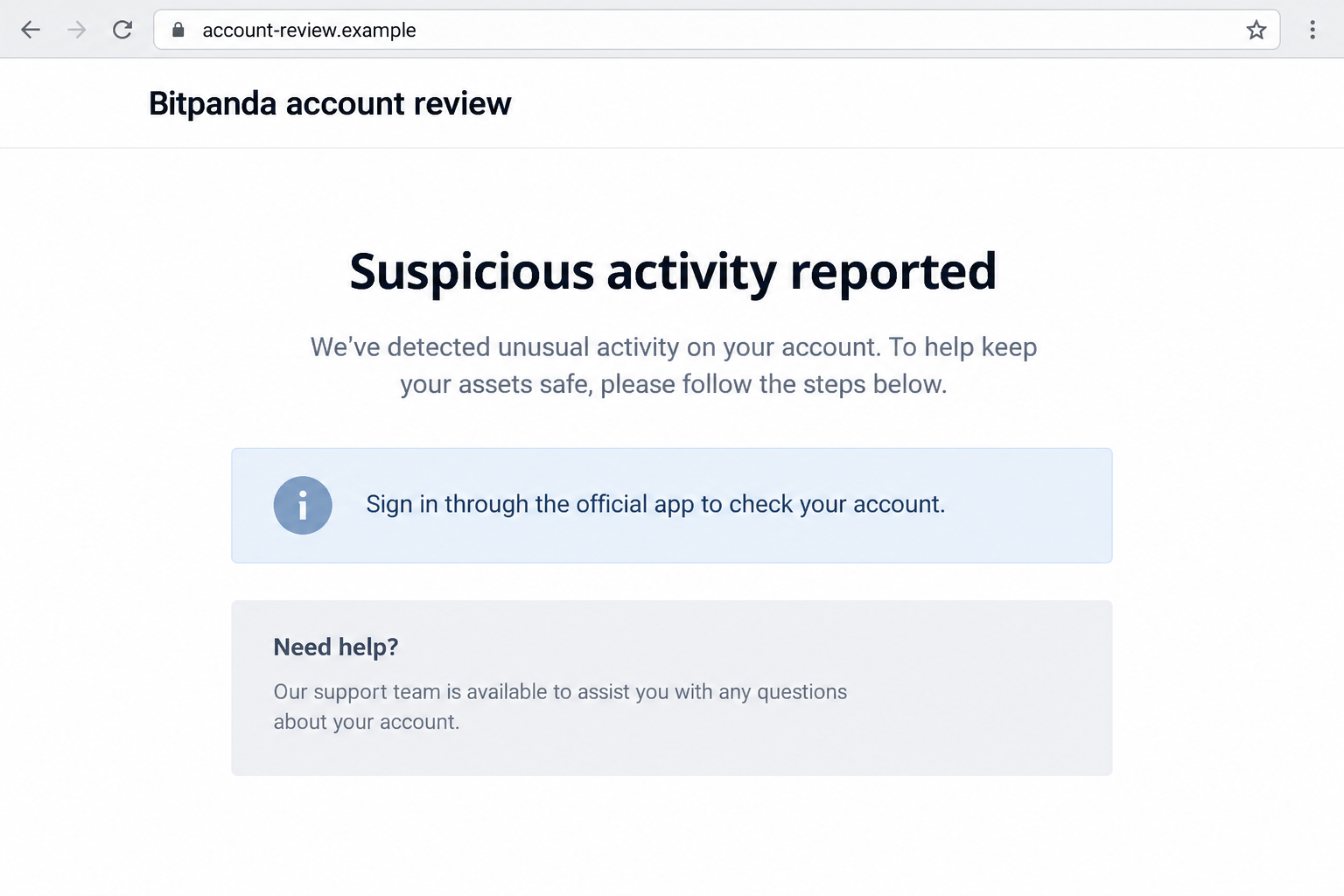
The displayed page is not evidence of a real intrusion. Its visual polish and padlock symbol do not establish its operator.
If someone asks you to read an authentication code aloud, stop. That code is meant for your own sign-in or transaction verification.
Step 4: The attacker targets access or assets
With credentials and a code, an attacker may try to enter the account. With a safe-wallet story, they may instead persuade you to transfer funds voluntarily.
Some variants could seek screen-sharing access. That can expose balances, codes, and recovery information even without a direct request for passwords.
These are possible scam branches, not a claim that the specific reported text used all of them. The common feature is attacker-directed action.
Do not move assets or install software based on a message. Verify account status and available safeguards from the official interface.
Step 5: A second request keeps the victim engaged
If an initial transfer or code does not work, the impersonator may blame a verification error and request another step.
They could also claim that official support is too slow or that any independent call will cancel the recovery. Those claims serve the attacker.
End the interaction. Use the genuine account to freeze activity if the feature exists, and ask official support to review the account.
Save the suspicious message and any transaction identifiers. Do not send more assets in an attempt to recover what has already moved.
How to Verify a Real Bitpanda Account Alert
Check the account without the text link
Open the Bitpanda app from your device or type the official website yourself. Review security notices, sign-in history, and withdrawals.
If you see an unfamiliar event, use available account protections and contact support through the official page. Do not ask the text sender for confirmation.
Keep a record of the event’s time and transaction reference. Those facts will help genuine support investigate.
If the account appears normal, the message may still be an attempted scam. Report it and remain alert for follow-up contact.
Understand the anti-phishing code’s limits
Where supported, Bitpanda’s anti-phishing code helps identify certain genuine communications. Its absence or mismatch can be a warning sign.
It is not a reason to trust every message that looks familiar. Verify the exact channel and code behavior against Bitpanda’s current instructions.
Never disclose the code, password, or recovery phrase to someone on a call. A verifier should not need you to read secrets aloud.
The safest route remains a fresh login and an official support interaction initiated by you.
Distinguish scheduled support from a surprise callback
Bitpanda currently offers scheduled support calls. That is different from a text suddenly directing you to call an unknown number.
If you scheduled a call, check its details in the official support flow. If you did not, do not let a caller’s claim substitute for verification.
Even during a genuine scheduled call, avoid sharing passwords, recovery phrases, or one-time codes. Ask support to explain a safe, documented process.
This nuance matters because overbroad “they never call” advice can make readers distrust legitimate support while missing the real danger.
What the Alert Does Not Prove
A named location is not account access
A message may claim a login from a city you do not recognize. The sender can invent a location without seeing your real login history.
Check the genuine account’s activity view. If there is no matching event, the text’s detail should not pressure you toward its link.
If there is a matching event, use the account’s official security controls. The suspicious sender still does not become your support agent.
Keep the event timestamp and device details for genuine support. Do not read them aloud to an unsolicited caller.
A familiar SMS thread is not authentication
Sender spoofing can place fraudulent texts where legitimate ones appeared before. That is why the message’s position in your inbox is not decisive.
Compare its request with official safety guidance. An instruction to move funds or disclose a code is dangerous even if the sender label looks familiar.
Open the app yourself and examine notices there. A fresh route avoids depending on the very message you are trying to evaluate.
Do not reply to the thread to ask whether the warning is real. The answer may come from the same unverified sender.
A callback offer is not a support appointment
Because Bitpanda offers scheduled support calls, a real call is possible. The important distinction is who initiated and verified the appointment.
If the only evidence of a call is the alarming text, treat its number as untrusted. Find the support page independently.
Check whether you actually requested a call and whether its details appear in the official support flow. If not, decline the surprise contact.
During a verified call, support should not require a transfer to a new wallet as proof of ownership or a quick safety measure.
If a Transfer Already Left the Account
Crypto transactions may be final once confirmed on the network. Contact Bitpanda promptly, but do not assume a reversal is possible.
Preserve the transaction hash, destination address, network, amount, and time. Those details are more useful for an investigation than a screenshot alone.
If the transfer is still pending inside the platform, ask official support about any available intervention. Do not take instructions from the original caller.
Someone may offer to recover the funds for a fee or ask for a second transfer to “unlock” them. Treat that as another scam risk.
Keep the account protected while the case is reviewed. Change compromised passwords and secure the email account connected to it.
Report the incident to the relevant local authority. A report may not reverse a transfer, but it preserves the facts and can support a broader investigation.
What to Do if You Have Fallen Victim to This Scam
- End contact with the impostor. Stop the call, close the page, and do not respond to another security text from the same thread.
- Secure the Bitpanda account. Open the genuine app or website independently. Change the password, review sessions and withdrawals, and use available freeze controls.
- Contact official support promptly. Give the timing, claimed alert, account activity, and any transaction ID. Ask what security controls and investigation options are available.
- Protect your email and two-factor method. If you shared a code or recovery details, secure the linked email account and speak with the provider about resetting authentication.
- Record any outgoing transfer. Keep the wallet address, transaction hash, amount, network, and time. Do not send more crypto to a claimed recovery wallet.
- Check the device if remote access was involved. Remove unauthorized tools, scan with reputable security software, and change credentials from a trusted device.
- Report the impersonation. Share the text and destination with Bitpanda’s support, and file a report with the relevant fraud authority where you live.
- Prepare for recovery scams. Anyone guaranteeing a crypto reversal for an upfront fee is adding another risk. Verify every contact through official channels.
If you only read the SMS and did not click, call, or share information, you do not need to move your holdings. Report or delete the message.
If you entered credentials but did not see a withdrawal, still act immediately. A quiet account screen does not prove the credentials were never captured.
Frequently Asked Questions
Can a fake Bitpanda SMS appear in a genuine thread?
Yes. Bitpanda warns about SMS sender spoofing. A familiar thread is not independent proof that the newest message came from the company.
Does Bitpanda ever offer phone support?
Its current support page offers scheduled calls. The issue is an unexpected number supplied by a suspicious text, not every possible phone interaction.
Should I transfer crypto to a safe wallet after an alert?
No. Do not use a destination supplied by a text or caller. Check your account and official support options instead.
What if the message shows my real name?
Personal details can come from unrelated sources. They do not authenticate the sender or prove that a withdrawal is pending.
Will a padlock icon on the linked page make it genuine?
No. A phishing page can use encryption. The critical check is whether you reached a verified Bitpanda destination independently.
What if I only opened the page?
Close it and avoid entering information. If it downloaded a file or requested permissions, review the device and remove anything you did not intend to install.
The Bottom Line
The Bitpanda SMS scam uses fear of account loss to push users toward an impostor’s link or callback route. A familiar sender display is not enough.
Open the genuine app, check activity, and reach support independently. Never move crypto or reveal an authentication code to someone who appeared through the alert.








