

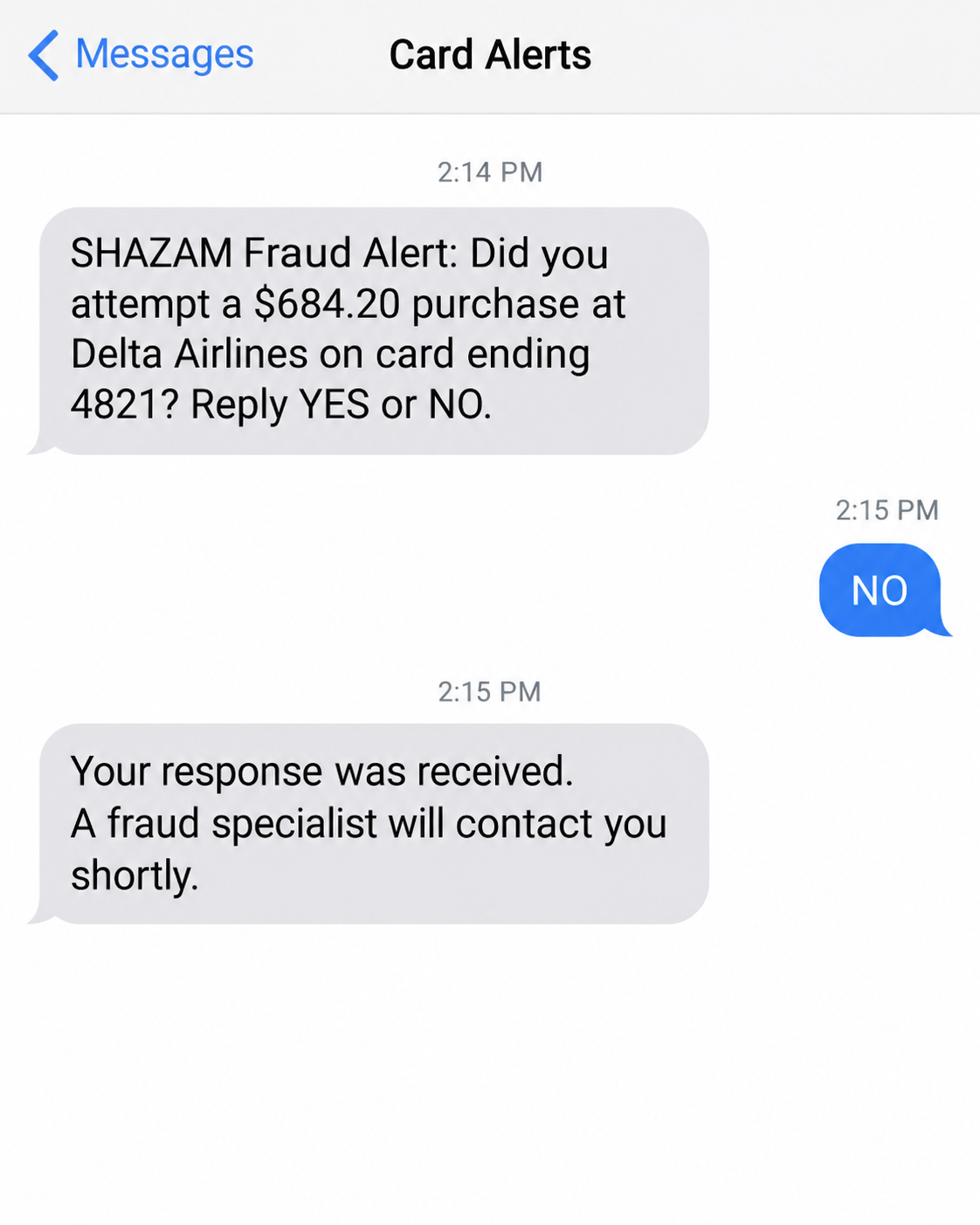
A text asks whether you just bought airline tickets. You reply that you did not, and almost immediately someone calls about your card.
The SHAZAM text scam exploits that unsettling sequence. What happens during the conversation matters much more than the familiar name on the alert.
Overview
Scammers impersonate a real card-fraud service
SHAZAM is a legitimate payments network. This scam concerns impostors using its name, not a finding that the network or your financial institution is fraudulent.
The fake alert introduces an unfamiliar purchase. A follow-up caller then claims to be preventing fraud while asking for information or actions that can enable theft.
The dangerous requests include sharing one-time codes, revealing card credentials, approving activity you did not initiate, or transferring money under a protection pretext.
Financial institutions have confirmed the pattern
In a September 2026 warning, Citizens Federal Credit Union reported several members receiving fake SHAZAM alerts followed by urgent calls.
Its warning described an airline-charge message and callers seeking sensitive information or transaction approval. That establishes more than one person’s dissatisfaction with a bank.
SHAZAM’s own passcode warning also addresses callers who impersonate financial institutions and try to obtain codes. The preventive language can conceal a login or payment attempt.
A callback alone does not prove a scam
Some legitimate card-alert programs do follow up by phone. Procedures differ between institutions, so a blanket rule that every SHAZAM callback is fake would be wrong.
- End a call that requests a password, PIN, full card credentials, or a sign-in code.
- Do not approve an unfamiliar transaction because the caller calls it a cancellation.
- Reject instructions to move money into another account for protection.
- Reach your institution using the number on your card or its verified app.
- Ask your institution to confirm its own SHAZAM notification procedure.
The safe decision is not to ignore every alert. It is to investigate the alert through a contact route the incoming caller did not supply.
Why the Text and Call Feel Like One Official Process
An unfamiliar purchase is a powerful interruption. You want it stopped, and a person who calls moments later seems to have arrived at exactly the right time.
The text creates the problem; the caller offers the solution. Their timing makes them appear connected to your card provider before they have proved anything.
A transaction amount, merchant name, or card ending can add credibility. Those details still do not tell you who controls the conversation.
Do not assume a caller has your complete financial history merely because they know a few details. The information’s source may remain unknown.
Likewise, do not assume the displayed telephone number proves identity. An incoming call can show a misleading number or a convincing business label.
The caller may sound calm, understand banking terms, and tell you they are recording the conversation. None of that substitutes for independent verification.
The trick is especially effective because preventing fraud usually feels like the responsible thing to do. You are trying to protect your money, not chase a reward.
That intention is used against you. Each requested action is explained as necessary to stop the purchase, even when it actually opens a new route into the account.
How the SHAZAM Text Scam Works
Step 1: An unfamiliar purchase gets your attention
The initial message asks whether a transaction was yours. It may use the language and simple YES-or-NO format people associate with card monitoring.
In the credit union’s warning, the supposed purchase involved airline tickets. Other merchant names or amounts can serve the same purpose.
A convincing format is not enough to establish authenticity. Compare it with the notification system your own institution says it uses.
If you do not recognize the transaction, check the account directly. You can investigate without clicking a link or accepting help from the next caller.
Step 2: The follow-up caller claims to handle the cancellation
The caller presents themselves as a fraud specialist. They explain that your response triggered a case or that the account needs immediate protection.
That explanation joins the two contacts into one story. It also discourages you from interrupting a process that supposedly already has your money under review.
A genuine institution can investigate without requiring you to trust an unsolicited caller. Hang up and initiate contact using your established banking route.
Do not let the caller transfer you to another supposed department as verification. Another voice inside the same call does not independently authenticate it.
Step 3: A security code is redefined as a cancellation code
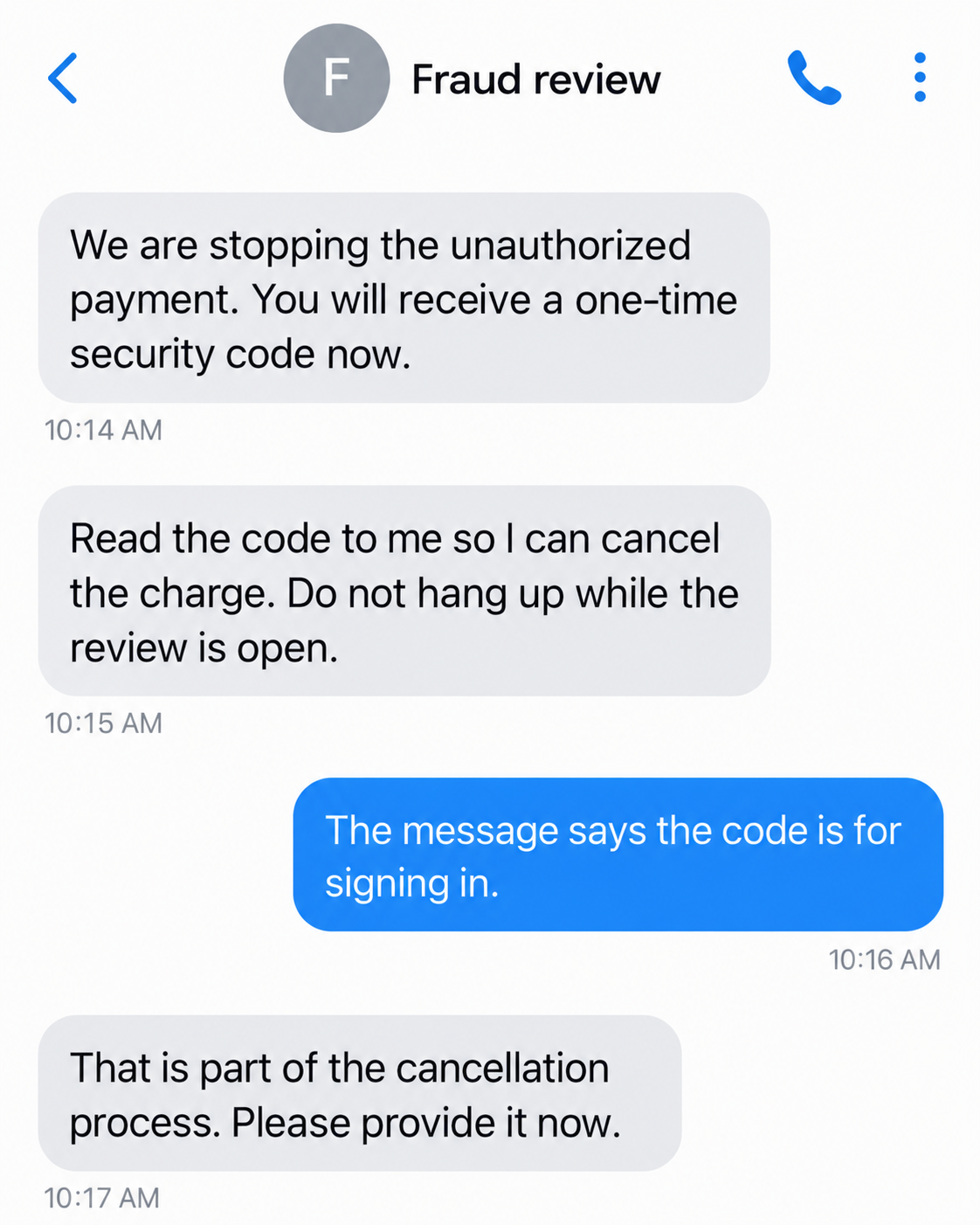
The impostor may trigger a real code and ask you to read it aloud. They say it will cancel the purchase or identify the rightful account holder.
The code can instead complete an action the scammer started. Its real purpose may be signing in, registering access, or authorizing something sensitive.
Read the accompanying notice yourself. If it describes a login you did not begin, do not let the caller rename that action as fraud prevention.
Our fictional screens illustrate the alert and a subsequent code request. The second screen presents the conversation as messages; it is not an authentic SHAZAM support exchange.
Step 4: The caller requests approval or movement of money
Some versions push beyond codes. A caller can ask you to accept a prompt, confirm a charge, or move funds while describing it as a protective measure.
The words do not change the action. Approving a transaction is not the same as disputing it, and moving money can put it beyond your control.
Ask your institution directly what activity is pending. Do not experiment with approval buttons to see whether the stranger’s explanation is correct.
No particular amount establishes the pattern. The warning is the mismatch between the promised protection and what the requested action actually does.
Step 5: Urgency keeps you from making the independent call
The impostor may say a charge will clear in minutes or that hanging up prevents reimbursement. Such pressure keeps you dependent on their instructions.
A genuine problem deserves prompt attention, but not blind cooperation. You can act quickly by calling the number printed on your card.
If you feel flustered, say you will contact the institution yourself and end the call. You do not need the caller’s permission to do that.
Tell the real fraud team which prompts or codes appeared. Their account records are more useful than the stranger’s running commentary.
Real SHAZAM Alerts Versus the Impersonation
There is an important difference between recognizing a fraudulent instruction and declaring an entire alert system fraudulent. SHAZAM’s services are used by legitimate institutions.
Peoples Bank’s guidance describes legitimate telephone follow-up in certain circumstances. It also warns against disclosing sensitive card information or one-time passcodes to callers.
This is why your institution’s own published procedure matters. A policy for one credit union should not be treated as the policy for every SHAZAM customer.
A merchant-confirmation question is also different from a request for credentials. Asking whether you recognize a purchase does not justify asking for your online-banking password.
Still, you should not try to authenticate an unknown caller by guessing which questions sound acceptable. End the incoming conversation and reach the institution independently.
Never treat a text thread’s familiar location as sufficient proof. Your concern is who sent this particular message and what the next action authorizes.
Do not use a telephone number copied from a questionable message. The number on your physical card, a bookmarked bank website, or the verified app is safer.
After reaching the institution, explain both contacts. Ask whether a genuine alert exists and whether any new login, card authorization, or transfer has occurred.
What a One-Time Code Can and Cannot Tell You
A code arriving from a real service does not authenticate the person asking for it. The service and the caller may be completely separate.
For example, an attacker trying to sign in can cause the real service to send a security message. The message is genuine; their explanation is not.
Do not assume this proves that your phone has malware or that someone has taken over every account. A specific attempted action may explain the notice.
Save the notice without sending the code to anyone. Tell the institution what the message says, when it arrived, and whether you disclosed it.
An expired code does not make the incident irrelevant. If it was used before expiration, the resulting access or authorization may already exist.
Likewise, a failed attempt does not guarantee the caller has stopped. They may try another route or send a second message with a different explanation.
The institution needs facts rather than guesses: what you shared, what you approved, which account was involved, and what happened afterward.
That information helps its fraud team choose the right response. Replacing a card alone may not address an exposed online-banking login.
What to Do if You Have Fallen Victim to This Scam
-
Stop the incoming call and any related messages. Do not provide another code, authorize a reversal, or move funds into an account selected by the caller.
-
Contact the card issuer or financial institution immediately through a verified number. Explain that a SHAZAM impersonator contacted you about supposed card fraud.
Describe every disclosure and approval accurately. Ask which card, account access, or payment functions should be blocked while the incident is investigated.
-
If a code was shared, specify which service sent it and its stated purpose. Ask whether the corresponding login or authorization succeeded.
Do not wait for a visible missing balance before reporting. Account access can create a risk even when no withdrawal appears yet.
-
If banking credentials were disclosed, change them through the legitimate service using a trusted device. Review available sessions, recovery details, and newly registered access.
Change a reused password elsewhere too. Ask the institution whether it requires additional steps to secure the affected banking profile.
-
Review recent card activity, pending transactions, payees, and transfers with the institution. Identify items you did not initiate or were tricked into approving.
Keep those categories clear. Tell the fraud team when you personally approved an action because of deception rather than calling everything an unauthorized login.
-
Preserve the text, caller number, call time, security notices, and any transfer instructions. Do not publish full card numbers or unexpired codes with the evidence.
Record the case number from the real institution. A short timeline makes later conversations easier and helps avoid contradictory descriptions.
-
Ask about applicable dispute or recall options and required deadlines. Follow up in writing where the institution directs you, and retain copies.
Reimbursement depends on the facts, payment method, and applicable rules. An internet warning cannot promise the outcome of an individual claim.
-
Report the impersonation through your institution and the appropriate fraud-reporting service. In the U.S., you can submit an internet-crime report to IC3.
Refuse anyone demanding a separate recovery fee. A second caller may reuse the first incident to sound informed and trustworthy.
If You Replied NO but Shared Nothing Else
Replying to a message is not the same as handing over a password. Do not assume that a single response automatically emptied or compromised your account.
Check with your institution anyway, especially if a suspicious call followed. Verify whether the original transaction exists and whether the alert was genuine.
If the institution confirms the purchase was unauthorized, follow its actual fraud process. Do not return to the unsolicited caller to finish a supposed cancellation.
If there was no purchase, keep the message as evidence and follow the institution’s reporting advice. Block the impostor after preserving what you need.
Ask household members not to answer follow-up requests on your behalf. A caller may switch to another number or claim an earlier employee made a mistake.
You do not have to solve the caller’s story. Your job is to protect the account and give the real institution an accurate account of the contact.
Frequently Asked Questions
Is SHAZAM itself a scam?
No. It is a legitimate payments network. This warning concerns impostors borrowing its fraud-alert identity to obtain credentials, approvals, or money.
Does a call after replying NO prove fraud?
No. Some institutions use legitimate follow-up calls. Verify your provider’s procedure independently rather than trusting the incoming caller.
Should I tell a caller the code that just arrived?
Do not disclose a sign-in or authorization code to an unsolicited caller. Contact the institution yourself and ask what action produced it.
What if the caller knows my card ending?
A partial card number does not establish identity. Treat it as information the caller has, not proof that they represent your issuer.
Can approving a payment cancel it?
Do not rely on that explanation. Ask the real issuer how to dispute the transaction without approving activity selected by a stranger.
Do I need antivirus because I received the text?
The text alone does not establish a device infection. This pattern primarily requires banking verification and account protection, not a generic software cleanup.
The Bottom Line
The SHAZAM text scam works by presenting an account takeover or payment approval as the cure for an alarming purchase.
Investigate the alert, but choose the contact route yourself. A real fraud concern never makes an unsolicited caller entitled to your passwords, codes, or money.








